SOQVESTELPROMEGAVESTEL PC PROMEGA
VESTEL KOMUNIKASYON SAN. TIC. A.S.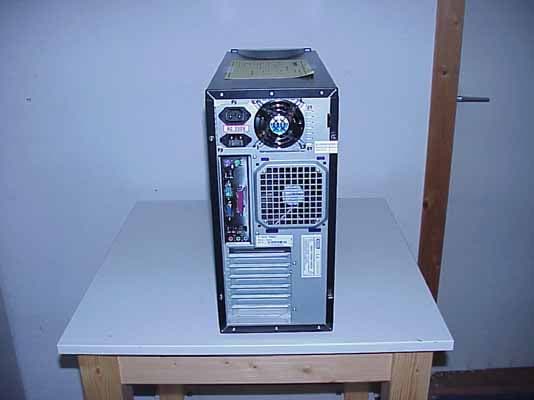
Click to zoom
Application Details
- Equipment Class
- JBC - Part 15 Class B Computing Device/Personal Computer
- Date of Grant
- Dec 14, 2004
- Application Purpose
- Original Equipment
- Date of Application
- Dec 14, 2004
- Equipment Note
- VESTEL PC PROMEGA
- Country
- Turkey
Documents & Files
Document Text
Text extracted from the exhibit documents filed with the FCC. Open a document above to read the original.
Users Manual
Personal Computer User Manual Model : PROMEGA T T h h i i s s g g u u i i d d e e c c o o n n t t a a i i n n s s i i m m p p o o r r t t a a n n t t i i n n f f o o r r m m a a t t i i o o n n . . P P l l e e a a s s e e r r e e a a d d i i t t t t h h o o r r o o u u g g h h l l y y b b e e f f o o r r e e p p h h o o n n i i n n g g y y o o u u r r s s t t o o r r e e o o r r t t h h e e P P C C S S e e r r v v i i c c e e H H e e l l p p l l i i n n e e f f o o r r T T e e c c h h n n i i c c a a l l S S u u p p p p o o r r t t . . 2 Product Safety Precautions ? Follow all warnings and instructions marked on the product ? Do not use this product near water ? This PC should be installed on a solid horizontal base ? To protect from electrical shock, unplug PC from the wall outlet before relocating or cleaning. When cleaning, use only a neutral detergent cleaner with soft damp cloth. Do not spray with liquid or aerosol cleaners. ? Do not expose this PC to direct sunlight or heat. Hot air may cause damage to the PC and other parts. ? Adequate ventilation must be maintained to ensure reliable and continued operation and to protect the PC from overheating. Do not block ventilation slots and openings with objects or install the PC in a place where ventilation may be hindered. ? This PC should be operated from the type of power source indicated on the rear panel of the display. ? The main socket has to be near the device and easy accessible. ? Do not allow metal pieces or objects of any kind fall into the PC from ventilation holes. ? Do not attempt to service this unit yourself. Removal of the display cover may expose you to dangerous voltage or other risks. Refer all servicing to qualified service personnel. Unplug this product from the wall outlet and refer servicing to qualified service personnel in the event that: 1. Power cord or plug is damaged or frayed. 2. Liquid is spilled into the product or the product is exposed to rain or water. 3 WARNING ? TO PREVENT FIRE OR SHOCK HAZARD. DO NOT EXPOSE THIS PC TO RAIN OR MOISTURE. Caution: 1. Keep PC away from excessive dust, high temperature, moisture or direct sunlight. 2. Use in well ventilated area and do not cover ventilation openings. 3. Unauthorized modifications of this equipment or substitution or attachment of unshelded connecting cable may cause excessive interference. 4. When the PC is not in use for a long time, turn off power switch ! 4 CONTENTS Welcome 3 Introduction 3 In the Box 4 Safety 5 Virus Warning 5 Epilepsy Warning 5 Lightning Damage 5 Setup 6 Connecting Your Vestel PC 6 Connecting Additional Devices 8 Starting Windows XP for the first time 9 Using your Vestel PC 10 Knowing your Vestel PC 10 The Keyboard 11 The Mouse 12 How to use a Floppy Disk 13 How to use your CD ROM / DVD drive 14 Getting additional help 15 Upgrade capabilities 15 Technical Support 16 Quick Tips 16 Specialist support for your PC 17 Copyright Notice 18 5 WELCOME Introduction Dear Customer Thank you for choosing the Vestel Personal Computer which we hope will give you many years of trouble-free service. The purpose of this User Manual is to give you an introduction on how to operate your new PC and to help you be on friendly terms with the system. Because the potential uses of your PC are so varied, a detailed explanation of the system's abilities would fill several volumes. The objective of this manual is not to tell you everything that the system can do, but rather to help you get the most from it without submerging yourself in technicalities or the internal workings of your PC. If this is your first PC, be aware that this can be a frustrating, sometimes baffling, often addictive and usually tremendously rewarding experience. You will help yourself considerably if you give yourself time and exercise patience. Your Vestel PC and the software that you use will do exactly as they are told. The challenge is in making sure that the instructions you give the system are the right ones to make it do as you wish. When you do encounter a difficulty, give yourself time to read the manuals, time to use the on-line "Help" functions and most important of all, time to think. If the problems persist qualified personnel are always available to help 24 hours a day, 365 days a year (see section 6 for details). If you have previous experience of PC's you should have no difficulty connecting the individual elements of the system together in order to get the machine working. All the connections at the back of the system unit are labelled. Your Vestel PC comes with twelve months on-site warranty covering both parts and labour. To ensure that you receive the best possible service in the unlikely event of needing a warranty repair, Please: Keep your proof of purchase and a note of the machine's serial number in a safe place. Finally, all electrical equipment is potentially dangerous if misused or damaged. Please read and follow the safety information in this manual. Always contact qualified personnel if you have any doubts about the safety of any of your equipment. Wishing you many years of interesting, productive and enjoyable computing. Yours sincerely, VESTEL Personal Computers 6 IN THE BOX Check to ensure you have all the necessary hardware and that the set of manuals and backup software is complete. If anything is damaged or missing please contact your supplier. You should have the following hardware components: ? Base unit ? Monitor (This may have come in a separate box) ? Speakers (This may have come in a separate box, Excluding Subwoofer* ) ? Mouse ? Keyboard ? Two Power Leads ? Modem cable - Selected models only ? User Guide (this one) ? Windows XP Guide ? Full Product Recovery CD-ROM disk *You may also have a separate box with the subwoofer and 2 more speakers. 7 SAFETY Virus warning Vestel guarantees that this product is 100% virus free. Please take the following precautions to protect your system against new viruses: ? Do not use illegal copies of software protect…
Text truncated - open the document above for the full version.
Block Diagram
16 Block Diagram D865GBF Only Intel 865G Chipset Intel 82801EB I/O Controller Hub (ICH5) Intel 82865G Graphics and Memory Controller Hub (GMCH) Intel 82802AB 4 Mbit Firmware Hub (FWH) AHA Bus System Bus (400/533/800 MHz) mPGA478 Processor Socket Parallel ATA IDE Connectors (2) Diskette Drive Connector LPC Bus I/O Controller PS/2 Keyboard PS/2 Mouse Parallel Port Serial Port Parallel ATA IDE Interface LPC Bus Hardware Monitoring and Fan Control ASIC AD1985 Audio Codec Mic In Front Left and Right Out CD-ROM Line In LAN Connector 10/100 LAN PLC (Optional) CSMA/CD Unit Interface AGP Interface Universal 0.8/ 1.5 V AGP 3.0 Connector = connector or socket PCI Bus SMBus AC Link Back Panel/ Front Panel USB Ports USB Dual-Channel Memory Bus SMBus PCI Slot 1 PCI Slot 2 PCI Slot 3 PCI Slot 4 PCI Slot 5 Center and LFE Out Rear Left and Right Out S/PDIF Serial ATA IDE Connectors (2) Serial ATA IDE Interface PCI Slot 6 VGA Port Display Interface Channel A DIMMs (2) Channel B DIMMs (2) LAN Connector Gigabit LAN PLC (Optional) CSA Interface Auxiliary Line In (33 MHz) (133/166/200 MHz) (1.5 GHz)
External Photos
External Photos of EUT FRONT VIEW REAR VIEW SIDE VIEW KEYBOARD TOP VIEW KEYBOARD BOTTOM VIEW MOUSE TOP VIEW MOUSE BOTTOM VIEW
ID Label/Location Info
VESTEL KOMUNIKASYON SAN.TIC.A.S. Model: PROMEGA FCCID: SOQVESTELPROMEGA This device complies with Part 15 of the FCC Rules. Operation is subject to the following two conditions: (1) this device may not cause harmful interference, and (2) this device must accept any interference received, including interference that may cause undesired operation.
Internal Photos
External Photos of EUT OPEN COVER VIEW HARD DISK TOP VIEW HARD DISK BOTTOM VIEW CD-ROM FRONT VIEW CD-ROM TOP VIEW CD-ROM BOTTOM VIEW CD-ROM REAR VIEW FDD-FRONT VIEW FDD-TOP VIEW FDD-BOTTOM VIEW POWER SUPPLY SIDE VIEW POWER SUPPLY TOP VIEW POWER SUPPLY PCB TOP VIEW POWER SUPPLY PCB SIDE VIEW CHASSIS FAN TOP VIEW MAINBOARD BOTTOM VIEW MAINBOARD SIDE VIEW MAINBOARD REAR VIEW MEMORY FRONT VIEW MEMORY REAR VIEW CPU COOLER TOP VIEW CPU COOLER BOTTOM VIEW CPU TOP VIEW CPU BOTTOM VIEW
Operational Description
Operational Description: - Power supply switched on - The microprocessor timer chip receives the Power Good Signal. - The CPU starts executing the ROM BIOS code - The ROM BIOS performs a basic test of central hardware to verify basic functionality - The BIOS searches for adapters that may need to load their own ROM BIOS routines - If this is a cold-start the ROM BIOS executes a full POST (Power On Self Test). If this is a warm- start the memory test portion of the POST is switched off - The BIOS locates and reads the configuration information stored in CMOS - If the first bootable disk is a fixed disk the BIOS examines the very first sector of the disk for a Master Boot Record (MBR). For a floppy the BIOS looks for a Boot Record in the very first sector - With a valid MBR loaded into memory the BIOS transfers control of the boot process to the partition loader code that takes up most of the 512 bytes of the MBR - The partition loader (or Boot Loader) examines the partition table for a partition marked as active. The partition loader then searches the very first sector of that partition for a Boot Record - The active partition's boot record is checked for a valid boot signature and if found the boot sector code is executed as a program - Assuming that the operating system being loaded is Windows NT, 2000, or XP , operating system boot sequence go on. - Last phase of sequence is logon to operatiog system than the computer ready to operate.
Test Report
Testreport No.: E-0012-1453-01 MG signed Page 1 of 41 FCC ID 765810 Date of release: 2004-11-09 emitel AG Landshuter Str. 211a, D-94315 Straubing Tel: +49 (0) 94 21 97 46-0 Fax: +49 (0) 94 21 97 46-70 F10_12_Rev2_0 Test Report Electromagnetic Compatibility Test report file no: E-0012-1453-01 MG Applicant: VESTEL ELEKTRONIK SANAYI VE TICARET A.S. Organze Sanayi Bölgesi 45030 MANISA Contact person: Hülya Döner Model: Vestel Promega PC Kind of Product: PC Manufacturer: VESTEL Komunikasyon A.S. Ege Serbest Bolgesi Akcay Cad. Ayfer Sk. No: 144/1 35410 Gaziemir Izmir, Turkey Test result Emission tests: The tested sample meets the requirements stated on page 6 according to FCC Part 15 Subpart B Date of issue: 2004-November-18 The testresult only responds to the tested sample. It is not allowed to copy this report partly without the allowance of the test laboratory. DAT- P-121 / 02-00 Testreport No.: E-0012-1453-01 MG signed Page 2 of 41 FCC ID 765810 Date of release: 2004-11-09 emitel AG Landshuter Str. 211a, D-94315 Straubing Tel: +49 (0) 94 21 97 46-0 Fax: +49 (0) 94 21 97 46-70 F10_12_Rev2_0 DIRECTORY IDENTIFICATION OF THE TEST LABORATORY............................................................................. 3 DESCRIPTION OF THE EQUIPMENT UNDER TEST (EUT): ........................................................... 4 OPERATION MODES ......................................................................................................................... 5 ENVIRONMENTAL CONDITIONS ..................................................................................................... 5 STATEMENT OF MEASUREMENT UNCERTAINTY ........................................................................ 5 TEST SPECIFICATION ...................................................................................................................... 6 SUMMARY:......................................................................................................................................... 7 Emission test ..................................................................................................................................... 8 Conducted emission ......................................................................................................................... 9 PHOTO TESTSETUP CONDUCTED EMISSIONS .......................................................................... 14 Radiated emission........................................................................................................................... 15 MEASUREMENT SETUP RADIATED EMISSIONS ........................................................................ 25 PHOTO TESTSETUP RADIATED EMISSION ................................................................................. 25 PHOTO OF THE TESTSAMPLE ...................................................................................................... 26 Testreport No.: E-0012-1453-01 MG signed Page 3 of 41 FCC ID 765810 Date of release: 2004-11-09 emitel AG Landshuter Str. 211a, D-94315 Straubing Tel: +49 (0) 94 21 97 46-0 Fax: +49 (0) 94 21 97 46-70 F10_12_Rev2_0 IDENTIFICATION OF THE TEST LABORATORY Company name: emitel AG Address: Landshuter Str. 211a D-94315 Straubing Germany Contact person: Dieter Fröhlich Contact address: Phone: +49 9421 9746-0 Fax.: +49 9421 9746-70 eMail: [email protected] Homepage: www.emitel.de FCC Registration number: 765810 Testreport No.: E-0012-1453-01 MG signed Page 4 of 41 FCC ID 765810 Date of release: 2004-11-09 emitel AG Landshuter Str. 211a, D-94315 Straubing Tel: +49 (0) 94 21 97 46-0 Fax: +49 (0) 94 21 97 46-70 F10_12_Rev2_0 DESCRIPTION OF THE EQUIPMENT UNDER TEST (EUT): Date of receipt of test sample: 2004-November-02 Testing Start Date: 2004-November-05 Testing End Date: 2004-November-09 Number of received/tested samples: 1 Serial Number: 7160803000005 FCC-ID: SOQ-VESTELPROMEGA Voltage consumption: 120V/60 Hz Product status: Development Sample Preproduction Sample Production Sample Dimensions: L x W x H: 49cm x 20cm x 43,5cm Following system devices are parts of the EUT and were connected during the measurement: Mouse: Genius Power Scroll Eye PS/2 Optical S/N 23002682751401 Keyboard: Samsung SDM 4510P S/N 43000822 Following cables were connected during the measurement: Power supply cord: 2m, unshielded LPT I cable: 3m, shielded RS 232 cable: 2m, shielded Headphone: 1,5m, unshielded Network 3m, unshielded USB cable 3m, shielded FIR cable 2m shielded (port internal not connected to mainboard) Testreport No.: E-0012-1453-01 MG signed Page 5 of 41 FCC ID 765810 Date of release: 2004-11-09 emitel AG Landshuter Str. 211a, D-94315 Straubing Tel: +49 (0) 94 21 97 46-0 Fax: +49 (0) 94 21 97 46-70 F10_12_Rev2_0 OPERATION MODES OPERATION MODES: Windows Desktop on screen – Mediaplayer is working for sound. EUT MONITORING Monitor 17” ADI Miroscan S/N 167030 ENVIRONMENTAL CONDITIONS Temperature 20 °C Humidity 50 % Atmosperheric pressure: 860-1060 mbar STATEMENT OF MEASUREMENT UNCERTAINTY The data and results referenced in this document are true and accurate. The reader is cautioned that there may be errors within the calibration limits of the equipment and facilities. The measurement uncertainty was calculated for all measurements listed in this test report according to NIS 81 /5.1994 „The Treatment of Uncertainty in EMC Measurements“ and is documented in the emitel quality system according to EN ISO/IEC 17025. Furthermore, component and process variability of devices similar to that tested may result in additional deviation. The manufacturer has the sole responsibility of continued compliance of the device. Testreport No.: E-0012-1453-01 MG signed Page 6 of 41 FCC ID 765810 Date of release: 2004-11-09 emitel AG Landshuter Str. 211a, D-94315 Straubing Tel: +49 (0) 94 21 97 46-0 Fax: +49 (0) 94 21 97 46-70 F10_12_Rev2_0 TEST SPECIFICATION The tests were performed according to the following specifications: FCC Part 15 Subpart A Code of Regulation…
Text truncated - open the document above for the full version.
Test Setup Photos
TESTSETUP Photos of EUT PHOTO TESTSETUP CONDUCTED EMISSIONS PHOTO TESTSETUP RADIATED EMISSION
Contact Information
Applicant
Emir Bacak
Test Firm
Emitel AGDieter Froehlich
Technical Specifications
| # | Rule Parts | Frequency Range | Power Output |
|---|---|---|---|
| 1 | 15B | - | - |