SRQ-A004ZTLTE Ufi (LTE, WCDMA, WIFI)
ZTE Corporation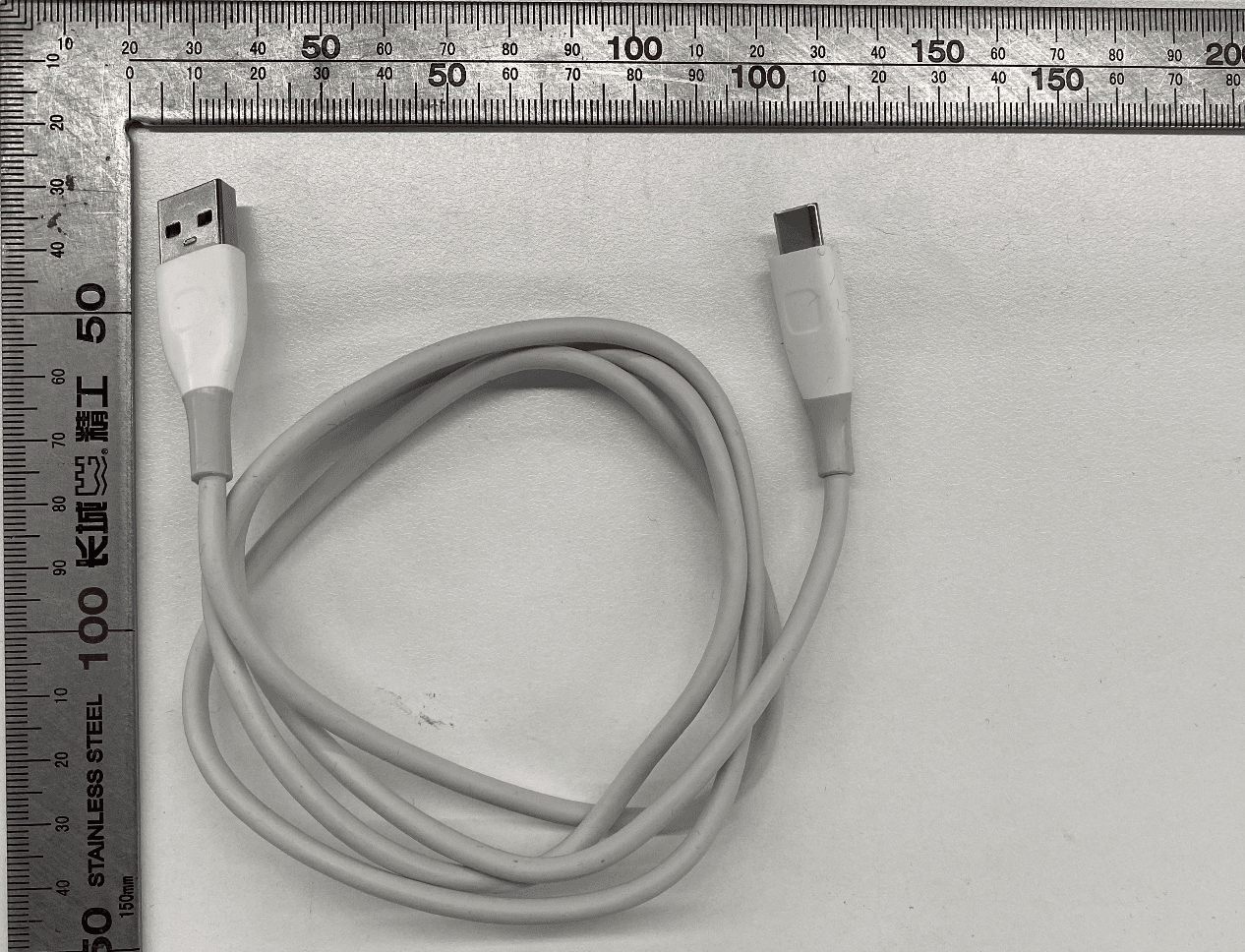
Click to zoom
Application Details
- Equipment Class
- JBP - Part 15 Class B Computing Device Peripheral
- Date of Grant
- Nov 09, 2020
- Application Purpose
- Original Equipment
- Date of Application
- Nov 09, 2020
- Equipment Note
- LTE Ufi (LTE, WCDMA, WIFI)
- Company
- ZTE Corporation
- Country
- China
Documents & Files
Document Text
Text extracted from the exhibit documents filed with the FCC. Open a document above to read the original.
Users Manual
1 A004ZT Let’s Go Getting started with your device. 2 1. Prepare A valid nano-SIM card. Open the back cover and view the label in the battery slot to get the default information. The following figure is for reference only. 3 2. Install the Battery 1. Open the back cover. 2. Insert the battery. 4 3. Put the cover back. 3. Insert the nano-SIM Card 1. Insert the tip of the tray eject tool into the hole. 2. Pull out the card tray and place the nano-SIM card on the tray, as shown. Carefully slide the tray back into place. 5 6 4. Start Your Device Press and hold the power button until the screen lights up and then the device will connect to the Internet automatically. NOTE: If the battery is extremely low, you may be unable to power on the device. Please charge your device first. 7 5. Access the Internet Wi-Fi: The default Wi-Fi SSID and password can be found on the device label. Connect to the Wi-Fi network with your mobile device and then access the Internet. NOTE: You can touch the screen to view the default Wi-Fi SSID and password. USB Type-C cable: Connect with the computer via USB port and then access the Internet. 8 Network cable: Connect with the computer via a network cable and then access the Internet. 9 6. Change Your Device Settings You can change the device settings by logging in to the 5G Mobile Hotspot configuration web page. 1. View the label on your device to get the default Device Manager Website IP address and Password. 2. Launch the Internet browser. Enter the Device Manager Website IP address in the Address bar. 3. Input the Password and then click Login. 4. After the 5G Mobile Hotspot configuration web page is opened, you can change the default settings. NOTE: You can also change some settings by touching the screen. 10 Touch Screen Icons and Interfaces 11 1. External antenna connector Connect the antenna if necessary. 2. Power button Press and hold for about 2 seconds to power on your device. 3. nano-SIM card tray Insert your nano-SIM card. 4. Touch screen icons Description Network signal strength Network type New SMS Battery power level Settings: Touch to configure the device settings. Wi-Fi: Touch to configure the Wi-Fi settings. Show the number of connected users. Connected with your computer via a network cable. Connected with your computer via a USB Type-C cable. 5. LAN port (RJ45) Connect to the computer. 12 6. Charging/USB Type-C jack Charge the device or connect to the USB port of a computer. 13 Troubleshooting Problem Recommended Action The connection between your device and a PC through a USB cable cannot be established automatically. If the driver of your device is abnormal, reinstall the software. You need to uninstall the software first. The connection between your device and a client through Wi-Fi cannot be established. Ensure that the Wi-Fi function is enabled. Refresh the network list and select the correct SSID. Check the IP address, and ensure that your client can automatically obtain an IP address. Enter the correct network key (Wi-Fi password) when you connect the client to your device. 14 Troubleshooting Problem Recommended Action The client connected to the device cannot access the Internet. Ensure that your nano-SIM card is available. Change the location and find a place with good signal. Check the settings of the WAN connection mode. Contact your service provider and confirm your APN settings. The 5G Mobile Hotspot configuration page cannot be visited. Enter the correct address. Please view the label on your device to get the default Device Manager Website IP address. Use only one network adapter in your PC. Do not use any proxy server. 15 Get More Help You can get help by: • Sending an email to [email protected] • Visiting www.ztedevices.com 16 LEGAL INFORMATION Copyright © 2020 ZTE CORPORATION. All rights reserved. No part of this publication may be quoted, reproduced, translated or used in any form or by any means, electronic or mechanical, including photocopying and microfilm, without the prior written permission of ZTE Corporation. Notice ZTE Corporation reserves the right to make modifications on print errors or update specifications in this guide without prior notice. Disclaimer Images and screenshots used in this guide may differ from the actual product. Content in this guide may differ from the actual product or software. Trademarks ZTE and the ZTE logos are trademarks of ZTE Corporation. Other trademarks and trade names are those of their respective owners. Version No.: R1.0 17 Label To check the certification information on you device,from the home screen, touch About > E-labeling information. Warning and Notice To the User • If inadequately shielded, some electronic devices, for example, the electronic system of vehicles, may be affected by the electromagnetic interference caused by the device. Consult the manufacturers of such devices before using the device if necessary. • Operating the device may interfere with medical instruments such as hearing aids and pacemakers. Always keep the device more than 20 centimeters away from such medical instruments when your device is powered on. Power off the device if necessary. Consult a physician or the manufacturers of medical instruments before using the device if necessary. • Be aware of the usage limitation when using the device at places such as oil warehouses or chemical factories, where there are explosive gases or explosive products being processed. Power off the device if necessary. • Do not use electronic transmission devices in aircraft, at petrol stations or in hospitals. Observe and obey all warning signs, and power off the device in these conditions. • Do not touch the inner antenna area unless necessary. Otherwise the performance of the device may be affected. • Do not use the device in an enclosed environment or where heat dissipation is poor. Prolonged work in such space may 18 cause excessive heat and raise ambient temperature, which may lead to …
Text truncated - open the document above for the full version.
Cover Letter(s)
ZTE Corporation ZTE Plaza, #55 Keji Road South, Hi-Tech, Industrial Park, Nanshan District,Guangdong Request of Confidentiality Federal Communications Commission Authorization and Evaluation Division Pursuant to Sections 0.457 and 0.459 of the Commission’s Rules, the Applicant hereby requests confidential treatment of information accompanying of following product: Product Name: LTE Ufi Product Model: A004ZT FCC ID: SRQ- A004ZT The following information should be held confidential: All Schematics/block diagrams All Parts list for the above schematic diagram Tune-Up Procedure Operational description and technical overview of product The above materials contain trade secrets and proprietary information not customarily released to the public. The public disclosure of these matters might be harmful to the applicant and provide unjustified benefits to its competitors. The applicant understands that pursuant to Rule 0.457, disclosure of this application and all accompanying documentation will not be made before the date of the Grant for this application. Certification Manager: Gong Yu 2020/10/30 ZTE Corporation Address: ZTE Plaza, #55 Keji Road South, Hi-Tech, Industrial Park, Nanshan District,Guangdong Tel: +86-21-68895397 Fax:+86-21-50801070
Cover Letter(s)
ZTE Corporation ZTE Plaza, #55 Keji Road South, Hi-Tech, Industrial Park, Nanshan District,Guangdong Authorization Letter Date: Oct 30, 2020 To whom it may concern: We, the undersigned, hereby authorize The State Radio_monitoring_center Testing Center (SRTC) to act on our behalf, as our agent, in the following matters related to the FCC approval, IC certification approval of our product: Product Name: LTE Ufi Product Model: A004ZT FCC ID: SRQ- A004ZT Report submittal, related correspondence, the signing of all documents relating to these matters, and any other lawful activity necessary to obtain such certification. Any act carried out by The State Radio_monitoring_center Testing Center (SRTC) within the scope of this authorization shall have the same effects as our own. This authorization shall expire 2 months from original date. If you have any question regarding the authorization, please don’t hesitate to contact with me. Thank you. Gong Yu ZTE Corporation ZTE Plaza, #55 Keji Road South, Hi-Tech, Industrial Park, Nanshan District,Guangdong Tel: +86-21-68895397 Fax:+86-21-50801070
Cover Letter(s)
ZTE Corporation ZTE Plaza, #55 Keji Road South, Hi-Tech, Industrial Park, Nanshan District,Guangdong PHOENIX TESTLAB GmbH Date: 6 November 2020 Product Certification Königswinkel 10 D 32825 Blomberg Subject: Declaration Operating Channel Limitation Product Name: LTE Ufi Product Model: A004ZT FCC ID: SRQ- A004ZT To Whom it may concern, This device is acting as a master device in Ad Hoc Mode and/or Hot Spot Mode. The operating channels in 802.11 b/g/n mode for the device marketed to the US/Canada are firmware limited to channel 1 ~ 11 (2412 ~ 2462 MHz). The end- user has no possibility to select any other operating channels. If you have any questions, please feel free to contact me. Thank you. Sincerely, ZTE Corporation ZTE Plaza, #55 Keji Road South, Hi-Tech, Industrial Park, Nanshan District,Guangdong Tel: +86-21-68895397 Fax:+86-21-50801070
Cover Letter(s)
Ersteller: D. Brandhorst Revision: 00 Erstelldatum: 20.06.2011 Datum: 00.00.00 Seite 1 von 1 UNII Declaration Letter We have declared below featured for FCC equipment authorization, device FCC ID:SRQ-A004ZT (1) DFS Device -- Master, Client with Radar detection capability , Client without radar detection capability, N/A (2) Active / Passive Scanning , adhoc mode access point capability Frequency Band (MHz) Active Scanning (the device can transmit a probe (beacon)) passive scanning (where the device is can listen only with no probes) Ad Hoc Mode capability Access point capability 2412 – 2462 MHz Yes, No Yes, No Yes, No Yes, No 2422 – 2452 MHz Yes, No Yes, No Yes, No Yes, No 5745 – 5825 MHz Yes, No Yes, No Yes, No Yes, No 5755 – 5795 MHz Yes, No Yes, No Yes, No Yes, No 5180 – 5240 MHz Yes, No Yes, No Yes, No Yes, No 5190 – 5230 MHz Yes, No Yes, No Yes, No Yes, No 5260 – 5320 MHz Yes, No Yes, No Yes, No Yes, No 5270 – 5310 MHz Yes, No Yes, No Yes, No Yes, No 5500 – 5700 MHz Yes, No Yes, No Yes, No Yes, No 5510 – 5670 MHz Yes, No Yes, No Yes, No Yes, No (3) Country code selection ability - Yes , No If no, pls explain how was implemented : use Microsoft network utility (4) Meet 15.202 requirement - Yes , No , pls check below : A master device is defined as a device operating in a mode in which it has the capability to transmit without receiving an enabling signal. In this mode it is able to select a channel and initiate a network by sending enabling signals to other devices A client device is defined as a device operating in a mode in which the transmissions of the device are under control of the master. A device in client mode is not able to initiate a network. (5) For client devices that have software configuration control to operate in different modes (active scanning in some and passive scanning in others) in different bands (devices with multiple equipment classes or those that operate on non-DFS frequencies) or modular devices which configure the modes of operations through software, the application must provide software and operations description on how the software and / or hardware is implemented to ensure that proper operations modes can not be modified by end user or an installer. Apply , No Apply , (If apply , pls help to provide explanation on how it was implement (By hardware or software , and how software was controlled) Applicant: ZTE Corporation Address: ZTE Plaza, #55 Keji Road South, Hi-Tech, Industrial Park, Nanshan District,Guangdong Signature:2020/10/30 Name:Gong YU Job Title: Certification Manager
External Photos
External Photo FCC ID: SRQ‐A004ZT 1 /5 External Photo FCC ID: SRQ‐A004ZT 2 /5 External Photo FCC ID: SRQ‐A004ZT 3 /5 External Photo FCC ID: SRQ‐A004ZT 4 /5 USB Cable (USB-TC30-W-100-M made by King power Co.,Ltd) USB Cable (USB-TC30-W-100-M made by Shenz luxshare-ict co.ltd) External Photo FCC ID: SRQ‐A004ZT 5 /5 Battery View (Li3945T44P4h815174 made by ZHUHAI COSMX BATTERY CO., LTD.) Battery View (Li3945T44P4h815174 made by ZHUHAI COSMX BATTERY CO., LTD.)
ID Label/Location Info
To check the certification information on you device,from the home screen, touch About > E-labeling information.
Internal Photos
Internal Photo FCC ID : SRQ‐A004ZT 1 / 11 Internal Photo FCC ID : SRQ‐A004ZT 2 / 11 IC Details 1 IC Details 2 Internal Photo FCC ID : SRQ‐A004ZT 3 / 11 IC Details 3 IC Details 4 Internal Photo FCC ID : SRQ‐A004ZT 4 / 11 IC Details 5 IC Details 6 Internal Photo FCC ID : SRQ‐A004ZT 5 / 11 IC Details 7 IC Details 8 Internal Photo FCC ID : SRQ‐A004ZT 6 / 11 IC Details 9 IC Details 10 Internal Photo FCC ID : SRQ‐A004ZT 7 / 11 IC Details 11 IC Details 12 Internal Photo FCC ID : SRQ‐A004ZT 8 / 11 IC Details 13 IC Details 14 Internal Photo FCC ID : SRQ‐A004ZT 9 / 11 IC Details 15 IC Details 16 Internal Photo FCC ID : SRQ‐A004ZT 10 / 11 IC Details 17 IC Details 18 Internal Photo FCC ID : SRQ‐A004ZT 11 / 11 IC Details 19
Test Report
TEST REPORT Report No.: SRTC2020-9003(R)-0062 Product Name: LTE Ufi Model Name: A004ZT Applicant: ZTE Corporation Manufacturer: ZTE Corporation Specification: FCC Part15B (Certification) (2019 edition) FCC ID: SRQ-A004ZT The State Radio_monitoring_center Testing Center (SRTC) 15th Building, No.30 Shixing Street, Shijingshan District, Beijing, China Tel: 86-10-57996183 Fax: 86-10-57996388 No.: SRTC2020-9003(R)-0062 FCC ID: SRQ-A004ZT The State Radio_monitoring_centerTesting Center (SRTC) Page number:2 of 25 Tel: 86-10-57996183 Fax:86-10-57996388 Copyright © SRTC CONTENTS 1. General information ......................................................................................... 3 1.1 Notes of the test report ............................................................................................................ 3 1.2 Information about the testing laboratory ................................................................................ 3 1.3 Applicant’s details ..................................................................................................................... 3 1.4 Manufacturer’s details .............................................................................................................. 3 1.5 Application details ..................................................................................................................... 4 1.6 Reference specification ............................................................................................................ 4 1.7 Information of EUT ................................................................................................................... 4 1.7.1 General information ....................................................................................................... 4 1.7.2EUT details ...................................................................................................................... 5 1.7.3 Auxiliary equipment details........................................................................................... 5 2.Test information ................................................................................................ 5 2.1 Summary of the test results .................................................................................................... 6 2.2 Test result ................................................................................................................................... 7 2.2.1Conducted Emissions-FCC Part15.107 ...................................................................... 7 2.2.2RadiatedEmissions-FCC Part15.109 ......................................................................... 14 2.3. List of test equipments .......................................................................................................... 25 No.: SRTC2020-9003(R)-0062 FCC ID: SRQ-A004ZT The State Radio_monitoring_centerTesting Center (SRTC) Page number:3 of 25 Tel: 86-10-57996183 Fax:86-10-57996388 Copyright © SRTC 1. General information 1.1 Notes of the test report The test report may only be reproduced or published in full. Reproduction or publication of extracts from the report requires the prior written permission of The State Radio_monitoring_center Testing Center (SRTC). The test results relate only to individual items of the samples which have been tested. 1.2 Information about the testing laboratory Company: The State Radio_monitoring_center Testing Center (SRTC) Address: 15th Building, No.30 Shixing Street, Shijingshan District Testing location: No.80, Zhaojiachang, BeizangCun, Daxing District, Beijing, China. City: Beijing Country or Region: China Contacted person: Liu Jia Tel: +86 10 57996183 Fax: +86 10 57996388 Email: [email protected] 1.3 Applicant’s details Company: ZTE Corporation Address: ZTE Plaza, Keji Road South, Hi-Tech, Industrial Park, NanshanDistrict, Shenzhen, Guangdong,518057,P.R.China City: Shenzhen Country or Region: P.R.China Contacted person: Zhao Yang Tel: + 86-029-83637990 Email: [email protected] 1.4 Manufacturer’s details Company: ZTE Corporation Address: ZTE Plaza, Keji Road South, Hi-Tech, Industrial Park, NanshanDistrict, Shenzhen, Guangdong,518057,P.R.China City: Shenzhen Country or Region: P.R.China Contacted person: Zhao Yang Tel: + 86-029-83637990 Email: [email protected] No.: SRTC2020-9003(R)-0062 FCC ID: SRQ-A004ZT The State Radio_monitoring_centerTesting Center (SRTC) Page number:4 of 25 Tel: 86-10-57996183 Fax:86-10-57996388 Copyright © SRTC 1.5 Application details Date of reception of test sample: 16 th Sep. 2020 Date of test: 16 th Sep. 2020 to 22 th Oct. 2020 1.6 Reference specification FCC Part 15B, 2019 (Certification) 1.7 Information of EUT 1.7.1 General information Name of EUT LTE Ufi Model Name A004ZT FCC ID SRQ-A004ZT Frequency Range WCDMA: FDD II / FDD IV LTE: FDD 2/ FDD 4/ FDD 12/ FDD 17 /TDD 41 WiFi: 2.4~2.4835GHz/5.15-5.25GHz Equipment Class Class B Power Supply Battery Rated Power Supply Voltage 3.8V Extreme Temperature Lowest: -10°C Highest: +55°C Extreme Voltage Minimum: 3.6V Maximum: 4.4V HW Version H01 SW Version S01 No.: SRTC2020-9003(R)-0062 FCC ID: SRQ-A004ZT The State Radio_monitoring_centerTesting Center (SRTC) Page number:5 of 25 Tel: 86-10-57996183 Fax:86-10-57996388 Copyright © SRTC 1.7.2EUT details Product Name Model Name IMEI LTE Ufi A004ZT 861046050002923 1.7.3 Auxiliary equipment details AE (Auxiliary Equipment) 1#: Laptop Manufacturer Lenovo Model Number E7000 S/N MP1965WU Input Voltage 100V-240V AC AE (Auxiliary Equipment) 2#: USB Cable1 Manufacturer Kingpower Co.,Ltd Model Number USB-TC30-W-100-M AE (Auxiliary Equipment) 3#: USB Cable2 Manufacturer Shenz luxshare-ict co.ltd Model Number USB-TC30-W-100-M AE (Auxiliary Equipment) 4#: Battery Type Li-Lon Manufacturer ZHUHAI COSMX BATTERY CO.,LTD. Model Number Li3945T44P4h815174 AE (Auxiliary Equipment) 5#: Charger Manufacturer JIANGSU CHENYANG ELECTRON CO LTD Model Number SP-11N1201250-Z Note1: The EUT is sold…
Text truncated - open the document above for the full version.
Test Setup Photos
SRQ-A004ZT TEST SETUP PHOTOS RF TEST SET UP: RF Conducted Test setup (BT/BLE/WIFI) RF Conducted Test setup (WCDMA) RF Conducted Test setup (LTE) Spurious Radiated Emissions Test setup Spurious Radiated Emissions Test setup Spurious Radiated Emissions Test setup Conducted Emissions Test Setup (with charger) EMC Test Setup Radiated Emissions Test Setup(with laptop)(30-1000MHz) Radiated Emissions Test Setup (with charger) (30-1000MHz) Radiated Emissions Test Setup(with laptop)(above1GHz) Radiated Emissions Test Setup (with charger) (above1GHz) Conducted Emissions Test Setup(with laptop) Conducted Emissions Test Setup (with charger) SAR TEST SETUP FLAT Section, Back FLAT Section, Front FLAT Section, Top FLAT Section, Bottom FLAT Section, Left FLAT Section, Right 10mm Spacer The thickness of EUT:16 mm
Contact Information
Applicant
Chaijue Ding(Certification Manager)
Test Firm
The State Radio_monitoring_center Testing CenterSun Yang
[email protected]+86-10-57996131
Technical Specifications
| # | Rule Parts | Frequency Range | Power Output |
|---|---|---|---|
| 1 | 15B | - | - |
Other Applications from ZTE Corporation

SRQ-ZTEA53
Nov 06, 2022LTE/WCDMA/GSM(GPRS) Multi-Mode Digital Mobile Phone with Bluetooth and WiFi
Equipment Class
DSS - Part 15 Spread Spectrum Transmitter
SRQ-ZTEA53-1
Nov 05, 2022LTE/WCDMA/GSM(GPRS) Multi-Mode Digital Mobile Phone with Bluetooth and WiFi
Equipment Class
JBP - Part 15 Class B Computing Device Peripheral
SRQ-ZTET1002
Sep 23, 2022Tablet PC
Equipment Class
PCB - PCS Licensed Transmitter
SRQ-Z6103
Aug 14, 2022LTE/UMTS Digital Mobile Phone with Bluetooth and WiFi
Equipment Class
DTS - Digital Transmission System
SRQ-ZTET0801
Jul 18, 2022Tablet with GSM, WCDMA, LTE, Bluetooth and WiFi
Equipment Class
DSS - Part 15 Spread Spectrum Transmitter