SRQ-MF253MA4G Wireless Router
ZTE Corporation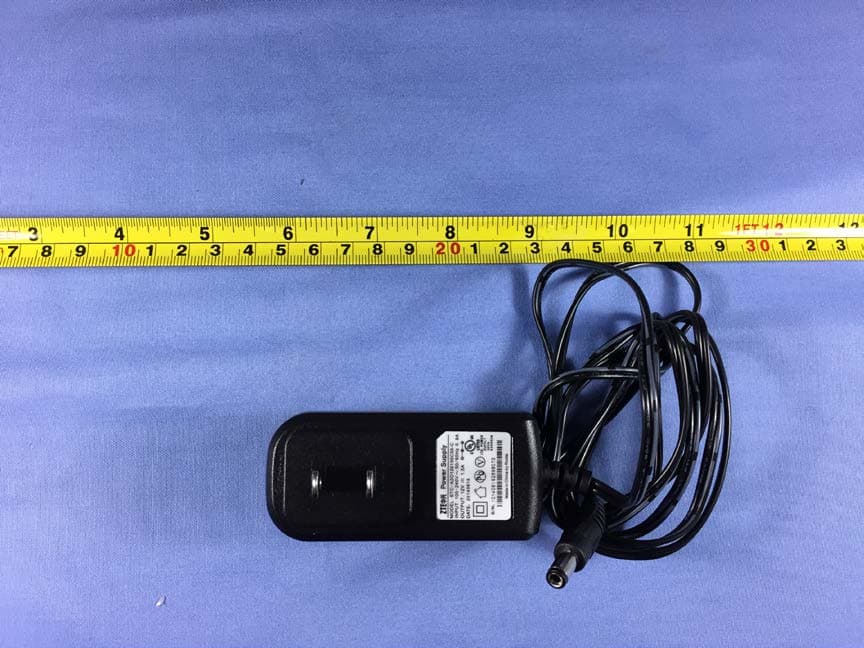
Click to zoom
Application Details
- Equipment Class
- JBP - Part 15 Class B Computing Device Peripheral
- Date of Grant
- Jul 19, 2015
- Application Purpose
- Original Equipment
- Date of Application
- Jul 18, 2015
- Equipment Note
- 4G Wireless Router
- Company
- ZTE Corporation
- Country
- China
Documents & Files
Document Text
Text extracted from the exhibit documents filed with the FCC. Open a document above to read the original.
Users Manual
MF253M Let’s go Getting started with your device 2 Getting to Know Your Device Appearance NOTE: Please use the original external antenna if necessary. Interface Description Lan Ethernet connections to computer. Phone Standard RJ11 connector for telephone. Reset To restore factory default configurations. WPS button WPS button is used to start Wi-Fi Protected Setup authentication process. Power Socket Connector to the external power supply. On/Off Turn the router on or off. 3 Install the (U)SIM Card Hold the (U)SIM card with its cut corner oriented as shown and slip it into the card holder. NOTE: Your device does not support the micro-SIM card and nano-SIM card or any other nonstandard SIM cards. To avoid damaging the device, do not use those cards or any card holders. Indicators Indicator State Description POWER Blue ON Power is on and external power supply is working normally. OFF Power is off or external power supply is working abnormally. WIFI Blue ON Wi-Fi works normally with no data transmission. Blue Blinking Wi-Fi works normally with data transmission. OFF Wi-Fi works abnormally or the Wi-Fi function is disabled. PHONE OFF The phone is not in use. Blue Blinking The phone is ringing. Blue ON The phone is in calling. SIG Blue ON Signal strength is very good or good. Blue Blinking Signal strength is weak. 4 Indicator State Description OFF There is no signal. 3G/4G Red The device is turned on but not registered to the mobile network. Blue Blinking The device is connected to the LTE network and data is being transferred. Blue Solid The device is registered to the LTE network. Green Blinking The device is connected to the 3G network and data is being transferred. Green Solid The device is registered to the 3G network. LAN Green ON The LAN port is connected. Green Blinking The LAN port is connected with data transmission. OFF The network cable is not connected. NOTE: The phone function needs the network support. Connecting Your Device Follow the picture to connect your device. If you select a different operation mode, the connection of the LAN port is different. Please refer to the chapter “Accessing the Internet”. If you want to use the mobile network to connect to the Internet or use your home phone, you need insert your (U)SIM card first. CAUTION: Put your device at least 2 meters away from the connected phone, TV sets, radio and other electronic devices to avoid electromagnetic interference. 5 Configuring Your PC The following procedure describes how to configure the Internet Protocol in the Windows 7 operating system for your Wi-Fi connection. 1. Right-click Network and select Properties. 2. Select Chang adapter settings. 3. Right-click Wireless Network Connection and select Properties. 4. Select Internet Protocol Version 4 (TCP/IPv4) and click Properties. 6 5. Select Obtain an IP address automatically and Obtain DNS server address automatically, and click OK. 7 Accessing the Internet Before accessing the Internet, please make sure that the following operations are finished. Your device is connected via a network cable or Wi-Fi. Your PC is configured. To access the Internet: Log in the Configuration Page. 1) Launch the Internet browser and enter http://192.168.1.1 in the address bar. The login page appears. 2) Input the password and then click Login. The default password is vivo. SMS Manage the SMS, send and receive text messages. You can also set the SMS limit settings. This function allows you to send or receive short messages. 1. From the Web UI, click the SMS tab to manage messages in the device and SIM card. 8 2. From the Web UI, click SMS > SMS Settings to set the SMS limit settings. Validity: Set valid period of outgoing messages. Center Number: Enter SMS center number. For more information, please contact your service provider. Delivery Report: Receive or reject a prompt informing you that the message is delivered to the recipient. 3. Click Apply to save your settings. Phonebook Manage the contacts information. The phonebook information can be saved in the device or SIM card, and you can choose the saved position. From the Web UI, click the Phonebook tab to view, add and delete new contacts. 9 Settings Do not modify any settings unless instructed by your service provider. NOTE: Please disconnect the router from the network before changing the settings. Network Settings Dial-up Settings After the client is connected to your device successfully, you can access the Internet in the Automatic, Manual or On Demand mode. The default mode is Automatic. Mode Operations Automatic Your device is connected to the Internet automatically, and you can surf on the Internet directly. Manual 1. Log in to the web GUI configuration page. 2. Select Settings > Network Settings > Dial-up Settings > WAN Connection Mode > Manual, and then click Apply to confirm your configuration. Click Home and then click Connect to access the Internet. On Demand The Max Idle Time can be defined by the user. NOTE: To modify the parameters of your device, log in to the web GUI configuration page by visiting http://192.168.1.1. You can also setting Reconnection Mode and Connection Reset to connect to the Internet. Network Selection From the Web UI, click Settings > Network Settings > Network Selection,you can change your network selection as follows: APN To connect to the Internet you can use the default Access Point Names (APNs) in Auto/Manual mode, click Settings > Network Settings > APN. 10 Create a new APN selecting the Manual mode, then click Add New. Wi-Fi Settings Basic settings From the Web UI, click Settings > Wi-Fi Settings > Basic Settings, the wireless network basic parameters are shown in the following figure: 11 Wi-Fi Switch: Enable or disable Wi-Fi. Multi SSID Switch: Enable or disable multi SSID. Network Name (SSID): Service Set Identifier (SSID). Enter a string less than 32 characters as the name for your wireless local area network (Wi-Fi). Broadcast Network Name (SSID…
Text truncated - open the document above for the full version.
Cover Letter(s)
SCS-F18: Project and Product Certification Representative Authorization Letter Page 1 of 2 Rev 5.0 775 Montague Expressway Milpitas, CA 95035 Tel: 408-526-1188 Fax: 408-526-1088 Email: [email protected] Project and Product Certification Representative Authorization Letter Reason for Amendment (current / obsolete) Revision History Approved Date From To Initial Release (obsolete) 1.0 1.0 Nov-14-2006 Revised wording (obsolete) 1.0 2.0 Sept–25-2007 Updated company template (obsolete) 2.0 3.0 Jan-31-2012 Updated letter information (obsolete) 3.0 4.0 May-23-2014 Added FCC ID field (current) 4.0 5.0 Sept 16 2014 SCS-F18: Project and Product Certification Representative Authorization Letter Page 2 of 2 Rev 5.0 ZTE Corporation 06/07/2015 To: SIEMIC, INC. 775 Montague Expressway, Milpitas, CA 95035 USA Dear Sir/Madam, Re: Product Certification Representative Authorization Letter We, _____ ZTE Corporation _____hereby authorize SIEMIC, Inc. to act as a Certification Body for certifying for the following project(s): 4G Wireless Router, MF253M FCC ID: SRQ-MF253MA Sincerely, Client’s signature Client’s name / title Min Zhang / Mir Contact information / address ZTE Plaza, Keji Road South, Nanshan District, Shenzhen, China
Cover Letter(s)
SCS-F19: Confidentiality Request Letter Page 1 of 3 Rev 4.0 775 Montague Expressway Milpitas, CA 95035 Tel: 408-526-1188 Fax: 408-526-1088 Email: [email protected] Confidentiality Request Letter Reason for Amendment (current / obsolete) Revision History Approved Date From To Initial Release (obsolete) 1.0 1.0 Nov-14-2006 Adding CFR 2.459 (obsolete) 1.0 2.0 August – 11 - 2008 Updated company template & Added text box (obsolete) 2.0 3.0 Jan-31-2012 Added IC confidentiality letter form (current) 3.0 4.0 March-26-2015 SCS-F19: Confidentiality Request Letter Page 2 of 3 Rev 4.0 ZTE Corporation 06/07/2015 To: Federal Communications Commission Authorization and Evaluation Division 7435 Oakland Mills Road Columbia, MD Subject: Permanent Confidentiality Request for FCC ID: SRQ-MF253MA We hereby request confidential treatment of information accompanying this application as outlined below: - Block Diagram - Schematics - Operational Description - Tune up Procedure - Part List The above materials contain trade secrets and proprietary information not customarily released to the public. The public disclosure of these materials may be harmful to the applicant and provide unjustified benefits to its competitors. The applicant understands that pursuant to Section 0.457 & 0.459 of the Rules, disclosure of this application and all accompanying documentation will not be made before the date of the Grant for this application. Sincerely, Client’s signature : Client’s name & title : Min Zhang / Manager Contact information / address: ZTE Plaza, Keji Road South, Nanshan District, Shenzhen, China SCS-F19: Confidentiality Request Letter Page 3 of 3 Rev 4.0 ZTE Corporation 06/07/2015 To: Federal Communications Commission Office of Engineering and Technology Equipment Authorization Division 7345 Oakland Mills Road Columbia, Maryland 21046 Subject: Short Term Confidentiality Request for FCC ID: SRQ-MF253MA To Whom It May Concern: Pursuant to sections 0.457 and 0.459 of CFR 47 and to avoid premature release of sensitive information prior to marketing or release of the product to the public, the applicant requests the following documents contained in this certification application be temporarily withheld from public disclosure for an initial period of 45 or 180 days (please check one). - User Manual - Internal Photo - External Photo - Setup Photo The above materials contain trade secrets and proprietary information not customarily released to the public. The public disclosure of these materials may be harmful to the applicant and provide unjustified benefits to its competitors. Sincerely, Client’s signature : Client’s name & title : Min Zhang / Manager Contact information / address : ZTE Plaza, Keji Road South, Nanshan District, Shenzhen, China
External Photos
External Photos EUT EUT External Photos EUT External Photos EUT EUT External Photos EUT EUT
ID Label/Location Info
The bottom of EUT The label location A
Internal Photos
Internal Photos EUT EUT WWAN Module WiFi Module Internal Photos EUT EUT Wifi Auxiliary antenna Wifi main antenna Internal Photos EUT EUT Internal Photos EUT EUT Internal Photos EUT EUT Internal Photos EUT EUT Internal Photos Internal Photos
Test Report
©Copyright. All rights reserved by CTTL. TEST REPORT No. I15Z41308-EMC01 for ZTE CORPORATION 4G Wireless Router Model Name: MF253M FCC ID: SRQ-MF253MA with Hardware Version: MF253M.H01 Software Version: EN_VIVO_BR_MF253MV1.0.1B02 Issued Date: 2015-07-06 Note: The test results in this test report relate only to the devices specified in this report. This report shall not be reproduced except in full without the written approval of CTTL. Test Laboratory: FCC 2.948 Listed: No. 525429 CTTL, Telecommunication Technology Labs, Academy of Telecommunication Research, MIIT No. 52, Huayuan North Road, Haidian District, Beijing, P. R. China 100191. Te l: +86(0)10-62304633-2512, Fax: +86(0)10-62304633-2504 Email: [email protected], website: www.chinattl.com No.I15Z41308-EMC01 Page 2 of 15 ©Copyright. All rights reserved by CTTL. REPORT HISTORY Report Number Revision Description Issue Date I15Z41308-EMC01 R ev.0 1st edition 2015-07-06 No.I15Z41308-EMC01 Page 3 of 15 ©Copyright. All rights reserved by CTTL. CONTENTS 1. TEST LABORATORY ............................................................................................................... 4 1.1. TESTING LOCATION ........................................................................................................... 4 1.2. TESTING ENVIRONMENT ................................................................................................... 4 1.3. PROJECT DATA ................................................................................................................... 4 1.4. SIGNATURE .......................................................................................................................... 4 2. CLIENT INFORMATION ........................................................................................................... 5 2.1. APPLICANT INFORMATION ................................................................................................ 5 2.2. MANUFACTURER INFORMATION ...................................................................................... 5 3. EQUIPMENT UNDER TEST (EUT) AND ANCILLARY EQUIPMENT (AE) ............................ 6 3.1. ABOUT EUT .......................................................................................................................... 6 3.2. INTERNAL IDENTIFICATION OF EUT USED DURING THE TEST ................................... 6 3.3. INTERNAL IDENTIFICATION OF AE USED DURING THE TEST ...................................... 6 3.4. EUT SET-UPS ....................................................................................................................... 6 4. REFERENCE DOCUMENTS .................................................................................................... 7 4.1. REFERENCE DOCUMENTS FOR TESTING....................................................................... 7 5. LABORATORY ENVIRONMENT .............................................................................................. 8 6. SUMMARY OF TEST RESULTS .............................................................................................. 9 7. TEST EQUIPMENTS UTILIZED ............................................................................................. 10 ANNEX A: MEASUREMENT RESULTS ....................................................................................... 11 No.I15Z41308-EMC01 Page 4 of 15 ©Copyright. All rights reserved by CTTL. 1. Test Laboratory 1.1. Testing Location Location 1: CTTL(huayuan North Road) Address: No. 52, Huayuan North Road, Haidian District, Beijing, P. R. China 100191 1.2. Testing Environment Normal Temperature: 15-35°C Relative Humidity: 20-75% 1.3. Project data Testing Start Date: 2015-05-28 Testing End Date: 2015-06-22 1.4. Signature Zhang Hui (Prepared this test report) Qu Pengfei (Reviewed this test report) Liu Baodian (Approved this test report) No.I15Z41308-EMC01 Page 5 of 15 ©Copyright. All rights reserved by CTTL. 2. Client Information 2.1. Applicant Information Company Name: ZTE CORPORATION Address /Post: ZTE Plaza, Keji Road South, Shenzhen, China City: Shenzhen Postal Code: / Country: China Contact Person: Min Zhang Contact Email [email protected] Telephone: +86 18616587757 Fax: +86 021 50801070 2.2. Manufacturer Information Company Name: ZTE CORPORATION Address /Post: ZTE Plaza, Keji Road South, Shenzhen, China City: Shenzhen Postal Code: / Country: China Contact Person: Min Zhang Contact Email [email protected] Telephone: +86 18616587757 Fax: +86 021 50801070 No.I15Z41308-EMC01 Page 6 of 15 ©Copyright. All rights reserved by CTTL. 3. Equipment Under Test (EUT) and Ancillary Equipment (AE) 3.1. About EUT Description 4G Wireless Router Model Name MF253M FCC ID SRQ-MF253MA Extreme vol. Limits 3.2VDC to 3.6VDC (nominal: 3.3VDC) Note: Components list, please refer to documents of the manufacturer; it is also included in the original test record of CTTL,Telecommunication Technology Labs, Academy of Telecommunication Research, MIIT. 3.2. Internal Identification of EUT used during the test EUT ID* SN or IMEI HW Version SW Version EUT2 865461026007334 MF253M.H01 EN_VIVO_BR_MF253MV1.0.1B02 *EUT ID: is used to identify the test sample in the lab internally. 3.3. Internal Identification of AE used during the test AE ID* Description SN Remarks AE1 Travel Charger 101406162891650 1541308CH004 AE2 Antenna / / AE3 PC / / AE4 Ethernet cable / / AE1 Type STC-A20120150C55-C Manufacturer Ruide Electronical Industrial Co., Ltd Length of cable 150 cm AE2 Type / Manufacturer ZTE AE3 Type / Manufacturer / AE4 Type / Manufacturer / *AE ID: is used to identify the test sample in the lab internally. 3.4. EUT set-ups EUT set-up No. Combination of EUT and AE Remarks Set.1 EUT2 + AE1 + AE2 + AE3 + AE4 / No.I15Z41308-EMC01 Page 7 of 15 ©Copyright. All rights reserved by CTTL. 4. Reference Documents 4.1. Reference Documents for testing The following documents listed in this section are referred for testing. Reference Title Version FCC Part …
Text truncated - open the document above for the full version.
Test Setup Photos
Test setup photos 1. Part 15B conducted emission 2. Part 15B conducted emission 3. Part 15B radiated emission below 1 GHz 4. Part 15B Radiated emission above 1GHz
Contact Information
Applicant
Chaijue Ding(Certification Manager)
Test Firm
Telecommunication Technology Labs,zhen xue
[email protected]861062304633
Technical Specifications
| # | Rule Parts | Frequency Range | Power Output |
|---|---|---|---|
| 1 | 15B | - | - |
Other Applications from ZTE Corporation

SRQ-ZTEA53
Nov 06, 2022LTE/WCDMA/GSM(GPRS) Multi-Mode Digital Mobile Phone with Bluetooth and WiFi
Equipment Class
DSS - Part 15 Spread Spectrum Transmitter
SRQ-ZTEA53-1
Nov 05, 2022LTE/WCDMA/GSM(GPRS) Multi-Mode Digital Mobile Phone with Bluetooth and WiFi
Equipment Class
JBP - Part 15 Class B Computing Device Peripheral
SRQ-ZTET1002
Sep 23, 2022Tablet PC
Equipment Class
PCB - PCS Licensed Transmitter
SRQ-Z6103
Aug 14, 2022LTE/UMTS Digital Mobile Phone with Bluetooth and WiFi
Equipment Class
DTS - Digital Transmission System
SRQ-ZTET0801
Jul 18, 2022Tablet with GSM, WCDMA, LTE, Bluetooth and WiFi
Equipment Class
DSS - Part 15 Spread Spectrum Transmitter