SRQ-MF970LTE Ufi
ZTE Corporation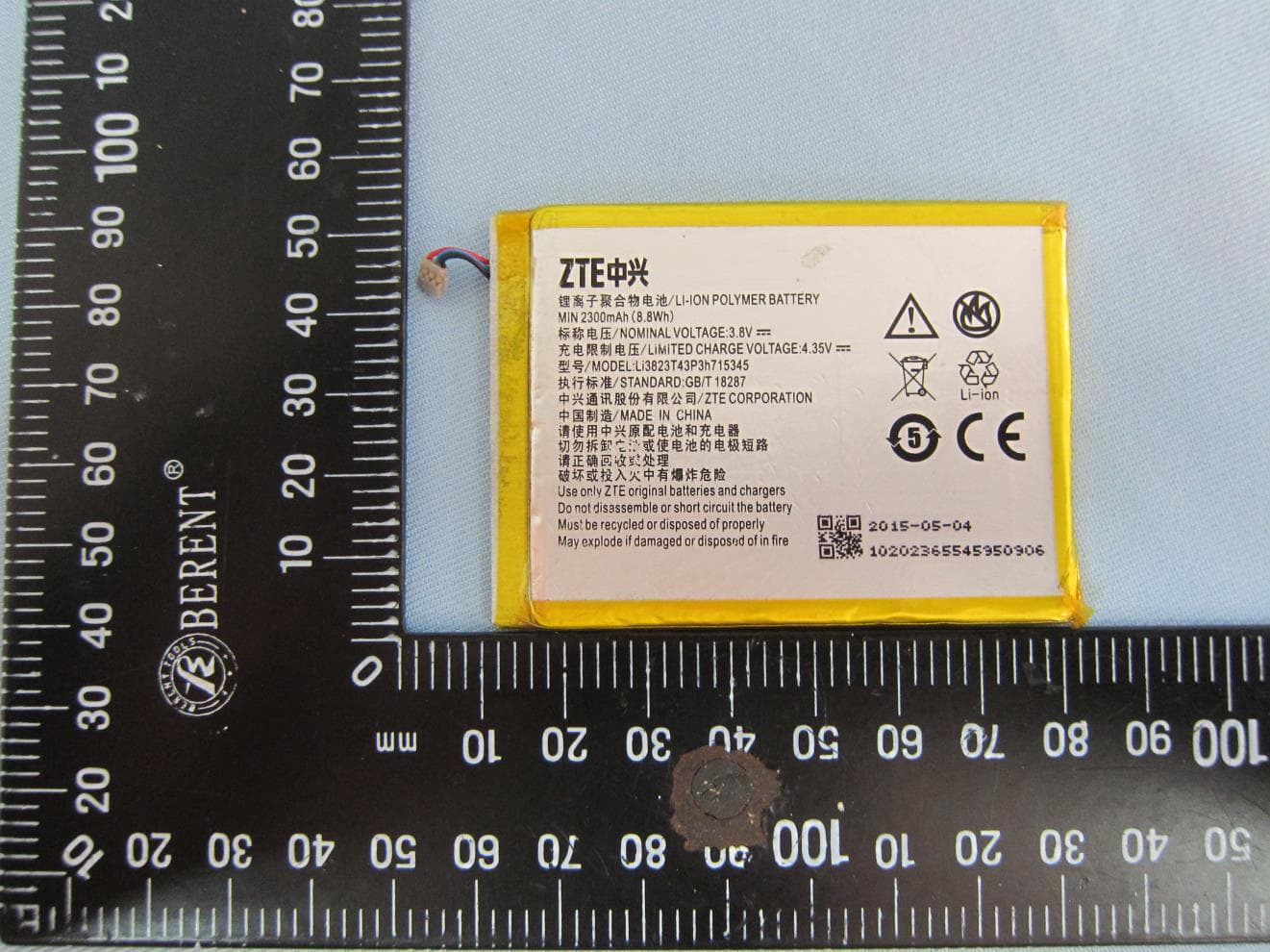
Click to zoom
Application Details
- Equipment Class
- DTS - Digital Transmission System
- Date of Grant
- Aug 18, 2015
- Application Purpose
- Original Equipment
- Date of Application
- Aug 16, 2015
- Equipment Note
- LTE Ufi
- Frequency Range
- 2412.00000000 - 2462.00000000
- Company
- ZTE Corporation
- Country
- China
Documents & Files
Document Text
Text extracted from the exhibit documents filed with the FCC. Open a document above to read the original.
Users Manual
1 MF970 User Guide ZTE CORPORATION NO. 55, Hi-tech Road South, Shenzhen, P.R.China Postcode: 518057 2 Getting to Know Your Device Appearance The following figure is for your reference only. Left Side Front Right Side 1. micro-SIM Card Slot Cover and Reset Hole Insert your micro-SIM card. Restore your device to the factory default settings. 2. FUNC Key Press the FUNC Key to access the options menu. 3. Power Key Press the Power Key to power on/off your device. 3 4. Screen It indicates the signal type, signal strength, battery, Wi-Fi, etc. 5. Charging/micro-USB Jack Charge your device. Connect the client to your device via the USB cable. 6. External Antenna Connector It is used to connect an external antenna to enhance the signal strength. Getting to Know Your Device Indicators When the device is powered on, the following icons may be displayed on the LCD screen. For a description of the icons, refer to the following table. Icon Description Network signal strength / Network type The user is in roaming status. Connected to the Internet. 4 Connected to the Internet in the Internet Wi-Fi mode. New message (s) Wi-Fi status and the number of connected users Battery level Installing the micro-SIM Card 1. Open the micro-SIM card slot cover, and install a micro-SIM card to the micro-SIM card slot. NOTE: Do not remove the cover entirely, because it is connected with the device. WARNING! To avoid damage to the device, do not use any other kind of SIM cards, or any non-standard micro-SIM card cut from a SIM card. You can get a standard micro-SIM card from your service provider. 5 2. Close the micro-SIM card slot cover. Charging Your Device You can charge your device by using the USB cable or adapter. Use the USB cable to connect your device and PC directly. Use the adapter and USB cable to connect the wall outlet and your device. 6 NOTE: The plug only fits one way to connect your device. Do not use excessive force to insert the plug. Internet Access Connection Scenarios The device can access the Internet in two ways and it allows multiple clients to surf on the Internet at the same time. The following figures are for your reference only. Cellular network mode: A micro-SIM card can be used to access the Internet. 7 Internet Wi-Fi Mode: Your device can be connected to a WLAN device (such as a hotspot device or wireless router) through Wi-Fi to access the Internet. The WLAN device must be already connected to the Internet. NOTE: Your device and the WLAN device must be in different subnets. Connecting to Your Device Using Wi-Fi 1. Power on your device. 2. Ensure that your computer or other client devices have enabled Wi-Fi, and search for available wireless networks. NOTE: Refer to your Wi-Fi-enabled client device manual for further details on how to search for wireless networks. If you use a computer, you need to set your computer to obtain an IP address automatically. 8 3. Select the Wi-Fi name (SSID) of your device, and click Connect. 4. Enter the Wi-Fi password if necessary, and click OK. NOTE: Refer to the chapter Getting to Know the Wi-Fi SSID and Password to get the default Wi-Fi SSID and password. 5. Wait until the client device is connected to your device successfully. Using a USB Cable 1. Connect a computer to your device with a USB cable. 2. Power on your device. Follow the system prompts to complete the software installation. NOTES: If the system does not automatically launch installation, you can double-click the device installation icon in My Computer to install the software. The driver of your device will be installed at the same time. 9 3. Wait until the computer is connected to your device successfully. Using the WPS(Optional) If your client device supports WPS, you don’t have to input the password manually after WPS has been available. Please do the following steps: 1. Power on your device, and enable the Wi-Fi function on your device. 2. Enable WPS function. Please press the FUNC Key. 3. Select WPS to start Wi-Fi Protected Setup authentication process. 4. Enable the WPS function on your client to respond this authentication process. 5. Follow the system prompts on your client to finish the connection. NOTES: The device will wait for receiving the access request of wireless access client within 2 minutes. For the detailed operations about the client, please refer to the client’s instruction. 10 Getting to Know the Wi-Fi SSID and Password You can use the following methods to get the default Wi-Fi SSID and password. View the label on the device. Press the FUNC Key to access the options menu. Select Device Info and the Wi-Fi SSID and password are displayed on the screen. Logging in to the ZTE Mobile Hotspot Configuration Page 1. Ensure that the connection between your device and the client device is correct. 2. Launch the Internet browser and enter http://192.168.0.1 or http://rogers.rockethub in the address bar. 3. Enter the password to log in to the ZTE Mobile Hotspot configuration page. The login page appears as follows. The following figure is only for your reference. 11 NOTE: The default password is admin. Changing the Wi-Fi SSID or Password 1. Log in to the ZTE Mobile Hotspot configuration page. 2. Select Wi-Fi Settings > Main SSID. 3. Change the Network Name (SSID) or the Password in the Main SSID area. 4. Click Apply. 12 Accessing the Internet Cellular network mode After a client device is successfully connected to your device, you can access the Internet in Automatic or Manual mode. The default mode is Automatic. Mode Operation Automatic Your device is automatically connected to the Internet, and you can surf on the Internet through the client. Manual 1. Log in to the ZTE Mobile Hotspot configuration page. 2. Select Settings > Connection Mode > Manual, and then click Apply. 3. Click to back to the home page, and click or . You can also press the FUNC Key and select Data Connection. Select Yes or No. NOTE: To modify the parameters of your device, log in t…
Text truncated - open the document above for the full version.
Cover Letter(s)
ZTE Corporation ZTE Plaza, Keji Road South, Shenzhen, China Tel: +86-21-68897541 ; Fax: +86-21-50801070 Date: August 12, 2015 Federal Communications Commission Authorization and Evaluation Division 1435 Oakland Mills Road Columbia, MD 21046 SUBJECT: FCC Application for FCC ID: SRQ-MF970 To Whom It May Concern: We, ZTE Corporation, declare that MF970 I/O connect can only support charging. It can’t support USB with PC for data transfer. Sincerely yours, Contact Person: Min Zhang Company: ZTE Corporation TEL: +86-21-68897541 FAX: +86-21-50801070 E-mail: [email protected]
Cover Letter(s)
RF_160, Issue 03 Declaration of Authorization We Name: <ZTE Corporation> Address: ZTE Plaza, Keji Road South, Shenzhen, China City: Shenzhen Country: China Declare that: Name Representative of agent: Michael Lin (1) Agent Company name: SPORTON INTERNATIONAL (KUNSHAN) INC Address: No. 3-2, PingXiang Road, Kunshan, Jiangsu Province, P.R.C. City: Kunshan Country China is authorized to apply for Certification of the following product(s): Product description: LTE Ufi Model Name: MF970 Trademark: ZTE on our behalf. Date: August 12, 2015 City: China Name: Min Zhang (2) Function: Certification Manager Signature: Notes: (1): Required for FCC application (2): For FCC it must be the Grantee Code “owner” or the authorized agent.
Cover Letter(s)
FCC, Request for non-disclosure Date: 16-Jul-10 RF_501, Issue 6 Page 1 of 1 Company Name: ZTE Corporation Address : ZTE Plaza, Keji Road South, Shenzhen, China City: Shenzhen Country: China To: Telefication B.V., Dept. FCC TCB Edisonstraat 12A 6902 PK ZEVENAAR The Netherlands Subject: Request for confidentiality FCC ID: SRQ-MF970 Reference number: ###### Dear FCC TCB, 1. Long-Term Confidentiality Pursuant to 47 CFR Section 0.459(a) & (b), we hereby requests non-disclosure and confidential treatment of the following materials submitted in support of FCC certification application: Bill(s) of Material Block Diagrams Operational Description Schematic Diagrams Tune-up Procedure Above materials contain secrets, proprietary and technical information, which would customarily be guarded from competitors under 47 CFR, section 0.457(d)(2). Disclosure or publication or any portion of this company confidential material to other parties could cause substantial competitive harm and provide unjustified benefits for competitors. 2. Short-Term Confidentiality (STC) Pursuant to Public Notice DA 04-1705 of the Commission’s policy, in order to comply with the marketing regulations in 47 CFR §2.803 and the importation rules in 47 CFR §2.1204, a pplicant hereby requests Short-Term Confidential treatment of the following materials (note 1): Internal Photos User’s Manual Test Set-up Photos External Photos Justification: The applicant deems to be trade secrets and proprietary. Planned Release Date STC: 180 Days (notes 2, 3, 4, 5) Date: August 12, 2015 Name and signature of applicant: Min Zhang Notes: 1) A document or type of document can only have ONE type of confidentiality! 2) Short-Term confidentiality is in principle for 45 days from date of grant; it can be extended max 3 times (total time 180 days max.)! 3) FCC must be informed when marketing begins earlier. 4) Release takes place automatically thus extension must be requested in time. Telefication does not remind you of this! 5) Request for extension or for release must be received by Telefication at least 7 days before date of actual marketing or before expiration of the STC period
External Photos
Photographs of EUT Report No.: EP562904 Brand Name: ZTE; Model Name: MF970 SPORTON INTERNATIONAL (KUNSHAN) INC. Page Number : 1 of 32 TEL : 86-0512-5790-0158 Report Issued Date : Aug. 12, 2015 FAX : 86-0512-5790-0958 Report Version : Rev. 01 FCC ID : SRQ-MF970 1. External Photograph of EUT Photographs of EUT Report No.: EP562904 Brand Name: ZTE; Model Name: MF970 SPORTON INTERNATIONAL (KUNSHAN) INC. Page Number : 2 of 32 TEL : 86-0512-5790-0158 Report Issued Date : Aug. 12, 2015 FAX : 86-0512-5790-0958 Report Version : Rev. 01 FCC ID : SRQ-MF970 Photographs of EUT Report No.: EP562904 Brand Name: ZTE; Model Name: MF970 SPORTON INTERNATIONAL (KUNSHAN) INC. Page Number : 3 of 32 TEL : 86-0512-5790-0158 Report Issued Date : Aug. 12, 2015 FAX : 86-0512-5790-0958 Report Version : Rev. 01 FCC ID : SRQ-MF970 Photographs of EUT Report No.: EP562904 Brand Name: ZTE; Model Name: MF970 SPORTON INTERNATIONAL (KUNSHAN) INC. Page Number : 4 of 32 TEL : 86-0512-5790-0158 Report Issued Date : Aug. 12, 2015 FAX : 86-0512-5790-0958 Report Version : Rev. 01 FCC ID : SRQ-MF970 Photographs of EUT Report No.: EP562904 Brand Name: ZTE; Model Name: MF970 SPORTON INTERNATIONAL (KUNSHAN) INC. Page Number : 5 of 32 TEL : 86-0512-5790-0158 Report Issued Date : Aug. 12, 2015 FAX : 86-0512-5790-0958 Report Version : Rev. 01 FCC ID : SRQ-MF970 Photographs of EUT Report No.: EP562904 Brand Name: ZTE; Model Name: MF970 SPORTON INTERNATIONAL (KUNSHAN) INC. Page Number : 6 of 32 TEL : 86-0512-5790-0158 Report Issued Date : Aug. 12, 2015 FAX : 86-0512-5790-0958 Report Version : Rev. 01 FCC ID : SRQ-MF970 Photographs of EUT Report No.: EP562904 Brand Name: ZTE; Model Name: MF970 SPORTON INTERNATIONAL (KUNSHAN) INC. Page Number : 7 of 32 TEL : 86-0512-5790-0158 Report Issued Date : Aug. 12, 2015 FAX : 86-0512-5790-0958 Report Version : Rev. 01 FCC ID : SRQ-MF970 List of Accessory: Specification of Accessory AC Adapter Brand Name ZTE Model Name STC-A51A-Z Battery Brand Name ZTE Model Name Li3823T43P3h715345 USB Cable Signal Line Type 0.79m shielded without core Remark: For accessories equipped with this EUT, please refer to the following photos. 2. Photograph of Accessory Photographs of EUT Report No.: EP562904 Brand Name: ZTE; Model Name: MF970 SPORTON INTERNATIONAL (KUNSHAN) INC. Page Number : 8 of 32 TEL : 86-0512-5790-0158 Report Issued Date : Aug. 12, 2015 FAX : 86-0512-5790-0958 Report Version : Rev. 01 FCC ID : SRQ-MF970 720510 Photographs of EUT Report No.: EP562904 Brand Name: ZTE; Model Name: MF970 SPORTON INTERNATIONAL (KUNSHAN) INC. Page Number : 9 of 32 TEL : 86-0512-5790-0158 Report Issued Date : Aug. 12, 2015 FAX : 86-0512-5790-0958 Report Version : Rev. 01 FCC ID : SRQ-MF970 AC Adapter Photographs of EUT Report No.: EP562904 Brand Name: ZTE; Model Name: MF970 SPORTON INTERNATIONAL (KUNSHAN) INC. Page Number : 10 of 32 TEL : 86-0512-5790-0158 Report Issued Date : Aug. 12, 2015 FAX : 86-0512-5790-0958 Report Version : Rev. 01 FCC ID : SRQ-MF970 Battery Photographs of EUT Report No.: EP562904 Brand Name: ZTE; Model Name: MF970 SPORTON INTERNATIONAL (KUNSHAN) INC. Page Number : 11 of 32 TEL : 86-0512-5790-0158 Report Issued Date : Aug. 12, 2015 FAX : 86-0512-5790-0958 Report Version : Rev. 01 FCC ID : SRQ-MF970
ID Label/Location Info
size:48.5*25mm 4-R1.0 出纸方向 Model: MF970 IC: 5200E-MF970 H/W: xxxx MADE IN CHINA IMEI(D): XXXXXXXXXXXXXXX SKU: MF970 S/N: XXXXXXXXXXXX FCC ID: SRQ-MF970
Internal Photos
Photographs of EUT Report No.: EP562904 Brand Name: ZTE; Model Name: MF970 SPORTON INTERNATIONAL (KUNSHAN) INC. Page Number : 12 of 32 TEL : 86-0512-5790-0158 Report Issued Date : Aug. 12, 2015 FAX : 86-0512-5790-0958 Report Version : Rev. 01 FCC ID : SRQ-MF970 720510 3. Internal Photograph of EUT WLAN 1 Antenna<Tx/Rx> WWAN Main Antenna<Tx/Rx> WWAN Diversity Antenna<Rx> WLAN 0 Antenna<Tx/Rx> Photographs of EUT Report No.: EP562904 Brand Name: ZTE; Model Name: MF970 SPORTON INTERNATIONAL (KUNSHAN) INC. Page Number : 13 of 32 TEL : 86-0512-5790-0158 Report Issued Date : Aug. 12, 2015 FAX : 86-0512-5790-0958 Report Version : Rev. 01 FCC ID : SRQ-MF970 Photographs of EUT Report No.: EP562904 Brand Name: ZTE; Model Name: MF970 SPORTON INTERNATIONAL (KUNSHAN) INC. Page Number : 14 of 32 TEL : 86-0512-5790-0158 Report Issued Date : Aug. 12, 2015 FAX : 86-0512-5790-0958 Report Version : Rev. 01 FCC ID : SRQ-MF970 Photographs of EUT Report No.: EP562904 Brand Name: ZTE; Model Name: MF970 SPORTON INTERNATIONAL (KUNSHAN) INC. Page Number : 15 of 32 TEL : 86-0512-5790-0158 Report Issued Date : Aug. 12, 2015 FAX : 86-0512-5790-0958 Report Version : Rev. 01 FCC ID : SRQ-MF970 Photographs of EUT Report No.: EP562904 Brand Name: ZTE; Model Name: MF970 SPORTON INTERNATIONAL (KUNSHAN) INC. Page Number : 16 of 32 TEL : 86-0512-5790-0158 Report Issued Date : Aug. 12, 2015 FAX : 86-0512-5790-0958 Report Version : Rev. 01 FCC ID : SRQ-MF970 Photographs of EUT Report No.: EP562904 Brand Name: ZTE; Model Name: MF970 SPORTON INTERNATIONAL (KUNSHAN) INC. Page Number : 17 of 32 TEL : 86-0512-5790-0158 Report Issued Date : Aug. 12, 2015 FAX : 86-0512-5790-0958 Report Version : Rev. 01 FCC ID : SRQ-MF970 Photographs of EUT Report No.: EP562904 Brand Name: ZTE; Model Name: MF970 SPORTON INTERNATIONAL (KUNSHAN) INC. Page Number : 18 of 32 TEL : 86-0512-5790-0158 Report Issued Date : Aug. 12, 2015 FAX : 86-0512-5790-0958 Report Version : Rev. 01 FCC ID : SRQ-MF970 Photographs of EUT Report No.: EP562904 Brand Name: ZTE; Model Name: MF970 SPORTON INTERNATIONAL (KUNSHAN) INC. Page Number : 19 of 32 TEL : 86-0512-5790-0158 Report Issued Date : Aug. 12, 2015 FAX : 86-0512-5790-0958 Report Version : Rev. 01 FCC ID : SRQ-MF970 Photographs of EUT Report No.: EP562904 Brand Name: ZTE; Model Name: MF970 SPORTON INTERNATIONAL (KUNSHAN) INC. Page Number : 20 of 32 TEL : 86-0512-5790-0158 Report Issued Date : Aug. 12, 2015 FAX : 86-0512-5790-0958 Report Version : Rev. 01 FCC ID : SRQ-MF970 Photographs of EUT Report No.: EP562904 Brand Name: ZTE; Model Name: MF970 SPORTON INTERNATIONAL (KUNSHAN) INC. Page Number : 21 of 32 TEL : 86-0512-5790-0158 Report Issued Date : Aug. 12, 2015 FAX : 86-0512-5790-0958 Report Version : Rev. 01 FCC ID : SRQ-MF970 Photographs of EUT Report No.: EP562904 Brand Name: ZTE; Model Name: MF970 SPORTON INTERNATIONAL (KUNSHAN) INC. Page Number : 22 of 32 TEL : 86-0512-5790-0158 Report Issued Date : Aug. 12, 2015 FAX : 86-0512-5790-0958 Report Version : Rev. 01 FCC ID : SRQ-MF970 Photographs of EUT Report No.: EP562904 Brand Name: ZTE; Model Name: MF970 SPORTON INTERNATIONAL (KUNSHAN) INC. Page Number : 23 of 32 TEL : 86-0512-5790-0158 Report Issued Date : Aug. 12, 2015 FAX : 86-0512-5790-0958 Report Version : Rev. 01 FCC ID : SRQ-MF970 Photographs of EUT Report No.: EP562904 Brand Name: ZTE; Model Name: MF970 SPORTON INTERNATIONAL (KUNSHAN) INC. Page Number : 24 of 32 TEL : 86-0512-5790-0158 Report Issued Date : Aug. 12, 2015 FAX : 86-0512-5790-0958 Report Version : Rev. 01 FCC ID : SRQ-MF970 Photographs of EUT Report No.: EP562904 Brand Name: ZTE; Model Name: MF970 SPORTON INTERNATIONAL (KUNSHAN) INC. Page Number : 25 of 32 TEL : 86-0512-5790-0158 Report Issued Date : Aug. 12, 2015 FAX : 86-0512-5790-0958 Report Version : Rev. 01 FCC ID : SRQ-MF970 Photographs of EUT Report No.: EP562904 Brand Name: ZTE; Model Name: MF970 SPORTON INTERNATIONAL (KUNSHAN) INC. Page Number : 26 of 32 TEL : 86-0512-5790-0158 Report Issued Date : Aug. 12, 2015 FAX : 86-0512-5790-0958 Report Version : Rev. 01 FCC ID : SRQ-MF970 Photographs of EUT Report No.: EP562904 Brand Name: ZTE; Model Name: MF970 SPORTON INTERNATIONAL (KUNSHAN) INC. Page Number : 27 of 32 TEL : 86-0512-5790-0158 Report Issued Date : Aug. 12, 2015 FAX : 86-0512-5790-0958 Report Version : Rev. 01 FCC ID : SRQ-MF970 Photographs of EUT Report No.: EP562904 Brand Name: ZTE; Model Name: MF970 SPORTON INTERNATIONAL (KUNSHAN) INC. Page Number : 28 of 32 TEL : 86-0512-5790-0158 Report Issued Date : Aug. 12, 2015 FAX : 86-0512-5790-0958 Report Version : Rev. 01 FCC ID : SRQ-MF970 Photographs of EUT Report No.: EP562904 Brand Name: ZTE; Model Name: MF970 SPORTON INTERNATIONAL (KUNSHAN) INC. Page Number : 29 of 32 TEL : 86-0512-5790-0158 Report Issued Date : Aug. 12, 2015 FAX : 86-0512-5790-0958 Report Version : Rev. 01 FCC ID : SRQ-MF970 WLAN 0 Antenna <Tx / Rx> Photographs of EUT Report No.: EP562904 Brand Name: ZTE; Model Name: MF970 SPORTON INTERNATIONAL (KUNSHAN) INC. Page Number : 30 of 32 TEL : 86-0512-5790-0158 Report Issued Date : Aug. 12, 2015 FAX : 86-0512-5790-0958 Report Version : Rev. 01 FCC ID : SRQ-MF970 WLAN 1 Antenna <Tx / Rx> Photographs of EUT Report No.: EP562904 Brand Name: ZTE; Model Name: MF970 SPORTON INTERNATIONAL (KUNSHAN) INC. Page Number : 31 of 32 TEL : 86-0512-5790-0158 Report Issued Date : Aug. 12, 2015 FAX : 86-0512-5790-0958 Report Version : Rev. 01 FCC ID : SRQ-MF970 WWAN Main Antenna <Tx/Rx> Photographs of EUT Report No.: EP562904 Brand Name: ZTE; Model Name: MF970 SPORTON INTERNATIONAL (KUNSHAN) INC. Page Number : 32 of 32 TEL : 86-0512-5790-0158 Report Issued Date : Aug. 12, 2015 FAX : 86-0512-5790-0958 Report Version : Rev. 01 FCC ID : SRQ-MF970 WWAN Diversity Antenna <Rx>
RF Exposure Info
SPORTON INTERNATIONAL (XI’AN) INC. TEL : +86-029-8860-8767 / FAX : +86-029-8860-8791 Issued Date : Aug. 14, 2015 FCC ID : SRQ-MF970 Page C1 of C1 Form version. : 150415 FCC SAR Test Report Report No. : FA562904 Appendix C. DASY Calibration Certificate The DASY calibration certificates are shown as follows.
RF Exposure Info
Schnrd & Partner Errgineering AG Zer:ghausstrasse 43, 8004 Zurrch, Switzerlanci Phone +41 442459100. Fax +41 442459719 [email protected], http :rwvrw. speag.conr USAGE OF THE DAE 4 The DAE unit is a delicate, high precision instrument and requires careful treatment by the user. There are no serviceable parts inside the DAE. Special attention shall be given to the following points: Battery Exchange: The battery cover of the DAE4 unit is closed using a screw, over tightening the 6crew may cause the threads inside the DAE to wear out. Shipping of the DAE: Before shipping the DAE to SPEAG for calibration, remove the batteries and pack the DAE in an antistatic bag. This antistatic bag shall then be packed into a larger box or container which protects the DAE from impacts during transportation, The package shall be marked to indicate that a fragile instrument is inside. E-Stop Failures Touch detection may be malfunctioning due to broken magnets in the E-stop. Rough handling of the E-stop may lead to damage of these magnets. Touch and collision errors are often caused by dust and dirt accumulated in the E-stop. To prevent E-stop failure, the customer shall always mount the probe to the DAE carefully and keep the DAE unit in a non-dusty environment if not used for measurements. Repair: Minor repairs are performed at no extra cost during the annual calibration. However, SPEAG reserves the right to charge for any repair especially if rough unprofessional handling caused the defect. DASY Configuration Files: Since the exact values of the DAE input resistances,. as measured during the calibration procedure of a DAE unit, are not used by the DASY software, a nominal value of 200 MOhm is given in the corresponding configuration file. lmportant Note: Never attempt to grease or oil the E-stop assembly. Cleaning and readjusting of the E- stop assembly is allowed by certified SPEAG personnel only and is part of the annual cal i bration procedure. lmportant Note: To prevent damage of the DAE probe connector pins, use great care when installing the probe to the DAE. Carefully connect the probe with the connector notch oriented in the mating position. Avoid any rotational movement of the probe body versus the DAE while turning the locking nut of the connector. The same care shall be used when disconnecting the probe from the DAE. Calibration Laboratory of Schmid & Partner Engineering AG Zeughausstrasse 43, 8004 Zurich, Switzerland Accredited by the Swiss Accreditation Service (SAS) The Swiss Accreditation Service is one of the signatories to the EA Multilateral Agreement for the recognition of calibration certificates crient Sporton GN (Auden) Catibration procedure(s) QA CAL-06.v29 calibration procedure for the data acquisition electronics (DAE) This calibration certificate documents the traceability to national standards, which realize the physical units of measurements (Sl). The measurements and the uncertainties with confidence probability are given on the following pages and are part of the certificate. All calibrations have been conducted in the closed laboratory tacility: environment temperature (22 l=3)"C and humidity < 7OZ. Calibration Equipment used (M&TE critical for calibration) Primarv Standards lro+ Cal Date (Certificate No.) 06-Jan-15 (in house check) 06-Jan-15 (in house check) ln house check: Jan-16 ln house check: Jan-16 Name Dominique Steffen Fin Bomholt Function Technician Deputy Technical Manager Signature This calibration certificate shall not be reproduced except in full without written approval of the laboratory. lssued: May 21,2015 Page 1 of 5 Calibration Laboratory of Schmid & Partner Engineering AG Zeughausstrasse 43, 8004 Zurich, Switzerland Accredited by the Swiss Accreditation Service (SAS) The Swiss Accreditation Service is one of the signatories to the EA Multilateral Agreement for the recognition of calibration certificates Glossary DAE data acquisition electronics Connector angle information used in DASY system to align probe sensor X to the robot coordinate system. Methods Applied and lnterpretation of Parameters . DC Vottage Measurement: Calibration Factor assessed for use in DASY system by comparison with a calibrated instrument traceable to national standards. The figure given corresponds to the full scale range of the voltmeter in the respective range. . Connector angle: The angle of the connector is assessed measuring the angle mechanically by a tool inserted. Uncertainty is not required. o The following parameters as documented in the Appendix contain technical information as a result from the performance test and require no uncertainty. . DC Vottage Measurement Linearity: Verification of the Linearity at +10% and -1O"/" ol the nominal calibration voltage. lnfluence of offset voltage is included in this measurement. . Common mode sensitivity: lnfluence of a positive or negative common mode voltage on the differential measurement. . Channel separation; lnfluence of a voltage on the neighbor channels not subject to an input voltage. . AD Converter Values with inputs shorted: Values on the internal AD convefter corresponding to zero input voltage . lnput Offset Measuremenf Output voltage and statistical results over a large number of zero voltage measurements. . lnput Offset Current: Typical value for information; Maximum channel input offset current, not considering the input resistance. . lnput resistance; Typical value for information: DAE input resistance at the connector, during internal auto-zeroing and during measurement. . Low Battery Alarm Vottage: Typical value for information. Below this voltage, a'battery alarm signal is generated. c Power consumption:Typical value for information. Supply currents in various operating modes. DC Voltage Measurement A,/D - Converter Resolution nominal High Range: lLSB = 6.1pV, full range = -100...+300 mV Low Range: 1 LSB = 61nV , f ull range = -1 .......+3mV DASY measurement parameters: Auto Zero Time: 3 sec; Measuring time: 3 sec C…
Text truncated - open the document above for the full version.
RF Exposure Info
SPORTON INTERNATIONAL (XI’AN) INC. TEL : +86-029-8860-8767 / FAX : +86-029-8860-8791 Issued Date : Aug. 14, 2015 FCC ID : SRQ-MF970 Page 1 of 63 Form version. : 150415 FCC SAR Test Report Report No. : FA562904 FCC SAR Test Report APPLICANT : ZTE CORPORATION EQUIPMENT : LTE Ufi BRAND NAME : ZTE MODEL NAME : MF970 FCC ID : SRQ-MF970 STANDARD : FCC 47 CFR Part 2 (2.1093) ANSI/IEEE C95.1-1992 IEEE 1528-2013 We, SPORTON INTERNATIONAL (XI’AN) INC., would like to declare that the tested sample has been evaluated in accordance with the procedures and had been in compliance with the applicable technical standards. The test results in this report apply exclusively to the tested model / sample. Without written approval of SPORTON INTERNATIONAL (XI’AN) INC., the test report shall not be reproduced except in full. SPORTON INTERNATIONAL (XI’AN) INC. 1F, Building A3, No. 39 Chuangye Rd., Xi'an Hi-tech Zone, Shanxi Province, P. R. China Approved by: Jones Tsai / Manager Reviewed by: Eric Huang / Deputy Manager SPORTON INTERNATIONAL (XI’AN) INC. TEL : +86-029-8860-8767 / FAX : +86-029-8860-8791 Issued Date : Aug. 14, 2015 FCC ID : SRQ-MF970 Page 2 of 63 Form version. : 150415 FCC SAR Test Report Report No. : FA562904 Table of Contents 1. Statement of Compliance ..............................................................................................................................................4 2. Administration Data .......................................................................................................................................................5 3. Guidance Standard ........................................................................................................................................................5 4. Equipment Under Test (EUT) ........................................................................................................................................6 4.1 General Information ................................................................................................................................................6 4.2 Maximum Tune-up Limit ..........................................................................................................................................7 4.3 General LTE SAR Test and Reporting Considerations .......................................................................................... 11 5. RF Exposure Limits .....................................................................................................................................................13 5.1 Uncontrolled Environment .....................................................................................................................................13 5.2 Controlled Environment .........................................................................................................................................13 6. Specific Absorption Rate (SAR) ..................................................................................................................................14 6.1 Introduction ...........................................................................................................................................................14 6.2 SAR Definition .......................................................................................................................................................14 7. System Description and Setup ...................................................................................................................................15 8. Measurement Procedures ...........................................................................................................................................16 8.1 Spatial Peak SAR Evaluation ................................................................................................................................16 8.2 Power Reference Measurement............................................................................................................................17 8.3 Area Scan .............................................................................................................................................................17 8.4 Zoom Scan ............................................................................................................................................................18 8.5 Volume Scan Procedures ......................................................................................................................................18 8.6 Power Drift Monitoring ...........................................................................................................................................18 9. Test Equipment List .....................................................................................................................................................19 10. System Verification ..........................................................................................................................................…
Text truncated - open the document above for the full version.
Contact Information
Applicant
Chaijue Ding(Certification Manager)
Technical Contact
SPORTON INTERNATIONAL (KUNSHAN) INCMichael Lin
[email protected]86-0512-5790-0158
No. 3-2, PingXiang Road, Kunshan · China
Non-Technical Contact
SPORTON INTERNATIONAL (KUNSHAN) INCMichael Lin
[email protected]86-0512-5790-0158
Test Firm
SPORTON International(KunShan) IncMichael Lin
[email protected]86-512-57900158
Technical Specifications
| # | Rule Parts | Frequency Range | Power Output |
|---|---|---|---|
| 1 | 15C | 2.41 GHz - 2.46 GHz | 183.00 mW |
Other Applications from ZTE Corporation

SRQ-ZTEA53
Nov 06, 2022LTE/WCDMA/GSM(GPRS) Multi-Mode Digital Mobile Phone with Bluetooth and WiFi
Equipment Class
DSS - Part 15 Spread Spectrum Transmitter
SRQ-ZTEA53-1
Nov 05, 2022LTE/WCDMA/GSM(GPRS) Multi-Mode Digital Mobile Phone with Bluetooth and WiFi
Equipment Class
JBP - Part 15 Class B Computing Device Peripheral
SRQ-ZTET1002
Sep 23, 2022Tablet PC
Equipment Class
PCB - PCS Licensed Transmitter
SRQ-Z6103
Aug 14, 2022LTE/UMTS Digital Mobile Phone with Bluetooth and WiFi
Equipment Class
DTS - Digital Transmission System
SRQ-ZTET0801
Jul 18, 2022Tablet with GSM, WCDMA, LTE, Bluetooth and WiFi
Equipment Class
DSS - Part 15 Spread Spectrum Transmitter