SRQ-V779MWCDMA Digital Mobile Handset
ZTE Corporation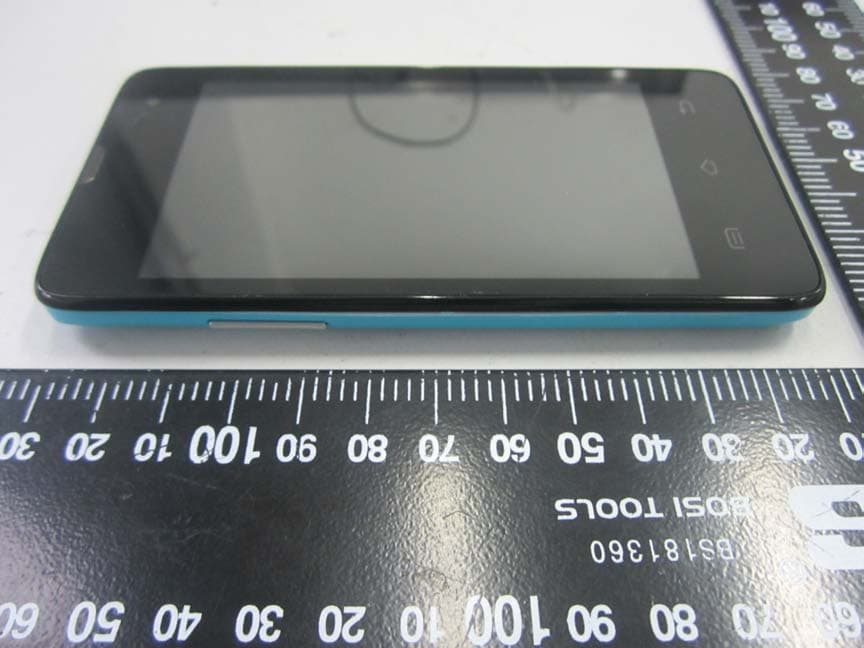
Click to zoom
Application Details
- Equipment Class
- DSS - Part 15 Spread Spectrum Transmitter
- Date of Grant
- Sep 14, 2014
- Application Purpose
- Original Equipment
- Date of Application
- Sep 14, 2014
- Equipment Note
- WCDMA Digital Mobile Handset
- Frequency Range
- 2402.00000000 - 2480.00000000
- Company
- ZTE Corporation
- Country
- China
Documents & Files
Document Text
Text extracted from the exhibit documents filed with the FCC. Open a document above to read the original.
Users Manual
WCDMA Digital Mobile Phone Handset ZTE V779M User Manual - 1 - Using your phone Thanks for choosing the V779M, It’s a WCDMA Digital Mobile Phone, which will refer to as ‘phone’ from now on. Powered by Android TM , the phone supports 3G high-speed Internet access, which brings you brand new experiences. Don’t worry if the pictures we use to demonstrate your phone’s functions look a little different from what you see on the screen. It’s the functions that matter. - 2 - Before getting started Inserting and removing the SIM 1. Switch off your phone and disconnect any external power. 2. Remove the back cover and then the battery. 3. Hold your SIM on the cut corner, and slide it face down into the card holder. 4. Insert the battery. 5. Replace the back cover. Inserting a memory card 1. Remove the back cover. 2. Push tightly until the card is installed in the correct position and replace the back cover. - 3 - Using the battery Inserting the battery 1. Open the battery cover on the back of your phone. 2. Align the battery's contact points with those of the phone and gently press the battery down into place. 3. Replace the battery cover clicking it back into position. Removing the battery 1. Switch off your phone. 2. Open the battery cover. - 4 - 3. Lift the battery up and out of your phone. Charging the battery The battery is not fully charged when you unpack it for the first time. Please exhaust the capacity of the battery before you recharge it for the first time.To ensure the battery is always in its best condition, please charge the battery 8 hours for the first time and recharge it later at least 2 hours each time. 1. Connect the charger to the phone, and insert the charger to the standard power socket. 2. Please disconnect the charger from the power socket after the charging is completed. Tips: To charge the battery, you can also connect the phone to the PC through the USB cable. During charging, the phone and charger may normally become hot. - 5 - Headset jack Earpiece Power key Front camera Touch screen Menu key Home key Back key Camera Volume Speaker Microphone USB port Getting to know your phone - 6 - Descriptions of Keys Keys Functions Menu key Touch it to open a menu with items that affect the current screen or application. Home key Touch it to open the home screen. If you’re viewing the left or right extended home screen, Press it to open the central home screen. Back key Touch it to open the previous screen you were working in. If the onscreen keyboard is open, touch it to close the keyboard. Power key Press it to turn on/off the display. Long press it to open a menu with options for Airplane mode, for Silent mode, for Vibration mode, and for powering off and for rebooting the phone. Volume keys Adjust the volume. Long press it to quickly adjust the ring tone volume to maximum or minimum. - 7 - Onscreen icons Icons Descriptions Icons Descriptions Signal strength Full battery Charging Missed calls You have an unread message. Music playing New calendar reminder Airplane mode Connected to a PC Alarm clock on Vibration mode Silent mode Wi-Fi function on Bluetooth function is on Power on/off Powering on Long press the Power key until the power-on animation appears. Powering off Long press the Power key to display the phone options and select Power off. - 8 - Basic Operation Screen control You can control your phone through a series of operations on the screen. Touch: you can touch the items on the screen to select them, to open the applications, or using the keyboard to input characters. Swipe or slide: Quickly move your finger across the surface of the screen, without pausing when you first touch (so you don't drag something instead). Touch & hold: you can touch & hold some items to get the item’s available menu. Drag: you can drag some items on the screen to realize some operations. Switch between landscape mode and portrait mode: you can switch to the landscape mode by rotating your phone. The landscape mode is only valid under some interfaces, such as text input interface, message viewing interface, etc. Pinch: In some apps (such as Maps, Browser, and Gallery), you can zoom in and out by placing two fingers on the screen at once and pinching them together (to zoom out) or spreading them apart (to zoom in). - 9 - Home screen Switch to a recently used application On the home screen, touch & hold the Home key, opens a list of thumbnail images of apps you've worked with recently. To open an app, touch it. To remove a thumbnail from the list, swipe it left or right. Manage notifications • Open notifications panel: When a new notification appears on the notification bar, you can drag the notification bar down from the top of the screen to open notifications panel. • Respond to a notification: Touch it. • Dismiss a notification: Swipe it sideways. • Close notifications panel: Drag the tab at the bottom of the notification panel to the top of the screen. Notification bar Drag the notification bar down from the top of the screen to open the notifications panel. Status bar Shows the signal strength, battery status, etc. Favorites tray - 10 - Favorites tray The app icons you keep in the favorites tray remain visible on every Home screen. Touch, hold, & slide to move one of the Favorites icons out of the tray. Then use the same technique to move another one into the same position. Display area The home screen can be extended to exceed the screen’s width in order to provide more space for newly added shortcuts, widgets, etc. On the home screen, slide your finger on the screen to extend to the left or right. Use folders You can combine several app icons in a folder. Drop one app icon over another on a Home screen, and the two icons will be combined. From any Home screen, you can - Open a folder: Touch it. The folder opens. - Rename a folder: Touch its name. - Move icons around your Home screens: Touch, hold, and drag. Delete icons on the home screen To remove an application or wid…
Text truncated - open the document above for the full version.
Cover Letter(s)
ZTE CORPORATION ZTE Plaza, Keji Road South, Hi-Tech, Industrial Park, Nanshan District, Shenzhen, Guangdong, P.R.China Tel: +86-755-86360379 ; Fax: +86-755-86360298 Date: September 4, 2014 Power of Attorney To whom it may concern, Please be notified that I, Zhang Min, have designated Ivy.Zhu in Shenzhen Morlab Communications Technology Co., Ltd. and David Gong in ZTE CORPORATION as the persons being responsible for this project and to sign the form 731 and other documentation. Any and all acts carried out by Ivy Zhu in Shenzhen Morlab Communications Technology Co., Ltd., and David Gong in ZTE CORPORATION on the matters of relating to all processes required in the FCC approval and any communication needed with the national authority, shall have the same legal authority as acts on our own behalf. We further certifies that neither the applicant nor any party to this application, as defined in 47 CFR Ch. 1.2002 (b), is subject to a denial to Federal benefits, that include FCC benefits, pursuant to section 5301 of the Anti-Drug Abuse Act of 1998, 21 U.S.C. 835(a). This authorization is limited to the product of as following: FCC ID: SRQ-V779M If you have any acknowledgement and response, please send it to Shenzhen Morlab Communications Technology Co., Ltd. directly. Should you have any questions or comments regarding this matter, please have my best attention. Sincerely yours, Contact Person: Min Zhang Company: ZTE CORPORATION TEL: +86-21-68897541 FAX: +86-21-68891070 E-mail: [email protected]
Cover Letter(s)
ZTE CORPORATION ZTE Plaza, Keji Road South, Hi-Tech, Industrial Park, Nanshan District, Shenzhen, Guangdong, P.R.China Tel: +86-755-86360379 ; Fax: +86-755-86360298 2014/9/4 Federal Communications Commission Authorization and Evaluation Division Confidentiality Request regarding application for certification of FCC ID: SRQ-v779M Pursuant to Sections 0.457 and 0.459 of the Commission’s Rules, we hereby request confidential treatment of information accompanying this application as outlined below: Schematics Block Diagram Parts List Operation Description Tune Up Procedure The above materials contain trade secrets and proprietary information not customarily released to the public. The public disclosure of these materials may be harmful to the applicant and provide unjustified benefits to its competitors. The applicant understands that pursuant to Section 0.457 of the Rules, disclosure of this application and all accompanying documentation will not be made before the date of the Grant for this application. Yours Sincerely, Zhang Min ZTE product approval manager
External Photos
External Photos 1. EUT front view 2. EUT rear view 3. EUT left side view 4. EUT right side view 5. EUT top view 6. EUT bottom view 7. Accessories
ID Label/Location Info
FCC label and label location
Internal Photos
Internal Photos 1. EUT uncover view 2. Mainboard front view with shielding 3. Mainboard rear view 4. Mainboard front view without shielding 5. RF chip view 6. CPU chip view 7. GSM/WCDMA antenna view 8. BT/WIFI antenna view 9. GPS antenna view
Test Report
Report No.:SZ14080098W03A Shenzhen Morlab Communications Technology Co., Ltd Phone: +86 (0) 755 36698555 Web site: http://www.morlab.cn/ Fax: +86 (0) 755 36698525 Email: [email protected] Page 2 of 77 TABLE OF CONTENTS 1. GENERAL INFORMATION ...................................................................................................................... 5 1.1. EUT DESCRIPTION .................................................................................................................................. 5 1.2. TEST STANDARDS AND RESULTS ............................................................................................................. 6 1.3. FACILITIES AND ACCREDITATIONS ............................................................................................................ 7 1.3.1. FACILITIES ....................................................................................................................................................... 7 1.3.2. TEST ENVIRONMENT CONDITIONS ................................................................................................................ 7 2. 47 CFR PART 15C REQUIREMENTS .................................................................................................... 8 2.1. ANTENNA REQUIREMENT ......................................................................................................................... 8 2.1.1. APPLICABLE STANDARD ................................................................................................................................. 8 2.1.2. RESULT: COMPLIANT ...................................................................................................................................... 8 2.2. NUMBER OF HOPPING FREQUENCY ......................................................................................................... 8 2.2.1. REQUIREMENT ................................................................................................................................................ 8 2.2.2. TEST DESCRIPTION ........................................................................................................................................ 8 2.2.3. TEST PROCEDURE ......................................................................................................................................... 9 2.2.4. TEST RESULT .................................................................................................................................................. 9 2.3. PEAK OUTPUT POWER ........................................................................................................................... 13 2.3.1. REQUIREMENT .............................................................................................................................................. 13 2.3.2. TEST DESCRIPTION ...................................................................................................................................... 13 2.3.3. TEST RESULT ................................................................................................................................................ 13 2.3.3.1. GFSK MODE ............................................................................................................................................. 14 2.3.3.2. ∏/4-DQPSK MODE ................................................................................................................................. 14 2.3.3.3. 8-DPSK MODE ......................................................................................................................................... 14 2.4. 20DB BANDWIDTH .................................................................................................................................. 15 2.4.1. DEFINITION ................................................................................................................................................... 15 2.4.2. TEST DESCRIPTION ...................................................................................................................................... 15 2.4.3. TEST PROCEDURE ....................................................................................................................................... 15 2.4.4. TEST RESULT ................................................................................................................................................ 16 2.4.4.1. GFSK MODE ............................................................................................................................................. 16 2.4.4.2. ∏/4-DQPSK MODE ................................................................................................................................. 18 2.4.4.3. 8-DPSK MODE ......................................................................................................................................... 20 2.5. CARRIED FREQUENCY SEPARATION ....................................................................................................... 22 2.5.1. DEFINITION ................................................................................................................................................... 22 2.5.2. TEST DESCRIPTION ...................................................................................................................................... 22 2.5.3. TEST PROCEDURE ....................................................................................................................................... 22 2.5.4. TEST RESULT ................................................................................................................................................ 23 Report No.:SZ14080098W03A Shenzhen Morlab Communications Technology Co., Ltd Phone: +86 (0) 755 36698555 Web site: http://www.morlab.cn/ Fax: +86 (0) 755 36698525 Email: [email protected] Page 3 of 77 2.6. TIME OF OCCUPANCY (DWELL TIME) ......…
Text truncated - open the document above for the full version.
Test Setup Photos
Test Setup Photos 1. Conducted emission main’s port front view 2. Conducted emission main’s port side view 3. Radiated emission (9KHz-30MHz) 4. Radiated emission (30MHz-1GHz) 5. Radiated emission (above 1GHz) 6. Conducted emission antenna’s port
Contact Information
Applicant
Chaijue Ding(Certification Manager)
Technical Contact
Shenzhen Morlab Communications Technology Co.,LtdIvy Zhu
[email protected]86-755-36698618
FL.3, Building A, FeiYang Science Park · ShenZhen, GuangDong Province · China
Test Firm
Shenzhen Morlab Communications Technology Co., LtdIvy zhu
Technical Specifications
| # | Rule Parts | Frequency Range | Power Output |
|---|---|---|---|
| 1 | 15C | 2.40 GHz - 2.48 GHz | 5.00 mW |
Other Applications from ZTE Corporation

SRQ-ZTEA53
Nov 06, 2022LTE/WCDMA/GSM(GPRS) Multi-Mode Digital Mobile Phone with Bluetooth and WiFi
Equipment Class
DSS - Part 15 Spread Spectrum Transmitter
SRQ-ZTEA53-1
Nov 05, 2022LTE/WCDMA/GSM(GPRS) Multi-Mode Digital Mobile Phone with Bluetooth and WiFi
Equipment Class
JBP - Part 15 Class B Computing Device Peripheral
SRQ-ZTET1002
Sep 23, 2022Tablet PC
Equipment Class
PCB - PCS Licensed Transmitter
SRQ-Z6103
Aug 14, 2022LTE/UMTS Digital Mobile Phone with Bluetooth and WiFi
Equipment Class
DTS - Digital Transmission System
SRQ-ZTET0801
Jul 18, 2022Tablet with GSM, WCDMA, LTE, Bluetooth and WiFi
Equipment Class
DSS - Part 15 Spread Spectrum Transmitter