SRQ-ZTEA7020WCDMA/LTE Multi-mode Digital Mobile Phone
ZTE Corporation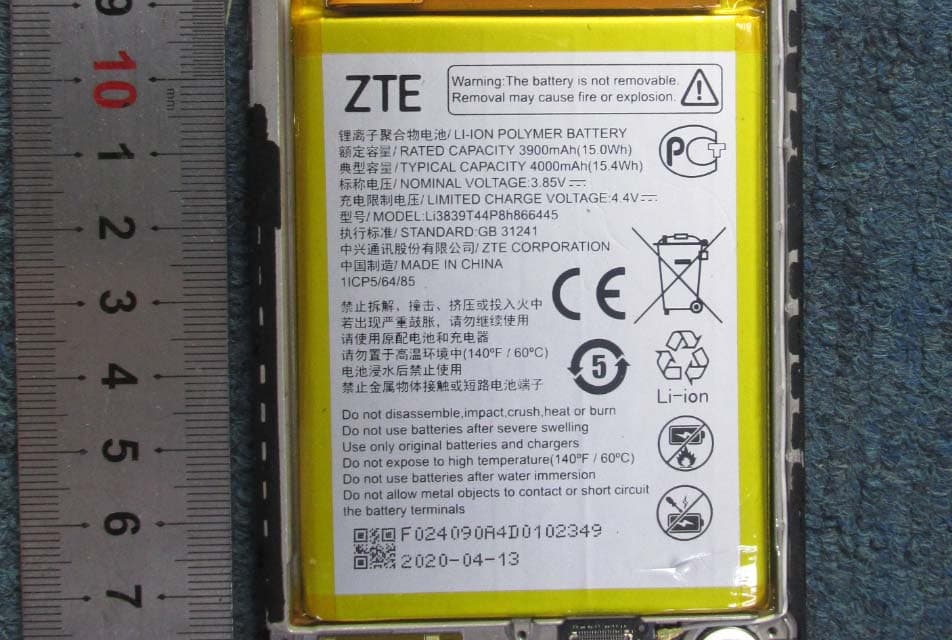
Click to zoom
Application Details
- Equipment Class
- JBP - Part 15 Class B Computing Device Peripheral
- Date of Grant
- Jun 29, 2020
- Application Purpose
- Original Equipment
- Date of Application
- Jun 29, 2020
- Equipment Note
- WCDMA/LTE Multi-mode Digital Mobile Phone
- Company
- ZTE Corporation
- Country
- China
Documents & Files
Document Text
Text extracted from the exhibit documents filed with the FCC. Open a document above to read the original.
Users Manual
1 ZTE A7020 Quick Start Guide 2 LEGAL INFORMATION Copyright © 2020 ZTE CORPORATION. All rights reserved. No part of this publication may be quoted, reproduced, translated or used in any form or by any means, electronic or mechanical, including photocopying and microfilm, without the prior written permission of ZTE Corporation. Notice ZTE Corporation reserves the right to make modifications on print errors or update specifications in this guide without prior notice. We offer self‐service for our smart terminal device users. Please visit the ZTE official website (at www.ztedevices.mx) for more information on self‐service and supported product models. Information on the website takes precedence. Visit https://ztedevices.mx/soporte/ to download the user manual. Disclaimer ZTE Corporation expressly disclaims any liability for faults and damages caused by unauthorized modifications of the software. Images and screenshots used in this guide may differ from the actual product. Content in this guide may differ from the actual product or software. Trademarks ZTE and the ZTE logos are trademarks of ZTE Corporation. Android™ is a trademark of Google LLC. The Bluetooth® word mark and logos are registered trademarks owned by the Bluetooth SIG, Inc. and any use of such marks by ZTE Corporation is under license. microSDXC Logo is a trademark of SD ‐3C, LLC. Other trademarks and trade names are those of their respective owners. Version No.: R1.0 Edition Time : May 20, 2020 Manual No.: 3 Getting to Know Your Phone Front camera Touch screen Earpiece Volume key Power key Charging/USB Type‐C jack Headset jack Back cameras and flash Speaker Indicator light nano‐SIM/ microSDXC card tray Fingerprint sensor Proximity & light sensor 4 Setting Up Your Phone The nano‐SIM card can be installed or removed while the phone is turned on. WARNING! To avoid damage to the phone, do not use any other kind of SIM cards, or any non‐standard nano‐SIM card cut from a SIM card. You can get a standard nano‐SIM card from your service provider. 1. Insert the tip of the tray eject tool into the hole on the card tray. CAUTION: Never replace the included tray eject tool with sharp objects. Ensure that the tray eject tool is perpendicular to the hole. Otherwise, the phone may be damaged. 2. Pull out the card tray and place the nano‐SIM card and the microSDXC card (optional) on the tray, as shown. Carefully slide the tray back into place. 5 Charging the Phone Your phone’s battery should have enough power for the phone to turn on, find a signal, and make a few calls. You should fully charge the battery as soon as possible. WARNING! Use only ZTE‐approved chargers and USB Type‐C cables. The use of unapproved accessories could damage your phone or cause the battery to explode. WARNING! Do not remove the back cover. The battery is not removable. Removal may cause fire or explosion. 1. Connect the adapter to the charging jack. nano‐SIM card microSDXC card 6 2. Connect the charger to a standard AC power outlet. 3. Disconnect the charger when the battery is fully charged. NOTE: If the battery is extremely low, you may be unable to power on the phone even when it is being charged. In this case, try again after charging the phone for at least 20 minutes. Contact the customer service if you still cannot power on the phone after prolonged charging. Powering On/Off Your Phone Make sure the battery is charged before powering on. Press and hold the Power key to turn on your phone. To power off, press and hold the Power key to open the options menu, and touch > . NOTE: If the screen freezes or takes too long to respond, try pressing and holding the Power key for over 10 seconds to restart the phone. 7 FM Radio Scanning for Channels 1. Plug in a wired headset and open FM Radio. 2. Touch > Scan. Your phone scans for all available channels and saves them to the channel list. Listening to FM Radio 1. Open FM Radio while the headset is connected. 2. Touch > All channels and select a channel. You can also drag the red line along the frequency panel or touch or to switch to other channels, or touch or to adjust the current channel frequency. NOTES: Touch to add the channel to favorites. Touch to listen to the radio through the phone speaker. The FM radio feature does not require an Internet connection. 8 Product Safety Information Don’t make or receive phone calls while driving. Never text while driving. Keep your phone at least 10 mm away from your body while making calls. Small parts may cause choking. Your phone can produce a loud sound. To prevent possible hearing damage, do not listen at high volume levels for long periods. Exercise caution when holding your phone near your ear while the loudspeaker is in use. Avoid contact with anything magnetic. Keep away from pacemakers and other electronic medical devices. Turn off when asked to in hospitals and medical facilities. Turn off when told to on aircraft and at airports. Turn off when near explosive materials or liquids. Don’t use at gas stations. Your phone may produce a bright or flashing light. Don’t dispose of your phone in fire. Avoid extreme temperatures. Avoid contact with liquids. Keep your phone dry. Do not attempt to disassemble your phone. 9 Only use approved accessories. For pluggable equipment, the socket‐outlet shall be installed near the equipment and shall be easily accessible. Don’t rely on your phone as a primary device for emergency communications. FCC RF Exposure Information (SAR) This phone is designed and manufactured not to exceed the emission limits for exposure to radio frequency (RF) energy set by the Federal Communications Commission of the United States. During SAR testing, this device was set to transmit at its highest certified power level in all tested frequency bands, and placed in positions that simulate RF exposure in usage against the head with no separation, and near the body with the separation of 10 mm. Although the SAR is determined at the highest certified …
Text truncated - open the document above for the full version.
Cover Letter(s)
ZTE Corporation Office of Engineering Technology Federal Communications Commission 7435 Oakland Mills Road Columbia, MD 21046 Date: 2020/6/22 Subject; Request for Confidentiality FCC ID: SRQ-ZTEA7020 To Whom It May Concern, Pursuant to the provisions of the Commission’s rules Title 47 Sections §0.457 and §0.459, we are requesting the Commission to withhold the following attachment(s) as confidential documents from public disclosure indefinitely. These documents contain detailed system and equipment descriptions and are considered as proprietary information in operation of the equipment. The public disclosure of these documents might be harmful to our company and would give competitors an unfair advantage in the market. Schematic Diagram Block Diagram Operational Description Bom List Tune up procedure In additional to above mentioned documents, in order to comply with the marketing regulations in Title 47 CFR §2.803 and the importation rules in Title 47 CFR §2.1204, while ensuring that business sensitive information remains confidential until the actual marketing of newly authorized devices, we request Short Term Confidentiality of the following attachment(s); External Photos Test Setup Photos Internal Photos User Manual For 45 days, pursuant to Public Notice DA 04-1705. OR For 180 days pursuant to KDB 726920 D01. It is our understanding that all measurement test reports, FCC ID label format and correspondence during the certification review process cannot be granted as confidential documents and this information will be available for public review once the grant of equipment authorization is issued. Sincerely, Signature: Name: Yu Gong Title: Certification Manager
Cover Letter(s)
ZTE Corporation. Letter of Authorization Company: ZTE Corporation Address: ZTE Plaza, Keji Road South, Shenzhen, China Product Name: WCDMA/LTE Multi-mode Digital Mobile Phone Model Number: ZTE A7020 FCC Identifier: SRQ-ZTEA7020 We authorize MiCOM Labs Inc, 575 Boulder Court, Pleasanton, California 94566, USA, to act on our behalf on all matters concerning the above named equipment. Any individual within MiCOM Labs is authorized to act on our behalf and take action on the application. We declare that MiCOM Labs Inc, 575 Boulder Court, Pleasanton, California 94566, USA, is allowed to forward all information related to the approval project to the Federal Communication Commission and to discuss any issues concerning the approval application. Any and all acts carried out by MiCOM Labs on our behalf shall have the same effect as acts of our own. Name: Yu Gong Date: 2020/6/23 Title: Certification Manager Signature of applicant:
External Photos
External Photo
Internal Photos
Internal Photo WWAN ANT Sub ANT BT/WIFI/GPS
Test Report
Report No.: SET2020-05835 CCIC-SET/TRF: GJ-EMC-E (2020-01-09) Page 1 of 19 EMC TEST REPORT Report No.: SET2020-05835 Product Name: WCDMA/LTE Multi-mode Digital Mobile Phone FCC ID: SRQ-ZTEA7020 Model No. : ZTE A7020 Marketing No.: ZTE Blade A7s 2020 Applicant: ZTE Corporation Address: ZTE Plaza, Keji Road South, Shenzhen, China Received Date: 2020.05.12 Dates of Testing: 12/05/2020 —12/05/2020 Issued by: CCIC Southern Testing Co., Ltd. Lab Location: Electronic Testing Building, No. 43 Shahe Road, Xili Street, Nanshan District, Shenzhen, Guangdong, China. Tel: 86 755 26627338 Fax: 86 755 26627238 This test report consists of 19 pages in total. It may be duplicated completely for legal use with the approval of the applicant. It should not be reproduced except in full, without the written approval of our laboratory. The client should not use it to claim product endorsement by CCIC-SET. The test results in the report only apply to the tested sample. The test report shall be invalid without all the signatures of testing engineers, reviewer and approver. Any objections must be raised to CCIC-SET within 15 days since the date when the report is received. It will not be taken into consideration beyond this limit. Report No.: SET2020-05835 CCIC-SET/TRF: GJ-EMC-E (2020-01-09) Page 2 of 19 Te s t R e p o r t Product Name .................... WCDMA/LTE Multi-mode Digital Mobile Phone Model No. ......................... ZTE A7020 Trade name ZTE Applicant ............................ ZTE Corporation Applicant Address ............. ZTE Plaza, Keji Road South, Shenzhen, China Manufacturer ..................... ZTE Corporation Manufacturer Address ...... ZTE Plaza, Keji Road South, Shenzhen, China Test Standards ................... 47 CFR Part 15 Subpart B Test Result ......................... PASS Tested by .......................... Yun Lei Fang Test Engineer 2020.06.05 Reviewed by ...................... Chris You Senior Engineer 2020.06.05 Approved by ...................... 2020.06.05 Shuangwen Zhang, Manager Report No.: SET2020-05835 CCIC-SET/TRF: GJ-EMC-E (2020-01-09) Page 3 of 19 TABLE OF CONTENTS 1. GENERAL INFORMATION .................................................................................................... 4 1.1 EUT Description ......................................................................................................................... 4 1.2 Test Standards and Results ........................................................................................................ 5 1.3 Facilities and Accreditations ...................................................................................................... 6 1.3.1 Facilities .................................................................................................................................... 6 1.3.2 Test Environment Conditions .................................................................................................... 6 1.3.3 Measurement Uncertainty ......................................................................................................... 6 2. TEST CONDITIONS SETTING............................................................................................... 7 2.1 Test Mode .................................................................................................................................... 7 2.2 Test Setup and Equipments List ................................................................................................ 8 2.2.1 Conducted Emission.................................................................................................................. 8 2.2.2 Radiated Emission ..................................................................................................................... 8 3. 47 CFR PART 15B REQUIREMENTS .................................................................................. 11 3.1 Conducted Emission ................................................................................................................. 11 3.1.1 Requirement ............................................................................................................................ 11 3.1.2 Test Description ...................................................................................................................... 11 3.1.3 Test Result ............................................................................................................................... 11 3.2 Radiated Emission .................................................................................................................... 14 3.2.1 Requirement ............................................................................................................................ 14 3.2.2 Test Description ...................................................................................................................... 15 3.2.3 Test Result ............................................................................................................................... 15 Change History Issue Date Reason for change 1.0 2020.06.05 First edition Report No.: SET2020-05835 CCIC-SET/TRF: GJ-EMC-E (2020-01-09) Page 4 of 19 1. GENERAL INFORMATION 1.1 EUT Description EUT Name .......................... .: WCDMA/LTE Multi-mode Digital Mobile Phone Trade Name.....................: ZTE Brand Name.....................: ZTE Hardware Version............ : urrA Software Version .................. : TEL_MX_ZTE_A7020V1.0 Power supply...... ...... : Battery Model No.: Li3839T44P8h866445 Capacitance:3900mAh Rated Voltage:3.85V Charge Limit:4.4V Manufacturer :Zhongshan Tianmao Battery Co.,Ltd Ancillary Equipment ... : AC Adapter Model No.: STC-A520A-Z I/p: 100-240V~50/60Hz ,400mA O/p: 5.0V 2000mA Manufacturer 1# : Jiangsu chenyang Electron Co.,Ltd Manufacturer 2#:SHENZHEN RUIJING INDUSTRIAL CO LTD AC Adapter Model No.: STC-A520A-A I/p: 100-240V~50/60Hz ,400mA O/p: 5.0V 2000mA Manufacturer 3# : SHENZHEN R…
Text truncated - open the document above for the full version.
Test Setup Photos
15B Test setup
Contact Information
Applicant
Chaijue Ding(Certification Manager)
Technical Contact
Test Firm
CCIC Southern Testing Co., LtdZhu Qi
[email protected]867552626067
Technical Specifications
| # | Rule Parts | Frequency Range | Power Output |
|---|---|---|---|
| 1 | 15B | - | - |
Other Applications from ZTE Corporation

SRQ-ZTEA53
Nov 06, 2022LTE/WCDMA/GSM(GPRS) Multi-Mode Digital Mobile Phone with Bluetooth and WiFi
Equipment Class
DSS - Part 15 Spread Spectrum Transmitter
SRQ-ZTEA53-1
Nov 05, 2022LTE/WCDMA/GSM(GPRS) Multi-Mode Digital Mobile Phone with Bluetooth and WiFi
Equipment Class
JBP - Part 15 Class B Computing Device Peripheral
SRQ-ZTET1002
Sep 23, 2022Tablet PC
Equipment Class
PCB - PCS Licensed Transmitter
SRQ-Z6103
Aug 14, 2022LTE/UMTS Digital Mobile Phone with Bluetooth and WiFi
Equipment Class
DTS - Digital Transmission System
SRQ-ZTET0801
Jul 18, 2022Tablet with GSM, WCDMA, LTE, Bluetooth and WiFi
Equipment Class
DSS - Part 15 Spread Spectrum Transmitter