SRQZTEN880GCDMA Digital Mobile Phone
ZTE Corporation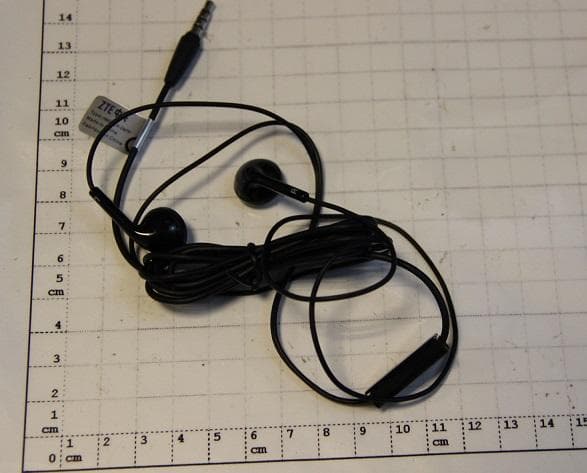
Click to zoom
Application Details
- Equipment Class
- JBP - Part 15 Class B Computing Device Peripheral
- Date of Grant
- Sep 09, 2013
- Application Purpose
- Original Equipment
- Date of Application
- Sep 08, 2013
- Equipment Note
- CDMA Digital Mobile Phone
- Company
- ZTE Corporation
- Country
- China
Documents & Files
Document Text
Text extracted from the exhibit documents filed with the FCC. Open a document above to read the original.
Users Manual
1 ZTE N880G Version No.: R1.0 Edition Time : 201307 2 Contents Getting Started ....................................................... 10 Getting to Know Your Phone ............................................ 10 Knowing the Keys ............................................................ 11 Installing the microSD Card ............................................. 11 Charging the Battery ........................................................ 13 Extending the Battery Life ................................................ 14 Powering On/Off .............................................................. 14 Restarting the Phone ....................................................... 15 Setting Up for the First Time ............................................ 15 Locking/Unlocking the Screen and Keys .......................... 16 Using the Touch Screen ................................................... 17 Getting to Know the Home Screen ................................... 18 Personalizing.......................................................... 20 Changing the System Language ...................................... 20 Setting the Date and Time................................................ 20 Changing Ringtone and Notification Sound ...................... 20 Turning On/Off Touch Sounds .......................................... 21 Adjusting Volumes ........................................................... 21 Switching to Silent Mode .................................................. 21 Applying New Wallpapers ................................................ 22 Changing Screen Brightness ........................................... 22 3 Protecting Your Phone With Screen Locks ........................ 23 Protecting Your Phone With Encryption ............................ 23 Knowing the Basics ............................................... 26 Monitoring the Phone Status ............................................ 26 Managing Notifications ..................................................... 27 Managing Shortcuts and Widgets ..................................... 29 Organizing With Folders ................................................... 30 Rearranging the Favorites Tray ........................................ 31 Entering Text .................................................................... 32 Editing Text ...................................................................... 38 Opening and Switching Apps ............................................ 39 Connecting to Networks and Devices .................. 40 Connecting to Mobile Networks ........................................ 40 Connecting to Wi-Fi .......................................................... 41 Using Wi-Fi Direct ............................................................ 44 Connecting to Bluetooth Devices ...................................... 45 Connecting to Your Computer via USB ............................. 47 Sharing Your Mobile Data Connection .............................. 49 Connecting to Virtual Private Networks ............................. 52 Phone Calls ............................................................ 55 Placing and Ending Calls ................................................. 55 Answering or Rejecting Calls ............................................ 56 Working With the Call Log ................................................ 56 Calling Your Contacts ....................................................... 58 Checking Voicemail .......................................................... 59 4 Using Options During a Call ............................................. 60 Managing Multi-party Calls ............................................... 60 Adjusting Your Call Settings ............................................. 62 People ..................................................................... 65 Checking Contact Details ................................................. 65 Adding a New Contact ..................................................... 65 Setting Up Your Own Profile ............................................. 66 Importing, Exporting, and Sharing Contacts ..................... 66 Working With Favorite Contacts ....................................... 68 Working With Groups ....................................................... 69 Searching for a Contact ................................................... 71 Editing Contacts............................................................... 71 Accounts ................................................................. 74 Adding or Removing Accounts ......................................... 74 Configuring Account Sync ................................................ 75 Email ....................................................................... 77 Set Up the First Email Account ......................................... 77 Checking Your Emails ...................................................... 77 Responding to an Email ................................................... 78 Writing and Sending an Email .......................................... 79 Adding Signature to Your Emails ...................................... 80 Adding and Editing Email Accounts .................................. 80 Changing General Email Settings .................................... 81 Gmail TM ................................................................... 82 Opening Your Gmail Inbox ............................................... 82 5 Switching Accounts .......................................................... 82 Writing and Sending a Message ....................................... 83 Adding Signature to Your Gmail Messages ....................... 83 Replying to or Forwarding a Message .............................. 84 Working With Received Attachments ................................ 84 Searching for Messages ................................................... 85 Working With Labels ........................................................ 85 Cha…
Text truncated - open the document above for the full version.
Cover Letter(s)
THIS MUST BE SIGNED BY THE APPLICANT AND SHOULD BE PLACED ON APPLICANTS LETTERHEAD ONLY IF AGENT IS SUBMITTING APPLICATION 022311 – 6 Authority to Act as Agent Date: _2013/5/30 American Certification Body, Inc. 6731 Whittier Avenue Suite C110 McLean, VA 22101 To Whom It May Concern: East China Institute of Telecommunications / Jarek Liu_ is authorized to act on our behalf, until otherwise notified, for applications to American Certification Body, Inc. (ACB). We certify that we are not subject to denial of federal benefits, that includes FCC benefits, pursuant to Section 5301 of the Anti-Drug Abuse Act of 1988, 21 U.S.C. 862. Further, no party, as defined in 47 CFR 1.2002 (b), to the application is subject to denial of federal benefits, that includes FCC benefits. Thank you, Agency Agreement Expiration Date: ____12 months_____ By: Min Zhang (Signature 1 ) (Print name) Title: Certification Manager On behalf of: ZTE CORPORATION (Company Name) Telephone: 0755-26770345 1 - Must be signed by applicant contact given for applicant on the FCC site, or by the authorized agent if an appropriate authorized agent letter has been provided. Letters should be placed on appropriate letterhead.
Cover Letter(s)
THIS MUST BE SIGNED BY THE APPLICANT/AGENT AND SHOULD BE PLACED ON APPROPRIATE LETTERHEAD Request for Confidentiality Date: 2013/8/5 Subject: Confidentiality Request for: SRQZTEN880G ______ Pursuant to FCC 47 CRF 0.457(d) and 0.459 and IC RSP-100, Section 10, the applicant requests that a part of the subject FCC application be held confidential. Type of Confidentiality Requested Exhibit Short Term Permanent Block Diagrams Short Term External Photos Short Term Permanent* 1 Internal Photos Short Term Permanent Operation Description/Theory of Operation Short Term Permanent Parts List & Placement/BOM Short Term Permanent Tune-Up Procedure Short Term Permanent Schematics Short Term Test Setup Photos Short Term Permanent* User’s Manual *Note: ______(Insert Explanation as Necessary)______ ZTE CORPORATION has spent substantial effort in developing this product and it is one of the first of its kind in industry. Having the subject information easily available to "competition" would negate the advantage they have achieved by developing this product. Not protecting the details of the design will result in financial hardship. Permanent Confidentiality: The applicant requests the exhibits listed above as permanently confidential be permanently withheld from public review due to materials that contain trade secrets and proprietary information not customarily released to the public. Short-Term Confidentiality: The applicant requests the exhibits selected above as short term confidential be withheld from public view for a period of ___(specify number of days not to exceed 180) 2 ___ days from the date of the Grant of Equipment Authorization and prior to marketing. This is to avoid premature release of sensitive information prior to marketing or release of the product to the public. Applicant is also aware that they are responsible to notify ACB in the event information regarding the product or the product is made available to the public. ACB will then release the documents listed above for public disclosure pursuant to FCC Public Notice DA 04-1705. NOTE for Industry Canada Applications: The applicant understands that until such time that IC distinguishes between Short Term and Permanent Confidentiality, either type of marked exhibit above will simply be marked Confidential when submitted to IC. Sincerely, By: _______ Zhang Min (Signature/Title 3 ) (Print name) 1 - The asterisked items (*) require further justification before permanent confidentiality will be allowed. These also currently require review by the FCC under their Permit-But-Ask policy before the grant is issued and can delay completion of an application. Further justification should be added to the note above. One such example for a potted device would be: “The EUT is FULLY potted using a non-removable epoxy based material. Removal of potting material causes irreparable damage to internal circuitry. See photographs exhibits that outline the device before and after potting.” 2 - Please refer to http://acbcert.com/documents/misc-docs/Memo-Short-Term-Vs-Standard-Confidentiality.pdf for complete details. 3 - Must be signed by applicant contact given for applicant on the FCC site, or by the authorized agent if an appropriate authorized agent letter has been provided. Letters should be placed on appropriate letterhead.
External Photos
External photo for N880G: Mobile phone Data cable Charger Charger earphone
ID Label/Location Info
Label for ZTE N880G
Internal Photos
Internal photo for N880G Mobile phone Charger Charger Charger
Test Report
No. ECIT-2013-0139-EMC Page 2 of 15 CONTENTS 1. TEST LABORATORY ............................................................................................................... 3 1.1. TESTING LOCATION ............................................................................................................... 3 1.2. TESTING ENVIRONMENT ....................................................................................................... 3 1.3. PROJECT DATA ....................................................................................................................... 3 1.4. SIGNATURE ............................................................................................................................. 3 2. CLIENT INFORMATION ........................................................................................................... 4 2.1. APPLICANT INFORMATION ................................................................................................... 4 2.2. MANUFACTURER INFORMATION ......................................................................................... 4 3. EQUIPMENT UNDER TEST (EUT) AND ANCILLARY EQUIPMENT (AE) ............................ 5 3.1. ABOUT EUT ............................................................................................................................. 5 3.2. INTERNAL IDENTIFICATION OF AE USED DURING THE TEST ......................................... 5 4. REFERENCE DOCUMENTS .................................................................................................... 6 4.1. REFERENCE DOCUMENTS FOR TESTING .......................................................................... 6 5. TEST RESULTS ........................................................................................................................ 7 5.1. SUMMARY OF TEST RESULTS .............................................................................................. 7 5.2. STATEMENTS........................................................................................................................... 7 6. TEST EQUIPMENTS UTILIZED ............................................................................................... 8 6.1 RADIATED EMISSION EQUIPMENTS LIST ............................................................................ 8 6.1 CE EQUIPMENTS LIST ............................................................................................................. 8 7. SYSTEM CONFIGURATION DURING TEST .......................................................................... 9 7.1 TEST MODE ............................................................................................................................... 9 7.2 CONNECTION DIAGRAM OF TEST SYSTEM ......................................................................... 9 8. MEASUREMENT RESULTS .................................................................................................. 10 8.1 RADIATED EMISSION 30MHZ-12.75GHZ ............................................................................. 10 8.2 CONDUCTED EMISSION ........................................................................................................ 13 No. ECIT-2013-0139-EMC Page 4 of 15 2. Client Information 2.1. Applicant Information Company Name: ZTE Corporation Address /Post: ZTE Plaza, Keji Road South, Hi-Tech, Industrial Park, Nanshan District,Shenzhen, Guangdong, 518057, P.R.China Country: China Telephone: +86-13918703840 2.2. Manufacturer Information Company Name: ZTE Corporation Address /Post: ZTE Plaza, Keji Road South, Hi-Tech, Industrial Park, Nanshan District,Shenzhen, Guangdong, 518057, P.R.China Country: China Telephone: +86-13918703840 No. ECIT-2013-0139-EMC Page 5 of 15 3. Equipment under Test (EUT) and Ancillary Equipment (AE) 3.1. About EUT EUT Description CDMA DIGITAL MOBILE PHONE Model name ZTE N880G Serial Number or IMEI A0000038365E08 Frequency CDMA2000 1x/CDMA2000 1x EVDO(Rev0&1) 800M(BC0) HW Version CY1B SW Version MOVILNET_VE_N880GV1.0.0B03 3.2. Internal Identification of AE used during the test AE ID* Description Model SN AE1 Adapter STC-A51A-Z NA AE2 Battery Li3720T42P3h585651 NA AE3 Earphone HMZ1-OMTP-3.5 NA AE4 Data Cable USB-MU5-B-120-A NA AE5 Desktop PC OptiPlex 790 DT X8RP1 A01 APCC AE6 Notebook PC ThinkPad T420i P1-5LEBD AE7 LAN Cable NA NA AE8 VGA Cable NA NA AE9 RS232 Cable NA NA AE10 Keyboard KB212-B CN-0Y88XT-65890-12I-005Q-A00 AE11 Mouse MS111-P CN-011D3V-71581-19J-1A64 *AE ID: is used to identify the test sample in the lab internally. No. ECIT-2013-0139-EMC Page 6 of 15 4. Reference Documents 4.1. Reference Documents for testing The following documents listed in this section are referred for testing. Reference Title Version FCC Part 15, Subpart B Radio frequency devices 10-1-10 Edition ANSI C63.4 Method of Measurement of Radio-Noise Emissions from Low-Voltage Electrical and Electronic Equipment in the Range of 9 kHz to 40 GHz 2009 No. ECIT-2013-0139-EMC Page 7 of 15 5. Test Results 5.1. Summary of Test Results Items Test List Clause in FCC rules Verdict 1 Radiated Emission 15.109(a) Pass 2 Conducted Emission 15.107(a) Pass 5.2. Statements The ZTE N880G, supporting CDMA 2000, manufactured by ZTE Corporation is a new product for testing. ECIT only performed test cases which identified with Pass/Fail/Inc result in section 5.1. ECIT has verified that the compliance of the tested device specified in section 3 of this test report is successfully evaluated according to the procedure and test methods as defined in type certification requirement listed in section 4 of this test report. No. ECIT-2013-0139-EMC Page 8 of 15 6. Test Equipments Utilized 6.1 Radiated Emission Equipments list No. Name Type Series Number Producer Cal. Due Date 1 Universal Radio Communication Tester CMU200 123102 R&S 2013-09-09 2 Test Receiver ESU40 100307 R&S 2013-11-07 3 Trilog Antenna VULB9163 19-162515 Schwarzbeck 2014-11-11 4 Double Ridged Guide Antenna ETS3117 135885 ETS 201…
Text truncated - open the document above for the full version.
Test Setup Photos
FCC Part 22H-Test Photograph Description: ERP Test Setup Description: Substitution Antenna for ERP Test Description: EIRP Test Setup Description: Substitution Antenna for EIRP Test Test Photograph Test Mode: Mode 2 Description: Conducted Emission Test Setup Test Mode: Mode 1 Description: Front View of Conducted Emission Test Setup Test Mode: Mode 1 Description: Side View of Conducted Emission Test Setup Test Mode: Mode 2 Description: Front view of Radiated Emission Test Setup Test Mode: Mode 2 Description: Back view of Radiated Emission Test Setup Test Mode: Mode 1 Description: Front view of Radiated Emission Test Setup Test Mode: Mode 1 Description: Back view of Radiated Emission Test Setup
Contact Information
Applicant
Chaijue Ding(Certification Manager)
Technical Contact
East china institute of TelecommunicationsLiu Jianquan
[email protected]86-21-63843300
7F, G Area,No. 668, Beijing East Road, · Shanghai · China
Test Firm
East China Institute of TelecommunicationsJing Li
[email protected]862-163-8433
Technical Specifications
| # | Rule Parts | Frequency Range | Power Output |
|---|---|---|---|
| 1 | 15B | - | - |
Other Applications from ZTE Corporation

SRQ-ZTEA53
Nov 06, 2022LTE/WCDMA/GSM(GPRS) Multi-Mode Digital Mobile Phone with Bluetooth and WiFi
Equipment Class
DSS - Part 15 Spread Spectrum Transmitter
SRQ-ZTEA53-1
Nov 05, 2022LTE/WCDMA/GSM(GPRS) Multi-Mode Digital Mobile Phone with Bluetooth and WiFi
Equipment Class
JBP - Part 15 Class B Computing Device Peripheral
SRQ-ZTET1002
Sep 23, 2022Tablet PC
Equipment Class
PCB - PCS Licensed Transmitter
SRQ-Z6103
Aug 14, 2022LTE/UMTS Digital Mobile Phone with Bluetooth and WiFi
Equipment Class
DTS - Digital Transmission System
SRQ-ZTET0801
Jul 18, 2022Tablet with GSM, WCDMA, LTE, Bluetooth and WiFi
Equipment Class
DSS - Part 15 Spread Spectrum Transmitter