SS3-RE5001307Repeater
SZ DJI TECHNOLOGY CO., LTD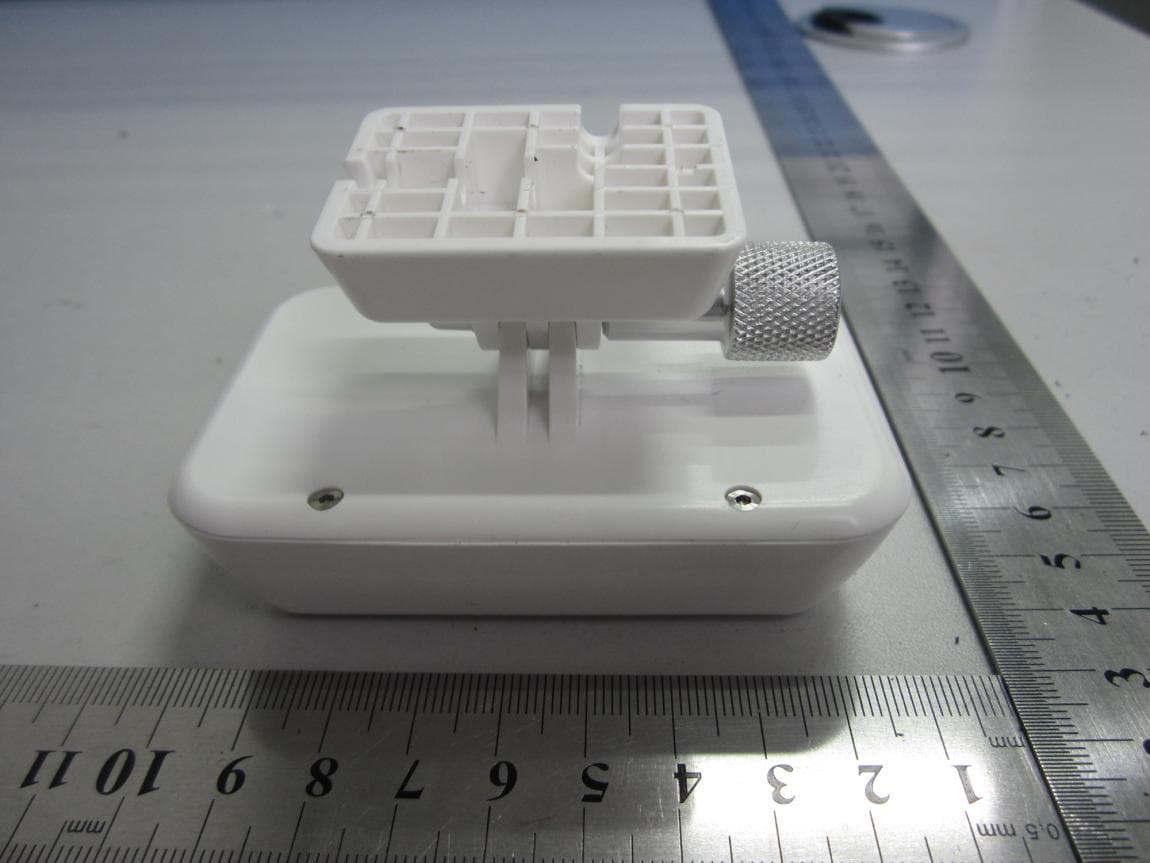
Click to zoom
Application Details
- Equipment Class
- DTS - Digital Transmission System
- Date of Grant
- Nov 05, 2013
- Application Purpose
- Original Equipment
- Date of Application
- Nov 05, 2013
- Equipment Note
- Repeater
- Frequency Range
- 2412.00000000 - 2462.00000000
- Company
- SZ DJI TECHNOLOGY CO., LTD
- Country
- China
Documents & Files
Document Text
Text extracted from the exhibit documents filed with the FCC. Open a document above to read the original.
Users Manual
©2013 DJI Innovations. All Rights Reserved. PHANTOM VISION User Manual V1.00 Range Extender RE500 2013.0614Revision Thank you for purchasing this DJI product. Please strictly follow these steps to use this product, including PHANTOM VISION and DJI VISION App. Please regularly check the web page of PHANTOM VISION at our website www.dji-innovations.com, which is updated regularly. Product information, technical updates and manual corrections will be available on this web page. Due to unforeseen changes or product upgrades, the information contained in this manual is subject to change without notice. This manual is only referenced for basic assembly and configuration; you can obtain more details and advanced instructions when using the Assistant software or DJI VISION App. To assure you have the latest information, please visit our website and download the latest manual and software. If you have any problem that you cannot solve during usage, please contact your dealer. ©2013 DJI Innovations. All Rights Reserved. Index INDEX ............................................................................................................................... 2 DISCLAIMER & WARNING ................................................................................................ 3 TRADEMARK .................................................................................................................... 3 CERTIFICATIONS ............................................................................................................... 4 SYMBOL INSTRUCTION .................................................................................................... 4 IN THE BOX ...................................................................................................................... 4 PRODUCT INSTRUCTION .................................................................................................. 5 ASSEMBLY ........................................................................................................................ 5 AIRCRAFT RECOGNITION ...................................................................................................... 5 TRANSMITTER RECOGNITION ................................................................................................ 6 BASIC USAGE OF AIRCRAFT AND TRANSMITTER ......................................................................... 6 CAMERA RECOGNITION ....................................................................................................... 7 RANGE EXTENDER RECOGNITION ........................................................................................... 8 CAMERA AND RANGE EXTENDER REBIND ................................................................................. 9 DJI VISION APP .............................................................................................................. 10 DOWNLOAD AND INSTALLATION ........................................................................................... 11 WI-FI NETWORK SELECTION ............................................................................................... 11 LOGIN ........................................................................................................................... 11 MAIN PAGE .................................................................................................................... 12 CAMERA PAGE ................................................................................................................. 13 CAMERA PAGE--CAMERA SETTINGS ...................................................................................... 14 ALBUM PAGE—ALBUM IN CAMERA SD CARD ........................................................................ 17 ALBUM PAGE—ALBUM IN MOBILE DEVICE ............................................................................. 19 NEWS PAGE .................................................................................................................... 20 SETTINGS PAGE ................................................................................................................ 20 APPENDIX ...................................................................................................................... 22 MC/PMU FIRMWARE UPGRADE ......................................................... 错误!未定义书签。 AUTOPILOT SYSTEM LED DESCRIPTION .................................................................................. 23 ©2013 DJI Innovations. All Rights Reserved.3 | SPECIFICATION ................................................................................................................. 23 Disclaimer &Warning Please read this disclaimer carefully before using the product. By using this product, you hereby agree to this disclaimer and signify that you have read them fully. THIS PRODUCT IS NOT SUITABLE FOR PEOPLE UNDER THE AGE OF 18. Despite the built-in autopilot system and our efforts in making the control as safe as possible, we strongly recommend users to remove all propellers when calibrating and setting parameters. Make sure all connections are good, and keep children and animals away during firmware upgrade, system calibration and parameter setup. DJI Innovations accepts no liability for damage(s) or injuries incurred directly or indirectly from the use of this product in the following conditions: 1. Damage(s) or injuries incurred when users are drunk, taking drugs, drug anesthesia, dizziness, fatigue, nausea and any other conditions no matter physically or mentally that could impair your ability. 2. Damage(s) or injuries caused by subjective intentional operations. Any mental damage compensation caused by accident. 3. Failure to follow the guidance of the manual to assemble or operate. 4. Malfunctions caused by refit or replacement with non-DJI accessories and parts. 5. Damage(s) or injuries caused by using third party products or fake DJI products. 6. Damage(s) or injuries caused by mis…
Text truncated - open the document above for the full version.
Cover Letter(s)
Ad-HocCountry Code Cover Letter We, SZ DJI TECHNOLOGY CO., LT D, declare that this EUT (FCC ID: SS3-RE5001307) doesn’t have Ad Hoc Mode function on “non-US/Canada frequencies”. In addition, the frequency selection feature is disable by firmware for device marketed to the US/Canada. For DTS part of this device, only channel 1~11 will be used in North America. Country code selection is disabled. Should you have any questions or comments regarding this matter, please have my best attention. Sincerely yours, Yongqian Fan SZ DJI TECHNOLOGY CO., LTD Engineer Te l : +86 8652 0030 Fax: +86 2665 6676 Email: [email protected]
External Photos
External Photos 1. EUT front view 2. EUT rear view 3. EUT left side view 4. EUT right side view 5. EUT top view 6. EUT bottom view
ID Label/Location Info
FCC label and label location 1. Label 2. Label location SIZE: 40mm*23mm
Internal Photos
Internal Photos 1. EUT uncover view 2. Mainboard front view 3. Mainboard rear view 4. WIFI antenna view
Test Report
SZ13060140W05 Page 2 of 113 DIRECTORY 1. GENERAL INFORMATION .................................................................................................... 3 1.1. EUT Description ....................................................................................................................... 3 1.2. Test Standards and Results ........................................................................................................ 4 1.3. Facilities and Accreditations ..................................................................................................... 5 2. 47 CFR PART 15C REQUIREMENTS .................................................................................... 6 2.1. Antenna requirement ................................................................................................................. 6 2.2. Peak Output Power .................................................................................................................... 6 2.3. Bandwidth ................................................................................................................................. 9 2.4. Conducted Spurious Emissions and Band Edge ..................................................................... 22 2.5. Power spectral density (PSD) ................................................................................................. 41 2.6. Restricted Frequency Bands .................................................................................................... 54 2.7. Conducted Emission ............................................................................................................... 73 2.8. Radiated Emission ................................................................................................................... 76 2.9. RF exposure evaluation ......................................................................................................... 111 Change History Issue Date Reason for change 1.0 November 1, 2013 First edition 1.1 November 5,2013 Update 802.11n-20 test results. SZ13060140W05 Page 3 of 113 1. General Information 1.1. EUT Description EUT Type ............................. : Range Extender Serial No. .............................. : (n.a, marked #1 by test site) Hardware Version ................. : V2.0 Software Version .................. : Applicant .............................. : Manufacturer ........................ : V1.05 SZ DJI TECHNOLOGY CO.,LTD Room 613、614, 6/F, HKUST SZ IER Bldg, No.9 Yuexing 1st Rd Hi-Tech Park(south), Nanshan District, Shenzhen, Guangdong, China SZ DJI TECHNOLOGY CO., LTD Room 613、614, 6/F, HKUST SZ IER Bldg,No.9 Yuexing,1st Rd Hi-Tech Park(south), Nanshan District, Shenzhen, Guangdong, China Frequency Range .................. : 802.11b/g/n-20MHz: 2.412GHz - 2.462GHz Channel Number................... : 802.11b/g/n-20MHz: 11 Modulation Type .................. : DSSS (802.11b), OFDM (802.11g/n) Antenna Type ........................ : Integral Antenna Antenna Gain ........................ : 1.0dBi Note 1: The EUT is Range Extender, it contains WIFI Module operating at 2.4GHz ISM band; it supports 802.11b, 802.11g, 802.11n and they are all tested in this report. Note 2: The frequencies allocated is F (MHz) =2412+5*(n-1) (1<=n<=11). The lowest, middle, highest channel numbers of the EUT used and tested in this report are separately 1 (2412MHz), 6 (2437MHz) and 11 (2462MHz). Note 3: For a more detailed description, please refer to Specification or User’s Manual supplied by the applicant and/or manufacturer. Note 4: The antenna connector of EUT is designed with permanent attachment and no consideration of replacement. Note 5: The repeater is work with a certified transmitter-the DJI Camera, is incapable of being used with open source transmitters, the FCC ID of the DJI camera is: SS3-FC2001307. Note 6: The repeater and the camera are connected by a RF cable.The camera is transmittin at its maximum level(about 12dBm), through a 12dB attenuator, the Repeater works at its maximu m input level (about 0dBm). SZ13060140W05 Page 4 of 113 1.2. Test Standards and Results The objective of the report is to perform testing according to 47 CFR Part 15 Subpart C (Wi-Fi, 2.4GHz ISM band radiators) for the EUT FCC ID Certification: No. Identity Document Title 1 47 CFR Part 15 (10-1- 12 Edition) Radio Frequency Devices Test detailed items/section required by FCC rules and results are as below: No. Section Description Result 1 15.203 Antenna Requirement PA S S 2 15.247(b) Peak Output Power PA S S 3 15.247(a) Bandwidth PA S S 4 15.247(d) Conducted Spurious Emission and Band Edge PA S S 5 15.247(d) Restricted Frequency Bands PA S S 6 15.207 Conducted Emission PA S S 7 15.209 ,15.247(d) Radiated Emission PA S S 8 15.247(e) Power spectral density (PSD) PA S S 9 15.247(i), 1.1307&2.1093 RF exposure evaluation PA S S The tests of Conducted Emission and Radiated Emission were performed according to the method of measurements prescribed in ANSI C63.4 2009. These RF tests were performed according to the method of measurements prescribed in KDB558074 D01 V03 (04/09/2013). SZ13060140W05 Page 5 of 113 1.3. Facilities and Accreditations 1.3.1. Facilities Shenzhen Morlab Communications Technology Co., Ltd. Morlab Laboratory is a testing organization accredited by China National Accreditation Service for Conformity Assessment (CNAS) according to ISO/IEC 17025. The accreditation certificate number is L3572. All measurement facilities used to collect the measurement data are located at FL.1, Building A, FeiYang Science Park, Block 67, BaoAn District, Shenzhen, 518101 P. R. China. The test site is constructed in conformance with the requirements of ANSI C63.10 2009, ANSI C63.4 2009 and CISPR Publication 22; the FCC registration number is 695796. 1.3.2. Test Environment Conditions During the measurement, the environmental conditions were within the listed ranges: Temperature (°C): 15 - 35 Relative Humidity (%): 30 -60 Atmosph…
Text truncated - open the document above for the full version.
Test Setup Photos
Test Setup Photos 1. Conducted emission main’s port front view 2. Conducted emission main’s port side view 3. Radiated emission (9KHz-30MHz) 4. Radiated emission (30MHz-1GHz) 5. Radiated emission (above 1GHz) 6. Conducted emission antenna’s port
Contact Information
Applicant
Gary Zeng(PM)
Technical Contact
Shenzhen Morlab Communications Technology Co.,LtdIvy Zhu
[email protected]86-755-36698618
FL.3, Building A, FeiYang Science Park · ShenZhen, GuangDong Province · China
Test Firm
Shenzhen Morlab Communications Technology Co., LtdIvy zhu
Technical Specifications
| # | Rule Parts | Frequency Range | Power Output |
|---|---|---|---|
| 1 | 15C | 2.41 GHz - 2.46 GHz | 31.70 mW |
Other Applications from SZ DJI TECHNOLOGY CO., LTD
SS3-T55A2510
Dec 19, 2025DJI AGRAS T55
Equipment Class
NII - Unlicensed National Information Infrastructure TXSS3-T100A2510
Dec 19, 2025DJI AGRAS T100S, DJI AGRAS T70S
Equipment Class
NII - Unlicensed National Information Infrastructure TXSS3-TKMI2507
Dec 19, 2025DJI RC Mini
Equipment Class
DTS - Digital Transmission SystemSS3-RD60B2510
Dec 18, 2025Fixed Millimeter Wave Radar
Equipment Class
FDS - Part 15 Field Disturbance SensorSS3-RD60A2510
Dec 18, 2025Rotational Active Phased Array Radar
Equipment Class
FDS - Part 15 Field Disturbance Sensor