T2M01200603CDMA2000 1X Mobile Phone
Guangzhou Jinpeng Telecommunication Industrial Co., Ltd.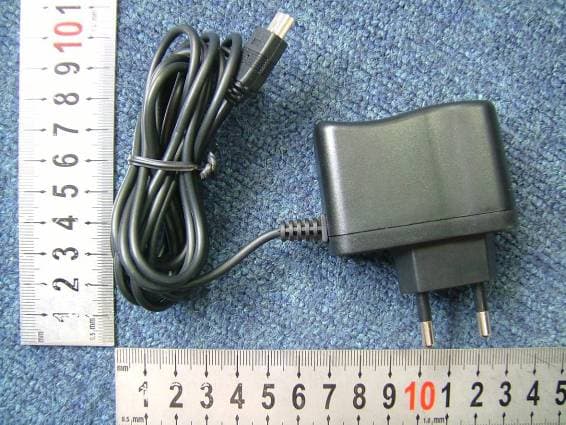
Click to zoom
Application Details
- Equipment Class
- TNE - Licensed Non-Broadcast Transmitter Held to Ear
- Date of Grant
- Mar 19, 2006
- Application Purpose
- Original Equipment
- Date of Application
- Mar 19, 2006
- Equipment Note
- CDMA2000 1X Mobile Phone
- Frequency Range
- 825.25000000 - 847.75000000
- Country
- China
Documents & Files
Document Text
Text extracted from the exhibit documents filed with the FCC. Open a document above to read the original.
Users Manual
Jinpeng Telecommunication Industrial Co., Ltd. JinPeng T100 User Manual The picture is referenced, please take material object as standard. Jinpeng Telecommunication Industrial Co., Ltd. Rev Page 2 of 93 CONTENTS CHAPTER 1 QUICK START................................................................................................... 5 Screen Icons.......................................................................................................................................... 7 Installing the Battery............................................................................................................................ 8 Charging the Battery Prior to Use...................................................................................................... 10 Introduction of writing mode.............................................................................................................. 11 Powering the Phone On and Off......................................................................................................... 12 Locking the Keypad........................................................................................................................... 12 Press “123” to unlock......................................................................................................................... 12 Navigating Through the Menus.......................................................................................................... 13 Navigating Through the Menus.......................................................................................................... 13 CHAPTER 2 NAMES............................................................................................................ 15 Using the Keypad to Enter Information............................................................................................. 15 Entering and Editing Names............................................................................................................... 17 Creating and Using the Speed List..................................................................................................... 22 Using the vCard - VCard exchange.................................................................................................... 24 CHAPTER 3 MESSAGES..................................................................................................... 32 Using Short Message.......................................................................................................................... 32 Using Ring Tone................................................................................................................................. 35 Browse all rings.................................................................................................................................. 37 Manage rings...................................................................................................................................... 38 Message Settings................................................................................................................................41 Using Draft......................................................................................................................................... 44 Using 1234Service.............................................................................................................................. 45 Using Voice Mail...............................................................................................................................45 Using Templates................................................................................................................................. 46 Using Msg Groups.............................................................................................................................. 46 CHAPTER 4 MAKING CALLS.............................................................................................. 50 Viewing Incoming Call Details.......................................................................................................... 50 Making an Emergency Call................................................................................................................ 51 Making Calls...................................................................................................................................... 51 Jinpeng Telecommunication Industrial Co., Ltd. Rev Page 3 of 93 Viewing a List of Call History........................................................................................................... 54 To erase one or all lists of call historys.............................................................................................. 55 CHAPTER 5 SET THE PROFILES IN YOUR PHONE......................................................... 56 To select profile.................................................................................................................................. 56 To select Ring Type............................................................................................................................ 57 To select Ring Tone............................................................................................................................ 57 To select Ring Volume....................................................................................................................... 58 To select Earpiece Volume................................................................................................................. 59 To select Key Volume........................................................................................................................ 59 To select Message Alert..................................................................................................................... 59 To select Auto Answer...............................................................…
Text truncated - open the document above for the full version.
Cover Letter(s)
GuangZhou Jinpeng Telecommunication Industrial Co.,Ltd PHOENIX TESTLAB GmbH Product Certification Königswinkel 10 D 32825 Blomberg RE: Certification Application FCC ID: T2M01200603 Confidentiality Request Pursuant to Section 0.459 of the Commission’s Rule, Guangzhou JinPeng Telecommunication Industrial Co.,Ltd hereby requests confidential treatment of information accompanying this Application as outlined below: - Block Diagram - Schematics - Operational Description - Part list/Tune-Up-Procedure The above materials contain trade secrets and proprietary information not customarily released to the prublic. The public disclosure of these matters might be harmful to Guangzhou JinPeng Telecommunication Industrial Co.,Ltd and provide unjustified benefits to its competitors. Thank you for your attention in this matter. Signatory Kenny Zhu R&D Testing Manager 2006-3-12 JingPeng Confidential Proprietary 1
Cover Letter(s)
GuangZhou Jinpeng Telecommunication Industrial Co.,Ltd PHOENIX TESTLAB GmbH Product Certification Königswinkel 10 D 32825 Blomberg To Whom It May Concern: Please be advised that GuangZhou Jinpeng Telecommunication Industrial Co.,Ltd authorizes Morlab to act on our behalf, until otherwise notified, for applications submitted to PHOENIX TESTLAB GmbH (PTL). Thank you for your attention to this matter. Signatory Kenny Zhu R&D Testing Manager 2006-3-12 JingPeng Confidential Proprietary 1
External Photos
External Photos 1. Front View of EUT 2. Inside View of EUT 3. Back View of EUT 4. AC adapter
ID Label/Location Info
Label Label Location
Internal Photos
Internal Photos
RF Exposure Info
No. SAR06-010 Page 3 of 48 Contents 1. GENERAL CONDITIONS 2. ADMINISTRATIVE DATA 2.1. Identification of the Responsible Testing Laboratory 2.2. Identification of the Responsible Testing Location(s) 2.3. Organization Item 2.4. Identification of Applicant 2.5. Identification of Manufacture 3. EQUIPMENT UNDER TEST (EUT) 3.1. Identification of the Equipment under Test 3.2. Identification of all used Test Sample of the Equipment under Test 4. OPERATIONAL CONDITIONS DURING TEST 4.1. Schematic Test Configuration 4.2. SAR Measurement System 5. CHARACTERISTICS OF THE TEST 5.1. Applicable Limit Regulations 5.2. Applicable Measurement Standards 6. LABORATORY ENVIRONMENT 7. TEST RESULTS 7.1. Dielectric Performance 7.2. Summary of Measurement Results 7.3. Conclusion 8. MEASUREMENT UNCERTAINTY 9. MAIN TEST INSTRUMENTS This Test Report consists of the following Annexes: Annex A: Accreditation Certificate Annex B: Test Layout Annex C: Sample Photographs Annex D: Graph Test Results No. SAR06-010 Page 4 of 48 1GENERAL CONDITIONS 1.1 This report only refers to the item that has undergone the test. 1.2 This report standalone dose not constitute or imply by its own an approval of the product by the certification Bodies or competent Authorities. 1.3 This document is only valid if complete; no partial reproduction can be made without written approval of Shenzhen Electronic Product Quality Testing Center. 1.4 This report cannot be used partially or in full for publicity and/or promotional purposes without previous written approval of Shenzhen Electronic Product Quality Testing Center and the Accreditation Bodies, if it applies. No. SAR06-010 Page 5 of 48 2. Administrative Date 2.1. Identification of the Responsible Testing Laboratory Company Name: ShenZhen Electronic Product Quality Testing Center Department: Testing Department Address: Electronic Testing Building, ShaHe Road, NanShan District, ShenZhen, P. R. China Telephone: +86-755-26628676 Fax: +86-755-26627238 Responsible Test Lab Managers: Mr. Wang Keqin 2.2. Identification of the Responsible Testing Location(s) Company Name: ShenZhen Electronic Product Quality Testing Center Address: Electronic Testing Building, ShaHe Road, NanShan District, ShenZhen, P. R. China 2.3. Organization Item S.E.T Report No.: SAR06_010 S.E.T Project Leader: Mr. Li Sixiong S.E.T Responsible for accreditation scope: Mr. Wang Keqin Start of Testing: 2005-3-1 End of Testing: 2006-3-4 2.4. Identification of Applicant Company Name: Guangzhou Jinpeng Telecommunication Industrial Co.,Ltd Address: No.9 Shenzhou Road,Science City,Guangzhou,P.R.China Contact person: Zhu yanfei Telephone: +8620 85571601-8100 Fax: +8620 32068126 2.5. Identification of Manufacture Company Name: Guangzhou Jinpeng Telecommunication Industrial Co.,Ltd Address: No.9 Shenzhou Road,Science City,Guangzhou,P.R.China Contact person: Zhu yanfei Telephone: +8620 85571601-8100 Fax: +8620 32068126 Notes: This data is based on the information by the applicant. No. SAR06-010 Page 6 of 48 3. Equipment Under Test (EUT) 3.1. Identification of the Equipment under Test Brand Name: JinPeng Type Name: T100 Marking Name: T100 Test frequency CDMA 800MHz Battery type JP-B00906500 Battery specification 650mAh 3.7V Antenna specification Build inside Operation mode Call established Modulation mode CDMA General description: Max. Power(ERP) 0.210w(23.22dBm) 3.2. Identification of all used Test Sample of the Equipment under Test EUT Code ESN Hardware Version Software Version MIN N.A. 00000000 P2.3 2.0.31.53.1 404001056000000 No. SAR06-010 Page 7 of 48 4 OPERATIONAL CONDITIONS DURING TEST 4.1 Schematic Test Configuration During SAR test, EUT is in Traffic Mode (Channel Allocated) at Normal Voltage Condition. A communication link is set up with a System Simulator (SS) by air link, and a call is established. The TCH is allocated to 9, 384 and 758 respectively in the case of CDMA 800 MHz. The EUT is commanded to operate at maximum transmitting power. The EUT shall use its internal transmitter. The antenna(s), battery and accessories shall be those specified by the manufacturer. The EUT battery must be fully charged and checked periodically during the test to ascertain uniform power output. If a wireless link is used, the antenna connected to the output of the base station simulator shall be placed at least 50 cm away from the handset. The signal transmitted by the simulator to the antenna feeding point shall be lower than the output power level of the handset by at least 35 dB. 4.2 SAR Measurement System The SAR measurement system being used is the IndexSAR SARA2 system, which consists of a Figure1. SAR Lab Test Measurement Set-up Mitsubishi RV-E2 6-axis robot arm and controller, IndexSAR probe and amplifier and SAM phantom No. SAR06-010 Page 8 of 48 Head Shape. The system is controlled remotely from a PC, which contains the software to control the robot and data acquisition equipment. The software also displays the data obtained from test scans, and determine the averaged SAR values (averaging region 1 gram or 10 gram) for compliance testing. The measurements are done by two scan: first a coarse scan (2-Division) determines the region of the maximum SAR, afterwards the averaged SAR is measured in a second san within the shape of a cube. The measurement time takes about 20 minutes. 4.2.1 Robot system specification The robot is used to articulate the probe to programmed positions inside the phantom head to obtain the SAR readings from the DUT. 4.2.2 Probe and amplifier specification IXP-050 Indexsar isotropic immersible SAR probe The probes are constructed using three orthogonal dipole sensors arranged on an interlocking, triangular prism core. The probes have built-in shielding against static charges and are contained within a PEEK No. SAR06-010 Page 9 of 48 cylindrical enclosure material at the tip (showed in figure 2). The system uses diode compression potential (DCP) to determine SAR values for different types of modulation. Crest factor …
Text truncated - open the document above for the full version.
Test Report
Report No. FCC06-8010 Page 2 of 42 Table of Contents 1 Test Report Certification ...............................................................................................................4 2 General Information ......................................................................................................................5 2.1 Description of EUT ...............................................................................................................5 2.2 Objective ...............................................................................................................................6 2.3 Test Standards and Results ....................................................................................................6 2.4 List of Equipments Used .......................................................................................................7 2.5 Test Facility ...........................................................................................................................7 2.6 Environmental conditions .....................................................................................................7 3 Conducted Emission Test ..............................................................................................................8 3.1 Limits of Conducted Emission..............................................................................................8 3.2 Test Procedure .......................................................................................................................8 3.3 Test Setup ..............................................................................................................................9 3.4 EUT Setup and Operating Conditions...................................................................................9 3.5 Test Results ...........................................................................................................................9 4 Radiated Emission Test ............................................................................................................... 11 4.1 Limits of Radiated Emission ............................................................................................... 11 4.2 Test Procedure ..................................................................................................................... 11 4.3 Test Setup ............................................................................................................................12 4.4 EUT Setup and Operating Conditions.................................................................................12 4.5 Test Results .........................................................................................................................12 5 Frequencies .................................................................................................................................14 5.1 Frequency Blocks Available for Cellular Service ...............................................................14 5.2 Test Procedure .....................................................................................................................14 5.3 Test Setup ............................................................................................................................14 5.4 EUT Setup and Operating Conditions.................................................................................14 5.5 Test Results .........................................................................................................................15 6 Conducted RF Output Power Test...............................................................................................16 6.1 RF Power Output Test Requirement ...................................................................................16 6.2 Test Procedure .....................................................................................................................16 6.3 Test Setup ............................................................................................................................16 6.4 EUT Setup and Operating Conditions.................................................................................16 6.5 Test Results .........................................................................................................................17 Report No. FCC06-8010 Page 3 of 42 7 Occupied Bandwidth Test ...........................................................................................................19 7.1 Definition ............................................................................................................................19 7.2 Test Procedure .....................................................................................................................19 7.3 Test Setup ............................................................................................................................19 7.4 EUT Setup and Operating Conditions.................................................................................19 7.5 Test Results .........................................................................................................................20 8 Conducted Spurious Emission Test.............................................................................................22 8.1 Limits of Conducted Spurious Emission.............................................................................22 8.2 Test Procedure .....................................................................................................................22 8.3 Test Setup ............................................................................................................................22 8.4 EUT Setup and Operating Conditions.................................................................................22 8.5 Test Results .................................................................................…
Text truncated - open the document above for the full version.
Test Setup Photos
Test Setup Photos 1. CE 2. CSE 3. RE 4. RSE
Contact Information
Applicant
Kenny Zhu
Test Firm
ShenZhen Electronic Product Quality Testing CenterXingsun Lin
Technical Specifications
| # | Rule Parts | Frequency Range | Power Output | Emission | Tolerance |
|---|---|---|---|---|---|
| 1 | 22H | 825.25 MHz - 847.75 MHz | 210.00 mW | 1M25F9W | 2.5000000000 ppm |