TX4CRB29AIR&RF Remote Controller
Remote Solution Co., Ltd.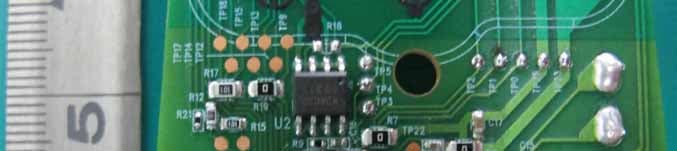
Click to zoom
Application Details
- Equipment Class
- DXX - Part 15 Low Power Communication Device Transmitter
- Date of Grant
- Nov 02, 2011
- Application Purpose
- Original Equipment
- Date of Application
- Nov 02, 2011
- Equipment Note
- IR&RF Remote Controller
- Frequency Range
- 2425.00000000 - 2475.00000000
- Company
- Remote Solution Co., Ltd.
- Country
- South Korea
Documents & Files
Document Text
Text extracted from the exhibit documents filed with the FCC. Open a document above to read the original.
Users Manual
Enjoy your XFINITY ® TV right away! Program your remote to get started. XFINITY XR2 Remote Control UsEr’s GUIdE Digital Transport Adapter Remote Control UsEr’s GUIdE xfinity.com/remotes Your remote control is already programmed to control your digital set-top box or DTA (Digital Transport Adapter). To control your TV functions (Power, VOL+, VOL – and Mute), follow the steps below: Here’s How: 1. Install the batteries. 2. Find the manufacturer’s code for your TV (see other side). 3. Turn on your TV and digital set-top box or DTA (Digital Transport Adapter). 4. On your remote, press and hold the Setup button for three seconds until the All Power button changes from red to green. 5. Enter the first manufacturer’s code you found in Step 2. The All Power button will flash green twice. 6. Press the TV Power button on the remote control. If the TV turns off, you know the code has been accepted. Turn the TV back on and make sure that the VOL +/ – and Mute buttons also work. If so, you’re all set! 7. If not, repeat these steps using the next manufacturer’s code found in Step 2 (You may need to try several codes to find the one that works for your TV). If you still can’t find a code that works, see the “Can’t Find Your Code?” section. Can’t Find Your Code? If you can’t program your remote using the codes on the back of this guide, follow the steps below to search for your code. 1. Turn on your TV. 2. On your remote, press and hold the Setup button for 3 seconds until the All Power button changes from red to green. 3. Enter 9-9-1. The All Power button will flash green, twice. 4. Press the CH button multiple times until the TV turns off. 5. After the TV turns off, press Setup. Helpful Tip: Additional remote control programming support, including code lookup tools and frequently asked questions, can be found at www.xfinity.com/remotes. Additional Feature: If you would like to place your digital set-top box or DTA out of line of site (for example, in an entertainment center or behind your TV), follow the instructions above to program the remote control for your TV, then refer to the “Installing your digital set-top box or DTA out of sight” instructions on the other side of this instruction sheet. Troubleshooting General troublesHootinG Q: Why does the All Power button flash red, but there is no response when I press a key? A: Make sure the remote is aimed at your TV and is no further than 15 feet away. Also, make sure your digital set-top box or DTA is powered on and in plain sight. Q: Why does the All Power button flash red then green while I am programming my remote? A: You may have entered the wrong code. Check the code and try programming again. Paired remote troublesHootinG Q: When paired, why does the All Power button flash green then red when pressing a button on the remote? A: The device you are paired with may not be powered on or you might be out of communication range. Make sure the device is powered on and move closer to the device. If this does not work, try re-pairing your remote by following the instructions in “Installing your digital set-top box or DTA out of sight.” Q: How can I tell which digital set-top box or DTA my remote control has been paired with? A: Once paired to a device, the remote will only work with that specific set-top box or DTA. Color-coded stickers have been included in the packaging to make it easier to quickly identify which device is paired with your remote. It’s simple to program your remote to control your TV. Here’s what your remote can do. esto es lo que tu control remoto puede hacer. Power: Turns on/off your TV. All Power: One button to turn on/off both the TV and set-top box. VOL+/ – : Turns the volume up and down on the DTA or set-top box. After your remote is programmed, these keys operate the TV’s volume control. CH / : Selects the next higher or lower channel. Mute: Turns the sound on and off. Video Controls: Controls On Demand or DVR viewing, Play/Pause, Fast-Forward, Rewind and Exit/Stop. Replay: Jumps back 15 seconds within an On Demand or DVR program. Rec: Records content currently being viewed. Note: Some features above require a DVR set-top box and/or access to On Demand programming. Keypad (0-9): Select the channel you want to view (e.g., 0-9 or 0-2-6). XFINITY/Menu: Enters the on-screen guide menus. Guide: Shortcut to TV listings. OK: Selects the highlighted item within the guide. Last: Returns to the previous channel or guide screen. Info: Provides a description of a program. Exit/Stop: Exits guide screens and returns you to TV viewing. Setup: Programs your remote control to your TV, set-top box or DTA. A, B, C, D: Context-sensitive control keys used in advanced setups. Note: Some features above require an on-screen programming guide not available with all devices. save Your tv Code For future reference, write the valid manufacturer’s code for your TV here: ¡disfruta de XFINITY ® TV ahora mismo! Programa tu control remoto para comenzar. XFINITY XR2 GUía dEl UsUarIo para el control remoto Tu control remoto ya está programado para controlar tu caja decodificadora digital o DTA (adaptador de transporte digital). Para controlar las funciones de tu televisor (Power [encendido], VOL+, VOL – y Mute [silencio]), sigue los pasos a continuación: asÍ es Como se HaCe: 1. Instala las baterías. 2. Localiza el código del fabricante de tu televisor (ver al dorso). 3. Enciende tu televisor y tu caja decodificadora digital o DTA (adaptador de transporte digital). 4. En tu control remoto, oprime y sostén el botón Setup (configurar) por tres segundos hasta que el botón All Power (todo encendido) cambie de rojo a verde. 5. Ingresa el primer código de fabricantes que encontraste en el segundo paso. El botón All Power se encenderá y apagará dos veces. 6. Oprime el botón TV Power en el control remoto. Si el televisor se apaga, quiere decir que el código ha sido aceptado. Vuelve a encender el televisor y asegúrate de que los botones VOL+/ – y Mute también estén funcio…
Text truncated - open the document above for the full version.
Cover Letter(s)
Compliance Certification Services Date: September 21, 2011 Certification Division 561F Monterey Road Morgan Hill, CA 95037 This authorization is valid until further written notice from the applicant. Sincerely Yours, ___________________________ Mr. Byung-Cheol, Kim / Manager Remote Solution Co., Ltd. Tel: +82-54-420-4581 Fax: +82-54-437-5520 E-mail: [email protected]
Cover Letter(s)
FCC Laboratory Date: September 21, 2011 7435 Oakland Mills Road Columbia, MD 21046 Attention : Application Examiner / Reviewing Engineer Subject : Request for confidentiality per Section 0.459 of FCC Rules Applicant : Remote Solution Co., Ltd. FCC ID : TX4CRB29A To whom it may concern, Request is hereby submitted, Remote Solution Co., Ltd., to withhold from public review certain portions of the application for equipment certification for the referenced FCC identifier. In particular, the following sections of the application and report are requested to be kept confidential: Schematics / Block Diagram / Operational Description / Parts List Rationale for request for confidentiality: Remote Solution Co., Ltd., has invested considerable time and materials in research and development to produce the referenced product. Disclosure of the confidential portions of this application to competitors would give them competitive advantage in developing similar products. If you have questions or need further information, please contact the undersigned. Sincerely Yours, _________________________ Mr. Byung-Cheol, Kim / Manager Remote Solution Co., Ltd. Tel: +82-54-420-4581 Fax: +82-54-437-5520 E-mail: [email protected]
External Photos
FCC ID. : TX4CRB29A Page 1 of 2 Report No. : E119R-031 It should not be reproduced except in full, without the written approval of ONETECH. EMC-003(Rev.1) HEAD OFFICE : #505 SK Apt. Factory, 223-28 Sangdaewon 1-dong, Jungwon-gu, Seongnam-si, Gyeonggi-do 462-121 Korea (TEL: 82-31-746-8500 FAX: 82-31-746-8700) EMC Testing Dept : 307-51 Daessangnyeong-ri, Chowol-eup, Gwangju-si, Gyeonggi-do 464-862 Korea.(TEL: 82-31-765-8289 FAX: 82-31-766-2904) FCC ID. : TX4CRB29A Page 2 of 2 Report No. : E119R-031 It should not be reproduced except in full, without the written approval of ONETECH. EMC-003(Rev.1) HEAD OFFICE : #505 SK Apt. Factory, 223-28 Sangdaewon 1-dong, Jungwon-gu, Seongnam-si, Gyeonggi-do 462-121 Korea (TEL: 82-31-746-8500 FAX: 82-31-746-8700) EMC Testing Dept : 307-51 Daessangnyeong-ri, Chowol-eup, Gwangju-si, Gyeonggi-do 464-862 Korea.(TEL: 82-31-765-8289 FAX: 82-31-766-2904)
ID Label/Location Info
FCC ID. : TX4CRB29A Page 1 of 1 Report No. : E119R-031 It should not be reproduced except in full, without the written approval of ONETECH. EMC-003(Rev.1) HEAD OFFICE : #505 SK Apt. Factory, 223-28 Sangdaewon 1-dong, Jungwon-gu, Seongnam-si, Gyeonggi-do 462-121 Korea (TEL: 82-31-746-8500 FAX: 82-31-746-8700) EMC Testing Dept : 307-51 Daessangnyeong-ri, Chowol-eup, Gwangju-si, Gyeonggi-do 464-862 Korea.(TEL: 82-31-765-8289 FAX: 82-31-766-2904) IDENTIFICATION LABEL: PROPOSED FCC ID LABEL The FCC ID shall be permanently affixed in the battery compartment of the equipment FCC ID AREA
Internal Photos
FCC ID. : TX4CRB29A Page 1 of 5 Report No. : E119R-031 It should not be reproduced except in full, without the written approval of ONETECH. EMC-003(Rev.1) HEAD OFFICE : #505 SK Apt. Factory, 223-28 Sangdaewon 1-dong, Jungwon-gu, Seongnam-si, Gyeonggi-do 462-121 Korea (TEL: 82-31-746-8500 FAX: 82-31-746-8700) EMC Testing Dept : 307-51 Daessangnyeong-ri, Chowol-eup, Gwangju-si, Gyeonggi-do 464-862 Korea.(TEL: 82-31-765-8289 FAX: 82-31-766-2904) FCC ID. : TX4CRB29A Page 2 of 5 Report No. : E119R-031 It should not be reproduced except in full, without the written approval of ONETECH. EMC-003(Rev.1) HEAD OFFICE : #505 SK Apt. Factory, 223-28 Sangdaewon 1-dong, Jungwon-gu, Seongnam-si, Gyeonggi-do 462-121 Korea (TEL: 82-31-746-8500 FAX: 82-31-746-8700) EMC Testing Dept : 307-51 Daessangnyeong-ri, Chowol-eup, Gwangju-si, Gyeonggi-do 464-862 Korea.(TEL: 82-31-765-8289 FAX: 82-31-766-2904) FCC ID. : TX4CRB29A Page 3 of 5 Report No. : E119R-031 It should not be reproduced except in full, without the written approval of ONETECH. EMC-003(Rev.1) HEAD OFFICE : #505 SK Apt. Factory, 223-28 Sangdaewon 1-dong, Jungwon-gu, Seongnam-si, Gyeonggi-do 462-121 Korea (TEL: 82-31-746-8500 FAX: 82-31-746-8700) EMC Testing Dept : 307-51 Daessangnyeong-ri, Chowol-eup, Gwangju-si, Gyeonggi-do 464-862 Korea.(TEL: 82-31-765-8289 FAX: 82-31-766-2904) FCC ID. : TX4CRB29A Page 4 of 5 Report No. : E119R-031 It should not be reproduced except in full, without the written approval of ONETECH. EMC-003(Rev.1) HEAD OFFICE : #505 SK Apt. Factory, 223-28 Sangdaewon 1-dong, Jungwon-gu, Seongnam-si, Gyeonggi-do 462-121 Korea (TEL: 82-31-746-8500 FAX: 82-31-746-8700) EMC Testing Dept : 307-51 Daessangnyeong-ri, Chowol-eup, Gwangju-si, Gyeonggi-do 464-862 Korea.(TEL: 82-31-765-8289 FAX: 82-31-766-2904) FCC ID. : TX4CRB29A Page 5 of 5 Report No. : E119R-031 It should not be reproduced except in full, without the written approval of ONETECH. EMC-003(Rev.1) HEAD OFFICE : #505 SK Apt. Factory, 223-28 Sangdaewon 1-dong, Jungwon-gu, Seongnam-si, Gyeonggi-do 462-121 Korea (TEL: 82-31-746-8500 FAX: 82-31-746-8700) EMC Testing Dept : 307-51 Daessangnyeong-ri, Chowol-eup, Gwangju-si, Gyeonggi-do 464-862 Korea.(TEL: 82-31-765-8289 FAX: 82-31-766-2904)
Test Report
FCC ID. : TX4CRB29A Page 1 of 18 Report No. : E119R-031 It should not be reproduced except in full, without the written approval of ONETECH. EMC-003(Rev.1) HEAD OFFICE : #505 SK Apt. Factory, 223-28 Sangdaewon 1-dong, Jungwon-gu, Seongnam-si, Gyeonggi-do 462-121 Korea (TEL: 82-31-746-8500 FAX: 82-31-746-8700) EMC Testing Dept : 307-51 Daessangnyeong-ri, Chowol-eup, Gwangju-si, Gyeonggi-do 464-862 Korea.(TEL: 82-31-765-8289 FAX: 82-31-766-2904) ELECTROMAGNETIC EMISSION COMPLIANCE REPORT FOR LOW-POWER, NON-LICENSED TRANSMITTER Test Report No. : E119R-031 AGR No : A118A-108 Applicant : Remote Solution Co., Ltd. Address : 92, Chogok-ri, Nam-myun, Kimchon-city, Kyungbuk, 740-871, Korea Manufacturer : Remote Solution Co., Ltd. Address : 92, Chogok-ri, Nam-myun, Kimchon-city, Kyungbuk, 740-871, Korea Type of Equipment : IR&RF Remote Controller FCC ID. : TX4CRB29A Model Name : CRB29A Multiple Model Name : XR2 Serial number : None Total page of Report : 18 pages (including this page) Date of Incoming : September 05, 2011 Date of issue : September 21, 2011 SUMMARY The equipment complies with the regulation; FCC Part 15 Subpart C Section 15.249. This test report only contains the result of a single test of the sample supplied for the examination. It is not a generally valid assessment of the features of the respective products of the mass-production. Prepared by: Reviewed by: Ki-Hong, Nam / Senior Engineer Y. K. Kwon / Exe. Managing Director EMC/RF Center EMC/RF Center ONETECH Corp. ONETECH Corp. FCC ID. : TX4CRB29A Page 2 of 18 Report No. : E119R-031 It should not be reproduced except in full, without the written approval of ONETECH. EMC-003(Rev.1) HEAD OFFICE : #505 SK Apt. Factory, 223-28 Sangdaewon 1-dong, Jungwon-gu, Seongnam-si, Gyeonggi-do 462-121 Korea (TEL: 82-31-746-8500 FAX: 82-31-746-8700) EMC Testing Dept : 307-51 Daessangnyeong-ri, Chowol-eup, Gwangju-si, Gyeonggi-do 464-862 Korea.(TEL: 82-31-765-8289 FAX: 82-31-766-2904) CONTENTS PAGE 1. VERIFICATION OF COMPLIANCE .............................................................................................4 2. TEST SUMMARY ..............................................................................................................................5 2.1 TEST ITEMS AND RESULTS..................................................................................................................................................5 2.2 ADDITIONS, DEVIATIONS, EXCLUSIONS FROM STANDARDS...............................................................................................5 2.3 RELATED SUBMITTAL(S) / GRANT(S)................................................................................................................................5 2.4 PURPOSE OF THE TEST.......................................................................................................................................................5 2.5 TEST METHODOLOGY........................................................................................................................................................5 2.6 TEST FACILITY...................................................................................................................................................................5 3. GENERAL INFORMATION ............................................................................................................6 3.1 PRODUCT DESCRIPTION.....................................................................................................................................................6 3.2 MODEL DIFFERENCES........................................................................................................................................................6 4. EUT MODIFICATIONS ....................................................................................................................6 5. SYSTEM TEST CONFIGURATION ...............................................................................................7 5.1 JUSTIFICATION...................................................................................................................................................................7 5.2 PERIPHERAL EQUIPMENT...................................................................................................................................................7 5.3 MODE OF OPERATION DURING THE TEST...........................................................................................................................7 5.4 CONFIGURATION OF TEST SYSTEM...................................................................................................................................7 5.5 ANTENNA REQUIREMENT..................................................................................................................................................7 6. PRELIMINARY TEST ......................................................................................................................8 6.1 AC POWER LINE CONDUCTED EMISSIONS TESTS.............................................................................................................8 6.2 GENERAL RADIATED EMISSIONS TESTS............................................................................................................................8 7. RADIATED EMISSION TEST .........................................................................................................9 7.1 TEST SET-UP.......................................................................................................................................................................9 7.2 MEASUREMENT UNCERTAINTY..........................................................................................................................................9 7.3 TEST EQUIPMENT USED......................................................................................................................................................9 7.4 FINAL RESULT OF MEA…
Text truncated - open the document above for the full version.
Contact Information
Applicant
Byung-Cheol Kim(Manager)
Test Firm
ONETECH Corp.Ki Hong Nam
Technical Specifications
| # | Rule Parts | Frequency Range | Power Output |
|---|---|---|---|
| 1 | 15C | 2.42 GHz - 2.48 GHz | - |
Other Applications from Remote Solution Co., Ltd.
TX4-EE48
Mar 24, 2026Josh Edge Base
Equipment Class
DCD - Part 15 Low Power Transmitter Below 1705 kHzTX4-RE47
Mar 12, 2026Josh Edge Remote
Equipment Class
DTS - Digital Transmission SystemTX4-RE79
Jan 22, 2026Remote controller
Equipment Class
DTS - Digital Transmission SystemTX4-RE78
Jan 22, 2026Remote controller
Equipment Class
DTS - Digital Transmission SystemTX4-RE72
Nov 26, 2025Remote control Unit
Equipment Class
DTS - Digital Transmission System