TX4CRB29C1IR&RF Remote
Remote Solution Co., Ltd.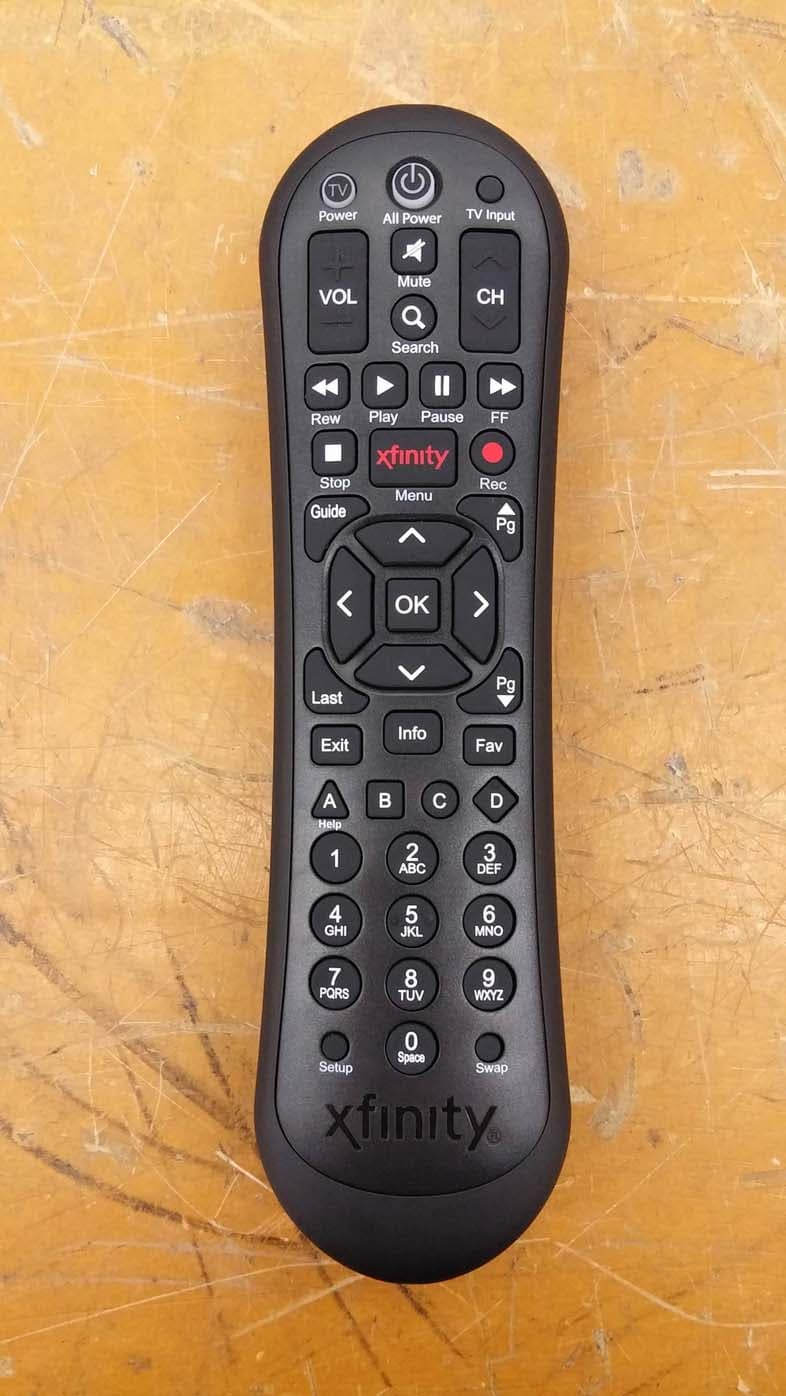
Click to zoom
Application Details
- Equipment Class
- DXX - Part 15 Low Power Communication Device Transmitter
- Date of Grant
- Nov 16, 2015
- Application Purpose
- Original Equipment
- Date of Application
- Nov 16, 2015
- Equipment Note
- IR&RF Remote
- Frequency Range
- 2425.00000000 - 2475.00000000
- Company
- Remote Solution Co., Ltd.
- Country
- South Korea
Documents & Files
Document Text
Text extracted from the exhibit documents filed with the FCC. Open a document above to read the original.
Users Manual
It’s simple to program your XFINITY Remote to control your TV and Audio Video Receiver. Your XFINITY Remote is already programmed to control your set-top box or Digital Transport Adapter (DTA). To program the remote for control of Power, Volume, Mute and TV Input on your TV or Power, Volume, and Mute on your au- dio video receiver (AVR), including a soundbar, follow the steps below. Note: A soundbar is a type of AVR. Here’s how to program your remote for control of a TV or TV and AVR: 1. Install the remote control batteries and make sure your TV, AVR and set-top box or DTA are powered on. 2. Refer to the “Setup Codes for TVs” and “Setup Codes for AVRs and Soundbars” sections on the back of this guide to find the manufacturers of your TV and AVR. 3. Press and hold the Setup button on your remote until the status LED changes from red to green. 4. Enter the first code listed for the TV manu- facturer. The status LED should flash green twice when the code is entered. 5. Press the TV Power button on the remote. If the TV turns off, you have successfully programmed your remote. Turn the TV back on and press the VOL +/- and Mute buttons to confirm they control the volume of your device. 6. If the TV (or AVR) does not turn off or the VOL +/- and Mute buttons do not work, repeat the steps above using the next code listed for your TV manufacturer. If you only want to program your remote for TV control, you’re all set! xfinity.com/remotes Troubleshooting :QWhy does the status LED flash red then green while I am entering the code on my remote? :AYou may have entered an incorrect code. Check the code and try re-entering it. :QWhy does the status LED flash red, but there is no response when I press a key? :AMake sure the remote is aimed at your TV or AVR and is no farther than 15 feet away. Also, make sure your set-top box or DTA is powered on and in plain sight. TV Power: Turns your TV on/off. All Power: One button to turn the TV, AVR and DTA or set-top box on/off. Vol +/–: Controls the volume on the DTA or set-top box. After your remote is programmed, these keys control the TV or AVR’s volume. CH ^/v: Selects the next higher or next lower channel. Mute: Turns the sound on and off. TV Input: Changes to the next available input on your TV. Note: Some features above require pro- gramming the remote for control of a TV and/or AVR. Video Controls: Controls On Demand or DVR viewing, Play, Pause, Fast-Forward, Rewind, and Stop. Search: Search for content by channel, program, or key words. Rec: Records content currently being viewed. Note: Some features above require a DVR set-top box and/or access to On Demand programming. XFINITY/Menu: Enters the on-screen guide menus. Guide: Shortcut to TV listings. OK: Selects the highlighted item within the guide. Last: Returns to the previous channel or guide screen. Exit: Exits guide screens and returns you to TV viewing. Info: Provides a program description. Fav : Allows you to set up or easily view your favorite channels. Setup: Programs your remote control to your TV, AVR, set-top box or DTA. A, B, C, D: Context-sensitive control keys. Note: Some features above require an on- screen programming guide not available with all devices. Keypad (0-9): Select the channel you want to view (e.g., 0-9 or 0-2-6). Setup: Programs your remote control to your TV, AVR, set-top box or DTA. Swap: Switches between two DVR tuners so you can control playback of two channels. TV Power (Encendido de televisor): Enci- ende y apaga el televisor. All Power (Todo encendido): Un botón para apagar y encender el televisor, el AVR y el DTA o el decodificador. Vol +/–: Controla el volumen del DTA o el decodificador. Una vez que se programa el control remoto para que controle un televisor y/o un AVR, estas teclas controlan el volumen del televisor o el AVR. CH ^/v: Selecciona el siguiente canal más alto o más bajo. Mute (Silenciar): Enciende y apaga el sonido. TV Input (Entrada de televisión): Cambia a la siguiente entrada disponible del televisor. Nota: Algunas de las funciones mencio- nadas requieren que el control remoto se programe para controlar un televisor y/o un AVR. Controles de video: Controlan la visual- ización de contenido on demand o de una videograbadora digital; Play (Reproducir), Pause (Pausar), Fast-Forward (Avanzar), Rewind (Retroceder) y Stop (Parar). Search (Buscar): Busca contenido por canal, programa o palabras clave. Rec (Grabar): Graba el contenido que se está viendo en ese momento. Nota: Algunas de las funciones mencio- nadas requieren un decodificador con videograbadora digital y/o acceso a programación on demand. XFINITY/Menu (XFINITY/Menú): Ingresa al menú XFINITY para dar acceso a la guía, programas almacenados, programación on demand y aplicaciones. Guide (Guía): Atajo a los listados de tele- visión. OK (Seleccionar): Selecciona el elemento resaltado dentro de la guía. Last (Último): Regresa al canal o a la guía anterior. Exit (Salir): Sale de las pantallas de guía y regresa a la visualización de televisión. Info (información): Brinda una descripción del programa. Fav (Favoritos): Configure sus listas de favoritos para obtener rápido acceso a sus canales favoritos. Setup (Configurar): Se usa a fin de pro- gramar el control remoto para que controle un televisor, AVR, decodificador o DTA. A, B, C, D: Teclas de control sensibles al contexto. Nota: Algunas de las funciones menciona- das requieren una guía de programación en pantalla que no está disponible con todos los equipos. Teclado (0-9): Seleccione el canal que quiere ver (p. ej., 0-9 o 0-2-6). Setup (Configurar): Se usa a fin de pro- gramar el control remoto para que controle un televisor, AVR, decodificador o DTA. Swap (Alternar): Cambie al canal actual- mente disponible en el sintonizador que no se está viendo. Here’s what your remote can do. Esto es lo que tu control remoto puede hacer. xfinity.com/remotes Continue with the following steps to program your remote for AVR control. Note: To program your remote fo…
Text truncated - open the document above for the full version.
Cover Letter(s)
Date: November 11, 2015 To SIEMIC Inc 775 Montague Expressway Milpitas, CA 95035 RE: New Family Listing Declaration Please review the attached exhibits supporting our request for applying New Family Listing to the FCC ID: TX4CRB29C1 for Company Name: Remotesolution Co., Ltd. Product Description: IR&RF Remote Base model: CRB29C Additional model(s): XR2 The only difference between the base model CRB29C and the additional model(s) XR2 is as follows: 1) These models are identical to basic model except for the model name only. Should you have any questions, please contact us. Sincerely, Client’s signature Client’s name / title : Mr. Byung-Cheol, Kim / Manager Contact information / address : 92, Chogokri, Nammyun, Kimchon city, Kyungbuk, Korea, 740-871 Telephone: +82-54-420-4517 Fax No.: +82-54-420-4530 E-mail: [email protected]
Cover Letter(s)
SCS-F18: Project and Product Certification Representative Authorization Letter Page 1 of 2 Rev 5.0 775 Montague Expressway Milpitas, CA 95035 Tel: 408-526-1188 Fax: 408-526-1088 Email: [email protected] Project and Product Certification Representative Authorization Letter Reason for Amendment (current / obsolete) Revision History Approved Date From To Initial Release (obsolete) 1.0 1.0 Nov-14-2006 Revised wording (obsolete) 1.0 2.0 Sept–25-2007 Updated company template (obsolete) 2.0 3.0 Jan-31-2012 Updated letter information (obsolete) 3.0 4.0 May-23-2014 Added FCC ID field (current) 4.0 5.0 Sept 16 2014 SCS-F18: Project and Product Certification Representative Authorization Letter Page 2 of 2 Rev 5.0 (November 11, 2015) To: SIEMIC, INC. 775 Montague Expressway, Milpitas, CA 95035 USA Dear Sir/Madam, Re: Product Certification Representative Authorization Letter We, _____(Remotesolution Co., Ltd.) _____hereby authorize SIEMIC, Inc. to act as a Certification Body for certifying for the following project(s): (IR&RF Remote, CRB29C) FCC ID: TX4CRB29C1 Sincerely, Client’s signature Client’s name / title : Mr. Byung-Cheol, Kim / Manager Contact information / address : 92, Chogokri, Nammyun, Kimchon city, Kyungbuk, Korea, 740-871 Telephone: +82-54-420-4517 Fax No.: +82-54-420-4530 E-mail: [email protected]
Cover Letter(s)
SCS-F19: Confidentiality Request Letter Page 1 of 3 Rev 4.0 775 Montague Expressway Milpitas, CA 95035 Tel: 408-526-1188 Fax: 408-526-1088 Email: [email protected] Confidentiality Request Letter Reason for Amendment (current / obsolete) Revision History Approved Date From To Initial Release (obsolete) 1.0 1.0 Nov-14-2006 Adding CFR 2.459 (obsolete) 1.0 2.0 August – 11 - 2008 Updated company template & Added text box (obsolete) 2.0 3.0 Jan-31-2012 Added IC confidentiality letter form (current) 3.0 4.0 March-26-2015 SCS-F19: Confidentiality Request Letter Page 2 of 3 Rev 4.0 (November 11, 2015) To: Federal Communications Commission Authorization and Evaluation Division 7435 Oakland Mills Road Columbia, MD Subject: Permanent Confidentiality Request for FCC ID: TX4CRB29C1 We hereby request confidential treatment of information accompanying this application as outlined below: - e.g. Block Diagram - e.g. Schematics - e.g. Operational Description - e.g. Part List The above materials contain trade secrets and proprietary information not customarily released to the public. The public disclosure of these materials may be harmful to the applicant and provide unjustified benefits to its competitors. The applicant understands that pursuant to Section 0.457 & 0.459 of the Rules, disclosure of this application and all accompanying documentation will not be made before the date of the Grant for this application. Sincerely, Client’s signature Client’s name / title : Mr. Byung-Cheol, Kim / Manager Contact information / address : 92, Chogokri, Nammyun, Kimchon city, Kyungbuk, Korea, 740-871 Telephone: +82-54-420-4517 Fax No.: +82-54-420-4530 E-mail: [email protected] SCS-F19: Confidentiality Request Letter Page 3 of 3 Rev 4.0 (November 11, 2015) To: Federal Communications Commission Office of Engineering and Technology Equipment Authorization Division 7345 Oakland Mills Road Columbia, Maryland 21046 Subject: Short Term Confidentiality Request for FCC ID: TX4CRB29C1 To Whom It May Concern: Pursuant to sections 0.457 and 0.459 of CFR 47 and to avoid premature release of sensitive information prior to marketing or release of the product to the public, the applicant requests the following documents contained in this certification application be temporarily withheld from public disclosure for an initial period of 45 or 180 days (please check one). - e.g. User Manual - External Photos - Internal Photos - Test Setup photo The above materials contain trade secrets and proprietary information not customarily released to the public. The public disclosure of these materials may be harmful to the applicant and provide unjustified benefits to its competitors. Sincerely, Client’s signature Client’s name / title : Mr. Byung-Cheol, Kim / Manager Contact information / address : 92, Chogokri, Nammyun, Kimchon city, Kyungbuk, Korea, 740-871 Telephone: +82-54-420-4517 Fax No.: +82-54-420-4530 E-mail: [email protected]
External Photos
Page 1 of 6 Page 2 of 6 Page 3 of 6 Page 4 of 6 Page 5 of 6 Pa ge 6 of 6
ID Label/Location Info
Pa ge 1 of 1 IDENTIFICATION LABEL: PROPOS ED FCC ID LABEL The FCC ID shall be permanently affixed in the rear side of the equipment
Internal Photos
Page 1 of 5 Page 2 of 5 Page 3 of 5 Page 4 of 5 Pa ge 5 of 5
Test Report
Page 1 of 21 Report No. : W15NR-D001 It should not be reproduced except in full, without the written approval of ONETECH Corp. EMC-003 (Rev.3) HEAD OFFICE : 301-14 Daessangnyeong-ri, Chowol-eup, Gwangju-si, Gyeonggi-do 464-862 Korea (TEL: 82-31-799-9500, FAX: 82-31-799-9599) EMC Testing Div. : 307-51 Daessangnyeong-ri, Chowol-eup, Gwangju-si, Gyeonggi-do 464-862 Korea (TEL: 82-31-765-8289, FAX: 82-31-766-2904) ELECTROMAGNETIC EMISSION COMPLIANCE REPORT FOR LOW-POWER, NON-LICENSED TRANSMITTER Test Report No. : W15NR-D001 AGR No : A15OA-182 Applicant : Remotesolution Co., Ltd. Address : 92, Chogokri, Nammyun, Kimchon city, Kyungbuk, Korea, 740-871 Manufacturer : Remotesolution Co., Ltd. Address : 92, Chogokri, Nammyun, Kimchon city, Kyungbuk, Korea, 740-871 Type of Equipment : IR&RF Remote FCC ID. : TX4CRB29C1 Model Name : CRB29C Multiple Model Name : XR2 Serial number : N/A Total page of Report : 21 pages (including this page) Date of Incoming : October 27, 2015 Date of issue : November 06, 2015 SUMMARY The equipment complies with the regulation; FCC Part 15 Subpart C Section 15.249. This test report only contains the result of a single test of the sample supplied for the examination. It is not a generally valid assessment of the features of the respective products of the mass-production. Reviewed by: Approved by: Ki-Hong, Nam / Asst, Chief Engineer Sung-Ik, Han/ Managing Director ONETECH Corp. ONETECH Corp. Page 2 of 21 Report No. : W15NR-D001 It should not be reproduced except in full, without the written approval of ONETECH Corp. EMC-003 (Rev.3) HEAD OFFICE : 301-14 Daessangnyeong-ri, Chowol-eup, Gwangju-si, Gyeonggi-do 464-862 Korea (TEL: 82-31-799-9500, FAX: 82-31-799-9599) EMC Testing Div. : 307-51 Daessangnyeong-ri, Chowol-eup, Gwangju-si, Gyeonggi-do 464-862 Korea (TEL: 82-31-765-8289, FAX: 82-31-766-2904) CONTENTS PAGE 1. VERIFICATION OF COMPLIANCE ............................................................................................. 5 2. TEST SUMMARY .............................................................................................................................. 6 2.1 TEST ITEMS AND RESULTS ............................................................................................................................................. 6 2.2 ADDITIONS, DEVIATIONS, EXCLUSIONS FROM STANDARDS ........................................................................................... 6 2.3 RELATED SUBMITTAL(S) / GRANT(S) ............................................................................................................................ 6 2.4 PURPOSE OF THE TEST ................................................................................................................................................... 6 2.5 TEST METHODOLOGY .................................................................................................................................................... 6 2.6 TEST FACILITY ............................................................................................................................................................... 6 3. GENERAL INFORMATION ............................................................................................................ 7 3.1 PRODUCT DESCRIPTION ................................................................................................................................................. 7 3.2 MODEL DIFFERENCES.................................................................................................................................................... 7 4. EUT MODIFICATIONS .................................................................................................................... 7 5. SYSTEM TEST CONFIGURATION ............................................................................................... 8 5.1 JUSTIFICATION ............................................................................................................................................................... 8 5.2 PERIPHERAL EQUIPMENT .............................................................................................................................................. 8 5.3 MODE OF OPERATION DURING THE TEST ...................................................................................................................... 8 5.4 CONFIGURATION OF TEST SYSTEM ............................................................................................................................... 8 5.5 ANTENNA REQUIREMENT .............................................................................................................................................. 8 6. PRELIMINARY TEST ...................................................................................................................... 9 6.1 AC POWER LINE CONDUCTED EMISSIONS TESTS ......................................................................................................... 9 6.2 GENERAL RADIATED EMISSIONS TESTS ....................................................................................................................... 9 7. RADIATED EMISSION TEST ....................................................................................................... 10 7.1 OPERATING ENVIRONMENT ......................................................................................................................................... 10 7.2 TEST SET-UP ................................................................................................................................................................. 10 7.3 MEASUREMENT UNCERTAINTY ................................................................................................................................... 10 7.4 TEST EQUIPMENT USED ................................................................................................................................................ 10 7.5 FINAL…
Text truncated - open the document above for the full version.
Test Setup Photos
Page 1 of 2 Radiated Emission Test Pa ge 2 of 2
Contact Information
Applicant
Byung-Cheol Kim(Manager)
Test Firm
ONETECH Corp.Ki Hong Nam
Technical Specifications
| # | Rule Parts | Frequency Range | Power Output |
|---|---|---|---|
| 1 | 15C | 2.42 GHz - 2.48 GHz | - |
Other Applications from Remote Solution Co., Ltd.
TX4-EE48
Mar 24, 2026Josh Edge Base
Equipment Class
DCD - Part 15 Low Power Transmitter Below 1705 kHzTX4-RE47
Mar 12, 2026Josh Edge Remote
Equipment Class
DTS - Digital Transmission SystemTX4-RE79
Jan 22, 2026Remote controller
Equipment Class
DTS - Digital Transmission SystemTX4-RE78
Jan 22, 2026Remote controller
Equipment Class
DTS - Digital Transmission SystemTX4-RE72
Nov 26, 2025Remote control Unit
Equipment Class
DTS - Digital Transmission System