TXOT2200Bluetooth headset
i-tec Electronics, Inc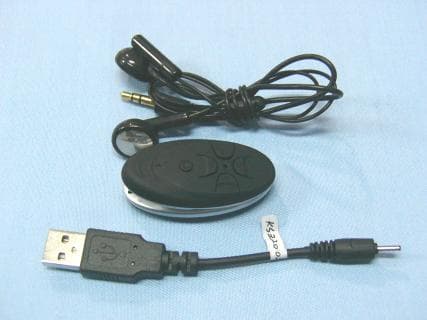
Click to zoom
Application Details
- Equipment Class
- DXT - Part 15 Low Power Transceiver, Rx Verified
- Date of Grant
- May 16, 2010
- Application Purpose
- Original Equipment
- Date of Application
- May 16, 2010
- Equipment Note
- Bluetooth headset
- Frequency Range
- 2402.00000000 - 2480.00000000
- Company
- i-tec Electronics, Inc
- Country
- United States
Documents & Files
Document Text
Text extracted from the exhibit documents filed with the FCC. Open a document above to read the original.
Users Manual
U&I-16 Bluetooth Headset Manual Bluetooth headset should be used with the compatible devices which support bluetooth wireless technology. This allows you the freedom to make any calls and enjoy the music streaming any time. Please read this user manual carefully before using the headset, and also read your device’s user manual regarding the bluetooth function, and pay attention to those important safety and maintenance information. Please keep the headset away from children. Structure Sketch 1-Microphone 2-Multifunction Button(MFB) 3-Backward 4-Indicator Light 5-Volume Key + (V+) 6-Forward 7-Volume Key - (V-) 8-Strap Holder 9-Charging Socket 10-Audio Jack 11-Earpiece Specifications Bluetooth Specification Bluetooth Profiles Supported Transmission Power Operation Range Frequency Range Battery Charging Voltage Charging Time Music Playing Time* Talk Time* Standby Time* Dimensions(mm) Weight V2.0+EDR Headset , Handsfree , A2DP,AVRCP Class 2 Up to 10 Meters 2.402~2.480GHz Built-in Rechargeable 3.7V /130mAH Li-polymer Battery DC5.0-6.5V About 2 hours Up to 4 hours Up to 4 hours Up to 60 hours L52 x W25 x H20 About 25g(with earpiece) Basic Operations Charging Your Headset Prior to using the headset for the first time, please fully charge the battery. Insert the charger’s plug into the headset’s charging socket, and plug the usb cable to PC USB port. 2 hours are required to fully charge the headset. The indicator light turns red while being charged, and will turn off automatically after being fully charged. When the headset is running out of battery, the indicator light will flash red every 8 seconds(the headset will switch off automatically when the battery is drained) . Please charge the headset as above steps in time to prolong the battery's useful life (Charging indication will be delayed for a few minutes if the headset has not been used for a long time or the battery is drained). Note: Use only the supplied charger/USB charging cable to charge the headset, or could be dangerous. Do not attempt to force open the built-in battery as this could damage the headset. If left unused, a fully charged headset will loose its power automatically. It is recommended to charge the headset every three months. Do not leave the headset in a too hot or too cold condition (best between 15°C and 25°C) which may affect the headset's operations. Do not dispose of the headset into a fire and water. Turning on the Headset In OFF MODE, press and hold MFB for 4 seconds until you hear a short beep and the indicator light flashes blue for 3 times, then the headset will enter into STANDBY MODE. Turning off the Headset In ON MODE, press and hold MFB for 4 seconds until you hear a short beep and the indicator light flashes red for 3 times, then the headset will enter into OFF MODE. Pairing Your Headset with a Bluetooth Mobile Phone 1.Ensure the headset is off. 2.Press and hold MFB for about 6 seconds until the indicator light flashes blue and red alternately as PAIRING MODE. 3.Activate the bluetooth function on the phone, search bluetooth devices (See the user guide of your phone for instructions). 4.Select headset “U&I-16” from the found devices list of the phone. 5.Enter the passkey “0000”, confirm to pair the headset with your phone. If successfully paired, the headset will beep. The headset enters into the STANDBY MODE, the indicator light flashes blue every 8 seconds(If the pairing cannot be completed within 5 minutes after the PAIRING MODE has been activated, the headset will enter into the STANDBY MODE. Repeat above steps to do the pairing again). 6.Ensure the distance between your headset and phone is within 10 meters, and without any obstacles. You can use the headset freely. 7.If the headset had paired with your phone but disconnected, it will paired automatically again when turns on within operation range. Answering/Ending a Call Press MFB once Rejecting a Call Press and hold V- for 2 seconds . Voice Dialing In STANDBY MODE, press MFB twice. Say the voice tag as soon as you hear the short beep(ensure your phone supports voice dialing function, and you have recorded the voice tag into your phone.) Last Number Redialing Press and hold MFB for 2 seconds Adjusting Volume Press V+ or V- to adjust the volume to meet your need Remote-control Functions Play/Pause Press MFB once for music playing and press again to pause Forward Press button to drop out or forward to the next song Backward Press to backward or return back to the last song Note: Ensure your paired devices support AVRCP Bluetooth Profile for remote-control functions. Disconnecting To disconnect the paired headset from your phone, please turn off the headset or disconnect the headset from the Bluetooth menu of your phone. Additional Statements Charge the headset under any status to a reset. The headset will turn off automatically if it can not be paired with any devices within 20 minutes. The headset will beep when operates successfully and this maybe too low to hear. The above operations may vary due to different devices. Manufacturer reserves the right to final explanation of all the above statements. FCC Information This device complies with Part 15 of the FCC rules. Operation is subject to the following two conditions: (1) this device may not cause harmful interference, and (2) this device must accept any interference received; including interference that may cause undesired operation. Federal Communications Commission (FCC) Statement This Equipment has been tested and found to comply with the limits for a Class B digital device, pursuant to Part 15 of the FCC rules. These limits are designed to provide reasonable protection against harmful interference in a residential installation. This equipment generates, uses and can radiate radio frequency energy and, if not installed and used in accordance with the instructions, may cause harmful interference to radio communications. However, there is no guarantee that interference will not occur in a particul…
Text truncated - open the document above for the full version.
Attestation Statements
I-Tec Electronics, Inc. 5255 NW 159 TH STREET MIAMI, FL 33014. Federal Communications Commission 7435 Oakland Mills Road Columbia, MD Date: May 12, 2010 SUBJECT: FCC Application for FCC ID: TXOT2200 To Whom It May Concern: This letter is to ascertain that I-Tec Electronics, Inc. Product has been the units used for conducting FCC compliance testing, the DoC part will be tested by FCC recognized test lab. If you have any question or concerns, please contact us Regards, May Hsu / General Manager
Block Diagram
I/O EDR MODEM Clock Memory CODEC Bluetooth Controller LED EEPROM Buttons Battery Charger U3 IS1602 Bluetooth RF IC Baseband MCU I/F MCU 2.8V LDO 1.8V LDO HCI UART USB 1.1 2.8V 1.8V U2 IS1035 Bulk Converter IS6601 2.7V 1.8V 2.402GHZ to 2.480GHZ 3.7V BAT ANTENNA MICROPHONE SPEAKER 16MHz SPEAKER
Cover Letter(s)
I-Tec Electronics, Inc. 5255 NW 159 TH STREET MIAMI, FL 33014. To: SIEMIC, INC. 2206 Ringwood Avenue, San Jose, CA 95131 USA Dear Sir/Madam, Re: Project and Product Certification Representative Authorization Letter We, I-Tec Electronics, Inc. hereby authorize SIEMIC, INC. to act as a Certification Body for certifying for the following project(s): Product description: Bluetooth Headset Model name: T2200 We affirm that between SIEMIC and I-Tec Electronics, Inc, any difference in understanding, including test plan, measurement methods, applicable standards and relevant procedures and processes have been resolved prior to commencement of testing activities. Sincerely, May Hsu / General Manager
External Photos
EUT top view EUT bottom view
ID Label/Location Info
FCC ID: TXOT2200
ID Label/Location Info
Proposed Label Location on EUT EUT Bottom View/Proposed FCC ID Label Location
Internal Photos
EUT inside whole view Main&RF board component side Main&RF board solder side
Schematics
U&I-08_V3.1.sch
Test Report
The test report consists 24 pages in total. It may be duplicated completely for legal use with the allowance of the applicant. It shall not be reproduced except in full, without the written approval of Ke Mei Ou Laboratory Corporation. The test result in the report only applied to the tested sample. FCC TEST REPORT Under FCC 15 Subpart C, Paragraph 15.249 Prepared For : i-tec Electronics, Inc. 5255 NW 159 TH STREET MIAMI, FL 33014 April 15, 2010 FCC ID: TXOT2200 EUT: Bluetooth Headset Model: T2200 Report Type: Original Report Test Engineer: Jacky Huang Test Date: April 14, 2010 Review By: Apollo Liu / Manager Ke Mei Ou Laboratory Co., Ltd. 7A, Jiaxiangge, Jiahuixincheng, No.3027, Shennan Rd., Futian, Shenzhen, Guangdong, P.R.China. Zip Code: 518033 Tel: + 86 755 83642690 Fax: + 86 755 83297077 www.kmolab.com i-tec Electronics, Inc. FCC ID: TXOT2200 KMO FCC ID Report Report #: KSZ2010040702J Page 2 of 24 TABLE OF CONTENTS 1. General Information...........................................................................................................................................................3 1. 1 Notes...............................................................................................................................................................................3 1. 2 Testing Laboratory..........................................................................................................................................................3 1. 3 Details of Applicant........................................................................................................................................................3 1. 4 Application Details.........................................................................................................................................................3 1. 5 Test Item.........................................................................................................................................................................3 1. 6 Test Standards.................................................................................................................................................................3 2. Technical Test.......................................................................................................................................................................4 2. 1 Summary of Test Results................................................................................................................................................4 3. EUT Modifications..............................................................................................................................................................4 4. Conducted Power Line Test................................................................................................................................................5 4. 1 Test Equipment...............................................................................................................................................................5 4. 2 Test Procedure................................................................................................................................................................5 4. 3 Test Setup.......................................................................................................................................................................5 4. 4 Configuration of the EUT...............................................................................................................................................6 4. 5 EUT Operating Condition...............................................................................................................................................7 4. 6 Conducted Power Line Emission Limits........................................................................................................................7 4. 7 Conducted Power Line Test Result.................................................................................................................................7 5. Radiated Emission Test.......................................................................................................................................................9 5. 1 Test Equipment...............................................................................................................................................................9 5. 2 Test Procedure................................................................................................................................................................9 5. 3 Radiated Test Setup........................................................................................................................................................9 5. 4 Configuration of the EUT.............................................................................................................................................10 5. 5 EUT Operating Condition.............................................................................................................................................10 5. 6 Radiated Emission Limit..............................................................................................................................................10 5. 7 Radiated Emission Test Result......................................................................................................................................11 6. Band Edge..........................................................................................................................................................................13 6. 1 Test Equipment.............................................................................................................................................................13 6. 2 Test Procedure.....................................................................…
Text truncated - open the document above for the full version.
Test Setup Photos
Conducted emission test view Radiated emission test view
Contact Information
Applicant
MAY HSU(General Manager)
Test Firm
SinTek Laboratory Co., Ltd.Eric Lin
Technical Specifications
| # | Rule Parts | Frequency Range | Power Output |
|---|---|---|---|
| 1 | 15C | 2.40 GHz - 2.48 GHz | - |
Other Applications from i-tec Electronics, Inc
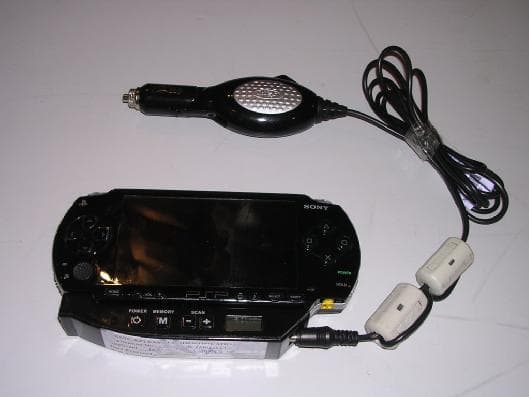
TXOTRANSMITTER
Feb 13, 2006Car Stereo Player
Equipment Class
DXX - Part 15 Low Power Communication Device Transmitter