U46-WI921Mobile Phone
TeleEpoch Limited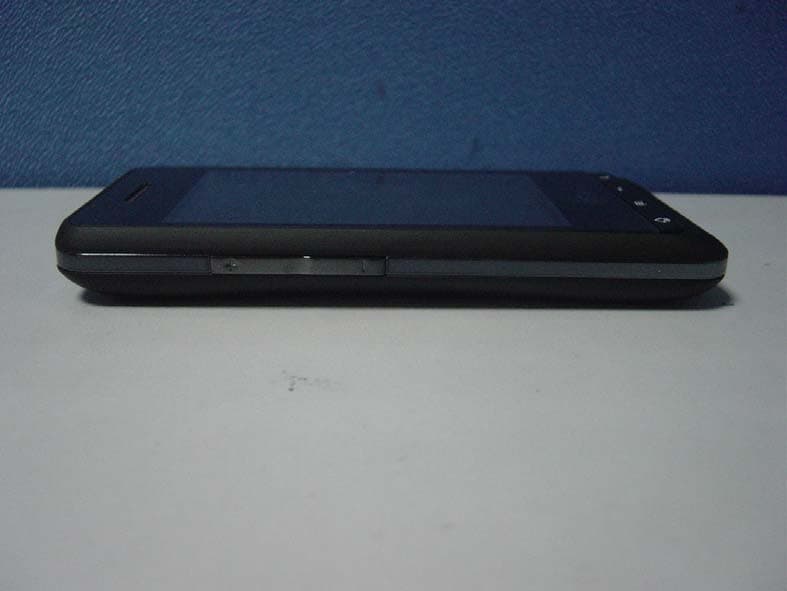
Click to zoom
Application Details
- Equipment Class
- DTS - Digital Transmission System
- Date of Grant
- Aug 22, 2011
- Application Purpose
- Original Equipment
- Date of Application
- Aug 17, 2011
- Equipment Note
- Mobile Phone
- Frequency Range
- 2412.00000000 - 2462.00000000
- Company
- TeleEpoch Limited
- Country
- China
Documents & Files
Document Text
Text extracted from the exhibit documents filed with the FCC. Open a document above to read the original.
Users Manual
1 USER MANUAL Android Smartphone SKU:VM2090PDKIT180 For more information, refer to the user manual at www.pcd.com 2 Using this guide Thank you for purchasing this PCD mobile device. This device will provide you with high quality mobile communication and entertainment based on PCD’s exceptional technology and high standards. This guide has been specially designed to guide you through the basics of your device, such as assembling and getting started with the device. • Please read this guide carefully before using your device to ensure safe and correct use. • The descriptions in this guide are based on the default settings of your device. • Please keep this guide for future reference. You can get more detailed descriptions and instructions for using the device's features from user manual. Visit the PCD website (http://www.pcd.com/ ) to view your device's user manual. Instructional icons Before you start, familiarize yourself with the icons you will see in this guide: Warning - situations that could cause injury to yourself or others. Caution - situations that could cause damage to your device or other equipment. Note - notes, usage tips, or additional information. 3 ► Refer to - pages with related information; for example: ► p.12 (represents “see page 12”). Followed by - the order of options or menus you must select to perform a step; for example: Home screen, open the application list and select Messaging →New message (represents Messaging, followed by New message). [ ] Square brackets-device keys; for example: [ ] (represents the Power key). Copyright information Rights to all technologies and products that comprise this device are the property of their respective owners: • This product has an Android platform based on Linux which can be expanded by a variety of JavaScript-based software. • Google™, Android Market™, Google Mail™, and YouTube™ are trademarks of Google, Inc. • Java™ is a trademark of Sun Microsystems, Inc. • Wi-Fi ®, the Wi-Fi CERTIFIED logo, and the Wi-Fi logo are registered trademarks of the Wi-Fi Alliance. 4 Contents Assembling.............................................................................................6 Unpack.......................................................................................... 6 ............................................................................................. 6 Charge the battery........................................................................... 8 Insert a memory card (optional)...................................................... 10 Getting started.......................................................................................12 Turn your device on and off............................................................ 12 Get to know your device.................................................................. 13 Use the touch screen..................................................................... 17 Lock or unlock the touch screen and keys.......................................... 18 Get to know the home screen......................................................... 19 Access applications..................................................................... 23 Customize your device.................................................................. 24 Enter text.................................................................................... 27 5 .............................................................................. 29 Calling................................................................................................ 29 Creating and finding contacts............................................................... 31 Messaging.......................................................................................... 32 Camera................................................................................................ 35 Music................................................................................................... 39 Connecting to the Internet..................................................................... 44 Download files from the web.................................................................. 45 Connecting to a PC.............................................................................. 46 Using Bluetooth.................................................................................... 47 Using Wi-Fi.......................................................................................... 48 PCD Service Center.............................................................................. 49 6 Assembling Unpack Check your product box for the following items: • Mobile device • Battery • Travel adapter (charger) • Headset • Quick start guide • USB cable Use only PCD-approved software. Pirated or illegal software may cause damage or malfunctions that are not covered by your manufacturer's warranty. • The items supplied with your device may vary depending on the software and accessories available in your region or offered by your service provider. • You can obtain additional accessories from your local PCD dealer. • The supplied accessories perform best for your device. Install battery To install battery 7 1. If the device is on, press and hold [] and select Power off to turn it off. 2. Remove the back cover. Be careful not to damage your fingernails when you remove the back cover. 3. Insert the battery. 4. Replace the back cover. 8 Charge the battery Before using the device for the first time, you must charge the battery. You can charge the device with the provided travel adapter or by connecting the device to a PC with a PC data cable. Use only PCD-approved chargers and cables. Unauthorised chargers or cables can cause batteries to explode or damage your device. When your battery is low, the device will emit a warning tone and display a low battery message. If the battery level becomes too low, the device will power off automatically. Recharge your battery to continu…
Text truncated - open the document above for the full version.
Cover Letter(s)
Date: August 15, 2011 To: Federal Communications Commission, Authorization & Evaluation Division, 7435 Oakland Mills Road, Columbia, MD 21046 To Whom It May Concern: The TeleEpoch Limited, the undersigned, hereby authorizes Mr.Wu Xuewen from Shenzhen Morlab Communications Technology Co., Ltd., to act on the behalf of TeleEpoch Limited solely in matters relating to the application for an FCC equipment authorization for FCC ID #U46-UI921 including the signing of documents in connection with this Application. Necessary acts carried out by TeleEpoch Limited on our behalf of the TeleEpoch Limited in connection with the Application shall have the same effect as acts of the TeleEpoch Limited. The TeleEpoch Limited also hereby certify that no party to this application is subject to a denial of benefits, including FCC benefits, pursuant to Section 5301 of the Anti-Drug Abuse Act of 1988, 21 U.S.C. 853(a). Thank you for your attention to this matter. Yours Sincerely,
Cover Letter(s)
Date: August 15, 2011 To: Federal Communications Commission, Authorization & Evaluation Division, 7435 Oakland Mills Road, Columbia, MD 21046 Re: TeleEpoch Limited FCC ID: U46-WI921 FCC Certification Confidentiality Request Gentlemen: This letter is to comply with 47 CFR 0.457 and 0.459 pertaining to confidentiality material. TeleEpoch Limited requests that the following documents regarding this submission for FCC ID: U46-WI921 be kept confidential: Exhibit Type File Name Block Diagram CONF APPENDIX U46-WI921_Block Diagram.pdf Schematics CONF APPENDIX U46-WI921_Schematics.pdf Operational Description CONF APPENDIX U46-WI921_Operational Description.pdf Part list CONF APPENDIX U46-WI921_BOM.pdf Tune-Up-Procedure CONF APPENDIX U46-WI921_Tune up procedure.pdf Those documents contain detailed system and equipment description and related information about the product which TeleEpoch Limited considers to be confidential proprietary, a custom design and, otherwise, not releasable to the general public. Since this design is a basis form which future technological products will evolve, TeleEpoch Limited considers this information would be of benefit to its competitors, and that the disclosure of the information in these documents would give competitors an unfair advantage in the market. Yours Sincerely,
External Photos
External Photos 1. Front View of EUT 2. Back View of EUT 3. Side View of EUT
ID Label/Location Info
FCC ID: U46-WI921, Model: VM2090PDKIT180; Wi921; 1. Label 2.Label Location
ID Label/Location Info
Date: August 15, 2011 Equipment Authorization Division Office of Engineering and Technology Federal Communications Commission 7435 Oakland Mills Road Columbia, MD 21046 Ref: FCC ID: U46-WI921 Dear Sirs: Teleepoch Limited requests acceptance of the labeling proposal described below for cell phone bearing FCC identifier U46-WI921. The subject cell phone are compact handheld models as shown in figure 1, authorized under 47CFR Part 22H&24E for CDMA mobile services. Figure 1_FCC ID: U46-WI921, Model: VM2090PDKIT180; Wi921; Because the majority of the cell phone housing is composed of display, speaker, operating controls and a removable battery pack, there is extremely limited space available to attach the required label carrying the FCC identifier. Attaching the label to the battery pack is not acceptable because the battery pack is a removable item. For this reason, TeleEpoch Limited proposes placing the label carrying the FCC identifier inside the battery compartment as shown in figure 2. Figure 2_FCC ID: U46-WI921, Model: VM2090PDKIT180; Wi921; The consumer packaging for these models includes the battery pack as a separate item, NOT installed on the radio. As such, the FCC identifier will be readily visible to the user before the battery pack is installed and whenever the battery pack is removed or replaced. In this location, the label will also be protected from physical abuse and remain readable for the anticipated life of the device. The consumer packaging for these models is a "gift box" which does not allow the transceiver to be seen at time of purchase. In order to meet the requirements of 47CFR Part 2.925 (d), TeleEpoch Limited will add the FCC identifier " U46-WI921" to the outside of the consumer "gift box" packaging. Thank you for your attention to this matter. Yours Sincerely,
Internal Photos
Internal Photos
Test Report
Report No.: SZ11060134W02 Page 2 of 43 TABLE OF CONTENTS 1. GENERAL INFORMATION .................................................................................................... 4 1.1 EUT Description ......................................................................................................................... 4 1.2 Test Standards and Results ........................................................................................................ 5 1.3 Facilities and Accreditations ...................................................................................................... 6 1.3.1 Facilities .................................................................................................................................... 6 1.3.2 Test Environment Conditions .................................................................................................... 6 2. 47 CFR PART 15C REQUIREMENTS .................................................................................... 7 2.1 Peak Output Power .................................................................................................................... 7 2.1.1 Requirement .............................................................................................................................. 7 2.1.2 Test Description ........................................................................................................................ 7 2.1.3 Test Result ................................................................................................................................. 8 2.2 Bandwidth ................................................................................................................................... 9 2.2.1 Definition .................................................................................................................................. 9 2.2.2 Test Description ........................................................................................................................ 9 2.3 Conducted Spurious Emissions ............................................................................................... 14 2.3.1 Requirement ............................................................................................................................ 14 2.3.2 Test Description ...................................................................................................................... 14 2.3.3 Test Result ............................................................................................................................... 14 2.4 Power spectral density (PSD) .................................................................................................. 18 2.4.1 Requirement ............................................................................................................................ 18 2.4.2 Test Description ...................................................................................................................... 18 2.4.3 Test Result ............................................................................................................................... 18 2.5 Band Edge ................................................................................................................................. 23 2.5.1 Requirement ............................................................................................................................ 23 2.5.2 Test Description ...................................................................................................................... 23 2.5.3 Test Result ............................................................................................................................... 24 2.6 Conducted Emission ................................................................................................................. 29 2.6.1 Requirement ............................................................................................................................ 29 2.6.2 Test Description ...................................................................................................................... 29 2.6.3 Test Result ............................................................................................................................... 30 Report No.: SZ11060134W02 Page 3 of 43 2.7 Radiated Emission .................................................................................................................... 32 2.7.1 Requirement ............................................................................................................................ 32 2.7.2 Test Description ...................................................................................................................... 32 2.7.3 Test Result ............................................................................................................................... 34 Change History Issue Date Reason for change 1.0 Aug 10, 2011 First edition Report No.: SZ11060134W02 Page 4 of 43 1. GENERAL INFORMATION 1.1 EUT Description EUT Type ............................. : Mobile phone Serial No. .............................. : (n.a, marked #1 by test site) Hardware Version ................. : WI921_V1.21 Software Version .................. : Applicant .............................. : Manufacturer ........................ : N/A Teleepoch Limited 5A, B1 Building, Digital Tech Zone, High-Tech Park(south), Nanshan district, Shenzhen, Guangdong Province, China TELEEPOCH Limited 5A, B1 Building, Digital Tech Zone, High-Tech Park(south), Nanshan district, Shenzhen, Guangdong Province, China Frequency Range .................. : 802.11b/g -20MHz: 2.412GHz - 2.462GHz Modulation Type................... : DSSS Note 1: The EUT is a Mobile phone, it contains WIFI Module operating at 2.4GHz ISM band; It supports 802.11b, 802.11g, and they are all tested in this report. Note 2: The frequencies allo…
Text truncated - open the document above for the full version.
Test Setup Photos
Test Setup Photos 1. CE 2. RE 3. CSE 4. RSE
Contact Information
Applicant
Ferry Wan(Vice President)
Technical Contact
Shenzhen Morlab Communications Technology Co.,LtdXuewen Wu
[email protected]+86-755-86120298
FL.3,Electronic Testing Bld, Shahe Rd, · Shenzhen · China
Test Firm
Shenzhen Morlab Communications Technology Co.,LtdShu Luan
Technical Specifications
| # | Rule Parts | Frequency Range | Power Output |
|---|---|---|---|
| 1 | 15C | 2.41 GHz - 2.46 GHz | 13.00 mW |
Other Applications from TeleEpoch Limited
U46-CDM2070
Jul 30, 2012CDMA1X handset
Equipment Class
DSS - Part 15 Spread Spectrum Transmitter
U46-C5620
Apr 19, 2012Mobile Phone
Equipment Class
PCE - PCS Licensed Transmitter held to ear
U46-CDM2035
Mar 06, 2012CDMA Mobile Phone
Equipment Class
PCE - PCS Licensed Transmitter held to ear
U46-MAX
Sep 22, 2011Mobile Phone
Equipment Class
DSS - Part 15 Spread Spectrum Transmitter
U46-D5
Sep 20, 2011WIFI Hotspot Device
Equipment Class
DTS - Digital Transmission System