Text extracted from the exhibit documents filed with the FCC. Open a document above to read the original.
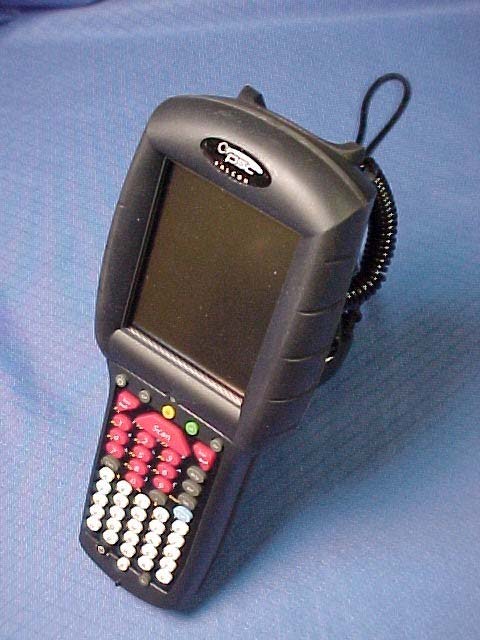
Falcon ® 4400 Series with Windows ® CE Falcon 4410 26-Key model Falcon 4420 48-Key model Falcon 4410 52-Key NU model Quick Reference Guide Datalogic Mobile, Inc 1505 Westec Dr. Eugene, Oregon 97402 Telephone: (541) 743-4800 Fax: (541) 743-4900 An Unpublished Work - All rights reserved. No part of the contents of this documentation or the procedures described therein may be reproduced or transmitted in any form or by any means without prior written permission of Datalogic Mobile, Inc. or its affiliates or subsidiaries ("Datalogic" or “Datalogic Mobile”) . Owners of Datalogic prod- ucts are hereby granted a non-exclusive, revocable license to reproduce and transmit this documentation for the purchaser's own internal business purposes. Purchaser shall not remove or alter any proprietary notices, including copyright notices, contained in this documentation and shall ensure that all notices appear on any reproductions of the documentation. Should future revisions of this manual be published, you can acquire printed versions by contacting your Datalogic representative. Electronic versions may either be downloadable from the Datalogic Mobile website (www.mobile.datalogic.com) or provided on appropriate media. If you visit our website and would like to make comments or suggestions about this or other Datalogic publications, please let us know via the “Contact Datalogic” page. Disclaimer Datalogic has taken reasonable measures to provide information in this manual that is complete and accurate, however, Datalogic reserves the right to change any specification at any time without prior notice. Datalogic is a registered trademark of Datalogic S.p.A. and the Datalogic logo is a trademark of Datalogic S.p.A. all licensed to Datalogic Mobile, Inc. All other trademarks and trade names referred to herein are property of their respective owners. Falcon ® is a registered trademark of Datalogic Mobile, Inc. and of its wholly owned subsidiaries. Microsoft Windows ® , Windows ® 2000, Windows ® CE, Windows ® NT, Windows ® XP and the Windows logo are registered trademarks of Microsoft Corporation. Patents This product may be covered by one or more of the following patents: 4,861,972 • 4,866,257 • 4,879,456 • 5,198,649 • 5,208,449 • 5,212,372 • 5,247,161 • 5,311,000 • 5,440,110 • 5,481,098 • 5,493,108 • 5,508,505 • 5,664,231 • 5,671,374 • 5,686,716 • 6,041,374 • 6,412,698 • 6,415,978 • 6,454,168 • 6,478,224 • 6,513,714 • 6,536,670 • 6,561,427 • 6,585,157 • 6,923,377 • 7,108,170 • D377345 • CA2,188,399 • Other U.S. and Foreign Patents Pending. Quick Reference Guide 1 Table of Contents Falcon® 4400 Series with Windows® CE ............................................................. 3 Overview ......................................................................................................................3 Getting Started ..............................................................................................................4 Features of the Falcon ...................................................................................................4 Powering the Falcon .......................................................................................................8 Getting Started ..............................................................................................................8 Battery Pack ...........................................................................................................8 Power Supply ..........................................................................................................9 Installing the Battery Pack ..................................................................................... 10 Checking Battery Power .......................................................................................... 12 System Tray Battery Status Indicators ...................................................................... 12 Charging the Batteries ............................................................................................ 13 Charging with a Battery Charger .............................................................................. 14 Charging with the Dock ........................................................................................... 14 Backup Battery ...................................................................................................... 15 Battery Discharge Characteristics ............................................................................ 15 Setting Up the Mobile Computer ..................................................................................... 16 Touchscreen Calibration .......................................................................................... 16 Getting Connected ................................................................................................. 16 Setting the Date and Time ...................................................................................... 19 Entering Data .............................................................................................................. 19 Using the Stylus .................................................................................................... 20 Navigating the Display ............................................................................................ 22 Keypads ............................................................................................................... 24 Scanning Bar Codes ..................................................................................................... 31 Laser Scanning ...................................................................................................... 31 Bar Code Scanning with 2D Imager .......................................................................... 33 Image Capture ............................................................................................................ 34 Flash Memory ........................…
Text truncated - open the document above for the full version.
Falcon ® 4400 Series with Windows Mobile ® 26-Key model Falcon 4420 48-Key model 52-Key NU model Quick Reference Guide Datalogic Mobile, Inc 1505 Westec Dr. Eugene, Oregon 97402 Telephone: (541) 743-4800 Fax: (541) 743-4900 An Unpublished Work - All rights reserved. No part of the contents of this documentation or the procedures described therein may be reproduced or transmitted in any form or by any means without prior written permission of Datalogic Mobile, Inc. or its affiliates or subsidiaries ("Datalogic" or “Datalogic Mobile”) . Owners of Datalogic prod- ucts are hereby granted a non-exclusive, revocable license to reproduce and transmit this documentation for the purchaser's own internal business purposes. Purchaser shall not remove or alter any proprietary notices, including copyright notices, contained in this documentation and shall ensure that all notices appear on any reproductions of the documentation. Should future revisions of this manual be published, you can acquire printed versions by contacting your Datalogic representative. Electronic versions may either be downloadable from the Datalogic Mobile website (www.mobile.datalogic.com) or provided on appropriate media. If you visit our website and would like to make comments or suggestions about this or other Datalogic publications, please let us know via the “Contact Datalogic” page. Disclaimer Datalogic has taken reasonable measures to provide information in this manual that is complete and accurate, however, Datalogic reserves the right to change any specification at any time without prior notice. Datalogic is a registered trademark of Datalogic S.p.A. and the Datalogic logo is a trademark of Datalogic S.p.A. all licensed to Datalogic Mobile, Inc. All other trademarks and trade names referred to herein are property of their respective owners. Falcon ® is a registered trademark of Datalogic Mobile, Inc. and of its affiliates and wholly owned subsidiaries. Microsoft Windows ® , Windows ® 2000, Windows ® CE, Windows Mobile ® , Windows ® NT, Windows ® XP and the Windows logo are registered trademarks of Microsoft Corporation. Patents This product may be covered by one or more of the following patents: 4,861,972 • 4,866,257 • 4,879,456 • 5,198,649 • 5,208,449 • 5,212,372 • 5,247,161 • 5,311,000 • 5,440,110 • 5,481,098 • 5,493,108 • 5,508,505 • 5,664,231 • 5,671,374 • 5,686,716 • 6,041,374 • 6,412,698 • 6,415,978 • 6,454,168 • 6,478,224 • 6,513,714 • 6,536,670 • 6,561,427 • 6,585,157 • 6,923,377 • 7,108,170 • D377345 • CA2,188,399 • Other U.S. and Foreign Patents Pending. Quick Reference Guide 1 Table of Contents Falcon® 4400 Series with Windows Mobile® ....................................................... 3 Overview ......................................................................................................................3 Getting Started ..............................................................................................................4 System Requirements ...............................................................................................4 Connecting to a PC ...................................................................................................5 Features of the Falcon .............................................................................................6 Powering the Falcon .......................................................................................................9 Battery Pack ...........................................................................................................9 Installing the Battery Pack ..................................................................................... 10 Checking Battery Power .......................................................................................... 12 Battery Status Indicators ........................................................................................ 12 Power Supply ........................................................................................................ 13 Charging the Batteries .................................................................................................. 14 Charging with the Dock ........................................................................................... 15 Backup Battery ...................................................................................................... 16 Charging with a Battery Charger .............................................................................. 16 Battery Discharge Characteristics ............................................................................ 16 Setting Up the Mobile Computer ..................................................................................... 16 Touchscreen Calibration .......................................................................................... 17 Entering a Password ............................................................................................... 17 Communications Setup ........................................................................................... 18 Radio Card Setup ................................................................................................... 19 Entering Data .............................................................................................................. 19 Using the Stylus .................................................................................................... 20 Navigating the Display ............................................................................................ 21 Keypads ............................................................................................................... 25 Scanning Bar Codes ..................................................................................................... 34 Laser Scanning ...................................................................................................... 34 Bar Code Scanning with 2D I…
Text truncated - open the document above for the full version.
NORTHWEST EMC, INC. 22975 NW Evergreen Parkway, Suite 400 Hillsboro, OR 97124 August 1, 2007 Dear Application Examiner: On behalf of Datalogic Mobile, Inc., Northwest EMC Inc is submitting this application for the certification of Datalogic’s Portable Data Terminal, M/N: Falcon 4410 or Falcon 4420. The Falcon handheld device is being certified as a composite device, FCC ID: U4SRSB. It includes two previously certified radios, the BlueGiga WT12-A Bluetooth radio and the Summit Data Communications SDC-CF10G 802.11 radio (original FCC IDs: QOQWT12 and TWG-SDCCF10G, respectively). Both radios operate in the 2.4 – 2.4835 GHz frequency range. Only radiated tests were performed with the radios in the Falcon, since the output power has not changed from the original grants. The Falcon can operate off of battery power or while charging in a cradle that is connected to the AC Mains. In the battery powered mode, the device has body worn accessories that put it within 20 cm from the head or torso. SAR testing was performed to show compliance with RF Exposure requirements. Please note, Datalogic has provided attestations explaining the differences in models and in keypads. In addition, some of the exhibits refer to the WiFi radio as the Gemtek Technology WCFB-105G. Gemtek is Summit’s ODM partner. They manufacture the device and do the hardware design work to Datalogic’s specifications. Gemtek’s part number for the Summit SDC- CF10G is WCFB-105G. The Bluetooth radio utilizes a single multilayer chip antenna. The WiFi radio utilizes a low profile antenna for each of its two ports. These configurations satisfy the requirements of 47 CFR 15.203. The technical reports and exhibits demonstrate compliance of the Bluetooth radio with FCC rules 47 CFR 15.247 as a hybrid transmitter. For reference, please see the third example (highlighted) in the attached FCC interpretation. The reports and exhibits also demonstrate compliance of the WiFi radio with FCC rules 47 CFR 15.247 as a DTS device. Your efforts in reviewing this application are greatly appreciated. Best regards, Northwest EMC, Inc. Company: Subject:Digital Transmission system 20021209- 001 Remarks: Keyword:BlueTooth FH HS Rule Parts:15.247 City: State: Country: INQUIRY: I have an inquiry about FCC15.247 (f). In this section, it is stated as follows; The digital modulation operation of the hybrid system, with the frequency hopping turned off, shall comply with the power density requirements of paragraph (d) of this section. Should we apply to the above requirement even Bluetooth equipment ? RESPONSE: A bluetooth device may apply under the rules in 15.247 as either a Digital transmission system, a Frequency hopping system or a Hybrid system whichever provides an advantage to the grantee as long as all the requirements are met. Please note the following regarding the requirements for Hybrids and clarification of spread spectrum systems with regard to the recent changes to the spread spectrum rules. Prior to the recent changes to the spread spectrum rules, there were two major types of spread spectrum systems. They were direct sequence and frequency hopping spread spectrum ("FHSS") systems. These two distinct systems were required to comply with separate rule requirements. The new rules, however, allow manufacturers more flexibility and are not as limiting. The new rules provide more flexibility for manufacturers by eliminating the requirement to employ direct sequence modulation techniques along with its associated requirement to comply with a minimum processing gain. Instead, manufacturers now may employ wideband digital modulation under the new rules for Digital Transmissions Systems ("DTS"). It is possible for a device to be designed to operate as a DTS, as a FHSS system, or using a combination of these two modulation types. Because of this, we have received several requests for interpretations by manufacturers that wish to produce transmission systems that employ both frequency hopping (or channel changing) techniques using digitally modulated channels. We believe that such systems fall under three possible combinations of standards, depending on the exact methods of modulation. First example: We will allow a manufacturer of a combination DTS and FHSS system to demonstrate compliance with the rules required for DTS operation or for FHSS operation. There is no need to demonstrate compliance with both the FHSS standards and the DTS standards. Second example: Systems may employ two mutually exclusive operational modes. One mode would be as a FHSS system and the other would be as a DTS. For example, a device may be operated as a FHSS system while transmitting data and as a DTS while in the acquisition mode. When operating in this manner, the device must fully comply with the rules for a FHSS system when operating in that mode and as a DTS when operating in that mode. The two types of operation must be distinct so that each mode of operation can be distinguished and separately demonstrated to comply with the pertinent standards. Third example: The third method of authorizing a combination system is as a hybrid system under the provisions described in Section 15.247(f) of the rules. Prior to the new rules on DTS operation, a hybrid system consisted of a transmission system that employed a combination of both direct sequence and frequency hopping techniques. Such systems were required to show compliance with a 17 dB processing gain. This is no longer required since the processing gain requirement has been replaced by the DTS regulations. A hybrid system uses both digital modulation and frequency hopping techniques at the same time on the same carrier. This is similar to the combination DTS/FHSS system described above in the first example but the system is subject to slightly different standards. As indicated in Section 15.247(f), a hybrid system must comply with the power density standard of 8 dBm in any 3 kHz band when the frequency hopping function is…
Text truncated - open the document above for the full version.
Northwest EMC TCB Compliance Opinion Rev. 9/15/03 PSCI0245 Information about the Applicant Grantee (Company Name) Datalogic Scanning, Inc. FCC Contact Person Ken Wyman Address 1505 Westec Drive City, State, Zip Eugene, OR 97402-9150 Job Number PSCI0245 Model Falcon 4410 and Falcon 4420 w/ Summit/BG Radios FCC ID U4SRSB Agent Northwest EMC, Inc. Approval Type Original Equipment Class DTS Digital Transmission System Rule Part 15C (15.247) Overview This application is for the certification of Datalogic’s Portable Data Terminal, M/N: Falcon 4410 or Falcon 4420, FCC ID: U4SRSB. It includes two previously certified radios, the BlueGiga WT12-A Bluetooth radio and the Summit Data Communications SDC-CF10G 802.11 radio (original FCC IDs: QOQWT12 and TWG-SDCCF10G, respectively). Both radios operate in the 2.4 – 2.4835 GHz frequency range. Recommendation All items have been resolved and completed to my satisfaction; therefore I recommend this application for approval. Signature Dave Tolman, TCB Committee 8/16/2007 Northwest EMC TCB Compliance Opinion Rev. 9/15/03 PSCI0245
Request for Confidentiality May 17, 2007 Federal Communications Commission Authorization and Evaluation Division 7435 Oakland Mills Road Columbia, Maryland 21046 To whom it may concern, We hereby respectfully request that under the provision of 47 CFR 0.459, the documents listed below and attached with this application for certification be provided with confidential status. • Schematics • Theory of Operation • Frequency Block Diagrams Any exhibit / information for which we have requested confidentiality, but which may not be accorded such treatment by the FCC, should be returned to us. The documents listed above contain trade secrets that are treated as confidential by us. Substantial competitive harm to us could result should they be made available to the public. Sincerely, Ronald Seide President
BACKUP BATTERY: 3.1 V Lithium Approved RLAN Module inside PRODUCT OF USA A V O I D E X P O S U R E — LASER LIGHT IS EMITTED FRO M T H I S A P E R T U R E NRTL Safety tested Production monitored PRODUCT SERVICE Datalogic Mobile, Inc 1505 Westec Dr. Eugene, OR 97402 Complies with 21CFR and Part 15 of FCC rules. N2468 P A T : 4 , 3 8 7 , 2 9 7 - 4 , 5 9 3 , 1 8 6 - 4 , 4 6 0 , 1 2 0 - 4 , 7 5 8 , 7 1 7 - 5 , 1 3 0 , 5 2 0 LASER LIGHT – DO NOT STARE INTO BEAM 1.65mW Scanning — 650 nm Class 2 Laser Product (IEC/EN 60825-1:1998) MODEL: FALCON 4420 COLOR MFG. DATE: 2007-05-18 CLASS #: 4423-16761-10000R RADIO: SUMMIT/BG FCC ID: U4SRSB IC: 3862C-RSB EURO:R&TTE SERIAL #: F407137052
ACX Advanced Ceramic X AT3216 Series Multilayer Chip Antenna Features Monolithic SMD with small, low-profile and light-weight type. Wide bandwidth Applications Bluetooth/Wireless LAN/Home RF ISM band 2.4GHz applications Specifications Part Number Frequency Range (MHz) Peak Gain (XZ-V) Average Gain (XZ-V) VSWR Impedance AT3216 -B2R7HAA_ 2400 ~ 2500 0.5 dBi typ. -0.5 dBi typ.2 max. 50 Ω Q’ty/Reel (pcs) : 3,000pcs Operating Temperature Range : -40 ~ +85 o C Storage Temperature Range : -40 ~ +85 o C Power Capacity : 3W max. Part Number AT 3216 - B 2R7 HAA i ghfe dc c Type AT : Antenna d Dimensions ( L × W ) 3.2× 1.6 mm e Material Code B f Frequency Range 2R7=2700MHz g Specification Code HAA h Packaging T: Tape & Reel B: Bulk i Soldering =lead-containing /LF=lead-free Terminal Configuration No. Terminal Name No. Terminal Name c Feeding Point d NC d c ACX Advanced Ceramic X Dimensions and Recommended PC Board Pattern Unit : mm a W T L Mark L W T a Dimensions 3.2±0.2 1.6±0.2 1.3+ 0.1/-0.2 0.5±0.3 (a) Without Matching Circuits (b) With Matching Circuits 1.2pF 3.3nH 2.6 4.2 1.6 1.9 2.7nH 0.4 * *Line width should be designed to match 50Ω characteristic impedance, depending on PCB material and thickness. ACX Advanced Ceramic X Typical Electrical Characteristics (T=25 o C) Test Board Ground 13.5mm 6.5mm 39.5mm 4mm No Ground Matching Circuit 50Ω Feed Line 19mm Antenna 6.5mm Return Loss (a) Without Matching Circuits (b) With Matching Circuits ACX Advanced Ceramic X Radiation Patterns .... XZ cut @2.45GHz Vertical Horizontal YZ cut @2.45GHz Vertical Horizontal XZ-V/XZ-H YZ-V/YZ-H XY cut @2.45GHz Vertical Horizontal Z 270 o 0 o X Y XY-cut scanning direction Y 270 o 0 o X Z XZ-cut scanning direction Z X 0 o 270 Y YZ-cut scanning direction 180 180 180 o XY-V/XY-H 90 o 90 o 90 o Advanced Ceramic X Corp. 16 Tzu Chiang Road, Hsinchu Industrial District Hsinchu Hsien 303, Taiwan TEL:886-3-5987008 FAX:886-3-5987001 E-mail: [email protected] http://www.acxc.com.tw
IN ACCORDANCE WITH THE REQUIREMENTS OF FCC OET BULLETIN 65 SUPPLEMENT C FOR HANDHELD SCANNER MODEL: FALCON 4410 & 4420 FCC ID: U4SRSB REPORT NUMBER: 07U11195-1, REVISION B ISSUE DATE: AUGUST 14, 2007 Prepared for DATALOGIC MOBILE, INC. 1505 WESTEC DRIVE EUGENE, OREGON, 97402 USA Prepared by COMPLIANCE CERTIFICATION SERVICES 47173 BENICIA STREET, FREMONT, CA 94538 USA REPORT NO: 07U11195-1B DATE: August 14, 2007 FCC ID: U4SRSB COMPLIANCE CERTIFICATION SERVICES Page: 2 of 33 This report shall not be reproduced except in full, without the written approval of CCS. Revision History Rev. Issued date Revisions Revised By -- August 6, 2007 Initial issue Sunny Shih B August 14, 2007 Modified WLAN module description T. Hong REPORT NO: 07U11195-1B DATE: August 14, 2007 FCC ID: U4SRSB COMPLIANCE CERTIFICATION SERVICES Page: 3 of 33 This report shall not be reproduced except in full, without the written approval of CCS. CERTIFICATE OF COMPLIANCE (SAR EVALUATION) DATES OF TEST: August 1 and 2, 2007 APPLICANT: ADDRESS: Datalogic Mobile, Inc. 1505 Westec Drive, Eugene, Oregon, 97402 USA FCC ID: MODEL: U4SRSB Falcon 4410 & 4420 Note: Falcon 4410 does not include a handle while Falcon 4420 does. DEVICE CATEGORY: EXPOSURE CATEGORY: Portable Device General Population/Uncontrolled Exposure Handheld Scanner is tested for SAR which includes WLAN module Summit Data Communications FCC ID: TWG-SDCCF10G and Bluetooth Module FCC ID: QOQWT12. Test Sample is a: Production unit Modulation type: Direct Sequence Spread Spectrum (DSSS) for 802.11b Orthogonal Frequency Division Multiplexing (OFDM) for 802.11g Frequency Hopping Spread Spectrum (FHSS) for Bluetooth module Rule Parts Frequency Range [MHz] The Highest SAR Values [1g_mW/g] Collocation SAR Values [1g_mW/g] FCC 15.247 2412 - 2462 0.079 0.055 This wireless portable device has been shown to be capable of compliance for localized specific absorption rate (SAR) for General Population/Uncontrolled Exposure limits specified in ANSI/IEEE Std. C95.1-1992 and had been tested in accordance with the measurement procedures specified in FCC OET 65 Supplement C (Edition 01-01). Note: The results documented in this report apply only to the tested sample, under the conditions and modes of operation as described herein. This document may not be altered or revised in any way unless done so by Compliance Certification Services and all revisions are duly noted in the revisions section. Any alteration of this document not carried out by Compliance Certification Services will constitute fraud and shall nullify the document. No part of this report may be used to claim product certification, approval, or endorsement by NVLAP, NIST, or any government agency. Approved & Released For CCS By: Tested By: Hsin Fu Shih Ninous Davoudi Engineering Supervisor EMC Engineer Compliance Certification Services Compliance Certification Services REPORT NO: 07U11195-1B DATE: August 14, 2007 FCC ID: U4SRSB COMPLIANCE CERTIFICATION SERVICES Page: 4 of 33 This report shall not be reproduced except in full, without the written approval of CCS. TABLE OF CONTENTS 1 DEVICE UNDER TEST (DUT) DESCRIPTION .................................................................... 5 2 FACILITIES AND ACCREDITATION .................................................................................... 6 3 SYSTEM DESCRIPTION...................................................................................................... 7 3.1 COMPOSITION OF INGREDIENTS FOR TISSUE SIMULATING LIQUIDS ................ 8 4 SIMULATING LIQUID PARAMETERS CHECK .................................................................... 9 4.1 SIMULATING LIQUID PARAMETER CHECK RESULT ............................................. 10 5 SYSTEM PERFORMANCE CHECK ................................................................................... 12 5.1 SYSTEM PERFORMANCE CHECK RESULTS.......................................................... 13 6 SAR MEASURMENT PROCEDURE .................................................................................. 14 6.1 DASY4 SAR MEASURMENT PROCEDURE .............................................................. 15 7 PROCEDURE USED TO ESTABLISH TEST SIGNAL ....................................................... 16 8 SAR MEASURMENT RESULTS......................................................................................... 17 8.1 ANTENNA 1 ................................................................................................................ 17 8.1.1 HOLSTER 1 – WORN ON RIGHT SIDE................................................................... 17 8.1.2 HOLSTER 1 – WORN ON LEFT SIDE ..................................................................... 18 8.1.3 HOLSTER 2 – WORN ON RIGHT SIDE................................................................... 19 8.1.4 HOLSTER 2 – WORN ON LEFT SIDE ..................................................................... 20 8.2 ANTENNA 2 ................................................................................................................ 21 8.2.1 HOLSTER 1 – WORN ON RIGHT SIDE................................................................... 21 8.2.2 HOLSTER 1 – WORN ON LEFT SIDE ..................................................................... 22 8.2.3 HOLSTER 2 – WORN ON RIGHT SIDE................................................................... 23 8.2.4 HOLSTER 2 – WORN ON LEFT SIDE ..................................................................... 24 9 MEASURMENT UNCERTAINTY ........................................................................................ 25 9.1 MEASURMENT UNCERTAINTY FOR 300 MHZ – 3000 MHZ ................................... 25 10 EQUIPMENT LIST AND CALIBRATION............................................................................. 26 11 PHOTOS ............................................................................................................................. 27 12 ATTACHMENTS ..........................…
Text truncated - open the document above for the full version.
Date/Time: 8/1/2007 5:02:11 PM Test Laboratory: Compliance Certification Services System Performance Check @ 2450 MHz DUT: Dipole 2450 MHz; Type: D2450V2;Serial: D2450V2 - SN:706 Communication System: CW - 2450 MHz;Frequency: 2450 MHz;Duty Cycle: 1:1 Medium parameters used: f = 2450 MHz; σ = 2.02 mho/m; ε r = 54.6; ρ = 1000 kg/m 3 Phantom section: Flat Section Room AmbientTemperature: 23.0deg. C; Liquid Temperature: 22.0 deg. C DASY4 Configuration: - Area Scan setting - Find Secondary Maximum Within: 2.0 dB and witha peak SAR value greater than 0.0012W/kg - Probe: EX3DV4 - SN3554; ConvF(6.14, 6.14, 6.14); Calibrated: 4/24/2007 - Sensor-Surface: 4mm (Mechanical Surface Detection) - Electronics: DAE3 Sn427; Calibrated: 11/16/2006 - Phantom: Flat Phantom ELI4.0; Type: QDOVA001BA; Serial: SN:1003 - Measurement SW: DASY4, V4.7 Build 53; Postprocessing SW: SEMCAD, V1.8 Build 172 d=10mm, Pin=250mW/Area Scan (7x7x1): Measurement grid: dx=15mm, dy=15mm Maximum value of SAR (measured) = 15.4 mW/g d=10mm, Pin=250mW/Zoom Scan (5x5x7)/Cube 0: Measurement grid: dx=7.5mm, dy=7.5mm, dz=5mm Reference Value = 87.9 V/m; Power Drift = -0.161 dB Peak SAR (extrapolated) = 27.3 W/kg SAR(1 g) = 13.7 mW/g; SAR(10 g) = 6.42 mW/g Maximum value of SAR (measured) = 15.3 mW/g 0 dB = 15.3mW/g Date/Time: 8/1/2007 5:12:56 PM Test Laboratory: Compliance Certification Services System Performance Check @ 2450 MHz DUT: Dipole 2450 MHz; Type: D2450V2; Serial: D2450V…
Text truncated - open the document above for the full version.
| # | Rule Parts | Frequency Range | Power Output |
|---|---|---|---|
| 2 | 15C | 2.41 GHz - 2.46 GHz | 64.00 mW |

Falcon X3
Equipment Class
DSS - Part 15 Spread Spectrum Transmitter