UB6TL040102WFTPMS
Shanghai Well-lion Electronic Technology co.,Ltd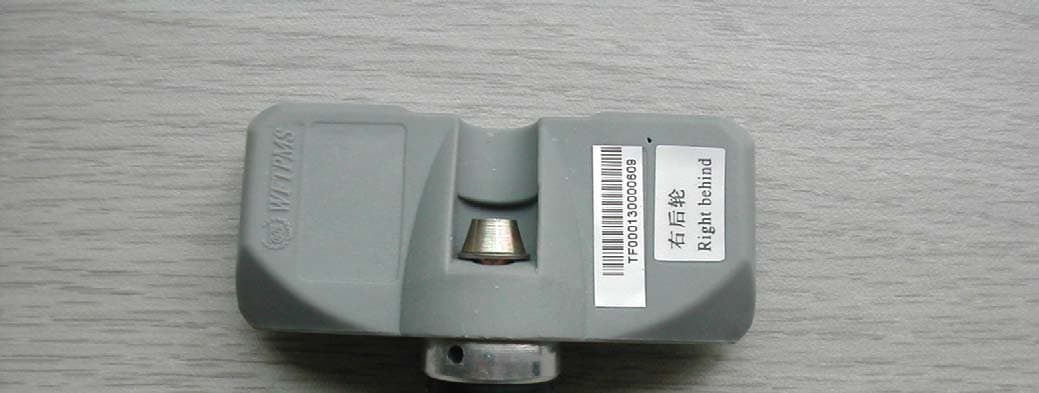
Click to zoom
Application Details
- Equipment Class
- DSC - Part 15 Security/Remote Control Transmitter
- Date of Grant
- Jun 22, 2006
- Application Purpose
- Original Equipment
- Date of Application
- Jun 22, 2006
- Equipment Note
- WFTPMS
- Frequency Range
- 433.92000000 - 433.92000000
- Country
- China
Documents & Files
Document Text
Text extracted from the exhibit documents filed with the FCC. Open a document above to read the original.
Users Manual
Well-Lion Internal Use 1 / 14 2006-01-14 WanFeng Tire Pressure Monitoring System User’s Manual ShangHai Well-Lion Electronic Technology Co., Ltd Well-Lion Internal Use 2 / 14 2006-01-14 Contents WFTPMS PACKING LIST ..................................................................................................................... 3 1. FOREWORD......................................................................................................................................... 3 2. INTRODUCTION OF WFTPMS .......................................................................................................3 3. BASIC FUNCTION OF WFTPMS.....................................................................................................4 4. INTRODUCTION OF RECEIVER INTERFACE BOARD ........................................................... 4 5. OPERATION ILLUSTRATION......................................................................................................... 5 6. SETTING ILLUMINATION............................................................................................................... 6 7 INSTALLATION ILLUMINATION ................................................................................................... 9 8 TECHNICAL SPECIFICATIONS .................................................................................................... 10 9 WARRANTY CLAUSE....................................................................................................................... 11 Well-Lion Internal Use 3 / 14 2006-01-14 z Thanks for buying WFTPMS TL040102. z WFTPMS TL040102 can be used in cars with tire pressure under 3.5Bar. z For a safe and correct use of WFTPMS, please read this manual first. z The ultimately explanation of this manual belongs to Shanghai Well-Lion Electronic Technology Co., Ltd z Please visit http://www.well-lion.com WFTPMS Packing List Dear user: Thanks for your purchasement. Please make sure that your purchasement includes all the following items: In case of short of any item, please contact your distributor for consultation. 1. Foreword WFTPMS is a new auto safety system, which is different from usual afterward safety solutions. WFTPMS warns the driver to take precaution to prevent traffic accidents caused by tire abnormal pressue. With WFTPMS you can enjoy a safer, more economical, more reliable and more comfortable drive. 2. Introduction of WFTPMS Adopting advanced IC technology, with high-capability, easy installation and high-reliability characteristics, WFTPMS is one of the most advanced system for tire pressure monitoring system in the world. WFTPMS can be used in cars with tire pressure under 3.5Bar. WFTPMS comprises a transmitter mounted inside the tire and a receiver installed in the car. Product Type WFTPMS TL040102 Product Color Grey+Black Transmitter 4 User Manual 1 Receiver 1 Quality Certificate 1 Double-face glue 2 Converter sleeve 1 Seal washer 4 Installation pin 1 Screw glue 1 Well-Lion Internal Use 4 / 14 2006-01-14 The advanced lithium battery is used to ensure that the transmitter can work six years at least. Transmitter transmits the monitored pressure and temperature data to the receiver. Once the data is abnormal, the system warns immediately, and the tire location and the corresponding values are displayed at the same time. For power supply, the receiver connects to the vehicle battery. The receiver not only can display the present time but also can memorize 38 pieces of history fault information that can be identified by diagnostic tool. 3. Basic Function of WFTPMS The system can monitor the tire pressure, tire temperature and the battery status all the time and warn in time. The main functions of WFTPMS are as follows: Clock function: Display the present time and set the time. Tire monitoring functions: Reading function: Read the present tire pressure and temperature values. Setting function: Set the tire pressure standard value and temperature warning threshold. Warning function: Air leak warning, high-pressure warning, low-pressure warning, high-temperature warning, low-battery warning and no-signal warning. Recording function: The record contains warning cause, tire pressure, tire temperature, and the warning time. 4. Introduction of receiver Interface board Well-Lion Internal Use 5 / 14 2006-01-14 1. Pressure value 8. “T” button (Time) 2. Prssure unit PSI 9. No-signal warning symbol 3. Pressure unit Bar 10. Low-battery warning symbol 4. Temperature value 11. High-temperature warning symbol 5. Temperature unit ( ) 12. Pressure warning symbol 6. Temperature unit ( ) 13. Product brand 7. “P” button (Pressure) 14. Buzzer High pressure warning Low-pressure warning Leak air warning 5. Operation Illustration Once the key switches on the ignition, the system is powered up by 12V voltage, and enters into the normal working mode with the LCD background lighting up for 10 seconds. The system starts checking tire pressure and temperature in the clockwise order: left front tireÆ right front tireÆ Press T button Press P button Press T button Without operation for 10s or press T button Tire pressure warning interface Without operation for 10s or press T button MONTH DATE interface Time display Normal main interface Tire situation interface Well-Lion Internal Use 6 / 14 2006-01-14 right rear tireÆleft rear tire. If the tire is in warning status, the buzzer rings, LCD background lights and displays the tire situation at the same time. If in normal status the system turns into clock mode and monitors the tire continually. In the normal working mode, the system monitors the tire and displays the time continually. If the tire is abnormal during driving, the buzzer rings, LCD background lights and the display shows the tire warning status. (If there are two or more tires warn at the same time, the system will display warning tire separately). It tells that the driver should stop or slow down for quick action. Under the warning mode, pre…
Text truncated - open the document above for the full version.
Cover Letter(s)
ADT (Shanghai) Corporation 2F, Building C, No.1618, Yishan Rd., 201103, Shanghai, China Jun. 22, 2006 FCC ID: UB6TL040102 The following lists are the answers for the comments on Jun. 20, 2006, please kindly have a review on it: 1) FYI....The device does not appear to be subject to DoC requirements and therefore the DoC FCC logo should not be placed on the device. The manufacturer should correct this. RE: Please take a reference to the mail. There is dissent regarding this. 2) The 731 form, item 7a on page 2 cites this is a composite device. Please explain as the device appears to be subject to a single authorization only. However it appears that maybe the receiver portion of this system may also need to be approved. In this case the information should be provided in 7b. Please review/correct as necessary. RE: Selection is made in 7b. Please see (UB6TL040102)731Form_0622. 3) According to recent FCC interpretations, the confidentiality letter must be signed by either the contact given on the FCC site for the applicant, or someone listed in the technical or non-technical portions of the 731 form. Lin Xianke does not appear to be listed on the FCC site as the appropriate contact (FCC site shows Huang Zhangxi). Please help correct the cover letters as necessary. RE: “Huang Zhangxi” quitted the job after the registration of FRN. I informed the client to change the information of contact person on the website. 4) The duty cycle shown simply appears to show 2 slightly different levels (likely due to FSK shifting between frequencies) and therefore is not an actual on-off pulsing during transmission and not considered correct. The duty cycle appears to actually have been 20 log 0.206 = -13.7 dB and not as shown. Note that this will also affect compliance at the second harmonics given the data provided. Please review and correct as necessary. RE: Please see (UB6TL040102)TestRpt_0622. Thank you very much.
Operational Description
Operation Illustration Once the key switches on the ignition, the system is powered up by 12V voltage, and enters into the normal working mode with the LCD background lighting up for 10 seconds. The system starts checking tire pressure and temperature in the clockwise order: left front tireÆ right front tireÆ right rear tireÆleft rear tire. If the tire is in warning status, the buzzer rings, LCD background lights and displays the tire situation at the same time. If in normal status the system turns into clock mode and monitors the tire continually. In the normal working mode, the system monitors the tire and displays the time continually. If the tire is abnormal during driving, the buzzer rings, LCD background lights and the display shows the tire warning status. (If there are two or more tires warn at the same time, the system will display warning tire separately). It tells that the driver should stop or slow down for quick action. Under the warning mode, press “T” button to terminate the buzzer and the system turns into the clock mode, Press T button Press P button Press T button Without operation for 10s or press T button Tire pressure warning interface Without operation for 10s or press T button MONTH DATE interface Time display Normal main interface Tire situation interface but the display will still light to remind the warning condition. The buzzer will resound after one hour if the warning is not be terminated. In normal working mode, press “T” button to display the time and date, press “P” button to display pressure and temperature situation in the clockwise order: left front tireÆ right front tireÆ right rear tireÆleft rear tire. Without operation in 10 seconds the system will go back to the clock mode automatically. When the car powers off, the receiver background lights shut down. The system will still monitor the tire situation continuously. When the warning occurs, the system will record automatically and save the data. The system will warn when the system is power up. 6. Setting Illumination The system factory default settings are as follows: Pressure unit: Bar Tire standard pressure: 2.4 Bar High-temperature warning threshold: 75 Temperature unit: High-pressure warning threshold: more than standard value 25% Low-pressure warning threshold: less than standard value 20% Aimed at different auto, setting can be done by professional or by yourself as the follows: Pressing the “T” button, then switching the key to the position of ACC or switching on the ignition, you can make the system turn into setting mode. These setting includes: System Time Setting, Pressure Standard Value Setting, Unit Selection Setting, Tire Interchange Setting, Tire ID Self-Learning Setting, Tire ID Reader Setting (professional tools, need to purchase extrally) and Exit Setting. Without operation for 30s, the system will exit the setting mode automatically and return to the normal working mode. 1) System Time Setting System Time Setting interface: enter the setting mode, the first setting is time, (Fig-left), press P button to go to the time setting mode, press T button to select other setting. “HOUR” setting: the “hour” figure flickers, press T button one time to increase the value by one. By keeping pressing the T button the figure will increase sequentially. The value range is from 0 to 23. Press P button to go into the “MINUTE” setting. With the same method, by pressing T button each time, you can set MINUTE, MONTH, DATE and YEAR Setting SEPARATELY. After the YEAR setting the system will return to the time setting interface and save the data automatically. 2) Pressure Standard Value Setting Pressure Standard Value Setting interface: enter the setting mode, press T button to select the picture as the left, press P button to go into the setting mode. Front-tire standard pressure value setting: Press T button one time, the value increase 0.1. By keeping pressing T button the value will increase sequentially. The value range is from 1.0 to 2.8. Press P button to go into the rear-tire pressure setting. (If the unit is PSI, the value range is from 15---41 PSI.) Rear-tire standard pressure value setting: Press T button one time, the value increase 0.1. By keeping pressing T button the value will increase sequentially. The value is from 1.0 to 2.8. Press P button to exit the rear-tire standard pressure value setting and return to the pressure standard value setting interface and save the data. (If the unit is PSI, the value range is from 15---41 PSI.) 3) Unit Selection Setting Unit Selection Setting interface: enter the setting mode, press T button to select picture as the left, then press P button to go into the pressure and temperature unit selection setting. Choose the pressure unit: Press T button to choose pressure unit (PSI or BAR), press P button to confirm and then go into the temperature selection interface. Choose the temperature unit: press T button to choose the temperature unit (°C or °F), press P button to confirm and save the unit information at the same time and return to the unit selection setting interface. 4) Tire Interchange Setting Tire Interchange Setting Interface: Enter the setting mode, press T button to select the picture as the left, then press P button to go into the tire interchange setting. The first tire selection: Press T button to select the first tire, then press P button to confirm and go into the second tire selection setting. The second tire selection: the first chosen tire turns black, press T button to select the second tire, then press P button to confirm the selection. When the selection succeeds (the two tires are not the same), the system will save the data after 5s flashing and return to the tire interchange setting interface. If the two chosen tires are the same, the setting fails and the system returns to the setting interface instead. 5) Tire ID Self-learning Setting If one of the transmitters breakdowns or for other reasons, users need to replace the transmi…
Text truncated - open the document above for the full version.
Test Report
Report No.: 060330FIA01 1 Report Format Version1.0.1 FCC TEST REPORT REPORT NO.: 060330FIA01 MODEL NO.: TL040102 RECEIVED: Mar. 31, 2006 TESTED: Mar. 31 ~ Jun. 6, 2006 ISSUED: Jun. 7, 2006 APPLICANT: Shanghai Well-lion Electronic Technology co., Ltd ADDRESS: 2nd Floor, No581, New Jin Qiao Road, Pudong District, Shanghai, 201206 ISSUED BY: ADT (Shanghai) Corporation ADDRESS: 2F, Building C, No.1618, Yishan Rd., 201103, Shanghai, China This test report consists of 20 pages in total. It may be duplicated completely for legal use with the approval of the applicant. It should not be reproduced except in full, without the written approval of our laboratory. The client should not use it to claim product endorsement by A2LA or any government agencies. The test results in the report only apply to the tested sample. ADT (Shanghai) Corporation. Report No.: 060330FIA01 2 Report Format Version1.0.1 Table of Contents 1 CERTIFICATION.......................................................................................... 3 2 SUMMARY OF TEST RESULTS.................................................................. 4 2.1 MEASUREMENT UNCERTAINTY............................................................... 4 3 GENERAL INFORMATION .......................................................................... 5 3.1 GENERAL DESCRIPTION OF EUT ............................................................ 5 3.2 DESCRIPTION OF TEST MODES .............................................................. 5 3.3 DESCRIPTION OF SUPPORT UNITS ........................................................ 7 3.4 DESCRIPTION OF SUPPORT UNITS ........................................................ 7 4 EMISSION TEST ......................................................................................... 8 4.1 CONDUCTED EMISSION MEASUREMENT............................................... 8 4.1.1 LIMITS OF CONDUCTED EMISSION MEASUREMENT ............................ 8 4.1.2 TEST RESULT............................................................................................. 8 4.2 20DB OCCUPIED BANDWIDTH MEASUREMENT .................................... 9 4.2.1 LIMITS OF BAND EDGES MEASUREMENT .............................................. 9 4.2.2 TEST INSTRUMENTS................................................................................. 9 4.2.3 TEST PROCEDURES ................................................................................. 9 4.2.4 DEVIATION FROM TEST STANDARD........................................................ 9 4.2.5 TEST SETUP............................................................................................... 9 4.2.6 TEST RESULTS ........................................................................................ 10 4.3 RADIATED EMISSION MEASUREMENT.................................................. 11 4.3.1 LIMITS OF RADIATED EMISSION MEASUREMENT ............................... 11 4.3.2 TEST INSTRUMENTS............................................................................... 13 4.3.3 TEST PROCEDURE.................................................................................. 14 4.3.4 DEVIATION FROM TEST STANDARD...................................................... 14 4.3.5 TEST SETUP............................................................................................. 15 4.3.6 EUT OPERATING CONDITIONS .............................................................. 15 4.3.7 TEST RESULTS ........................................................................................ 16 5 APPENDIX - INFORMATION ON THE TESTING LABORATORIES.......... 20 Report No.: 060330FIA01 3 Report Format Version1.0.1 1 CERTIFICATION PRODUCT: WFTPMS MODEL NO.: TL040102 APPLICANT: Shanghai Well-lion Electronic Technology co., Ltd TESTED: Mar. 31 ~ Jun. 6, 2006 TEST ITEM: Engineering Sample STANDARDS: FCC Part 15:2005, Subpart C (Section 15.209 and 15.231), ANSI C63.4-2003 The above equipment has been tested by ADT (Shanghai) Corporation, and found compliance with the requirement of the above standards. The test record, data evaluation & Equipment Under Test (EUT) configurations represented herein are true and accurate accounts of the measurements of the sample’s EMC characteristics under the conditions specified in this report. TECHNICAL ACCEPTANCE : , DATE:JUN. 7, 2006 Steven Qian Engineering Supervisor APPROVED BY : , DATE: JUN. 7, 2006 Wallace Pan Director of Operations Report No.: 060330FIA01 4 Report Format Version1.0.1 2 SUMMARY OF TEST RESULTS The EUT has been tested according to the following specifications: APPLIED STANDARD: FCC Part 15, Subpart C Standard Paragraph Test Type ResultRemarks 15.207 Conducted Emission Test N/A 15.231(c) 20dB Occupied Bandwidth Measurement PASS Meet the requirement of limit 15.209 15.231(e) Radiated Emission Test PASS Minimum passing PK margin is –1.79dB at 869.05MHz Note: This report contains data that were produced under subcontract by Laboratory ADT (Shanghai) Corporation. 2.1 MEASUREMENT UNCERTAINTY Where relevant, the following measurement uncertainty levels have been estimated for tests performed on the EUT as specified in CISPR 16-4: Measurement Value Conducted emissions 1.8dB Radiated emissions 3.5dB Report No.: 060330FIA01 5 Report Format Version1.0.1 3 GENERAL INFORMATION 3.1 GENERAL DESCRIPTION OF EUT PRODUCT WFTPMS MODEL NO. TL040102 POWER SUPPLY 3.6Vdc from battery MODULATION TYPE FSK CARRIER FREQUENCY OF EACH CHANNEL 433.92MHz NUMBER OF CHANNEL 1 ANTENNA TYPE Soldered on PCB DATA CABLE SUPPLIED N/A I/O PORTS N/A NOTE: The above EUT information was declared by manufacturer and for more detailed features description, please refer to the manufacturer's specifications or User's Manual. 3.2 DESCRIPTION OF TEST MODES One channel is provided to this EUT: Channel Frequency 1 433.92 MHz Report No.: 060330FIA01 6 Report Format Version1.0.1 Test Mode Applicability AND TESTED CHANNEL DETAIL: Applicable to EUT configure mode PLC RE<1G RE≥1GAPM Description - - …
Text truncated - open the document above for the full version.
Contact Information
Applicant
Lin Xianke
Technical Contact
ADT (Shanghai) CorporationWallace Pan
[email protected]86 21 6465 9091
2F, Building C. No. 1618, Yishan rd. · Shanghai · China
Non-Technical Contact
ADT (Shanghai) CorporationLily Liu
[email protected]86 21 6465 9091
Test Firm
BUREAU VERITAS ADT (Shanghai) CorporationZhaoqian YU
Technical Specifications
| # | Rule Parts | Frequency Range | Power Output |
|---|---|---|---|
| 1 | 15.231(e) | 433.92 MHz - 433.92 MHz | - |