UD5WEP20XBluetooth Headset
Dream Technology Co., Ltd.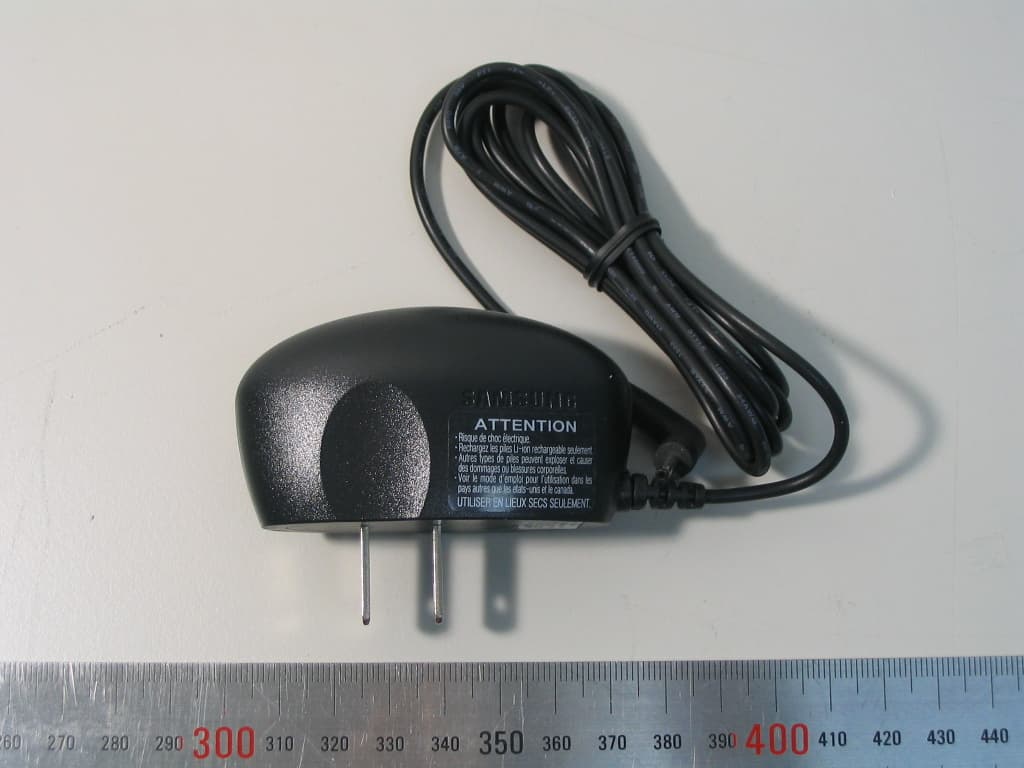
Click to zoom
Application Details
- Equipment Class
- DSS - Part 15 Spread Spectrum Transmitter
- Date of Grant
- Jul 26, 2006
- Application Purpose
- Original Equipment
- Date of Application
- Jul 26, 2006
- Equipment Note
- Bluetooth Headset
- Frequency Range
- 2402.00000000 - 2480.00000000
- Company
- Dream Technology Co., Ltd.
- Country
- South Korea
Documents & Files
Document Text
Text extracted from the exhibit documents filed with the FCC. Open a document above to read the original.
Users Manual
User Manual Dream Technology Co., Ltd. 1/9 Thank you for purchasing the Samsung Bluetooth Mono Headset WEP20X, we hope you will be delighted with its operation. Please read this user’s guide to get started, and to make the best use of the headset’s many features. Driving safety z When you are driving a car, driving is your first responsibility. z When using your headset while driving, follow local regulations in the country or region are in. BEFORE USING YOUR HEADSET Checking phone compatibility Your headset is compatible with most Bluetooth phones that are compliant with Bluetooth version 2.0 and support the headset and/or hands-free profile(s). Ensure that your phone has Bluetooth capability by visiting your phone manufacturer’s web site. Your headset overview Checking the accessories Make sure you have the following items with your headset: Charging case, Travel adapter, Manual, 2 headset hooks Charging the headset Your headset uses a rechargeable battery. You must charge the battery fully before using the headset for the first time. User Manual Dream Technology Co., Ltd. 2/9 1. Put the headset in the supplied charging case and close the cover. 2. Plug the travel adapter into the case’s charging socket. 3. Plug the travel adapter into the electrical outlet. z Charge the headset until the red light on the headset turns to blue. z The headset will be fully charged in approximately 2 hours. 4. Remove the travel adapter from the case. WARNING : Do not attempt to charge the headset with anything other than the travel adapter provided. Using unauthorized travel adapter may damage the headset. IMPORTANT : Removing the travel adapter from the case during charging will turn the headset off and stop the charging progress. The headset cannot be used while charging. Storage of the headset z Always store the headset with the power off and make sure it is safely protected. z Avoid storage at high temperatures (above 40C/104F). such as in a hot vehicle or in direct sunlight. (Storage at high temperatures can damaged performance and reduce battery life). z Do not expose the headset or any of its supplied parts to rain or other liquids. User Manual Dream Technology Co., Ltd. 3/9 BASIC OPERATIONS Turning the headset on/off To Press and hold You will hear You will see Turn the headset on The Multi-Function button for 4 seconds until you see 4 blue flashes on the indicator light, then release. A tone The indicator light flashes while the power is on (see Meaning of the indicator light). Turn the headset off The Multi-function button for 4 seconds until you see 2 blue flashes on the indicator light, then release. Series 2 tones The indicator light stops flashing. Meaning of the indicator light Light Tone Status Flashes in blue every 8 seconds Quick series of 2 tones.(Active mode starts.) The headset is in Active mode. z The headset has an active call in progress z You can talk up to 4 hours. * Flashes in blue every 3 seconds Quick series of 2 tones.(Standby mode starts.) The headset is in Standby mode. z The headset is waiting for a call. z The headset can be in Standby mode up to 70 hours. Flashes in red instead of 5 tones every 20 seconds. The battery of the headset User Manual Dream Technology Co., Ltd. 4/9 blue. is low. Recharge the battery. z There is only 1 minute of talk time left * Depending on the phone type and usage, the actual time may vary. Pairing with your Bluetooth phone Pairing will create a unique and encrypted wireless link between two Bluetooth enabled devices, such as your Bluetooth phone and Bluetooth headset. 1. Ensure that the headset is off (see Turning the headset on/off). 2. Press and hold the Multi-Function button until the indicator light turns on in blue(approximately 8 seconds). 3. Set your Bluetooth phone to discover the headset by following your phone’s guide. Typically, the steps involve going to a ‘Setup’, ‘Connect’, or ‘Bluetooth’ menu on your phone and then selecting the option to discover Bluetooth devices. 4. Your phone will find the Samsung WEP20X headset and ask if you want to pair with it. Confirm this by pressing the Yes or OK key. 5. Enter a passkey or PIN, 0000(4 zeros), then press the Yes or OK key. IMPORTANT : If pairing was successful, the indicator light will flash in blue 10 times rapidly before going to flashing every 3 seconds. If unsuccessful, the light remains on, and you will need to re-attempt pairing. Wearing the headset Wear the headset on your ear. In general, you will get better performance when there are no obstructions (including parts of your body) between the headset and the phone. Depending on what ear you are going to wear the headset, simply adjust the hook accordingly. User Manual Dream Technology Co., Ltd. 5/9 Making a call Making a voice activated call If the voice recognition feature is on, you can make a voice activated call. 1. Press the Multi-Function button once. You will hear the voice-activation tone. 2. Say the name of the person you wish to call. Depending on your phone, this feature is not supported. Redialing the last number If the voice recognition feature is off. Press and hold the Multi-Function button for 2 seconds, twice. If the voice recognition feature is on, 1. Press the Multi-Function button and listen for the voice-activation tone. When you hear it, press the button again to cancel the feature. 2. Press and hold the Multi-Function button to access the recent call list. 3. Press and hold the Multi-Function button to make a call to the last number you have dialed or received. IMPORTANT : Depending on your phone, you should press the Multi-Function button briefly or press and hold it to redial the last number. Ending a call Press the Multi-Function button once. Answering a call After you hear the ring tone, press the Multi-Function button once. If you answer the call with your phone, you can transfer the call to the headset by pressing the Multi-Function button. IMPORTANT : Do not hold the Multi-Function button down to…
Text truncated - open the document above for the full version.
Cover Letter(s)
Dream Technology Co., LTD Revision 1.0 1 - 1 Chief, Equipment Approval Services Federal Communications Commission PO Box 358315 Pittsburg, PA 15251-5315 Cheon-an, July 12, 2006 Authorization Letter Dear Sir or Madam: We, Dream Technology Co., LTD, hereby authorize O.N.R Tech Inc. 463-49, Sinlim-dong, Gwanak-gu, Seoul ,151-870, Republic of Korea To act as our agent and to process and sign on our behalf for equipment authorization under FCC Part 15, Subpart C. This authorization is applicable for the product: MONO HEADSET (WEP20X) with FCC ID: UD5WEP20X Sincerely, Printed Name : Jay Kang Title : Senior Engineer Signature : Company Stamp:
Cover Letter(s)
Dream Technology Co., LTD Revision 1.0 1 - 1 Federal Communications Commission Authorization and Evaluation Division 7435 Oakland Mills Road Columbia, MD 21046 Cheon-an, July 12, 2006 REQUEST FOR CONFIDENTIALITY, FCC ID: UD5WEP20X Pursuant to Sections 0.457(d)(1)(ii) and 0.459 of the Commission's Rules, the Applicant hereby requests confidential treatment of information accompanying as outlined below: • Schematic drawing • Bill of Materials • Block Diagram The above materials contain trade secrets and proprietary information not customarily released to the public. Public disclosure of these matters might be harmful to the Applicant and provide unjustified benefits to its competitors. The Applicant understands that pursuant to Rule 0.457(d)(1)(ii), disclosure of this Application and accompanying documentation will not be made before the date of the Grant for this application. Sincerely, Printed Name : Jay Kang Title : Senior Engineer Signature : Company Stamp:
External Photos
External Photos Dream Technology Co., Ltd. Revision No : 1. 0 1 1. Top side view 2. Bottom side view External Photos Dream Technology Co., Ltd. Revision No : 1. 0 2 3. Right side view 4. Left side view External Photos Dream Technology Co., Ltd. Revision No : 1. 0 3 5. Adaptor front view 6. Adaptor rear view External Photos Dream Technology Co., Ltd. Revision No : 1. 0 4 7. Adaptor with charger view I 8. Adaptor with charger view II
ID Label/Location Info
Label and Location Dream Technology Co., Ltd. Revision 1.0 1 - 1 * Location Label Position * Label 10mm 14 mm
Internal Photos
Internal Photos Dream Technology Co., Ltd. Revision No : 1.0 Page: 1 * Internal view 1. Internal View Internal Photos Dream Technology Co., Ltd. Revision No : 1.0 Page: 2 2. Top side View of the main PCB 3. Rear side View of the main PCB Bluetooth Antenna Bluetooth Chipset Bluetooth X-tal Internal Photos Dream Technology Co., Ltd. Revision No : 1.0 Page: 3 4. Rear side View of Battery PCB 5. Rear side View of Battery PCB
Operational Description
EUT Description Dream Technology Co., Ltd. Revision 1.0 1 - 1 1. BASIC DESCRIPTION Your headset is compatible with most Bluetooth phones that are compliant with Bluetooth specification and support the headset and/or hands-free profile(s). Ensure that your phone has Bluetooth capability by visiting your phone manufacturer’s web site. 2. Equipment under test Data Entries Product Name MONO HEADSET Product ID WEP20X Power Control? No Normal operation during battery charging? No Serial Number if any N/A Hardware Version VER 1.0 Software Version VER 1.0 Voltage ( Min, Nom , Max ) 3.0, 3.7, 4.0 Temperature ( Min, Nom , Max ) -10, 25, 50 Power supply Type TA ( 100~240 VAC 50~60 HZ 0.15A ) DTH ( 5.0V DC) Battery Type if any (ex. Lithium Ion ) Li-ion Battery Polymer Antenna Gain (maximum) -3 dBi Antenna Type ( ex. Surface mounting type ) Surface mounting type LSP(Largest supported packet)? DH5 3. General EUT Information Type Transmitter Receiver FCC Classification FHSS Sequence Spread Spectrum ( FHSS) FHSS Sequence Spread Spectrum ( FHSS) Operating frequency range 2402 – 2480 MHz 2402 – 2480 MHz Bands of operation 2.400 – 2.4835 GHz 2.400 – 2.4835 GHz Number of Channels 79 79 Channel Separation 1MHz 1MHz Type of Antenna Chip Antenna Chip Antenna Power Supply DC 3.7 V Lithum Ion Battery DC 3.7 V Lithum Ion Battery
Test Report
REPORT NO : NF-TA-R060013 NEX1 Future Co., Ltd. Revision No : 1.0 Page: 1 of 47 FCC TEST REPORT July 13, 2006 NEX 1 Future Co., Ltd. REPORT NO : NF-TA-R060013 NEX1 Future Co., Ltd. Revision No : 1.0 Page: 2 of 47 TEST REPROT CERTIFICATION Applicant : Dream Technology Co., Led. Adderss : 340-5, yang-dang Ri, jik-san Eup, Cheon-an si, Chung-Nam, Korea EUT Name : MONO HEADSET Model No. : WEP20X Serial No. : Engineering Sample FCCID : UD5WEP20X Testing location : Nex1 Future Co., Ltd. 133, Kongdan-Dong, Gumi-City, Kyeongsangbuk-Do, 730-030, R.O.K Applied specification : FCC Part 15 Test result : The above mentioned test item passed. Test Date July 13, 2006 Review Date July 13, 2006 Tested by Hyo-Jeung, Cho Reviewed by Jeong-Hi, Jin Title Engineer Title EMC Manager Signature Signature I HEREBY CERTIFY THAT the data shown in this report were made in accordance with the procedures given in the applied specification and I assume full responsibility for accuracy and completeness of these data. Note : This test report relates to the a. m. test item. Without permission of the test center this test report is not permitted to be duplicated in extracts. This test report does not entitle to carry any test mark on this or similar products. REPORT NO : NF-TA-R060013 NEX1 Future Co., Ltd. Revision No : 1.0 Page: 3 of 47 Contents 1. GENERAL INFORMATION................................................................................................. 5 1.1 PRODUCT DESCRIPTION............................................................................................... 5 1.2 PROJECT DATA............................................................................................................ 5 1.3 APPLICANT................................................................................................................. 5 1.4 MANUFACTURER......................................................................................................... 5 2. EUT INFORMATION........................................................................................................ 6 2.1 GENERAL EUT INFORMATION....................................................................................... 6 2.2 CENTER FREQUENCY OF TESTED CHANNEL................................................................... 6 2.3 TEST ENVIRONMENT.................................................................................................... 6 2.4 ACCESSORIES AND ANCILLARY EQUIPMENT.................................................................. 6 3. TESTING FACILITIES....................................................................................................... 7 4. EUT DESCRIPTION AND OPERATIONAL DESCRIPTION....................................................... 7 5. TEST SET-UP................................................................................................................. 8 5.1 PRINCIPLE OF CONFIGURATION..................................................................................... 8 5.2 OPERATIONAL MODES................................................................................................. 8 5.3 APPLIED SPECIFICATION.............................................................................................. 8 6. TEST REPORT SUMMARY............................................................................................... 9 7. TEST RESULTS............................................................................................................ 10 7.1 ANTENNA CONNECTOR REQUIREMENTS...................................................................... 10 7.2 AC CONNECTED EMISSION........................................................................................ 11 7.3 CARRIER FREQUENCY SEPARATION............................................................................ 12 7.4 TIME OF OCCUPANCY(DWELL TIME) ............................................................................ 14 7.5 20DB BANDWIDTH..................................................................................................... 16 7.6 NUMBER OF HOPPING FREQUENCIES REQUIREMENTS.................................................. 20 7.7 PSEUDORANDOM FHS AND EQUAL HOPPING FREQUENCY USE REQUIREMENTS............. 22 7.8 RECEIVER INPUT BANDWIDTH REQUIREMENTS............................................................. 23 REPORT NO : NF-TA-R060013 NEX1 Future Co., Ltd. Revision No : 1.0 Page: 4 of 47 7.9 PEAK OUTPUT POWER............................................................................................... 24 7.10 BAND-EDGE COMPLIANCE........................................................................................ 28 7.11 SPURIOUS CONDUCTED EMISSIONS........................................................................... 32 7.12 SPURIOUS RADIATED EMISSIONS.............................................................................. 43 8. LIST OF TEST AND MEASUREMENT INSTRUMENTS.......................................................... 46 9. NOTES........................................................................................................................ 47 REPORT NO : NF-TA-R060013 NEX1 Future Co., Ltd. Revision No : 1.0 Page: 5 of 47 1. General Information 1.1 Product Description Product Name : MONO HEADSET Product ID : WEP20X Serial No. : Prototype FCC ID : UD5WEP20X 1.2 Project data Receipt of EUT : July 3, 2006 Date of Test : July 13, 2006 Data of report : July 13, 2006 1.3 Applicant Company Name : Dream Technology Co., Led. Address : 340-5, yang-dang Ri, jik-san Eup, Cheon-an si, Chung-Nam, Korea Contact Person : Mr. Jay Kang 1.4 Manufacturer Company Name : Dream Technology Co., Led. Address : 340-5, yang-dang Ri, jik-san Eup, Cheon-an si, Chung-Nam, Korea Contact Person : Mr. Jay Kang REPORT NO : NF-TA-R060013 NEX1 Future Co., Ltd. Revision No : 1.0 Page: 6 of 47 2. EUT Information 2.1 General EUT Information Type Transmitter Receiver FCC Classification FHSS Sequence Spread Spectrum ( F…
Text truncated - open the document above for the full version.
Test Setup Photos
Test Setup Photos Dream Technology Co., Ltd. Revision No : 1.0 Page: 1 * Test set-up 1. Radiated Set up Test Setup Photos Dream Technology Co., Ltd. Revision No : 1.0 Page: 2 2 Spurious Radiated Emissions 2.1 Radiated test ( 30 MHz ~ 1GHz ) Test Setup Photos Dream Technology Co., Ltd. Revision No : 1.0 Page: 3 2.2 Radiated test ( 1 GHz ~ 13GHz ) Test Setup Photos Dream Technology Co., Ltd. Revision No : 1.0 Page: 4 2.3 Radiated test ( 13 GHz ~ 18GHz ) Test Setup Photos Dream Technology Co., Ltd. Revision No : 1.0 Page: 5 2.4 Radiated test ( 18 GHz ~ 25GHz )
Contact Information
Applicant
Hyouk-il Kwon(Manager)
Test Firm
LIG Nex1 Co., Ltd.Hyo-Jeung Cho
Technical Specifications
| # | Rule Parts | Frequency Range | Power Output |
|---|---|---|---|
| 1 | 15C | 2.40 GHz - 2.48 GHz | 440.00 µW |
Other Applications from Dream Technology Co., Ltd.
UD5DT100V
Nov 11, 2007BLUETOOTH HEADSET
Equipment Class
DSS - Part 15 Spread Spectrum Transmitter