V8VCNE8206BRSENTERTAINMENT CENTER
SKYPINE ELECTRONICS (SHEN ZHEN) CO., LTD.
Click to zoom
Application Details
- Equipment Class
- DSS - Part 15 Spread Spectrum Transmitter
- Date of Grant
- Jun 02, 2013
- Application Purpose
- Original Equipment
- Date of Application
- Jun 02, 2013
- Equipment Note
- ENTERTAINMENT CENTER
- Frequency Range
- 2402.00000000 - 2480.00000000
- Country
- China
Documents & Files
Document Text
Text extracted from the exhibit documents filed with the FCC. Open a document above to read the original.
Users Manual
Navigation Bluetooth Hands-Free iPod ® and MP3 compatible Back-up camera ready Play DVDs, Audio CDs, MP3 Discs Supports steering wheel controls Customizable backgrounds and illumination Satellite Radio ready Bluetooth Phonebook and favorites Multimedia Navigation System Quick Start Guide ENTERTAINMENT SYSTEMS This device complies with Part 15 of the FCC Rules. Operation is subject to the following two conditions: (1) this device may not cause harmful interference, and (2) this device must accept any interference received, including interference that may cause undesired operation. THE MANUFACTURER IS NOT RESPONSIBLE FOR ANY RADIO OR TV INTERFERENCE CAUSED BY UNAUTHORIZED MODIFICATIONS TO THIS EQUIPMENT. SUCH MODIFICATIONS COULD VOID THE USER’S AUTHORITY TO OPERATE THE EQUIPMENT. NOTICE OF INTENDED USE Some features of Rosen Entertainment Systems are not intended for viewing by the driver when the vehicle is in motion, such as movie playback. When using navigation, minimize the amount of time spent viewing the screen and use voice prompts as much as possible. Avoid prolonged use of the touch screen controls. Such use might distract the driver or interfere with the driver’s safe operation of the vehicle, and thus result in serious injury or death. Such use might also violate state or local laws. Rosen Entertainment Systems disclaims any liability for any bodily injury or property damage that might result from any improper or unintended use. ABOUT THE REGISTERED TRADEMARKS This item incorporates copy protection technology that is protected by U.S. patents and other intellectual property rights of Rovi Corporation. Reverse engineering and disassembly are prohibited. iPod ® is a registered trademark of Apple Computer, Inc. NAVIGATION MAPS Car navigation maps are frequently updated. While the database was judged to be as ac- curate as possible at the time of its release, a map database can never be 100% accurate. Road information that is maintained in the map databases, such as turn restrictions or road names may change over time. Errors or missing information in the map data are not covered by the Product Warranty. New and/or updates for the map data are the responsibility of the End-user. NOTE: Features listed in this manual are subject to change without notice. Copyright © 2011 by Rosen Entertainment Systems. All rights reserved. Except as permitted under the Copyright Act of 1976, no part of this publication may be reproduced or distributed in any form or by any means, or stored in a database or retrieval system, without the prior written permission of Rosen Entertainment Systems. For complete Owner’s and Navigation Manuals, please visit Rosen Entertainment Systems online at www.RosenEntertainment.com 1 Your system will automatically default to the last screen you were on prior to turning off the unit. The Information Bar is located at the top of the screen. Depending on the source, it will provide information or content sensitive controls This will take you to the Settings Menu for advanced control settings. The Source Tabs located at the bottom of the screen will give you direct access to common sources. Screen Organization Note: “PHONE” is highlighted BLUE when a phone is paired to Rosen Bluetooth. Customizing Source Tabs You have the option to customize the Source Tabs 3-6 on the bottom of the screen. AM/FM, DISC and PHONE are not customizable. To access the tab menu: 1) Press MENU and select SETTINGS 2) In left panel, select TABS 3) For each tab select the left and right arrows to toggle through the selections 4) Once you are satisfied with your choices, press RETURN to save. The customized tabs will now appear The Basics Voice Dial Screen Dimmer Mute ON/OFF (if supported) E 2 Short touch to seek previous and next available stations. Touch to scan. Each station will play for several seconds. Push the volume knob for Tuning, push again to go back to volume. In Tuning mode, after several seconds it will automatically go back to volume if it is not used. Note: This is only for vehicles with one knob. Touch to select AM1 & 2 and FM1,2 & 3 preset screens. To set a station as a Preset, press and hold the button. The name of the channel for SAT Radio or station frequency for AM/FM Radio will appear in the button when saved. Short touch the desired Preset button to select that channel. Touch to select SAT 1,2 & 3 preset screens Use numeric keypad to directly enter a channel station Short touch to seek previous and next available stations. Channel Selection Satellite Radio (If Equipped) Preset Channels E Radio To learn how to access preset channels while in navigation mode, please refer to the Navigation section of this Quick Start Guide. To learn how to access preset channels while in navigation mode, please refer to the Navigation section of this Quick Start Guide. You can access music files on your iPod by using your Apple iPod cable to connect to the unit. Simply plug it into the USB slot located on the front or rear of the unit. Touch Button Descriptions Press once to restart current track, press again for Previous Track Play/Pause Next track Repeat the current played song Shuffle tracks Search for artist, album, or song by the first letter Main iPod root menu 3 Note: Sleep mode should be enabled on the iPod to reduce battery drain if the iPod is left connected with the vehicle off. Root Menu Use this to toggle between Video and Audio menus Use to search by first letter Toggle between song details and root menu From the list of songs, press once to play the track and the song playing will be highlighted Press a second time to display song details and album artwork. Select to go back to track list To Play a Song Note: A special iPod video cable is required iPod 4 DVD Previous Chapter Play/Pause Next Chapter Shows information such as Chapter, Time Elapsed, etc Main DVD menu Exit Menu and return to full screen DVD Settings menu Long Touch in DVD mode to show the DVD control screen. To return …
Text truncated - open the document above for the full version.
Cover Letter(s)
SKYPINE SKYPINE SKYPINE SKYPINEELECTRONICS ELECTRONICS ELECTRONICS ELECTRONICS(SHEN (SHEN (SHEN (SHENZHEN) ZHEN) ZHEN) ZHEN)CO.,LTD. CO.,LTD. CO.,LTD. CO.,LTD. Date:May21,2013 FederalCommunicationsCommission AuthorizationandEvaluationDivision ConfidentialityRequestregardingapplicationforcertificationofFCCID:V8VCNE8206BRS. PursuanttoSections0.457and0.459oftheCommission’sRules,weherebyrequestconfidential treatmentofinformationaccompanyingthisapplicationasoutlinedbelow: Theabovematerialscontaintradesecretsandproprietaryinformationnotcustomarilyreleasedto thepublic.Thepublicdisclosureofthesematerialsmaybeharmfultotheapplicantandprovide unjustifiedbenefitstoitscompetitors. TheapplicantunderstandsthatpursuanttoSection0.457oftheRules,disclosureofthis applicationandallaccompanyingdocumentationwillnotbemadebeforethedateoftheGrant forthisapplication. Sincerely, SKYPINEELECTRONICS(SHENZHEN)CO.,LTD. ................................................... Signature AaronZheng/VicePresident ................................................... TypednameandTitle Exhibit Exhibit Exhibit ExhibitType Type Type TypeFile File File FileName Name Name Name Schematics BlockDiagram OperationalDescription SCH.pdf BlockDiagram.pdf CircuitDescription.pdf
External Photos
Report No.: WTS13S0503425E Page 67 of 80 Waltek Services (Shenzhen) Co.,Ltd. http://www.waltek.com.cn 18 Photographs - Constructional Details 18.1 EUT – External View Report No.: WTS13S0503425E Page 68 of 80 Waltek Services (Shenzhen) Co.,Ltd. http://www.waltek.com.cn Report No.: WTS13S0503425E Page 69 of 80 Waltek Services (Shenzhen) Co.,Ltd. http://www.waltek.com.cn
ID Label/Location Info
FCC Label Location for model: See the report The Label must not be a stick-on paper. The Label on these products must be permanently affixed to the product and readily visible at the time of purchase and must last the expected lifetime of the equipment not be readily detachable. FCC ID: V8VCNE8206BRS This device complies with Part 15 of the FCC Rules. Operation is subject to the following two conditions: (1) this device may not cause harmful interference, and (2) this device must accept any interference received, including interference that may cause undesired operation.
ID Label/Location Info
FCC Label Sample for model: See the report FCC ID: V8VCNE8206BRS This device complies with Part 15 of the FCC Rules. Operation is subject to the following two conditions: (1) this device may not cause interference, and (2) this device must accept any interference, including interference that may cause undesired operation of the device.
Internal Photos
Report No.: WTS13S0503425E Page 70 of 80 Waltek Services (Shenzhen) Co.,Ltd. http://www.waltek.com.cn 18.2 EUT- Internal View Report No.: WTS13S0503425E Page 71 of 80 Waltek Services (Shenzhen) Co.,Ltd. http://www.waltek.com.cn Report No.: WTS13S0503425E Page 72 of 80 Waltek Services (Shenzhen) Co.,Ltd. http://www.waltek.com.cn
Internal Photos
Report No.: WTS13S0503425E Page 73 of 80 Waltek Services (Shenzhen) Co.,Ltd. http://www.waltek.com.cn Report No.: WTS13S0503425E Page 74 of 80 Waltek Services (Shenzhen) Co.,Ltd. http://www.waltek.com.cn Report No.: WTS13S0503425E Page 75 of 80 Waltek Services (Shenzhen) Co.,Ltd. http://www.waltek.com.cn Report No.: WTS13S0503425E Page 76 of 80 Waltek Services (Shenzhen) Co.,Ltd. http://www.waltek.com.cn
Internal Photos
Report No.: WTS13S0503425E Page 77 of 80 Waltek Services (Shenzhen) Co.,Ltd. http://www.waltek.com.cn Report No.: WTS13S0503425E Page 78 of 80 Waltek Services (Shenzhen) Co.,Ltd. http://www.waltek.com.cn Report No.: WTS13S0503425E Page 79 of 80 Waltek Services (Shenzhen) Co.,Ltd. http://www.waltek.com.cn Report No.: WTS13S0503425E Page 80 of 80 Waltek Services (Shenzhen) Co.,Ltd. http://www.waltek.com.cn =End of test report==
Test Report
Reference No.: WTS13S0503425E Page 1 of 80 FCC TEST REPORT Waltek Services (Shenzhen) Co.,Ltd. http://www.waltek.com.cn FCC ID : V8VCNE8206BRS Applicant : SKYPINE ELECTRONICS (SHEN ZHEN) CO.,LTD. Address : A1 Building, No.6 Xinxing Industrial Park, Xinhe Village, Fuyong Town, Baoan District, Shenzhen City Manufacturer : The same as above Address : The same as above Equipment Under Test (EUT) : Product Name : Entertainment System Model No. : PR-UN1370(CNE-8206B-RS),See section 4.4 Model List for family models Brand : ROSEN(SKYPINE) Rules : FCC CFR47 Part15 C Section 15.247:2010 Date of Test : May. 13 ~ 15, 2013 Date of Issue : May. 20, 2013 Test Result : PASS* Remark: * The sample detailed above has been tested to the requirements of FCC rules mentioned above. The test results have been reviewed against the directives above and found to meet their essential requirements. The results shown in this test report refer only to the sample(s) tested, this test report cannot be reproduced, except in full, without prior written permission of the company. The report would be invalid without specific stamp of test institute and the signatures of compiler and approver. PERPARED BY: Waltek Services (Shenzhen) Co., Ltd. 1/F, Fukangtai Building, West of Baima Road., Songgang Street, Bao’an District, Shenzhen, China Tel: +86-755-83551033 Fax: +86-755-83552400 Compiled by: Approved by: Zero Zhou / Project Engineer Philo Zhong / Manager Report No.: WTS13S0503425E Page 2 of 80 Waltek Services (Shenzhen) Co.,Ltd. http://www.waltek.com.cn 2 Test Summary Test Items Test Requirement Result Conducted Emissions 15.207 N/A Radiated Emissions 15.205(a) 15.209 15.247(d) PASS Spurious RF Conducted Emissions from out of band 15.247(d) PASS 20dB Bandwidth 15.247(a)(1) PASS Maximum Peak Output Power 15.247(b)(1) PASS Frequency Separation 15.247(a)(1) PASS Number of Hopping Frequency 15.247(a)(1)(iii) PASS Dwell time 15.247(a)(1)(iii) PASS Antenna Requirement 15.203 PASS Maximum Permissible Exposure (Exposure of Humans to RF Fields) 1.1307(b)(1) PASS Report No.: WTS13S0503425E Page 3 of 80 Waltek Services (Shenzhen) Co.,Ltd. http://www.waltek.com.cn 3 Contents Page 1 COVER PAGE .......................................................................................................................................... 1 2 TEST SUMMARY................................................................................................................................................... 2 3 CONTENTS............................................................................................................................................................. 3 4 GENERAL INFORMATION.................................................................................................................................. 5 4.1 GENERAL DESCRIPTION OF E.U.T............................................................................................................. 5 4.2 DETAILS OF E.U.T...................................................................................................................................... 5 4.3 CHANNEL LIST............................................................................................................................................ 5 4.4 TEST FACILITY............................................................................................................................................ 8 4.5 TEST LOCATION.......................................................................................................................................... 8 4.6 GENERAL CONDITION.................................................................................................................................. 8 4.6.1 Environmental condition of test site.......................................................................................................8 4.6.2 Test Mode.................................................................................................................................................8 5 EQUIPMENT USED DURING TEST................................................................................................................... 9 5.1 EQUIPMENTS LIST....................................................................................................................................... 9 5.2 MEASUREMENT UNCERTAINTY................................................................................................................... 9 5.3 TEST EQUIPMENT CALIBRATION................................................................................................................. 9 6 CONDUCTED EMISSIONS................................................................................................................................10 7 RADIATED EMISSIONS..................................................................................................................................... 11 7.1 EUT OPERATION:..................................................................................................................................... 11 7.2 TEST SETUP.............................................................................................................................................. 12 7.3 SPECTRUM ANALYZER SETUP.................................................................................................................. 13 7.4 TEST PROCEDURE.................................................................................................................................... 14 7.5 CORRECTED AMPLITUDE & MARGIN CALCULATION................................................................................. 14 7.6 SUMMARY OF TEST RESULTS................................................................................................................... 15 8 SPURIOUS RF CONDUCTED EMISSIONS FROM OUT OF BAND.......................................................... 21 8.1 TEST PROCEDURE.........................…
Text truncated - open the document above for the full version.
Test Setup Photos
Report No.: WTS13S0503425E Page 64 of 80 Waltek Services (Shenzhen) Co.,Ltd. http://www.waltek.com.cn 17 Photographs –Test Setup 17.1 Radiated Emissions Below 30MHz Report No.: WTS13S0503425E Page 65 of 80 Waltek Services (Shenzhen) Co.,Ltd. http://www.waltek.com.cn From 30-1000MHz Report No.: WTS13S0503425E Page 66 of 80 Waltek Services (Shenzhen) Co.,Ltd. http://www.waltek.com.cn Above 1GHz
Contact Information
Applicant
bobe Li(Senior Director)
Test Firm
Waltek Services(Shenzhen) Co., Ltd.Philo zhong
Technical Specifications
| # | Rule Parts | Frequency Range | Power Output |
|---|---|---|---|
| 1 | 15C | 2.40 GHz - 2.48 GHz | 600.00 µW |
Other Applications from SKYPINE ELECTRONICS (SHEN ZHEN) CO., LTD.
V8V-WZA12000
Jan 28, 2026Car Multimedia
Equipment Class
DSS - Part 15 Spread Spectrum Transmitter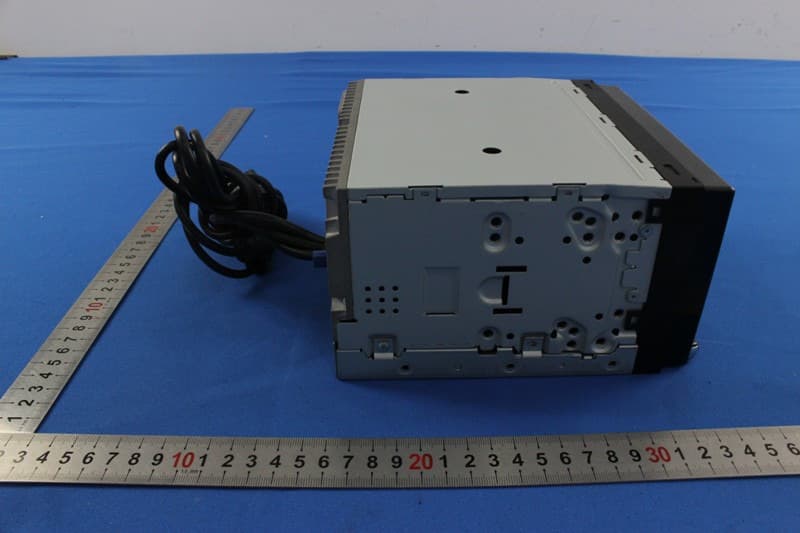
V8VNX706
Dec 13, 2015ALL IN ONE DVD PLAYER
Equipment Class
DTS - Digital Transmission System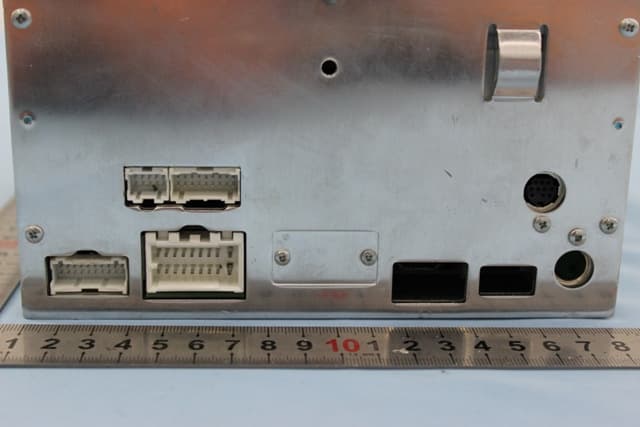
V8VCES8243CL
Dec 21, 2014All In One DVD Player
Equipment Class
DTS - Digital Transmission System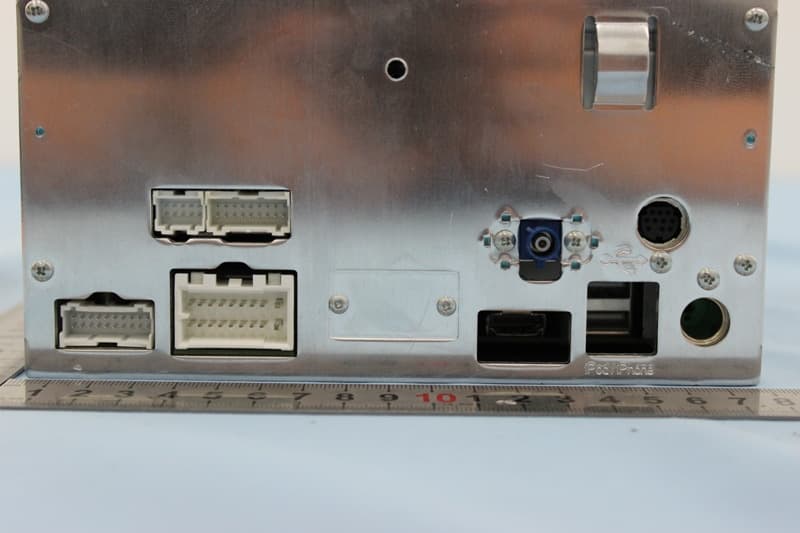
V8VCNE8243CCL
Dec 21, 2014All In One DVD Player
Equipment Class
DTS - Digital Transmission System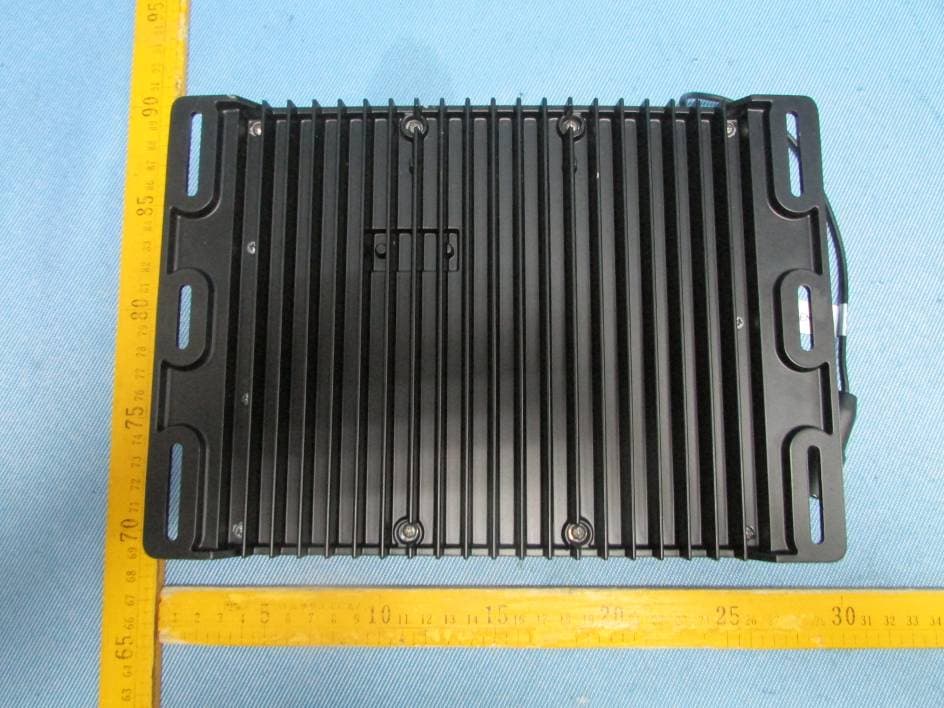
V8VMW4
Jul 07, 2014MARINE AUDIO SYSTEMS
Equipment Class
DSS - Part 15 Spread Spectrum Transmitter