V8VCNE8213FACar DVD entertainment center
SKYPINE ELECTRONICS (SHEN ZHEN) CO., LTD.
Click to zoom
Application Details
- Equipment Class
- DSS - Part 15 Spread Spectrum Transmitter
- Date of Grant
- Nov 23, 2010
- Application Purpose
- Original Equipment
- Date of Application
- Nov 22, 2010
- Equipment Note
- Car DVD entertainment center
- Frequency Range
- 2402.00000000 - 2480.00000000
- Country
- China
Documents & Files
Document Text
Text extracted from the exhibit documents filed with the FCC. Open a document above to read the original.
Users Manual
VER:7-9820-8319-00-00 注意: 红色虚线为刀模线 This device complies with Par t 15 of the FCC Rules. Operation is subject to the following two conditions: (1) this device may not cause harmful interference, and (2) this device must accept any interference received, including interference that may cause undesired operation. Warning:Changes or modifications to this unit not expressly approved by the par ty responsible for compliance could void the user's authority to operate the equipment. FCC ID:V8VCNE8213FA This equipment complies with FCC RF radiation exposure limits set forth for an uncontrolled environment.This equipment should be installed and operated with a minimum distance of 20 centimeters between the radiator and your body. 1 Contents Thankyouforyourchoosingourproduct.Wehopeyouwillfindtheinstructionsinthisuser manualclearandeasytofollow.Ifyoutakeafewminutestolookthroughit,you’lllearnhowto useallthefeaturesofyournewunitformaximumenjoyment. Afteryouhavefinishedreadingtheinstructions,pleasekeepthismanualinasafeplaceforfuture reference. Precautions Precautions Precautions Precautions 3-4 3-4 3-4 3-4 Onsafety3 Moisturecondensation3 Tomaintainhighsoundquality3 Playablediscs3 DVDRegionManagement4 Preparation Preparation Preparation Preparation 5 5 5 5 Features5 ToolsandSupplies5 WARNING5 DisconnectingtheBattery5 C C C Controls o ntrols ontrols ontrolsa a a and n d nd ndIndicators I ndicators Indicators Indicators 6-7 6-7 6-7 6-7 ButtonOperation6 TheKeyAreasOfTouchScreen7 Remote Remote Remote RemoteControl Control Control Control8-9 8-9 8-9 8-9 FrontZoneRemoteControl8 T T T TFT FT FT FTMonitor Monitor Monitor MonitorOperation Operation Operation Operation10 10 10 10 RearCameraMode10 ImageSettings10 ParkingBrakeInterlock10 Operating Operating Operating OperatingInstructions Instructions Instructions Instructions11-12 11-12 11-12 11-12 PowerOn/Off11 PlayingSourceSelection11 VolumeAdjustment11 AudioControlMenu11 Five-ChannelAudioControl12 RearZone12 SystemReset12 Mute12 Standby12 System System System SystemSetup Setup Setup SetupMenu Menu Menu Menu13-17 13-17 13-17 13-17 MAINMenu13 RearzoneMenu13 ScreenSetting13 GeneralSetupMenu14 Video15 ASP(AudioSignalProcessing)ConfigurationMenu16 LanguageMenu17 Tuner Tuner Tuner TunerOperation Operation Operation Operation18-19 18-19 18-19 18-19 TunerTFTDisplay18 SwitchtoRadiosource18 SelectFM/AMBand18 AutoTuning18 ManualTuning19 UsingPresetStations19 AutoStore(AS)19 ProgramScan(PS)19 LocalRadioStationsSeeking(LOC)19 2 NOTE NOTE NOTE NOTE:1.certaindescriptioninthebookmaydifferfromtheactualunit. 2.Somepicturesoriconsinthebookmaydifferfromactualdisplay. 3.Specificationssubjecttochangewithoutnotice. DVD DVD DVD DVDPlayer Player Player PlayerOperation Operation Operation Operation 20-25 20-25 20-25 20-25 Insert/EjectDisc20 ResettheLoadingMechanism20 AccessingDVDMode20 UsingtheTouch-ScreenControls20 ControllingPlayback21 AccessingtheDVDMenu21 MovingThroughChapters21 FastForward/FastReverse21 Selecting2-Channelor6-ChannelAudioPlayback22 GOTOSearch22 DirectChapter/TrackSelection23 ViewinganAlternatePictureAngle(DVDOnly)23 Zooming23 Multi-LanguageDiscs(DVDOnly)23 PlaybackInformation23 GeneralDiscInformation25 CD/MP3/WMA/JPEG CD/MP3/WMA/JPEG CD/MP3/WMA/JPEG CD/MP3/WMA/JPEGOperation O peration Operation Operation 26-28 26-28 26-28 26-28 CDPlayerUserInterface26 MP3/WMADiscs27 JPEGDiscs28 iPod iPod iPod iPodO O O Operation peration peration peration29 29 29 29 AccessingiPodMode29 iPodInstructions29 PlaybackofvideooniPod29 USB USB USB USBO O O Operation peration peration peration30 30 30 30 SD SD SD SDOperation Operation Operation Operation31 31 31 31 Navigation Navigation Navigation NavigationOperation Operation Operation Operation32 32 32 32 HowtoaccesstheNavigationmode32 HowtoListentoAudioWhileUsingNavigation32 Bluetooth Bluetooth Bluetooth BluetoothOperation Operation Operation Operation33-36 33-36 33-36 33-36 AccessingBluetoothMode33 BluetoothUserInterface33 Troubleshooting Troubleshooting Troubleshooting Troubleshooting37-40 37-40 37-40 37-40 Specifications Specifications Specifications Specifications41 41 41 41 3 Toavoidtheriskofinjuryoraccident,readthefollowingprecautionsbeforeinstallingand operatingtheunit. On On On Onsafety s afety safety safety Complywithyourlocaltrafficrulesandregulations. �Whiledriving � Youmustnotwatchoroperatethemonitor.Itmayleadtodistractionandcauseanaccident. Parkyourcarinasafeplacetowatchthemonitorandoperatetheunit. �Whileoperating �Donotinsertyourhands,fingersorforeignobjectintotheunitwhilethemonitoris functioning.Itmaycauseinjuryordamagetotheunit. �Keepsmallarticlesoutofthereachofchildren. �Ifyourcarwasparkedindirectsunlightresultinginaconsiderableriseintemperatureinside thecar,allowtheunittocooloffbeforeoperatingit. � Preventingaccidents Thevideopicturesappearonlyafteryouparkthecarandsettheparkingbrake. Whenthecarstartsmoving,thevideopicturesautomaticallydisappearforsafety reasons,afterdisplayingthefollowingcaution. Donotwatchthemonitorwhiledriving.Youmaycauseatrafficaccidentifyourattention isdistractedbythemonitor. �DonotusetheSystemSetupfeaturewhiledriving,orperformanyotherfunctionwhichcould divertyourattentionfromtheroad. � Whenyouconnectthebackcamera: �Whenyoudrive,watchthesurroundingscarefullyforyoursafety.Donotdependontheback cameraexclusively. � Whenbackingupyoucar,besuretolookbackforyoursafety. � DonottouchtheliquidcrystalfluidiftheLCDisdamagedorbroken.Theliquidcrystalfluidmay behazardoustoyourhealthorfatal.IftheliquidcrystalfluidfromtheLCDcontactsyourbody orclothing,washitoffwithsoapimmediately. Moisture Moisture Moisture Moisturecondensation condensation condensation condensation Whenthetemperatureoftheunitfalls(asinwinter),theliquidcrystalinsidethescreenwillbecome darkerthanusual.Normalbrightnesswillreturnafterusingthemonitorforawhile. To T o To Tomaintain maintain maintain maintainhigh high high highsound sound sound soundquality quality quality quality Becarefulnottosplashjuiceorothersoftdrinksontotheunitordiscs. Playable P lay…
Text truncated - open the document above for the full version.
Cover Letter(s)
SCS-F18: Project and Product Certification Representative Authorization Letter Page 1 of 2 Rev 2.0 2206 Ringwood Avenue San Jose, CA 95131 Tel: 408-526-1188 Fax: 408-526-1088 Email: [email protected] Project and Product Certification Representative Authorization Letter Revision History Reason for Amendment (current / obsolete) From To Approved Date Initial Release (current) 1.0 1.0 Nov-14-2006 Revised wording (current) 1.0 2.0 Sept–25-2007
Cover Letter(s)
2206 Ringwood Avenue San Jose, CA 95131 Tel: 408-526-1188 Fax: 408-526-1088 Email: [email protected] Confidentiality Request Letter Revision History Reason for Amendment (current / obsolete) From To Approved Date Initial Release (current) 1.0 1.0 Nov-14-2006 Adding CFR 2.459 1.0 2.0 August – 11 - 2008 SCS-F19: Confidentiality Request Letter Page 1 of 2 Rev 2.0 SCS-F19: Confidentiality Request Letter Page 2 of 2 Rev 2.0 Nov.22.2010 To: Federal Communications Commission Authorization and Evaluation Division 7435 Oakland Mills Road Columbia, MD Confidentiality Request regarding application for certification of FCC ID: :V8VCNE8213FA We hereby request confidential treatment of information accompanying this application as outlined below: - Block Diagram - Circuit(Schematic) - description(Operation description) The above materials contain trade secrets and proprietary information not customarily released to the public. The public disclosure of these materials may be harmful to the applicant and provide unjustified benefits to its competitors. The applicant understands that pursuant to Section 0.457 & 0.459 of the Rules, disclosure of this application and all accompanying documentation will not be made before the date of the Grant for this application. Sincerely, Client’s signature Client’s name / title Manager: Vice President Contact information / address : 2/F. A incubation Building, TaohuaYuan High-Tech innovation Park,Baoan District, ShenZhen City
External Photos
EXTERNAL PHOTOS OF EUT Front View of EUT Rear View of EUT
Internal Photos
INTERNAL PHOTOS OF EUT Internal View of EUT-1 Internal View of EUT-2 Internal View of EUT-3 Internal View of EUT-4 Internal View of EUT-5 Internal View of EUT-6 Internal View of EUT-7 Bluetooth PCB
RF Exposure Info
RF Exposures Evaluation For Maximum Permissible Exposure (MPE) evaluation of the product, the maximum power density at 20 cm from this transmitter shall be less than the General Population / Uncontrolled MPE limit in OET Bulletin 65. For the EUT of tested model IM-8213B, the measured maximum field strength measured (FS) was 89.0 dBμV/m. The distance (D) between the antenna and the equipment under test (EUT) was 3 meters. From these data, the exposed power density at a distance (R) of 20cm from the center of radiation of the antenna can be calculated according to OET Bulletin 65 as follow: The radiated power = (FS*D) 2 / 30 = 0.238mW The power density at 20 cm from the antenna = EIRP / = 0.00004 mW cm -2 In the frequency range of 2.4-2.4835GHz, the MPE limit is 1.0 mWcm -2 for general population and uncontrolled exposure. As the measured power density at 20cm from the transmitter is lower than the MPE limit, the compliance to the MPE limit can be ensured by indicating the minimum 20cm separation between the transmitter's radiating structures and body of the user or nearby persons.
Test Report
Report No. : SZEE101028119701 Page 1 of 41 ELECTROMAGNETIC EMISSIONS COMPLIANCE REPORT INTENTIONAL RADIATOR CERTIFICATION Product Name : Car DVD entertainment center Model Number : IM-8213B / CNE-8213F-A Trade Name : AVT / SKYPINE FCC ID : V8VCNE8213FA Report Number : SZEE101028119701 Date : November 15, 2010 Prepared for: SKYPINE ELECTRONICS (SHENZHEN) CO., LTD. 2/F, A Incubation Building, TaoHuaYuan High-tech Innovation Park, Baoan District, Shenzhen City TEL: +86-755-2794 8418 FAX: +86-755-2794 8503 Prepared by: CENTRE TESTING INTERNATIONAL Building C, Hongwei Industrial Zone, Baoan 70 District, Shenzhen, Guangdong, China TEL: +86-755-3368 3668 FAX: +86-755-3368 3385 This report shall not be reproduced, except in full, without the written approval of CENTRE TESTING INTERNATIONAL Building C, Hongwei Industrial Zone, Baoan 70 District, Shenzhen Standards Results 47 CFR FCC Part 15 Subpart C 15.247 PASS Report No. : SZEE101028119701 Page 2 of 41 TABLE OF CONTENTS Description Page 1. CERTIFICATION INFORMATION ............................................................................................................... 4 2. TEST SUMMARY ........................................................................................................................................ 5 3. MEASUREMENT UNCERTAINTY .............................................................................................................. 5 4. PRODUCT INFORMATION ......................................................................................................................... 5 5. SYSTEM TEST CONFIGURATION.............................................................................................................. 6 6. TEST EQUIPMENT LIST............................................................................................................................. 7 7. SUPPORT EQUIPMENT LIST .................................................................................................................... 7 8. 20DB BANDWIDTH MEASUREMENT ....................................................................................................... 8 8.1. LIMITS ................................................................................................................................................. 8 8.2. BLOCK DIAGRAM OF TEST SETUP.................................................................................................. 8 8.3. TEST PROCEDURE ........................................................................................................................... 8 8.4. TEST RESULT .................................................................................................................................... 8 9. CARRIER FREQUENCY SEPARATION ...................................................................................................10 9.1. LIMITS ............................................................................................................................................... 10 9.2. BLOCK DIAGRAM OF TEST SETUP................................................................................................ 10 9.3. TEST PROCEDURE ......................................................................................................................... 10 9.4. TEST RESULT .................................................................................................................................. 10 10. NUMBER OF HOPPING FREQUENCY................................................................................................ 12 10.1. LIMITS ............................................................................................................................................... 12 10.2. BLOCK DIAGRAM OF TEST SETUP................................................................................................ 12 10.3. TEST PROCEDURE ......................................................................................................................... 12 10.4. TEST RESULT .................................................................................................................................. 12 11. TIME OF OCCUPANCY (DWELL TIME)................................................................................................... 13 11.1. LIMITS ............................................................................................................................................... 13 11.2. BLOCK DIAGRAM OF TEST SETUP................................................................................................ 13 11.3. TEST PROCEDURE ......................................................................................................................... 13 11.4. TEST RESULT .................................................................................................................................. 13 Report No.SZEE100608119730-1 Page 3 of 41 12. MAXIMUM PEAK CONDUCTED OUTPUT POWER MEASUREMENT .............................................. 17 12.1. LIMITS ............................................................................................................................................... 17 12.2. BLOCK DIAGRAM OF TEST SETUP................................................................................................ 17 12.3. TEST PROCEDURE ......................................................................................................................... 17 12.4. TEST RESULT .................................................................................................................................. 17 13. BAND EDGE EMISSION MEASUREMENT ......................................................................................... 19 13.1. LIMITS ............................................................................................................................................... 19 13.2. BLOCK DIAGRAM OF TEST SETUP..............................…
Text truncated - open the document above for the full version.
Test Setup Photos
TEST SETUP PHOTOS TEST SETUP OF RADIATED EMISSION (30MHz-1GHz) TEST SETUP OF RADIATED EMISSION (above 1GHz)
Contact Information
Applicant
bobe Li(Senior Director)
Test Firm
CENTRE TESTING INTERNATIONAL CORPORATIONChristy Chen
Technical Specifications
| # | Rule Parts | Frequency Range | Power Output |
|---|---|---|---|
| 1 | 15C | 2.40 GHz - 2.48 GHz | 500.00 µW |
Other Applications from SKYPINE ELECTRONICS (SHEN ZHEN) CO., LTD.
V8V-WZA12000
Jan 28, 2026Car Multimedia
Equipment Class
DSS - Part 15 Spread Spectrum Transmitter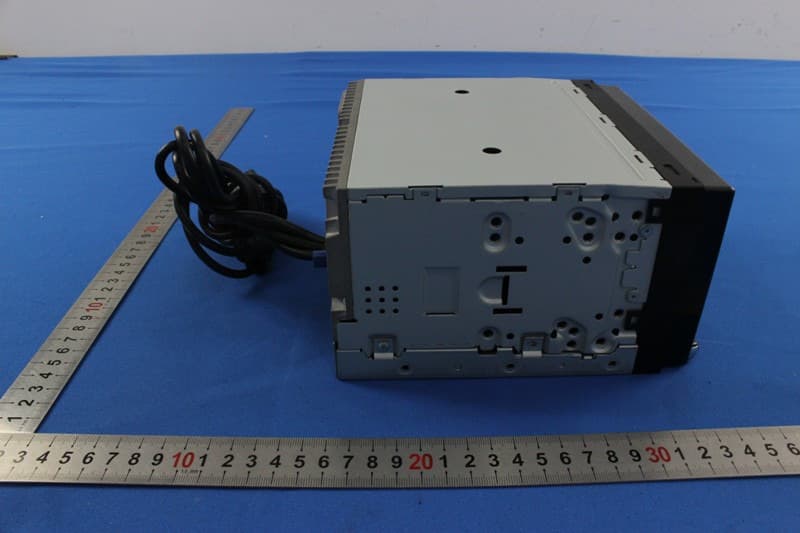
V8VNX706
Dec 13, 2015ALL IN ONE DVD PLAYER
Equipment Class
DTS - Digital Transmission System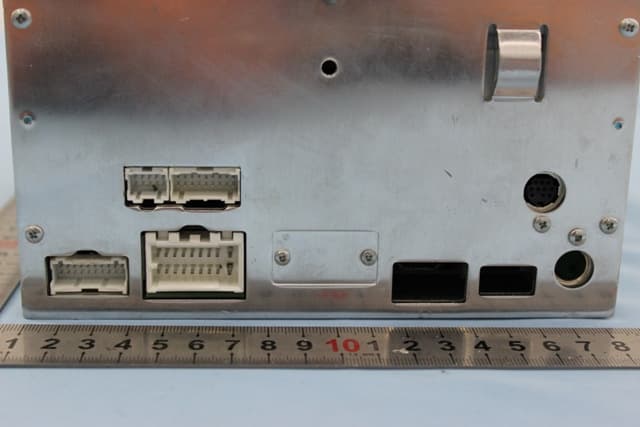
V8VCES8243CL
Dec 21, 2014All In One DVD Player
Equipment Class
DTS - Digital Transmission System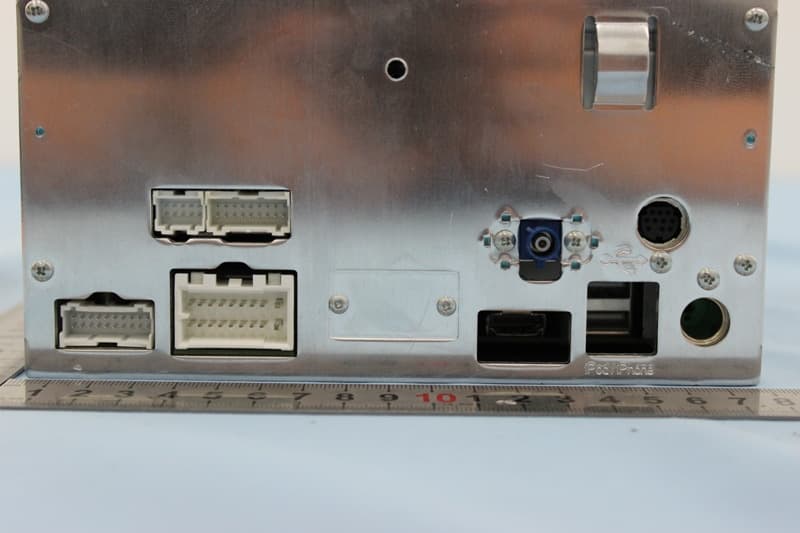
V8VCNE8243CCL
Dec 21, 2014All In One DVD Player
Equipment Class
DTS - Digital Transmission System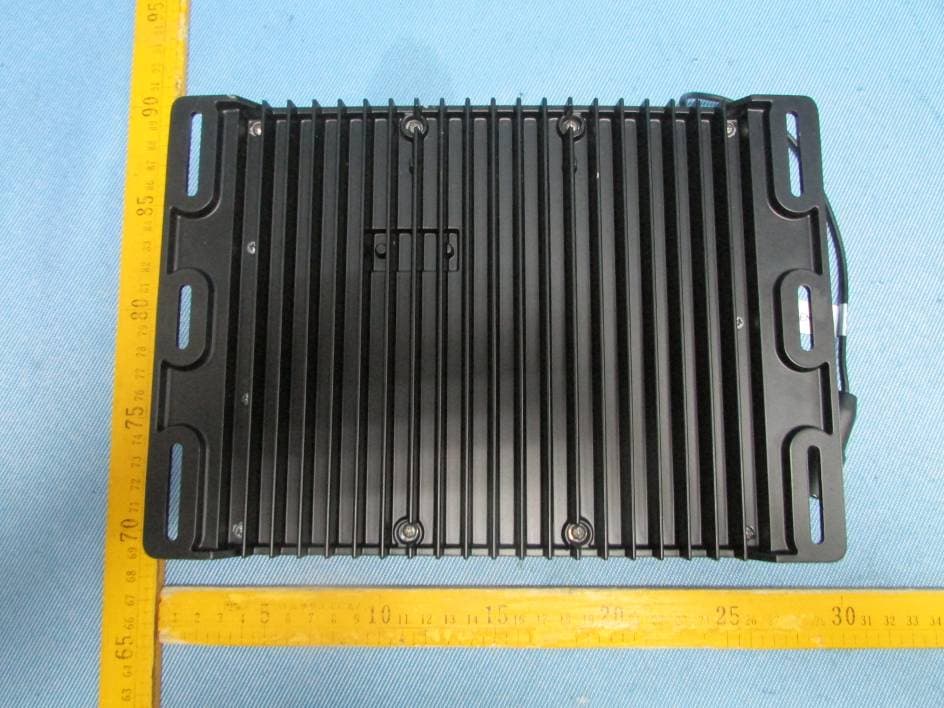
V8VMW4
Jul 07, 2014MARINE AUDIO SYSTEMS
Equipment Class
DSS - Part 15 Spread Spectrum Transmitter