V8VCNE8415BSMARTSmart High Line
SKYPINE ELECTRONICS (SHEN ZHEN) CO., LTD.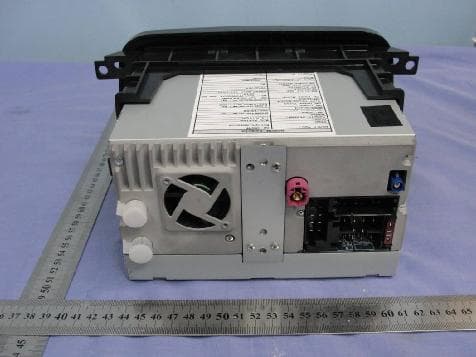
Click to zoom
Application Details
- Equipment Class
- DSS - Part 15 Spread Spectrum Transmitter
- Date of Grant
- Nov 24, 2011
- Application Purpose
- Original Equipment
- Date of Application
- Nov 24, 2011
- Equipment Note
- Smart High Line
- Frequency Range
- 2402.00000000 - 2480.00000000
- Country
- China
Documents & Files
Document Text
Text extracted from the exhibit documents filed with the FCC. Open a document above to read the original.
Users Manual
>> smart high line radio. Supplement Symbols *Optional equipment $ Warning % Environmental note ! Possible vehicle damage + Tip X Action required Y Y Continuation symbol (Y page) Page reference Index ............................................2 smart high line radio .......................5 4515848382 É451584838 25ËÍ Contents 1 A Address entry menu .........................28 Adjusting the balance .....................16 Adjusting the volume Click ......................................18 Confirmation tone .....................18 Navigation messages ..............15, 17 Switch-on volume ....................... 18 Traffic announcements ............ 15, 17 Alternative route Calculating ..............................32 Viewing information ..................32 Automatic full screen (video) ...........88 Auto zoom (navigation) ....................48 AUX jack ....................................... 73 B Bluetooth ® Conditions (telephone) ...............54 Editing device names .................64 LED display ..............................56 Searching for and registering a mobile phone ............................55 C Call Ending ....................................59 Transferring from the hands- free system to the mobile phone .... 59 CD/DVD Ejecting (DVD single drive) .........72 Inserting (DVD single drive) ........72 Character entry Navigation ...............................12 Phone book ...............................13 Connecting an audio device ..............74 Connecting a USB device ..................74 Connecting Bluetooth ® audio devi- ces ..............................................75 D Destination (navigation) Entering a destination by address ...................................28 Entering a destination using the map ...................................35 Entering a special destination ....35 Entering using geo-coordinates ... 33 Selecting from favourites ...........34 Selecting from previous towns .....34 Viewing on the map ....................31 Destination input ..........................27 Destination memory see Favourites DNC see Dynamic Noise Covering Dynamic Noise Covering ..................82 E Easy mode (navigation) ....................26 Electromagnetic compatibility .......... 5 Emergency call 999 or 112 .................54 Example: entering an address ...........28 Expert mode (navigation) .................26 F Factory settings ............................23 Favourites ....................................45 Creating a new favourite .............46 Deleting a destination ...............46 Renaming a destination ..............46 Saving a destination ..................45 Front panel Moving up/down .......................... 8 Full screen mode (video mode) ..........84 Function restrictions Using the telephone ...................54 G Guarantee ...................................... 5 H Home address Entering and saving ...................31 2 Index I Interference ................................... 5 iPod ® Connecting ...............................73 J Junction Entering ..................................30 M Main menu ...................................... 8 Navigation ...............................25 Map (navigation) Adjusting the scale ....................47 Display ...................................47 Moving ....................................47 Map view ......................................48 Master device (mobile phone) Determining .............................57 Menu All special destinations .............35 Audio settings ..........................81 Bluetooth ® settings .................... 63 Detailed information .................30 Editing a route .........................43 Entering a new destination (navigation) .............................28 Entering a street .......................29 Programme settings (navigation) .. 49 Screen settings .........................19 Searching for a special desti- nation .....................................36 Settings (radio) ........................68 Settings (video) ........................86 System settings .........................21 Time entry ...............................20 Volume settings ......................... 17 Mobile phone Connecting (Bluetooth ® inter- face) .......................................55 De-authorising .........................57 Registering (authorising) ...........55 Music main menu ............................75 Music mode Activating ...............................75 Switching off ............................76 N Navigation Deactivating ............................25 Navigation announcements Switching off ...........................40 Switching on ............................40 Navigation menu Showing ...................................85 Navigation mode Switching on ............................24 O Operating safety ............................. 5 P Phone book Downloading (from mobile phone) ..................................... 64 Mobile phone ............................60 smart high line radio .................61 Picture viewer Calling up ...............................90 Displaying pictures ...................91 Rotating pictures ......................91 Plotting the GPS track (Expert mode) .. 44 Previous towns (navigation) .............45 Product information .......................23 Proper use ..................................... 5 Q Quick menu (navigation, Expert mode) Calling up ...............................44 Editing ...................................45 R Radio display ................................65 Radio text .....................................71 Index 3 Route Alternative routes .....................32 Calculating ..............................31 Route guidance Map view .................................38 Route information (Expert mode) .......41 Trip info .................................42 Route options Checking/changing ....................31 Setting .................................... 27 S Screen Dimming ..................................19 SD/MMC memory card Insertin…
Text truncated - open the document above for the full version.
Users Manual
X Enter a name for the new favourite. Pro- ceed as described under "Character entry" in the "At a glance" section (Y page 13). X Press OK to save the destination to the favourites. Option 2: create a new favourite X Press Favourites in the "Navigation" main menu (Y page 25). The "Favourites" list appears. : Home address symbol X Press New favourite. X Select an option from the menu. SelectionStep Enter an address X Enter the destination address, e.g. as a town, street and house number (Y page 28). Last loca‐ tions X Select a destination from "Last locations" (Y page 34). SelectionStep Current position X Select the current position. Points of interest X Enter a special desti- nation (Y page 35). X Continue as described under "Option 1: after destination entry". Renaming a destination in favourites X Press on a destination or the edit symbol to the right while the "Favourites" list is shown. The "Detailed information" menu appears. X Press Rename favourite or Rename home address. X Enter a new name for the favourite. Pro- ceed as described under "Character entry" in the "At a glance" section (Y page 13). X Press OK and save the destination to the favourites with a new name. Deleting a destination from the favour- ites Deleting all destinations X Press 1 in the "Favourites" list. The Are you sure you want to delete all favourites? message appears. X Press OK. All destinations, including a home address, are deleted from the favourites. Deleting a destination X Press the edit symbol on the right-hand side of the destination entry in the "Favourites" list. X Press 1 on the bottom right of input menu. The destination is deleted from the favourites. 46 >> smart high line radio. Map operation and settings Note Company logos displayed on the map are trademarks of the respective companies and used solely for the purpose of indicat- ing the location of these companies. The use of such logos on the map does not indi- cate approval of, support of or advertising by these companies for the navigation sys- tem itself. Setting the map scale X When the map is displayed (Y page 38), press W or X. The section of the map is then zoomed in or zoomed out. X Press % to return to the original auto zoom view. Moving the map X Press on the map (Y page 38) and move the map using your finger. The map moves in the relevant direction. Display Calling up the "Display" menu X Press the d symbol in the "Naviga- tion" main menu (Y page 25). The "Settings" menu appears. X Press Display. The "Display" menu appears. >> smart high line radio. 47 Z Explanation of functions FunctionExplanationStep Display type Enables different dis- plays during route guidance X Press Display type. X Select Map only, Turn Icons or Compass. Map view Enables different map orientations X Press Map view. X Select Align map northwards, Map in driving direction, Map display dynamic or 3D map. North up: the map is displayed so that north is at the top, the point of the north arrow always points up. Map in driving direction: the map is displayed so that the heading is always up. The north arrow turns. The point of the current vehicle position always points up. Dynamic map: when a smaller map scale is used (e.g. when driving on the motorway), the map is displayed so that north is always up in order to make orientation easier. 3D map: the map is shown from the bird's-eye view. Auto zoom (Expert mode) Selects how much a map section will be zoomed in before a change in direction. X Press Auto zoom. X Select nearby, Middle or far. Map colours (Expert mode) Sets the display to day or night display or switches automati- cally. X Press Map colours. X Press Automatic, Day design or Night design in the list. Automatic: the display design changes depending on the brightness determined by the light sensor. Day design: the display is always set to day design. Night design: the display is always set to night design. 48 >> smart high line radio. Programme settings Calling up the "Programme settings" menu X Press the d symbol in the "Naviga- tion" main menu (Y page 25). The "Settings" menu appears. X Press Programme settings. The "Programme settings" menu appears. >> smart high line radio. 49 Z Explanation of functions FunctionExplanationStep Units Select km-display (met- ric) or mi-display (impe- rial) for the map mi = miles X Press Units. The setting switches between met- ric and imperial. Info Shows the respective map data version for all coun- tries contained in the map X Press Info. X Press 9 or : to scroll in the list. Speed limit (Expert mode) The maximum permissible speed is shown when the corresponding map data is available and the Speed limit function is not deactivated. A warning tone sounds if the maximum permissible speed is exceeded and one of the Warning at x km/ h settings is activated. i The maximum permis- sible speed display may differ from the actual traffic situation, e.g. as a result of incorrect map data. X Press Speed limit. X Press Warning at x km/h (several settings possible), Show with‐ out warning or Do not show in the list. Your device code The device code is required for map updates. X Press Your device code. The device code is shown. i The Plot GPS track function (Expert mode) is described in the "Route guidance" section (Y page 44). Special destination on the map (Expert mode) Displaying special destination symbols on the map Special destinations are, for example, Restaurant/Nightlife, Shopping centre, Cinema or Petrol station. The corresponding symbols can be displayed on the map. i The symbols are not shown on all map scales. X Press the d symbol in the "Naviga- tion" main menu (Y page 25). The "Settings" menu appears. X Press Points of interest in the map. The "Special destinations on the map" menu appears. It shows the available cat- egories. 50 >> smart high line radio. X To scroll in the list, press 9 or :. X Switching category display on/off: press on a symbol. Depending on the previous setting, the display is switched on or off. …
Text truncated - open the document above for the full version.
Cover Letter(s)
SCS-F18: Project and Product Certification Representative Authorization Letter Page 1 of 2 Rev 2.0 2206 Ringwood Avenue San Jose, CA 95131 Tel: 408-526-1188 Fax: 408-526-1088 Email: [email protected] Project and Product Certification Representative Authorization Letter Revision History Reason for Amendment (current / obsolete) From To Approved Date Initial Release (current) 1.0 1.0 Nov-14-2006 Revised wording (current) 1.0 2.0 Sept–25-2007 SCS-F18: Project and Product Certification Representative Authorization Letter Page 2 of 2 Rev 2.0 SKYPINE ELECTRONICS (SHEN ZHEN) CO., LTD. November 2, 2011 To: SIEMIC, INC. 2206 Ringwood Avenue, San Jose, CA 95131 USA Dear Sir/Madam, Re: Project and Product Certification Representative Authorization Letter We, SKYPINE ELECTRONICS (SHEN ZHEN) CO., LTD. hereby authorize SIEMIC, INC. to act as a Certification Body for certifying for the following project(s): NAME: Smart High Line MODEL: BOSCH: ECE, NAR, SAM We affirm that between SIEMIC and SKYPINE ELECTRONICS (SHEN ZHEN) CO., LTD. , any difference in understanding, including test plan, measurement methods, applicable standards and relevant procedures and processes have been resolved prior to commencement of testing activities. Sincerely, Client’s signature: Client’s name / title: Aaron Zheng Contact information / address : A1 BUILDING, NO.6 XINXING INDUSTRIAL PARK, XINHE VILLAGE, FUYONG TOWN, BAOAN, SHENZHEN, CHINA
Cover Letter(s)
SCS-F19: Confidentiality Request Letter Rev 1.0 Nov 14, 2006 Confidentiality Request Letter Revision History Reason for Amendment (current / obsolete) From To Approved Date Initial Release (current) 1.0 1.0 Nov-14-2006 SCS-F19: Confidentiality Request Letter Rev 1.0 Nov 14, 2006 SKYPINE ELECTRONICS (SHEN ZHEN) CO., LTD. November 2, 2011 To: Federal Communications Commission Authorization and Evaluation Division Confidentiality Request regarding application for certification of FCC ID: V8VCNE8415BSMART We hereby request confidential treatment of information accompanying this application as outlined below: - Block – - Circuit - - Circuit Description The above materials contain trade secrets and proprietary information not customarily released to the public. The public disclosure of these materials may be harmful to the applicant and provide unjustified benefits to its competitors. The applicant understands that pursuant to Section 0.457 of the Rules, disclosure of this application and all accompanying documentation will not be made before the date of the Grant for this application. Sincerely, Client’s signature: Client’s name / title: Aaron Zheng Contact information / address: A1 BUILDING, NO.6 XINXING INDUSTRIAL PARK, XINHE VILLAGE, FUYONG TOWN, BAOAN, SHENZHEN, CHINA
External Photos
EXTERNAL PHOTOGRAPHS View of EUT-1 View of EUT-2 View of EUT-3
ID Label/Location Info
V8VCNE8415BSMART
Internal Photos
INTERNAL PHOTOGRAPHS OF EUT Internal View of EUT-1 Internal View of EUT-2 Internal View of EUT-3 Internal View of EUT-4 Internal View of EUT-5 Internal View of EUT-6 Internal View of EUT-7 Internal View of EUT-8
RF Exposure Info
RF Exposures Evaluation For Maximum Permissible Exposure (MPE) evaluation of the product, the maximum power density at 20 cm from this transmitter shall be less than the General Population / Uncontrolled MPE limit in OET Bulletin 65. For the EUT of tested model NAR, the measured maximum field strength measured (FS) was 87.17 dBμV/m. The distance (D) between the antenna and the equipment under test (EUT) was 3 meters. From these data, the exposed power density at a distance (R) of 20cm from the center of radiation of the antenna can be calculated according to OET Bulletin 65 as follow: The radiated power = (FS*D) 2 / 30 = 0.156mW The power density at 20 cm from the antenna = EIRP / = 0.00003 mW cm -2 In the frequency range of 2.4-2.4835GHz, the MPE limit is 1.0 mWcm -2 for general population and uncontrolled exposure. As the measured power density at 20cm from the transmitter is lower than the MPE limit, the compliance to the MPE limit can be ensured by indicating the minimum 20cm separation between the transmitter's radiating structures and body of the user or nearby persons. The following RF exposure statement is proposed to be included in the user manual: “This equipment complies with FCC RF radiation exposure limits set forth for an uncontrolled environment. This equipment should be installed and operated with a minimum distance of 20 centimeters between the radiator and your body.”
Test Report
Report No. : EESZD09280005-4 Page 1 of 45 ELECTROMAGNETIC EMISSIONS COMPLIANCE REPORT INTENTIONAL RADIATOR CERTIFICATION Product Name : Smart High Line Model Number : ECE / NAR / SAM Trade Name : BOSCH FCC ID : V8VCNE8415BSMART Report Number : EESZD09280005-4 Date : November 16, 2011 Prepared for: SKYPINE ELECTRONICS (SHEN ZHEN) CO., LTD. A1 BUILDING, NO.6 XINXING INDUSTRIAL PARK, XINHE VILLAGE, FUYONG TOWN, BAOAN, SHENZHEN, CHINA Prepared by: CENTRE TESTING INTERNATIONAL Building C, Hongwei Industrial Zone, Baoan 70 District, Shenzhen, Guangdong, China TEL: +86-755-3368 3668 FAX: +86-755-3368 3385 Check No.: 11511698 This report shall not be reproduced, except in full, without the written approval of CENTRE TESTING INTERNATIONAL (SHENZHEN) CORPORATION Standards Results 47 CFR FCC Part 15 Subpart C 15.247:2010 PASS Report No. : EESZD09280005-4 Page 2 of 45 TABLE OF CONTENTS Description Page 1. CERTIFICATION INFORMATION ............................................................................................................... 4 2. TEST SUMMARY ........................................................................................................................................ 5 3. MEASUREMENT UNCERTAINTY .............................................................................................................. 5 4. PRODUCT INFORMATION ......................................................................................................................... 5 5. SYSTEM TEST CONFIGURATION.............................................................................................................. 6 6. TEST EQUIPMENT LIST............................................................................................................................. 7 7. SUPPORT EQUIPMENT LIST .................................................................................................................... 7 8. 20DB BANDWIDTH MEASUREMENT ....................................................................................................... 8 8.1. LIMITS ................................................................................................................................................. 8 8.2. BLOCK DIAGRAM OF TEST SETUP.................................................................................................. 8 8.3. TEST PROCEDURE ........................................................................................................................... 8 8.4. TEST RESULT .................................................................................................................................... 8 9. CARRIER FREQUENCY SEPARATION ...................................................................................................11 9.1. LIMITS ............................................................................................................................................... 11 9.2. BLOCK DIAGRAM OF TEST SETUP................................................................................................ 11 9.3. TEST PROCEDURE ......................................................................................................................... 11 9.4. TEST RESULT .................................................................................................................................. 11 10. NUMBER OF HOPPING FREQUENCY................................................................................................ 14 10.1. LIMITS ............................................................................................................................................... 14 10.2. BLOCK DIAGRAM OF TEST SETUP................................................................................................ 14 10.3. TEST PROCEDURE ......................................................................................................................... 14 10.4. TEST RESULT .................................................................................................................................. 14 11. TIME OF OCCUPANCY (DWELL TIME)................................................................................................... 15 11.1. LIMITS ............................................................................................................................................... 15 11.2. BLOCK DIAGRAM OF TEST SETUP................................................................................................ 15 11.3. TEST PROCEDURE ......................................................................................................................... 15 11.4. TEST RESULT .................................................................................................................................. 15 Report No. : EESZD09280005-4 Page 3 of 45 12. MAXIMUM PEAK CONDUCTED OUTPUT POWER MEASUREMENT .............................................. 19 12.1. LIMITS ............................................................................................................................................... 19 12.2. BLOCK DIAGRAM OF TEST SETUP................................................................................................ 19 12.3. TEST PROCEDURE ......................................................................................................................... 19 12.4. TEST RESULT .................................................................................................................................. 19 13. BAND EDGE EMISSION MEASUREMENT ......................................................................................... 21 13.1. LIMITS ............................................................................................................................................... 21 13.2. BLOCK DIAGRAM OF TEST SETUP................................................................................................ 21 13.3. TEST PROCEDURE …
Text truncated - open the document above for the full version.
Contact Information
Applicant
bobe Li(Senior Director)
Test Firm
CENTRE TESTING INTERNATIONAL CORPORATIONChristy Chen
Technical Specifications
| # | Rule Parts | Frequency Range | Power Output |
|---|---|---|---|
| 1 | 15C | 2.40 GHz - 2.48 GHz | 1.20 mW |
Other Applications from SKYPINE ELECTRONICS (SHEN ZHEN) CO., LTD.
V8V-WZA12000
Jan 28, 2026Car Multimedia
Equipment Class
DSS - Part 15 Spread Spectrum Transmitter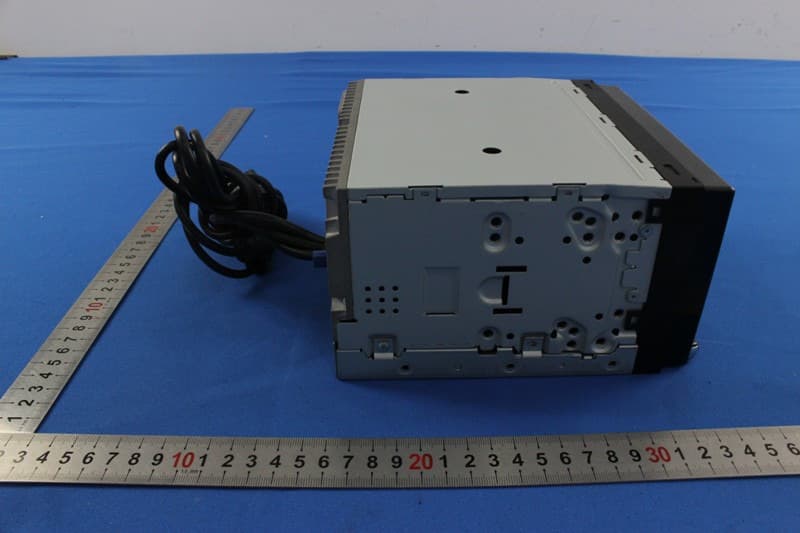
V8VNX706
Dec 13, 2015ALL IN ONE DVD PLAYER
Equipment Class
DTS - Digital Transmission System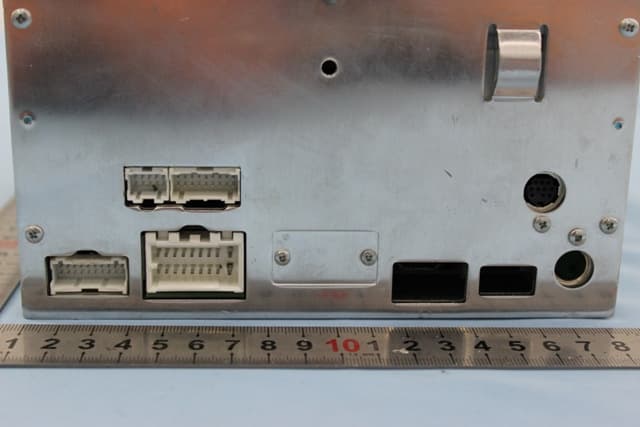
V8VCES8243CL
Dec 21, 2014All In One DVD Player
Equipment Class
DTS - Digital Transmission System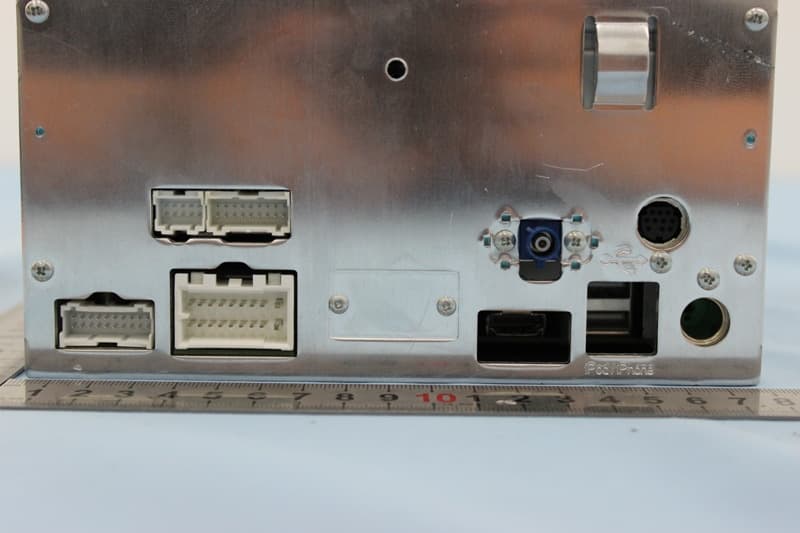
V8VCNE8243CCL
Dec 21, 2014All In One DVD Player
Equipment Class
DTS - Digital Transmission System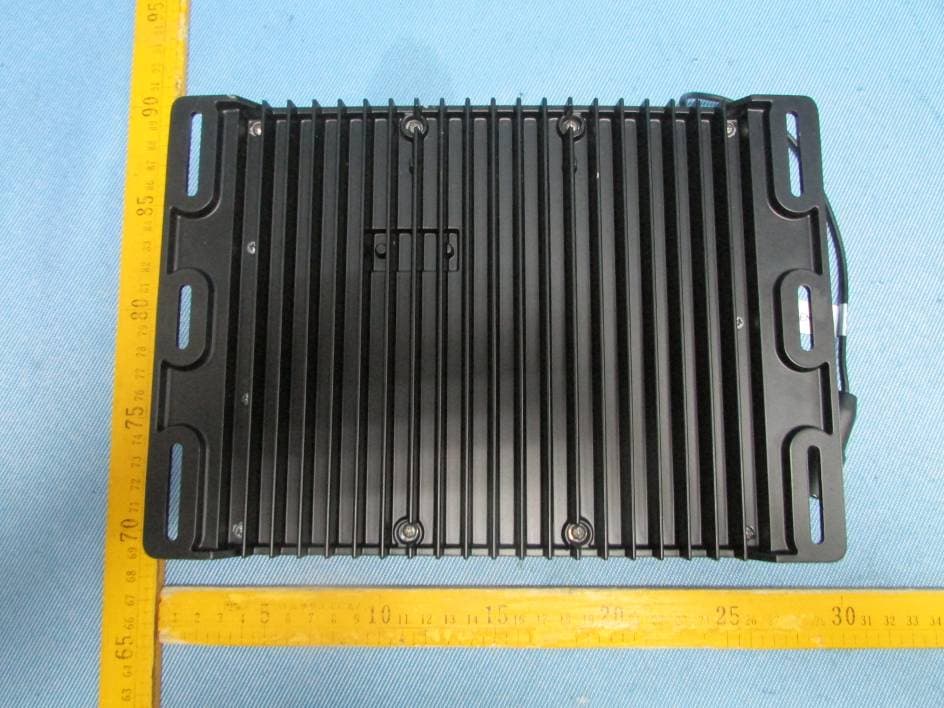
V8VMW4
Jul 07, 2014MARINE AUDIO SYSTEMS
Equipment Class
DSS - Part 15 Spread Spectrum Transmitter