VCQ7E000833iPod A/V Remote Control
ZicPlay SA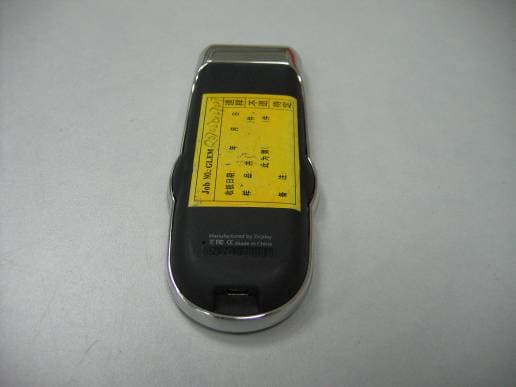
Click to zoom
Application Details
- Equipment Class
- DXX - Part 15 Low Power Communication Device Transmitter
- Date of Grant
- Oct 31, 2007
- Application Purpose
- Original Equipment
- Date of Application
- Oct 31, 2007
- Equipment Note
- iPod A/V Remote Control
- Frequency Range
- 2402.00000000 - 2480.00000000
- Company
- ZicPlay SA
- Country
- Switzerland
Documents & Files
Document Text
Text extracted from the exhibit documents filed with the FCC. Open a document above to read the original.
Users Manual
TM User’s guide P.06 Manuel d’utilisation P.16 Kurzübersicht P.26 Manual de utilización P.36 USER GUIDE 7 Specifi cations 7 9 1011 12 8 6 1 5 4 3 2 15 14 13 Français 1 2 3 4 5 6 7 8 9 10 11 12 13 14 15 Ecran Couleur TFT Zone de navigation tactile Bouton central de validation Connecteur USB Bouton Reset Zone d’accueil de la télécommande Zone d’accueil de l’iPod Berceau d’apadatation Connecteur audio analogique Connecteur audio optique Connecteur S-video Connecteur secteur Indicateur de communication radio Indicateur de batterie Menu de navigation English 1 2 3 4 5 6 7 8 9 10 11 12 13 14 15 TFT Colour display Tactile navigation pad Main button USB connector Reset button Remote docking place iPod docking place iPod adapter Analog audio connector Optical audio connector S-video connector Power supply connector Radio signal icon Battery level icon Main menu Deutsch 1 2 3 4 5 6 7 8 9 10 11 12 13 14 15 TFT Farb- Display Navigationstaste Haupttaste USB Anschlus Reset Knopf Dockingstelle für die Fehrnbedienung Dockingstelle für den I Pod iPod Adapter Analoger Audio Anschluss Optischer Audio Anschluss S-Video Anschluss Netz-Anschluss Funksignal Anzeige Batterie Anzeige Hauptmenü Español 1 2 3 4 5 6 7 8 9 10 11 12 13 14 15 Pantalla color TFT Zona de navegación táctil Botón central de navegación Conector USB Botón Reset Soporte cargador mando Soporte cargador iPod Adaptador para iPod Conector audio analógico Conector óptico de audio Conector S-video Conector corriente Indicador de señal de radio Indicador nivel de bateria Menú de navegación 89 English Take your EWOO™ remote control in hand and insert it into the slot provided on the station in order to charge it for the fi rst time. We suggest that you charge your EWOO™ remote control initially for one hour before you start using it. • N° iPod 3 6 7 8 9 10 11 iPod mini iPod Photo / Color U2 iPod Photo iPod nano 1 st generation iPod Video (5G) 30GB iPod Video (5G) 60/80GB iPod nano 2 nd generation Always be up to date Your remote may have been delivered without the latest release of the software. For the latest fi rmware & updated features for your ewoo TM , please visite www.zicplay.com IMPORTANT Fast rewind, skipping 25 items at a time in the Artist and Album menus Quick Start Guide Back to previous menu Next track in read mode Fast forward, skipping 25 items at a time in the Artist and Album menus Previous track in read mode Play / Pause Activate the alphabetic search mode in the Artist and Album menus Except for the central button, your Ewoo remote control uses an entirely touch navigation mode. Simply place your fi nger on the selected function key and wait for the selected action to be triggered. You needn’t press the control keys very strongly. ewoo TM special features 1011 Introduction At Zicplay, we thank you for buying the EWOO™ remote control. We hope this product will offer you full satisfaction and will enable you to get the most out of your multimedia experience. First of all, we suggest that you read the user manual carefully in order to avoid any mistake or bad experience upon implementing EWOO™. To start with, let’s check the content of your EWOO™ pack. In the pack, you will fi nd the following items: The EWOO™ remote control The EWOO™ iPod station Your EWOO™ station’s miniature power supply 7 iPod cradles 1 stereo analog audio cable 1 Ewoo USB cable 1 multilingual user manual However, should any of the items above be missing, please contact your reseller immediately. • • • • • • • Content of your EWOO™ pack Getting started with EWOO™ To start with, we recommend that you make all connections necessary for your new multimedia remote control to operate: Take the EWOO™ station and connect it to your audio system using the stereo analog cord shipped with the pack. You may also use an optical audio cable (optional) if your stereo audio equipment allows. The optical audio output enables you to enjoy audio quality superior to that of the analog connection. Important : When you use the optical connector, the volume level can not be remotely controlled. The volume can be manually controlled using the volume setting on the amplifi er. If your iPod offers Photo and Video (iPod Video (5G) / Nano 1st and 2nd generation), you may also connect the EWOO™ station to your video equipment in order to enjoy your visual content on a large screen (optional cable). Choose the cradle that’s compatible with your iPod and insert it into the station slot by pressing slightly on each side, until you hear a confi rmation «click». The cradle compatible with your iPod is easy to identify: just check the number on the back of your iPod and in the table below. • • • • English Analog audio connector S-video connector Power supply connector Optical audio connector English 1213 Take your EWOO™ remote control in hand and insert it into the slot provided on the station in order to charge it for the fi rst time. We suggest that you charge your EWOO™ remote control initially for one hour before you start using it. • N° iPod 3 6 7 8 9 10 11 iPod mini iPod Photo / Color U2 iPod Photo iPod nano 1 st generation iPod Video (5G) 30GB iPod Video (5G) 60/80GB iPod nano 2 nd generation Now that your remote control is charged, let’s get to the point. Insert your iPod into the slot on the station. Power on your Hi-Fi system and select the appropriate auxiliary channel. Take your EWOO™ remote control and enable it by slightly pressing the central key. The fi rst time you use your remote control, you are prompted to set the language you want. Move the cursor to the selected language and validate by slightly pressing the central key. You are now ready to use EWOO™. EWOO™ uses touch technology for all navigation features. Just like on your iPod, the Read/Pause, Menu, Next and Previous track features that appear in the navigation area, are not keys, but touch controls. You needn’t press these controls fi rmly. Slightly press with your fi nger for about 1 second to validate the control you…
Text truncated - open the document above for the full version.
Cover Letter(s)
FCC ID:VCQ7E000833
Cover Letter(s)
Permanent Confidentiality Letter 25/05/07 Federal Communications Commission Office of Engineering and Technology Equipment Authorization Division 7345 Oakland Mils Road Columbia, Maryland 21046 Subject: Permanent Confidentiality request for FCC ID: VCQ7E000833 To Whom It May Concern, Pursuant to sections 0.457 and 0.459 of CFR47, the applicant requests permanent confidential treatment of the following information accompanying this application: Block Diagrams Schematics Operation Description The above materials contain trade secrets and proprietary information not customarily released to the public. The public disclosure of these matters might be harmful to the applicant and provide unjustified benefits to its competitors. Sincerely,
Cover Letter(s)
1.) The equipment code and description on Form 731 (page 2) calls this an EWOO. No-one in North America will know what that means. Would it not be more appropriate to call it something like “...iPod A/V Remote Control “? I have revised 731 Form about the description. 2.) The internal photos are a bit too course and out of focus to be useful. May we have better internal photos please? I have uploaded the revised internal photos to website. 3.) The block diagram should contain a better description of the NRF24L01 2.4GHz transceiver. This critical part is the one most interesting to any reader. May I suggest finding a commercial chipset data sheet and uploading to the Operational Description of this device? I have uploaded the revised block diagram to website. 4.) The existing Operational Description does nothing to describe how the device creates, modulates and amplifies radio frequency energy. A chipset data sheet would answer a lot of questions. Kindly provide either a better Operational Description or chipset data sheet. I have uploaded chipset data sheet to website. 5.) Does this device transmit digital or analog intelligence within the 2400-2483.5 MHz band? Digital. 6.) I have a question about the Test Setup. It appears from the Manual that a fully configured system would consist of an EWOO, an iPod, a cradle to hold both products (as seen in the Manual) and possibly a computer with USB. If I am incorrect, my apologies. Please explain why only the EWOO by itself was tested. Please also confirm if it was tested in three orthogonal planes. Only the remote control is transmitter. 7.) The test report provides data on 2402 MHz. But the Form 731 appears to indicate this device is switched between 2410 and 2463 MHz. I am confused. What channels/frequencies will this device operate? Sorry for having a type error on it. Actually the device is 2402MHz. I have revised test report and 731 Form. 8.) The Harmonic and Spurious Emissions datasheet (page 10 of Test Report) shows no data. This is unusual. ANSI C63.4 requests data for the six highest emissions even when all emissions are 20dB or more below the limit. I suggest than in cases when no spurious emissions are found, you simply provide noise floor measurements of the system at the harmonics. Remember, it is always better to provide a number – any number - than no number at all. I have added test data to page 10 of test report. The revised test report has been uploaded to website.
Cover Letter(s)
Now the client define the frequency range to 2402-2480MHz, so I have uploaded the revised report to website.
Cover Letter(s)
American Telecommunications Certification Body Inc. 6731 Whittier Ave, McLean, VA 22101 October 26, 2007 RE: ZicPlay SA FCC ID: VCQ7E000833 I have a few comments on this Application. Depending on your responses, kindly understand there may be additional comments. 1.) The equipment code and description on Form 731 (page 2) calls this an EWOO. No-one in North America will know what that means. Would it not be more appropriate to call it something like “...iPod A/V Remote Control “? 2.) The internal photos are a bit too course and out of focus to be useful. May we have better internal photos please? 3.) The block diagram should contain a better description of the NRF24L01 2.4GHz transceiver. This critical part is the one most interesting to any reader. May I suggest finding a commercial chipset data sheet and uploading to the Operational Description of this device? 4.) The existing Operational Description does nothing to describe how the device creates, modulates and amplifies radio frequency energy. A chipset data sheet would answer a lot of questions. Kindly provide either a better Operational Description or chipset data sheet. 5.) Does this device transmit digital or analog intelligence within the 2400-2483.5 MHz band? 6.) I have a question about the Test Setup. It appears from the Manual that a fully configured system would consist of an EWOO, an iPod, a cradle to hold both products (as seen in the Manual) and possibly a computer with USB. If I am incorrect, my apologies. Please explain why only the EWOO by itself was tested. Please also confirm if it was tested in three orthogonal planes. 7.) The test report provides data on 2402 MHz. But the Form 731 appears to indicate this device is switched between 2410 and 2463 MHz. I am confused. What channels/frequencies will this device operate? 8.) The Harmonic and Spurious Emissions datasheet (page 10 of Test Report) shows no data. This is unusual. ANSI C63.4 requests data for the six highest emissions even when all emissions are 20dB or more below the limit. I suggest than in cases when no spurious emissions are found, you simply provide noise floor measurements of the system at the harmonics. Remember, it is always better to provide a number – any number - than no number at all. William H. Graff President mailto: [email protected] The items indicated above must be submitted before processing can continue on the above referenced application. Failure to provide the requested information may result in application termination. Correspondence should be considered part of the permanent submission and may be viewed from the Internet after a Grant of Equipment Authorization is issued. Please do not respond to this correspondence using the email reply button. In order for your response to be processed expeditiously, you must submit your documents through the AmericanTCB.com website. Also, please note that partial responses increase processing time and should not be submitted. Any questions about the content of this correspondence should be directed to the sender.
Cover Letter(s)
American Telecommunications Certification Body Inc. 6731 Whittier Ave, McLean, VA 22101 October 28, 2007 RE: ZicPlay SA FCC ID: VCQ7E000833 I have a few comments on this Application. Depending on your responses, kindly understand there may be additional comments. 1.) All comments from my RT of October 28 have been answered from the information presented– thank you. But upon reading the chipset specifications I have just one additional question. Please refer to section 1.1 of the “nRF24L01 Product Specification”. It appears this device is capable of 126 different channels and multiple programmable RF power levels. I am obligated to include a Grant Note which specifies that this equipment authorization is valid only for the frequency and power setting used in this specific filing. Any changes to either frequency or power will require a new FCC ID. Please check with Applicant to be sure this is understood. 2.) If more that a single channel operation at 2402 MHz is desired, then FCC rules require that testing be performed according to the requirements of 15.31(m). If that is true, then we need to have additional measurements for field strength, spurious emissions, and band edge data. William H. Graff President mailto: [email protected] The items indicated above must be submitted before processing can continue on the above referenced application. Failure to provide the requested information may result in application termination. Correspondence should be considered part of the permanent submission and may be viewed from the Internet after a Grant of Equipment Authorization is issued. Please do not respond to this correspondence using the email reply button. In order for your response to be processed expeditiously, you must submit your documents through the AmericanTCB.com website. Also, please note that partial responses increase processing time and should not be submitted. Any questions about the content of this correspondence should be directed to the sender.
Test Report
Report No.: GLEMR070501270RF Page: 1 of 18 FCC ID: VCQ7E000833 Authorized Signature: Jerry Chen Manager This report refers to the General Conditions for Inspection and Testing Services, printed overleaf This report details the results of the testing carried out on one sample. The results contained in this test report do not relate to other samples of the same product. The manufacturer should ensure that all products in series production are in conformity with the product sample detailed in this report. This report may only be reproduced and distributed in full. If the product in this report is used in any configuration other than that detailed in the report, the manufacturer must ensure the new system complies with all relevant standards. Any mention of SGS International Electrical Approvals or testing done by SGS International Electrical Approvals in connection with, distribution or use of the product described in this report must be approved by SGS International Electrical Approvals in writing. Member of the SGS Group (Société Générale de Surveillance) SGS-CSTC Standards Technical Services Ltd. No.198 Kezhu Road, Science Town Economic& Technology Development District Guangzhou, China 510663Telephone: Telephone: +86 (0) 20 82155555 Fax: +86 (0) 20 82075059 Email: [email protected] FEDERAL COMMUNICATIONS COMMISSION Registration number: 282399 TEST REPORT Application No. : GLEMR070501270RF Applicant: ZICPLAY SA FCC ID: VCQ7E000833 Frequency Band 2.402GHz to 2.480GHz Equipment Under Test (EUT): Name: EWOO Model No.: EWOO Standards: FCC PART 15C: 2007 Please refer to section 2 for further details. Date of Receipt: 11 May 2007 Date of Test: 11 to 30 May 2007 Date of Issue: 31 May 2007 Test Result : PASS * In the configuration tested, the EUT complied with the standards specified above. SGS-CSTC Standards Technical Services Ltd. Report No.: GLEMR070501270RF Page: 2 of 18 FCC ID: VCQ7E000833 2 Test Summary Test Test RequirementStanadard Paragraph Result Flied Strength of Fundamental FCC PART 15 :2007 Section 15.249 (a) PASS Flied Strength of Unwanted Emissions FCC PART 15 :2007 Section 15.249 (a) Section 15.249 (d) PASS Occupied Bandwidth FCC PART 15 :2007 Section 15.249 PASS Band Edges FCC PART 15 :2007 Section 15.249 (d) PASS Remark: Tx: In this whole report Tx (or tx) means Transmitter. Rx: In this whole report Rx (or rx) means Receiver. SGS-CSTC Standards Technical Services Ltd. Report No.: GLEMR070501270RF Page: 3 of 18 FCC ID: VCQ7E000833 3 Contents Page 1 COVER PAGE ...........................................................................................................................................1 2 TEST SUMMARY ........................................................................................................................................ 2 3 CONTENTS ................................................................................................................................................. 3 4 GENERAL INFORMATION......................................................................................................................... 4 4.1 CLIENT INFORMATION............................................................................................................................ 4 4.2 GENERAL DESCRIPTION OF E.U.T. ......................................................................................................... 4 4.3 DESCRIPTION OF EUT OPERATION......................................................................................................... 4 4.4 STANDARDS APPLICABLE FOR TESTING.................................................................................................. 4 4.5 TEST LOCATION..................................................................................................................................... 4 4.6 OTHER INFORMATION REQUESTED BY THE CUSTOMER............................................................................ 4 4.7 TEST FACILITY....................................................................................................................................... 5 5 TEST RESULTS .......................................................................................................................................... 6 5.1 TEST INSTRUMENTS...............................................................................................................................6 5.2 E.U.T. OPERATION................................................................................................................................7 5.3 TEST PROCEDURE & MEASUREMENT DATA............................................................................................. 8 5.3.1 Radiated Emissions ........................................................................................................................ 8 5.3.2 Occupied Bandwidth & Band Edge .........................................................................................13-18 SGS-CSTC Standards Technical Services Ltd. Report No.: GLEMR070501270RF Page: 4 of 18 FCC ID: VCQ7E000833 4 General Information 4.1 Client Information Applicant Name: ZICPLAY SA Applicant Address: Le Trési 6B, 1028 Préverenges - Switzerland 4.2 General Description of E.U.T. Product Name: EWOO Model: EWOO Power Supply: Tx: 3.7V DC inside rechargeable battery Rx:Input:100-240V~50/60Hz Output:5.0V~700mA Power Cord: N/A Emission Designation: F1D 4.3 Description of EUT operation The EUT have a remote controller and the music station for iPod. The remote controller with 2.4GHz carrier and show the status of the iPod. 4.4 Standards Applicable for Testing The standard used was FCC PART 15, SUBPART C (2007) section 15.249. 4.5 Test Location All tests were performed at: SGS-CSTC Standards Technical Services Co., Ltd., Guangzhou EMC Laboratory, No.198 Kezhu Road, Science Town Economic& Technology Development District Guangzhou, China 510663 Tel: +86 20 82155555 Fax: +86 20 82075059 No tests were sub-c…
Text truncated - open the document above for the full version.
Contact Information
Applicant
M. Alexandre Colot(Chief Technical Officer)
Technical Contact
SGS-CSTC Standards Technical Services Ltd.Stephen Guo
[email protected]+86 20 82155301
198 Kezhu Rd., Scientech Park · Guangzhou · China
Non-Technical Contact
SGS-CSTC Standards Technical Services Ltd.Cherri Li
[email protected]+86 20 82155317
Test Firm
SGS-CSTC Standards Technical Services Co., LtdJerry Chan
Technical Specifications
| # | Rule Parts | Frequency Range | Power Output |
|---|---|---|---|
| 1 | 15C | 2.40 GHz - 2.48 GHz | - |