WGI-XSC-339Apex+ Series Snow Goggle 339
Liquid Image Co. LLC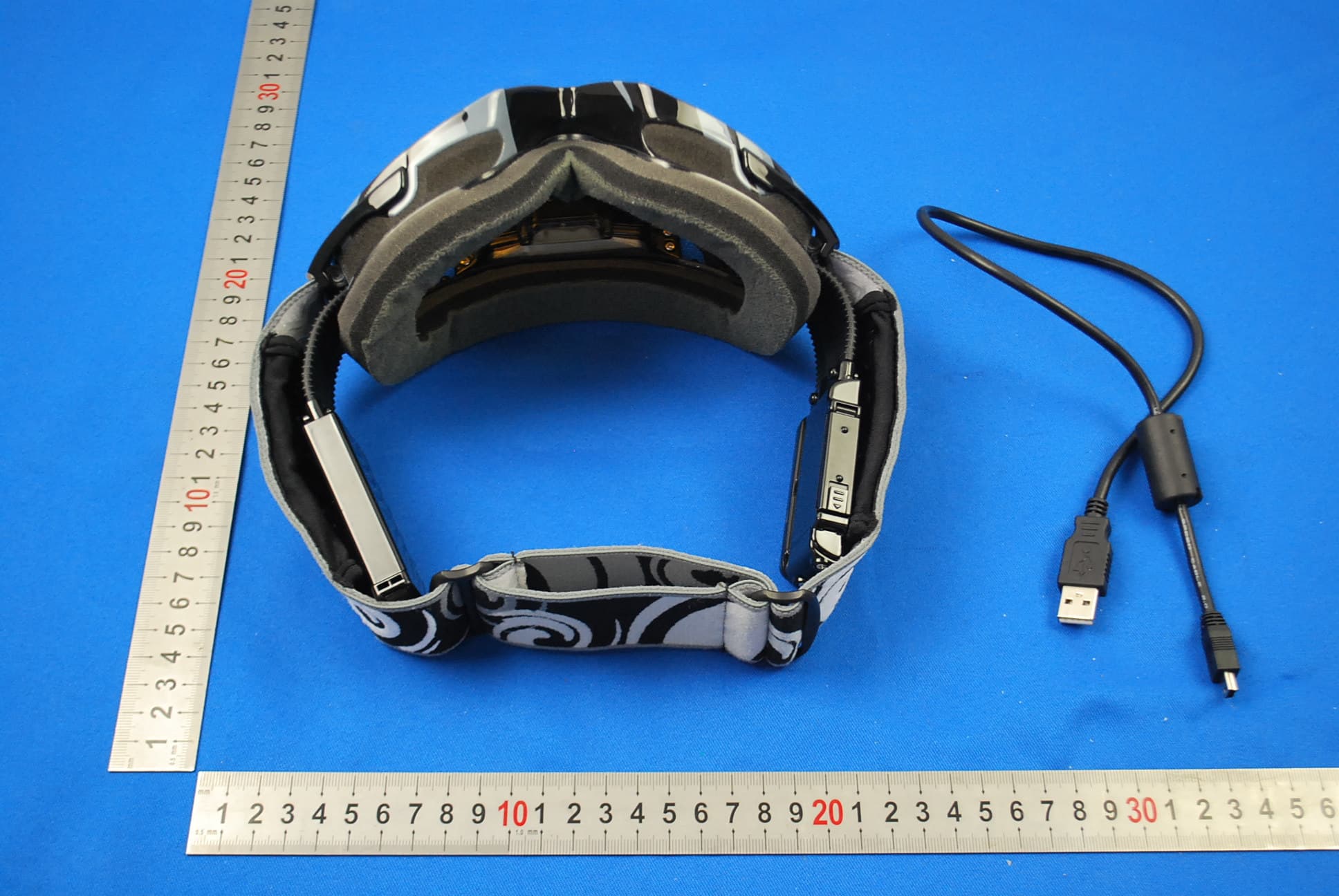
Click to zoom
Application Details
- Equipment Class
- DTS - Digital Transmission System
- Date of Grant
- Dec 30, 2012
- Application Purpose
- Original Equipment
- Date of Application
- Dec 26, 2012
- Equipment Note
- Apex+ Series Snow Goggle 339
- Frequency Range
- 2412.00000000 - 2462.00000000
- Company
- Liquid Image Co. LLC
- Country
- United States
Documents & Files
Document Text
Text extracted from the exhibit documents filed with the FCC. Open a document above to read the original.
Users Manual
Products mentioned above or throughout the manual may be trademarks or registered trademarks of their respective companies. ATTENTION This manual explains how to safely operate the Camera Goggle. Please read these instructions carefully before using the camera. Keep this manual in a safe place for later reference Disclaimer While every effort has been made to ensure that the information contained in the guide is accurate and complete, no liability can be accepted for any errors or omissions. Liquid Image Co reserves the right to change the specifications of the hardware and software described herein at any time without prior notice. Liquid Image Co declines all responsibility for damages due to improper use of this product, failure to adhere to the instructions given in this manual, or modifications to the CAMERA GOGGLE. Cautions concerning data storage: Stored data may be lost or corrupted. It is recommended that any important data be copied onto a separate media (such as a hard disk, DVD-R or CD-R disk). Liquid Image Co makes no warranties and shall not be held responsible for damages resulting from corrupted or lost data due to a malfunction of the camera, the software, the memory cards, personal computer, peripheral devices, or for any losses that result from images that could not be recorded, are erased, destroyed, or damaged in any way due to a problem or a mistake while utilizing the camera or any of its accessories. The Camera Goggle is a sophisticated electronic device and should be supervised by an adult at all times. This product should not be used by children under 13 years. This product is not a toy. The inserting of memory cards, USB cable, and battery must be performed by an adult 18 years or older who has read and understands this manual. An adult must always check all water resistant compartments prior to each use. ENGLISH ENG-2 1.0 GET TO KNOW YOUR CAMERA GOGGLE 1.1 Features Video Clips, Still Images, Micro SD/SDHC Card support Driver free for Windows XP/V ista/7 and Mac 9.x or above 1.2 Specifications - 1.2 System Requirements Subject to change without notice Sensor1/2.5” 5.0MP CMOS Sensor Image Resolution 12.0 Megapixels (4000x3000) Lens F/3.2 f=2.75mm (135 Degree FOV) Focus range.4m to infinity Internal Memory256MB NAND Flash Memory for CPU only External Memory Card Micro SD/SDHC Card supports up to 32GB Must be Class 6 and above Video Mode 30FPS@HD 1080P 60FPS@HD 720P (1280x720) with Audio (1920X1080) with Audio File Format Picture: JPEG, Video: H.264 MOV with Audio Status Display LCD Display PC Interface USB Power3.7V Lithium Rechargeable Battery 1150mAh Auto Of WiFi - Wireless f System time 180 seconds Apps for Android and iOS systems Operating System CPUIntel® Core™ 2 Duo CPU E6300 processor (or above), AMD Athlon 64 X2 3800+ (or above) RAM1GB RAM (2GB recommended for editing HD videos) 300 MB available hard disk space Memory Graphics Card 256 MB Graphics Card or above is recommendeded TV Output PAL and NTSC Quantity of pixels is only an approximate numberApproximate frames per second * *** ** *** *** No Software required to download files Windows® XP (SP2 or higher) ,Vista™, Windows® 7 or Mac 9.x ENG-1 ENG-1 TM 4.0 Recording Pictures and Video 4.1 720P Video ModeENG-10 4.2 1080P Video ModeENG-10 4.3 Still Image Photo ModeENG-11 4.4 Continuous Photo ModeENG-11 4.5 Power Off ENG-11 5.0 Transferring Still Images and Video to a Computer 5.1 Opening Memory CompartmentENG-12 5.2 Connecting and Transferring FilesENG-12 ENG-14 ENG-15 5.3 Disconnecting and Closing Memory CompartmentENG-13 7.0 Video and Image File Size ENG-15 6.0 Viewing Videos and Still Images on TV 6.1 Setting Correct NTSC/PAL Mode for your TV 6.2 Video and Still Image Playback on a TV ENG-18 ENG-18 11.0 Replacing Lenses 10.1 Removing the Lens 10.2 Inserting the Lens 10.0 Care and MaintenanceENG-17 8.0 WiFi Capabilites and Use with other WiFi DevicesENG-16 9.0 Firmware and Product UpdatesENG-17 12.0 Camera Warnings and PrecautionsENG-18 13.0 Battery Warning and PrecautionsENG-20 14.0 Commonly Asked Questions and TroubleshootingENG-20 CONTENTS 1.0 Get to know your CAMERA GOGGLE 1.1 FeaturesENG- 2 1.2 SpecificationsENG- 2 1.3 System requirementsENG- 2 2.0 Functional Parts 2.1 Included Parts and AccessoriesENG- 3 2.2 Part Names - Front ViewENG- 4 2.3 Part Names - Back ViewENG- 4 2.4 Part Names - Ports and LCD Screen 2.5 Part Names - Battery Compartment ENG- 5 ENG- 6 2.6 Replace Goggle Strap ENG- 6 2.7 Replace Face Foam and Rotate Lens ENG- 7 3.0 Camera Goggle Setup 3.1 Recharging or Replacing the Li-ion BatteryENG- 8 3.2 Inserting Micro SD/SDHC Memory CardENG- 8 3.3 Setting the Date and Time Mode ENG- 9 ENG-3 TM 2.0 Functional Parts 2.1 Included Parts and Accessories Please check the contents now (before use) to confirm that it is complete. Contact your Liquid Image Co dealer if anything is missing. USER MANUAL CAMERA GOGGLE USB CABLE WARRANTY MICRO FIBER STORAGE BAG RECHARGEABLE LI-ION BATTERY 3.7V 1150mAh EXTRA SNOW LENS EXTRA STRAP NOTE: The CAMERA GOGGLE will be referred to as the "CAMERA GOGGLE" throughout this instruction manual. WARNING: NEVER OPEN THE CAMERA BODY THAT IS FACTORY SEALED WITH SCREWS. THIS WILL VOID ANY WARRANTY. NEVER USE A SCREW DRIVER TO OPEN ANY PORTION OF THE CAMERA GOGGLE. TM “If the product is exposed to a strong electrostatic charge, its memory contents may be damaged or the keys may stop working. In such case, reinstall battery to clear the memory and restore normal key operation.” REPLACEMENT FACE FOAM HEX ALLEN WRENCH ENG-3 2.2 Part Names - Front View 2.3 Part Names - Back View CAMERA LENS POWER/MODE BUTTON SHUTTER/SELECT BUTTON BATTERY COMPARTMENT GOGGLE LENS 2.2 Part Names - Front View MICROPHONE WITH WIND GUARD ENG-4 MODE LIGHT INDICATOR (blue - video 720P@60fps) (green - video 1080P@30fps) (red - photo) (purple - continuous photo) (also used for recharging) 2.4 Part Names - Ports and LCD Screen ENG-5 POWER/MODE BUTTON SHUTTER/SELECT BUTTON HDMI Port Secondary LOCK 2.5 P…
Text truncated - open the document above for the full version.
Users Manual
ENG-11 4.5 Power Off 1. Press the POWER/MODE button for more than 3 second to turn the camera off. NOTE: If either the POWER/MODE or the SHUTTER/SELECT button has not been used in 180 seconds or the Camera Goggle is not recording, the GOGGLE will turn NOTE: To capture the sharpest images, it is important that the distance between the camera and the subject is at least .4 Meters (16 inches). 4.3 Still Image Photo Mode - RED LIGHT 1. Press and hold POWER/MODE button for 2 seconds to turn on camera. 2. Press the POWER/MODE button 2 times again for less than a second each to change to Photo Mode. Note: the RED MODE LIGHT INDICATOR is on and the GOGGLE is now in the PHOTO READY mode and set to take still images. The LCD screen displays the Camera icon. 3. Press the SHUTTER/SELECT button once. A still image is captured. 4.4 Continuous Photo Mode - PURPLE LIGHT 1. Press and hold POWER/MODE button for 2 seconds to turn on camera. 2. Press the POWER/MODE button 3 times again for less than a second to change to Continuous Photo Mode. Note: the PURPLE MODE LIGHT INDICATOR is on and the GOGGLE is now in the CONTINUOUS PHOTO READY mode and set to take continuous images. The LCD screen displays the Continuous Camera icon. 3. Press the SHUTTER/SELECT button once and the camera will start taking still images every 2 seconds. The PURPLE LIGHT INDICATOR will continue to blink while taking pictures. 4. Press the SHUTTER/SELECT button again to stop taking images. off automatically. The CAMERA GOGGLE has two ways to transfer your image and video files to a computer The CAMERA GOGGLE comes with a USB cable to connect your. CAMERA GOGGLE directly to a computer.You may also choose to purchase and use a commercially sold Micro SD/SDHC Card to store and transfer images and videos that were taken with the CAMERA GOGGLE.The computer does not require software to access the files stored on the CAMERA GOGGLE's Micro SD/SDHC card. The CAMERA GOGGLE will act as an external removable disc when the USB cable connects the camera to a computer.. 5.0 TRANSFERRING STILL IMAGES AND VIDEO TO A COMPUTER CAUTION: ALWAYS DRY THE GOGGLE BEFORE OPENING THE COMPARTMENTS. 5.1 Opening Memory Compartment 1. Make sure the CAMERA GOGGLE is thoroughly clean and dry. Follow the CARE AND MAINTENANCE instructions. 2. Open the MEMORY COMPARTMENT to expose the USB Port, and the Micro 5.2 Connecting and Transferring Files 1. Choose a method to transfer files: USB or Micro SD/SDHC Card. USB TRANSFER Plug the USB cable into the USB connection port on the computer and then into the USB Port on the CAMERA GOGGLE. Press the POWER/MODE to turn on the CAMERA GOGGLE. NOTE:The USB cable will be able to access the files stored on the Micro SD/SDHC Card. MICRO SD/SDHC CARD TRANSFER Press down on the Micro SD or SDHC Card gently..The card will pop up for removal. Carefully remove the card and insert it into the Micro SD card adapter that comes with the Micro SD/SDHC Card and then insert the card into your computer's SD Card Slot as directed by the manufacturer. SD/SDCH port. ENG-12 CAUTION: Never insert a wet Micro SD/SDHC Card into a card adapter or into a Computer. 2. The connection screen opens on your computer monitor automatically. Choose the option: OPEN FOLDER TO VIEW FILES. NOTE: If the screen does not automatically open, look for a new hard drive icon on the computer next to your other hard drive icons. Click on the icon to view your image and video files. 3. The image and video files will appear in a folder. 4. Copy the files to a folder on your computer (For example: My Pictures\California). Alternatively, you may copy the entire folder to your computer. 5. If you wish to delete the data from the CAMERA GOGGLE's Micro SD/SDHC Card, select the files you wish to delete and press delete on your computer keyboard. 6. Click the close button. 5.3 Disconnecting and Closing Memory Compartment 1. Safely disconnect the USB from your computer and from the CAMERA GOGGLE. Alternatively, if you transferred files using the SD Card method, disconnect the SD Card from the computer and then remove the Micro SD/SDHC card from the adapter. Reinsert the Micro SD/SDHC Card into your CAMERA GOGGLE. NOTE: It is recommended that you always delete all the files from your Micro SD/SDHC card after transferring your files to a computer. This will free up space for more images and video files. Deleting files can only be done through the computer. * Make sure your computer's SD Card Slot can handle High Capacity SDHC cards as they are different than standard SD cards. You may need an adapter. . 2.. Choose TO VIEW FILES. on 3.. . ENG-13 NOTE ON MEDIA PLAYERS: There are multiple media players available online to play the HD (H.264) MOV video files created with the CAMERA GOGGLE. The preferred video player is QUICKTIME. If your default computer media player is unable to play the videos, your player may be out of date and you may need to update it online. You may also try using an alternate media player if your computer has one or if you choose to download one from a source that you trust online. For PC Users - Windows 7 can play the MOV files with Windows Media Player. 6.0 VIEWING VIDEOS AND STILL IMAGES ON A TV The CAMERA GOGGLE can act as a media player and will be able to play videos and pictures directly from your CAMERA GOGGLE onto a television set. Connect an HDMI cable (not included) to the CAMERA GOGGLE and the HD television set. IMPORTANT! Make sure your camera is set to the correct NTSC or PAL video setting or your CAMERA GOGGLE will not work properly with your TV for either Video or photo playback. Select NTSC if viewing on a TV in North America. Choose PAL if viewing on a TV outside of North America or if viewing on a PAL TV in any region. 6.1 Setting correct NTSC/PAL mode for your TV This feature allows you to set the TV video output mode to PAL or NTSC. Please check your Television Set to see if the TV can accept either PAL or NTSC video playing devices. The CAMERA …
Text truncated - open the document above for the full version.
Cover Letter(s)
Statement We, the under signed, Liquid Image Co.LLC declared that, our product (Apex+ Series Snow Goggle 339; Model:339) has been tested by International Electrical Certification Centre Ltd. Located in Units 303-305, 3/F., 31 Lok Yip Road, On Lok Tsuen, Fanling, N.T., Hong Kong. Regards It is in compliance with conducted and radiated emission limits of FCC Rules Part 15B. Company Chop: Liquid Image CO.,LLC Authorized signature Kent Pearson Position: President Date : Oct. 23.2012
Cover Letter(s)
Authority to Act as Agent Date: Oct.24.2012 American Certification Body, Inc. 6731 Whittier Avenue Suite C110 McLean, VA 22101 To Whom It May Concern: SGS-CSTC Standards Technical Services Co., Ltd. (SGS) Shenzhen Branch is authorized to act on our behalf, until otherwise notified, for applications to American Certification Body, Inc. (ACB). We certify that we are not subject to denial of federal benefits, that includes FCC benefits, pursuant to Section 5301 of the Anti-Drug Abuse Act of 1988, 21 U.S.C. 862. Further, no party, as defined in 47 CFR 1.2002 (b), to the application is subject to denial of federal benefits, that includes FCC benefits. Thank you, Agency Agreement Expiration Date: 12 months By: Kent Pearson (Print name) Title: President On behalf of: Liquid Image Co,LLC (Company Name) Telephone: 916-721-3818
Cover Letter(s)
Request for Confidentiality Date: Oct 23,2012 Subject: Confidentiality Request for: FCC ID: WGI-XSC-339 Pursuant to FCC 47 CRF 0.457(d) and 0.459 and IC RSP-100, Section 10, the applicant requests that a part of the subject FCC application be held confidential. Type of Confidentiality Requested Exhibit Short Term Permanent Block Diagrams Short Term External Photos Short Term Permanent* 1 Internal Photos Short Term Permanent Operation Description/Theory of Operation Short Term Permanent Parts List & Placement/BOM Short Term Permanent Tune-Up Procedure Short Term Permanent Schematics Short Term Test Setup Photos Short Term Permanent*User’s Manual *Note: ______(Insert Explanation as Necessary)______ Liquid Image Co.LLC has spent substantial effort in developing this product and it is one of the first of its kind in industry. Having the subject information easily available to "competition" would negate the advantage they have achieved by developing this product. Not protecting the details of the design will result in financial hardship. Permanent Confidentiality: The applicant requests the exhibits listed above as permanently confidential be permanently withheld from public review due to materials that contain trade secrets and proprietary information not customarily released to the public. Short-Term Confidentiality: The applicant requests the exhibits selected above as short term confidential be withheld from public view for a period of ___(specify number of days not to exceed 180 ) 2 ___ days from the date of the Grant of Equipment Authorization and prior to marketing. This is to avoid premature release of sensitive information prior to marketing or release of the product to the public. Applicant is also aware that they are responsible to notify ACB in the event information regarding the product or the product is made available to the public. ACB will then release the documents listed above for public disclosure pursuant to FCC Public Notice DA 04-1705. NOTE for Industry Canada Applications: The applicant understands that until such time that IC distinguishes between Short Term and Permanent Confidentiality, either type of marked exhibit above will simply be marked Confidential when submitted to IC. Sincerely, By: Kent Pearson (Print name) 1 - The asterisked items (*) require further justification before permanent confidentiality will be allowed. These also currently require review by the FCC under their Permit-But-Ask policy before the grant is issued and can delay completion of an application. Further justification should be added to the note above. One such example for a potted device would be: “The EUT is FULLY potted using a non-removable epoxy based material. Removal of potting material causes irreparable damage to internal circuitry. See photographs exhibits that outline the device before and after potting.” 2 - Please refer to http://acbcert.com/documents/misc-docs/Memo-Short-Term-Vs-Standard-Confidentiality.pdf for complete details.
External Photos
1 Photographs - EUT Constructional Details Test Model No.: 339
Internal Photos
1 Photographs - EUT Constructional Details Test Model No.: 339
RF Exposure Info
SGS-CSTC Standards Technical Services Co., Ltd. No. 1 W orkshop, M-10, Middle Section, Science & Technology Park, Nanshan District, Shenzhen, China 518057 Telephone: +86 (0) 755 2601 2053 Fax: +86 (0) 755 2671 0594 Email: [email protected] Report No.: SZEM121000572902 Page: 1 of 5 Authorized Signature: Jack Zhang EMC Laboratory Manager The manufacturer should ensure that all products in series production are in conformity with the product sample detailed in this report. If the product in this report is used in any configuration other than that detailed in the report, the manufacturer must ensure the new system complies with all relevant standards. Any mention of SGS International Electrical Approvals or testing done by SGS International Electrical Approvals in connection with, distribution or use of the product described in this report must be approved by SGS International Electrical Approvals in writing. The report must not be used by the client to claim product certification, approval, or endorsement by NVLAP, NIST, or any agency of the federal government. All test results in this report can be traceable to National or International Standards. “This document is issued by the Company subject to its General Conditions of Service printed overleaf, available on request or accessible at www.sgs.com/terms_and_conditions.htm and, for electronic format documents, subject to Terms and Conditions for Electronic Documents at www.sgs.com/terms_e-document.htm. Attention is drawn to the limitation of liability, indemnification and jurisdiction issues defined therein. Any holder of this document is advised that information contained hereon reflects the Company’s findings at the time of its intervention only and within the limits of Client’s instructions, if any. The Company’s sole responsibility is to its Client and this document does not exonerate parties to a transaction from exercising all their rights and obligations under the transaction documents. This document cannot be reproduced except in full, without prior written approval of the Company. Any unauthorized alteration, forgery or falsification of the content or appearance of this document is unlawful and offenders may be prosecuted to the fullest extent of the law. Unless otherwise stated the results shown in this test report refer only to the sample(s) tested and such sample(s) are retained for 90 days only.” 1 Cover Page Cover PageCover Page Cover Page SAR Evaluation Report Application No.: SZEM1210005729RF Applicant: Liquid Image Co., LLC Manufacturer: Foxda Technology Industrial(Shenzhen) co., Ltd. Factory Foxda Technology Industrial(Shenzhen) co., Ltd. Product Name: Apex+ Series Snow Goggle 339 Model No.(EUT): 339 Standard: 47 CFR Part 1.1307(2011) 47 CFR Part 2.1093 (2011) KDB447498D01 FCC ID: WGI-XSC-339 Date of Receipt: 2012-10-22 Date of Test: 2012-10-28 to 2012-10-31 Date of Issue: 2012-12-14 Test Result: PASS* * In the configuration tested, the EUT complied with the standards specified above. SGS-CSTC Standards Technical Services Co., Ltd. Report No.: SZEM121000572902 Page: 2 of 5 “This document is issued by the Company subject to its General Conditions of Service printed overleaf, available on request or accessible at www.sgs.com/terms_and_conditions.htm and, for electronic format documents, subject to Terms and Conditions for Electronic Documents at www.sgs.com/terms_e-document.htm. Attention is drawn to the limitation of liability, indemnification and jurisdiction issues defined therein. Any holder of this document is advised that information contained hereon reflects the Company’s findings at the time of its intervention only and within the limits of Client’s instructions, if any. The Company’s sole responsibility is to its Client and this document does not exonerate parties to a transaction from exercising all their rights and obligations under the transaction documents. This document cannot be reproduced except in full, without prior written approval of the Company. Any unauthorized alteration, forgery or falsification of the content or appearance of this document is unlawful and offenders may be prosecuted to the fullest extent of the law. Unless otherwise stated the results shown in this test report refer only to the sample(s) tested and such sample(s) are retained for 90 days only.” 2 Contents 1 COVER PAGE ......................................................................................................................................................1 2 CONTENTS ..........................................................................................................................................................2 3 GENERAL INFORMATION .................................................................................................................................3 3.1 CLIENT INFORMATION .....................................................................................................................................3 3.2 GENERAL DESCRIPTION OF EUT ....................................................................................................................3 3.3 TEST LOCATION .............................................................................................................................................3 3.4 TEST FACILITY ...............................................................................................................................................4 3.5 DEVIATION FROM STANDARDS ........................................................................................................................4 3.6 ABNORMALITIES FROM STANDARD CONDITIONS ..............................................................................................4 3.7 OTHER INFORMATION REQUESTED BY THE CUSTOMER ...................................................................................4 4 SAR EVALUATION ......................................................................................................…
Text truncated - open the document above for the full version.
Test Report
SGS-CSTC Standards Technical Services Ltd. No. 1 W orkshop, M-10, Middle section, Science & Technology Park, Nanshan District, Shenzhen, Guangdong, China 518057 Telephone: +86 (0) 755 2601 2053 Fax: +86 (0) 755 2671 0594 Email: [email protected] Report No.: SZEM121000572901 Page: 1 of 49 Authorized Signature: Jack Zhang EMC Laboratory Manager The manufacturer should ensure that all products in series production are in conformity with the product sample detailed in this report. If the product in this report is used in any configuration other than that detailed in the report, the manufacturer must ensure the new system complies with all relevant standards. Any mention of SGS International Electrical Approvals or testing done by SGS International Electrical Approvals in connection with, distribution or use of the product described in this report must be approved by SGS International Electrical Approvals in writing. The report must not be used by the client to claim product certification, approval, or endorsement by NVLAP, NIST, or any agency of the federal government. All test results in this report can be traceable to National or International Standards. “This document is issued by the Company subject to its General Conditions of Service printed overleaf, available on request or accessible at www.sgs.com/terms_and_conditions.htm and, for electronic format documents, subject to Terms and Conditions for Electronic Documents at www.sgs.com/terms_e-document.htm . Attention is drawn to the limitation of liability, indemnification and jurisdiction issues defined therein. Any holder of this document is advised that information contained hereon reflects the Company’s findings at the time of its intervention only and within the limits of Client’s instructions, if any. The Company’s sole responsibility is to its Client and this document does not exonerate parties to a transaction from exercising all their rights and obligations under the transaction documents. This document cannot be reproduced except in full, without prior written approval of the Company. Any unauthorized alteration, forgery or falsification of the content or appearance of this document is unlawful and offenders may be prosecuted to the fullest extent of the law. Unless otherwise stated the results shown in this test report refer only to the sample(s) tested and such sample(s) are retained for 90 days only.” 1 Cover page FCC REPORT Application No: SZEM1210005729RF Applicant: Liquid Image Co., LLC Manufacturer: Foxda Technology Industrial(Shenzhen) co., Ltd. Factory: Foxda Technology Industrial(Shenzhen) co., Ltd. Product Name: Apex+ Series Snow Goggle 339 Model No.(EUT): 339 FCC ID: WGI-XSC-339 Standards: 47 CFR Part 15, Subpart C (2011) Date of Receipt: 2012-10-22 Date of Test: 2012-10-28 to 2012-10-31 Date of Issue: 2012-12-14 Test Result: PASS * . * In the configuration tested, the EUT complied with the standards specified above. SGS-CSTC Standards Technical Services Ltd. Report No.: SZEM121000572901 Page: 2 of 49 “This document is issued by the Company subject to its General Conditions of Service printed overleaf, available on request or accessible at www.sgs.com/terms_and_conditions.htm and, for electronic format documents, subject to Terms and Conditions for Electronic Documents at www.sgs.com/terms_e-document.htm. Attention is drawn to the limitation of liability, indemnification and jurisdiction issues defined therein. Any holder of this document is advised that information contained hereon reflects the Company’s findings at the time of its intervention only and within the limits of Client’s instructions, if any. The Company’s sole responsibility is to its Client and this document does not exonerate parties to a transaction from exercising all their rights and obligations under the transaction documents. This document cannot be reproduced except in full, without prior written approval of the Company. Any unauthorized alteration, forgery or falsification of the content or appearance of this document is unlawful and offenders may be prosecuted to the fullest extent of the law. Unless otherwise stated the results shown in this test report refer only to the sample(s) tested and such sample(s) are retained for 90 days only.” 2 Test Summary Test Item Test Requirement Test method Result Antenna Requirement 47 CFR Part 15, Subpart C Section 15.203/15.247 (c) ANSI C63.10 2009 PASS Conducted Peak Output Power 47 CFR Part 15, Subpart C Section 15.247 (b)(3) KDB558074 D01 PASS 6dB Occupied Bandwidth 47 CFR Part 15, Subpart C Section 15.247 (a)(2) KDB558074 D01 PASS Power Spectral Density 47 CFR Part 15, Subpart C Section 15.247 (e) KDB558074 D01 PASS Band-edge for RF Conducted Emissions 47 CFR Part 15, Subpart C Section 15.247(d) KDB558074 D01 PASS RF Conducted Spurious Emissions 47 CFR Part 15, Subpart C Section 15.247(d) KDB558074 D01 PASS Radiated Spurious Emissions 47 CFR Part 15, Subpart C Section 15.205/15.209 ANSI C63.10 2009 PASS Band Edge (Radiated Emission) 47 CFR Part 15, Subpart C Section 15.205/15.209 ANSI C63.10 2009 PASS SGS-CSTC Standards Technical Services Ltd. Report No.: SZEM121000572901 Page: 3 of 49 “This document is issued by the Company subject to its General Conditions of Service printed overleaf, available on request or accessible at www.sgs.com/terms_and_conditions.htm and, for electronic format documents, subject to Terms and Conditions for Electronic Documents at www.sgs.com/terms_e-document.htm. Attention is drawn to the limitation of liability, indemnification and jurisdiction issues defined therein. Any holder of this document is advised that information contained hereon reflects the Company’s findings at the time of its intervention only and within the limits of Client’s instructions, if any. The Company’s sole responsibility is to its Client and this document does not exonerate parties to a transaction from exercising all their rights and obligations under the transaction documents. This document cann…
Text truncated - open the document above for the full version.
Test Setup Photos
1 Photographs - EUT Test Setup (Test Model No.: 339) 1.1 Radiated Spurious Emission
Contact Information
Applicant
Kent Pearson(President)
Technical Contact
SGS-CSTC Standards Technical ServicesLtdSheek Luo
[email protected]0755-26544119
No.1 Workshop, M-10, Middle Section, · Shenzhen · China
Non-Technical Contact
SGS-CSTC Standards Technical ServicesLtdHellen Wang
[email protected]0755-86027259
Test Firm
SGS-CSTC Standards Technical Services Co.,Ltd.June Zhang
Technical Specifications
| # | Rule Parts | Frequency Range | Power Output |
|---|---|---|---|
| 1 | 15C | 2.41 GHz - 2.46 GHz | 14.50 mW |
Other Applications from Liquid Image Co. LLC
WGI-EGO-LS
Dec 03, 2015EGO LS-Live Streaming Camera 8 MP/Video HD 1080p
Equipment Class
DTS - Digital Transmission System
WGI-XSC-369
Jan 17, 2013Torque+ Series Offroad Goggle 369
Equipment Class
DTS - Digital Transmission System