WWOCTCDFRPHYSIOLOGICAL MONITOR READER
Cambridge Temperature Concepts Ltd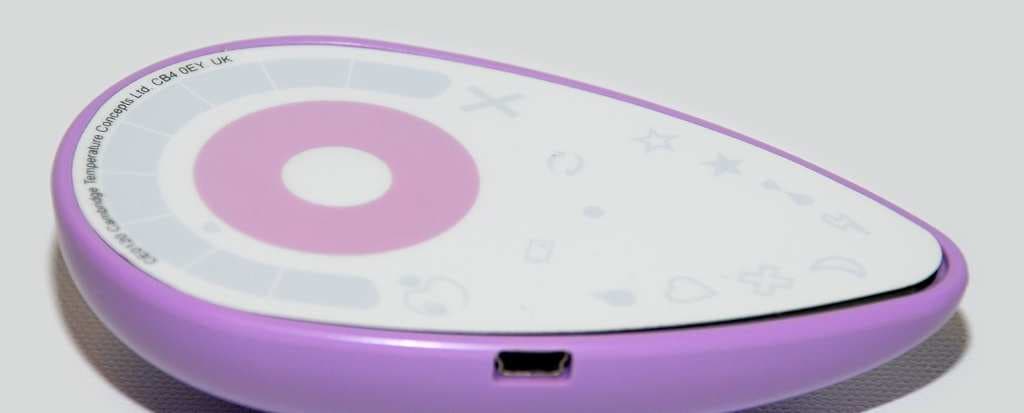
Click to zoom
Application Details
- Equipment Class
- JBP - Part 15 Class B Computing Device Peripheral
- Date of Grant
- May 03, 2012
- Application Purpose
- Original Equipment
- Date of Application
- May 03, 2012
- Equipment Note
- PHYSIOLOGICAL MONITOR READER
- Country
- United Kingdom
Documents & Files
Document Text
Text extracted from the exhibit documents filed with the FCC. Open a document above to read the original.
Users Manual
3 DuoFerti l it y Quick Start Guide & User Manual Simple Convenient Natural This product is not for contraceptive use A safe and natural alternative to fertility treatments A message from the team Thank you for choosing to use DuoFertility to help you conceive. Please read this guide carefully before using the product. We are committed to making this journey as natural and simple as possible for you. The DuoFertility system provides you with an easy way of keeping track of your body basal temperature, which is a clinically proven method of monitoring your fertility. DuoFertility uses the latest technology to identify the days in the month you are most likely to get pregnant. It has been designed to fit into any lifestyle, so you can use the product with confidence, without any disruption to your daily life. If you would like further advice on how to use DuoFertility, please do let us know. Our customer care team are happy to answer any queries that you may have about using the product, and our in-house team of dedicated fertility experts are available to answer any fertility-related queries. Any technical terms are explained in the Glossary (pages 33-34). We hope that you enjoy using DuoFertility, and that it helps you to take control of your fertility. Best wishes from the team at DuoFertility General product information Quick Start Guide 1 Contents of the DuoFertility box 2 How DuoFertility can help you 2 How DuoFertility works 3 The science behind DuoFertility 4 Getting the most out of DuoFertility 5 Understanding your menstrual cycle and ovulation 6 Indications for use 8 Warnings and precautions 8 A step-by-step guide to using DuoFertility How to use the sensor 10 Where to place the sensor 10 How to apply the sensor 10 When to wear the sensor 11 How to use the adhesives 12 How to wear the adhesive 12 How to change the adhesive 12 What to do if you experience skin irritation 12 Icons 13 Essential icons 13 Additional icons 14 How to use the software 15 Installing the software 15 Using the software 16 Data display 17 Entering information onto the software 17 Leaving notes on the software 18 Transferring your data to the DuoFertility centre 18 Synchronisation with the DuoFertility centre 19 Printing off your fertility chart 19 Saving a copy of your fertility chart 19 DuoFertility updates 19 The reader 20 How to use the reader 21 How to switch the reader ON and OFF 21 How to select an icon 21 How to cancel an icon 22 Entering information onto the reader 22 Transferring data from the sensor 23 How do I transfer the data? 23 How long does it take to transfer the data? 24 How often should I transfer the data? 24 Reading your fertility status 25 Displaying your fertility status on the reader 25 Displaying your fertility status on a computer 26 Troubleshooting 27 Contents Additional information Looking after the DuoFertility product 29 Cleaning the sensor and reader 30 What to do if you lose the sensor 30 What to do if you lose the reader 30 Frequently asked questions about DuoFertility 31 Glossary 34 Careline 36 Name and address of manufacturer 37 The “use of measurement data” 38 Limitations of information from Fertility Experts 38 1 Quick Start Guide Basic functions To switch on the reader, hold the central button (for approximately 1 second) until the reader beeps. The DuoFertility icon will flash white. The reader also switches on when connected to your computer. The reader turns itself off automatically; after about a minute, the reader icons will not be lit, indicating that the reader is off. Getting started You can start to use DuoFertility at any point during your cycle. To set up your monitor ready for use: 1. Connect your reader to your computer using the USB cable provided 2. Download the relevant software from the launch window 3. Launch the software 4. Follow the on-screen instructions for the initial welcome process You are now ready to start monitoring your cycle: 1. Use one of the adhesives provided to start wearing the sensor under one of your arms. Make sure that you position the sensor so the side with the large, blue circle is facing your skin. Remember to wear the sensor while you are sleeping. 2. After a couple of days, transfer the data from the sensor to your reader. To do this: o Turn on your reader by pressing the central button o Press the central button a second time. You should see a yellow light moving backwards and forwards on the light scale o Whilst the yellow light is moving, position the sensor over the central button. The reader should ‘recognise’ the sensor and a green light should appear on the left hand side of the light scale. During the download it will move slowly to the right hand side. o The reader will signal a successful download by sounding a low beep, followed by a high beep, and the green ‘today’ arrow should light up in green. After you have been using DuoFertility for approximately one cycle, your fertility status should start to be displayed on the reader light scale after the download and on the software graph on your computer. It is important for you to read the rest of the User Manual to learn about how to use the product in greater detail. 2 Contents of the DuoFertility box How DuoFertility can help you DuoFertility is a sophisticated fertility monitor. It predicts when you are most likely to be fertile by automatically taking continuous measurements of your temperature. This allows DuoFertility to build up a detailed picture of your cycle and identify your most fertile days. After transferring this data from your sensor, your reader will display a simple summary of your fertility status which you can use to plan intercourse for the best time of the month. DuoFertility may increase your chances of getting pregnant by helping you to: • Plan intercourse for when you are most likely to conceive • Understand your fertility by viewing a detailed picture of your menstrual cycles The DuoFertility box should contain: 1. The DuoFertility reader 2.…
Text truncated - open the document above for the full version.
Block Diagram
CPU Crystal Crystal PC USB 2.0 Full Speed 12Mbps Block Diagram FCCID WWO -CTCDFR CPU 12MHz / 32KHz Input Internal PLL to 96MHz LED Driver SPI @ 8MHz max Flash Memory SPI @ 8MHz max Battery Charger I2C @ 400KHz max Low-power RFID 120KHz-150KHz (category 15.201a) Crystal 12MHz Crystal 32KHz
External Photos
External Photos FCCID WWO -CTCDFR Face upNB : This device hasEU faceplate (no FCCID) Face down
ID Label/Location Info
FCC Label Location Information FCCID WWO -CTCDFR Front face of product, following contour of top edg e
ID Label/Location Info
FCC Label Location Sample FCCID WWO -CTCDFR
Test Report
|---------- ( Cambridge Ltd. ) ----------| Testing EMCEMC Consultancy EMC Training or : 01223 241140 (accounts) 23, Headington Drive, Cambridge. CB1 9HE Tel : 01954 251974 (test site) Fax : 01954 251907 email: [email protected] web : www.dbtechnology.co.uk REPORT ON ELECTROMAGNETIC COMPATIBILITY TESTS Performed at: TWENTY PENCE TEST SITE Twenty Pence Road, Cottenham, Cambridge U.K. CB24 8PS on Cambridge Temperature Concepts DuoFertility Reader dated 25th May 2011 Document History Initial release26/05/111 Approved by Revised by Description of modifications Affected page(s) DateIssue Based on report template: v071019 1 of 19 Page: Test Report T3927 Test No: FCC ID: WWO-CTCDFR R2933 1 Report No: Issue No: This report shall not be reproduced except in full, without the written approval of: dB Technology (Cambridge) Ltd. Equipment Under Test (EUT):DuoFertility Reader Test Commissioned by:Cambridge Temperature Concepts 23 Cambridge Science Park Milton Road Cambridge CB4 0EY Representative:Shamus Husheer Test Started:4th May 2011 Test Completed:5th May 2011 Test Engineer:Dave Smith Date of Report:25th May 2011 Written by:Dave SmithChecked by:Derek Barlow Signature:Signature: Date:25th May 2011Date:26th May 2011 dB Technology can only report on the specific unit(s) tested at its site. The responsibility for extrapolating this data to a product line lies solely with the manufacturer. Test Standards Applied CFR 47 : 2010Code of Federal Regulations: Pt 15 Subpart B- Radio Frequency Devices - Class BUnintentional Radiators 2 of 19 Page: Test Report T3927 Test No: FCC ID: WWO-CTCDFR R2933 1 Report No: Issue No: This report shall not be reproduced except in full, without the written approval of: dB Technology (Cambridge) Ltd. Emissions Test Results Summary CFR 47 : 2010 Part B - Unintentional RadiatorsPASS TestPortMethodLimitPASS/FAILNotes Conductedac powerANSI C63.4:2003CFR47 15.107PASSCISPR22(B) Emissions conducted Radiated ANSI C63.4:2003CFR47 15.109PASSFCC_B Emissions radiated specs_fccv080911 3 of 19 Page: Test Report T3927 Test No: FCC ID: WWO-CTCDFR R2933 1 Report No: Issue No: This report shall not be reproduced except in full, without the written approval of: dB Technology (Cambridge) Ltd. Contents 19 PLOT 4 Radiated Emissions - 250MHz to 1GHz - Downloading from Reader to PC ................ 18 PLOT 3 Radiated Emissions - 25MHz to 275MHz - Downloading from Reader to PC ............... 17 PLOT 2 Conducted Emissions - Neutral Line of PC .......................................... 16 PLOT 1 Conducted Emissions - Live Line of PC ............................................ 15 4.2 Radiated Emissions Results ........................................................... 14 4.1 Conducted Emissions (Power) - Results ................................................. 13 4 Test Results .......................................................................... 12 3.2 Radiated Emissions .................................................................. 12 3.1 Conducted Emissions - ac power ....................................................... 12 3 Test Methods ......................................................................... 11 2 Test Equipment ....................................................................... 10 Photograph 4 Radiated Emissions - Back ................................................... 10 Photograph 3 Radiated Emissions - Front .................................................. 9 Photograph 2 Conducted Emissions - Back .................................................. 9 Photograph 1 Conducted Emissions - Front .................................................. 8 Figure 1 General Arrangement of EUT and Peripherals ........................................ 7 1.3 EUT Operating Modes ................................................................. 7 1.2 Modifications to EUT and Peripherals .................................................... 5 1.1 General .............................................................................. 5 1 EUT Details ............................................................................ 4 of 19 Page: Test Report T3927 Test No: FCC ID: WWO-CTCDFR R2933 1 Report No: Issue No: This report shall not be reproduced except in full, without the written approval of: dB Technology (Cambridge) Ltd. 1 EUT Details 1.1 General The DuoFertility System is a temperature measuring system. It consists of: oa battery powered temperature sensor; oa reader which connects to a PC via a USB link. The sensor measures and records temperature data over a period of time. The system can therefore be considered as: Sensor: A battery powered class B digital device, and RF receiver operating below 30MHz and a passive tag; Reader: An intentional transmitter (120kHz to 150kHz) and a digital device which is a class B peripheral to a PC. The emissions from the intentional transmitter were all found to be: omore than 40dB below the limits of 15.209; ooperating below 490 kHz; onot operating a in a restricted band (the band between 110kHz and 495kHz is not restricted); and therefore, according to part 15.201a, is subject to Verification rather than Certification The maximum frequency used or generated by the digital devices was declared as 96MHz and therefore emission measurements were performed up to 1GHz. This report only includes test data on the Reader which is the subject of this submission for Certification. Data on the items subjet to Verification are detailed in a separate report. 5 of 19 Page: Test Report T3927 Test No: FCC ID: WWO-CTCDFR R2933 1 Report No: Issue No: This report shall not be reproduced except in full, without the written approval of: dB Technology (Cambridge) Ltd. Details of the EUT and associated peripherals used during the tests are listed below. Figure 1 shows the interconnections between the EUT and peripherals. ItemManufacturerModelDescriptionSerial No:Notes 1C.T.C.Duo-fertility ReaderUSB Reader#1 (Board Version 11.1) 2AppleMacBookProLaptop PCWQ…
Text truncated - open the document above for the full version.
Test Setup Photos
|---------- ( Cambridge Ltd. ) ----------| Testing EMCEMC Consultancy EMC Training or : 01223 241140 (accounts) 23, Headington Drive, Cambridge. CB1 9HE Tel : 01954 251974 (test site) Fax : 01954 251907 email: [email protected] web : www.dbtechnology.co.uk REPORT ON ELECTROMAGNETIC COMPATIBILITY TESTS Performed at: TWENTY PENCE TEST SITE Twenty Pence Road, Cottenham, Cambridge U.K. CB24 8PS on Cambridge Temperature Concepts DuoFertility Reader dated 25th May 2011 1 of 3 Page: Test Photos T3927 Test No: FCC ID: WWO-CTCDFR R2933 1 Report No: Issue No: This report shall not be reproduced except in full, without the written approval of: dB Technology (Cambridge) Ltd. Photograph 1 Conducted Emissions - Front Photograph 2 Conducted Emissions - Back 2 of 3 Page: Test Photos T3927 Test No: FCC ID: WWO-CTCDFR R2933 1 Report No: Issue No: This report shall not be reproduced except in full, without the written approval of: dB Technology (Cambridge) Ltd. Photograph 3 Radiated Emissions - Front Photograph 4 Radiated Emissions - Back 3 of 3 Page: Test Photos T3927 Test No: FCC ID: WWO-CTCDFR R2933 1 Report No: Issue No: This report shall not be reproduced except in full, without the written approval of: dB Technology (Cambridge) Ltd.
Contact Information
Applicant
Shamus Husheer(Chief Executive Officer)
Test Firm
DB TechnologyDave Smith
Technical Specifications
| # | Rule Parts | Frequency Range | Power Output |
|---|---|---|---|
| 1 | 15B | - | - |
Other Applications from Cambridge Temperature Concepts Ltd

WWO-CTCBLE
Jul 29, 2015Body-worn physiological monitor
Equipment Class
DTS - Digital Transmission System