FCCID.CO- FCC ID Database
HomeCompaniesEquipment ClassesSearch

© 2026 FCC ID Database. All rights reserved.

AboutContactData sourced from FCC public records
  1. Home/
  2. CyWee Group Ltd./
  3. WZS-CW-AP01KT

WZS-CW-AP01KTAir Shuttle

CyWee Group Ltd.
Air Shuttle - FCC ID WZS-CW-AP01KT - CyWee Group Ltd.
Click to zoom

Application Details

Equipment Class
DXX - Part 15 Low Power Communication Device Transmitter
Date of Grant
Dec 08, 2010
Application Purpose
Original Equipment
Date of Application
Dec 08, 2010
Equipment Note
Air Shuttle
Frequency Range
5760.00000000 - 5820.00000000
Company
CyWee Group Ltd.
Country
Taiwan

Documents & Files

Select a file to view

Users Manual

↗

Cover Letter(s)

↗
↗

External Photos

↗

ID Label/Location Info

↗

Internal Photos

↗

Test Report

↗

Test Setup Photos

↗

Document Text

Text extracted from the exhibit documents filed with the FCC. Open a document above to read the original.

Users Manual

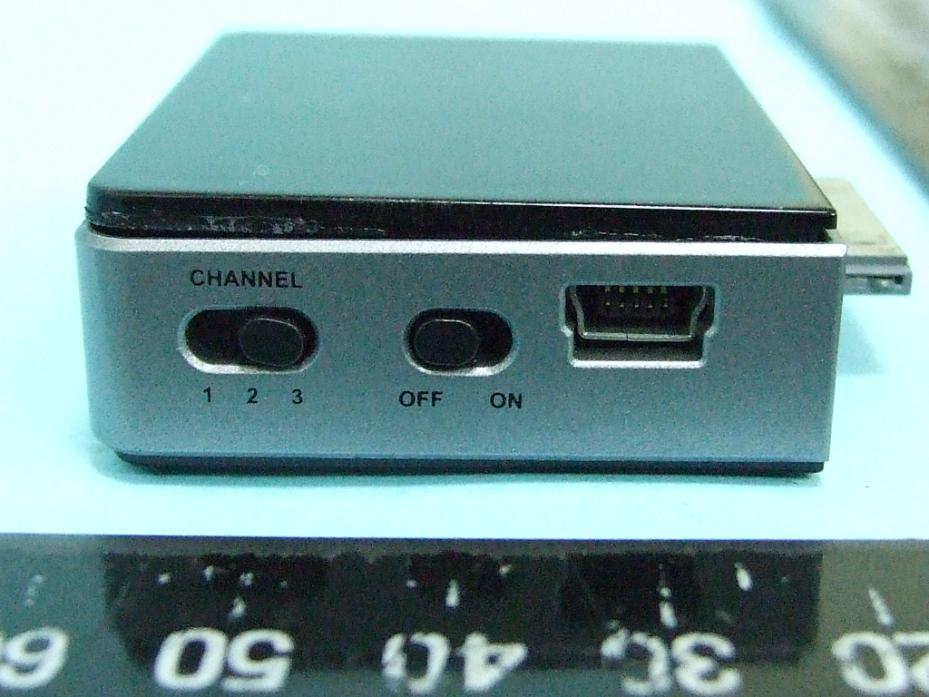
User Manual For an updated list of compatible apps & devices, please visit: www.getbigstream.com Brought to market by: © 2010 Personal Communications Devices LLC. All rights reserved. think bigthink big Follow us on: Introduction Package Contents Compatible Devices Set Up Usage Charging Instructions Maintenance Technical Specifications Troubleshooting Contact Us Table of Contents 01 01 02 03 05 06 06 07 08 09 0102 Introduction Bigstream TM is a plug-and-play device that enables users to stream media content from their Apple devices to a TV without the need for cables and wires. Extremely portable, the Bigstream can be transported from the home to the road for entertainment, business, and many other applications. Package Contents Transmitter - Mini-USB to USB Charging Cable - Audio/Video Cable Receiver - Receiver Power Adapter - Quick Start Guide Receiver Connectors/Switches 1. Channel Selector 3. DC-IN Power Port 2. Power Switch 4. A/V OUT 1 2 3 OFF ON CHANNEL 12 D C I N A / V O U T 34 SideBack Transmitter Connectors/Switches 1. Channel Selector 3. Mini-USB Port 2. Power Switch CHANNEL 1 2 3 OFF ON 123 Compatible Devices 1. iPhone 4 c 2. iPhone 3GS 3. iPhone 3G 4. iPhone 5. iPad TM 6. iPod touch c (4 th Gen) 7. iPod touch (3 rd Gen) 8. iPod touch (2 nd Gen) 9. iPod nano (6 th Gen) 10. iPod nano (4 th and 5 th Gen) SideFront Quick Start Guide 0304 Set Up 1. Plug the AC adapter into the receiver’s DC-IN power port and turn on the receiver. 2. Set the transmitter and receiver channel switches to the same channel. 3. Attach the fully charged transmitter into the mobile device and turn on. When the transmitter is on, the Power LED will emit a green light. 4. Plug the Audio/Video cable (red, yellow, and white connectors) into the component audio/video input ports on your TV. Attach the opposite end of the cable into the receiver’s A/V OUT port. 5. On your TV, select the appropriate input setting. 6. You are now ready to begin streaming media wirelessly to your TV. 4 1232 1 2 3 OFF ON CHANNEL 0506 Streaming a video/movie 1. Make sure the transmitter is fully charged, and both devices are set up for streaming. (see Set Up) 2. For iPhone users, select the” iPod” icon and then play a video from your library. 3. For iPad and iPod touch users, select the “Videos” icon and play a video from your library. 4. The video will instantly be played on your TV screen. Maintenance 1. Unplug the power and disconnect all external devices and cables from the transmitter and receiver. 2. Gently remove any surface dirt using a damp, soft lint-free cloth. Dry the plastic with a soft lint-free cloth after cleaning. 3. To clean the device, do not use cleaning sprays or solvents of any kind containing alcohol or other inflammable liquids. Charging Instructions Charging the Transmitter 1. When the red LED flashes, this indicates the device has less than ten minutes of playback time and needs to be charged immediately. 2. Connect the mini-USB charging cable to the transmitter. 3. Connect the other end of the USB cable to a power source that accepts USB. (computer, USB charger, etc.) 4. When charging, the Battery LED will emit a red light. 5. When the transmitter is fully charged, the Battery LED will turn off. Streaming an app 1. Download and install an app that supports Apps TV-out function. For a list of apps that support Apple's TV-out function, please visit www.getbigstream.com. 2. Launch the app from your device. 3. Most apps that support TV-out will automatically appear on the TV screen. 4. For some apps such as games, additional steps may be required. Follow the onscreen instructions to show on the TV. Streaming a presentation 1. You must have a presentation app installed on your device that supports TV-out to use this function. (e.g., Keynote for iPad) 2. Launch the presentation app. 3. For some presentation apps, the presentation can only be viewed in slideshow mode. 4. Start the slideshow and the presentation will be instantly displayed on the TV screen. Streaming a photo slideshow 1. Select the “Photos” icon. 2. Photos using the TV-out can only be shown as a slideshow. 3. On an iPad, select “slideshow” and “start” to begin viewing photos. 4. On an iPhone or iPod touch, press play to start slideshow and begin viewing. The slideshow will instantly appear on the TV. Power LED Battery LED 0708 Safety Information/ Warnings/ Warranty Repair Keep safety notes and other documentation together with device. Repair Only qualified technicians should repair the device. Unauthorized opening and improper repair can result in considerable danger to the user, the device, and may also void the warranty. Please refer to www.getbigstream.com/support for detailed information regarding warranty. Warning Never force a connector into a port. If the connector and port do not join with ease, they probably do not match. Ensure that the connector matches the port and that you have positioned the connector correctly in relation to the port. Troubleshooting 1. I can’t get the transmitter to turn on. Make sure that your transmitter is fully charged, and that the receiver is set up properly. In the event that the transmitter battery is not charged, power the transmitter with the included mini-USB to USB cable. 2. My picture quality is not clear. It is possible that there is another user in close proximity. You can solve this by changing the transmitter and receiver to a different channel. Choose the channels that provide the clearest picture and sound quality. Both transmitter and receiver must have the same channel selected. 3. I can’t get the picture to display on the TV. Check to make sure you have switched your TV input to the appropriate selection that corresponds to the plugged in Audio/Video cable. Additionally, make sure the application you are running is enabled for iPhone/ iPad/ iPod TV-out functionality. Technical Specifications Transmitter End Dimensions Weight Connectors Switches Indicators Resolution Support Power & Battery Op…

Text truncated - open the document above for the full version.

External Photos

FCC TEST REPORT SPORTON International Inc. PAGE NUMBER : B1 OF B13 TEL : 886-2-2696-2468 ISSUED DATE : Nov. 30, 2010 FAX : 886-2-2696-2255 APPENDIX B. Photographs of EUT FCC TEST REPORT SPORTON International Inc. PAGE NUMBER : B2 OF B13 TEL : 886-2-2696-2468 ISSUED DATE : Nov. 30, 2010 FAX : 886-2-2696-2255 FCC TEST REPORT SPORTON International Inc. PAGE NUMBER : B13 OF B13 TEL : 886-2-2696-2468 ISSUED DATE : Nov. 30, 2010 FAX : 886-2-2696-2255

Internal Photos

FCC TEST REPORT SPORTON International Inc. PAGE NUMBER : B3 OF B13 TEL : 886-2-2696-2468 ISSUED DATE : Nov. 30, 2010 FAX : 886-2-2696-2255 Ant. location FCC TEST REPORT SPORTON International Inc. PAGE NUMBER : B4 OF B13 TEL : 886-2-2696-2468 ISSUED DATE : Nov. 30, 2010 FAX : 886-2-2696-2255 FCC TEST REPORT SPORTON International Inc. PAGE NUMBER : B5 OF B13 TEL : 886-2-2696-2468 ISSUED DATE : Nov. 30, 2010 FAX : 886-2-2696-2255 Ant. location FCC TEST REPORT SPORTON International Inc. PAGE NUMBER : B6 OF B13 TEL : 886-2-2696-2468 ISSUED DATE : Nov. 30, 2010 FAX : 886-2-2696-2255 FCC TEST REPORT SPORTON International Inc. PAGE NUMBER : B7 OF B13 TEL : 886-2-2696-2468 ISSUED DATE : Nov. 30, 2010 FAX : 886-2-2696-2255 FCC TEST REPORT SPORTON International Inc. PAGE NUMBER : B8 OF B13 TEL : 886-2-2696-2468 ISSUED DATE : Nov. 30, 2010 FAX : 886-2-2696-2255 FCC TEST REPORT SPORTON International Inc. PAGE NUMBER : B9 OF B13 TEL : 886-2-2696-2468 ISSUED DATE : Nov. 30, 2010 FAX : 886-2-2696-2255 FCC TEST REPORT SPORTON International Inc. PAGE NUMBER : B10 OF B13 TEL : 886-2-2696-2468 ISSUED DATE : Nov. 30, 2010 FAX : 886-2-2696-2255 FCC TEST REPORT SPORTON International Inc. PAGE NUMBER : B11 OF B13 TEL : 886-2-2696-2468 ISSUED DATE : Nov. 30, 2010 FAX : 886-2-2696-2255 FCC TEST REPORT SPORTON International Inc. PAGE NUMBER : B12 OF B13 TEL : 886-2-2696-2468 ISSUED DATE : Nov. 30, 2010 FAX : 886-2-2696-2255

Test Report

FCC TEST REPORT Report No.: FR0O1402 SPORTON International Inc. Report Format Version: b FCC RADIO TEST REPORT according to 47 CFR FCC Part 15 Subpart C § 15.249 Equipment : Air Shuttle Model No. : CW-AP01KT Brand Name : CyWee Filing Type : New Application Applicant : CyWee Group Ltd. 3F, 28 Jing Ye 1st Road, Lane 128, Taipei, Taiwan 10462 FCC ID : WZS-CW-AP01KT Manufacturer : CyWee Group Ltd. 3F, 28 Jing Ye 1st Road, Lane 128, Taipei, Taiwan 10462 Received Date : Oct. 15, 2010 Final Test Date : Nov. 19, 2010 Statement The test result in this report refers exclusively to the presented test model / sample. Without written approval of SPORTON International Inc., the test report shall not be reproduced except in full. The measurements and test results shown in this test report were made in accordance with the procedures and found in compliance with the limit given in ANSI C63.4-2003 and 47 CFR FCC Part 15 Subpart C. The test equipment used to perform the test is calibrated and traceable to NML/ROC. SPORTON International Inc. No. 52 Hwa Ya 1 st Rd., Hwa Ya Technology Park, Kwei-Shan Hsiang, Tao Yuan Hsien, Taiwan, R.O.C. FCC TEST REPORT Report No.: FR0O1402 SPORTON International Inc. Page No. : i of ii TEL : 886-2-2696-2468 Issued Date : Nov. 30, 2010 FAX : 886-2-2696-2255 FCC ID : WZS-CW-AP01KT Table of Contents 1 SUMMARY OF THE TEST RESULT .......................................................................................................................2 2 GENERAL INFORMATION ......................................................................................................................................3 2.1 Product Details .................................................................................................................................................................................... 3 2.2 Accessories......................................................................................................................................................................................... 3 2.3 Table for Test Modes .......................................................................................................................................................................... 3 2.4 Table for Testing Locations ................................................................................................................................................................. 3 2.5 Table for Supporting Units ................................................................................................................................................................... 3 2.6 Test Configuration ............................................................................................................................................................................... 4 3 TEST RESULT .........................................................................................................................................................6 3.1 AC Power Line Conducted Emissions Measurement ........................................................................................................................... 6 3.2 Field Strength of Fundamental Emissions Measurement ................................................................................................................... 10 3.3 20dB Spectrum Bandwidth Measurement ......................................................................................................................................... 13 3.4 Radiated Emissions Measurement .................................................................................................................................................... 16 3.5 Band Edge Emissions Measurement ................................................................................................................................................. 28 3.6 Antenna Requirements...................................................................................................................................................................... 30 4 LIST OF MEASURING EQUIPMENTS ................................................................................................................. 31 5 TEST LOCATION .................................................................................................................................................. 33 6 TAF CERTIFICATE OF ACCREDITATION .......................................................................................................... 34 APPENDIX A. TEST PHOTOS ........................................................................................................................ A1 ~ A6 APPENDIX B. PHOTOGRAPHS OF EUT ..................................................................................................... B1 ~ B13 FCC TEST REPORT Report No.: FR0O1402 SPORTON International Inc. Page No. : ii of ii TEL : 886-2-2696-2468 Issued Date : Nov. 30, 2010 FAX : 886-2-2696-2255 FCC ID : WZS-CW-AP01KT History of This Test Report Original Issue Date: Nov. 30, 2010 Report No.: FR0O1402 ■ No additional attachment. □ Additional attachment were issued as following record: Attachment No. Issue Date Description 15.205(a) 15.209(a) 47 CFR FCC Part 15 Subpart C Further, this requirement does not apply to intentional radiators that must be professionally installed. FCC TEST REPORT Report No.: FR0O1402 SPORTON International Inc. Page No. : 1 of 34 TEL : 886-2-2696-2468 Issued Date : Nov. 30, 2010 FAX : 886-2-2696-2255 FCC ID : WZS-CW-AP01KT CERTIFICATE OF COMPLIANCE according to 47 CFR FCC Part 15 Subpart C § 15.249 Equipment : Air Shuttle Model No. : CW-AP01KT Brand Name : CyWee Applicant : CyWee Group Ltd. 3F, 28 Jing Ye 1st Road, Lane 128, Taipei, Taiwan 10462 Sporton International as requested by the applicant to evaluate the EMC performance of the product sample received on Oct. 15, 2010 would like to declare that the tested sample has been evaluated a…

Text truncated - open the document above for the full version.

Test Setup Photos

FCC TEST REPORT Report No.: FR0O1402 Page No. : A1 of A6 FCC ID : WZS-CW-AP01KT Appendix A. Test Photos FCC TEST REPORT Report No.: FR0O1402 Page No. : A2 of A6 FCC ID : WZS-CW-AP01KT 1 Photographs of Conducted Emissions Test Configuration FRONT VIEW REAR VIEW FCC TEST REPORT Report No.: FR0O1402 Page No. : A3 of A6 FCC ID : WZS-CW-AP01KT SIDE VIEW FCC TEST REPORT Report No.: FR0O1402 Page No. : A4 of A6 FCC ID : WZS-CW-AP01KT 2 Photographs of Radiated Emissions Test Configuration For radiated emissions 9kHz~30MHz FRONT VIEW REAR VIEW FCC TEST REPORT Report No.: FR0O1402 Page No. : A5 of A6 FCC ID : WZS-CW-AP01KT For radiated emissions 30MHz~1GHz FRONT VIEW REAR VIEW FCC TEST REPORT Report No.: FR0O1402 Page No. : A6 of A6 FCC ID : WZS-CW-AP01KT For radiated emissions above 1GHz FRONT VIEW REAR VIEW

Contact Information

Applicant

James Su(Product Manager)
[email protected]+886 2 85022798Fax: +886 2 8502 5718

Test Firm

Sporton International Inc.Alex Chen
[email protected]886-3-327-3456Fax: 886-3-327-0973

Technical Specifications

#Rule PartsFrequency RangePower Output
115C5.76 GHz - 5.82 GHz-
Confidentiality
Long Term

Other Applications from CyWee Group Ltd.

WZS-CWCL01KP-D

2.4G Wireless Dongle

Mar 15, 2009

Equipment Class

DXX - Part 15 Low Power Communication Device Transmitter