X5FB-IDC881011XXSOLAR SPEAKER
INTERNATIONAL DEVELOPMENT CORP.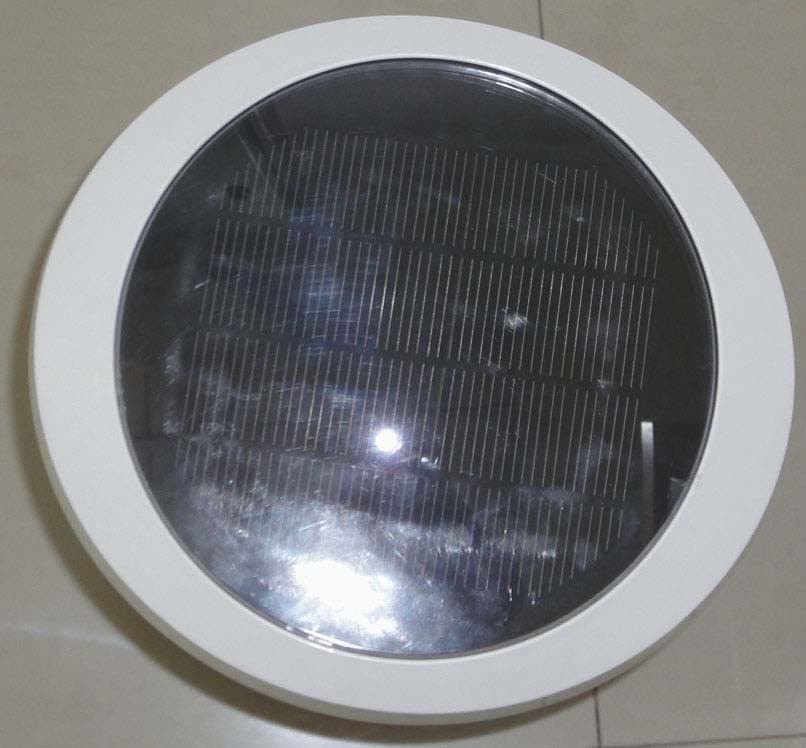
Click to zoom
Application Details
- Equipment Class
- CYY - Communications Receiver used w/Pt 15 Transmitter
- Date of Grant
- Mar 06, 2010
- Application Purpose
- Original Equipment
- Date of Application
- Mar 04, 2010
- Equipment Note
- SOLAR SPEAKER
- Frequency Range
- 913.00000000 - 915.00000000
- Country
- United States
Documents & Files
Document Text
Text extracted from the exhibit documents filed with the FCC. Open a document above to read the original.
Users Manual
Charging the solar speaker with your AC/DC adaptor. Charging The Solar Speaker Using The Sun. Place the solar speaker in direct sunlight for 15 hours to ensure a complete charge. PULL TAB Item # 88101x-xx Owners Manual REMOTE CONTROL O F F 1 2 3 Channel MP3/ AUX IN DC13.5V SOLAR SPEAKER DOCKING STATION AC ADAPTOR SOLAR SPEAKER AC ADAPTOR DOCKING STATION DOCKING STATION ADAPTORS AUXILIARY CABLE AUDIO CABLE REMOTE CONTROL POWER PORT POWER PORT DC 6.8V OFF 1 2 3 Solar panel may have protective film. THIS MUST BE REMOVED PRIOR TO USE. BOTTOM OF SOLAR SPEAKER BACK OF DOCKING STATION Charging the docking station with your AC/DC adaptor. A B C 30GB/60GB TOUCH 8,16,32GB10GB/20GB NANO MINI STEP 1 STEP 2 For first time use, remove pull tab from between the battery and its connector. (See remote control instructions for battery replacement) Charging your devices out of the box * For first time use allow both the speaker and the docking station to charge for 4 full hours to ensure a complete charge . Solar Speaker Parts Plug the docking station AC cable into the wall outlet. Plug the opposite end into the DC portal on the back of the docking station. When plugged into an AC outlet, the docking station will charge a docked iPod. Plug the solar speaker AC adaptor into the wall outlet. Plug the opposite end into the DC portal on the bottom of the solar speaker. When AC adapter is plugged in, red LED on speaker bottom lights up. IDC 899 Henrietta Creek Rd. Roanoke, TX 76262 - 1-888-377-5377 The Honeywell trademark is used under license from Honeywell International Inc. Honeywell International Inc. makes no representations or warranties with respect to this product or service 12/18/09 Revised 02/03/10 E O F F 1 2 3 Channel MP3/ AUX IN DC12V O F F 1 2 3 Channel There might be a slight delay in sound from your speaker once play is pressed, continue to press the volume key on your remote to make sure the volume is at a audible level. The iPod can be controlled using the keys on your remote or on the iPod itself. On a full charge the docking station and solar speaker can be expected to run approximately 3-10 hours (depending on volume setting) before recharging is required DOCKING STATION ADAPTOR To get started playing music you will need to first move the channel switch from the off position to one of the three available channels on both the solar speaker as well as your docking station. Please note that both the speaker and the docking station must be on the same channel. You will know that both units are powered on by the indicator light, which is located on the front of the speaker as well as the docking station. ON/OFF/CHANNELS SWITCH DC 6.8V OFF 1 2 3 OFF 1 2 3 BACK OF DOCKING STATION ON/OFF/CHANNELS SWITCH BOTTOM OF SOLAR SPEAKER Deciding How To Listen To Your Music Powering Your New Solar Speaker And Docking Station Item # 88101x-xx A MP3 or home audio wireless connection through docking station auxiliary port and audio input portiPod/MP3 Direct solar speaker connection TROUBLESHOOTING HIBERNATION MODE STEP 3 STEP 4 iPod wireless connection through docking station ABC NOTE: The front LCD lights will change color to show the charge progress. BATTERY STATUS INDICATOR - SPEAKER: • Green light indicates a battery capacity of 80%-100%. • Yellow light indicates a battery capacity of 20%-80% • Red light indicates a battery capacity of less than 20% • Flashing red light indicates that the battery capacity is exhausted. After one hour speaker turns off automatically. • Flashing green light indicates that the speaker is in hibernation mode. Blue lights on speaker will light up at night. BATTERY STATUS INDICATOR - DOCKING STATION: • Red light indicates a battery capacity of less than 20%. • Yellow light indicates a battery capacity of 20%-80%. • Green light indicates a battery capacity of 80%-100%. STEP 2 Contd. page 2 (1) If no sound is heard, first reconnect the docking station and speaker to the wall outlets to charge for 4 hours. Also make sure your iPod is set at an appropriate volume, as well as on your docking station using the volume key on your remote. (2) Ensure the docking station is within 100 feet of the solar speaker and has a clear line of sight.(3) If there is interference when the docking station is playing, choose a different audible channel on both the docking station and solar speaker. (Note: The same channel must be selected on both) For optimal sound and range performance, elevate speaker and docking station at least 24" off the ground. Depending on your iPod (nano, mini, 30GB, etc) select the correct docking station adaptor. ( See parts Included ) and snap in to place. Gently press your iPod down onto the docking pin until flush. Set your iPod to an appropriate volume, and press play. (For optimal sound elevate speaker and docking station 24” or more off the ground) INDICATOR LIGHT INDICATOR LIGHT INDICATOR LIGHT INDICATOR LIGHT After 10 minutes of inactivity, the docking station will enter hibernation mode. After one minute without signal from the docking station, the speaker will enter hibernation mode, indicated by a flashing light. After 30 minutes in hibernation, the speaker will automatically shut off. To awake the docking station or speaker from hibernation mode, turn the switch / channel selector off and back on. FOR FIRST TIME USE, REMOVE PULL T AB FROM BETWEEN THE BATTERY AND ITS CONNECTOR. Using your solar speaker remote Press the ON/OFF button once to turn the speaker ON or OFF. Press the volume buttons to control the volume levels. Press the BASS button to control the bass levels. Press the play/pause button to toggle between play and pause. Press the track selection buttons to change the track being played. Press the mute button to turn the sound off completely. Press the iPod button to indicate the use of an iPod. Press the AUX button to indicate the use of an auxiliary device. PULL TAB STEP 4 Contd. page 3 O F F 1 2 3 Channel AUXILIARY PORTAL AUXILIARY PORTAL DC 6.8V OFF 1…
Text truncated - open the document above for the full version.
Cover Letter(s)
INTERNATIONAL DEVELOPMENT CORP. Agency Authorization Letter Attn.: Reviewing Engineering Federal Communications Commission, Authorization & Evaluation Division, 7435 Oakland Mills Road, Columbia, MD 21046 Date: 2010-02-01 To Whom It May Concern: We, the undersigned, hereby authorize SIC International Certification Group (each one in this company) to act on our behalf in all matters before the Federal Communications Commission with respect to the application for equipment authorization of the solar speaker products, including the signing of all documents relating to these matters. Any and all acts carried out by SIC International Certification Group on our behalf shall have the same effect as our own. We, the applicant, hereby certify that in the case of an individual applicant, he or she is not subject to a denial or federal benefits pursuant to section 5301 of the Anti-Drug Abuse Act of 1988, 21 U.S.C. § 862 because of a conviction for possession or distribution of a controlled substance. See 47 CFR 1.2002(b) for the definition of a “party” for these purposes. Yours Sincerely, CATHERINE
Cover Letter(s)
INTERNATIONAL DEVELOPMENT CORP. Date: 2010-02-01 To: Federal Communications Commission, Authorization & Evaluation Division, 7435 Oakland Mills Road, Columbia, MD 21046 SIC International Certification Group 505 Wuning Road Shanghai P.R. China Re: Confidentiality Request Gentlemen: This letter is to comply with 47 CFR 0.457(d)(2) pertaining to confidentiality material. Shanghai Source Electronic Ltd., requests that the following documents regarding this submission for FCC ID: X5FB-IDC881011XX be kept confidential: 1. Block Diagram – Block Diagram.pdf 2. Schematics – Schematics.pdf 3. Operational Description - Operational Description.pdf These exhibits contain technical information, therefore this information cannot be published, if this information were to be made public it could be used to the disadvantage of the applicant in the marketplace. Yours Sincerely, CATHERINE
External Photos
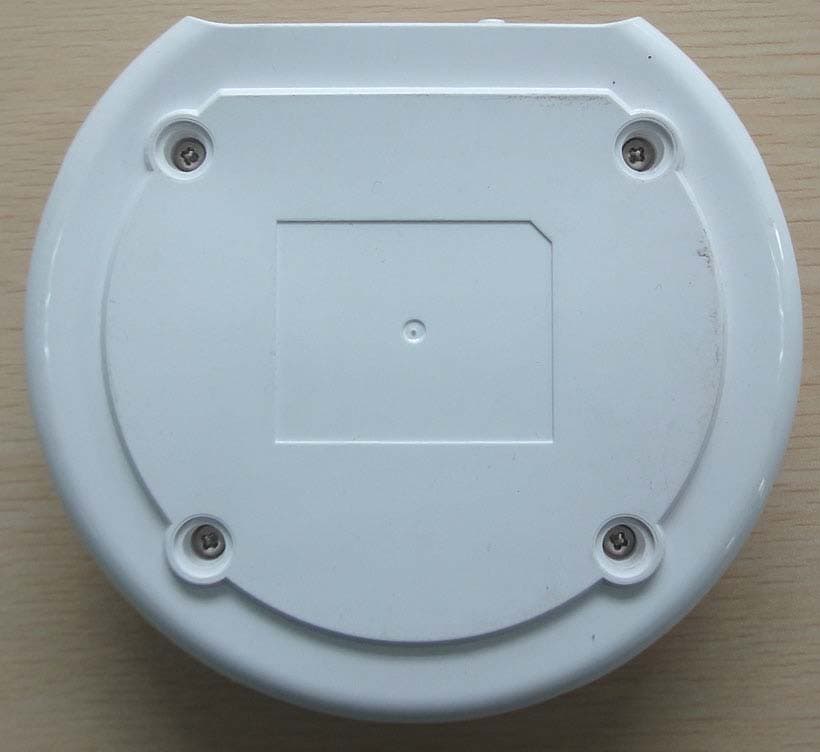
Front View Rear View Top View Bottom View
Internal Photos
Inside View -1 Inside View -2 Main Board Front View Main Board Back View Receiver Board Front View Receiver Board Back View Switch view -1 Switch view -2
Test Report
TEST REPORT Classification: EMC Report Number.: S100113E-RX Date: 2010, January 28 Applicant : INTERNATIONAL DEVELOPMENT CORP. Address : 899 HENRIETTA CREEK ROAD, ROANOKE, TX 76262, USA Product : SOLAR SPEAKER Brand name/Trade mark : HONEYWELL / HONEYWELL Model Number : 881011-XX (XX STANDS FOR FINISH/COLOR) According to : FCC part 15, Subpart B SIC INTERNATIONAL CERTIFICATION GROUP SIC International Certification Group S100113E-RX Page 1 of 20 Contents CONTENTS ...................................................................................................................................................................... 1 ADMINISTRATIVE DATA ............................................................................................................................................ 2 GENERAL PRODUCT INFORMATION: .................................................................................................................... 3 TEST SUMMARY ........................................................................................................................................................... 4 CONFIGURATION OF TESTED SYSTEM ................................................................................................................. 5 ATTACHMENT 1 - CONDUCTED EMISSION TEST RESULTS ............................................................................ 6 ATTACHMENT 2 – RADIATED EMISSION TEST RESULTS ................................................................................ 9 SIC International Certification Group S100113E-RX Page 2 of 20 Administrative Data Report No. ....................................... : S100113E-RX Tested by (name and signature) ...... : Allen Xia Reviewed by (name and signature) . : Angel Xie Approved by (name and signature) .. : Catherine Xing Date of issue .................................... : 2010-01-28 Accreditation Bodies ..................... : SIC International Certification Group Address ............................................ : 505 Wuning Road Shanghai P.R. China Testing location .............................. : Jiangsu Electronic Information Product Quality Supervision & Inspection Research Institute Address ............................................ : No.107, Zhongqiaogexiang, Wuxi, Jiangsu, China Registration Number......................: CNAS:L0262 Applicant’s name ........................... : INTERNATIONAL DEVELOPMENT CORP. Address ............................................ : 899 HENRIETTA CREEK ROAD, ROANOKE, TX 76262, USA Manufacturer................................... : SONAVOX ACOUSTICS CO., LTD. SUZHOU Address ............................................ : 88 WANLI ROAD, YUANHE TOWNSHIP, XIANGCHENG DISTRICT, SUZHOU Test specification: Standard(s) ....................................... : FCC part 15, Subpart B Standard test method ....................... : ANSI C63.4-2003 Non-standard test method ................ : / Test case verdicts Test case does’t apply to the test object N(N/A) Test item does meet the requirement: P(Pass) Test item does’t meet the requirement: F(Fail) Testing Date of receipt of test item : 2010-01-15 Date(s) of performance of test : 2010-01-15 to 2010-01-27 SIC International Certification Group S100113E-RX Page 3 of 20 General Remarks: This report shall not be reproduced except in full without the written approval of the testing laboratory. The test results presented in this report relate only to the item(s) tested. ”(see remark #)" refers to a remark appended to the report. "(see Annex #)" refers to an annex appended to the report. Throughout this report a comma is used as the decimal separator. Statement of Measurement Uncertainty The data and results referenced in the document are true and accurate. The reader is cautioned that there may be errors within the calibration limits of the equipment and facilities that can account for a nominal measurement error. Furthermore, component and process variability of devices similar to that tested may result in additional deviation. General product information: Test Sample.............................: SOLAR SPEAKER Model Numbers........................: 881011-XX (XX STANDS FOR FINISH/COLOR) Model Tested............................: 881011-06 Serial Number...........................: Engineering Sample Input Voltage........................... : 13.5 V DC Support Equipment...................: N/A Cable Description.....................: N/A FCC ID......................................: X5FB-IDC881011XX EUT Exercise Software............: The EUT is not programmable and doesn’t exercise any software. Equipment Modification............: Any modifications installed previous to testing by INTERNATIONAL DEVELOPMENT CORP. will be incorporated in each production model sold or leased in United States. There were no modifications installed by SIC International Certification Group test personnel. INTERNATIONAL DEVELOPMENT CORP. Model number 881011-06 (referred to as the EUT in this test report) is a receiver part of SOLAR SPEAKER system. SIC International Certification Group S100113E-RX Page 4 of 20 Test Summary The Electromagnetic Compatibility requirements on model 881011-XX tested for this test are stated below. All results listed in this report relate exclusively to this above-mentioned model as the Equipment Under Test. This report confers no approval or endorsement upon any other component, host or subsystem used in the test set-up. EMC Test Items Specification Description Test Results Remark FCC Part 15.107 Conducted Emission Limits Compliance Attachment 1 FCC Part 15.109 Radiated Emission Limits Compliance Attachment 2 FCC Part 15.111 Antenna Power Conduction Limits N/A No external receiving antenna. SIC International Certification Group S100113E-RX Page 5 of 20 Configuration of Tested System SIC International Certification Group S100113E-RX Page 6 of 20 ATTACHMENT 1 - CONDUCTED EMISSION TEST RESULTS CLIENT: INTERNATIONAL DEVELOPMENT CORP. TEST STANDARD: …
Text truncated - open the document above for the full version.
Test Setup Photos
Conducted Emissions Graph Radiated Emissions Graph
Contact Information
Applicant
CATHERINE HSU
Technical Contact
SIC International Certification GroupAngel Xie
[email protected]86-21-62574990
No. 505, Wuning Road · Shanghai · China
Non-Technical Contact
SIC International Certification GroupAngel Xie
[email protected]86-21-62574990
Test Firm
Jiangsu Electronic Products Supervision InstituteMinliang Wang
Technical Specifications
| # | Rule Parts | Frequency Range | Power Output |
|---|---|---|---|
| 1 | 15B | 913 MHz - 915 MHz | - |
Other Applications from INTERNATIONAL DEVELOPMENT CORP.
X5FA-IDC881011XX
Mar 06, 2010DOCKING STATION
Equipment Class
DXX - Part 15 Low Power Communication Device Transmitter