X5GIWING601SWireless iPod to Hi Fi Connection Kit (Sender)
Amazilla Holding B.V.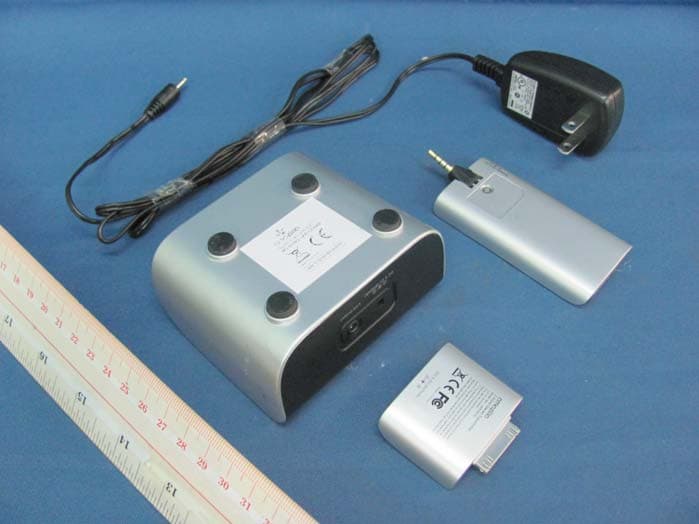
Click to zoom
Application Details
- Equipment Class
- DXX - Part 15 Low Power Communication Device Transmitter
- Date of Grant
- Mar 09, 2010
- Application Purpose
- Original Equipment
- Date of Application
- Mar 09, 2010
- Equipment Note
- Wireless iPod to Hi Fi Connection Kit (Sender)
- Frequency Range
- 2404.00000000 - 2479.00000000
- Company
- Amazilla Holding B.V.
- Country
- Netherlands
Documents & Files
Document Text
Text extracted from the exhibit documents filed with the FCC. Open a document above to read the original.
Users Manual
User Manual iWING SR-HD System No. IAR-601 What is inside?Page 1 Sender 2.4 GHzReceiver 2.4 GHzAdapter 110- 240V / DC 5.0V AUX extension cable Quickstart Legal Disclaimer “made for iPod” means that an electronic accessory has been designed to connect specifically to iPod and has been certified by the developer to meet Apple performance standards. Apple is not responsible for the operation of this device or its compliance with safety and regulatory standards. connectplugplay HiFi Dock & RCA Cable How does it work?Page 2 Connection to Hifi system Before you start, make sure your receiver is fully charged. Step 1 • Turn on your iPod. • Plug the sender into the iPod. • The purple LED will flash – the sender is trying to connect with the receiver. Step 2 • Connect the RCA cable to the Hifi dock and to the AUX socket of the Hifi system. • Power the Hifi dock with the adapter. • Turn on your Hifi system. • Plug the receiver firmly into the Hifi dock. Step 3 • Push the On/Off button (2-4 sec.) to activate the receiver. • If the purple light flashes, the receiver is connecting with the sender. • If the purple light does not flash you have to reload the battery. Step 4 • The sender and receiver will automatically pair within 10 - 20 seconds. • Once connected the purple light will stop flashing and will shine constantly. Now you can play your music wirelessly via your Hifi system and have full control through your iPod! How does it work?Page 3 Connection to speaker dock Before you start, make sure your receiver is fully charged. Step 1 • Turn on your iPod. • Plug the sender into your iPod. • The purple LED will flash; the sender is trying to connect with the receiver. Step 2 • Turn on your speaker dock. • Plug the receiver into the AUX socket of the speaker dock. • If the AUX socket is difficult to access, use the AUX extension cable. Step 3 • Push the On/Off button (2-4 sec.) to activate the receiver. • If the purple light flashes, the receiver is connecting with the sender. • If the purple light does not flash you have to reload the battery. Step 4 • The sender and receiver will automatically pair within 10 - 20 seconds. • Once connected the purple light will stop flashing and will shine constantly. Now you can play your music wirelessly via the speaker and have full control through your iPod! Range & performance Amazilla is using 2.4 GHz technology for sending & receiving audio. The standard range is 12 meters (36 ft), but is depending on environmental conditions such as wifi networks, wireless telephones, and other (wireless) interferences. LED light definitionsPage 4 Sender Flashing modeDefinition LED off- Sender is not plugged into iPod, or - iPod is not compatible LED flashing Sender is in pairing mode LED onSender is paired Receiver Flashing modeDefinition Purple LED offReceiver is in off status Purple LED flashingReceiver is in pairing mode Purple LED onReceiver is paired Battery indicator (red LED) on top off- Battery is fully charged, or - if the pairing LED does not flash, battery is empty Battery indicator (red LED) on top flashingBattery low. You need to recharge the receiver with the adapter or Hifi dock Battery indicator (red LED) on top onBattery is charging Charging Charging the Amazilla receiver The receiver contains a rechargeable battery, which can be charged by the adaptor and/or through the Amazilla Hifi dock (not included). You can power the receiver with the adaptor, even while the receiver is plugged into the speaker dock. When the battery of the receiver is fully charged, the lifetime of the battery is +/- 6 hours, depending the usage (loudness, distance) Charging iPod when sender is connected When the sender is connected, it will use the power of the iPod. Though the power consumption is very low, you may find the need to recharge your iPod simultaneously. Just plug your adaptor into the sender and you can proceed using the wireless communication. Charging/playing the iPod via the Hifi dock Page 5 If the Hifi dock is powered through the adapter, you can plug in your iPod with the use of the bracket suitable for your model, and consequently charge it. You can also plug your iPod into the Hifi dock and play the music via the Hifi system. Tip Once your Hifi dock is installed you may leave it permanently connected to you Hifi system. Do not disconnect. This way you are always ready to plug in the iPod or receiver without any hassle. iPod compatibility Trouble shooterPage 6 Sender is connected to an iPod and the receiver is connected to my speaker dock, but does not produce sound. Power • check if the battery of the receiver is charged (if not, charge the receiver first) • check if the battery of the iPod is not empty • verify if the speaker dock is powered Volume • verify if the volume of the speaker dock is turned up • verify if the volume of the iPod is turned up Functionality • verify if you are playing a song If the above does not give you answers • unplug the sender and the receiver • power off (put the power off of both the iPod and the speaker dock) • power on (re-activate the iPod and speaker dock) • plug on ( connect the sender and receiver as described) Guarantee & Service This product has been extensively tested, however, in case you experience any problem, please refer to our website for further information: www.amazilla.com/FAQ For more service, you can visit our website and learn more about frequent asked questions and/or other amazing products of Amazilla ; www.amazilla.com/FAQ Additional information & warningsPage 7 AC switching power adaptor AC INPUT : 100-240V ~ 50/60Hz DC OUTPUT :5V ===1000mA Warnings and guidelines for safe use : • This product consists of a sender, a receiver, a power adaptor, and for certain models a Hifi dock. • Use this product only with the power adapter supplied in the product package. Using another power supply may damage the units. • The product and the AC/DC adaptor shall not be exposed to dripping or splashing and that no object…
Text truncated - open the document above for the full version.
Cover Letter(s)
Letter of Agency "I, Director of Amazilla B.V. do hereby authorize Intertek Testing Services (Mr. Ben Ho) to act on our behalf in front of the Federal Communications Commission with respect to all matters relating to certification of equipment under Part 15 and Part 18 of the FCC Rules until further notice." I further certify that no party (as defined in §1.2002(b) of CFR 47. 2004) to this application, including myself, is subject to a denial of federal benefits, that includes FCC benefits, pursuant to Section 5301 of the Anti-Drug Abuse Act of 1988, 21 U.S.C.,862. Dated this __ 25 ____ day _ January of 2010 Printed Name Tel. +31 (0) 10 411 00 5a Fax +31 (0) 10 411 01 55 Director [email protected] Title Amazilla B.V. WiIlemskade 18-C 3016 DL Rotterdam The Netherlands By
Cover Letter(s)
Confidential Request Letter Attention: Application Examiner Re: Request for confidentiality Applicant: Amazilla B.V. FCC ID: X5GIWING601S X5GIWING601R To whom it may concern. Permanent Confidentially Request is hereby submitted by Amazilla B.V. to wi thhold permanently from public review certain portions of the application for equipment certification for the referenced FCC identifiers. This request for confidentiality is made pursuant to 47 CFR 0.457(d1 and 0.459 of the FCC Rules. In particular, the following sections of the application are to be kept permanently confidential: Schematics Detailed Block diagrams Detailed Operational / Functional Description Rationale for request for confidentially: Amazilla B.V. has invested considerable time and materials in research and development to produce the referenced product. [Permanent confidentiality Disclosure of the permanently confidential portions of this application to competitors would not only give them significant competitive advantages in developing similar products. but would also disclose successful implementation of unpu1lished. leading edge technology developed by us. If you have questions or need further information. please contact the undersigned. Director Tel. +31(0) 10-4110055 Amazilla B.V. Fax +31(0) 10-2133495 [email protected]
External Photos
INTERTEK TESTING SERVICE Report No.: HK10020088-1 FCC ID: X5GIWING601S Equipment Photographs Model : IAR-601S (External) INTERTEK TESTING SERVICE Report No.: HK10020088-1 FCC ID: X5GIWING601S Equipment Photographs Model : IAR-601S (External)
Internal Photos
INTERTEK TESTING SERVICE Report No.: HK10020088-1 FCC ID: X5GIWING601S Equipment Photographs Model : IAR-601S (Internal) INTERTEK TESTING SERVICE Report No.: HK10020088-1 FCC ID: X5GIWING601S Equipment Photographs Model : IAR-601S (Internal)
Test Report
INTERTEK TESTING SERVICES Report No.:HK10020088-1 Sample No.:1/1 Code: FCC15C_d / Effective Date: 26 Jan 2010 ( of ) Bandedge Plot – Pursuant to FCC Part 15 Section 15. 249 Requirement (Pass)
Test Report
Report no.: HK10020088-1 Tx Mode AC Mains Ctrl No.: N/A 150 kHz30 MHz 1 PK CLRWR 2 AV CLRWR SGL TDS 6DB dBμV dBμV AC RBW 9 kHz MT 1 s PREAMP OFFAtt 10 dB AUTO 1 MHz10 MHz 0 10 20 30 40 50 60 70 80 90 100 CF15MAV CF15MQP HK10020088-1 (B00881A1) Date: 5.FEB.2010 17:37:57 Report no.: HK10020088-1 Tx Mode AC Mains Ctrl No.: N/A EDIT PEAK LIST (Final Measurement Results) Trace1: CF15MQP Trace2: CF15MAV Trace3: --- TRACE FREQUENCY LEVEL dBμV DELTA LIMIT dB 1 Quasi Peak 231 kHz 48.33 N gnd -14.08 2 CISPR Average231 kHz 39.80 N gnd -12.60 1 Quasi Peak 348 kHz 45.46 N gnd -13.54 2 CISPR Average348 kHz 37.63 N gnd -11.37 2 CISPR Average460.5 kHz 36.20 N gnd -10.47 1 Quasi Peak 519 kHz 43.41 N gnd -12.58 1 Quasi Peak 694.5 kHz 42.29 N gnd -13.70 2 CISPR Average694.5 kHz 34.38 N gnd -11.61 1 Quasi Peak 807 kHz 44.53 N gnd -11.46 2 CISPR Average807 kHz 35.69 N gnd -10.30 2 CISPR Average1.1535 MHz 31.99 N gnd -14.00 1 Quasi Peak 1.5045 MHz 40.04 N gnd -15.95 1 Quasi Peak 1.6125 MHz 36.40 N gnd -19.59 2 CISPR Average2.022 MHz 31.81 N gnd -14.18 2 CISPR Average2.3685 MHz 32.18 N gnd -13.81 1 Quasi Peak 2.427 MHz 41.04 N gnd -14.95 1 Quasi Peak 3.0615 MHz 38.66 N gnd -17.33 1 Quasi Peak 4.335 MHz 36.12 N gnd -19.87 HK10020088-1 (B00881A1) Date: 5.FEB.2010 17:37:50
Test Report
- The test report only allows to be revised within the retention period unless further standard or the requirement was noticed. - This report is for the exclusive use of Intertek's Client and is provided pursuant to the agreement between Intertek and its Client. Intertek's responsibility and liability are limited to the terms and conditions of the agreement. Intertek assumes no liability to any party, other than to the Client in accordance with the agreement, for any loss, expense or damage occasioned by the use of this report. Only the Client is authorized to permit copying or distribution of this report and then only in its entirety. Any use of the Intertek name or one of its marks for the sale or advertisement of the tested material, product or service must first be approved in writing by Intertek. The observations and test results in this report are relevant only to the sample tested. This report by itself does not imply that the material, product, or service is or has ever been under an Intertek certification program. Intertek Testing Services Hong Kong Ltd. 2/F., Garment Centre, 576 Castle Peak Road, Kowloon, Hong Kong. Tel: (852) 2173 8888 Fax: (852) 2785 5487 Website: www.hk.intertek-etlsemko.com TEST REPORT Report No.: HK10020088-1 Amazilla Holding B.V. Application For Certification (Original Grant) (FCC ID: X5GIWING601S) Transceiver Prepared and Checked by: Approved by: Signed On File Michael Leung/sl Engineer Chan Chi Hung, Terry Senior Lead Engineer Date: February 23, 2010 INTERTEK TESTING SERVICES Report No.: HK10020088-1 FCC ID: X5GIWING601S i GENERAL INFORMATION Amazilla Holding B.V. BRAND NAME: Amazilla, MODEL: IAR-601S FCC ID: X5GIWING601S Grantee: Amazilla Holding B.V. Grantee Address: Willemskade 18-C, 3016 DL Rotterdam, The Netherlands. Contact Person: W.A. Vermaat Tel: +31 (0) 10 411 00 55 Fax: +31 (0) 10 411 01 55 e-mail: N/A Manufacturer: N/A Manufacturer Address: N/A Brand Name: Amazilla Model: IAR-601S Type of EUT: Transceiver Description of EUT: Wireless iPod to Hi Fi Connection Kit (Sender) Serial Number: N/A FCC ID: X5GIWING601S Date of Sample Submitted: February 02, 2010 Date of Test: February 04, 2010 Report No.: HK10020088-1 Report Date: February 23, 2010 Environmental Conidtions: Temperature: +10 to 40°C Humidity: 10 to 90% INTERTEK TESTING SERVICES Report No.: HK10020088-1 FCC ID: X5GIWING601S ii SUMMARY OF TEST RESULT Amazilla Holding B.V. BRAND NAME: Amazilla, MODEL: IAR-601S FCC ID: X5GIWING601S TEST SPECIFICATION REFERENCE RESULTS Maximum Peak Output Power 15.247(b), (c) / RSS-210 A8.4 N/A Hopping Channel Carrier Frequencies Separation 15.247(e) / RSS-210 A8.1 N/A 20dB Bandwidth of the Hopping Channel 15.247(a) / RSS-210 A8.1 N/A Number of Hopping Frequencies 15.247(e) / RSS-210 A8.1 N/A Average Time of Occupancy of Hopping Frequency 15.247(e) / RSS-210 A8.1 N/A Antenna Conducted Spurious Emissions 15.247(d) / RSS-210 A8.5 N/A Radiated Spurious Emissions 15.247(d) / RSS-210 A8.5 N/A RF Exposure Compliance 15.247(i) / RSS-Gen 5.5 N/A Transmitter Power Line Conducted Emissions 15.207 / RSS-Gen 7.2.2 N/A Transmitter Field Strength 15.227 / RSS-310 3.8 N/A Transmitter Field Strength 15.229 / RSS-210 A2.7 N/A Transmitter Field Strength, Bandwidth and Timing Requirement 15.231(a) / RSS-210 A1.1.1 N/A Transmitter Field Strength, Bandwidth and Timing Requirement 15.231(e) / RSS-210 A1.1.5 N/A Transmitter Field Strength and Bandwidth Requirement 15.239 / RSS-210 A2.8 N/A Transmitter Field Strength and Bandwidth Requirement 15.249 / RSS-210 A2.9 Pass Transmitter Field Strength and Bandwidth Requirement 15.235 / RSS-310 3.9 N/A Receiver / Digital Device Radiated Emissions 15.109 / ICES-003 Pass Digital Device Conducted Emissions 15.107 / ICES-003 Pass Note: 1. The EUT uses a permanently attached antenna which, in accordance to section 15.203, is considered sufficient to comply with the pervisions of this section. 2. Pursuant to FCC part 15 Section 15.215(c), the 20 dB bandwidth of the emission was contained within the frequency band designated (mentioned as above) which the EUT operated. The effects, if any, from frequency sweeping, frequency hopping, other modulation techniques and frequency stability over excepted variations in temperature and supply voltage were considered. INTERTEK TESTING SERVICES Report No.: HK10020088-1 FCC ID: X5GIWING601S iii Table of Contents 1.0 General Description........................................................................................ 1 1.1 Product Description ........................................................................................... 1 1.2 Related Submittal(s) Grants............................................................................... 1 1.3 Test Methodology.............................................................................................. 1 1.4 Test Facility ....................................................................................................... 1 2.0 System Test Configuration ............................................................................. 2 2.1 Justification ....................................................................................................... 2 2.2 EUT Exercising Software................................................................................... 2 2.3 Special Accessories .......................................................................................... 2 2.4 Equipment Modification ..................................................................................... 2 2.5 Measurement Uncertainty.................................................................................. 2 2.6 Support Equipment List and Description ............................................................ 3 3.0 Emission Results ............................................................................................ 3 3.1 Field Strength Calculation.................................................................................. 3 3.2 Radiat…
Text truncated - open the document above for the full version.
Test Setup Photos
INTERTEK TESTING SERVICE Report No: HK10020088-1 FCC ID: X5GIWING601S i Configuration Photographs Worst-Case Line-Conducted Emissions (Front View) Model : IAR-601S INTERTEK TESTING SERVICE Report No: HK10020088-1 FCC ID: X5GIWING601S ii Configuration Photographs Worst-Case Line-Conducted Emissions (Back View) Model : IAR-601S INTERTEK TESTING SERVICE Report No: HK10020088-1 FCC ID: X5GIWING601S iii Configuration Photographs Worst-Case Line-Conducted Emissions (Side View) Model : IAR-601S
Test Setup Photos
INTERTEK TESTING SERVICE Report No: HK10020088-1 FCC ID: X5GIWING601S Configuration Photographs Worst-Case Radiated Emissions (Front View) Model : IAR-601S INTERTEK TESTING SERVICE Report No: HK10020088-1 FCC ID: X5GIWING601S Configuration Photographs Worst-Case Radiated Emissions (Back View) Model : IAR-601S
Contact Information
Applicant
Willem Vermaat(General Manager)
Technical Contact
Intertek Testing Services Hong Kong LtdBen Ho
[email protected]852-21738505
2/F Garment Centre · Kowloon · Hong Kong
Non-Technical Contact
Intertek Testing Services Hong Kong LtdBen Ho
[email protected]852-21738505
Test Firm
Intertek Testing Services Hong Kong Ltd.Billy Chow
Technical Specifications
| # | Rule Parts | Frequency Range | Power Output |
|---|---|---|---|
| 1 | 15C | 2.40 GHz - 2.48 GHz | - |
Other Applications from Amazilla Holding B.V.
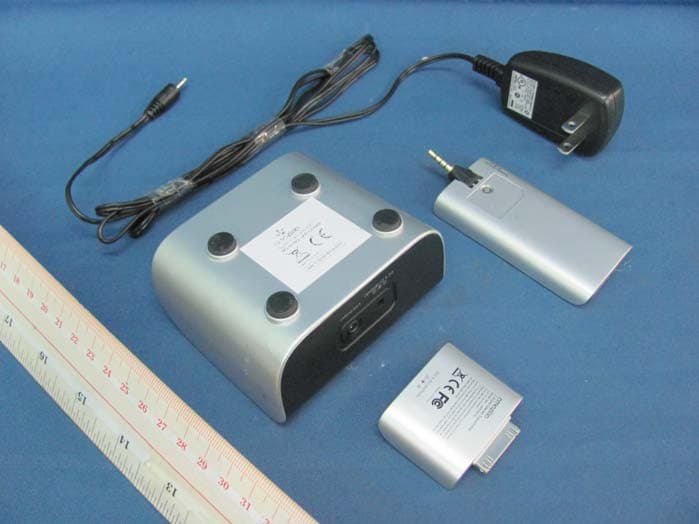
X5GIWING601R
Mar 08, 2010Wireless iPod to Hi Fi Connection Kit (Receiver)
Equipment Class
DXX - Part 15 Low Power Communication Device Transmitter