XD6U520ASSmart Phone
Shenzhen Tinno Mobile Technology Corp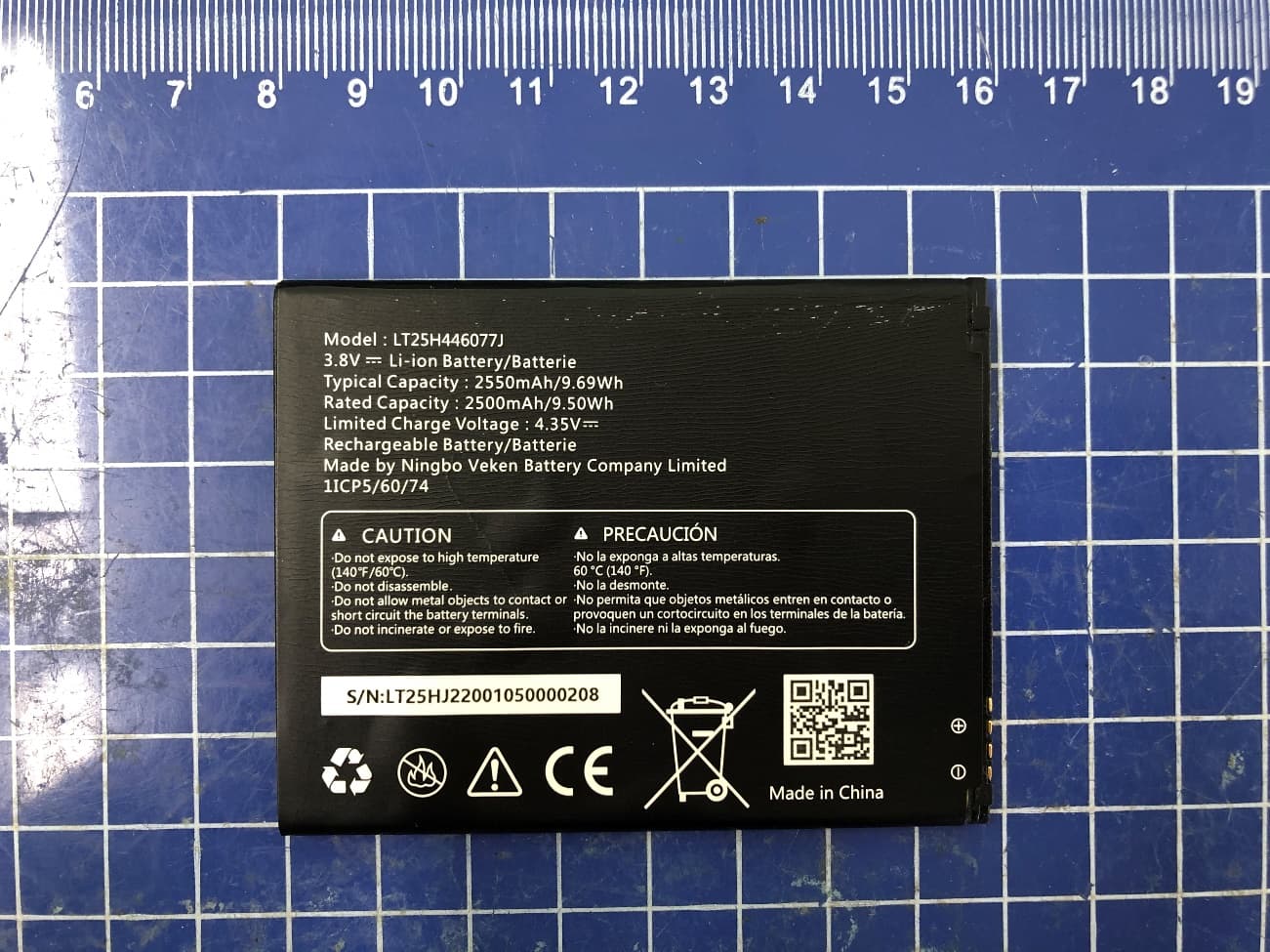
Click to zoom
Application Details
- Equipment Class
- DTS - Digital Transmission System
- Date of Grant
- Mar 25, 2020
- Application Purpose
- Original Equipment
- Date of Application
- Mar 22, 2020
- Equipment Note
- Smart Phone
- Frequency Range
- 2412.00000000 - 2462.00000000
- Country
- China
Documents & Files
Document Text
Text extracted from the exhibit documents filed with the FCC. Open a document above to read the original.
Users Manual
USER GUIDE A downloadable, printable guide to your Wiko Ride 2 and its features. Available applications and services are subject to change at any time. Table of contents Table of contents .......................................................................................................................... i Getting started ........................................................................................................................... 1 Introduction ......................................................................................................................... 2 About the user guide .................................................................................................... 2 Set up your phone............................................................................................................... 3 Parts and functions ...................................................................................................... 3 Battery use .................................................................................................................. 4 SIM card ...................................................................................................................... 8 SD card........................................................................................................................ 8 Turn your phone on and off ......................................................................................... 11 Use the touchscreen ................................................................................................... 11 Activation and service .................................................................................................13 Complete the setup screens .......................................................................................13 Basic operations ................................................................................................................14 Home screen and applications (Apps) list ...................................................................14 Phone settings menu ..................................................................................................15 Portrait and landscape screen orientation ...................................................................16 Capture screenshots ...................................................................................................16 Applications ................................................................................................................17 Phone number ............................................................................................................22 Airplane mode.............................................................................................................22 Enter text ....................................................................................................................23 Google Account ..........................................................................................................25 Google Play Store .......................................................................................................27 Lock and unlock your screen ......................................................................................32 Update your phone .....................................................................................................32 Your phone’s home screen.................................................................................................37 Home screen basics ...................................................................................................37 Status bar and notification panel .................................................................................39 Customize the home screen .......................................................................................42 Making connections ..................................................................................................................46 Phone calls and voicemail ..................................................................................................47 Place and answer calls ...............................................................................................47 Voicemail ....................................................................................................................55 Optional calling services .............................................................................................56 Call settings ................................................................................................................58 Contacts ............................................................................................................................61 Add a contact ..............................................................................................................61 Edit a contact ..............................................................................................................64 Delete a contact ..........................................................................................................65 Share a contact ...........................................................................................................66 Import contacts ...........................................................................................................67 Back up contacts ........................................................................................................67 Messages ..........................................................................................................................69 Text and multimedia messages ...................................................................................69 Gmail ..........................................................................................................................75 Internet and social networking .................…
Text truncated - open the document above for the full version.
Users Manual
93 3. Tap a connected device. Your phone connects to the paired device. The pairing and connection status is displayed below the device’s name in the Bluetooth devices section. When the device is connected to your phone, the Bluetooth paired icon is displayed in the status bar. Depending on the type of device you have connected, you can then start using the headset or car kit to listen to music or make and receive phone calls. Note: Due to different specifications and features of other Bluetooth-compatible devices, display and operations may be different, and functions such as transfer or exchange may not be possible with all Bluetooth-compatible devices. Send information using Bluetooth You can use Bluetooth to transfer information between your phone and another Bluetooth- enabled device such as a phone or notebook computer. Types of data you can send via Bluetooth You can send the following types of information, depending on the device you are sending to: • Images and videos • Calendar events • Contacts • Audio files In the instructions below, Contacts data is being used as an example. Sending contacts data via Bluetooth 1. From home, swipe up to access Apps, and tap Contacts . 2. Tap a contact to send. 3. Tap Menu > Share > Bluetooth. 94 4. Tap a paired device to receive the data. The contact information is sent. Receive information via Bluetooth Your phone is capable of receiving a wide variety of file types with Bluetooth, including pictures, music tracks, and documents such as PDFs. 1. When another device attempts to send a file to your phone via Bluetooth, you will see a request to accept the file. 2. Tap ACCEPT. Your phone has received the file. • When your phone receives a file, you will see a notification. To open the file immediately, drag the status bar down to display the notification panel, and then tap the notification. • When you open a received file, what happens next depends on the file type: o Media files and documents are usually opened directly in a compatible application. For example, if you open a music track, it starts playing in the Music application. o For a vCalendar file, select the calendar where you want to save the event, and then tap Import. The vCalendar is added to your Calendar events. For more information on using Calendar, see Calendar. o For a vCard contact file, if there are multiple vCard files on your storage card, you can choose to import one, several, or all of those contacts to your contacts list. 95 Apps and entertainment The topics in this section will explore the features that make your phone so much more than a phone, from the camera and productivity apps to music, entertainment, and more. 96 Camera and video You can use the camera or video camera to take and share pictures and videos. Your phone comes with a 5 megapixel camera that lets you capture sharp pictures and videos. Camera overview The camera's viewfinder screen lets you view your subject and access camera controls and options. Menu Function/Service Options menu Tap to select camera mode and settings options. Theme Tap to select theme mode. HDR boost Tap to activate or deactivate HDR boost mode. Picture size ratio Tap to set the photo quality and aspect ratio. Flash Tap to select flash modes. Panoroma Tap to activate panorama mode to create a linear image by taking pictures in either a horizontal or vertical direction. 97 Video mode Tap to access Video mode. Photo mode Tap to access Photo mode. Face detector Tap to access Face detector mode to enhance the focus of a selfie by adjusting blur to the background. Face Beauty Tap to access Face Beauty mode to make your photo more beautiful. Pictures View the last photo or video taken. Capture Capture a photo. Switch Switch between the front and main cameras. Take pictures and record videos The following topics teach you how to take pictures and record videos with your phone’s camera. Camera cautions If Lens becomes dirty: Fingerprints/smudges on lens prevent capturing of clear still images/videos. Wipe lens with a soft cloth beforehand. Avoid exposure to direct sunlight: Be careful not to expose lens to direct sunlight for long periods. May discolor color filter and affect color of images. Take a picture You can take pictures using your phone’s camera. Note: If you have an SD card installed, pictures and videos are stored to the SD card. If no card is installed, pictures and videos are saved to your phone’s memory. 1. From home, swipe up to access Apps, and tap Camera . 2. Tap to switch to Photo mode. 3. Aim the camera at your subject and tap to take the picture. The shutter clicks and the picture is captured and saved to your phone or SD card. Record videos You can record high-quality videos with your phone’s video camera. 98 Note: If you have an SD card installed, pictures and videos are stored to the SD card. If no card is installed, pictures and videos are saved to your phone’s memory. 1. From home, swipe up to access Apps, and tap Camera . 2. Tap to switch to Video mode. 3. Aim the camera at your subject and tap to start to record a video. 4. Tap again to stop recording. The camera stops recording and the video is captured and saved to your phone or SD card. View pictures and video using Photos Using the Photos application, you can view pictures and watch videos that you’ve taken with your phone’s camera, downloaded, or copied onto your storage card or phone memory. You can also take a look at your pictures and your friends’ pictures that are on your social networks. For pictures that are on your storage card or phone memory, you can do basic editing such as rotating and cropping. You can also easily assign a picture as your contact picture or wallpaper and share pictures with your friends. View pictures and videos You can access and view all your stored pictures and videos from your phone’s Gallery. 1. From home, swipe up to access Apps, and tap Photos . 2. Tap an album. 99 3. Tap an image or a video to view. Pictures and videos:…
Text truncated - open the document above for the full version.
Cover Letter(s)
ShenzhenTinnoMobileTechnologyCorp. 4/F,H-3Building,OCTEasternlndustrialPark.NO.1XiangShanEastRoad,NanShan District,Shenzhen,P.R.China Declaration Towhomitmayconcern: ThisisaWLAN/BluetoothcombinationantennawithFCCID:XD6U520AS. ThisWLAN/Bluetoothco-existencemechanismistoensurethattheWLANandBluetooth transmitterswouldnotsimultaneouslyoperate.Therefore,WLANandBluetoothantennain FCCID:XD6U520ASshouldnotbeconsideredtobeabletotransmitsimultaneously. ThoughtheuserscanuseWLANandBluetoothsimultaneously,buttherealsituationisthat WLANandBluetoothareusedbytimesharingandnooverlaptransmission. Shouldyouhaveanyquestion,pleasehavemybestattention. Signature: JobTitleandDept.:Productcertificationmanager
Cover Letter(s)
Wiko 1,rueCapitaineDessemond13007-Marseille-France Declaration We,ShenzhenTinnoMobileTechnologyCorp.,declarethatthedevice,FCCID: XD6U520AS,don'toperateonChannels12and13.US2.4Gchannel12-13andCountry codeselectionaredisabledthroughproprietarysoftwareandarenotuserchangeable. Shouldyouhaveanyquestionorcommentregardingthismatter,pleasedonot hesitatetocontactme. Sincerelyyours, PrintedName:Xiaoping.li Signature: Position:Productcertificationmanager
Cover Letter(s)
Declarationofpre-installofOTTvoiceservice We,[ShenzhenTinnoMobileTechnologyCorp.],asthemanufacturerofFCC ID:XD6U520AS(Model:WikoU520AS),declaresthatthismodelsupports Wi-FiCallingandonlypre-installsGoogleDUOofOTTservicewithAndroid OS,anddoesn’tsupportanyotherOTTservices.WetestedDUOusingthe softwarefromGoogleaccordingtoKDB285076D02v03Guidancefor performingT-CoiltestsforairinterfacessupportingVOIPtosupportCMRS basedtelephoneservices. APPROVEDBY: ProjectsManager: Signature: Companyname:ShenzhenTinnoMobileTechnologyCorp. Date:3/5/2020
Cover Letter(s)
ShenzhenTinnoMobileTechnologyCorp Date:2020/3/5 To:FederalCommunicationsCommission, Authorization&EvaluationDivision, 7435OaklandMillsRoad, Columbia,MD21046 AndAmericanCertificationBody,Inc. 6731WhittierAvenue SuiteC110 McLean,VA22101 ToWhomItMayConcern: TheTinno,theundersigned,herebyauthorizesCTTL,Telecommunication TechnologyLabs,CAICTtoactonthebehalfoftheTinnosolelyinmatters relatingtotheapplicationforanFCCequipmentauthorizationforFCCID: XD6U202AAincludingthesigningofdocumentsinconnectionwiththis Application.NecessaryactscarriedoutCTTL,TelecommunicationTechnology Labs,CAICTonourbehalfoftheTinnoinconnectionwiththeApplicationshall havethesameeffectasactsoftheTinno.Tinnoalsoherebycertifythatnoparty tothisapplicationissubjecttoadenialofbenefits,includingFCCbenefits, pursuanttoSection5301oftheAnti-DrugAbuseActof1988,21U.S.C.862. Thankyouforyourattentiontothismatter. YoursSincerely, Signatory: Contactname:Xiaoping.li Title:Productcertificationmanager Tel:+86-755-8609-5550 Email:[email protected] Companyname:ShenzhenTinnoMobileTechnologyCorp ShenzhenTinnoMobileTechnologyCorp
Cover Letter(s)
Date:March5,2020 To:FederalCommunicationsCommission, Authorization&EvaluationDivision, 7435OaklandMillsRoad, Columbia,MD21046 Re:Tinno FCCID:XD6U520AS FCCPart15CCertification ConfidentialityRequest Gentlemen: 1.Long-TermConfidentiality Thisletteristocomplywith47CFR0.457and0.459pertainingtoconfidentialitymaterial. TinnorequeststhatthefollowingdocumentsregardingthissubmissionforFCCID: XD6U202AAbekeptconfidential: ExhibitTypeFileName BlockDiagramBlockDiagram.pdf SchematicsCircuitDiagram.pdf OperationalDescriptionOperationalDescription.pdf PartlistBOM.pdf TuneupTuneup.pdf 2.Short-TermConfidentiality PursuanttoPublicNoticeDA04-1705oftheCommission’spolicy,inordertocomplywiththe marketingregulationsin47CFR§2.803andtheimportationrulesin47CFR§2.1204, applicantherebyrequestsShort-TermConfidentialtreatmentofthefollowingmaterialsuntil 180daysaftertheGrantDateofEquipmentAuthorizations. ExhibitTypeFileName InternalPhotosInternalPhotos.pdf User’sManualUserManual.pdf SetupPhotosSetupPhotos.pdf ExternalPhotosExternalPhotos.pdf Thosedocumentscontaindetailedsystemandequipmentdescriptionandrelatedinformation abouttheproductwhichFCCID:XD6U202AAconsiderstobeconfidentialproprietary,a customdesignand,otherwise,notreleasabletothegeneralpublic.Sincethisdesignisa basisformwhichfuturetechnologicalproductswillevolve,Tinnoconsidersthisinformation wouldbeofbenefittoitscompetitors,andthatthedisclosureoftheinformationinthese documentswouldgivecompetitorsanunfairadvantageinthemarket. Signature: JobTitleandDept.:Productcertificationmanager
External Photos
XD6U520AS Battery LT25H446077J Battery LT25H446077J Charger TN-050100U6 Charger TN-050100U6 Cable 1 Model: 336189 Part No.: P103-ASH130-000/P103-BFT131-010/P103-BFT132-010 (only Part No. difference) Cable 2 Model: T365-004 Part No.: P103-BMX131-000/ P103-BL4130-000/ P103-BL4132-000 (only Part No. difference)
RF Exposure Info
©Copyright. All rights reserved by CTTL. SAR TEST REPORT No. I19Z62263-SEM05 For Shenzhen Tinno Mobile Technology Corp. Smart Phone Model name: Wiko U520AS With Hardware Version: V1.0 Software Version: U520ASV01.25.10 FCC ID: XD6U520AS Issued Date: 2020-3-14 Note: The test results in this test report relate only to the devices specified in this report. This report shall not be reproduced except in full without the written approval of CTTL. The report must not be used by the client to claim product certification, approval, or endorsement by NVLAP, NIST, or any agency of the U.S.Government. Test Laboratory: CTTL, Telecommunication Technology Labs, CAICT No. 51, Xueyuan Road, Haidian District, Beijing, P. R. China 100191. Tel:+86(0)10-62304633-2512, Fax:+86(0)10-62304633-2504 Email: [email protected], website: www.caict.ac.cn No.I19Z6263-SEM05 ©Copyright. All rights reserved by CTTL. Page 2 of 260 REPORT HISTORY Report Number Revision Issue Date Description I19Z62263-SEM05 Rev.0 2020-3-14 Initial creation of test report No.I19Z62263-SEM05 ©Copyright. All rights reserved by CTTL. Page 3 of 260 TABLE OF CONTENT 1 TEST LABORATORY .................................................................................................................... 5 1.1 TESTING LOCATION ........................................................................................................................................ 5 1.2 TESTING ENVIRONMENT ................................................................................................................................. 5 1.3 PROJECT DATA ............................................................................................................................................... 5 1.4 SIGNATURE ..................................................................................................................................................... 5 2 STATEMENT OF COMPLIANCE .................................................................................................. 6 3 CLIENT INFORMATION ................................................................................................................ 8 3.1 APPLICANT INFORMATION .............................................................................................................................. 8 3.2 MANUFACTURER INFORMATION ..................................................................................................................... 8 4 EQUIPMENT UNDER TEST (EUT) AND ANCILLARY EQUIPMENT (AE) ................................. 9 4.1 ABOUT EUT ................................................................................................................................................... 9 4.2 INTERNAL IDENTIFICATION OF EUT USED DURING THE TEST .......................................................................... 9 4.3 INTERNAL IDENTIFICATION OF AE USED DURING THE TEST ............................................................................ 9 5 TEST METHODOLOGY .............................................................................................................. 10 5.1 APPLICABLE LIMIT REGULATIONS ................................................................................................................ 10 5.2 APPLICABLE MEASUREMENT STANDARDS .................................................................................................... 10 6 SPECIFIC ABSORPTION RATE (SAR) ...................................................................................... 11 6.1 INTRODUCTION ............................................................................................................................................. 11 6.2 SAR DEFINITION .......................................................................................................................................... 11 7 TISSUE SIMULATING LIQUIDS ................................................................................................. 12 7.1 TARGETS FOR TISSUE SIMULATING LIQUID .................................................................................................... 12 7.2 DIELECTRIC PERFORMANCE ......................................................................................................................... 12 8 SYSTEM VERIFICATION ............................................................................................................ 16 8.1 SYSTEM SETUP ............................................................................................................................................. 16 8.2 SYSTEM VERIFICATION ................................................................................................................................. 17 9 MEASUREMENT PROCEDURES .............................................................................................. 18 9.1 TESTS TO BE PERFORMED ............................................................................................................................. 18 9.2 GENERAL MEASUREMENT PROCEDURE ........................................................................................................ 20 9.3 WCDMA MEASUREMENT PROCEDURES FOR SAR ...................................................................................... 21 9.4 SAR MEASUREMENT FOR LTE ..................................................................................................................... 22 9.5 BLUETOOTH & WI-FI MEASUREMENT PROCEDURES FOR SAR .................................................................... 24 9.6 POWER DRIFT ............................................................................................................................................... 24 10 AREA SCAN BASED 1-G SAR ................................................................................................. 25 10.1 REQUIREMENT OF KDB .........................................................................................................…
Text truncated - open the document above for the full version.
RF Exposure Info
No.I19Z62263-SEM05 ©Copyright. All rights reserved by CTTL. Page 176 of 260 1750 MHz Date: 2/25/2020 Electronics: DAE4 Sn1289 Medium: Head 1750 MHz Medium parameters used: f = 1750 MHz; σ =1.38 mho/m; ε r = 40.68; ρ = 1000 kg/m 3 Ambient Temperature: 22.5 o C Liquid Temperature: 22.3 o C Communication System: CW Frequency: 1750 MHz Duty Cycle: 1:1 Probe: EX3DV4 – SN7307 ConvF(8.86,8.86,8.86) System Validation /Area Scan (81x191x1): Interpolated grid: dx=1.000 mm, dy=1.000 mm Reference Value = 104.5 V/m; Power Drift = 0.06 Fast SAR: SAR(1 g) = 9.03 W/kg; SAR(10 g) = 4.83 W/kg Maximum value of SAR (interpolated) = 14.31 W/kg System Validation /Zoom Scan (7x7x7)/Cube 0: Measurement grid: dx=5mm, dy=5mm, dz=5mm Reference Value =104.5 V/m; Power Drift = 0.06 dB Peak SAR (extrapolated) = 16.53 W/kg SAR(1 g) = 9.01 W/kg; SAR(10 g) = 4.85 W/kg Maximum value of SAR (measured) = 13.9 W/kg 0 dB = 13.9 W/kg = 11.43 dB W/kg Fig.B.3 validation 1750 MHz 250mW No.I19Z62263-SEM05 ©Copyright. All rights reserved by CTTL. Page 177 of 260 1900 MHz Date: 2/26/2020 Electronics: DAE4 Sn1289 Medium: Head 1900 MHz Medium parameters used: f = 1900 MHz; σ =1.39 mho/m; ε r = 39.55; ρ = 1000 kg/m 3 Ambient Temperature: 22.5 o C Liquid Temperature: 22.3 o C Communication System: CW Frequency: 1900 MHz Duty Cycle: 1:1 Probe: EX3DV4 – SN7307 ConvF(8.56,8.56,8.56) System Validation /Area Scan (81x191x1): Interpolated grid: dx=1.000 mm, dy=1.000 mm Reference Value = 107.26 V/m; Power Drift = 0.02 Fast SAR: SAR(1 g) = 9.96 W/kg; SAR(10 g) = 5.2 W/kg Maximum value of SAR (interpolated) = 15.34 W/kg System Validation /Zoom Scan (7x7x7)/Cube 0: Measurement grid: dx=5mm, dy=5mm, dz=5mm Reference Value =107.26 V/m; Power Drift = 0.02 dB Peak SAR (extrapolated) = 17.52 W/kg SAR(1 g) = 10.07 W/kg; SAR(10 g) = 5.15 W/kg Maximum value of SAR (measured) = 14.81 W/kg 0 dB = 14.81 W/kg = 11.71 dB W/kg Fig.B.4 validation 1900 MHz 250mW No.I19Z62263-SEM05 ©Copyright. All rights reserved by CTTL. Page 178 of 260 2450 MHz Date: 2/27/2020 Electronics: DAE4 Sn1289 Medium: Head 2450 MHz Medium parameters used: f = 2450 MHz; σ =1.784 mho/m; ε r = 39.05; ρ = 1000 kg/m 3 Ambient Temperature: 22.5 o C Liquid Temperature: 22.3 o C Communication System: CW Frequency: 2450 MHz Duty Cycle: 1:1 Probe: EX3DV4 – SN7307 ConvF(7.83,7.83,7.83) System Validation /Area Scan (81x191x1): Interpolated grid: dx=1.000 mm, dy=1.000 mm Reference Value = 116.72 V/m; Power Drift = -0.08 Fast SAR: SAR(1 g) = 12.8 W/kg; SAR(10 g) = 5.97 W/kg Maximum value of SAR (interpolated) = 21.99 W/kg System Validation /Zoom Scan (7x7x7)/Cube 0: Measurement grid: dx=5mm, dy=5mm, dz=5mm Reference Value =116.72 V/m; Power Drift = -0.08 dB Peak SAR (extrapolated) = 25.53 W/kg SAR(1 g) = 13.14 W/kg; SAR(10 g) = 6.16 W/kg Maximum value of SAR (measured) = 21.92 W/kg 0 dB = 21.92 W/kg = 13.41 dB W/kg Fig.B.5 validation 2450 MHz 250mW No.I19Z62263-SEM05 ©Copyright. All rights reserved by CTTL. Page 179 of 260 2600 MHz Date: 2/28/2020 Electronics: DAE4 Sn1289 Medium: Head 2600 MHz Medium parameters used: f = 2600 MHz; σ =1.966 mho/m; ε r = 39.57; ρ = 1000 kg/m 3 Ambient Temperature: 22.5 o C Liquid Temperature: 22.3 o C Communication System: CW Frequency: 2600 MHz Duty Cycle: 1:1 Probe: EX3DV4 – SN7307 ConvF(7.65,7.65,7.65) System Validation /Area Scan (81x191x1): Interpolated grid: dx=1.000 mm, dy=1.000 mm Reference Value = 118.31 V/m; Power Drift = -0.05 Fast SAR: SAR(1 g) = 13.82 W/kg; SAR(10 g) = 6.2 W/kg Maximum value of SAR (interpolated) = 25.14 W/kg System Validation /Zoom Scan (7x7x7)/Cube 0: Measurement grid: dx=5mm, dy=5mm, dz=5mm Reference Value =118.31 V/m; Power Drift = -0.05 dB Peak SAR (extrapolated) = 28.68 W/kg SAR(1 g) = 14.17 W/kg; SAR(10 g) = 6.31 W/kg Maximum value of SAR (measured) = 23.74 W/kg 0 dB = 23.74 W/kg = 13.75 dB W/kg Fig.B.6 validation 2600 MHz 250mW No.I19Z62263-SEM05 ©Copyright. All rights reserved by CTTL. Page 180 of 260 The SAR system verification must be required that the area scan estimated 1-g SAR is within 3% of the zoom scan 1-g SAR. Table B.1 Comparison between area scan and zoom scan for system verification Date Band Position Area scan (1g) Zoom scan (1g) Drift (%) 2020-2-23 750 Head 2.11 2.14 -1.40 2020-2-24 835 Head 2.42 2.45 -1.22 2020-2-25 1750 Head 9.03 9.01 0.22 2020-2-26 1900 Head 9.96 10.07 -1.09 2020-2-27 2450 Head 12.8 13.14 -2.59 2020-2-28 2600 Head 13.82 14.17 -2.47 No.I19Z62263-SEM05 ©Copyright. All rights reserved by CTTL. Page 181 of 260 ANNEX C SAR Measurement Setup C.1 Measurement Set-up The Dasy4 or DASY5 system for performing compliance tests is illustrated above graphically. This system consists of the following items: Picture C.1SAR Lab Test Measurement Set-up ⚫ A standard high precision 6-axis robot (StäubliTX=RX family) with controller, teach pendant and software. An arm extension for accommodating the data acquisition electronics (DAE). ⚫ An isotropic field probe optimized and calibrated for the targeted measurement. ⚫ A data acquisition electronics (DAE) which performs the signal amplification, signal multiplexing, AD-conversion, offset measurements, mechanical surface detection, collision detection, etc. The unit is battery powered with standard or rechargeable batteries. The signal is optically transmitted to the EOC. ⚫ The Electro-optical converter (EOC) performs the conversion from optical to electrical signals for the digital communication to the DAE. To use optical surface detection, a special version of the EOC is required. The EOC signal is transmitted to the measurement server. ⚫ The function of the measurement server is to perform the time critical tasks such as signal filtering, control of the robot operation and fast movement interrupts. ⚫ The Light Beam used is for probe alignment. This improves the (absolute) accuracy of the probe positioning. ⚫ A computer running WinXP and the DASY4 or DASY5 software. ⚫ Remote control and teach pendant as well as additional circuitry for robot safety such as ⚫ warning …
Text truncated - open the document above for the full version.
RF Exposure Info
No.I19Z62263-SEM05 ©Copyright. All rights reserved by CTTL. Page 204 of 260 No.I19Z62263-SEM05 ©Copyright. All rights reserved by CTTL. Page 205 of 260 No.I19Z62263-SEM05 ©Copyright. All rights reserved by CTTL. Page 206 of 260 No.I19Z62263-SEM05 ©Copyright. All rights reserved by CTTL. Page 207 of 260 No.I19Z62263-SEM05 ©Copyright. All rights reserved by CTTL. Page 208 of 260 No.I19Z62263-SEM05 ©Copyright. All rights reserved by CTTL. Page 209 of 260 No.I19Z62263-SEM05 ©Copyright. All rights reserved by CTTL. Page 210 of 260 No.I19Z62263-SEM05 ©Copyright. All rights reserved by CTTL. Page 211 of 260 No.I19Z62263-SEM05 ©Copyright. All rights reserved by CTTL. Page 212 of 260 ANNEX H Dipole Calibration Certificate 750 MHz Dipole Calibration Certificate
RF Exposure Info
No.I19Z62263-SEM05 ©Copyright. All rights reserved by CTTL. Page 213 of 260 No.I19Z62263-SEM05 ©Copyright. All rights reserved by CTTL. Page 214 of 260 No.I19Z62263-SEM05 ©Copyright. All rights reserved by CTTL. Page 215 of 260 No.I19Z62263-SEM05 ©Copyright. All rights reserved by CTTL. Page 216 of 260 No.I19Z62263-SEM05 ©Copyright. All rights reserved by CTTL. Page 217 of 260 No.I19Z62263-SEM05 ©Copyright. All rights reserved by CTTL. Page 218 of 260 No.I19Z62263-SEM05 ©Copyright. All rights reserved by CTTL. Page 219 of 260 No.I19Z62263-SEM05 ©Copyright. All rights reserved by CTTL. Page 220 of 260 835 MHz Dipole Calibration C…
Text truncated - open the document above for the full version.
Contact Information
Applicant
xiaoping LI(Manager)
Technical Contact
CTTL-Terminals Test Lab of China Academy of TelecXue Zhen
[email protected]86-10-62304633
No. 52, Huayuan Bei Road, Haidian District, · Beijing · China
Test Firm
Telecommunication Technology Labs, CAICTYaqin Shen
Technical Specifications
| # | Rule Parts | Frequency Range | Power Output |
|---|---|---|---|
| 2 | 15C | 2.41 GHz - 2.46 GHz | 395.40 mW |
Other Applications from Shenzhen Tinno Mobile Technology Corp
XD6U651DS
Apr 14, 2026Smart phone
Equipment Class
DSS - Part 15 Spread Spectrum TransmitterXD6U205AA
Mar 20, 20265G Feature Phone
Equipment Class
DSS - Part 15 Spread Spectrum TransmitterXD6V461A
Jan 15, 2026Smart Phone
Equipment Class
JBP - Part 15 Class B Computing Device PeripheralXD6WM2508T
Jan 07, 2026onn 8.1 inches Core Tablet
Equipment Class
DTS - Digital Transmission SystemXD6WM2511T
Dec 29, 2025onn 11 inches Core Tablet
Equipment Class
NII - Unlicensed National Information Infrastructure TX