XKS-SMPLUG03Digital hearing protection communication product
Sensear Pty Ltd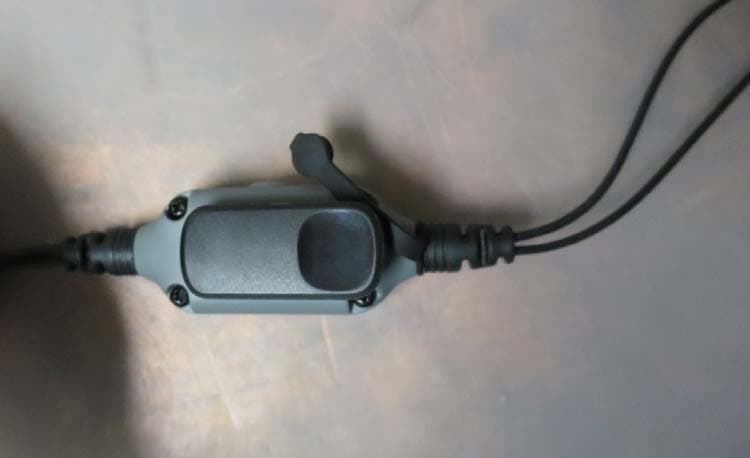
Click to zoom
Application Details
- Equipment Class
- DXX - Part 15 Low Power Communication Device Transmitter
- Date of Grant
- Jan 19, 2015
- Application Purpose
- Original Equipment
- Date of Application
- Jan 19, 2015
- Equipment Note
- Digital hearing protection communication product
- Frequency Range
- 88.10000000 - 107.90000000
- Company
- Sensear Pty Ltd
- Country
- Australia
Documents & Files
Document Text
Text extracted from the exhibit documents filed with the FCC. Open a document above to read the original.
Users Manual
USER GUIDE 1. HEADSET ANATOMYGETTING STARTED 1.Headset anatomy 2.Wearing the headset 3.Fitting the Earbuds 4.Charging the headset 5.Power up the headset 6.Environmental modes 7.Connecting A Two Way Radio 8.Using Bluetooth 9.Bluetooth pairing and connecting 10.Using Short Range 11.Using FM Radio 12.Troubleshooting 1 2. WEARING THE HEADSET The smartPlug is a state of the art hearing protection communication system that allows you to retain situational awareness while being in full contact with all your communication devices. Situational awareness is provided by processing technology and environmental microphones within the Earbuds. Contact through other communication devices is enabled by: -Two Way Radios interface cables (sold separately). -Bluetooth to Two Way Radios and cell phones (if installed) -Direct Headset to Headset communications through Short Range (if installed) The smartPlug is designed to be worn with the main housing attaching to the belt or pant seam, and the Inline PTT attaching to the shirt / upper garment of the user. Note:For SR communications, the best communication range is achieved with the Inline PTT set as high up on the user as possible. 2 3. FITTING THE EARBUDS 1. Place Disposable Foam Tip between thumb and forefinger. 2. Roll Foam Tip to a compressed, crease free cylinder 3. Push the Foam Tip all the way onto the Ear Bud spout. 4. Roll the Foam Tip again between the thumb and forefinger. 5. Ensure the Foam Tip remains a compressed, crease free cylinder on the Ear Bud. 6. Using your opposite hand, pull your ear upward and outward. Insert the Ear Bud deeply into the ear - as you would normally do with a Foam Ear Plug. 7. Hold the Ear Bud in place for 30 seconds while the Foam Tip expands. 8. Check to ensure the Ear Buds are correctly inserted. 9. A poor fit will be visible by the Earbuds being far away from the ear. No foam tip should be visible. Repeat the process until a good fit is achieved. 3 It is critical the earbuds are correctly fitted to ensure the correct level of hearing protection and communication abilities. T he Earbuds incorporate an in-ear pickup, if the Earbuds are not fitted correctly, the speech quality may be lower than expected. 4. CHARGING Your headset comes supplier with a charger. Do not attempt to use third party chargers as damage may result. The headset should be regularly charged. To charge your headset connect the charger to the headset and connect to the mains power. While charging the Right Indicator LED will be Red. When charging is complete the LED will turn Green. Note: Be sure to charge your headset fully before first use. Note:Your headset will automatically power up when the charger is connected to the headset. Charge Time:5 hours Battery Life:15 hours Your headset is powered by a built-in high capacity Lithium Ion battery.Thisis designed to last the life of your headset and should be returned to the manufacturer for replacement and servicing. Any attempt to access the battery will damage the headset. Please see accompanying smartPlug Headset Information guide for additional safety battery precautions. 4 5. POWER ON HEADSET Your headset must be powered up to use situational awareness and the communication connectivity features. Power on / off To power up your headset press and release the power button. To power off your headset press and hold the power button until the unit powers off. 6. ENVIRONMENTAL MODES Your smartPlug headset features situational awareness technology. (Speech Enhancement, Noise Suppression) allows you to be in audible contact with your surroundings while wearing your headset. To togglesituational awareness on or off momentarily press and release the power button. 5 7. CONNECTING TWO WAY RADIO smartPlugheadset can be connected to most Two Way Radios through interface cables (sold separately). 1.Connect the Two Way Radio Cable into the Two way Radio Connector located on the bottom of the Main Unit. 2.Turn the Two Way Radio on. A tone will be heard through the headset indicating it has detected the Two Way Radio. 3.Adjust the volume of the Two Way Radio communication by the normal controls of your Two Way Radio until a comfortable level is reached. 4.To transmit, press and hold the Inline 1 Button or the button programmed by your dealer. Note: See ‘Using Bluetooth’ for more information on connecting Two-Way Radios by Bluetooth. 6 8. USING BLUETOOTH 7 smartPlug Headsets also feature Bluetooth connectivity (if installed). Bluetooth enables wireless connections to some models of Two Way Radio, industrial computers, vibration analysers and most Cell phones. If Bluetooth is installed on your smartPlug, the following details apply. Default automatic connection setting:When the headset powers up, the smartPlug searches for previously paired devices. If a previously paired device is within range, it will automatically attempt to reconnect to this device. A blue light will flash slowly if a Bluetooth connection is made and you will hear a tone in the headset. Note:When entering pairing mode the smartPlug forgets all previously connected devices. Note:Bluetooth is discoverable for 2 minutes in pairing mode. If no connection has been made within this time, the process will need to be repeated. Bluetooth Phone:To answer calls, press the Multi Function Button (or programmed button, consult your dealer). To end or reject a call, press and hold the Multi Function button for 2 seconds. Bluetooth PTT:Some radios and cell phones feature PTT over Bluetooth. Please consult your dealer for more information. 9. BLUETOOTH PAIRING AND CONNECTING Bluetooth pairing to new device: For Bluetooth functionality, the smartPlug headset must be paired and connected. 1.Enable Bluetooth on the device which you want to connect to the smartPlug 2.Power up the smartPlug 3.Hold the Multi Function Button for 5 seconds to enable pairing. A blue light indicator will switch on. 4.Follow pairing instructions on the device that you want to connect to, …
Text truncated - open the document above for the full version.
Users Manual
Xxx####A XBT Technical Data DOC00046 rev 1.3 HEADSET INFORMATION DOC00070 smartPlug Headset Information rev 1.0 2 FCC COMPLIANCE STATEMENT The Sensear model smartPlug headset with Bluetooth module, complies with Part 15 of the FCC Rules. Operation is subject to the following two conditions: (i) This device may not cause harmful interference (ii) This device must accept any interference received, including interference that may cause undesired operation. Warning: Any changes or modifications not expressively approved by Sensear Pty. Ltd. could void the user’s authority to operate this equipment. This equipment has been tested and found to comply with the limits for a Class B digital device, pursuant to Part 15 of the FCC Rules. These limits are designed to provide reasonable protection against harmful interference in a residential installation. This equipment generates, uses and can radiate radio frequency energy and, if not installed and used in accordance with the instructions, may cause harmful interference to radio communications. However, there is no guarantee that interference will not occur in a particular installation. If this equipment does cause harmful interference to radio or television reception, which can be determined by turning the equipment off and on, the user is encouraged to try to correct the interference by one or more of the following measures: • Reorient or relocate the receiving antenna • Increase the separation between the equipment and receiver • Connect the equipment into an outlet on a circuit different from that to which the receiver is connected. Consult the dealer or an experienced radio/tv technician for help. DOC00070 smartPlug Headset Information rev 1.0 3 FOREWORD Product Safety and RF Exposure Compliance This product is designed to be used in isolation or in conjunction with your two way radio or cell phone. Before using this product with a two way radio, read the operating instructions for safe usage contained in the Product Safety and RF Exposure booklet enclosed with your two way radio. Battery and Charging Information The internal battery is shipped with a nominal charge between 30 and 50% and should be stored between -10°C (14°F) and 30°C (86°F) to minimize permanent capacity loss. Do not charge your headset in temperatures below 0°C (32°F) or above 40°C (104°F). Conditions inside a parked car can exceed this range. Do not store your headset in a parked car. Do not store your headset in direct sunlight. Storing your fully charged headset in high-temperature conditions may permanently reduce the life of the internal battery. Battery life may temporarily shorten in low-temperature conditions. Warning: Never dispose of batteries in a fire because they may explode. Note: The battery is not a user replaceable part. This equipment operates on a secondary mode in Brazil, and it does not have the right of protection against harmful interference, even from stations of the same type, and they can not cause interference to systems operating on a primary mode. DOC00070 smartPlug Headset Information rev 1.0 4 SPECIFICATIONS TECHNICAL SPECIFICATIONS smartPlug Weight 172g 6.1oz Operational Temperature (charging) 0°C to +45°C 32°F to 113°F Operational Temperature (discharging) -20°C to +60°C -4°F to 140°F Battery Life 15 hours Battery Charge Time 5 hours Battery Charge Life 80% capacity after 300 full cycles 60% capacity after 500 full cycles Battery Chemistry Lithium Polymer Housing Material PC/ABS + TPE RoHS Compliant Yes Bluetooth Version 3.0 Bluetooth Profiles Supported HSP, HFP v1.6, A2DP FM Radio Reception 88.0 – 108.0 MHz SR Transmitter Range 20m / 65ft line-of-site depending on region setting NRR (ANSI S3.19-1974) XXXXX dB SNR (EN352-2) XXXXX dB SLC80 (AS/NZS 1270-2002) XXXXX dB Class 5 Charge Voltage 5V OTHERS OTHERS DOC00070 smartPlug Headset Information rev 1.0 5 This product must not be dismantled by the user for any purpose. The unit cannot be repaired by the user. NRR AND SLC80 The smartPlug has been certified to International hearing protection standards including EN352-2, EN352-7, ANSI S3.19-1974 and AS/NZS 1270-2002. The following passive attenuation ratings were observed; Model SNR NRR SLC80 smartPlug XXXX XXXXX XXXXXX Class 5 ATTENUATION smartPlug measured in accordance with EN352-2. F(Hz) 125 250 500 1000 2000 3150 4000 6300 8000 H M L SNR Mean(dB) 999 999 999 999 999 999 999 999 999 999 dB 999 dB 999 dB 999 dB Std(dB) 999 999 999 999 999 999 999 999 999 APV(84%) 999 999 999 999 999 999 999 999 999 DOC00070 smartPlug Headset Information rev 1.0 6 The smartPlug has level dependent facilities and the criterion levels defined in EN352-7 are displayed below. Model H M L smartPlug XXXdBA XXXdBA XXXdBA The headset is an active hearing protector that allows audible contact with your surroundings while providing protection from harmful noise. It is recommended that the headset is fitted, adjusted and maintained in accordance with these instructions. This headset should be worn at all times in noisy surroundings. The headset should be regularly inspected for serviceability. The smartPlug headset is supplied with disposable ear-tips that can be fitted to the ear-buds. There are three sizes of ear-tips available with nominal diameters as follows: S=10.5mm M=12mm L=14mm TEST report will define this and weight also. Warning: Small and Medium size ear tips are of 'small size range’ or ‘large size range’. Ear-plugs complying with EN 352-2 are of ‘medium size range' or 'small size range’ or ‘large size range'. ‘Medium size range' ear-plugs will fit the majority of wearers. 'Small size range’ or ‘large size range' ear-plugs are designed to fit wearers for whom ‘medium size range' ear-plugs are not suitable. Warning: If these instructions are not followed the protection of the headset will be severely impaired. DOC00070 smartPlug Headset Information rev 1.0 7 Warning: Noise reduction will be adversely affected by anything that impairs the seal of the earplug ea…
Text truncated - open the document above for the full version.
Cover Letter(s)
Sensear Pty Ltd 197-199 Great Eastern Highway Belmont, WA, 6104 AUSTRALIA +61 8 9277 7332 1 Federal Communications Commission Authorization and Evaluation Division 1435 Oakland Mills Road Columbia, MD 21046 Date: 14-01-2015 SUBJECT: FCC Application for XKS-SMPLUG03 To Whom It May Concern: We, the undersigned, hereby attest that the Bluetooth module, Bluegiga WT32i-A with FCC ID: QOQWT32I, is electrically identical to the WT32i-A originally certified by Bluegiga Technologies. Note that the antenna is a ceramic chip antenna integrated into the WT32i-A module and is already approved. Regards, Name: Alan Davis Title: VP Engineering Date: 14 JAN 2015
Cover Letter(s)
Sensear Pty Ltd 197-199 Great Eastern Highway Belmont, WA, 6104 AUSTRALIA +61 8 9277 7332 1 Federal Communications Commission Authorization and Evaluation Division 1435 Oakland Mills Road Columbia, MD 21046 Date: 14-01-2015 SUBJECT: FCC Application for XKS-SMPLUG03 To Whom It May Concern: We, the undersigned, hereby attest we are aware of our responsibility to ensure that the SMPLUG03 still complies to FCC requirements when all transmitter modules are operating simultaneously. Regards, Name: Alan Davis Title: VP Engineering Date: 14 JAN 2015
Cover Letter(s)
EMC Technologies Pty Ltd, 176 Harrick VIC 3043 Australia Ph: +613 9365 1000 Fax: +613 9331 7455 www.emctech.com.au EMC Technologies Pty Ltd ABN 82 057 105 549 176 Harrick Road, Keilor Park Victoria Australia 3042 Ph: + 613 9365 1000 Fax: + 613 9331 7455 email: [email protected] To: TIMCO Engineering Inc. Attention: Certification Manager No. of pages: 1 From: Donna Lennon Date: 19 January 2014 EMC Ref: M141112-3 FCC Subject: FCC & IC APPROVAL – FCC ID: XKS-SMPLUG03, IC: 8376A-SMPLUG03 Please receive EMC Technologies’ Report M141112-3 FCC for review. The EUT is a Digital hearing protection communication product, Model: S MPLUG03 EMC Technologies Pty Ltd is acting as agent for Sensear Pty Ltd in this request for FCC & IC approval. The FCC ID for this application is FCC ID: XKS-SMPLUG03. The IC ID for this application is IC: 8376A-SMPLUG03. Regards ______________ Donna Lennon Report Secretary EMC Technologies Pty Ltd
Cover Letter(s)
Sensear Pty Ltd 197-199 Great Eastern Highway Belmont, WA, 6104 AUSTRALIA +61 8 9277 7332 1 Federal Communications Commission Authorization and Evaluation Division 1435 Oakland Mills Road Columbia, MD 21046 Date: 14-01-2015 SUBJECT: FCC Application for XKS-SMPLUG03 To Whom It May Concern: We, the undersigned, hereby authorize Chris Zombolas at EMC Technologies Pty Ltd, on our behalf, to apply to the Federal Communications Commission on our equipment. Any and all acts carried out by Chris Zombolas on our behalf shall have the same effect as acts of our own. This is to advise that we are in full compliance with the Anti- Drug Abuse Act. We, the applicant, are not subject to a denial of federal benefits pursuant to Section 5301 of the Anti-Drug Act of 1988, 21 USC853a, and no party to the application is subject to a denial of federal benefits pursuant to that section. Regards, Alan Davis
Cover Letter(s)
Sensear Pty Ltd 197-199 Great Eastern Highway Belmont, WA, 6104 AUSTRALIA +61 8 9277 7332 1 Federal Communications Commission Authorization and Evaluation Division Confidentiality Request regarding application for certification of FCC ID: XKS-SMPLUG03. Pursuant to Sections 0.457 and 0.459 of the Commission’s Rules, we hereby request confidential treatment of information accompanying this application as outlined below: Exhibit Type File Name Schematics CONF_SCHEM Block Diagram CONF_BLOCK Operational Description CONF_OPDES Operational Description CONF_OPDESANTENNA The above materials contain trade secrets and proprietary information not customarily released to the public. The public disclosure of these materials may be harmful to the applicant and provide unjustified benefits to its competitors. The applicant understands that pursuant to Section 0.457 of the Rules, disclosure of this application and all accompanying documentation will not be made before the date of the Grant for this application. Sincerely, Alan Davis
External Photos
FCC ID: XKS-SMPLUG03 IC: 8376A-SMPLUG03 Test Sample Photographs - External FCC ID: XKS-SMPLUG03 IC: 8376A-SMPLUG03 Test Sample Photographs - External FCC ID: XKS-SMPLUG03 IC: 8376A-SMPLUG03 Test Sample Photographs - External
ID Label/Location Info
SMPLUG03 Labelling Label Text The MFP Number is a serial number that is unique for each product manufactured. The barcode is coded based on the serial number. The label is white with black text, 1 inch wide and 0.9 inch high. Label Placement The label is affixed to the rear of the product permanently. FRONT OF PRODUCT REAR OF PRODUCT LabelPlacement on Rear
Internal Photos
FCC ID: XKS-SMPLUG03 IC: 8376A-SMPLUG03 Test Sample Photographs - Internal FCC ID: XKS-SMPLUG03 IC: 8376A-SMPLUG03 Test Sample Photographs - Internal
Test Report
Page 1 of 16 RADIO TEST REPORT FOR CERTIFICATION to FCC PART 15 Subpart C (Section 15.239) and RSS-210 FCC ID: XKS-SMPLUG03 Industry Canada ID: 8376A-SMPLUG03 Test Sample: Sensear smartPlug Model: SMPLUG03 Report Number: M141112-3 Issue Date: 20 January 2015 EMC Technologies Pty Ltd reports apply only to the specific samples tested under stated test conditions. It is the manufacturer’s responsibility to assure that additional production units of this model are manufactured with identical electrical and mechanical components. EMC Technologies Pty Ltd shall have no liability for any deductions, inferences or generalisations drawn by the client or others from EMC Technologies Pty Ltd issued reports. This report shall not be used to claim, constitute or imply product endorsement by EMC Technologies Pty Ltd. This document is issued in accordance with NATA’s accreditation requirements. The results of tests, calibration and/or measurements included in this document are traceable to Australian/national standards. NATA is a signatory to the ILAC Mutual Recognition Arrangement for the mutual recognition of the equivalence of testing and calibration reports. This document shall not be reproduced except in full. EMC Technologies Pty Ltd ABN 82 057 105 549 176 Harrick Road Keilor Park Victoria Australia 3042 Ph: + 613 9365 1000 Fax: + 613 9331 7455 Email: [email protected] FCC ID: XKS-SMPLUG03 Report No. M141112-3 Page 2 of 16 IC ID: 8376A-SMPLUG03 This document must not be copied or reproduced, except in full without the written permission of the Manager, EMC Technologies Pty Ltd. The certificate of pg 3 may be reproduced in full. www.emctech.com.au RADIO TEST REPORT FOR CERTIFICATION to FCC PART 15 Subpart C (Section 15.239) and RSS-210 EMC Technologies Report No. M141112-3 Issue Date: 20 January 2015 CONTENTS 1.0 INTRODUCTION 2.0 GENERAL INFORMATION 3.0 CONDUCTED EMISSION MEASUREMENTS 4.0 RADIATED EMISSION MEASUREMENTS 5.0 CHANNEL BANDWIDTH and BAND EDGE 6.0 ANTENNA REQUIREMENT 7.0 COMPLIANCE STATEMENT 8.0 MEASUREMENT UNCERTAINTY APPENDIX A: MEASUREMENT INSTRUMENT DETAILS FCC ID: XKS-SMPLUG03 Report No. M141112-3 Page 3 of 16 IC ID: 8376A-SMPLUG03 This document must not be copied or reproduced, except in full without the written permission of the Manager, EMC Technologies Pty Ltd. The certificate of pg 3 may be reproduced in full. www.emctech.com.au RADIO TEST REPORT FOR CERTIFICATION to FCC PART 15 Subpart C (Section 15.239) and RSS-210 Report No. M141112-3 Test Sample: Sensear smartPlug Model: SMPLUG03 FCC ID: XKS-SMPLUG03 Industr y Canada ID: 8376A-SMPLUG03 Equipment Type: Intentional Radiator/Low power FM transmitter Manufacturer / Tested For: Sensear Pty Ltd Address: 197-199 Great Eastern Highway Belmont, WA 6104, Australia Contact: Frank Lin Email: [email protected] Standards: FCC Part 15 – Radio Frequency Devices FCC Part 15 Subpart C – Intentional Radiators Section 15.239: Operation in the Band 88 - 108 MHz ANSI C63.4 – 2009 RSS-210 Issue 8 – Low Power Licence-Exempt RadioCommunication Devices. Annex 2 (A2.8): Operation in the Band 88 - 108 MHz RSS-Gen Issue 4 – General Requirements and Information for the Certification of RadioCommunication Equipment Test Dates: 17 th , 28 th November 2014, 16 th January 2015 Test Officer: Mahan Ghassempouri Attestation: I hereby certify that the device(s) described herein were tested as described in this report and that the data included is that which was obtained during such testing. Authorised Signatory: Chris Zombolas Managing Director EMC Technologies Pty Ltd FCC ID: XKS-SMPLUG03 Report No. M141112-3 Page 4 of 16 IC ID: 8376A-SMPLUG03 This document must not be copied or reproduced, except in full without the written permission of the Manager, EMC Technologies Pty Ltd. The certificate of pg 3 may be reproduced in full. www.emctech.com.au RADIO TEST REPORT FOR CERTIFICATION to FCC PART 15 Subpart C (Section 15.239) and RSS-210 1.0 INTRODUCTION Radio testing was performed on the Sensear smartPlug, Model: SMPLUG03. Test results and procedures were performed in accordance with the following Federal Communications Commission (FCC) standards/regulations: 47 CFR, Part 15, Subpart C: Rules for intentional radiators (particularly section 15.239) Section 15.203: Antenna requirements Section 15.205: Restricted bands of operation Section 15.209: Radiated Emission Limits (General requirements) Section 15.239: Operation in the bands 88 - 108 MHz The test sample complied with the requirements of 47 CFR, Part 15 Subpart C - Section 15.239. The test sample also complied with the Industry Canada RSS-210 issue 8 - Low Power Licence- Exempt Radiocommunication Devices (All Frequency Bands): Category I Equipment, Annex 2 (A2.8). The measurement procedure used was in accordance with ANSI C63.4-2009. The instrumentation conformed to the requirements of ANSI C63.2-2009. 1.1 Summary of Results FCC Part 15 Subpart C Clauses Industry Canada RSS-210 Issue 8 and RSS-Gen Clauses Test Performed Results 15.203 RSS-Gen (8.3) Antenna Requirement Complies 15.207 RSS-Gen (8.8) Conducted Emissions Not Applicable 15.209 RSS-Gen (8.9) Radiated Emissions Complies 15.239 (a) RSS-210 (A2.8) Channel Bandwidth Complies 15.239 (b) RSS-210 (A2.8) In Band Emissions Complies 15.239 (c) RSS-210 (A2.8) Out of Band Emissions Complies 15.239 (d) - Telemetry Intentional Radiator Not Applicable 1.2 Modifications by EMC Technologies No modifications were required. FCC ID: XKS-SMPLUG03 Report No. M141112-3 Page 5 of 16 IC ID: 8376A-SMPLUG03 This document must not be copied or reproduced, except in full without the written permission of the Manager, EMC Technologies Pty Ltd. The certificate of pg 3 may be reproduced in full. www.emctech.com.au 2.0 GENERAL INFORMATION (Information supplied by the Client) 2.1 EUT Details Test Sample: Sensear smartPlug Model Number: SMPLUG03 Serial Number: PCAA006824690123 Internal Clock: 200 MHz Supply Voltage 5 VDC internal battery charged by auxiliary AC/DC Adapter EU…
Text truncated - open the document above for the full version.
Test Setup Photos
FCC ID: XKS-SMPLUG03 IC: 8376A-SMPLUG03 Test Setup Photographs FCC ID: XKS-SMPLUG03 IC: 8376A-SMPLUG03 Test Setup Photographs
Contact Information
Applicant
Alan Davis
Test Firm
EMC Technologies Pty. Ltd.Chris Zombolas
Technical Specifications
| # | Rule Parts | Frequency Range | Power Output |
|---|---|---|---|
| 1 | 15C | 88.1 MHz - 107.9 MHz | - |