XQGQRF600-TR1Wireless QClick
QOMO HiteVision, LLC.
Click to zoom
Application Details
- Equipment Class
- DXT - Part 15 Low Power Transceiver, Rx Verified
- Date of Grant
- May 31, 2010
- Application Purpose
- Original Equipment
- Date of Application
- May 31, 2010
- Equipment Note
- Wireless QClick
- Frequency Range
- 2404.10000000 - 2480.00000000
- Company
- QOMO HiteVision, LLC.
- Country
- American Samoa
Documents & Files
Document Text
Text extracted from the exhibit documents filed with the FCC. Open a document above to read the original.
Users Manual
1 User’s Manual Part 1. QRF600 ARS Overview The QRF600 Audience Response System (ARS) is an easy-to-use RF response system that obtains immediate feedback from each participant (up to 400 persons) synchronously. Working completely out of Power Point, the QClick software is both easy to learn and use. The system is also organized for instructors to use any no-Power Point formats of document exam files or hardcopy exam paper to start an exam, or with free style of system setting, an instructor can start a quiz even without considering a quiz file or a quiz paper ahead before starting a quiz. The instance captured quiz questions and answers can be easily saved to the system after a quiz is finished. The system is composed of hardware (instructor remote keypad, participants’ remote keypads, RF main receiver, and extended USB cable, etc) and PC software. The instructor keypad is equipped with a remote mouse and PC keypad functions making it easy to control any formats of showing slice and the system functions in a far distance. The QRF600 LCD display and no volatile memory in student and instructor keypads make it possible that remote control can be used in any classes with the features of virtually log into a class which is located by automatic RF channel searching. The beauty of RF communication makes it easy for a student to raise a question by directly communicating to an instructor with one single key press, but not interrupting other people. At the same time, an instructor can view each student’s exam performances and the exam statistical data on the remote LCD display without sharing the private student exam info with others. The no volatile memory in the student remote keypad can hold as much as a whole semester’s homework and exam answers for later review. Students can use the keypads to receive the homework assignment, do the homework from home, and then turn in the assignment in the class with just a simple key press. Each student keypad keeps one unique Student ID which can be easily set and reset by a manager or by a user. If a student keypad is lost or damaged, it can be replaced with any new keypad by just resetting its Student ID. The QRF600 ARS encourages participation and elicits individual response through the following no free style activities: Normal Quiz, Paper Quiz, Homework, Rush Quiz, Elimination, Survey, Vote, and Roll Call and free style activities: Normal Quiz, Rush Quiz and Elimination. The QRF600 displays the instant results in the form of a histogram and score board after each question is finished in a quiz. - 1 - 2 Part 2. Hardware & System Installation Illustration 1. Student keypad 1.1 Specifications Dimensions (l w h): 130mm x 52mm x18.5mm Keys: 21 Power required: 2 AAA Batteries RF transmission distance: ~200 feet Battery life: 6 months to 1 year dependent on the usage Function: Transmit response signals Frequency band : 2404.1 ~ 2480.0 MHz ISM/SRD band systems The working frequency of QRF 600 system 1. Adopting the 2404.1-2480.0 MHz ISM/SRD band systems 2. The specific value of 50 carrier wave frequency points are as follows: 0 2404.1 2424.0 2444.0 2464.0 1 2405.6 2425.6 2445.6 2465.6 2 2407.2 2427.2 2447.2 2467.2 3 2408.8 2428.8 2448.8 2468.8 4 2410.4 2430.4 2450.4 2470.4 5 2412.0 2432.0 2452.0 2472.0 6 2413.6 2433.6 2453.6 2472.6 7 2415.2 2435.2 2455.2 2474.5 8 2416.7 2436.8 2456.8 2476.2 9 2418.4 2438.4 2458.4 2478.8 10 2412.0 2440.0 2460.0 2480.0 11 2421.6 2441.6 2461.6 12 2423.2 2443.2 2463.2 3 1. 2. Illustration 1.2.1 Student Keypad Layout: 1- LCD 2- Power Key: Press and hold for at least 0.5 seconds to turn on or off the keypad. 3- Up Key: To scroll the screen display up when pressed. 4- Return Key: To return menu to one level up. Special function is used to enter a function selection menu when a user exits from the answer screen in homework or paper quiz mode (see 1.2.2 section 6). 5- Alpha-Numeric Key: To toggle between alpha and numeric key functions. 6- Enter key: To confirm a selection or to enter the main menu when pressed. 7- Del key: To back space or to delete an exam under Paper Quiz or Home Work. 8- T/Y Key: To respond to Yes/No or True/False prompt for T (TRUE) or Y (YES). 9- Down Key: To scroll the screen display down when pressed. A special function is used for auto registration. 10- F/N Key: To respond to Yes/No or True/False prompt for F (FALSE) or N (NO). 11- Choice Keys: Labeled “A1” to “J0” for alpha numeric inputs. 12- Operation +/- Key: For”+” “-” sign enter. 13- Operation /. Key: For the division “/” and the decimal point “.” sign enter. 1.2.2 Student Keypad Instruction: 1- NoHost Screen: The following information is displayed: 1) RF Signal strength is displayed on the upper left corner of LCD. 2) Battery remaining sign is displayed on the upper right corner of LCD. 3) Student ID. 4) The class name registered last time. The following functions can be performed under this display: 1) To enter main menu by pressing the “Enter Key”. 2) To auto register by pressing “Down Key”. 3) To search class by pressing “F/N Key”. 2- Menu Screens: 4 Use “Up Key” or “Down Key” to scroll selection of the menu item. The item selected will be highlighted. Press “Enter Key” to select the menu item. The shortcut to select a menu item is by directly pressing “Choice Keys” number corresponding to the submenu items number shown at front of each item. 3- Input Screens: The shown cursor prompts a user to input characters or numeric numbers. The user can press “Choice Keys” or press its combination of “Alpha-Numeric Key” to enter desired characters. Or just simply press “T/Y Key” or “F/N Key” to enter “true” or “false” or “yes” or “no” selection. Pressing “Del Key” will backspace to remove the character just entered. Pressing “Enter Key” will save or send a setting. For convenience of multiple fields setting, after finishing setting for one field, if press the “Enter Key”, it will advance the cursor to next field. When a page is turned over, the content of …
Text truncated - open the document above for the full version.
Block Diagram
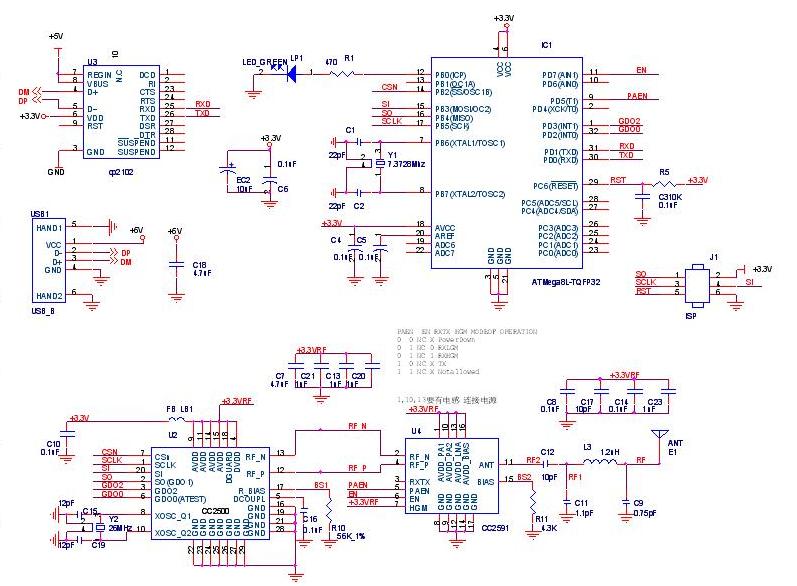
QRF600 Host (Model) BLOCK DIAGRAM MCU Atmega ANT OUT RF (2404.1~24 48.0MHz ) USB To UART Data Transfer ANT SCL SI SO Crystal frequency (7.3728MHz) Crystal frequency (26MHz)
Cover Letter(s)
2206 Ringwood Avenue San Jose, CA 95131 Tel: 408-526-1188 Fax: 408-526-1088 Email: [email protected] Project and Product Certification Representative Authorization Letter Reason for Amendment (current / obsolete) Revision History Approved Date From To Initial Release (current) 1.0 1.0 Nov-14-2006 Revised wording (current) 1.0 2.0 Sept–25-2007 __________________________________________________________________ SCS-F18: Project and Product Certification Representative Authorization Letter Page 2 of 2 Rev 2.0 Centre of Testing Service Co., Ltd. Phone: +86-20-61243023 FAX: +86-20-38780406 Date: May 07, 2010 To: SIEMIC, INC. 2206 Ringwood Avenue, San Jose, CA 95131 USA Dear Sir/Madam, Re: Project and Product Certification Representative Authorization Letter We, CTS hereby authorize SIEMIC, INC. to act as a Certification Body for certifying for the following project(s): . Product Name: Wireless QClick Model Name: QRF600, QRF6XX, QRF300, QRF3XX, QRF600-R, QRF300-R We affirm that between SIEMIC and CTS, any difference in understanding, including test plan, measurement methods, applicable standards and relevant procedures and processes have been resolved prior to commencement of testing activities. Sincerely, Kevin Liang Title: Manager Phone : +86-20-61243023 ext.:8138 Facsimile : +86-20-38780406 Address: Building F, Dachuang industrial park, NO.379, zhongshan Dadao, Guangzhou, China
Cover Letter(s)
QOMO HiteVision,LLC. 28265 Beck Road, Suite C1, Wixom, MI 48393, USA www.qomo.com | Email: [email protected] | Phone: 1-866-990-7666 | Fax: 1-248-281-1999 1 AGENCY AUTHORIZATION LETTER FCC ID: XQGQRF600-TR1 Date: 07 May 2010 To whom it may concern: We, the undersigned, hereby authorize Centre of Testing Service Co., Ltd, (CTS) to act on our behalf, in the following matters related to the FCC approval of our products: Report submittal, related correspondence, the signing of all documents relating to these matters, and any other lawful activity necessary to obtain such certification, any act carried out by CTS within the scope of this authorization shall have the same effects as our own. This authorization shall expire 6 moths from original date. If you have any questions regarding the authorization, Please don’t hesitate to contact us. Thanks. Sincerely, (Weihua Li/Manager) Tel: 1-866-9907666 Fax: 1-248-2811999 e-mail: [email protected] web site: www.qomo.com
External Photos
FCC ID: XQGQRF600-TR1 opyright of this report is owned by Centre of Testing Service and may not be reproduced other than in full except with the written approval of the issuing Company. CENTRE OF TESTING SERVICE CO., LTD. Building F, Dachuang industrial park, No.379, Zhongshan Dadao, Guangzhou, China Tel:+86-20-85543113 (32 lines) Fax:+86-20-38780406 Complaint line:+86-20-85533471 E-mail:[email protected] See Reverse For Terms And Conditions of Service Report No.: CGZ3100507-01560-O Page 1 of 1 1 External Photos of the EUT External view-front External view-back Top
ID Label/Location Info
FCC ID: XQGQRF600-TR1 QOMO HiteVision, LLC. ____________________________________________________________________________________________ Report No.: CGZ3100507-01560-O Page 1 of 4 APPLICATION FOR FCC CERTIFICATION Applicant : QOMO HiteVision, LLC.. EUT : QClick Model No. : QRF600 Document List: EXHIBIT 1. LABEL DRAWING.......................................... 3 EXHIBIT 2. PHOTOGRAPHS........................................... 4 FCC ID: XQGQRF600-TR1 QOMO HiteVision, LLC. ____________________________________________________________________________________________ Report No.: CGZ3100507-01560-O Page 3 of 4 EXHIBIT 1. Label Drawing FCC Label Drawing 30.7mm 4.5mm FCC ID: XQGQRF600-TR1 QOMO HiteVision, LLC. ____________________________________________________________________________________________ Report No.: CGZ3100507-01560-O Page 4 of 4 Please refer Exhibit 2 Figure 2 for Label Placement Location EXHIBIT 2. Photographs Figure 1 External view-back Label Location
Internal Photos
FCC ID: XQGQRF600-TR1 opyright of this report is owned by Centre of Testing Service and may not be reproduced other than in full except with the written approval of the issuing Company. CENTRE OF TESTING SERVICE CO., LTD. Building F, Dachuang industrial park, No.379, Zhongshan Dadao, Guangzhou, China Tel:+86-20-85543113 (32 lines) Fax:+86-20-38780406 Complaint line:+86-20-85533471 E-mail:[email protected] See Reverse For Terms And Conditions of Service Report No.: CGZ3100507-01560-O Page 1 of 1 1 Internal Photos of the EUT Internal view-1 PCB 1 layout PCB 1 Solder
Operational Description
The description of QRF600 working principle After the chip CPU (IC1 ATmega324pv-10au) electrifies, it will be made the initialize setting and display the interface. Then wait for the importing single of pressing button through user. The system will enter the sleep mode automatically after 15 seconds if it doesn’t import the single, and then the screen will be closed, if it receives the single, that can be displayed the information of the user importing. The single will be sent out through CC2500, when the user sends answers or login to the system. Then it will enter the receive state and wait the feedback information. When the host receives the single, it will judge whether the single is correct. If the single is correct, the host will transmit it to upper layer software in the computer, which will response and feedback the information to the host in according to the practical running and state. At last, the host will transmit the single to the student keypad and the instruction keypad. The keypads will prompt for the user operation if it’s success or failure which the overtime
Test Setup Photos
FCC ID: XQGQRF600-TR1 opyright of this report is owned by Centre of Testing Service and may not be reproduced other than in full except with the written approval of the issuing Company. CENTRE OF TESTING SERVICE CO., LTD. Building F, Dachuang industrial park, No.379, Zhongshan Dadao, Guangzhou, China Tel:+86-20-85543113 (32 lines) Fax:+86-20-38780406 Complaint line:+86-20-85533471 E-mail:[email protected] See Reverse For Terms And Conditions of Service Report No.: CGZ3100507-01560-O Page 1 of 3 1 TEST PHOTOGRAPHS 1.1.Photos of power line conducted emission measurement Front view of conducted measurement Side view of Conducted measurement EUT FCC ID: XQGQRF600-TR1 opyright of this report is owned by Centre of Testing Service and may not be reproduced other than in full except with the written approval of the issuing Company. CENTRE OF TESTING SERVICE CO., LTD. Building F, Dachuang industrial park, No.379, Zhongshan Dadao, Guangzhou, China Tel:+86-20-85543113 (32 lines) Fax:+86-20-38780406 Complaint line:+86-20-85533471 E-mail:[email protected] See Reverse For Terms And Conditions of Service Report No.: CGZ3100507-01560-O Page 2 of 3 1.2.Photos of Radiated Emission Test (In Anechoic Chamber) 30~230MHz (X position) 230~1000MHz (X position) above 1000MHz (X position) EUT EUT FCC ID: XQGQRF600-TR1 opyright of this report is owned by Centre of Testing Service and may not be reproduced other than in full except with the written approval of the issuing Company. CENTRE OF TESTING SERVICE CO., LTD. Building F, Dachuang industrial park, No.379, Zhongshan Dadao, Guangzhou, China Tel:+86-20-85543113 (32 lines) Fax:+86-20-38780406 Complaint line:+86-20-85533471 E-mail:[email protected] See Reverse For Terms And Conditions of Service Report No.: CGZ3100507-01560-O Page 3 of 3 Position of EUT Circling 1.3. Band Edge Compliance Test X position Position of EUT Circling EUT EUT EUT
Contact Information
Applicant
Weihua Li(Manager)
Test Firm
Centre of Testing service Co., LtdVincent Yao
Technical Specifications
| # | Rule Parts | Frequency Range | Power Output |
|---|---|---|---|
| 1 | 15C | 2.40 GHz - 2.48 GHz | - |
Other Applications from QOMO HiteVision, LLC.

XQGQRF700-RES
Oct 14, 2010Wireless QClick
Equipment Class
DXX - Part 15 Low Power Communication Device Transmitter
XQGQRF900-TR1
May 31, 2010Wireless QClick
Equipment Class
JBP - Part 15 Class B Computing Device Peripheral
XQGQRF900-TR
Dec 20, 2009Wireless QClick
Equipment Class
DXX - Part 15 Low Power Communication Device Transmitter
XQGQRF900-RET
Dec 20, 2009Wireless QClick
Equipment Class
DXX - Part 15 Low Power Communication Device Transmitter
XQGQRF900-RES
Dec 20, 2009Wireless QClick
Equipment Class
DXX - Part 15 Low Power Communication Device Transmitter