XYUIGEN3WIRELESS VIBRATING DEVICE
I-GEN HEALTHCARE CORPORATION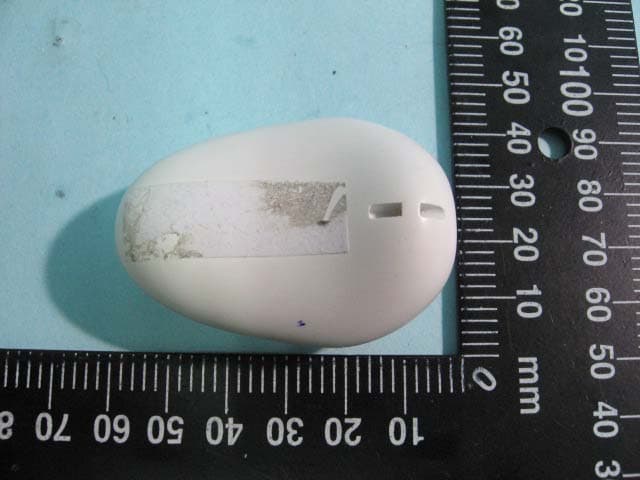
Click to zoom
Application Details
- Equipment Class
- DSC - Part 15 Security/Remote Control Transmitter
- Date of Grant
- Mar 17, 2010
- Application Purpose
- Original Equipment
- Date of Application
- Mar 17, 2010
- Equipment Note
- WIRELESS VIBRATING DEVICE
- Frequency Range
- 434.00400000 - 434.00400000
- Company
- I-GEN HEALTHCARE CORPORATION
- Country
- Hong Kong
Documents & Files
Document Text
Text extracted from the exhibit documents filed with the FCC. Open a document above to read the original.
Users Manual
Partie « The I-GEN SEAL » [Stamp I-GE HEALTHCARE QUALITY] This seal is your assurance that this product meets I-GEN standards for excellence in workmanship, reliability and quality. [Stamp GREEN PRODUCT] This seal certifies that this product meets the environmental standards of the I- GEN quality chart. ZOON+ does not contain any battery to charge since they are included and rechargeable via USB. PART 1: Intro + Handbook of quick utilization PRESENTATION TEXT I-GEN goes beyond the universe of pleasure with a new concept as sexy as innovative. ZOON : a new generation of revolutionary sensual toys developed by the I-GEN experts ! Pure design, perfect ergonomics, extreme sophistication, ZOON+ is the first sensual toy remotely controlled thanks to its remote control or even... from thousands of kilometres away through Internet! With a simple click, your lover will experience the most outstanding ZOON’s vibrations. At home, in the restaurant, in the office, at the other corner of the world, single, in couple and maybe more, « e-zoon » without borders... Let your imagination free, and join the ZOONERS’ community: with ZOON+ the e- sexual revolution is in motion! www.i-zoon.com INSTRUCTIONS FOR USE Thank you for choosing ZOON+! Before going any further, take few minutes and read the instructions for use. Uncover how to get the most benefits out of your newly acquired pleasure object. Notice: more detailed instructions for use of ZOON+ in the TECHNICAL USER MANUAL To get more information about the products commercialized by I-GEN and about the products range ZOON log onto our website: www.i-zoon.com CONTENT OF THE ZOON+ BOX Schéma avec chaque accessoire . ZOON+ . A dual USB cable . A remote control . A charger . A box STARTING UP THE ZOON+ Schéma pour chaque étape Important: Follow these steps for a classical use, alone or in couple (local mode) and for at-a-distance use via Internet 1/ Plug in the device Plug in the USB cables in the remote control and the ZOON+ charger. 2/ Loading of ZOON+ Put ZOON+ on your loader. A small red light blinks when it is loading. When the light stops blinking, ZOON+ is loaded. The loading length is about 3 hours Once loaded, you can unplug and store the dual USB cable in your box. 3/ Synchronization of ZOON+ with the remote control Press the button I-GEN of ZOON+ until it blinks rapidly. Press within a very small interval on any button of the remote control. The I-GEN button of ZOON+ blinks 3 times slowly, the synchronization is active. 4/ Starting up ZOON+ Press the key I-GEN on the remote control to start ZOON+ Press the keys + or – of the remote control and make the vibrations progress at your own rhythm. → To stop the vibrations, press the key [PICTO] of the remote control USING ZOON+ VIA INTERNET Note: Mrs ZOON should be the first to follow the steps . Preliminary step to follow for Mrs ZOON To do only once : installation of a pilot available on our website within few seconds - Log onto our website http://www.i-zoon.com - Click on the icon: Install the pilot → Stay connected . Steps to follow for Mrs ZOON → Switch on ZOON+: Press the key I-GEN of the remote control (cf. 4/ Starting up ZOON+) - Stay connected on our website, click on the icon « Mrs ZOON » - Click on the window: 'Please connect your device to your PC' → At this stage, you can connect the USB cable onto the remote control and your PC. - Click on OK: A unique and confidential code appears Communicate this code to your partner on the phone, through a chat, skype ... so that he could make your ZOON+ vibrate from a distance. . Steps to follow for Mr ZOON - Go on the website http://www.i-zoon.com - Click on the icon « Mr ZOON » - Click on OK - A window appears: ‘Submit authentication code’: Log in the confidential code given by you partner - Click on OK → After this stage, you are both connected Set in motion the vibrations of Mrs ZOON by pressing the button ON (PICTO) of the program The green heart comes on: you are connected → Mrs ZOON can now vibrate with pleasure! → You can steer Mrs ZOON’s pleasure in 2 ways, to your liking! To optimize ZOON+ via Internet, report to the Technical User Manuel, section UTILIZATION OF ZOON+ PROGRAMS VIA INTERNET PART 2: Technical User Manual TECHNICAL USER MANUAL Read the technical user manual to know all about ZOON+: Its functionalities, usage tips, frequently asked questions, etc. OVERVIEW OF THE ZOON+ REMOTE CONTROL Important : You only need a remote control for a classical use (local mode), to play alone or in couple... Schéma avec légendes . The key I-GEN enables you to start the ZOON+ . The keys – and + enable you to choose the modes of vibrations . The button PICTO is the key OFF: it enables you to stop the vibrations of ZOON+ UTILIZATION OF ZOON+ PROGRAMS VIA INTERNET Once you are both connected (cf. INSTRUCTIONS FOR USE) Mr ZOON can make Mrs ZOON vibrate with pleasure from a distance going to www.i-zoon.com Follow the guide! OVERVIEW OF THE PROGRAM Mrs ZOON Schéma de la fenêtre du logiciel avec flèches . ON LINE: means your device is plugged . LEVEL: shows the vibrations intensity . TIMER: shows how long you’ve been zooning . HEART: symbolizes the program Mr ZOON has selected to make you zoon OVERVIEW OF THE PROGRAM Mr ZOON Schéma de la fenêtre du logiciel avec flèches Set in motion Mrs ZOON’s vibrations by clicking on the button ON (PICTO) of the program The green heart comes on: you are connected → Mrs ZOON can now vibrate with pleasure! → You can steer Mrs ZOON’s pleasure in 2 ways, to your liking! . Click on the button + or – of the program to vary the intensity of the vibrations . Click on the button P (PICTO) and choose the naughty program → To come back to the normal mode, click on the button + or - FAQ → How to enjoy myself with ZOON+? . Classical utilization with the remote control, alone or as a duo ZOON+ is a pleasure object controllable from a distance with a wireless remote control. The reach of the remote control is about 10 meters. . Utiliza…
Text truncated - open the document above for the full version.
Cover Letter(s)
1 KC Chen 寄件者: SS [[email protected]] 寄件日期: 2010年3月15日星期一 10:24 收件者: KC Chen 副本: R00/黃心怡 主旨: Re: I-GEN HEALTHCARE CORPORATION, FCC ID: XYUIGEN3, Assessment NO.: AN09T9904, Notice#1 Dear KC, Yes. The click is the same as "press and release". BR S. S. Liou Section Manager EMC Testing Dept. II Electronics Testing Center, Taiwan Tel: +886-2-26023052 ext. 20 Email: [email protected] URL: http://www.etc.org.tw ----- Original Message ----- From: KC Chen To: SS Cc: R00/黃心怡 Sent: Monday, March 15, 2010 9:04 AM Subject: RE: I-GEN HEALTHCARE CORPORATION, FCC ID: XYUIGEN3, Assessment NO.: AN09T9904, Notice#1 Dear Mr. Liou, Thanks for your reply. But there is a question for your reply. This transmitter transmits continuously when the button is pressed and stops transmitting when the button is released. If a click is same as a press, then how the transmitting will be stopped? Or you mean a click is same “press and release”? Please explain. Best regards, K. C. Chen From: SS [mailto:[email protected]] Sent: Friday, March 12, 2010 3:50 PM To: KC Chen Cc: R00/黃心怡 Subject: Re: I-GEN HEALTHCARE CORPORATION, FCC ID: XYUIGEN3, Assessment NO.: AN09T9904, Notice#1 Dear KC, 3. Via internet, this device can be controlled remotely. But its function is the same like one pressing the buttons. It is still a manually controlled device. 2 KC: For Internet control, there is no button being pressed. Please provide demonstration of compliance with the relevant requirement when the transmitter is activated from Internet. From internet, the user can control the transmitter to work just as the same with the function of manually operation. A click on the internet is the same function like a press on the buttoms. It complies with the relevant requirements. Best regards, S. S. Liou Section Manager EMC Testing Dept. II Electronics Testing Center, Taiwan Tel: +886-2-26023052 ext. 20 Email: [email protected] URL: http://www.etc.org.tw ----- Original Message ----- From: KC Chen To: SS Sent: Tuesday, December 08, 2009 7:27 PM Subject: RE: I-GEN HEALTHCARE CORPORATION, FCC ID: XYUIGEN3, Assessment NO.: AN09T9904, Notice#1 Dear Mr. Liou, Please check my question embedded in your reply below: From: SS [mailto:[email protected]] Sent: Tuesday, December 08, 2009 7:13 PM To: KC Chen Cc: R00/黃心怡 Subject: Re: I-GEN HEALTHCARE CORPORATION, FCC ID: XYUIGEN3, Assessment NO.: AN09T9904, Notice#1 Dear Sir, 1. The issue date was corrected because the conduction test was completed on Oct. 05, 2009. The radiated emission test was completed in 2008. This project was suspended due to the problem of conducted emission test. KC : Accepted. 2. Preliminary measurements were performed before the final measurement. Please refer to section 4.2 for the procedure. It was found that the worse case is when EUT orientation was flat down on the table. This description was added to the operation mode of section 4.3. KC: Accepted. 3. Via internet, this device can be controlled remotely. But its function is the same like one pressing the buttons. It is still a manually controlled device. KC: For Internet control, there is no button being pressed. Please provide demonstration of compliance with the relevant requirement when the transmitter is activated from Internet. Best regards, 3 S. S. Liou Section Manager EMC Testing Dept. II Electronics Testing Center, Taiwan Tel: +886-2-26023052 ext. 20 Email: [email protected] URL: http://www.etc.org.tw ----- Original Message ----- From: <[email protected]> To: <[email protected]> Cc: <[email protected]>; <[email protected]> Sent: Monday, December 07, 2009 1:10 AM Subject: I-GEN HEALTHCARE CORPORATION, FCC ID: XYUIGEN3, Assessment NO.: AN09T9904, Notice#1 > Dear Sir, > > The review of above application is complete. Please reply the questions below: > > 1. The test report provided was issued on Aug. 21, 2009, while the test was performed in 2008. Please explain. > 2. Per ANSI C63.4, the measurement of portable transmitters shall be investigated with three axes. Please make necessary correction. > 3. When the remote controller is in connection to a PC via the USB port, it can be activated through the Internet. Please explain how the operation of transmitter will continuously comply with FCC 15.231(b). > > Best regards, > > K. C. Chen > > > > The items indicated above must be submitted before processing can continue on the above referenced application. Failure to provide the requested information within 30 days of the original e-mail date may result in application dismissal and forfeiture of the filing fee. Also, please note that partial responses increase processing time and should not be submitted. Any questions about the content of this correspondence should be directed to the e-mail address listed below the name of the sender. >
External Photos
ETC Report No.:09-08-RBF-111-03 FCC ID.: XYUIGEN3 Rev. No 1.0 CONSTRUCTED PHOTOS of EUT Mode : Tx Top View of EUT Side View of EUT ETC Report No.:09-08-RBF-111-03 FCC ID.: XYUIGEN3 Rev. No 1.0 CONSTRUCTED PHOTOS of EUT Rear View of EUT Side View of EUT ETC Report No.:09-08-RBF-111-03 FCC ID.: XYUIGEN3 Rev. No 1.0 CONSTRUCTED PHOTOS of EUT Front View of EUT Bottom View of EUT
ID Label/Location Info
910805 1 LABEL FCC ID: XYUIGEN3 Model: I-GEN3 This device complies with Part 15 of the FCC Rules. Operation is sbject to the following two conditions: (1) this device may not cause harmful interference, and (2) this device must accept any interference received, including interference that may cause undesired operation. 30mm 20mm
Internal Photos
ETC Report No.:09-08-RBF-111-03 FCC ID.: XYUIGEN3 Rev. No 1.0 CONSTRUCTED PHOTOS of EUT Internal View of EUT ETC Report No.:09-08-RBF-111-03 FCC ID.: XYUIGEN3 Rev. No 1.0 CONSTRUCTED PHOTOS of EUT Component View of PCB Solder View of PCB
Test Report
Rev. No 1.0 FCC Part 15 EMI TEST REPORT of E.U.T. : WIRELESS VIBRATING DEVICE FCC ID : XYUIGEN3 MODEL : I-GEN3 Workin g Frequency : 433.004 MHz for APPLICANT : I-GEN HEALTHCARE CORPORATION ADDRESS : RM. 1003-5, 10/F., ALLIED KAJIMA BLDG., 138 GLOURCESTER RD, WANCHAI, Hong Kong. Test Performed by ELECTRONICS TESTING CENTER, TAIWAN NO.34, LIN 5, DINGFU TSUEN, LINKOU SHIANG TAIPEI COUNTY, TAIWAN, 24442, R.O.C. TEL : (02)26023052 Fax : (02)26010910 http://www.etc.org.tw ; e-mail: [email protected] Report Number : 09-08-RBF-111-03 ETC Report No.:09-08-RBF-111-03 FCC ID.: XYUIGEN3 Rev. No 1.0 TEST REPORT CERTIFICATION Applicant : I-GEN HEALTHCARE CORPORATION RM. 1003-5, 10/F., ALLIED KAJIMA BLDG., 138 GLOURCESTER RD, WANCHAI, Hong Kong. Manufacturer : I-GEN HEALTHCARE CORPORATION RM. 1003-5, 10/F., ALLIED KAJIMA BLDG., 138 GLOURCESTER RD, WANCHAI, Hong Kong. Description of EUT : a) Type of EUT : WIRELESS VIBRATING DEVICE b) Trade Name : ZOON c) Model No. : I-GEN3 d) FCC ID : XYUIGEN3 e) Working Frequency : 433.004 MHz f) Power Supply : Tx: DC 3.7 V Battery Regulation Applied : FCC Rules and Regulations Part 15 Subpart C (2008) I HEREBY CERTIFY THAT; The data shown in this report were made in accordance with the procedures given in ANSI C63.4 and the energy emitted by the device was founded to be within the limits applicable. I assume full responsibility for accuracy and completeness of these data. Note : 1. The results of the testing report relate only to the items tested. 2. The testing report shall not be reproduced except in full, without the written approval of ETC. ETC Report No.:09-08-RBF-111-03 FCC ID.: XYUIGEN3 Rev. No 1.0 Issued Date : Aug. 21, 2009 Test Engineer : ( Vincent Chang, Engineer ) Check By : ( Charles Wang, Supervisor ) Approve & Authorized Signer : Will Yauo, Manager EMC Dept. II of ELECTRONICS TESTING CENTER, TAIWAN ETC Report No.:09-08-RBF-111-03 FCC ID.: XYUIGEN3 Rev. No 1.0 Table of Contents Page 1. GENERAL INFORMATION ............................................................................................................................... 1 1.1 PRODUCT DESCRIPTION.......................................................................................................................................... 1 1.2 CHARACTERISTICS OF DEVICE: ...............................................................................................................................1 1.3 TEST METHODOLOGY............................................................................................................................................. 1 1.4 TEST FACILITY........................................................................................................................................................ 1 2. DEFINITION AND LIMITS ................................................................................................................................ 2 2.1 DEFINITION............................................................................................................................................................. 2 2.2 RESTRICTED BANDS OF OPERATION....................................................................................................................... 2 2.3 LIMITATION............................................................................................................................................................ 2 2.4 LABELING REQUIREMENT....................................................................................................................................... 4 2.5 USER INFORMATION............................................................................................................................................... 4 3 SYSTEM TEST CONFIGURATION ................................................................................................................... 5 3.1 JUSTIFICATION........................................................................................................................................................ 5 3.2 DEVICES FOR TESTED SYSTEM................................................................................................................................5 4. RADIATED EMISSION MEASUREMENT ...................................................................................................... 6 4.1 APPLICABLE STANDARD......................................................................................................................................... 6 4.2 MEASUREMENT PROCEDURE................................................................................................................................... 6 4.3 TEST DATA............................................................................................................................................................. 8 4.4 FIELD STRENGTH CALCULATION.......................................................................................................................... 10 4.5 ACTIVATE TIME.................................................................................................................................................... 10 4.6 CALCULATION OF DUTY FACTOR.......................................................................................................................... 10 4.7 RADIATED TEST EQUIPMENT................................................................................................................................16 4.8 MEASURING INSTRUMENT SETUP......................................................................................................................... 16 4.9 RADIATED MEASUREMENT PHOTOS...................................................................................................................... 17 5. BANDWIDTH OF EMISSION........................................................................................................................... 19 5.1 APPLICABLE STANDARD PLOT GRAPHIC OF BANDWI…
Text truncated - open the document above for the full version.
Test Setup Photos
ETC Report No.:09-08-RBF-111-03 FCC ID.: XYUIGEN3 Rev. No 1.0 Radiated Measurement Photos Mode: Charge ETC Report No.:09-08-RBF-111-03 FCC ID.: XYUIGEN3 Rev. No 1.0 Mode: Transmitting ETC Report No.:09-08-RBF-111-03 FCC ID.: XYUIGEN3 Rev. No 1.0 Photos of Conduction Measuring Setup
Contact Information
Applicant
EDWARD HAGEGE
Test Firm
Taiwan Testing and Certification CenterAnderson Ku
Technical Specifications
| # | Rule Parts | Frequency Range | Power Output |
|---|---|---|---|
| 1 | 15.231 | 434.004 MHz - 434.004 MHz | - |