Y56QSLHB216Bluetooth Digital Watch
SHENZHEN QI SHENGLONG INDUSTRIALIST CO.,LTD.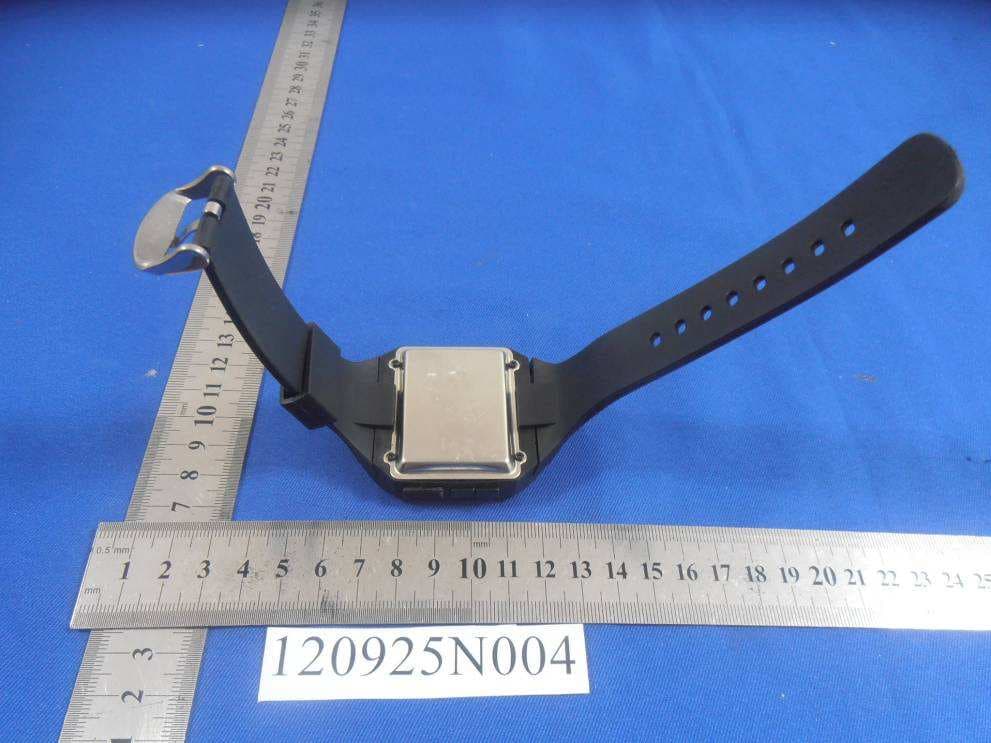
Click to zoom
Application Details
- Equipment Class
- DXX - Part 15 Low Power Communication Device Transmitter
- Date of Grant
- Oct 28, 2012
- Application Purpose
- Original Equipment
- Date of Application
- Oct 28, 2012
- Equipment Note
- Bluetooth Digital Watch
- Frequency Range
- 2402.00000000 - 2480.00000000
- Country
- China
Documents & Files
Document Text
Text extracted from the exhibit documents filed with the FCC. Open a document above to read the original.
Users Manual
1 MODEL NO.: HB-216 BLUETOOTH DIGITAL WATCH INSTRUCTION MANUAL PLEASE READ ALL INSTRUCTIONS CAREFULLY AND RETAIN FOR FUTURE USE 2 Getting Started • Remove the unit from the box. • Remove any packaging from the product. • Please retain all packaging until you have checked and counted all the parts and the contents against the parts list. In the Box • Bluetooth Digital Watch • USB Charging Cable • Quick Reference Guide • Instruction Manual KEY FEATURES • Bluetooth Digital Watch • Compatible with all Bluetooth enabled devices such as Smart Phones, Tablets, etc. • Syncs in Seconds • Big Blue LCD Display • Built-In Speaker & Microphone • Answer call wirelessly • Voice Dialing • One Touch Operation • Wireless Range – 10 Meters (33 Feet) SAFETY INSTRUCTIONS Keep the unit away from heat sources, direct sunlight, humidity, water and any other liquids. Do not operate the unit if it has been exposed to water, moisture or any other liquids to prevent against electric shock, explosion and/or injury to yourself and damage to the unit. Do not use the unit if it has been dropped or damaged in any way. Repairs to electrical equipment should only be performed by a qualified electrician. Improper repairs may place the user at serious risk. Do not use the unit with wet hands. Do not put objects into any of the openings. Keep the unit free from dust, lint etc. Do not use this unit for anything other than its intended use. Keep the unit out of reach of children. This appliance is not a toy. Do not use the handset at excessive levels as damage to hearing may occur. Batteries (battery pack or batteries installed) shall not be exposed to excessive heat place, such as sunshine, fire or the like. 3 Description of Parts 4 Turning the Bluetooth ON Press and hold the Function button for 5 seconds. The LCD will display “ON” with a beep sound indicating that the device has been switched ON 5 Turning the Bluetooth OFF While the device is ON, press and hold the Function button for 5 seconds. The LCD will display “OFF” and the device would turn OFF. Pairing the Bluetooth Watch with a Bluetooth enabled device Turn ON the unit 6 Long Press and hold the Function Button for 7 to 8 seconds until the LCD displays “PAIring” indicating that the device is now in pairing mode. Activate the Bluetooth function on your Bluetooth Device (Mobile Phone or Tablet). Please refer to manufacturer’s instructions for instructions on enabling Bluetooth on your device. Once you have activated Bluetooth on your device, select the earphones “BT DIGITAL WATCH” from the list of available Bluetooth devices. If required, enter the password ‘0000’ to confirm to finalize pairing. LCD will display “Connected” indicating successful connection and the Bluetooth Logo would light up on the LCD Display. Note: The Bluetooth Logo would light off on the LCD Display once the Bluetooth connection has been disconnected. Play Music wirelessly on Bluetooth Watch Once your Bluetooth enabled device (For example iPhone or Android Smartphone) is paired with Bluetooth Watch, play music from your phone and it would stream music wirelessly through the Bluetooth Watch speakers Answering a call LCD display would show Caller-ID when you get any incoming phone call. Press the “Function Button” once to answer the call. LCD will display “Calling” indicating that you are now on a Call. 7 Ending a call Press the “Function Button” once when you finish your phone conversation. LCD will display “HangUP” and you have now ended your phone call. Rejecting a call When you get an incoming phone call, Long Press the “Function Button” until the LCD displays “REJECT” to reject the incoming phone call. Voice Dialing 8 Press twice the “Function Button” for voice dialing and name the person on your Mobile Phone Contact list. Bluetooth watch would then automatically voice dial if it matches the name on your contact list. Last Number Redial Long Press the “Function Button” until the LCD displays “REDIAL” for last number re-dialing. Answer Waiting Call 9 Long press the “Function Button” to switch between two calls. Press the Function button once to terminate a call and restore the other call. Call waiting service may not be available on all networks. Contact your network operator for more information. Setting the Time Press the “Mode” button and hold for 3 seconds to enter into time setting mode. Press S1 and S2 to set, the steps are Hour – Minute – Year – Month – Date – Exit the setting mode. 10 Setting Alarm Press the “Function” button once to enter into Alarm setting mode. Long Press the Function button again to set the alarm. Press S1 and S2 to set, the steps are Hour – Minute – Exit the setting mode. Charging the watch The USB Charging Port is on the right side of the Bluetooth Digital Watch. Insert the Micro USB plug here and other end of the USB Port to any USB charging port (Computer or USB AC Charging Socket). It may take up to 4 to 5 hours for a full charge. Specifications – Bluetooth Compliance – A2DP, AVRCP, HFP and HSP ASP Wireless Range – 10 meters (33 Feet) Watch dimension: 11mm x 10.8mm x 11.6mm Weight of Watch: 90Grams Standby Time – 80Hours Talk Time – 8 Hours Music Play Time – 2-3 Hours Rechargeable Battery – 250mAh DC 5V 11 Care and maintenance Read the following recommendations before using the Bluetooth Multi Media Speaker System. Following these you will be able to enjoy the product for many years. • Do not expose the unit to liquid, moisture or humidity to avoid the product’s internal circuit being affected. • Don’t use abrasive cleaning solvents to clean the unit. • Do not expose the unit to extremely high or low temperature as this will shorten the life of electronic devices, destroy the battery or distort certain plastic parts. • Don’t dispose of the unit in fire as it will result in an explosion. • Don’t expose the unit to contact with sharp objects as this will cause scratches and damage. • Don’t let the unit fall down onto the floor. The internal circuit might get dama…
Text truncated - open the document above for the full version.
Cover Letter(s)
SHENZHEN QI SHENGLONG INDUSTRIALIST CO., LTD. ——————————————————————————————— Date: September 28, 2012 Federal Communications Commission Authorization and Evaluation Division FCC ID: Y56QSLHB216 Confidentiality Request Pursuant to Sections 0.457 and 0.459 of the Commission’s Rules, the Applicant hereby requests confidential treatment of information accompanying this application as outlined below: 1. Block diagram 2. Schematics 3. Operation Description The above materials contain trade secrets and proprietary information not customarily released to the public. The public disclosure of these matters might to harmful to the applicant and provide unjustified benefits to its competitors. The applicant understands that pursuant to Rule 0.457, disclosure of this application and all accompanying documentation will not be made before the date of the grant for this application. Sincerely, Name:Huang Derong Company name: SHENZHEN QI SHENGLONG INDUSTRIALIST CO., LTD.
Cover Letter(s)
SHENZHEN QI SHENGLONG INDUSTRIALIST CO., LTD. ——————————————————————————————— AGENCY AUTHORIZATION LETTER FCC ID: Y56QSLHB216 Date: September 28, 2012 To whom it may concern: We, the undersigned, hereby authorize Bureau Veritas Shenzhen Co. Ltd Dongguan Branch., to act on our behalf, as our agent, in the following matters related to the FCC approval of our products: report submittal, related correspondence, the signing of all documents relating to these matters, and any other lawful activity necessary to obtain such certification. Any act carried out by BVDG within the scope of this authorization shall have the same effects as our own. This authorization shall expire 6 months form original date. If you have any Questions regarding the authorization, please don’t hesitate to contact us. Thank you. Sincerely, Name:Huang Derong Company name: SHENZHEN QI SHENGLONG INDUSTRIALIST CO., LTD.
External Photos
Bureau Veritas Shenzhen Co., Ltd. Dongguan Branch No. 34, Chenwulu Section, Guantai Rd., Houjie Town, Dongguan City, Guangdong 523942, China Tel.: +86 769 8593 5656 Fax: +86 769 8593 1080 Email: [email protected] Page 1 of 3 Report Version 1 Test Report No.: FC120925N004 PHOTOGRAPHS OF THE EUT Bureau Veritas Shenzhen Co., Ltd. Dongguan Branch No. 34, Chenwulu Section, Guantai Rd., Houjie Town, Dongguan City, Guangdong 523942, China Tel.: +86 769 8593 5656 Fax: +86 769 8593 1080 Email: [email protected] Page 2 of 3 Report Version 1 Test Report No.: FC120925N004 Bureau Veritas Shenzhen Co., Ltd. Dongguan Branch No. 34, Chenwulu Section, Guantai Rd., Houjie Town, Dongguan City, Guangdong 523942, China Tel.: +86 769 8593 5656 Fax: +86 769 8593 1080 Email: [email protected] Page 3 of 3 Report Version 1 Test Report No.: FC120925N004
ID Label/Location Info
FCC ID: Y56QSLHB216 Size: 0.5CM*1.5CM
Internal Photos
Bureau Veritas Shenzhen Co., Ltd. Dongguan Branch No. 34, Chenwulu Section, Guantai Rd., Houjie Town, Dongguan City, Guangdong 523942, China Tel.: +86 769 8593 5656 Fax: +86 769 8593 1080 Email: [email protected] Page 1 of 2 Report Version 1 Test Report No.: FC120925N004 PHOTOGRAPHS OF THE EUT Bureau Veritas Shenzhen Co., Ltd. Dongguan Branch No. 34, Chenwulu Section, Guantai Rd., Houjie Town, Dongguan City, Guangdong 523942, China Tel.: +86 769 8593 5656 Fax: +86 769 8593 1080 Email: [email protected] Page 2 of 2 Report Version 1 Test Report No.: FC120925N004 Antenna
Test Report
Bureau Veritas Shenzhen Co., Ltd. Dongguan Branch No. 34, Chenwulu Section, Guantai Rd., Houjie Town, Dongguan City, Guangdong 523942, China Tel: +86 769 8593 5656 Fax: +86 769 8593 1080 Email: [email protected] Page 1 on 33 Report Version 1 Test Report No.: FC120925N004 TEST REPORT Applicant: SHENZHEN QI SHENGLONG INDUSTRIALIST CO.,LTD Address: 5F.,Blk 6A, Jing Nan Industry,Bai Ge long,Buji,Shenzhen,China Manufacturer or Supplier DONGGUAN FEIHAO INDUSTRIALIST CO.,LTD Address No.8, Fengyi Road, Dakan Village, Huangjiang, DongGuan, China Product: Bluetooth Digital Watch Brand Name: N/A Model: HB-216 Additional Model & Model Difference: See Section 3.1 Date of tests: Oct. 8 ~Oct. 18, 2012 the tests have been carried out according to the requirements of the following standards: FCC Part 15, Subpart C (Section 15.249) )) ) CONCLUSION: The submitted sample was found to COMPLY with the test requirement Prepared by Grace Ren Project Engineer / EMC Department Approved by Sam Tung Manager / EMC Department Date: Oct. 19, 2012 This report is for your exclusive use. Any copying or replication of this report to or for any other person or entity, or use of our name or trademark, is permitted only with our prior written permission. This report sets forth our findings solely with respect to the test samples identified herein. The results set forth in this report are not indicative or representative of the quality or characteristics of the lot from which a test sample was taken or any similar or identical product unless specifically and expressly noted. Our report includes all of the tests requested by you and the results thereof based upon the information that you provided to us. You have 60 days from date of issuance of this report to notify us of any material error or omission caused by our negligence, provided, however, that such notice shall be in writing and shall specifically address the issue you wish to raise. A failure to raise such issue within the prescribed time shall constitute your unqualified acceptance of the completeness of this report, the tests conducted and the correctness of the report contents. Unless specific mention, the uncertainty of measurement has been explicitly taken into account to declare the compliance or non-compliance to the specification Bureau Veritas Shenzhen Co., Ltd. Dongguan Branch No. 34, Chenwulu Section, Guantai Rd., Houjie Town, Dongguan City, Guangdong 523942, China Tel: +86 769 8593 5656 Fax: +86 769 8593 1080 Email: [email protected] Page 2 on 33 Report Version 1 Test Report No.: FC120925N004 TABLE OF CONTENTS RELEASE CONTROL RECORD 3 1 SUMMARY OF TEST RESULTS 4 2 MEASUREMENT UNCERTAINTY.................................................................................. 4 3 GENERAL INFORMATION 5 3.1 GENERAL DESCRIPTION OF EUT ............................................................................... 5 3.2 DESCRIPTION OF TEST MODES ................................................................................. 6 3.3 GENERAL DESCRIPTION OF APPLIED STANDARDS ................................................ 7 3.4 DESCRIPTION OF SUPPORT UNITS ........................................................................... 7 4. TEST TYPES AND RESULTS 8 4.1 CONDUCTED EMISSION MEASUREMENT ................................................................. 8 4.1.1 LIMITS OF CONDUCTED EMISSION MEASUREMENT............................................... 8 4.1.2 TEST INSTRUMENTS .................................................................................................... 8 4.1.3 TEST PROCEDURES..................................................................................................... 9 4.1.4 DEVIATION FROM TEST STANDARD........................................................................... 9 4.1.5 TEST SETUP ................................................................................................................ 10 4.1.6 EUT OPERATING CONDITIONS ................................................................................. 10 4.1.7 TEST RESULTS............................................................................................................ 11 4.2 RADIATED EMISSION MEASUREMENT .................................................................... 13 4.2.1 LIMITS OF RADIATED EMISSION MEASUREMENT.................................................. 13 4.2.2 TEST INSTRUMENTS .................................................................................................. 14 4.2.3 TEST PROCEDURES................................................................................................... 15 4.2.4 DEVIATION FROM TEST STANDARD......................................................................... 15 4.2.5 TEST SETUP ................................................................................................................ 16 4.2.6 EUT OPERATING CONDITIONS ................................................................................. 16 4.2.7 TEST RESULTS............................................................................................................ 17 4.3 20dB BANDWIDTH MEASUREMENT.......................................................................... 25 4.3.1 LIMITS OF 20dB BANDWIDTH MEASUREMENT ....................................................... 25 4.3.2 TEST INSTRUMENTS .................................................................................................. 25 4.3.3 TEST PROCEDURE ..................................................................................................... 26 4.3.4 DEVIATION FROM TEST STANDARD......................................................................... 26 4.3.5 TEST SETUP ................................................................................................................ 27 4.3.6 EUT OPERATING CONDITIONS ................................................................................. 27 4.3.7 TEST RESULTS.............…
Text truncated - open the document above for the full version.
Test Setup Photos
Bureau Veritas Shenzhen Co., Ltd. Dongguan Branch No. 34, Chenwulu Section, Guantai Rd., Houjie Town, Dongguan City, Guangdong 523942, China Tel.: +86 769 8593 5656 Fax: +86 769 8593 1080 Email: [email protected] Page 1 of 2 Report Version 1 Test Report No.: FC120925N004 SET-UP FOR CONDUCTED EMISSION TEST Bureau Veritas Shenzhen Co., Ltd. Dongguan Branch No. 34, Chenwulu Section, Guantai Rd., Houjie Town, Dongguan City, Guangdong 523942, China Tel.: +86 769 8593 5656 Fax: +86 769 8593 1080 Email: [email protected] Page 2 of 2 Report Version 1 Test Report No.: FC120925N004 SET-UP FOR RADIATED EMISSION TEST <Frequency Range Below 1GHz> <Frequency Range Above 1GHz>
Contact Information
Applicant
Derong Huang(Manager)
Test Firm
Bureau Veritas Shenzhen Co., Ltd. Dongguan BranchAlec Hu
Technical Specifications
| # | Rule Parts | Frequency Range | Power Output |
|---|---|---|---|
| 1 | 15C | 2.40 GHz - 2.48 GHz | - |
Other Applications from SHENZHEN QI SHENGLONG INDUSTRIALIST CO.,LTD.
Y56QSLMA878B
Jul 17, 2015Bluetooth Shower Speaker
Equipment Class
DSS - Part 15 Spread Spectrum Transmitter
Y56QSLHD276
Jan 10, 2015Portable Bluetooth Headset
Equipment Class
DSS - Part 15 Spread Spectrum TransmitterY56QSLDC932C
Nov 15, 2014Portable Bluetooth Stereo Speaker
Equipment Class
DSS - Part 15 Spread Spectrum Transmitter
Y56QSLMA0129
Sep 02, 2014Hands-Free Bluetooth Hat
Equipment Class
DSS - Part 15 Spread Spectrum Transmitter
Y56QSLMA960B
Aug 10, 2014Bluetooth Speaker
Equipment Class
DSS - Part 15 Spread Spectrum Transmitter