Y722011001RFID Reader
ROYAL TAG SA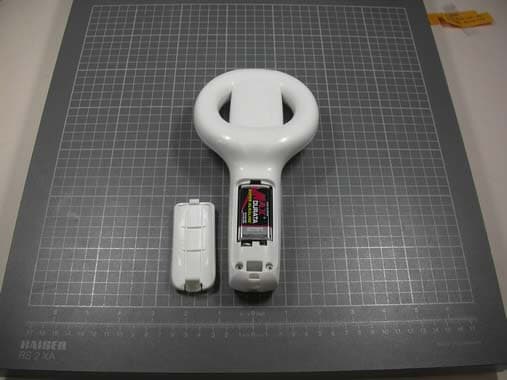
Click to zoom
Application Details
- Equipment Class
- DCD - Part 15 Low Power Transmitter Below 1705 kHz
- Date of Grant
- Mar 07, 2011
- Application Purpose
- Original Equipment
- Date of Application
- Mar 07, 2011
- Equipment Note
- RFID Reader
- Frequency Range
- 0.13420000 - 0.13420000
- Company
- ROYAL TAG SA
- Country
- Switzerland
Documents & Files
Document Text
Text extracted from the exhibit documents filed with the FCC. Open a document above to read the original.
Users Manual
I-Read OPERATION MANUAL Display Power/Shut OFF button Read button Selection button Buzzer USB Removable parts ● Reader ● Cover ● Battery ● USB → mini USB cable 1. Insert the battery paying attention to polarity. 2. Make sure that the battery is placed in the right position, and close the battery cover. To turn on / off the reader, press the ON / OFF button. In order to carry out the reading of the transponder, press the key “Scan”. Two red LED flash alternatively. When the transponder is read the buzzer emits a warning sound. I Read I Read Press Scan I-Read Firmware: 00.11.37 Bootloader: 2.0.6 Serial: 0000 “Firmware - Bootloader” On the screen appears for 5 second the version of the software, the Bootloader and the serial number. Initial screen personalized with the logo which is customizable. On the display appear the battery level and memory usage as default. If no Transponder was read, in “Full Power” mode after 14 sec. Appears “Tag not found”. If you read a transponder not usable for animals, the screen shows "No Animals" in red color. If you read a transponder not usable for animals, and is selected the MODE 6 "Only animals," appears on the screen in red, “This is not an animal tag”. I Read 84 – No Animal FDX-B C: 000 S:0 R:0 000165903077 I Read Tag not found! Select I Read I Read This is not an animal tag I Read 40 - Animal First Read FDX-B C:0951 S:0 R:0 000000000514 On the screen appears: - Category (Animal), beside Animal/No animal, appears a number indicating position in memory occupied from the code - Type of transponders (HDX / FDX-B) - C: (Country) - S: (Species) - R: (Retagging) - Code DEFAULTCUSTOM CHANGE 1● Last Scans Scroll 2● Switch ON REC → OFF REC 3● Erase Memory 4● Memory Report 5● Full Power → Energy Save 6● Only animal → All codes 7● Double ON → OFF To read the latest recording, enter the function "Last Scan", press "Select", last reading appear in purple to indicate that this is a historical reading and not real. Scroll to see others codes by press the menu button . By pressing the selection button of the menu one time, it will be displayed the function “Last Scans”. Pressing the reading key , if there are no readings, returns to the initial vision. FUNCTION 1 “Last scan”, allows to visualize and scroll the code read. I Read Last Scans Select Next I Read 72 Animal FDX-B C: 0999 S:0 R:0 000000000514 DEFAULT FUNCTIONS Press this key to enter the setup menu of functions and change the default setting. x 1 By pressing the selection button of menu two time, the function “Switch OFF REC” appear on the screen. As confirmation an image appears and the written Done. On the initial screen disappears the icon with a Floppy-Disk symbol. Codes are not saved. Repeat the entire process, to restore the REC memory function. Done FUNCTION 2 "Switch ON REC", allows to save all the readings done, max 2048 codes. "Switch OFF REC", no code is stored in the memory. Pressing the reading key , will confirm the change. I Read Switch OFF REC Select Next I Read Switch OFF REC Select Done Next x 2 I Read Press Scan I Read Press Scan DEFAULT FUNCTIONSCUSTOM SETTING Under the disc icon, the filling rate of the memory, is graphical expressed with a progress bar. By every reading, the code comes recorded in rows releasable through PC. The memory has capacity of 2048 codes. When the memory is filled up, the indication “Press scan” of the main shielded is replaced from the indication “Memory full”. However the I-Read continuous to read regularly, but will not store more code till the memory emptying. I Read Press Scan I Read Memory full Done As confirmation an image appears and the written “Erase memory” and the symbol Done. By pressing the selection button of menu tree time, it will be displayed the function “Erase memory” FUNCTION 3 “Erase memory”, deletes all previously stored codes. I Read Next Erase memory Select x 3 By pressing the selection button of menu four time, it will be displayed the function “Memory report” FUNCTION 4 “Memory report”, shows the data collected and the free memory space. I Read Next Memory report Select x 4 I Read Total:2045 Used:72 Free:1973 Pressing the reading key , will get the information, and on the screen appear tree script: Total number of storage capacity ( ID) Used ID Free ID Done As confirmation an image appears and the written Done. By pressing the selection button of menu five time, it will appear the function “Energy save” FUNCTION 5 “Full Power”, view in high quality using bottom graphics screen color. “Energy save”,switch to monochrome display with a considerable saving battery. Pressing the reading button , for apply the change. I Read Next Energy save Select I Read Next Energy Save Select Done x 5 DEFAULT FUNCTIONSCUSTOM SETTING The screen switches to monochrome. At the start you have the monochrome vision. Pressing the reading button , for apply the change. To exit the function “Energy save”, repeat the procedure. Pressing the select button five times, the menu will display the function “Full Power” I Read Press Scan Press Scan Done As confirmation an image appears and the written Done. By pressing the selection button of menu six time, it will appear the function “All codes” Press the reading key , will confirm the change. FUNCTION 6 "Only animals," shows only the codes programmed for animals (BIT 1 = 1). “All codes", reads all the consistent codes to standard ISO 11784 / 5. In order to exit from the function “All codes”, repeat the procedure. Press the push-button of selection of the menu six times, will be visualized the function “Only animal”. Pressing the reading button , for apply the change, and pass to the function “All codes”. I Read Next Only animal Select I Read All codes Select Next x 6 I Read All codes Select Done Next DEFAULT FUNCTIONSCUSTOM SETTING Press the selection button seven times, to visualize the function “Double OFF”. I Read 40 - Animal Double Read HDX C: 0380 S:2 R:2 003990056308 I Read 40 - Animal Double Read…
Text truncated - open the document above for the full version.
ID Label/Location Info
000000676 FCC ID: Y722011001 IC: 9508A-2011001 50.549.0210.0.0 Model: FCC ID:Y722011001 mikes-testingpartners gmbh File No. T34125-00-02HS, page 5 of 20 Ohmstrasse 2-4 x 94342 STRASSKIRCHEN x GERMANY Tel.: +49(0)9424-94810 x Fax: +49(0)9424-9481240 Rev. No. 1.1, 23.4.2009 3 EQUIPMENT UNDER TEST 3.1 Photo documentation of the EUT External views:
Internal Photos
FCC ID:Y722011001 mikes-testingpartners gmbh File No. T34125-00-02HS, page 6 of 20 Ohmstrasse 2-4 x 94342 STRASSKIRCHEN x GERMANY Tel.: +49(0)9424-94810 x Fax: +49(0)9424-9481240 Rev. No. 1.1, 23.4.2009 Internal views: FCC ID:Y722011001 mikes-testingpartners gmbh File No. T34125-00-02HS, page 7 of 20 Ohmstrasse 2-4 x 94342 STRASSKIRCHEN x GERMANY Tel.: +49(0)9424-94810 x Fax: +49(0)9424-9481240 Rev. No. 1.1, 23.4.2009 FCC ID:Y722011001 mikes-testingpartners gmbh File No. T34125-00-02HS, page 8 of 20 Ohmstrasse 2-4 x 94342 STRASSKIRCHEN x GERMANY Tel.: +49(0)9424-94810 x Fax: +49(0)9424-9481240 Rev. No. 1.1, 23.4.2009
Test Report
FCC ID:Y722011001 mikes-testingpartners gmbh File No. T34125-00-02HS, page 1 of 20 Ohmstrasse 2-4 x 94342 STRASSKIRCHEN x GERMANY Tel.: +49(0)9424-94810 x Fax: +49(0)9424-9481240 Rev. No. 1.1, 23.4.2009 EMI − T E S T R E P O R T - FCC Part 15.209 - Test Report No. : T34125-00-02HS 01. March 2011 ______________________________________________________________________________________________ Date of issue Type / Model Name : i-Read Product Description : RFID Reader Applicant : ROYAL TAG SA Address : Via Industria 1 6933 MUZZANO, SWITZERLAND Manufacturer : ROYAL TAG SA Address : Via Industria 1 6933 MUZZANO, SWITZERLAND Licence holder : ROYAL TAG SA Address : Via Industria 1 6933 MUZZANO, SWITZERLAND Test Result according to the standards listed in clause 1 test standards: POSITIVE The test report merely corresponds to the test sample. It is not permitted to copy extracts of these test results without the written permission of the test laboratory. FCC ID:Y722011001 mikes-testingpartners gmbh File No. T34125-00-02HS, page 2 of 20 Ohmstrasse 2-4 x 94342 STRASSKIRCHEN x GERMANY Tel.: +49(0)9424-94810 x Fax: +49(0)9424-9481240 Rev. No. 1.1, 23.4.2009 Contents 1 TEST STANDARDS 3 2 SUMMARY 4 3 EQUIPMENT UNDER TEST 5 3.1 Photo documentation of the EUT 5 3.2 Power supply system utilised 9 3.3 Extreme test conditions 9 3.4 Short description of the equipment under test (EUT) 9 4 TEST ENVIRONMENT 10 4.1 Address of the test laboratory 10 4.2 Environmental conditions 10 4.3 Statement of the measurement uncertainty 10 4.4 Measurement protocol for FCC 10 4.5 Determination of worst case measurement conditions 11 5 TEST CONDITIONS AND RESULTS 12 5.1 Conducted emissions 12 5.2 Field strength of the fundamental wave 12 5.3 Spurious emissions (TX mode) 14 5.4 Spurious emissions (Standby mode) 16 5.5 Emission bandwidth 18 6 USED TEST EQUIPMENT AND ACCESSORIES 20 FCC ID:Y722011001 mikes-testingpartners gmbh File No. T34125-00-02HS, page 3 of 20 Ohmstrasse 2-4 x 94342 STRASSKIRCHEN x GERMANY Tel.: +49(0)9424-94810 x Fax: +49(0)9424-9481240 Rev. No. 1.1, 23.4.2009 1 TEST STANDARDS The tests were performed according to following standards: FCC Rules and Regulations Part 15, Subpart A - General (October, 2009) Part 15, Subpart A, Section 15.31 Measurement standards Part 15, Subpart A, Section 15.33 Frequency range of radiated measurements Part 15, Subpart A, Section 15.35 Measurement detector functions and bandwidths FCC Rules and Regulations Part 15 Subpart B - Unintentional Radiators (October, 2009) Part 15, Subpart B, Section 15.109 Radiated emissions, general requirements FCC Rules and Regulations Part 15, Subpart C - Intentional Radiators (October, 2009) Part 15, Subpart C, Section 15.205 Restricted bands of operation Part 15, Subpart C, Section 15.207 Conducted limits Part 15, Subpart C, Section 15.209 Radiated emission limits, general requirements ANSI C63.4: 2003 Methods of Measurement of Radio-Noise Emissions from Low- Voltage Electrical and Electronic Equipment in the Range of 9 kHz to 40 GHz. CISPR 16-4-2: 2003 Uncertainty in EMC measurement CISPR 22: 2005 Information technology equipment EN 55022: 2006 FCC ID:Y722011001 mikes-testingpartners gmbh File No. T34125-00-02HS, page 4 of 20 Ohmstrasse 2-4 x 94342 STRASSKIRCHEN x GERMANY Tel.: +49(0)9424-94810 x Fax: +49(0)9424-9481240 Rev. No. 1.1, 23.4.2009 2 SUMMARY GENERAL REMARKS: The EUT operates at frequency 134.2 kHz. Due the EUT is a RFID device the RX mode makes sense only if before a TX signal has provided the tag with power. After reading cycle the device goes automatically in standby mode. Therefore the TX mode and the standby mode are measured for the EUT as worst case. USB connection is only possible in standby mode. Is USB connected RFID function is not available. FINAL ASSESSMENT: The equipment under test fulfills the EMI requirements cited in clause 1 test standards. Date of receipt of test sample : acc. to storage records Testing commenced on : 08 March 2010 Testing concluded on : 11 March 2010 Checked by: Tested by: Klaus Gegenfurtner Dipl.-Ing.(FH) Manager: Radio Group Hermann Smetana Dipl.-Ing.(FH) Radio Expert FCC ID:Y722011001 mikes-testingpartners gmbh File No. T34125-00-02HS, page 5 of 20 Ohmstrasse 2-4 x 94342 STRASSKIRCHEN x GERMANY Tel.: +49(0)9424-94810 x Fax: +49(0)9424-9481240 Rev. No. 1.1, 23.4.2009 3 EQUIPMENT UNDER TEST 3.1 Photo documentation of the EUT External views: FCC ID:Y722011001 mikes-testingpartners gmbh File No. T34125-00-02HS, page 6 of 20 Ohmstrasse 2-4 x 94342 STRASSKIRCHEN x GERMANY Tel.: +49(0)9424-94810 x Fax: +49(0)9424-9481240 Rev. No. 1.1, 23.4.2009 Internal views: FCC ID:Y722011001 mikes-testingpartners gmbh File No. T34125-00-02HS, page 7 of 20 Ohmstrasse 2-4 x 94342 STRASSKIRCHEN x GERMANY Tel.: +49(0)9424-94810 x Fax: +49(0)9424-9481240 Rev. No. 1.1, 23.4.2009 FCC ID:Y722011001 mikes-testingpartners gmbh File No. T34125-00-02HS, page 8 of 20 Ohmstrasse 2-4 x 94342 STRASSKIRCHEN x GERMANY Tel.: +49(0)9424-94810 x Fax: +49(0)9424-9481240 Rev. No. 1.1, 23.4.2009 FCC ID:Y722011001 mikes-testingpartners gmbh File No. T34125-00-02HS, page 9 of 20 Ohmstrasse 2-4 x 94342 STRASSKIRCHEN x GERMANY Tel.: +49(0)9424-94810 x Fax: +49(0)9424-9481240 Rev. No. 1.1, 23.4.2009 3.2 Power supply system utilised Power supply voltage : 9 VDC Battery 3.3 Extreme test conditions The EUT is designed for the temperature range: 0°C to 35°C, T nom = 20°C; The extreme voltage for this battery supplied equipment is V nom = V max = 9 V; V min = 0.9 V nom = 8.1 V; 3.4 Short description of the equipment under test (EUT) The EUT is a mobile RFID reader. The identified tags and the read data can be stored onto PC via USB cable. The reader has a special mode for reading animal tags. In this mode animal specific data are read, stored internally and are available for storing to PC on request. Number of tested samples: 1 Serial number: Prototype EUT operation mode: The equipment under test was operated during the measurement under the following…
Text truncated - open the document above for the full version.
Test Setup Photos
FCC ID:Y722011001 mikes-testingpartners gmbh File No. T34125-00-02HS, page 12 of 20 Ohmstrasse 2-4 x 94342 STRASSKIRCHEN x GERMANY Tel.: +49(0)9424-94810 x Fax: +49(0)9424-9481240 Rev. No. 1.1, 23.4.2009 5 TEST CONDITIONS AND RESULTS 5.1 Conducted emissions For test instruments and accessories used see section 6 Part A 4. 5.1.1 Description of the test location Test location: NONE Remarks: The measurement is not applicable. The EUT has no AC mains connections and the RFID function is disabled when the device is connected via USB (data exchange). 5.2 Field strength of the fundamental wave For test instruments and accessories used see section 6 Part CPR 1. 5.2.1 Description of the test location Test location: OATS1 Test distance: 3 metres 5.2.2 Photo documentation of the test set-up FCC ID:Y722011001 mikes-testingpartners gmbh File No. T34125-00-02HS, page 14 of 20 Ohmstrasse 2-4 x 94342 STRASSKIRCHEN x GERMANY Tel.: +49(0)9424-94810 x Fax: +49(0)9424-9481240 Rev. No. 1.1, 23.4.2009 5.3 Spurious emissions (TX mode) For test instruments and accessories used see section 6 Part SER 1, SER 2. 5.3.1 Description of the test location Test location: OATS1 Test distance: 3 metres 5.3.2 Photo documentation of the test set-up FCC ID:Y722011001 mikes-testingpartners gmbh File No. T34125-00-02HS, page 16 of 20 Ohmstrasse 2-4 x 94342 STRASSKIRCHEN x GERMANY Tel.: +49(0)9424-94810 x Fax: +49(0)9424-9481240 Rev. No. 1.1, 23.4.2009 5.4 Spurious emissions (Standby mode) For test instruments and accessories used see section 6 Part SER 2. 5.4.1 Description of the test location Test location: OATS1 Test distance: 3 metres 5.4.2 Photo documentation of the test setup 5.4.3 Applicable standard According to FCC Part 15B, Section 15.109 (a): Except for Class A digital devices, the field strength of radiated emissions from unintentional radiators at a distance of 3 m shall not exceed the given limit. 5.4.4 Description of Measurement The radiated power of the spurious emission from the EUT is measured in a test setup following the procedures set out in ANSI C63.4. If the emission level of the EUT in peak mode complies with the average limit, then testing will be sto pped and pe ak v alues of the EUT will b e rep orted, otherwise th e emissio n will be me asured in average/quasipeak mode again and reported. Instrument settings: 30 MHz – 1000 MHz: RBW: 120 kHz
Contact Information
Applicant
Gianpaolo Pontarolo(Technical Director)
Test Firm
CSA Group Bayern GmbHThomas Weise
Technical Specifications
| # | Rule Parts | Frequency Range | Power Output |
|---|---|---|---|
| 1 | 15C | 0.1342 MHz - 0.1342 MHz | - |