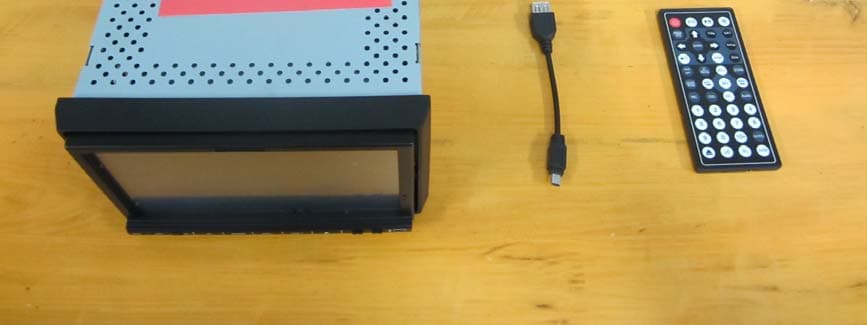
YMKD72TSB7" Wide Screen TFT LCD High-Definition Media Player Monitor
SAGA AUDIO EQUIPMENT CO., LTD.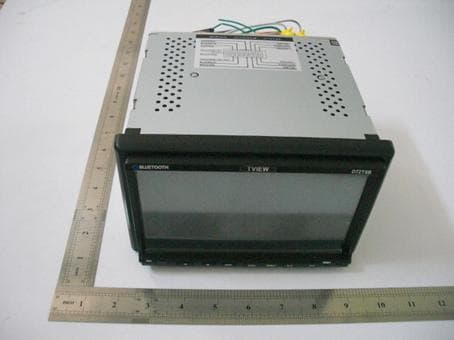
Click to zoom
Application Details
- Equipment Class
- DSS - Part 15 Spread Spectrum Transmitter
- Date of Grant
- Jul 28, 2010
- Application Purpose
- Original Equipment
- Date of Application
- Jul 28, 2010
- Equipment Note
- 7" Wide Screen TFT LCD High-Definition Media Player Monitor
- Frequency Range
- 2402.00000000 - 2480.00000000
- Country
- China
Documents & Files
Document Text
Text extracted from the exhibit documents filed with the FCC. Open a document above to read the original.
Users Manual
USB/SD Operation When the machine is connect USB / SD, touch the main menu "USB/SD" icon, the screen displays "SD" or "USB",and will auto read and display the file. If under the playing mode, and insert the card, no need to choose the any function, will auto get into the display mode. When display USB or SD card, touch panel menu is the same as DVD menu, also the same operation, Touch the DVD menu / / / button move to the file bag, file,MP3 icon or JPEG icon. After more cursor to the display bag, then press "OK" to ensure the icon; The chosen file will be display by order. After you choose the JPEG display, touch again the OK button to confirm this picture, then touch again the number / / / button can change the picture direction to up/down/left/right. Note: While the USB/SD is playing, and if you eject the disc or slot-in the disc, the display will pause for few second, this is normal situation. After finish the disc operation will resume the display. pull out the USB/ SD when you want to stop playing 13 14 Key 5 6 1. File bag 4. JPEG Icon 3. Mp3 Icon 2. File 5. Video Icon Key 6. Menu Icon CDC MODE MENU INTERFACE Touch the icon “CDC” to enter the CDC mode if CD/DVD changer connected: 1 2 3 45 6 78 10 9 11 12 13 14 1.Back to main menu 2.Show the display mode 3.Mute: touch the icon to shut off the sound; touch it again to resume to the previous volume level. 4. : PLAY/PAUSE Touch the icon to play or pause the disc. To press the PAUSE/PLAY button of panel or remote control performs the same operation. 5.RDM: RANDOM MODE 6.INT:CHANGE TRACK PLAYING 7.REP: REPEAT 8. PREVIOUS DISC 9. PREVIOUS TRACK 10. NEXT DISC 11. NEXT TRACK 12. VOLUME INCREASE 13. VOLUME DECREASE 14.Sound mode select, touch the icon to choose “BAS”; “FAD” rear and front sound adjustment; If without choose the setting, the unit is set the “SEL” as default. After select the sound mode, touch the “- “+” icon to adjust the volume. 1516 SYSTEM MENU SETUP Press “ “ picture on main menu , on AUX mode ,Click the screen will enter to system menu setup: 1/2、VOL-/VOL+: Volume adjust 3/4、TRE-/TRE+: High volume balance adjust 5/6、BAS-/BAS+: Low volume balance adjust 7/8、 -/+: Display picture brightness adjust 9/10、 -/+: Display picture contrast adjust 11/12、R/F: Rear/ Front audio adjust 13/14、 -/+: Display picture colorful adjust 15/16、 -/+: Display picture acutance adjustment 17/18、L/R: left / right audio adjust 19、DBAS: Sub-woofer on /off 20、MBP: Listen respectfully left/right on / off 21、STD: Standard video select 22、LOUD: LOUD ON/OFF 23、 EQ: sound select There are “POPULAR, CLASSICALITY, ROCK” three kind of sound mode, can through EQto select or turn off EQ. 24、BACK: Back (back to last step) You can operate above function follow the instruction. When you choose above point 1 to 16 items, through “SEL” button can adjust it directly . 1 23 17 22 16 21 15 20 14 24 18 19 13 7 12 6 5114103928 SYSTEM MENU SETUP 1 9 1110 8 7 6 5 4 3 2 COMMON MENU SETUP On main menu page, touch “ “ position can enter to currency menu setup: 1、 : Exit menu 2、CLOCK SET: Touch “H” on panel and “ M”, then touch “+” “-“ to adjust the time. 3、RDS MODE: Wireless Data Broadcasting System to open or closed (only in the English mode, it can be set). 4、REARVIEW CAMERA: Touch “left “ or “right” to set the position of your rearview camera. 5、RADIO FREQ: FM area setup It's convenient for your to use this product, we already setup five RADIO area for your select, only through the touch screen text to choose the position which you listen to. 6、OSD LANG: Language Setting: Chinese and English Display is included for your choice. 7、MODE display picture: After choose the sub-menu, touch the relatively items to setup. 8.Touch Screen Calibration When the touch-screen functionality offset, click it into touch-screen calibration. Or on DVD stop playing mode, use the remote control continuous input "ZOOM / / " three keys may also enter the touch-screen calibration. When entering touch function, follow the prompts click the "+" center, Until succeed calibration then automatically exit AUDIO/VIDEO MENU SETUP Under DVD mode, touch “ ” button enter to “AUDIO/VIDEO”menu setting interface: Same as below picture1.2: (Picture 1) Audio setting interface 1 6 5 4 3 2 7 Touch 8 17 18 191817 20 16 15 13 12 14 (Picture 2) Video setting interface 1、AUDIO: Audio mode. Touch this function, the icon is concave, then will enter to audio setting mode. 2、VIDEO MODE:Touch this function, the picture is concave, then will enter to video setting mode. 3、VOLUME ADJUST Touch the“-”“+”function on the screen, the volume will change. 4 BAS: Bourdon volume adjust Touch the“-”“+”function on the screen, the bourdon volume will change. 5、TRE: Alt volume adjustment Touch the“-”“+”function on the screen, the alt volume will change. 6、BAL: Left and right track adjustment Touch the“-”“+” function on the screen, the left right track volume will change. 7、FAD: Front and Rear volume adjustment Touch the“-”“+” function on the screen, the front and Rear volume will change. 8、LOUD Touch here can turn on or turn off the loud. 9、DBAS: Bourdon modeTouch here to enter to bourdon display mode. 10、MBP : Listen position Touch here to choose left or right listen position. 11、EQ: Sound effect mode Touch here to choose the preset sound mode :popular, rock, classicality. 12、BRI: Brightness Touch the“-”“+”function on the screen, to adjust the picture brightness. 13、CON: ContrastTouch the“-” “+”function on the screen, to adjust the picture contrast. 14、COL: ColorTouch the“-”“+” function on the screen, to adjust the picture color. 15、HUE: HueTouch the“-”“+” function on the screen, to adj- ust the picture hue. 16、STDY: STANDARD MODE 17、USER: USER-DEFINED MODE 18、BRIG: BRIGHTNESS 19、SOFT: SOFT 20、SHAR: SHARP SYSTEM SETUP TV SYSTEM TV TYPE PASSWORD RATING DEFAULT NTSC PAL AUTO SYSTEM SETUP TV SYSTEM TV TYPE PASSWORD RATING DEFAULT 4:3PS 4:3LB 16:9 SYSTEM SETUP TV SYSTEM TV TYPE PASSWORD RATING DEFAULT RESTORE SYSTEM SETUP TV SYSTEM TV TYPE P…
Text truncated - open the document above for the full version.
Cover Letter(s)
SCS-F18: Project and Product Certification Representative Authorization Letter Page 1 of 2 Rev 2.0 2206 Ringwood Avenue San Jose, CA 95131 Tel: 408-526-1188 Fax: 408-526-1088 Email: [email protected] Project and Product Certification Representative Authorization Letter Revision History Reason for Amendment (current / obsolete) From To Approved Date Initial Release (current) 1.0 1.0 Nov-14-2006 Revised wording (current) 1.0 2.0 Sept–25-2007 SCS-F18: Project and Product Certification Representative Authorization Letter Page 2 of 2 Rev 2.0 SAGA AUDIO EQUIPMENT CO., LTD. 2010-07-21 To: SIEMIC, INC. 2206 Ringwood Avenue, San Jose, CA 95131 USA Dear Sir/Madam, Re: Project and Product Certification Representative Authorization Letter We, ___ SAGA AUDIO EQUIPMENT CO., LTD.___ hereby authorize SIEMIC, INC. to act as a Certification Body for certifying for the following project(s): 7" wide screen TFT LCD high-definition media player monitor We affirm that between SIEMIC and __ SAGA AUDIO EQUIPMENT CO., LTD._, any difference in understanding, including test plan, measurement methods, applicable standards and relevant procedures and processes have been resolved prior to commencement of testing activities. Sincerely, Client’s signature: Client’s name / title: Luoguichun/Manager Contact information / address: No.1 Saga Road, Shashui District, Songgang Town, Nanhai, Foshan City, Guangdong, P.R. China
Cover Letter(s)
SCS-F19: Confidentiality Request Letter Rev 1.0 Nov 14, 2006 Confidentiality Request Letter Revision History Reason for Amendment (current / obsolete) From To Approved Date Initial Release (current) 1.0 1.0 Nov-14-2006 SCS-F19: Confidentiality Request Letter Rev 1.0 Nov 14, 2006 SAGA AUDIO EQUIPMENT CO., LTD. 2010-07-21 To: Federal Communications Commission Authorization and Evaluation Division Confidentiality Request regarding application for certification of FCC ID:YMKD72TSB We hereby request confidential treatment of information accompanying this application as outlined below: - Schematics - Block Diagram - Operational Description The above materials contain trade secrets and proprietary information not customarily released to the public. The public disclosure of these materials may be harmful to the applicant and provide unjustified benefits to its competitors. The applicant understands that pursuant to Section 0.457 of the Rules, disclosure of this application and all accompanying documentation will not be made before the date of the Grant for this application. Sincerely, Client’s signature: Client’s name / title: Luoguichun/Manager Contact information / address: No.1 Saga Road, Shashui District, Songgang Town, Nanhai, Foshan City, Guangdong, P.R. China
ID Label/Location Info
1 Size: 120mm(L)*40mm(W) Product name: 7" wide screen TFT LCD high-definition media player monitor Model No: D72TSB FCC ID: YMKD72TSB Wa r n i n g : This device complies with Part 15 of the FCC Rules. Operation is subject to the following two conditions: (1) this device may not cause harmful interference, and (2) this device must accept any interference received, including interference that may cause undesired operation.
RF Exposure Info
Report No.: GTSE10070010201 Page: 33 of 33 5.10 RF Exposure Compliance Requirement 5.10.1 Standard requirement 15.247(b)(4) requirement: (4) The conducted output power limit specified in paragraph (b) of this section is based on the use of antennas with directional gains that do not exceed 6 dBi. Except as shown in paragraph (c) of this section. if transmitting antennas of directional gain greater than 6 dBi are used. the conducted output power from the intentional radiator shall be reduced below the stated values in paragraphs (b)(1). (b)(2). and (b)(3) of this section. as appropriate. by the amount in dB that the directional gain of the antenna exceeds 6 dBi. 5.10.2 EUT RF Exposure Predication of MPE limit at a given distance S = PG/4πR² S = power density (in appropriate units, e.g. mW/cm2) P = power input to the antenna (in appropriate units, e.g., mW) . G = power gain of the antenna in the direction of interest relative to an isotropic radiator, the power gain factor, is normally numeric gain. R = distance to the center of radiation of the antenna (appropriate units, e.g., cm) Maximum peak output power at antenna input terminal: -3.11dBm0.489mw Prediction distance: >20 (cm) Predication frequency: 2402 (MHz) Antenna Gain (typical): 2.0(dBi) Antenna Gain (typical): 1.58 (numeric) The worst case is power density at predication frequency at 20 cm : Power density S = PG/4πR²= 0.489mW x 1.58 /(4 x3.14 x 20 2 = 0.000154 mW/cm 2 MPE limit for general population exposure at prediction frequency:1 (mW/cm2) < . Note: For mobile or fixed loc ation transmitters, the minimum separation distance is 20cm, even if calculations indicate that the MPE distance would be less.
Test Report
Global United Technology Service Co., Ltd. Telephone: +86 (0) 755 2779 8480 Fax: +86 (0) 755 2779 8960 Email: [email protected] Report No.: GTSE10070010201 Page: 1 of 33 Authorized Signature: Robinson Lo Laboratory Manager This report details the results of the testing carried out on one sample. The results contained in this test report do not relate to other samples of the same product and does not permit the use of the GTS product certification mark. The manufacturer should ensure that all products in series production are in conformity with the product sample detailed in this report. This report may only be reproduced and distributed in full. If the product in this report is used in any configuration other than that detailed in the report, the manufacturer must ensure the new system complies with all relevant standards. Any mention of GTS International Electrical Approvals or testing done by GTS International Electrical Approvals in connection with, distribution or use of the product described in this report must be approved by GTS International Electrical Approvals in writing. This document cannot be reproduced except in full, without prior written approval of the Company. Any unauthorized alteration, forgery or falsification of the content or appearance of this document is unlawful and offenders may be prosecuted to the fullest extent of the law. Unless otherwise stated the results shown in this test report refer only to the sample(s) tested and such sample(s) are retained for 90 days only.” 1 Cover Page FCC REPORT Application No: GTSE100700102RF Applicant: SAGA AUDIO EQUIPMENT CO., LTD. Address of Applicant: No.1 Saga Road, Shashui District, Songgang Town, Nanhai, Foshan City, Guangdong, P.R. China Equipment Under Test (EUT) Name: 7" Wide Screen TFT LCD High-Definition Media Player Monitor Model No. D72TSB, D73TSB, D365IN, LTF-DV2716, LTF-DV2726, LTF-DV2736, LTF-DV2746, LTF-DV2756 Operation Frequency: 2400MHz to 2483.5MHz FCC ID: YMKD72TSB Standards: FCC CFR Title 47 Part 15 Subpart C Section 15.247:2008 Date of Receipt: 14 July, 2010 Date of Test: 15~17 July, 2010 Date of Issue: 17 July, 2010 Test Result : PASS * * In the configuration tested, the EUT complied with the standards specified above. Report No.: GTSE10070010201 Page: 2 of 33 2 Contents Page 1 COVER PAGE...................................................................................................................................................... 1 2 CONTENTS .......................................................................................................................................................... 2 3 TEST SUMMARY ................................................................................................................................................. 3 4 GENERAL INFORMATION.................................................................................................................................. 4 4.1 CLIENT INFORMATION....................................................................................................................................... 4 4.2 GENERAL DESCRIPTION OF E.U.T. ................................................................................................................... 4 4.3 E.U.T OPERATION MODE.................................................................................................................................. 6 4.4 TEST FACILITY................................................................................................................................................. 7 4.5 TEST LOCATION............................................................................................................................................... 7 4.6 OTHER INFORMATION REQUESTED BY THE CUSTOMER...................................................................................... 7 4.7 TEST INSTRUMENTS LIST.................................................................................................................................. 8 5 TEST RESULTS AND MEASUREMENT DATA ................................................................................................. 9 5.1 ANTENNA REQUIREMENT: ................................................................................................................................. 9 5.2 CONDUCTED PEAK OUTPUT POWER............................................................................................................... 10 5.3 20DB OCCUPY BANDWIDTH............................................................................................................................ 11 5.4 CARRIER FREQUENCIES SEPARATION............................................................................................................. 14 5.5 HOPPING CHANNEL NUMBER.......................................................................................................................... 18 5.6 DWELL TIME.................................................................................................................................................. 19 5.7 BAND EDGE................................................................................................................................................... 25 5.8 PSEUDORANDOM FREQUENCY HOPPING SEQUENCE........................................................................................ 27 5.9 RADIATED EMISSION...................................................................................................................................... 28 5.9.1 Radiated emission below 1GHz........................................................................................................... 30 5.9.2 Transmitter emission above 1GHz ...................................................................................................... 31 5.10 RF EXPOSURE COMPLIANCE REQUIREMENT................................................................................................. 33 5.10.1 Standard …
Text truncated - open the document above for the full version.
Contact Information
Applicant
GuiChun Luo(Manager)
Test Firm
Global United Technology Service Co., LtdRobinson Lo
Technical Specifications
| # | Rule Parts | Frequency Range | Power Output |
|---|---|---|---|
| 1 | 15C | 2.40 GHz - 2.48 GHz | 489.00 µW |
Other Applications from SAGA AUDIO EQUIPMENT CO., LTD.
YMKD75TSB
May 06, 20127" wide screen TFT LCD high-definition media player monitor
Equipment Class
DSS - Part 15 Spread Spectrum Transmitter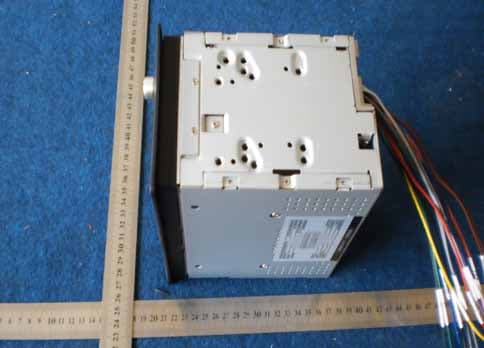
YMK-D65TSG
May 24, 20116.2" wide screen TFT LCD high-definition media player monitor
Equipment Class
DXX - Part 15 Low Power Communication Device Transmitter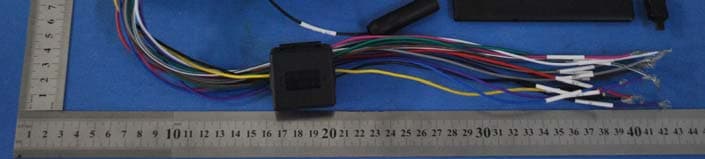
YMKD74TS
Jan 19, 20117" wide screen TFT LCD high-definition media player monitor
Equipment Class
DSS - Part 15 Spread Spectrum Transmitter