FCCID.CO- FCC ID Database
HomeCompaniesEquipment ClassesSearch

© 2026 FCC ID Database. All rights reserved.

AboutContactData sourced from FCC public records
  1. Home/
  2. Best-Supplier International Inc./
  3. YU6BSI6636P01

YU6BSI6636P01LOOKEE TV

Best-Supplier International Inc.
LOOKEE TV - FCC ID YU6BSI6636P01 - Best-Supplier International Inc.
Click to zoom

Application Details

Equipment Class
DXX - Part 15 Low Power Communication Device Transmitter
Date of Grant
Oct 28, 2010
Application Purpose
Original Equipment
Date of Application
Oct 28, 2010
Equipment Note
LOOKEE TV
Frequency Range
2402.00000000 - 2480.00000000
Company
Best-Supplier International Inc.
Country
China

Documents & Files

Select a file to view
Users Manual

↗

Block Diagram

↗

External Photos

↗

ID Label/Location Info

↗

Internal Photos

↗

Operational Description

↗

Schematics

↗

Test Report

↗

Test Setup Photos

↗

Document Text

Text extracted from the exhibit documents filed with the FCC. Open a document above to read the original.

Users Manual

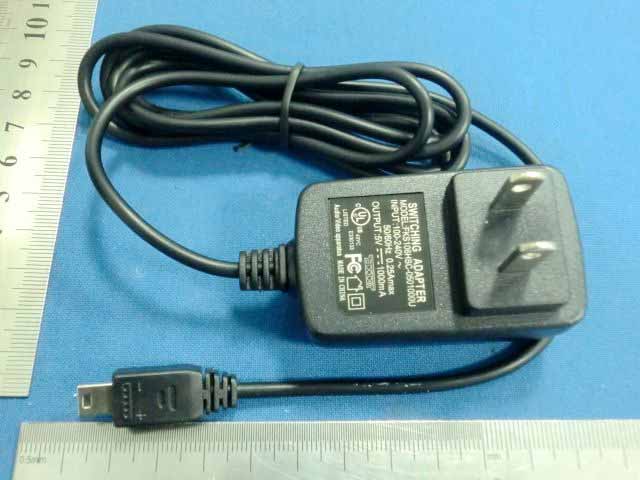
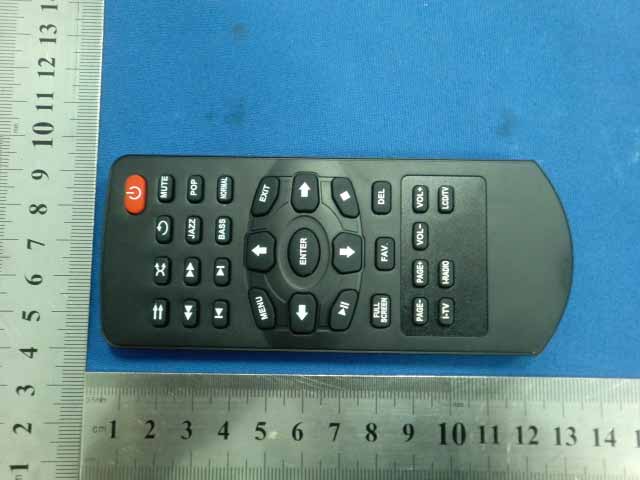
TABLE OF CONTENTS Introduction 1 2.1 Product Description About Product 2 2.2 Product Features 2.3 Accessory List 3.1 Location of Controls on the Player Getting Started 3 3.2 Location of Controls on the Remote Control 3.3 Understanding the Controls on the Remote Control 3.4 Charge Unit Operational Instructions 4 4.1 Start Menu 4.2 Connect Internet through Wi -Fi 4.3 Internet TV 4.4 Internet Radio 4.5 SHOUTcast 4.6 Podcast 4.7 Media Player-Playing Video/Music/Picture 4.8 UPnP File Sharing–Play Video/Music/Picture from PC 4.9 Setting Digital Photo Frame 4.10 Setting Time, Date, Calendar and Alarm 4.11 FM Radio Setup 4.12 TV/LCD Output 5.1 Language Other Settings 5 5.2 Network Setting 5.2.1. Wi-Fi Setup 5.2.2. Network Type 5.2.3. Network Status 5.3 Alarm 5.4 Key Tone Setting 5.5 Slideshow Setting 5.6 FM Setting 5.7 Screensaver time 5.8 Time Zone 5.9 Date & Time 5.10 Firmware Update 5.11 Auto Power Off 5.12 Restore Default Factory Setting 5.13 About 6.1 No Screen Display TV-Out Troubleshooting Guide 6 6.2 No Sound 6.3 Remote control is not working 6.4 Cannot connect to Wi-Fi Network 6.5 Black and White Screen User Safety Guide 7 Specifications 8 Warranty Note 9 Introduction 1 Congratulations on your purchase of our product. Lookee TV 6636P01 will allow you enjoy TV channels, radio stations and podcast throughout the world via Wi-Fi internet connection. Its TV-out function will turn your home TV into an internet TV. With its portable design, you can simply carry it around and enjoy! Please read this manual carefully before you start to use it. This instruction manual contains the important information you will need. Please keep this manual for future reference. About Product 2 2.1 Product Description Bringing over thousands of worldwide Internet TV channels, radio stations and podcasts throughout the world via Wi-Fi connection, Lookee TV 6636P01 not only allow you to enjoy these on its 4.3” high resolution LCD screen and built-in speaker/earphone, but also let you take these to your home big TV screen. Moreover, it can play video, music, and pictures from SD/MMC card. And, it can stream video, music, pictures from your home or office PC to TV by UPnP function. FM Radio, Picture Viewer and more... 2.2 Product Features  Stream over 2000 TV channels and over 30000 radio stations and podcasts throughout the world via Wi-Fi internet connection.  Support SHOUTcast, Podcast, Live Internet radio stations and video broadcasting.  Browse channels by regions, genres, languages, keyword search, and my favorites lists  Media player reads and plays videos, music and picture files from built-in memory and SD/MMC card.  Stream videos, music and pictures from your home or office PC to TV by UPnP function.  Digital picture frame Slideshow (with background music option).  Built-in speaker and earphone jack for your shared or private listening. Enjoy music from built-in speakers and stereo earphones.  TV-out function supports resolutions at 720 x 480 pixels.  Support TV output in: CVBS and YPbPr.  Support Wi-Fi in 3 protocols: Static IP, DHCP and PPoE.  FM radio and dual alarm clock/calendar.  Wake up to internet radio, FM radio, music or a buzzer.  Easy operation with navigation Keys and a remote control. 2.3 Accessory List  Main Unit  Remote Control  AC Adapter 5V/1A  CVBS Cable  Flexible FM antenna  Instruction Manual  YPbPr Cable (optional)  USB Mini 5P cable (optional)  Headset (optional) Getting Started 3 3.1 Locations of Controls on the Player 1. USB Mini 5P 2. YPbPr output 3. CVBS output 4. Earphones jack 5. Receptor for the remote control 6. Navigation Control Keys: UP/DOWN/LEFT/RIGHT/ENTER UP/ VOL+: Scroll up or increase the volume DOWN / VOL-: Scroll down or decrease the volume LEFT: Go to the previous track/menu, hold for fast backward during media playing. RIGHT: Go to the next track/menu, hold for fast forward during media playing ENTER:Press to confirm your selection. It can be used to switch the screen mode. 7. MENU: Press once to go back to the previous directory or sub directory. Long press for about 3 seconds to go to the main menu. 8. POWER SWITCH: to turn unit ON/OFF 9. Built-in Speaker 10. SD /MMC card slot 3.2 Locations of Controls on the Remote Control 3.3 Understanding the Controls on the Remote Control 1. Power, (not work for this portable model, please use Power Switch on unit) 2. Play In Order: Play video/music in order on playlist 3. Shuffle: Randomly select and play video/music on playlist 4. Repeat: Repeat playing the selected video/music on playlist 5. Mute 6. Fast Backward 7. Fast Forward 8. Ja zz: Jazz mode 9. POP: Pop mode 10. Previous: Go to the previous Track 11. Next: Go to the next Track 12. Bass: Bass mode 13. Normal: Back to default. No equalization 14. Menu: Go to the main menu 15. UP: Direction Key, Scroll up or Increase the volume (when playing video/audio) or adjust FM Radio stations manually. 16. EXIT: Back or Return to the previous page/menu/track/channel 17. Left Key: Direction Key and Return to the previous track/menu 18. Enter: Press to confirm your selection. It can be used to switch the screen mode. 19. Right Key: Direction Key and Go to the next page/menu/track/channel 20. Play/Pause 21. Down: Direction Key, Scroll down or Decrease the volume (when playing video/audio) or adjust FM Radio stations manually. 22. Stop 23. FULL SCREEN: : Switch three screen display mode 24. FAV: Add to My Favourites list 25. DEL: Delete 26. PAGE-: Go to previous page 27. PAGE+: Go to next page 28. VOL-: decrease the volume 29. VOL+: increase the volume 30. I-TV: Internet TV shortcut key 31. I-RADIO: Internet Radio shortcut key 32. LCD/TV: switch LCD/TV 3.4 Charge Unit Before your first use of this product, please use Power Cord to charge the unit at least 12 hours. You will see a full battery mark on screen to show the battery is fully charged. When the battery power is too low to support the usage, the unit will be turned off automatically. So you need to cha…

Text truncated - open the document above for the full version.

Block Diagram

CPU KEY MATRIX RAM/RO TFT Wireless IR CVBS Speaker MCU FM YPbPr crystal oscillator 32MHz

External Photos

External Photo for model: BSI-6636P01 External Photo for model: BSI-6636P01 External Photo for model: BSI-6636P01 External Photo for model: BSI-6636P01 External Photo for model: BSI-6636P01 External Photo for model: BSI-6636P01 External Photo for model: BSI-6636P01

ID Label/Location Info

FCC ID LABEL FCC ID: YU6BSI6636P01 This device complies with Part 15 of the FCC Rules.Operation is subject to the following two conditions:1. This device may not cause harmful interference, and 2. This device must accept any interference received,including interference that may cause undesired operation. Label Location on EUT EUT Bottom View/ FCC ID Label Location

Internal Photos

Internal Photo for model: BSI-6636P01 Internal Photo for model: BSI-6636P01 Antenna Internal Photo for model: BSI-6636P01 Internal Photo for model: BSI-6636P01 Internal Photo for model: BSI-6636P01 Internal Photo for model: BSI-6636P01 Internal Photo for model: BSI-6636P01

Operational Description

KEY-MATRIX Press Button: with Up/Down/Left/Right/Enter/Manu,when the power is on, you can control with this six button. TFT 4.3”LCD Screen CVBS/YPbPr/USB/SD/FM External Interfaceoffer TV out (CVBSYPbPr)USBSD and FM LINE OUT Offer 1pc Speaker and 3.5mm earphone plug WiFi Offer 802.11b/g WiFi supplort MCU MCU Provided for the key combination control panel RAM/ROM Can read and write Memory, Read and write data stored in the solid state semiconductor memory CPU Main frequency reach to 360MHzSupport Multimedia instruction set, built-in powerful video engineTV Encoder and Audio CodecSupport High quality Vedio output and Audio outputJz4755 integrated USB2.0, MMC / SD / SDIO, LCD controller and other peripherals.

Schematics

1.0 JZ4755.sch JZ4755_DEV_V1.0 14/11/2009 Feng A B D C A B C D 6 5 4 3 2 1 DATE: LTR ECO NO: APPROVED: REVISION RECORD SCALE: SHEET: OF DRAWING NO: TITLE: COMPANY: RELEASED: DATED: DATED: QUALITY CONTROL: CHECKED: DATED: DATED: DRAWN: CODE: SIZE: REV: 8 1 <Scale> C Skytc <Release Date> <QC Date> <Checked Date> <Released By> <QC By> <Checked By> <CODE> NAND FLASH Single Die Only TSOP54 (Max 16M x 16bit x 4 Bank) TSOP54 (Max 16M x 16bit x 4 Bank) When Programing,J1 should connected. 1 NC_1 2 NC_2 3 NC_3 4 NC(R/B4#) 5 NC(R/B3#) 6 NC(R/B2#) 7 R/B# 8 RE# 9 CE# 10 NC(CE2#) 11 NC_11 12 VCC_1 13 VSS_1 14 NC(CE3#) 15 NC(CE4#) 16 CLE 17 ALE 18 WE# 19 WP# 20 NC_20 21 NC_21 22 NC_22 23 NC_23 24 NC_24 48 DNU_48 47 NC_47 46 NC_46 45 NC_45 44 I/O7 43 I/O6 42 I/O5 41 I/O4 40 NC_40 39 NC_39 38 DNU/VSS 37 VCC_2 36 VSS_2 35 NC_35 34 NC_34 33 NC_33 32 I/O3 31 I/O2 30 I/O1 29 I/O0 28 NC_28 27 NC_27 26 DNU_26 25 DNU_25 U9 NANDFLASH_TSOP48 R1 10K C51 0.1u C52 0.1u 23 A0 24 A1 25 A2 26 A3 29 A4 30 A5 31 A6 32 A7 33 A8 34 A9 22 A10 35 A11 36 A12-NC 20 BA0 21 BA1 16 WE 17 CAS 18 RAS 15 DQML 39 DQMH 2 DQ0 4 DQ1 5 DQ2 7 DQ3 8 DQ4 10 DQ5 11 DQ6 13 DQ7 42 DQ8 44 DQ9 45 DQ10 47 DQ11 48 DQ12 50 DQ13 51 DQ14 53 DQ15 19 CS 37 CKE 38 CLK 1 VDD 3 VDDQ 6 VSSQ 9 VDDQ 12 VSSQ 14 VDD 27 VDD 28 VSS 40 NC 41 VSS 43 VDDQ 46 VSSQ 49 VDDQ 52 VSSQ 54 VSS U2 SDRAM-MT48LC32M16A2TG 23 A0 24 A1 25 A2 26 A3 29 A4 30 A5 31 A6 32 A7 33 A8 34 A9 22 A10 35 A11 36 A12-NC 20 BA0 21 BA1 16 WE 17 CAS 18 RAS 15 DQML 39 DQMH 2 DQ0 4 DQ1 5 DQ2 7 DQ3 8 DQ4 10 DQ5 11 DQ6 13 DQ7 42 DQ8 44 DQ9 45 DQ10 47 DQ11 48 DQ12 50 DQ13 51 DQ14 53 DQ15 19 CS 37 CKE 38 CLK 1 VDD 3 VDDQ 6 VSSQ 9 VDDQ 12 VSSQ 14 VDD 27 VDD 28 VSS 40 NC 41 VSS 43 VDDQ 46 VSSQ 49 VDDQ 52 VSSQ 54 VSS U7 SDRAM-MT48LC32M16A2TG C93 0.1u C94 0.1u C97 0.1u C120 0.1u C121 0.1u C122 0.1u C123 0.1u C124 0.1u C125 0.1u C126 0.1u C127 0.1u C128 0.1u C129 0.1u C130 0.1u + 1 2 C72 10uF R22 NC R37 10K NAND_R/B# [2] +3.3V NAND_CS# [2] +3.3V +3.3V A15 [2] A16 [2] NAND_WE# [2] D[0:31] [1,2] D0 D1 D2 D3 D4 D5 D6 D7 NAND_RE# [2] D[0:31] [1,2] +3.3V A[0:14] [1] A0 A1 A2 A3 A4 A5 A6 A7 A8 A9 A10 A11 A12 A13 A14 D[0:31] [1,2] A[0:14] [1] A0 A1 A2 A3 A4 A5 A6 A7 A8 A9 A10 A11 A12 A13 A14 +3.3V D0 D1 D2 D3 D4 D5 D6 D7 D8 D9 D10 D11 D12 D13 D14 D15 D16 D17 D18 D19 D20 D21 D22 D23 D24 D25 D26 D27 D28 D29 D30 D31 SDRAM_CS# [1,2] SDRAM_CS# [1,2] S_CAS# [2] S_RAS# [2] S_CKE# [1,2] S_CKE# [1,2] SDRAM_CLK1 [2] SDRAM_CLK2 [2] S_WE/RD# [2] WE0# [2] WE1# [2] WE2# [2] WE3# [2] NAND_WP# [2] 14/11/2009 1.0 JZ4755_DEV_V1.0 JZ4755.sch A B D C A B C D 6 5 4 3 2 1 DATE: LTR ECO NO: APPROVED: REVISION RECORD SCALE: SHEET: OF DRAWING NO: TITLE: COMPANY: RELEASED: DATED: DATED: QUALITY CONTROL: CHECKED: DATED: DATED: DRAWN: CODE: SIZE: REV: 8 2 <Scale> C Skytc <Release Date> <QC Date> <Checked Date> <Released By> <QC By> <Checked By> Feng <CODE> IF NEED PROGRAMING,JUST SHORT J4'S PIN2,3 BOOT_SEL1 GPE25 1 0 1 1 NAND FLASH USB_DEVICE BOOT FROM ADCIN1 1 0 FOR PROGRAMING R24 10K 1 D13/GPA13 2 D14/GPA14 3 D15/GPA15 4 VDDIO 5 WE0/GPB20 6 D0/GPA0 7 D1/GPA1 8 D2/GPA2 9 D3/GPA3 10 D4/GPA4 11 D5/GPA5 12 D6/GPA6 13 D7/GPA7 14 A16/MSC0_CMD/GPC16 15 A15/MSC0_CLK/GPB15 16 FWE_N/MSC0_D1/GPC29 17 A17/MSC0_D3/GPC17/N_CS2 18 FRE_N/MSC0_D0/GPC28 19 FRB_N/MSC0_D2/GPC27 20 CS1/GPC21 21 VSS 22 VDDCORE 23 PWM2/SYNC/GPE22 24 CIM_D0/TSDI0/GPE0 25 CIM_D1/TSDI1/GPE1 26 CIM_D2/TSDI2/GPE2 27 CIM_D3/TSDI3/GPE3 28 PWM3/UART1_RXD/BCLK/GPE23 29 CIM_D4/TSDI4/GPE4 30 CIM_D5/TSDI5/GPE5 31 CIM_D6/TSDI6/GPE6 32 CIM_D7/TSDI7/GPE7 33 PWM5/UART1_TXD/SCLK_RSTN/GPE25 34 CIM_PCLK/TSCLK/GPE9 35 CIM_VSYNC/TSSTR/GPE10 36 CIM_HSYNC/TSFRM/GPE11 37 CIM_MCLK/TSFAIL/GPE8 38 I2C_SCL/GPE13 39 I2C_SDA/GPE12 40 SSI_DT/MSC1_D1/GPB27 41 SSI_DR/MSC1_D0/GPB28 42 SSI_CLK/MSC1_CLK/GPB26 43 SSI_CE0/MSC1_CMD/GPB29 44 SSI_GPC/MSC1_D2/GPB30 45 SSI_CE1/MSC1_D3/GPB31 46 EXCLK 47 EXCLKO 48 VDDIO 49 AVSDAC 50 REXT 51 COMP 52 LUMA 53 AVDDAC 54 CHROMA_U 55 CHROMA_V 56 VSSPLL 57 VDDPLL 58 XN 59 YN 60 YP 61 XP 62 AVDADC 63 ADIN1 64 PBAT/ADIN0 65 AVSUSB 66 DP0 67 DM0 68 AVDUSB 69 RREF 70 VDDA 71 RTCLK 72 RTCLKO 74 PPRST 75 WAKEUP 76 PWR_ON 77 AIR 78 AIL 79 MIC 80 VCOM 81 AVSCDC 82 AVDCDC 83 AOHPR 84 AVSHP 85 AOHPM 86 AVDHP 87 AOHPL 88 SDAT/GPE19 89 SDATO/GPE18 90 SSI_DT/PWM1/GPF11 91 SSI_DR/GPF12 92 SSI_CLK/GPF10 93 BOOT_SEL1/GPC31 94 VDDIO 95 LCD_R0/GPD27 96 LCD_B0/GPD26 97 LCD_SPL/LCD_G0/GPD23 98 LCD_CLS/LCD_R1/GPD22 99 LCD_REV/LCD_B1/GPD25 100 LCD_PS/LCD_G1/GPD24 101 LCD_VSYNC/GPD20 102 LCD_HSYNC/GPD19 103 LCD_DE/GPD21 104 VDDCORE 105 VSS 106 LCD_R7/GPD17 107 LCD_R6/GPD16 108 LCD_R5/GPD15 109 LCD_R4/GPD14 110 LCD_R3/GPD13 111 LCD_R2/GPD12 112 LCD_G7/GPD11 113 LCD_G6/GPD10 114 LCD_G5/GPD9 115 LCD_G4/GPD8 116 LCD_G3/GPD7 117 LCD_G2/GPD6 118 LCD_B7/GPD5 119 LCD_B6/GPD4 120 LCD_B5/GPD3 121 LCD_B4/GPD2 122 LCD_B3/GPD1 123 LCD_B2/GPD0 124 LCD_PCLK/GPD18 125 D24/GPA24 126 D25/GPA25 127 D26/GPA26 128 D27/GPA27 129 D28/GPA28 130 D29/GPA29 131 D30/GPA30 132 D31/GPA31 133 WE3_N/GPB23 134 D16/GPA16 135 D17/GPA17 136 D18/GPA18 137 D19/GPA19 138 D20/GPA20 139 D21/GPA21 140 D22/GPA22 141 D23/GPA23 142 VDDCORE 143 CS4/GPC24 144 VSS 145 CS3/GPC23 146 VDDIO 147 WE2_N/GPB22 148 A3/GPB3 149 A2/GPB2 150 A1/GPB1 151 A0/GPB0 152 A10/GPB10 153 A14/GPB14 154 A13/GPB13 155 DCS0_N/GPB16 156 RAS_N/GPB17 157 CAS_N/GPB18 158 SDWE_N/GPB19 159 CKO/GPB24 160 VSS 161 VDDCORE 162 CKE/GPB25 163 A12/GPB12 164 A11/GPB11 165 A9/GPB9 166 A8/GPB8 167 A7/GPB7 168 A6/GPB6 169 A5/GPB5 170 A4/GPB4 171 WE1_N/GPB21 172 D8/GPA8 173 D9/GPA9 174 D10/GPA10 175 D11/GPA11 176 D12/GPA12 73 VDDRTC U14 JZ4755 C3 33p 1 2 X2 R18 1M C2 33p C6 22p C5 22p R20 10M R21 33R R12 33R R7 33R R2 33R R3 33R R4 33R 1 8 2 7 3 6 4 5 1 8 2 7 3 6 4 5 R5 33R R6 33R R14 33R 1 2 3 4 J4 J4X1_2.54MM-P R9 33R R10 510R + 1 2 C1 10uF C152 0.1u R11 10K + 1 2 C4 10uF C7 0.1u C8 0.1u C9 0.1u C46 0.1u R39 33R R31 0R R64 100K R65 10K C78 0.1u R23 10K R32 470R C39 0.1u R59 1K R60 1K R61 47K 1 8 RN8-A 4 5 RN8-D 2 7 RN8-B 3 6 RN8-C 1 2 3 D3 BAT54C 2 8 1 2 B1 R29 10K R62 100 SH SH SH 1 2 …

Text truncated - open the document above for the full version.

Test Report

FCC PART 15.249 EMI MEASUREMENT AND TEST REPORT For Best-Supplier International Inc No.3, Dazhi Industrial Park, Tangwei, Gongming Town, Guangming, Shenzhen FCC ID: YU6BSI6636P01 Oct 10, 2010 This Report Concerns: Original Report Equipment Type Lookee TV Test Engineer: Eric Li Report No.: BST10100004Y-1ER-3 Receive EUT Date/Test Date: Oct. 6,2010/ Oct 12-Oct 13,2010 Reviewed By: Christina Prepared By: Shenzhen BST Technology Co.,Ltd. 3F,Weames Technology Building, No. 10 Kefa Road, Science Park, Nanshan District,Shenzhen,Guangdong,China Tel: 0755-267477513 Fax: 0755-267477513 ext.826 Note: The test report is specially limited to the above company and this particular sample only. It may not be duplicated without prior written consent of Shenzhen BST Technology Co.,Ltd. This report must not be used by the client to claim product certification,approval,or endorsement by NVLAP, NIST or any agency of the US Government. Best-Supplier International Inc FCC ID: YU6BSI6636D01 BST FCC ID REPORT : BST10100004Y-1ER-3 Page 2/19 TABLE OF CONTENTS 1. GENERAL INFORMATION ....................................................................................................3 1.1. Report information ............................................................................................................3 1.2. Measurement Uncertainty .................................................................................................3 2. PRODUCT DESCRIPTION ......................................................................................................3 2.1. EUT Description ...............................................................................................................3 2.2. Block Diagram of EUT Configuration..............................................................................3 2.3. Support Equipment List ....................................................................................................3 2.4. Test Conditions .................................................................................................................3 3. FCC ID LABEL...........................................................................................................................3 4. TEST RESULTS SUMMARY ...................................................................................................3 Modifications ................................................................................................................................3 5. TEST EQUIPMENT USED .......................................................................................................3 6. CONDUCTED POWER LINE TEST .......................................................................................3 6.1. Test Equipment .................................................................................................................3 6.2. Test Procedure ..................................................................................................................3 6.3. Test Setup..........................................................................................................................3 6.4. Configurating of the EUT .................................................................................................3 6.5. EUT Operating Condition.................................................................................................3 6.6. Conducted Power line Emission Limits............................................................................3 6.7. Conducted Power Line Test Result...................................................................................3 7. RADIATED EMISSION TEST .................................................................................................3 7.1. Test Equipment .................................................................................................................3 7.2. Test Procedure ..................................................................................................................3 7.3. Radiated Test Setup ..........................................................................................................3 7.4. Confihuration of the EUT .................................................................................................3 7.5. EUT Operating Condition.................................................................................................3 7.6. Radiated Emission Limit...................................................................................................3 7.7. Radiated Emission Test Result .........................................................................................3 8. BAND EDGE ...............................................................................................................................3 8.1. Test Equipment .................................................................................................................3 8.2. Test Procedure ..................................................................................................................3 8.3. Configuration of The EUT ................................................................................................3 8.4. EUT Operating Condition.................................................................................................3 8.5. Band Edge FCC 15.249(d) Limit ......................................................................................3 8.6. Band Edge Test Result ......................................................................................................3 Best-Supplier International Inc FCC ID: YU6BSI6636D01 BST FCC ID REPORT : BST10100004Y-1ER-3 Page 3/19 1. GENERAL INFORMATION 1.1. Report information 1.1.1.This report is not a certificate of quality; it only applies to the sample of the specific product/equipment given at the time of its testing. The results are not used to indicate or imply that they are application to the similar items. I…

Text truncated - open the document above for the full version.

Contact Information

Applicant

Ketty Yang(President Assistant)
[email protected](86) 755-27549987Fax: (86) 755-27177625

Test Firm

emitel (Shenzhen) LimitedLouis Lin
[email protected]8675583182012Fax: 8675583123810

Technical Specifications

#Rule PartsFrequency RangePower Output
115C2.40 GHz - 2.48 GHz-

Other Applications from Best-Supplier International Inc.

LOOKEE TV - FCC ID YU6BSI6636D01 - Best-Supplier International Inc.
YU6BSI6636D01

LOOKEE TV

Nov 02, 2010

Equipment Class

DXX - Part 15 Low Power Communication Device Transmitter