FCCID.CO- FCC ID Database
HomeCompaniesEquipment ClassesSearch

© 2026 FCC ID Database. All rights reserved.

AboutContactData sourced from FCC public records
  1. Home/
  2. Cropmark AG/
  3. YZL-WKP-1314

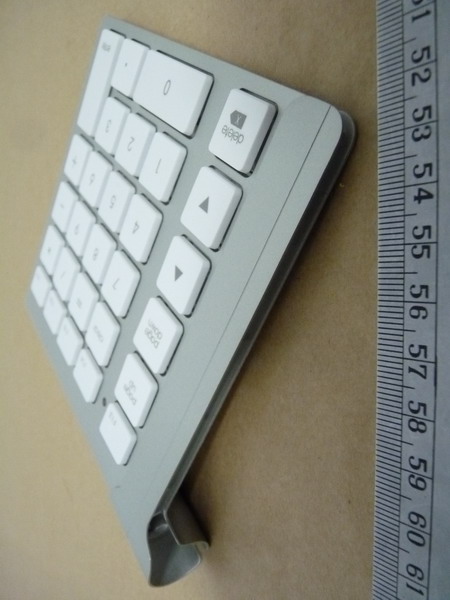
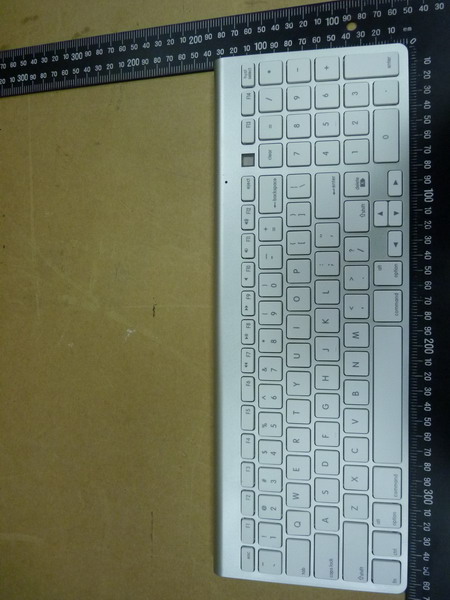
YZL-WKP-1314Wireless Bluetooth Keypad / Keyboard

Cropmark AG
Wireless Bluetooth Keypad / Keyboard - FCC ID YZL-WKP-1314 - Cropmark AG
Click to zoom

Application Details

Equipment Class
DSS - Part 15 Spread Spectrum Transmitter
Date of Grant
Nov 24, 2010
Application Purpose
Original Equipment
Date of Application
Nov 24, 2010
Equipment Note
Wireless Bluetooth Keypad / Keyboard
Frequency Range
2402.00000000 - 2480.00000000
Company
Cropmark AG
Country
Switzerland

Documents & Files

Select a file to view
Users Manual

↗

Cover Letter(s)

↗
↗

External Photos

↗

ID Label/Location Info

↗

Internal Photos

↗

RF Exposure Info

↗

Test Report

↗

Test Setup Photos

↗

Document Text

Text extracted from the exhibit documents filed with the FCC. Open a document above to read the original.

Users Manual

LMP Bluetooth Keypad WKP-1314 ENGLISH MANUAL Preface Thank you for purchasing the WKP-1314 Bluetooth wireless numeric LMP Keypad! The WKP-1314 is specifically designed for the use with the Apple™ wireless keyboard (P/N A1314). You can also use it as a stand-alone numeric wireless LMP Keypad with any Bluetooth-enabled Macintosh™ computer * . Before using the LMP Keypad, read this manual and the FAQ carefully. Keep the User Manual for future reference. * See package contents on system requirements. Not all Bluetooth dongles may support the LMP Keypad in all its functions! WKP-1314 does not work with iPad! Key Features • 28-key numeric wireless Keypad for easy and fast working with figures, tables, calculations, spread sheets, etc. • Bluetooth wireless technology for convenient wireless access to any Bluetooth-enabled Macintosh™ computer. No dongle or driver installation required! • Linkage bar connects the WKP-1314 seamlessly with the Apple™ wireless keyboard (A1314) to form a full-size wireless keyboard – a perfect alternative solution to the USB keyboard! • Can be used as a stand-alone numeric wireless Keypad with any Macintosh™ Bluetooth-enabled computer * . • Keys include 0 ~ 9, operation keys, decimal key “.” (or “,”), hot-keys F13 ~ F17, page up/down, arrow up/down, delete forward, enter key. • Designed to fit the Apple™ wireless keyboard in an elegant way. • Broadcom Bluetooth chipset. • Power on/off, pairing button, power on/off bar for activating/de-activating the Apple™ wireless keyboard, LED status indicator. • Scissor-type membrane keys with non-curved square keycaps for high comfort typing and reduced typing tiredness. • No dongle or driver installation needed! * Works with built-in Bluetooth as well with most USB Bluetooth dongles. WKP-1314 does not work with iPad! Overview Getting Started 1) Hold the LMP Keypad upside down in both hands. Open the battery compartment by gently pressing on the arrows with your two thumbs until you hear a click. Remove the battery cover on the backside of the LMP Keypad. LMP Keypad power button 2) Place the 2 AA-size batteries in the battery compartment. Make sure the batteries are placed according to the polarity symbols (+/-) shown in the battery compartment! 3) Press the power button on the LMP Keypad to turn on the LMP Keypad. The LED indicator will be light up once in green. The LMP Keypad is now turned on. Pairing the LMP Keypad in Mac OS X Make sure that you have Bluetooth support on your Macintosh™ and Mac OS X 10.5.x or higher installed. The LMP Keypad may work with older Mac OS X but it is not officially supported. 1) Choose the Apple menu and open the "System Preferences." Under “Internet & wireless communication” (OS X 10.6.x)/”Hardware” (OS X 10.5.x) you should see a Bluetooth icon. If you do not, your Mac does not have Bluetooth. 2) Enable Bluetooth. Under "System Preferences" click the Bluetooth icon and make sure you see "Bluetooth: On" under the "Settings" tab. If it's not turned on, click "Turn Bluetooth On." 3) Go to the menu bar and click the Bluetooth icon, then click "Bluetooth Preferences." 4) Click the "+" tab (set up new device) in the left window to pair a new Bluetooth device. The Bluetooth assistant opens. (With Mac OS X 10.5.x, the Bluetooth assistant may ask what kind of device you are going to pair. Choose “keyboard” and click “continue”). Your computer now searches automatically for new Bluetooth devices. 5) Press the Pairing Button on the backside of the LMP Keypad with a pen to set up a connection to your Macintosh™. The pairing LED starts to flash in yellow. Your Macintosh™ should see the LMP Keypad as “Bluetooth Keypad”. Click “continue”. 6) In the dialog box the device “Bluetooth Keypad” will appear. If it is not listed, make sure that LMP Keypad is turned on and in pairing mode. Then click "Search Again" in the "Bluetooth Device" dialog box. 7) Click on “Bluetooth Keypad” and press “continue”. The PIN number of the LMP Keypad will be shown on your screen. 8) Enter the 8-digit PIN number with your LMP Keypad according to the digits shown on your screen and press the “enter” key of your LMP Keypad. Click "OK" and the LMP Keypad should be listed in the "Devices" tab under "Bluetooth Preferences." When you enter a digit on the LMP Keypad, it is not highlighted as with some other Bluetooth devices. Keep entering the digits quickly and press the “enter” key at the end. If you need too long to or enter a wrong digit, you may have to enter the PIN number again. Using the Pairing Button 1) You may use the pairing button after you have changed the batteries (you need to set up the LMP Keypad like you did for the first time) or when the connection is constantly lost. Follow steps 1 ~ 8 above. 2) If you have used the LMP Keypad with another Macintosh™ computer, you have to set up the LMP Keypad again. Follow steps 1 ~ 8 above. Power Management To save power, it is highly recommended to power off the LMP Keypad if the LMP Keypad won’t be used for a longer period. 1) To power off the LMP Keypad, hold the power button of LMP Keypad about 3 seconds until green LED indicator is turned off. You should see the message “lost connection” on you screen. The LMP Keypad is in power off mode. 2) To power on the LMP Keypad again, hold the power button of the LMP Keypad for 1 second. The LED indicator flashes in yellow. You may see the message “connected” on your screen. You can use the LMP Keypad now. The pairing time of LMP Keypad with your Macintosh™ computer normally just takes a few seconds. However, it may take up to 40 seconds with some Bluetooth dongles. 3) The LMP Keypad greatly reduces the power consumption automatically when it is in idle mode (connected, but no keying). In fact, the power consumption in idle mode is only about ¼ (about 0.65 mA) of the consumption of the keying mode (typing on the LMP Keypad; about 3 mA). This feature greatly extends the battery life. 4) The LMP Keypad uses 2 pcs. AA size batteries. You ca…

Text truncated - open the document above for the full version.

External Photos

Registration number: W6M21011-11021-P FCC ID: YZL-WKP-1314 Worldwide Testing Services(Taiwan) Co., Ltd. Appendix page 2 of 11 Pictures External Photos Registration number: W6M21011-11021-P FCC ID: YZL-WKP-1314 Worldwide Testing Services(Taiwan) Co., Ltd. Appendix page 3 of 11 Registration number: W6M21011-11021-P FCC ID: YZL-WKP-1314 Worldwide Testing Services(Taiwan) Co., Ltd. Appendix page 4 of 11 Registration number: W6M21011-11021-P FCC ID: YZL-WKP-1314 Worldwide Testing Services(Taiwan) Co., Ltd. Appendix page 5 of 11 Registration number: W6M21011-11021-P FCC ID: YZL-WKP-1314 Worldwide Testing Services(Taiwan) Co., Ltd. Appendix page 6 of 11 Registration number: W6M21011-11021-P FCC ID: YZL-WKP-1314 Worldwide Testing Services(Taiwan) Co., Ltd. Appendix page 7 of 11

ID Label/Location Info

Model number: WKP-1314 FCC ID: YZL-WKP-1314 Label Size: 30Ă—20 mm Model: WKP-1314 FCC ID: YZL-WKP-1314 Made in China .

Internal Photos

Registration number: W6M21011-11021-P FCC ID: YZL-WKP-1314 Worldwide Testing Services(Taiwan) Co., Ltd.Appendix page 8 of 11 Internal Photos Registration number: W6M21011-11021-P FCC ID: YZL-WKP-1314 Worldwide Testing Services(Taiwan) Co., Ltd.Appendix page 9 of 11 Registration number: W6M21011-11021-P FCC ID: YZL-WKP-1314 Worldwide Testing Services(Taiwan) Co., Ltd.Appendix page 10 of 11

Test Report

of Applicant: Cropmark AG Address: Jurastrasse 56, CH-5430 Wettingen, Switzerland Tested and Prepared by Worldwide Testing Services (Taiwan) Co., Ltd. FCC Registration No.: 930600 Industry Canada filed test laboratory Reg. No. IC 5679A-1 A2LA Accredited No.: 2732.01 Report No.: W6M21011-11021-C-1 6F, NO. 58, LANE 188, RUEY-KUANG RD., NEIHU TAIPEI 114, TAIWAN, R.O.C. TEL: 886-2-66068877 FAX: 886-2-66068879 E-mail: [email protected] FCC PART 15 SUBPART C TEST REPORT for Wireless Bluetooth Keypad/ Keyboard Model No.: WKP-1314 FCC ID: YZL-WKP-1314 Registration number: W6M21011-11021-C-1 FCC ID: YZL-WKP-1314 Worldwide Testing Services(Taiwan) Co., Ltd. Page 1 of 29 TABLE OF CONTENTS 1 GENERAL INFORMATION ...................................................................................................... 2 1.1 Notes .................................................................................................. 2 1.2 Testing laboratory .................................................................................................. 3 1.2.1 Location .................................................................................................. 3 1.2.2 Details of accreditation status .............................................................................................. 3 1.3 Details of approval holder .................................................................................................. 3 1.4 Application details .................................................................................................. 4 1.5 General information of Test item......................................................................................... 4 1.6 Test standards .................................................................................................. 5 2 TECHNICAL TEST .................................................................................................................... 6 2.1 Summary of test results .................................................................................................. 6 2.2 Test environment .................................................................................................. 6 2.3 Test Equipment List .................................................................................................. 7 2.4 General Test Procedure ................................................................................................ 10 3 TEST RESULTS (ENCLOSURE) ............................................................................................ 12 3.1 Peak Output Power (transmitter) ....................................................................................... 13 3.2 RF Exposure Compliance Requirements ........................................................................... 15 3.3 Out of Band Radiated Emissions ....................................................................................... 15 3.4 Transmitter Radiated Emissions in restricted Bands ......................................................... 16 3.5 Spurious emissions (tx) ................................................................................................ 17 3.6 Carrier Frequency Separation ............................................................................................ 20 3.7 Number of Hopping Frequencies....................................................................................... 21 3.7.1 Pseudorandom Frequency Hopping Sequence................................................................... 21 3.7.2 Coordination of hopping sequences to other transmitters ................................................. 21 3.7.3 System Receiver Hopping Capability ................................................................................ 21 3.8 Time of Occupancy (Dwell Time) ..................................................................................... 22 3.9 20dB Bandwidth ................................................................................................ 24 3.9.1 System Receiver Input Bandwidth .................................................................................... 24 3.10 Band-edge Compliance of RF Emissions .......................................................................... 25 3.11 Radiated Emissions from Receiver Section of Transceiver............................................... 27 3.12 Power Line Conducted Emission....................................................................................... 27 Appendix..........................................................................................................28 Registration number: W6M21011-11021-C-1 FCC ID: YZL-WKP-1314 Worldwide Testing Services(Taiwan) Co., Ltd. Page 2 of 29 1 General Information 1.1 Notes The purpose of conformity testing is to increase the probability of adherence to the essential requirements or conformity specifications, as appropriate. The complexity of the technical specifications, however, means that full and thorough testing is impractical for both technical and economic reasons. Furthermore, there is no guarantee that a test sample which has passed all the relevant tests conforms to a specification. Neither is there any guarantee that such a test sample will interwork with other genuinely open systems. The existence of the tests nevertheless provides the confidence that the test sample possesses the qualities as maintained and that is performance generally conforms to representative cases of communications equipment. The test results of this test report relate exclusively to the item tested as specified in 1.5. The test report may only be reproduced or published in full. Reproduction or publication of extracts from the report requires the prior written approval of the Worldwide Testing Services(Taiwan) Co., Ltd. Tester: November 16, 2010 Kevin Wang Date WTS-Lab. Name Signature Technical responsibility for area of testing: November 16, 2010 Chang Tse-Ming Date WTS Name Signat…

Text truncated - open the document above for the full version.

Test Setup Photos

Registration number: W6M21011-11021-P FCC ID: YZL-WKP-1314 Worldwide Testing Services(Taiwan) Co., Ltd.Appendix page 11 of 11 Set Up Photo of Radiated Emission

Contact Information

Applicant

Ralph Kuenzler(Vice President)
[email protected]+41 (0)56 437 60 70Fax: +41 (0)56 437 60 77

Technical Contact

Worldwide Testing Services (Taiwan) Co., Ltd.Tse-Ming Chang
[email protected]+886-2-6606-8877

6F., No. 58, Lane 188, Ruey Kuand Rd., Neihu · Taipei · Taiwan

Test Firm

Worldwide Testing Services (Taiwan) Co. Ltd.Chang Tse-Ming
[email protected]886266068877Fax: 886266068879

Technical Specifications

#Rule PartsFrequency RangePower Output
115C2.40 GHz - 2.48 GHz1.83 mW
Confidentiality
Long Term
Grant Notes
Output power listed is conducted. The antenna(s) used for this transmitter must not be co-located with any other transmitters except in accordance with FCC multi-transmitter product procedures. End-users and installers must be provided with antenna installation instructions and transmitter operating conditions for satisfying RF exposure compliance.

Other Applications from Cropmark AG

Multi-host Switchable Bluetooth Keyboard / Keypad - FCC ID YZL-WKB-802A - Cropmark AG
YZL-WKB-802A

Multi-host Switchable Bluetooth Keyboard / Keypad

Nov 08, 2012

Equipment Class

DSS - Part 15 Spread Spectrum Transmitter