Text extracted from the exhibit documents filed with the FCC. Open a document above to read the original.
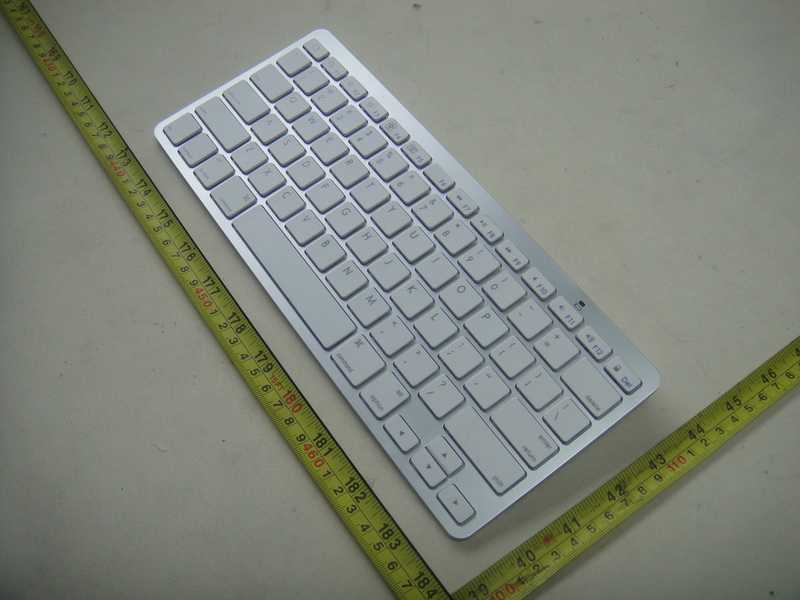
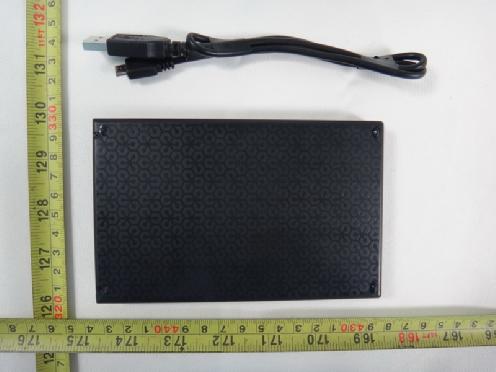
Bluetooth Foldable Keyboard Manual Packing Include: 1,A Bluetooth Keyboard 2,A White bag 3,A list of manual 4,USB charging cable(The product shall not apply to Apple 30-Pin charger) 5, sleeping current: <200UA 6, charging current: <100MA 7, standby time: 100days 8, Theory of working Time: 25 days 9, uninterrupted working time: 90 hours 10, charging time: 1-2 hours 11, Li-ion battery Capacity: Minimum 180mAH 12, lithium battery life: 3 years 13, lithium battery Specifications: 40*20*2.5MM 14,key strength:80±10g 15, key life: 500 million 16,operating temperature:-20-+55°C 17,Storage temperature:-40-+70°C Note: When you switch on the keyboard, the power light and Bluetooth light will be on in three seconds, at this time the keyboard do not connect with any device, But the LED light will automatically be off if the keyboard still do not connected to any device after the Led keep lighting for 5 seconds. The keyboard can connect when you switch on after your first successfully use ,the power light will keep lighting, but the Bluetooth light will be off after it successfully connect to device. Charging interface----------------------- Connect button---------------------------- Bluetooth indicator light----------------- Power indicator light--------------------- Charging indicator light----------------- Power Switch------------------------------- Bluetooth Keyboard Install Bluetooth Keyboard 1, How to install Bluetooth keyboard into IPAD Step 1: Find (1),as shown, Turn on the toggle switch, power light and Bluetooth light will be on in 3 seconds, But after keep lighting for 5 seconds, It will be off, At this time the keyboard is in working situation. (2), Press the connect button, the Bluetooth light will be flashing, Power light will be lighting, so the keyboard is in connecting situation. Product Features: 1, With Broadcom20730 as main control chip, with Bluetooth 3.0 interface. 2, Use industry-leading Bluetooth solution, WIDCOMM BTW Bluetooth software which is specified software by Microsoft to carry with IPAD bay. 3, Specially design for IPAD, It will be more convenient to carry with IPAD bay. 4, Buit-in power management software, It can automatically show the available capacity in the Microsoft Windows 5, Silence design, It will not affect other people’s rest 6, It is waterproof, dustproof, anti-pollution, anti-acid, waterproof for silicone part 7, work with PC and commercial mobile, It will be convenient to work. 8,working temperaturer:-20°C-55°C humidity:20%-50% 9, built-in lithium battery, you do not need to frequently change battery Specifications 1, executive standard: Bluetooth v3.0 2, Working distance: 10 meters 3, modulation system: GFSK 2.4G 4, operating voltage: 3-5v 5, work current: <3.0MA 6, standby current: 2.5MA (3) Click setting of the screen of the Ipad will in setting area, then choose Bluetooth, open the Bluetooth keyboard working situation. Note There will not have any prompt, just click enter after your enter passwork in the Ipad screen.. It will be connected successfully. Step 3: Connect successfully, The keyboard is in working situation Power light will keep lighting after it connect successfully , so the keyboard can work with IPAD successfully, The lighting power light to remind that you should turn off the keyboard when you to not use it. Charge The power light keep flashing in your working, the keyboard is short of power. It is time to charge the keyboard. (1) Before you install your Bluetooth Keyboard, please make sure you have done the Bluetooth Dongle installation procedure, and the Bluetooth facility is turned on. (2) Press and release the connect button on the bottom of Bluetooth Keyboard. The blue led light will change into a flashing mode. (3) Make sure that the keyboard is within the effective range-- 10M. (4) Make sure that there’s no change of the Bluetooth facility. If anything changed, please kindly rematch. (5) If your Bluetooth facility is connected to other Bluetooth products, please kindly confirm that the speed of the Bluetooth facility is enough. (6) Please kindly check the batteries. If they are short of power, replace them for new ones. (7) Please make sure that your Bluetooth Dongle is damaged or not. 2. Every time you turn off the keyboard power and after turn on it or reboot the computer shuts down, if it is no response (1)After the keyboard and the computer power, re-install back, the keyboard and the computer needs to re-invent code, which may take 23 seconds of your time, if you shut down and then boot, or keyboard, disconnect the power re-opened, please you press any key on the keyboard, and then wait three seconds, your keyboard can be properly used. TIPS: When your battery is low, low-voltage lights on the keyboard will blink, and you should give your keyboard charging, so as not to affect your work. Charging procedure as follows (1) Use the IPAD charger/USB charging cable plug into outlet, put one end of the plug into keyboard USB charging cable, as follows, (2) Now red indictor, after charging finish, red indictor off(charging time:4.5 hours) Federal Communication Commission Interference Statement This equipment has been tested and found to comply with the limits for a Class B digital device. Pursuant to Part 15 of the FCC Rules, These limits are designed to provide reasonable protection against harmful interference in a residential installation. This equipment generates uses and can radiate radio frequency energy and, if no installed an used in accordance with the instructions, may cause harmful interference to radio or television reception, which can be determined by turning the equipment off and on, the user is encouraged to try to correct the interference by one of the following measures: ·Reorient or relocate the receiving the equipment and receiver. ·Increase the separation between the equipment and receiver. ·Connect the equipment into an outlet on a circuit different from that to which the receiver is connected ·Consult the de…
Text truncated - open the document above for the full version.
Neutron Engineering Inc. Project No.: 1204C117 Page 2 of 8 1204C117 1204C117 Neutron Engineering Inc. Project No.: 1204C117 Page 2 of 8 1204C117 1204C117 Neutron Engineering Inc. Project No.: 1204C117 Page 3 of 8 1204C117 1204C117 Neutron Engineering Inc. Project No.: 1204C117 Page 3 of 8 1204C117 1204C117 Neutron Engineering Inc. Project No.: 1204C117 Page 4 of 8 1204C117 1204C117 Neutron Engineering Inc. Project No.: 1204C117 Page 4 of 8 1204C117 1204C117
Neutron Engineering Inc. Project No.: 1204C117 Page 5 of 8 1204C117 1204C117 Neutron Engineering Inc. Project No.: 1204C117 Page 5 of 8 1204C117 1204C117 Neutron Engineering Inc. Project No.: 1204C117 Page 6 of 8 1204C117 1204C117 Neutron Engineering Inc. Project No.: 1204C117 Page 6 of 8 1204C117 1204C117 Neutron Engineering Inc. Project No.: 1204C117 Page 7 of 8 1204C117 1204C117 Neutron Engineering Inc. Project No.: 1204C117 Page 7 of 8 1204C117 1204C117 Neutron Engineering Inc. Project No.: 1204C117 Page 8 of 8 1204C117 1204C117 Neutron Engineering Inc. Project No.: 1204C117 Page 8 of 8 1204C117 1204C117
Neutron Engineering Inc. Report No.: NEI-FCCP-1-1204C117 Page 1 of 67 FCC Radio Test Report FCC ID: YZTBT15012012 This report concerns (check one) : Original Grant Class II Change Issued Date : May. 08, 2012 Project No. : 1204C117 Equipment : Bluetooth Foldable Keyboard Model Name : BT1501 Applicant : Donar Electronics Technology CO.,LTD Address : D Building,No.2,Zhentou Road,Huangbu Industrial Zone,Shajing Town,Bao’an District, Shenzhen, China Manufacturer : Donar Electronics Technology CO.,LTD Address : D Building,No.2,Zhentou Road,Huangbu Industrial Zone,Shajing Town,Bao’an District, Shenzhen, China Tested by: Neutron Engineering Inc. EMC Laboratory Date of Receipt: Apr. 24, 2012 Date of Test: Apr. 24, 2012 ~ May. 07, 2012 Testing Engineer : (David Mao) Technical Manager : (Leo Hung) Authorized Signatory : (Steven Lu) Neutron Engineering Inc. No.3,Jinshagang 1st Road, ShiXia, Dalang Town, Dong Guan, China. TEL : (0769) 8318-3000 FAX : (0769) 8319-6000 Neutron Engineering Inc. Report No.: NEI-FCCP-1-1204C117 Page 2 of 67 Declaration Neutron represents to the client that testing is done in accordance with standard procedures as applicable and that test instruments used has been calibrated with the standards traceable to National Measurement Laboratory (NML) of CHINA, or National Institute of Standards and Technology (NIST) of U.S.A. Neutron's reports apply only to the specific samples tested under conditions. It is manufacture’s responsibility to ensure that additional production units of this model are manufactured with the identical electrical and mechanical components. Neutron shall have no liability for any declarations, inferences o r generalizations drawn by the client or others from Neutron issued reports. Neutron’s reports must not be used by the client to claim product endorsement by the authorities or any agency of the Government. This report is the confidential property of the client. As a mutual protection to the clients, the public and Neutron-self, extracts from the test report shall not be reproduced except in full with Neutron’s authorized written approval. Neutron’s laboratory quality assurance procedures are in compliance with the ISO Guide 17025 requirements, and accredited by the conformity assessment authorities listed in this test report. Limitation For the use of the authority's logo is limited unless the Test Standard(s)/Scope(s)/Item(s) mentioned in this test report is (are) included in the conformity assessment authorities acceptance respective. Neutron Engineering Inc. Report No.: NEI-FCCP-1-1204C117 Page 3 of 67 Table of Contents Page 1 . CERTIFICATION 6 2 . SUMMARY OF TEST RESULTS 7 2.1 TEST FACILITY 8 2.2 MEASUREMENT UNCERTAINTY 8 3 . GENERAL INFORMATION 9 3.1 GENERAL DESCRIPTION OF EUT 9 3.2 DESCRIPTION OF TEST MODES 11 3.3 TABLE OF PARAMETERS OF TEXT SOFTWARE SETTING 11 3.4 BLOCK DIAGRAM SHOWING THE CONFIGURATION OF SYSTEM TESTED 12 3.5 DESCRIPTION OF SUPPORT UNITS 13 4 . EMC EMISSION TEST 14 4.1 CONDUCTED EMISSION MEASUREMENT 14 4.1.1 POWER LINE CONDUCTED EMISSION LIMITS 14 4.1.2 MEASUREMENT INSTRUMENTS LIST AND SETTING 14 4.1.3 TEST PROCEDURE 15 4.1.4 DEVIATION FROM TEST STANDARD 15 4.1.5 TEST SETUP 15 4.1.6 EUT OPERATING CONDITIONS 15 4.1.7 TEST RESULTS 16 4.2 RADIATED EMISSION MEASUREMENT 18 4.2.1 RADIATED EMISSION LIMITS 18 4.2.2 MEASUREMENT INSTRUMENTS LIST ANS SETTING 19 4.2.3 TEST PROCEDURE 20 4.2.4 DEVIATION FROM TEST STANDARD 20 4.2.5 TEST SETUP 21 4.2.6 EUT OPERATING CONDITIONS 22 4.2.7 TEST RESULTS (BELOW 30MHZ) 23 4.2.8 TEST RESULTS (BETWEEN30 – 1000 MHZ) 24 4.2.9 TEST RESULTS (ABOVE 1000 MHZ) 26 5 . NUMBER OF HOPPING CHANNEL 38 5.1 APPLIED PROCEDURES / LIMIT 38 5.1.1 MEASUREMENT INSTRUMENTS LIST AND SETTING 38 5.1.2 TEST PROCEDURE 38 5.1.3 DEVIATION FROM STANDARD 38 5.1.4 TEST SETUP 38 5.1.5 EUT OPERATION CONDITIONS 38 Neutron Engineering Inc. Report No.: NEI-FCCP-1-1204C117 Page 4 of 67 Table of Contents Page 5.1.6 TEST RESULTS 39 6 . AVERAGE TIME OF OCCUPANCY 40 6.1 APPLIED PROCEDURES / LIMIT 40 6.1.1 MEASUREMENT INSTRUMENTS LIST 40 6.1.2 TEST PROCEDURE 40 6.1.3 DEVIATION FROM STANDARD 40 6.1.4 TEST SETUP 41 6.1.5 EUT OPERATION CONDITIONS 41 6.1.6 TEST RESULTS 42 7 . HOPPING CHANNEL SEPARATION MEASUREMENT 48 7.1 APPLIED PROCEDURES / LIMIT 48 7.1.1 MEASUREMENT INSTRUMENTS LIST AND SETTING 48 7.1.2 TEST PROCEDURE 48 7.1.3 DEVIATION FROM STANDARD 48 7.1.4 TEST SETUP 48 7.1.5 EUT OPERATION CONDITIONS 48 7.1.6 TEST RESULTS 49 8 . BANDWIDTH TEST 51 8.1 APPLIED PROCEDURES / LIMIT 51 8.1.1 MEASUREMENT INSTRUMENTS LIST AND SETTING 51 8.1.2 TEST PROCEDURE 51 8.1.3 DEVIATION FROM STANDARD 51 8.1.4 TEST SETUP 51 8.1.5 EUT OPERATION CONDITIONS 51 8.1.6 TEST RESULTS 52 9 . PEAK OUTPUT POWER TEST 54 9.1 APPLIED PROCEDURES / LIMIT 54 9.1.1 MEASUREMENT INSTRUMENTS LIST AND SETTING 54 9.1.2 TEST PROCEDURE 54 9.1.3 DEVIATION FROM STANDARD 54 9.1.4 TEST SETUP 54 9.1.5 EUT OPERATION CONDITIONS 54 9.1.6 TEST RESULTS 55 10 . ANTENNA CONDUCTED SPURIOUS EMISSION 57 10.1 APPLIED PROCEDURES / LIMIT 57 10.1.1 MEASUREMENT INSTRUMENTS LIST AND SETTING 57 10.1.2 TEST PROCEDURE 57 Neutron Engineering Inc. Report No.: NEI-FCCP-1-1204C117 Page 5 of 67 Table of Contents Page 10.1.3 DEVIATION FROM STANDARD 57 10.1.4 TEST SETUP 57 10.1.5 EUT OPERATION CONDITIONS 57 10.1.6 TEST RESULTS 58 11 . EUT TEST PHOTO 64 Neutron Engineering Inc. Report No.: NEI-FCCP-1-1204C117 Page 6 of 67 1. CERTIFICATION E q u i p m e n t : Bluetooth Foldable Keyboard Brand Name : N/A Model Name : BT1501 A p p l i c a n t : Donar Electronics Technology CO.,LTD Factory : Donar Electronics Technology CO.,LTD Address : D Building,No.2,Zhentou Road,Huangbu Industrial Zone,Shajing Town,Bao’ an District, Shenzhen, China Date of Test : Apr. 24, 2012 ~ May. 07, 2012 T e s t I t e m : ENGINEERING SAMPLE Standards : FCC Part15, Subpart C(15.247) / ANSI C63.4 : 2009 / ANSI C63.10:2003 / FCC Public Notice DA 00-705, March 30, 2000. The above equipment has been tested and found compliance with the requirement of t…
Text truncated - open the document above for the full version.
Neutron Engineering Inc. Report No.: NEI-FCCP-1-1204C117 Page 64 of 67 11. EUT TEST PHOTO Conducted Measurement Photos Normal Link Neutron Engineering Inc. Report No.: NEI-FCCP-1-1204C117 Page 64 of 67 11. EUT TEST PHOTO Conducted Measurement Photos Normal Link Neutron Engineering Inc. Report No.: NEI-FCCP-1-1204C117 Page 65 of 67 Radiated Measurement Photos 9K~30MHz Neutron Engineering Inc. Report No.: NEI-FCCP-1-1204C117 Page 65 of 67 Radiated Measurement Photos 9K~30MHz Neutron Engineering Inc. Report No.: NEI-FCCP-1-1204C117 Page 66 of 67 Radiated Measurement Photos 30MHz~1000MHz Neutron Engineering Inc. Report No.: NEI-FCCP-1-1204C117 Page 66 of 67 Radiated Measurement Photos 30MHz~1000MHz Neutron Engineering Inc. Report No.: NEI-FCCP-1-1204C117 Page 67 of 67 Radiated Measurement Photos Above 1000MHz Neutron Engineering Inc. Report No.: NEI-FCCP-1-1204C117 Page 67 of 67 Radiated Measurement Photos Above 1000MHz
| # | Rule Parts | Frequency Range | Power Output |
|---|---|---|---|
| 1 | 15C | 2.40 GHz - 2.48 GHz | 550.00 µW |

MINI Keyboard
Equipment Class
DSS - Part 15 Spread Spectrum Transmitter