YZZGRP2636IP Phone
Grandstream Networks, Inc.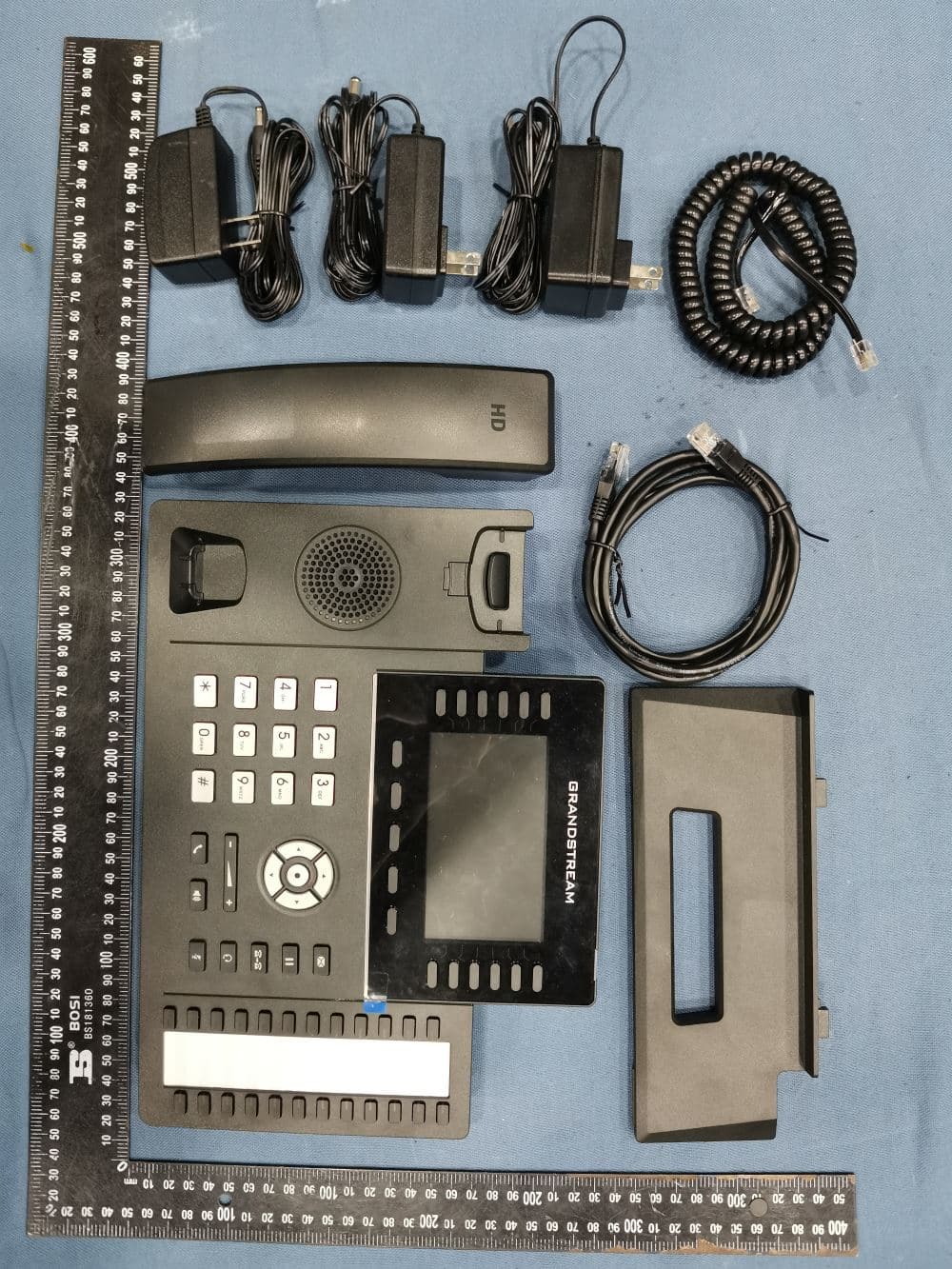
Click to zoom
Application Details
- Equipment Class
- DTS - Digital Transmission System
- Date of Grant
- Jul 18, 2022
- Application Purpose
- Original Equipment
- Date of Application
- Jul 18, 2022
- Equipment Note
- IP Phone
- Frequency Range
- 2412.00000000 - 2462.00000000
- Company
- Grandstream Networks, Inc.
- Country
- United States
Documents & Files
Document Text
Text extracted from the exhibit documents filed with the FCC. Open a document above to read the original.
Users Manual
For certification information, please refer to User Manuals: http://www.grandstream.com Common part: This equipment complies with radiation exposure limits set forth for an uncontrolled environment. This transmitter must not be co-located or operating in conjunction with any other antenna or transmitter. This equipment should be installed and operated with minimum distance 20cm between the radiator& your body. Après examen de ce matériel aux conformité ou aux limites d’intensité de champ RF, les utilisateurs peuvent sur l’exposition aux radiofréquences et la conformité and compliance d’acquérir les informations correspondantes. La distance minimale du corps à utiliser le dispositif est de 20cm. The earpiece is easy to absorb small object, please take care to avoid scratching. U.S. FCC Part 68 Regulatory Information This equipment complies with Part 68 of the FCC rules. Located on the equipment is a label that contains, among other information, the ACTA registration number and ringer equivalence number (REN.) If requested, this information must be provided to the telephone company. The REN is used to determine the quantity of devices which may be connected to the telephone line. Excessive REN’s on the telephone line may result in the devices not ringing in response to an incoming call. In most, but not all areas, the sum of the REN’s should not exceed five (5.0). To be certain of the number of devices that may be connected to the line, as determined by the total REN’s contact the telephone company to determine the maximum REN for the calling area. This equipment cannot be used on the telephone company-provided coin service. Connection to Party Line Service is subject to State Tariffs. If this equipment causes harm to the telephone network, the telephone company will notify you in advance that temporary discontinuance of service may be required. If advance notice isn’t practical, the telephone company will notify the customer as soon as possible. Also, you will be advised of your right the file a complaint with the FCC if you believe it is necessary. The telephone company may make changes in its facilities, equipment, operations, or procedures that could affect the operation of the equipment. If this happens, the telephone company will provide advance notice in order for you to make the necessary modifications in order to maintain uninterrupted service. If the trouble is causing harm to the telephone network, the telephone company may request you to remove the equipment from the network until the problem is resolved. This equipment uses the following USOC jacks: RJ45C. It is recommended that the customer install an AC surge arrester in the AC outlet to which this device is connected. This is to avoid damaging the equipment caused by local lightening strikes and other electrical surges. If trouble is experienced with this equipment, please contact (Agent in the US): Company Name: Grandstream Networks, Inc. Address: 126 Brookline Ave, 3rd Floor Boston, MA 02215, USA Tel: 1-617-5669300 Fax: 1-617-2491987 U.S. FCC Part 15 Regulatory Information This device complies with part 15 of the FCC Rules. Operation is subject to the following two conditions:(1) this device may not cause harmful interference, and (2) this device must accept any interference received, including interference that may cause undesired operation. Any Changes or modifications not expressly approved by the party responsible for compliance could void the user's authority to operate the equipment. Note: This equipment has been tested and found to comply with the limits for a Class B digital device, pursuant to part 15 of the FCC Rules. These limits are designed to provide reasonable protection against harmful interference in a residential installation. This equipment generates, uses and can radiate radio frequency energy and, if not installed and used in accordance with the instructions, may cause harmful interference to radio communications. However, there is no guarantee that interference will not occur in a particular installation. If this equipment does cause harmful interference to radio or television reception, which can be determined by turning the equipment off and on, the user is encouraged to try to correct the interference by one or more of the following measures: —Reorient or relocate the receiving antenna. —Increase the separation between the equipment and receiver. —Connect the equipment into an outlet on a circuit different from that to which the receiver is connected. —Consult the dealer or an experienced radio/TV technician for help. Canada Regulatory Information Radio equipment Operation of 5150-5250 MHz is restricted to indoor use only. This device contains licence-exempt transmitter(s)/receiver(s) that comply with Innovation, Science and Economic Development Canada’s licence-exempt RSS(s). Operation is subject to the following two conditions: (1) This device may not cause interference. (2) This device must accept any interference, including interference that may cause undesired operation of the device. L’émetteur/récepteur exempt de licence contenu dans le présent appareil est conforme aux CNR d’Innovation, Sciences et Développement économique Canada applicables aux appareils radio exempts de licence. L’exploitation est autorisée aux deux conditions suivantes : 1) L’appareil ne doit pas produire de brouillage; 2) L’appareil doit accepter tout brouillage radioélectrique subi, même si le brouillage est susceptible d’en compromettre le fonctionnement. CAN ICES-003 (B)/NMB-003(B) This product meets the applicable Innovation, Science and Economic Development Canada technical specifications. Le présent produit est conforme aux spécifications techniques applicables d'Innovation, Sciences et Développement économique Canada. Terminal equipment This product meets the applicable Innovation, Science and Economic Development Canada technical specifications. The Ringer Equivalence Number (REN) indicates the maximum number o…
Text truncated - open the document above for the full version.
Users Manual
~17~ ~18~ CONTENU DU PACK: PRECAUTIONS: 12V ALERTE: Veuillez ne pas redémarrer le GRP2636 lors du démarrage du système ou la mise à jour du firmware. Ceci peut corrompre l’image du firmware et causer un dysfonctionnement de l’unité. ALERTE: N’utilisez que l’adaptateur d’alimentation fourni dans le pack GRP2636. L’utilisation d’un autre adaptateur d’alimentation non qualifié peut endommager l’unité. PRESENTATION: Le GRP2636 est un téléphone IP d’entreprise de nouvelle gé- nération doté de 12 touches de ligne bicolores (pouvant être programmées numériquement comme jusqu’à 48 touches BLF/ numérotation rapide provisionnables) en plus de 24 touches Multi- Fonctions, écran LCD couleur TFT 4.3 “(480x272), 4 touches pro- grammables contextuelles, port USB, ports réseau 1000M, prise en charge PoE, Wi-Fi et Bluetooth intégrée, conférence à 5 voies et commutateur à crochet électronique (EHS). Le GRP2636 of- fre une qualité audio HD supérieure, des fonctionnalités de télé- phonie riches et avancées, une protection de la confidentialité et une large interopérabilité avec la plupart des appareils SIP tiers et les principales plates-formes SIP/NGN/IMS. GRP2636 est le choix idéal pour les utilisateurs en entreprise à la recherche d’un téléphone IP exécutif multiligne d’une haute qualité, riche en fonc- tionnalités et de performances avancées. 1x Appareil GRP26361x Combiné 1x Support du téléphone 1x Adaptateur d’alimentation 12V 1x Câble Ethernet 1x Câble téléphonique 1x Guide d’installation rapide Port USB Languette avec appui vers le haut Languette avec appui vers le bas INSTALLATION DU TÉLÉPHONE: Fentes pour la fixa- tion murale et sup- port du téléphone Verrou Kensington Port PC Port LAN Port Casque Port Combiné Alimentation Fixation Murale Support du téléphone Installation du téléphone (Fixation murale *vendue séparément): 1. Attachez le support de fixation murale à la fente située à l’arrière du téléphone. 2. Attachez le téléphone au mur via la fente de fixation murale 3. Tirez la languette du support du combiné (Voir figure ci-dessous). 4. Pivotez la languette et rebranchez-la dans la fente en gardant son appui vers le haut pour tenir le combiné lorsque le téléphone est fixé au mur (Voir figure ci-dessous). Appui du Combiné Fixation Murale Installation du téléphone (Support du téléphone): Pour installer le téléphone sur la table avec le support du téléphone, attachez ce dernier à la fente placée à la base du téléphone (partie su- périeure, partie inférieure). ~19~ ~20~ Pour installer le GRP2636, suivez les instructions ci-dessous: 1. Connectez le combiné et le boîtier du téléphone principal avec le câble téléphonique. 2. Connectez la fiche de sortie 12V DC à la prise d’alimentation sur le téléphone; branchez l’adaptateur dans une prise électrique. 3. La connexion réseau est possible via deux méthodes: • Connexion via Ethernet: - Connectez le port LAN de votre téléphone au port RJ-45 d’un con- centrateur/commutateur ou un routeur (côté LAN du routeur) à l’aide du câble Ethernet. • Connexion via Wi-Fi: - A partir du menu LCD, accédez à “Système→Réseau→Configuration Wi-Fi” et activez le Wi-Fi. - Sélectionnez “Rechercher” et le GRP2636 démarrera automatique- ment la recherche des réseaux Wi-Fi disponibles. - Une liste des réseaux Wi-Fi sera affichée. Sélectionnez le réseau souhaité et, si nécessaire, entrez le mot de passe correct pour vous connecter. 4. Le LCD va afficher les informations d’approvisionnement ou de mise à jour du firmware. Avant de continuer, veuillez patienter jusqu’à que la date/heure s’affiche. 5. En utilisant le serveur web intégré du téléphone ou le menu de la configuration du téléphone, vous pouvez le configurer en utilisant soit IP statique ou DHCP. CONNECTER LE TÉLÉPHONE: DESCRIPTION DU TÉLÉPHONE: Indicateur de mes- sage en attente Touches de naviguation Volume Haut-parleur Envoyer Touches Multi- Fonctions Touches Lignes Touches contextuelles Touche Menu/OK Messsage Mise en attente Transfert Casque Muet Clavier standard 1. Vérifiez que votre téléphone est sous tension et connecté à Internet. 2. Appuyez et maintenez l’appui pendant 3 secs pour voir l’adresse IP. 3. Saisissez l’adresse IP du téléphone dans votre navigateur PC. 4. Entrez le nom d’utilisateur et le mot de passe d’administarteur pour accéder au menu de configuration. (Le nom d’utilisateur par défault est “admin” tant dit que le mot de passe peur être trouvé sur l’étiquette à l’arrière de l’unité). 1. Assurez-vous que le téléphone est libre. 2. Appuyez sur le bouton “MENU” pour accéder au MENU pour config- urer le téléphone. 3. Sélectionnez MENU → Phone → SIP → Account, pour configurer les paramètres du Proxy SIP, Proxy Sortant, Nom d’utilisateur SIP, Nom d’authentification SIP et le mot de passe SIP 4. Suivez les options du MENU pour configurer les fonctionnalités de base du téléphone. Par exemple: l’adresse IP si vous utilisez une adresse IP statique. Pour plus de détails, veuillez vérifier le manuel d’utilisation du GRP2636. 5. Veuillez contacter votre Fournisseur d’accès Internet pour les paramètres supplémentaires qui peuvent être nécessaires pour con- figurer le téléphone. Configurer le GRP2636 en utilisant le Clavier: CONFIGURATION DU TÉLÉPHONE: Configurer le GRP2636 en utilisant le Navigateur web: Veuillez télécharger le manuel d’utilisation et la FAQ pour plus de détails sur les instructions de configuration: https://www.grandstream.com/our-products Les termes de la licence GNU GPL sont incorporés dans le micrologiciel du périphérique et sont accessibles via l’interface utilisateur Web du périphéri- que à l’adresse http(s)://IP/gpl_license. Pour obtenir un CD contenant les informations du code source GPL, veuillez envoyer une demande écrite à [email protected] ~21~ ~22~ Im GRP2636 sind keine Notfallrufnummern voreingestellt oder vorkonfiguriert. Das GRP2636 tätigt keine automa- tischen Anrufe zu medizinischen, sozialen oder juristisch- en Hilfs- oder Serviceorganisationen. Die Anbindung an derartige Einr…
Text truncated - open the document above for the full version.
Users Manual
~37~ ~38~ O GRP2636 é um telefone IP empresarial de próxima geração com 12 teclas de linha de duas cores (pode ser programado digitalmente como até 48 teclas BLF/discagem rápida provision- áveis), além de 24 teclas multifuncionais, LCD colorido TFT de 4.3” (480x272), 5 teclas programáveis sensíveis ao contexto, por- ta USB, portas de rede Gigabit, PoE integrado, suporte para Wi-Fi e Bluetooth, conferência 5-way e Electronic Hook Switch (EHS).O GRP2636 entrega qualidade de áudio superior em HD, avança- dos recursos de telefonia, proteção para privacidade e uma com- pleta interoperabilidade com os dispositivos SIP e as plataformas SIP/NGN/IMS mais reconhecidos do mercado. O GRP2636 é a escolha perfeita para usuários corporativos que buscam uma telefone IP executivo de alta qualidade, com avançados recursos, funcionalidades e desempenho. 1x Handset1x 12V Adaptador de Corrente 12V ATENÇÃO: Por favor NÃO desligue a energia do GRP2636 durante o inicio do sistema ou durante a atualização de firmware. Você poderá corromper a imagem do firmware e originar o mau funcionamento da unidade. PRECAUÇÕES: ATENÇÃO: Utilize unicamente a fonte de alimentação incluída na embala- gem do GRP2636. Utilizar uma fonte de alimentação alternativa e não certi- ficada possivelmente pode danificar a unidade. RESUMO: CONTEÚDO DA EMBALAGEM: 1x Base Principal 1x Cabo de telefone 1x Cabo de Ethernet 1x Cabo de telefone 1x Guia de Instalação Rápido INSTALAÇÃO DO TELEFONE: Aberturas para a montagem de parede Bloqueio Kensington Porta USB Porta PC Porta LAN Porta Headset Porta Handset Corrente Montagem na parede Suporte do telefone A instalar o telefone (Montagem na parede): 1. Coloque o suporte de parede na abertura que está na parte traseira do telefone. 2. Coloque o telefone na parede através do furo para o suporte de parede. 3. Puxe a trava de suporte do monofone (Consulte a imagem abaixo) 4. Vire a trava do telefone e coloque de novo no seu lugar para manter o handset no suporte quando o telefone estiver instalado na parede (Ver imagem abaixo) Montagem na parede Suporte do Handset Suporte com a trava para acima Suporte com a trava para abaixo Para instalar o telefone no escritório com o suporte do telefone, fixe o supor- te no fundo do telefone onde estão as aberturas para o suporte de escritório (parte de cima, parte do fundo). A instalar o telefone (Suporte do telefone): ~39~ ~40~ DESCRIÇÃO DO TELEFONE: Headset Volume Reter Para configurar o GRP2636, verifique os passos abaixo: 1. Conecte o handset à base principal utilizando o cabo de telefone. 2. Conecte a saída da fonte de alimentação 12V DC na porta correspon- dente no telefone; conecte a fonte de alimentação em uma tomada de energia. 3. A conexão à rede é possível através de dois métodos, os quais estão especificados abaixo. • Conexão via Ethernet: - Conecte a porta LAN do telefone à tomada RJ-45 de um hub/switch ou um roteador (lado de LAN do roteador) utilizando o cabo de Ethernet. • Conexão via Wi-Fi: - Através do menu na tela LCD, navegue até “Sistema→ Rede→ Con- figurações Wi-Fi”. - Selecione “Scan” e o GRP2636 iniciará automaticamente uma varredura dentro do intervalo de alcance. - Uma lista de redes Wi-Fi será exibida. Selecione a rede desejada e, se for necessário, insira a senha correspondente para conectar-se. 4. A tela LCD exibirá a informação de atualização ou de provisionamento. Antes de continuar, por favor aguarde até exibir na tela a data e a hora. 5. Utilizando a interface web do telefone ou utilizando o menu de configura- ção através do teclado, você poderá configurar o telefone para utilizar IP estático ou obter IP a partir do DHCP. A CONECTAR O TELEFONE: Indicador de mensa- gem em espera Teclas de Navegação Viva-voz Enviar/Chamar Tecla multifunção Teclas de Linha Tecla de função Tecla Menu/OK Mensagem Transferir Mudo Teclado Padrão 1. Verifique e confira que o telefone está ligado e conectado à internet. 2. Pressione e mantenha pressionada a tecla “UP” durante 3 segundos para visualizar o endereço IP. 3. Digite o endereço IP do telefone no navegador web do seu computador (Ver imagem à direita). 4. Coloque o ID e a senha do administrador para acessar ao menu de con- figuração. (O ID de usuário padrão é “admin”, a senha de acesso ale- atória pode ser encontrada na etiqueta na parte inferior do dispositivo). CONFIGURAÇÃO DO TELEFONE: Configurar o GRP2636 utilizando a interface web: 1. Verifique que o telefone está desocupado. 2. Pressione a tecla MENU para acessar ao MENU do teclado para con- figurar o telefone. 3. Selecione MENU→ Phone→ SIP→ Account para definir as configura- ções de Proxy SIP, Proxy de Saída, ID de Usuário SIP, ID de Aut SIP e Senha SIP 4. Siga as opções do MENU para configurar os recursos básicos do tele- fone, por exemplo: o endereço IP se vai utilizar um IP estático. Para informação detalhada, consulte o Manual de Usuário do GRP2636. 5. Por favor contatar o seu ITSP (Provedor de serviços de telefonia por internet) para consultar, se for necessário, as definições adicionais que podem ser necessárias para configurar o telefone.figure the phone. Configurar o GRP2636 utilizando o teclado: Por favor, baixe o Manual do Usuário e verifique a seção FAQ para instruções mais detalhadas: https://www.grandstream.com/our-products Os termos de licença GNU GPL estão dentro do firmware do dis- positivo e você pode visualizar o documento através da interface web do dispositivo, em http(s)://IP/gpl_license. Para obter um CD com a informação do código fonte GPL, por favor solicite-o através de [email protected] ~41~ ~42~ Urządzenie GRP2636 nie jest wstępnie skonfigurowane do obsługi lub wykonywania połączeń alarmowych do szpitali, organów ochrony porządku publicznego, jed- nostek opieki medycznej (zwanych dalej „służbami ra- tunkowymi”) ani jakichkolwiek innych służb ratunkowych. Aby uzyskać dostęp do służb ratunkowych, konieczne jest wprowadzenie dodatkowych ustawień. Użytkownik jest odpowiedzialny za zakup usługi telefonii internetowej z…
Text truncated - open the document above for the full version.
Cover Letter(s)
C5266091_X8_Ed.1 1/1 Grandstream Networks, Inc. 126 Brookline Ave., 3rd Floor Boston, MA 02215, USA Letter of Authorization Company: Grandstream Networks, Inc. Address: 126 Brookline Ave., 3rd Floor Boston, MA 02215, USA Model Number: GRP2636 FCC Identifier: YZZGRP2636 We authorize LGAI Technological Center S.A., Ronda de la Font del Carme, s/n, 08193 Bellaterra, Spain, to act on our behalf on all matters concerning the above named equipment. Any individual within LGAI Technological Center S.A. is authorized to act on our behalf and take action on the application. We declare that authorize LGAI Technological Center S.A., Ronda de la Font del Carme, s/n, 08193 Bellaterra, Spain, is allowed to forward all information related to the approval project to the Federal Communication Commission and to discuss any issues concerning the approval application. Any and all acts carried out by LGAI Technological Center S.A. on our behalf shall have the same effect as acts of our own. Name: Ning Wei Date: June 27, 2022 Title: Manager Signature of applicant:
Cover Letter(s)
C5266091_X10_Ed.1 1/1 Grandstream Networks, Inc. 126 Brookline Ave., 3rd Floor Boston, MA 02215, USA Office of Engineering Technology Federal Communications Commission 7435 Oakland Mills Road Columbia, MD 21046 Date: June 24, 2022 Subject: Request for Confidentiality FCC ID: YZZGRP2636 To Whom It May Concern, Pursuant to the provisions of Sections 0.457 and 0.459 of Commission's rules (47CFR0.457, 0.459), we are requesting the Commission to withhold the following attachment(s) as confidential document from public disclosure. Exhibits Long-Term Confidentiality Short-Term Confidentiality ID Label/Location No No Attestation Statement No No External Photos No Block Diagram Schematics Test Report No No Test Setup Photos No User’s Manual Internal Photos Parts List / Tune Up RF Exposure Info Operational Description Cover Letter(s) No No SDR Software / Security Info No Above mentioned document contains detailed system and equipment description are considered as proprietary information in operation of the equipment. The public disclosure of above documents might be harmful to our company and would give competitor an unfair advantage in the market. It is our understanding that all measurement test reports, FCC ID label format and correspondent during certification review process cannot be granted as confidential documents and those information will be available for public review once the grant of equipment authorization is issued. Sincerely, Signature: Name: Ning Wei Title: Manager
External Photos
Page 1 of 9 FCC ID: YZZGRP2636 IC ID: 11964A-GRP2636 Shenzhen UnionTrust Quality and Technology Co., Ltd. Address: Unit D/E of 9/F and 16/F, Block A, Building 6, Baoneng science and technology park, Longhua district, Shenzhen, China Tel: +86-755-28230888 Fax: +86-755-28230886 E-mail: [email protected] Http://www.uttlab.com APPENDIX 2 PHOTOS OF EUT CONSTRUCTIONAL DETAILS EUT EXTERNAL PHOTOS EUT Photo EUT Photo Page 2 of 9 FCC ID: YZZGRP2636 IC ID: 11964A-GRP2636 Shenzhen UnionTrust Quality and Technology Co., Ltd. Address: Unit D/E of 9/F and 16/F, Block A, Building 6, Baoneng science and technology park, Longhua district, Shenzhen, China Tel: +86-755-28230888 Fax: +86-755-28230886 E-mail: [email protected] Http://www.uttlab.com EUT Photo EUT Photo Page 3 of 9 FCC ID: YZZGRP2636 IC ID: 11964A-GRP2636 Shenzhen UnionTrust Quality and Technology Co., Ltd. Address: Unit D/E of 9/F and 16/F, Block A, Building 6, Baoneng science and technology park, Longhua district, Shenzhen, China Tel: +86-755-28230888 Fax: +86-755-28230886 E-mail: [email protected] Http://www.uttlab.com EUT Photo EUT Photo-Ports Page 4 of 9 FCC ID: YZZGRP2636 IC ID: 11964A-GRP2636 Shenzhen UnionTrust Quality and Technology Co., Ltd. Address: Unit D/E of 9/F and 16/F, Block A, Building 6, Baoneng science and technology park, Longhua district, Shenzhen, China Tel: +86-755-28230888 Fax: +86-755-28230886 E-mail: [email protected] Http://www.uttlab.com EUT Photo EUT Photo Page 5 of 9 FCC ID: YZZGRP2636 IC ID: 11964A-GRP2636 Shenzhen UnionTrust Quality and Technology Co., Ltd. Address: Unit D/E of 9/F and 16/F, Block A, Building 6, Baoneng science and technology park, Longhua district, Shenzhen, China Tel: +86-755-28230888 Fax: +86-755-28230886 E-mail: [email protected] Http://www.uttlab.com EUT Photo EUT Photo Page 6 of 9 FCC ID: YZZGRP2636 IC ID: 11964A-GRP2636 Shenzhen UnionTrust Quality and Technology Co., Ltd. Address: Unit D/E of 9/F and 16/F, Block A, Building 6, Baoneng science and technology park, Longhua district, Shenzhen, China Tel: +86-755-28230888 Fax: +86-755-28230886 E-mail: [email protected] Http://www.uttlab.com EUT Photo EUT Photo-Adapter 3 Page 7 of 9 FCC ID: YZZGRP2636 IC ID: 11964A-GRP2636 Shenzhen UnionTrust Quality and Technology Co., Ltd. Address: Unit D/E of 9/F and 16/F, Block A, Building 6, Baoneng science and technology park, Longhua district, Shenzhen, China Tel: +86-755-28230888 Fax: +86-755-28230886 E-mail: [email protected] Http://www.uttlab.com EUT Photo-Adapter 3 EUT Photo-Adapter 1 Page 8 of 9 FCC ID: YZZGRP2636 IC ID: 11964A-GRP2636 Shenzhen UnionTrust Quality and Technology Co., Ltd. Address: Unit D/E of 9/F and 16/F, Block A, Building 6, Baoneng science and technology park, Longhua district, Shenzhen, China Tel: +86-755-28230888 Fax: +86-755-28230886 E-mail: [email protected] Http://www.uttlab.com EUT Photo-Adapter 1 EUT Photo-Adapter 2 Page 9 of 9 FCC ID: YZZGRP2636 IC ID: 11964A-GRP2636 Shenzhen UnionTrust Quality and Technology Co., Ltd. Address: Unit D/E of 9/F and 16/F, Block A, Building 6, Baoneng science and technology park, Longhua district, Shenzhen, China Tel: +86-755-28230888 Fax: +86-755-28230886 E-mail: [email protected] Http://www.uttlab.com EUT Photo-Adapter 2
ID Label/Location Info
R1 53.00 mm 28.00 mm 5 This device complies with part 15 of the FCC rules. Operation is subject to the following two conditions: (1) this device may not cause harmful interference, and (2) this device must accept any interference received, including interference that may cause undesired operation. CAN ICES-003(B)/NMB-003(B) IC: 11964A-GRP2636 Complies with part 68.FCC Rules US: GNIIPNANGRP2636 FCC ID: YZZGRP2636 Made in China Model: GRP2636 Input: 12V 1A Label Location
Internal Photos
Page 1 of 7 FCC ID: YZZGRP2636 IC ID: 11964A-GRP2636 Shenzhen UnionTrust Quality and Technology Co., Ltd. Address: Unit D/E of 9/F and 16/F, Block A, Building 6, Baoneng science and technology park, Longhua district, Shenzhen, China Tel: +86-755-28230888 Fax: +86-755-2823088 6 E-mail: [email protected] Http://www.uttlab.com APPENDIX 2 PHOTOS OF EUT CONSTRUCTIONAL DETAILS EUT INTERNAL PHOTOS EUT Photo EUT Photo Page 2 of 7 FCC ID: YZZGRP2636 IC ID: 11964A-GRP2636 Shenzhen UnionTrust Quality and Technology Co., Ltd. Address: Unit D/E of 9/F and 16/F, Block A, Building 6, Baoneng science and technology park, Longhua district, Shenzhen, China Tel: +86-755-28230888 Fax: +86-755-2823088 6 E-mail: [email protected] Http://www.uttlab.com EUT Photo EUT Photo Page 3 of 7 FCC ID: YZZGRP2636 IC ID: 11964A-GRP2636 Shenzhen UnionTrust Quality and Technology Co., Ltd. Address: Unit D/E of 9/F and 16/F, Block A, Building 6, Baoneng science and technology park, Longhua district, Shenzhen, China Tel: +86-755-28230888 Fax: +86-755-2823088 6 E-mail: [email protected] Http://www.uttlab.com EUT Photo EUT Photo Page 4 of 7 FCC ID: YZZGRP2636 IC ID: 11964A-GRP2636 Shenzhen UnionTrust Quality and Technology Co., Ltd. Address: Unit D/E of 9/F and 16/F, Block A, Building 6, Baoneng science and technology park, Longhua district, Shenzhen, China Tel: +86-755-28230888 Fax: +86-755-2823088 6 E-mail: [email protected] Http://www.uttlab.com EUT Photo EUT Photo_Wi-Fi Module View Page 5 of 7 FCC ID: YZZGRP2636 IC ID: 11964A-GRP2636 Shenzhen UnionTrust Quality and Technology Co., Ltd. Address: Unit D/E of 9/F and 16/F, Block A, Building 6, Baoneng science and technology park, Longhua district, Shenzhen, China Tel: +86-755-28230888 Fax: +86-755-2823088 6 E-mail: [email protected] Http://www.uttlab.com EUT Photo_ Wi-Fi Module Unshielded View EUT Photo Page 6 of 7 FCC ID: YZZGRP2636 IC ID: 11964A-GRP2636 Shenzhen UnionTrust Quality and Technology Co., Ltd. Address: Unit D/E of 9/F and 16/F, Block A, Building 6, Baoneng science and technology park, Longhua district, Shenzhen, China Tel: +86-755-28230888 Fax: +86-755-2823088 6 E-mail: [email protected] Http://www.uttlab.com EUT Photo EUT Photo _ Antenna View Antenna Page 7 of 7 FCC ID: YZZGRP2636 IC ID: 11964A-GRP2636 Shenzhen UnionTrust Quality and Technology Co., Ltd. Address: Unit D/E of 9/F and 16/F, Block A, Building 6, Baoneng science and technology park, Longhua district, Shenzhen, China Tel: +86-755-28230888 Fax: +86-755-2823088 6 E-mail: [email protected] Http://www.uttlab.com EUT Photo _ Handset
RF Exposure Info
Page 1 of 15 Report No.: 220329012RFC-5 Shenzhen UnionTrust Quality and Technology Co., Ltd. Address: Unit D/E of 9/F and 16/F, Block A, Building 6, Baoneng science and technology park, Longhua district, Shenzhen, China Te l : + 8 6-755-28230888 Fax: +86-755-28230886 E-mail: [email protected] http://www.uttlab.com UTTR-RF-RSS102-V1.1 RF EXPOSURE EVALUATION REPORT Product Name: IP Phone Trade Mark: GRANDSTREAM Model No.: GRP2636 HVIN: GRP2636 Report Number: 220329012RFC-5 Test Standards: FCC 47 CFR Part 1 Subpart I RSS-102 Issue 5 FCC ID: YZZGRP2636 IC: 11964A-GRP2636 Test Result: PASS Date of Issue: June 28, 2022 Prepared for: Grandstream Networks, Inc. 126 Brookline Ave., 3rd Floor Boston, MA 02215, USA Prepared by: Shenzhen UnionTrust Quality and Technology Co., Ltd. Unit D/E of 9/F and 16/F, Block A, Building 6, Baoneng science and technology park, Longhua district, Shenzhen, China TEL: +86-755-2823 0888 FAX: +86-755-2823 0886 Prepared by: Reviewed by: Calvin Chen Eric Yu Senior Project Engineer Project Supervisor Approved by: Date: June 28, 2022 Kevin Liang Assistant Manager Page 2 of 15 Report No.: 220329012RFC-5 Shenzhen UnionTrust Quality and Technology Co., Ltd. Address: Unit D/E of 9/F and 16/F, Block A, Building 6, Baoneng science and technology park, Longhua district, Shenzhen, China Te l : + 8 6-755-28230888 Fax: +86-755-28230886 E-mail: [email protected] http://www.uttlab.com UTTR-RF-RSS102-V1.1 Version Version No. Date Description V1.0 June 28, 2022 Original Page 3 of 15 Report No.: 220329012RFC-5 Shenzhen UnionTrust Quality and Technology Co., Ltd. Address: Unit D/E of 9/F and 16/F, Block A, Building 6, Baoneng science and technology park, Longhua district, Shenzhen, China Te l : + 8 6-755-28230888 Fax: +86-755-28230886 E-mail: [email protected] http://www.uttlab.com UTTR-RF-RSS102-V1.1 CONTENTS 1. GENERAL INFORMATION ....................................................................................................................................... 4 1.1 CLIENT INFORMATION ........................................................................................................................................ 4 1.2 EUT INFORMATION ............................................................................................................................................ 4 1.3 PRODUCT SPECIFICATION SUBJECTIVE TO THIS STANDARD ................................................................................. 4 1.4 OTHER INFORMATION ......................................................................................................................................... 7 1.5 GENERAL DESCRIPTION OF APPLIED STANDARDS ............................................................................................... 8 1.6 DEVIATION FROM STANDARDS ............................................................................................................................ 8 1.7 ABNORMALITIES FROM STANDARD CONDITIONS .................................................................................................. 8 1.8 OTHER INFORMATION REQUESTED BY THE CUSTOMER ........................................................................................ 8 2. EQUIPMENT L…
Text truncated - open the document above for the full version.
Contact Information
Applicant
Ning Wei
Technical Contact
Shenzhen UnionTrust Quality and Technology Co., LtBilly li
[email protected]0755-28230888
Shenzhen · China
Non-Technical Contact
Shenzhen UnionTrust Quality and Technology Co., LtBilly li
[email protected]0755-28230888
Test Firm
Shenzhen UnionTrust Quality and Technology Co., LtGeorge Luo
[email protected]+86-755-28230888
Technical Specifications
| # | Rule Parts | Frequency Range | Power Output |
|---|---|---|---|
| 2 | 15C | 2.41 GHz - 2.46 GHz | 109.90 mW |
Other Applications from Grandstream Networks, Inc.
YZZGWN7712P
Sep 04, 2026Layer 2 Lite Managed Network PoE Switch
Equipment Class
JAD - Part 15 Class A Digital DeviceYZZGWN7801PC
Aug 27, 2026Enterprise Layer 2+ Compact Managed Switch
Equipment Class
JAD - Part 15 Class A Digital DeviceYZZGWN7823P
Aug 26, 2026Layer 3 Multi-Gigabit Network Switch
Equipment Class
JAD - Part 15 Class A Digital DeviceYZZGWN7703P
Aug 26, 202624 Unmanaged Gigabit Port and 2 SFP Port Switch with 24 PoE+
Equipment Class
JAD - Part 15 Class A Digital DeviceYZZGWN7673
Jul 29, 2026Dual-Band Wi-Fi 7 Access Point
Equipment Class
DTS - Digital Transmission System