YZZGVR3552Network Video Recorded
Grandstream Networks, Inc.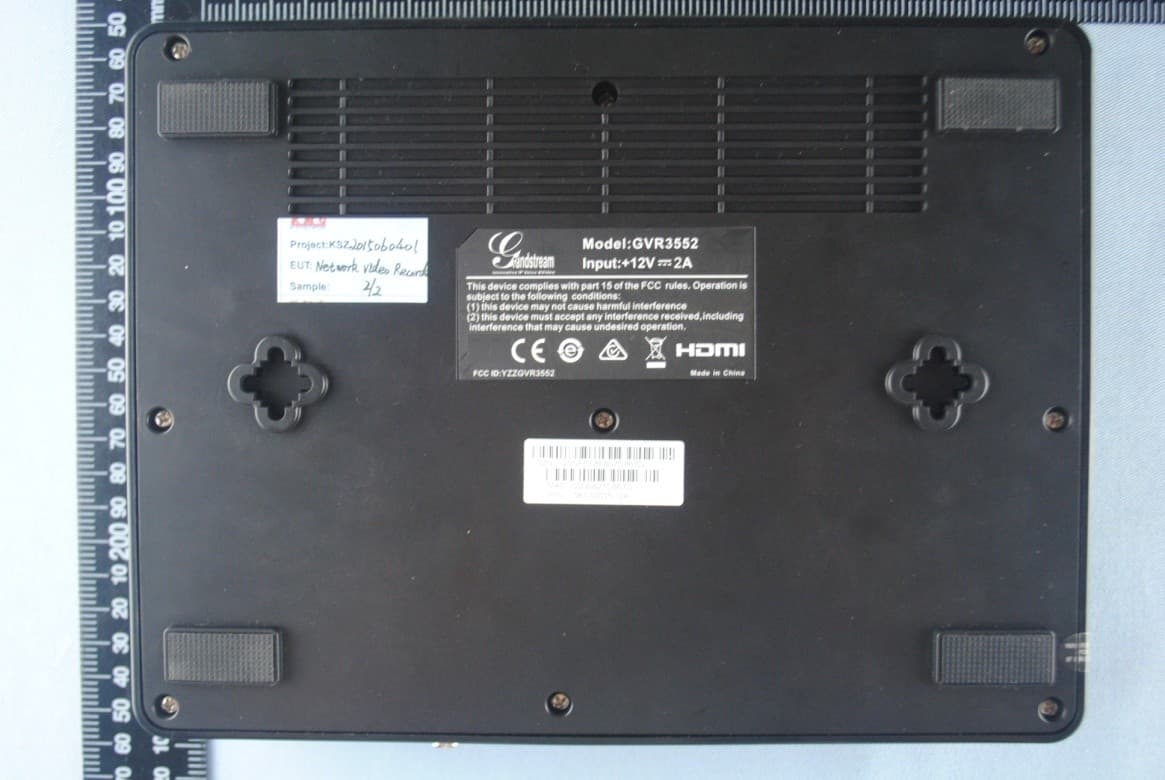
Click to zoom
Application Details
- Equipment Class
- JBP - Part 15 Class B Computing Device Peripheral
- Date of Grant
- Jul 14, 2015
- Application Purpose
- Original Equipment
- Date of Application
- Jul 14, 2015
- Equipment Note
- Network Video Recorded
- Company
- Grandstream Networks, Inc.
- Country
- United States
Documents & Files
Document Text
Text extracted from the exhibit documents filed with the FCC. Open a document above to read the original.
Users Manual
GVR3550/GVR3552 User Manual www.grandstream.com http://esupport.grandstream.com Grandstream Networks, Inc. GVR3550/GVR3552 Network Video Recorder User Manual GVR3550/GVR3552 USER MANUAL Page 1 of 125 Firmware version: 1.0.0.72 Last Updated: 06/2015 GVR3550/GVR3552 User Guide Index CHANGE LOG ............................................................................................. 10 GVR3550 ............................................................................................................................... 10 GVR3552 ............................................................................................................................... 10 WELCOME .................................................................................................. 11 PRODUCT FEATURES........................................................................................................... 11 SAFETY COMPLIANCE ........................................................................................................ 12 FCC CAUTION ...................................................................................................................... 12 RF EXPOSURE INFORMATION (SAR) ..................................................... 错误!未定义书签。 WARRANTY .......................................................................................................................... 13 INSTALL GVR3550/GVR3552 ..................................................................... 15 GVR3550/GVR3552 EQUIPMENT PACKAGE ....................................................................... 15 GVR3550 PRODUCT APPEARANCE .................................................................................... 16 GVR3552 PRODUCT APPEARANCE .................................................................................... 19 INSTALLING GVR3550 HDD .......................................................................................... 20 INSTALLING GVR3552 HDD .......................................................................................... 21 CONNECT GVR3550/GVR3552 ..................................................................................... 22 NETWOKR CONNECTION ............................................................................................. 24 EXTERNAL USB DEVICE ............................................................................................... 24 INSTALLING eSATA ........................................................................................................ 25 CONNECT HDMI MONITOR ........................................................................................... 25 CONNECT VGA MONITOR ............................................................................................ 25 CONNECT ALARM DEVICE ........................................................................................... 26 EXTERNAL INTERCOM DEVICE ................................................................................... 27 PRODUCT OVERVIEW ............................................................................... 29 GVR3550/GVR3552 SPECIFICATIONS ................................................................................ 29 IR REMOTE CONTROL ......................................................................................................... 31 INPUT METHOD .................................................................................................................... 33 LOCAL OPERATIONS .................................................................................... 36 USING THE WIZARD ............................................................................................................ 36 LOGIN ................................................................................................................................... 36 LOCAL PREVIEW ........................................................................................................... 38 PREVIEW STATUS ......................................................................................................... 38 GVR3550/GVR3552 USER MANUAL Page 2 of 125 Firmware version: 1.0.0.72 Last Updated: 06/2015 BASIC PREVIEW OPERATION ...................................................................................... 39 IMAGE CONFIG .............................................................................................................. 40 PTZ CONTROL ............................................................................................................... 41 RIGHT-CLICK ................................................................................................................. 46 SHORTCUT BUTTON ..................................................................................................... 47 LOCAL PLAYBACK ................................................................................................................ 47 SEARCH RECORD ......................................................................................................... 48 VIDEO PLAYBACK ......................................................................................................... 50 MAIN MENU ................................................................................................ 54 SETTINGS ............................................................................................................................. 54 CAMERA MANAGEMENT............................................................................................... 54 SCHEDULE .................................................................................................................... 62 ALARM CONFIG ............................................................................................................. 68 NETWORK SETTINGS ................................................................................................... 70 SYSTEM SETTINGS ..............................................................…
Text truncated - open the document above for the full version.
Cover Letter(s)
Grandstream Networks, Inc. 5F, Bldg #1, No.2 Kefa Rd., Science & Technology Park, Shenzhen, China Date: 07/13/2015 Federal Communications Commission 7435 Oakland Mills Road Columbia, MD 21046 Confidentiality Request FCC ID: YZZGVR3552 Pursuant to Sections 0.457(d)(1)(ii) and 0.459 of the Commission’s Rules, Grandstream Networks, Inc. hereby requests permanent confidential treatment of information accompanying this application as outlined below: Schematics Block Diagrams Theory of Operation The above materials contain trade secrets and proprietary information not customarily released to the public. The public disclosure of these matters might be harmful to the Applicant and provide unjustified benefits to its competitors. The Applicant understands that pursuant to Rule 0.457(d)(1)(ii), disclosure of this Application and all accompanying materials will not be made before the date of the Grant for this Application. Yours sincerely, Ning Wei / Deputy management
Cover Letter(s)
Grandstream Networks, Inc. 5F, Bldg #1, No.2 Kefa Rd., Science & Technology Park, Shenzhen, China Date: 07/13/2015 To whom it may concern: We the undersigned, hereby authorize EMCCert DR. RAŠEK GmbH to act on our behalf in all manners relating to application for equipment authorization, including signing of all documents relating to these matters. Any and all acts carried out by EMCCert DR. RAŠEK GmbH on our behalf shall have the same affect as acts of our own. This authorization is valid until further written notice from Grandstream Networks, Inc. Yours sincerely, Ning Wei / Deputy management
External Photos
EUT top view EUT bottom view
ID Label/Location Info
This device complies with Part 15 of the FCC Rules. Operation is subject to the following two conditions: (1) this device may not cause harmful interference, and (2) this device must accept any interference received, including interference that may cause undesired operation. The Label must not be a stick-on paper label. The Label on these products must be permanently affixed to the product and readily visible at the time of purchase and must last the expected lifetime of the equipment not be readily detachable. Proposed Label Location on EUT EUT Bottom View/Proposed FCC Mark Location
Internal Photos
EUT inside whole view Main board component side Main board solder side
Test Report
The test report consists 29 pages in total. It may be duplicated completely for legal use with the allowance of the applicant. It shall not be reproduced except in full, without the written approval of Ke Mei Ou Laboratory Corporation. The test result in the report only applied to the tested sample. FCC TEST REPORT Under: FCC Part 15, Class B Prepared For: Grandstream Networks, Inc. 5F, Bldg #1, No.2 Kefa Rd., Science & Technology Park, Shenzhen, China FCC ID: YZZGVR3552 EUT: Network Video Recorded Model: GVR3552 July 15, 2015 Issue Date: Original Report Report Type: Test Engineer: Eric Guo Review By: Apollo Liu / Manager E506, 5th Floor, No.39 Keji Middle 2nd Rd, Science & Technology Park, Nanshan District, Shenzhen, P. R. China Tel: + 86 755 83642690 Fax: + 86 755 83297077 www.kmolab.com Grandstream Networks, Inc. FCC ID: YZZGVR3552 KMO FCC 15 Test Report Report #: KSZ2015060401A Page 2 of 29 TABLE OF CONTENTS 1. General Information ........................................................................................................................................................... 3 1. 1 Notes ............................................................................................................................................................................... 3 1. 2 Testing Laboratory .......................................................................................................................................................... 3 1. 3 Details of Applicant ........................................................................................................................................................ 3 1. 4 Application Details ......................................................................................................................................................... 3 1. 5 Test Item ......................................................................................................................................................................... 3 1. 6 Test Standards ................................................................................................................................................................. 3 2. Technical Test ...................................................................................................................................................................... 4 2. 1 Summary of Test Results ................................................................................................................................................ 4 3. EUT Modifications .............................................................................................................................................................. 4 4. Conducted Power Line Test ................................................................................................................................................ 5 4. 1 Test Equipment ............................................................................................................................................................... 5 4. 2 Test Procedure ................................................................................................................................................................ 5 4. 3 Test Setup ....................................................................................................................................................................... 5 4. 4 Configuration of The EUT .............................................................................................................................................. 5 4. 5 EUT Operating Condition ............................................................................................................................................... 7 4. 6 Conducted Power Line Emission Limits ........................................................................................................................ 7 4. 7 Conducted Power Line Test Result ................................................................................................................................. 7 5. Radiated Emission Test ..................................................................................................................................................... 11 5. 1 Test Equipment ..............................................................................................................................................................11 5. 2 Test Procedure ...............................................................................................................................................................11 5. 3 Radiated Test Setup .......................................................................................................................................................11 5. 4 Configuration of The EUT ............................................................................................................................................ 12 5. 5 EUT Operating Condition ............................................................................................................................................. 12 5. 6 Radiated Emission Limit .............................................................................................................................................. 12 5. 7 Radiated Emission Test Result...................................................................................................................................... 13 6. Photo of Testing ................................................................................................................................................................. 18 6.1 Emission test view ......................................................................................................................................................... 18 6.2 Photograph - EUT ...............................…
Text truncated - open the document above for the full version.
Test Setup Photos
Conducted Emission Radiated Emission (30MHz~1GHz) Radiated Emission (1GHz Above)
Contact Information
Applicant
Ning Wei
Test Firm
Ke Mei Ou Laboratory Co., Ltd.Apollo Liu
Technical Specifications
| # | Rule Parts | Frequency Range | Power Output |
|---|---|---|---|
| 1 | 15B | - | - |
Other Applications from Grandstream Networks, Inc.
YZZGWN7712P
Sep 04, 2026Layer 2 Lite Managed Network PoE Switch
Equipment Class
JAD - Part 15 Class A Digital DeviceYZZGWN7801PC
Aug 27, 2026Enterprise Layer 2+ Compact Managed Switch
Equipment Class
JAD - Part 15 Class A Digital DeviceYZZGWN7823P
Aug 26, 2026Layer 3 Multi-Gigabit Network Switch
Equipment Class
JAD - Part 15 Class A Digital DeviceYZZGWN7703P
Aug 26, 202624 Unmanaged Gigabit Port and 2 SFP Port Switch with 24 PoE+
Equipment Class
JAD - Part 15 Class A Digital DeviceYZZGWN7673
Jul 29, 2026Dual-Band Wi-Fi 7 Access Point
Equipment Class
DTS - Digital Transmission System