YZZGXP1400IP Phone
Grandstream Networks, Inc.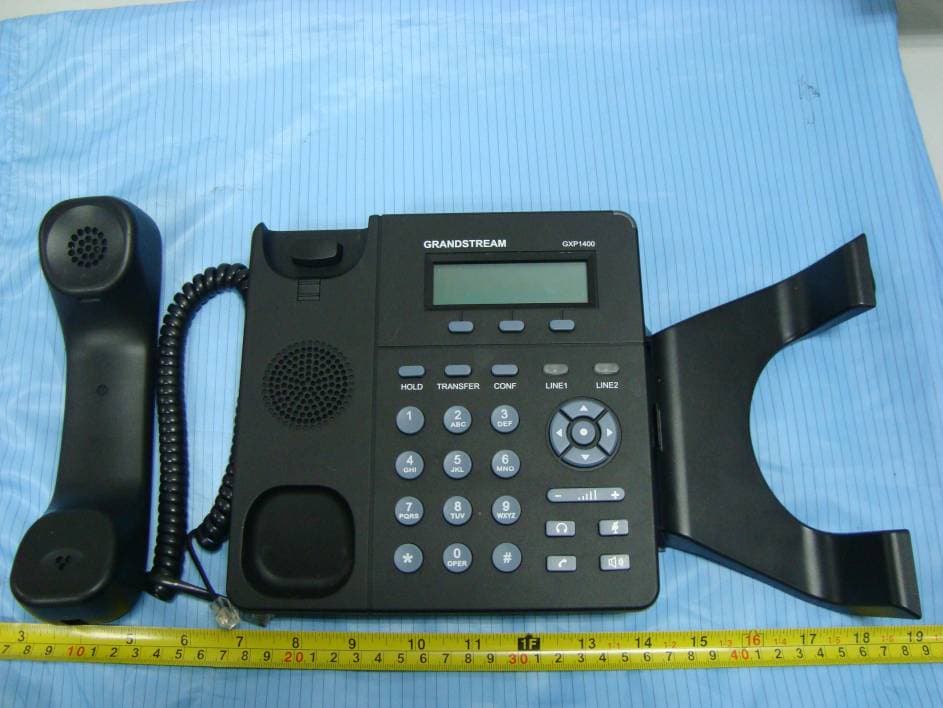
Click to zoom
Application Details
- Equipment Class
- JBP - Part 15 Class B Computing Device Peripheral
- Date of Grant
- Jan 16, 2011
- Application Purpose
- Original Equipment
- Date of Application
- Jan 16, 2011
- Equipment Note
- IP Phone
- Company
- Grandstream Networks, Inc.
- Country
- United States
Documents & Files
Document Text
Text extracted from the exhibit documents filed with the FCC. Open a document above to read the original.
Users Manual
Grandstream Networks, Inc. GXP1400 SERIES User Manual Page 1 of 39 Firmware 1.0.1.26 Last Updated: 12/2010 Grandstream Networks, Inc. GXP1400 SERIES SIP Enterprise Phone GXP1400 SERIES User Manual Page 2 of 39 Firmware 1.0.1.26 Last Updated: 12/2010 TABLE OF CONTENTS GXP1400 SERIES USER MANUAL WELCOME .................................................................................................................................................................4 INSTALLATION.........................................................................................................................................................5 EQUIPMENT PACKAGING.............................................................................................................................................5 CONNECTING YOUR PHONE........................................................................................................................................5 SAFETY COMPLIANCES................................................................................................................................................5 WARRANTY.................................................................................................................................................................5 PRODUCT OVERVIEW ............................................................................................................................................6 USING THE GXP1400 SERIES SIP ENTERPRISE PHONE ................................................................................9 GETTING FAMILIAR WITH THE LCD ............................................................................................................................9 MAKING PHONE CALLS.............................................................................................................................................12 ANSWERING PHONE CALLS.......................................................................................................................................15 PHONE FUNCTIONS DURING A PHONE CALL.............................................................................................................15 CALL FEATURES........................................................................................................................................................17 CUSTOMIZED LCD SCREEN & XML .........................................................................................................................17 CONFIGURATION GUIDE ......................................................................................................................................18 CONFIGURATION VIA KEYPAD..................................................................................................................................18 CONFIGURATION VIA WEB BROWSER......................................................................................................................21 SAVING THE CONFIGURATION CHANGES...................................................................................................................35 REBOOTING THE PHONE REMOTELY.........................................................................................................................35 SOFTWARE UPGRADE & CUSTOMIZATION..................................................................................................36 FIRMWARE UPGRADE THROUGH TFTP/HTTP ..........................................................................................................36 CONFIGURATION FILE DOWNLOAD...........................................................................................................................37 RESTORE FACTORY DEFAULT SETTING.......................................................................................................38 TABLE OF FIGURES GXP1400 SERIES USER MANUAL Table 10: GXP1400 SERIES Keypad Buttons.............................................................................. 11 Table 10: GXP1400 SERIES Keypad Buttons.............................................................................. 11 Figure 2: Keypad GUI Flow............................................................................................................ 20 TABLE OF TABLES GXP1400 SERIES USER MANUAL Table 1: Equipment Packaging ....................................................................................................... 5 Table 2: GXP Connectors ............................................................................................................... 5 Table 3: GXP1400 SERIES Product Models................................................................................... 6 Table 4: GXP1400 SERIES Feature Guide..................................................................................... 6 Table 5: GXP1400 SERIES Key Features in a Glance .................................................................. 6 GXP1400 SERIES User Manual Page 3 of 39 Firmware 1.0.1.26 Last Updated: 12/2010 Table 6: GXP1400 SERIES Hardware Specifications .................................................................... 6 Table 7: GXP1400 SERIES Technical Specifications .................................................................... 7 Table 8: LCD Buttons...................................................................................................................... 9 Table 9: LCD Icons ......................................................................................................................... 9 Table 11: GXP Call Features ........................................................................................................ 17 Table 12: Key Pad Configuration Menu ........................................................................................ 18 Table 13: Device Configuration - Status ........................................................................................22 Table 14: Device Configuration – Settings/…
Text truncated - open the document above for the full version.
Cover Letter(s)
Company: Grandstream Networks, Inc. Address: 5F, Bldg #1, No.2 Kefa Rd., Science & Technology Park,ShenZhen,China FCC Confidential Authorization Date: 2011-01-10 FEDERAL COMMUNICATIONS COMMISSIONS Authorization and Evaluation Division 7435 Oakland Mills Road Columbia, MD 21046 Confidentiality Request regarding application for certification of FCC ID: YZZGXP1400 Pursuant to Sections 0.457 and 0.459 of the Commission’s Rules, we hereby request confidential treatment of information accompanying this application as outlined below: • Detailed Circuit Schematics of EUT--- (Long term) Block Diagram--- (Long term) Circuit Description--- (Long term) The above materials contain trade secrets and proprietary information not customarily released to the public. The public disclosure of these materials may be harmful to the applicant and provide unjustified benefits to its competitors. The applicant understands that pursuant to Section 0.457 of the Rules, disclosure of this application and all accompanying documentation will not be made before the date of the Grant for this application. Sincerely Yours, Signature: Typed or Printed Name: Ning Wei Title: Senior Director of Production Company Name: Grandstream Networks, Inc.
External Photos
EXHIBIT B - EUT EXTERNAL PHOTOGRAPHS GXP1400 EUT – Full View EUT – Top View EUT – Bottom View GXP1405 EUT – Full View EUT – Top View EUT – Bottom View EUT – Adapter View EUT – Adapter Label View
ID Label/Location Info
EXHIBIT A - FCC ID LABELING AND LOCATION FCC ID Label FCC ID Label Location Label here The label shown shall be permanently affixed at a conspicuous location on the device and be readily visible to the user at the time purchase (Labeling requirements per 2.925) GXP1405 GXP1400 GXP1400 GXP1405
Internal Photos
EXHIBIT C - EUT INTERNAL PHOTOGRAPHS GXP1400 EUT – Cover off View EUT – Main Board Top View EUT – Main Board Bottom View EUT – Key Board Top View EUT – Key Board Bottom View GXP1405 EUT – Cover off View EUT – Main Board Top View EUT – Main Board Bottom View EUT – Key Board Top View EUT – Key Board Bottom View
Test Report
Note: This test report is prepared for the customer shown above and for the device described herein. It may not be duplicated or used in part without prior written consent from Bay Area Compliance Laboratories Corp. This report must not be used by the customer to claim product certification, approval, or endorsement by NVLAP*, NIST, or any agency of the Federal Government. * This report contains data that are not covered by the NVLAP accreditation and are marked with an asterisk “★” (Rev.2) FCC PART 15B MEASUREMENT AND TEST REPORT For Grandstream Networks, Inc. 5F, Bldg #1, No.2 Kefa Rd., Science & Technology Park, Shenzhen, Guangdong, China FCC ID: YZZGXP1400 Report Type: Original Report Product Type: IP Phone Test Engineer: Walt Kang Report Number: RSZ10121711 Report Date: 2011-01-13 Reviewed By: Lisa Zhu EMC Engineer Prepared By: Bay Area Compliance Laboratories Corp. (Shenzhen) 6/F, the 3rd Phase of WanLi Industrial Building, ShiHua Road, FuTian Free Trade Zone Shenzhen, Guangdong, China Tel: +86-755-33320018 Fax: +86-755-33320008 Grandstream Networks, Inc. FCC ID: YZZGXP1400 Report No.: RSZ10121711 Page 2 of 26 FCC Part15B Test Report TABLE OF CONTENTS GENERAL INFORMATION.......................................................................................................................................3 PRODUCT DESCRIPTION FOR EQUIPMENT UNDER TEST (EUT) .....................................................................................3 OBJECTIVE...................................................................................................................................................................3 RELATED SUBMITTAL(S)/GRANT(S).............................................................................................................................3 TEST FACILITY.............................................................................................................................................................3 SYSTEM TEST CONFIGURATION ..........................................................................................................................5 JUSTIFICATION.............................................................................................................................................................5 EUT EXERCISE SOFTWARE..........................................................................................................................................5 EQUIPMENT MODIFICATIONS.......................................................................................................................................5 LOCAL SUPPORT EQUIPMENT LIST AND DETAILS........................................................................................................5 EXTERNAL I/O CABLE..................................................................................................................................................5 CONFIGURATION OF TEST SETUP.................................................................................................................................6 BLOCK DIAGRAM OF TEST SETUP................................................................................................................................7 SUMMARY OF TEST RESULTS ...............................................................................................................................8 FCC §15.107 – AC LINE CONDUCTED EMISSIONS .............................................................................................9 MEASUREMENT UNCERTAINTY....................................................................................................................................9 EUT SETUP..................................................................................................................................................................9 EMI TEST RECEIVER SETUP.......................................................................................................................................10 TEST EQUIPMENT LIST AND DETAILS.........................................................................................................................10 TEST PROCEDURE......................................................................................................................................................10 TEST RESULTS SUMMARY..........................................................................................................................................10 TEST DATA................................................................................................................................................................10 FCC §15.109 – RADIATED SPURIOUS EMISSIONS............................................................................................17 MEASUREMENT UNCERTAINTY..................................................................................................................................17 EUT SETUP................................................................................................................................................................17 EMI TEST RECEIVER SETUP.......................................................................................................................................18 TEST EQUIPMENT LIST AND DETAILS.........................................................................................................................18 TEST PROCEDURE......................................................................................................................................................18 CORRECTED AMPLITUDE & MARGIN CALCULATION.................................................................................................19 TEST RESULTS SUMMARY..........................................................................................................................................19 TEST DATA.................................................................…
Text truncated - open the document above for the full version.
Test Setup Photos
EXHIBIT D - TEST SETUP PHOTOGRAPHS Conduction Emissions - Front View (Powered by AC/DC adapter) Conduction Emissions - Side View (Powered by AC/DC adapter) Conduction Emissions - Front View (Powered by POE) Conduction Emissions - Side View (Powered by POE) Radiated Emissions - Front View (30-1000 MHz, Powered by AC/DC adapter) Radiated Emissions - Rear View (30-1000 MHz, Powered by AC/DC adapter) Radiated Emissions - Front View (Above 1 GHz, Powered by AC/DC adapter) Radiated Emissions - Rear View (Above 1 GHz, Powered by AC/DC adapter) Radiated Emissions - Front View (30-1000 MHz, Powered by POE) Radiated Emissions - Rear View (30-1000 MHz, Powered by POE) Radiated Emissions - Front View (Above 1 GHz, Powered by POE) Radiated Emissions - Rear View (Above 1 GHz, Powered by POE)
Contact Information
Applicant
Ning Wei
Test Firm
Bay Area Compliance Laboratory Corp. (Shenzhen)John Chan
Technical Specifications
| # | Rule Parts | Frequency Range | Power Output |
|---|---|---|---|
| 1 | 15B | - | - |
Other Applications from Grandstream Networks, Inc.
YZZGWN7712P
Sep 04, 2026Layer 2 Lite Managed Network PoE Switch
Equipment Class
JAD - Part 15 Class A Digital DeviceYZZGWN7801PC
Aug 27, 2026Enterprise Layer 2+ Compact Managed Switch
Equipment Class
JAD - Part 15 Class A Digital DeviceYZZGWN7823P
Aug 26, 2026Layer 3 Multi-Gigabit Network Switch
Equipment Class
JAD - Part 15 Class A Digital DeviceYZZGWN7703P
Aug 26, 202624 Unmanaged Gigabit Port and 2 SFP Port Switch with 24 PoE+
Equipment Class
JAD - Part 15 Class A Digital DeviceYZZGWN7673
Jul 29, 2026Dual-Band Wi-Fi 7 Access Point
Equipment Class
DTS - Digital Transmission System