YZZGXV3240IP Multimedia Phone
Grandstream Networks, Inc.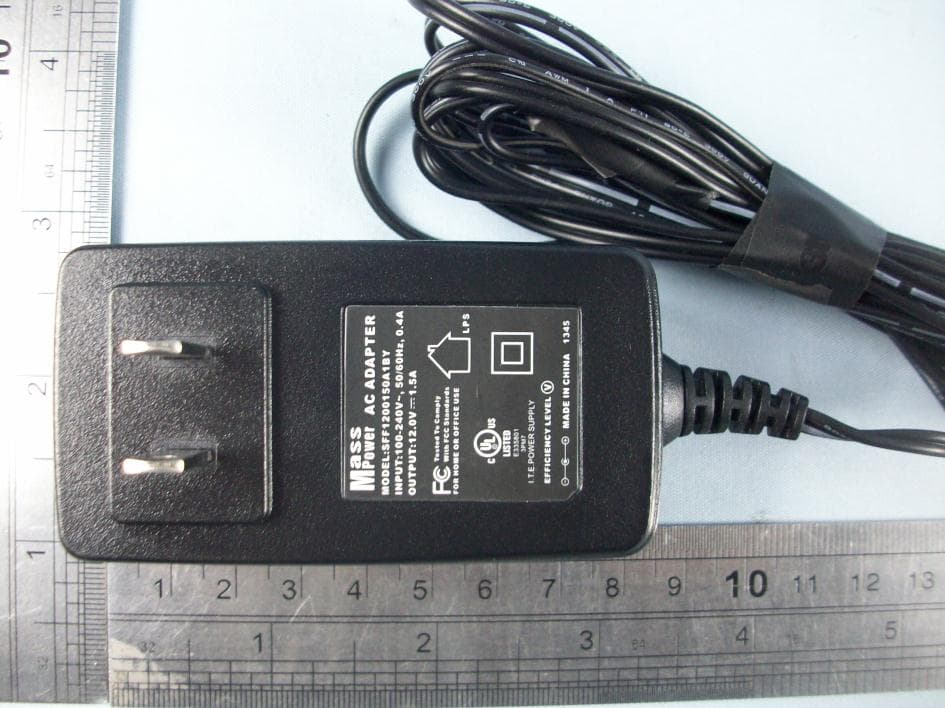
Click to zoom
Application Details
- Equipment Class
- DTS - Digital Transmission System
- Date of Grant
- Mar 24, 2014
- Application Purpose
- Original Equipment
- Date of Application
- Mar 24, 2014
- Equipment Note
- IP Multimedia Phone
- Frequency Range
- 2412.00000000 - 2462.00000000
- Company
- Grandstream Networks, Inc.
- Country
- United States
Documents & Files
Document Text
Text extracted from the exhibit documents filed with the FCC. Open a document above to read the original.
Users Manual
GXV3240,GXV3275 User’s Manual Regulatory EU Compliance Statement: The device complies with EU EMF Directive 1999/519/EC can be used in the European Community. “ Hereby, (Grandstream Networks, INC), declares that this (IP Multimedia Phone ) is in compliance with the essential requirements and other relevant provisions of Directive 1999/5/EC.” FCC Compliance Statement: This device complies with part 15 of the FCC Rules. Operation is subject to the following two conditions:(1)This device may not cause harmful interference, and (2) this device must accept any interference received, including interference that may cause undesired operation. Important: Any Changes or modifications not expressly approved by the party responsible for compliance could void the user's authority to operate the equipment. Note: This equipment has been tested and found to comply with the limits for a Class B digital device, pursuant to part 15 of the FCC Rules. These limits are designed to provide reasonable protection against harmful interference in a residential installation. This equipment generates, uses and can radiate radio frequency energy and, if not installed and used in accordance with the instructions, may cause harmful interference to radio communications. However, there is no guarantee that interference will not occur in a particular installation. If this equipment does cause harmful interference to radio or television reception, which can be determined by turning the equipment off and on, the user is encouraged to try to correct the interference by one or more of the following measures: —Reorient or relocate the receiving antenna. —Increase the separation between the equipment and receiver. —Connect the equipment into an outlet on a circuit different from that to which the receiver is connected. —Consult the dealer or an experienced radio/TV technician for help. RF Exposure: This equipment complies with FCC’s and Europe's RF radiation exposure limits set forth for an uncontrolled environment. The antenna(s) used for this transmitter must be installed and operated to provide a separation distance of at least 20 cm from all persons and must not be collocated or operating in conjunction with any other antenna or transmitter. Installers must ensure that 20cm separation distance will be maintained between the device (excluding its handset) and users.
Users Manual
www.grandstream.cn Grandstream Networks, Inc. GXV3240 Enterprise Application Phone User Manual Grandstream Networks, Inc. GXP3275 Enterprise Application Phone User Manual x-PDFDivision GXV3240 User Manual Grandstream Co., Ltd Software Version: 1.0.0.9 Format Version:0.2 I GXV3240 User Manual Index CHANGE LOG .................................................................................................. 3 FIRMWARE VERSION 1.0.0.11 ............................................................................................... 3 WELCOME ........................................................................................................ 4 PRODUCT OVERVIEW ........................................................................................................... 5 FEATURE HIGHLIGHTS .......................................................................................................... 7 INSTALLATION ................................................................................................. 9 EQUIPMENT PACKAGING ...................................................................................................... 9 PRODUCT APPEARANCE ...................................................................................................... 9 CONNECTING YOUR PHONE .............................................................................................. 13 GETTING TO KNOW GXV3240 ..................................................................... 15 SOFTWARE FEATURES ....................................................................................................... 15 HARDWARE FEATURES ....................................................................................................... 16 USING THE MESSAGE WAITING INDICATOR ..................................................................... 17 MANAGING STATUS BAR ..................................................................................................... 18 ONSCREEN KEYBOARD ...................................................................................................... 19 ENGLISH INPUT METHOD ............................................................................................. 20 CHINESE KEYBOARD .................................................................................................... 20 NUMBER AND SYMBOLS .............................................................................................. 20 DESKTOP .............................................................................................................................. 21 ASSISTIVE TOUCH ........................................................................................ 23 USING TOUCHSCREEN ....................................................................................................... 23 SHORTCUT KEYS ................................................................................................................. 24 MANAGING STATUS BAR ..................................................................................................... 25 DESKTOP MENU ................................................................................................................... 28 SWITCH DESKTOPS ............................................................................................................. 29 EDIT DESKTOP ..................................................................................................................... 29 ADDING AN APP TO DESKTOP ..................................................................................... 30 ADDING AN ITEM TO DESKTOP .................................................................................... 31 MANAGING DESKTOP APPS AND ITEMS ..................................................................... 32 x-PDFDivision GXV3240 User Manual Grandstream Co., Ltd Software Version: 1.0.0.9 Format Version:0.2 II MANAGING APPS ................................................................................................................. 35 EDITING WALLPAPER .......................................................................................................... 36 MAKING PHONE CALLS ............................................................................... 37 ACCOUNT ............................................................................................................................. 37 MAKING A CALL .................................................................................................................... 38 DIRECT DIALING ............................................................................................................ 38 REDIAL ........................................................................................................................... 39 CONTACTS ..................................................................................................................... 39 CALL HISTORY ............................................................................................................... 40 DIRECT IP CALL ............................................................................................................. 41 ANSWERING A CALL ............................................................................................................ 42 SINGLE INCOMING CALL .............................................................................................. 42 MULTIPLE INCOMING CALL .......................................................................................... 44 ACTIVE CALL ........................................................................................................................ 45 CALL HOLD AND CALL RESUME .................................................................................. 45 CALL RECORD ............................................................................................................... 46 MUTE ......................................................................…
Text truncated - open the document above for the full version.
Users Manual
GXV3240 User Manual TOOLS Grandstream Co., Ltd Software Version:1.0.0.11 Document Version:0.1 96 VIEW SMS The SMS page displays the received and sent SMS list, which are classified by contacts names or numbers as well as sorted by the time receive or send SMS. Tap on one specific SMS entry to view the interaction with the details of the contact's message, as shown in figure 92 below. Figure 93 GXV3240 Send SMS NEW SMS Tap on in the toolbar on the SMS page to access SMS draft page. See figure 93. x-PDFDivision GXV3240 User Manual TOOLS Grandstream Co., Ltd Software Version:1.0.0.11 Document Version:0.1 97 Figure 94 GXV3240 New SMS 1. Select the account to send SMS in the drop-down menu. 2. Add contact. GXV3240 supports adding contact from the Contacts as well as directly input phone number. Input the number in the textbox then input comma to add another contact. Press to select contacts or groups from the Contacts. 3. Click the textbox below to bring out the intelligent keyboard. 4. Input the message via the keyboard then touch “Send”. MANAGE SMS DELETE SMS 1. Long press one SMS to entry the editing mode. x-PDFDivision GXV3240 User Manual TOOLS Grandstream Co., Ltd Software Version:1.0.0.11 Document Version:0.1 98 2. Check the SMS you would like to delete and when it turns to blue background and the icon indicates the SMS has been selected and click again to unselect the SMS. Users could also tap on on the upper left corner to batch select/unselect. Select all indicates selects all SMS in the list. Unselect all indicates unselect all SMS in the list. 3. Press to delete the selected message. RECORDER Users could record conference, institution and personal notes via GXV3240 Recorder conveniently. There is no time limit to recording time and the larger the available storage capacity is, the longer the recording time is. Users could also find the recording file in the recorder and listen to it. x-PDFDivision GXV3240 User Manual TOOLS Grandstream Co., Ltd Software Version:1.0.0.11 Document Version:0.1 99 Figure 95 GXV3240 Recorder NORMAL RECORDER Figure 96 GXV3240 Normal Recorder 1. Tap on to initiate recording. 2. Click “Save” to save the record file, click “Cancel” will bring out the dialog for users to confirm whether to save the file or not and to stop recording. x-PDFDivision GXV3240 User Manual TOOLS Grandstream Co., Ltd Software Version:1.0.0.11 Document Version:0.1 100 Figure 97 GXV3240 Normal Record-Recording 3. Go back to the Recorder page, select one recording file and click on the right of the progress bar to play the file. CALL RECORDER In the process of an active call, the recording file will be saved on the phone. Users can only listen to it via Recorder. See figure 97 below. Figure 98 GXV3240 Call Recordings IP LOCATION x-PDFDivision GXV3240 User Manual TOOLS Grandstream Co., Ltd Software Version:1.0.0.11 Document Version:0.1 101 Based on the IP address provided, the following information will be given: Country, Region and City. See figure 98. Figure 99 GXV3240 IP Location DIAGNOSIS Users could make operation like LCD Diagnosis, Keypad Diagnosis, LED Diagnosis, Audio Loopback and Camera Test on GXV3240 via built-in Diagnosis app. x-PDFDivision GXV3240 User Manual TOOLS Grandstream Co., Ltd Software Version:1.0.0.11 Document Version:0.1 102 Figure 100 GXV3240 Diagnosis FTP SERVER GXV3240 supports file transfer via FTP server. As shown in figure 100.Users can tap on “Start FTP Server” to activate it. x-PDFDivision GXV3240 User Manual TOOLS Grandstream Co., Ltd Software Version:1.0.0.11 Document Version:0.1 103 Figure 101 GXV3240 FTP Server Once enabled, the field is shown in figure 101. Input the FTP address in the browser on the computer. i.e., ftp://192.168.124.136:2121/ Figure 102 GXV3240 FTP Server- Start FTP Server Before start the FTP server ,you can tap on on the lower right corner of the page to access the settings .You can set the username and password, port number and the file directory to login the remote server. x-PDFDivision GXV3240 User Manual TOOLS Grandstream Co., Ltd Software Version:1.0.0.11 Document Version:0.1 104 Figure 103 GXV3240 FTP Server Settings x-PDFDivision GXV3240 User Manual MULTIMEDIA Grandstream Co., Ltd Software Version:1.0.0.11 Document Version:0.1 105 MULTIMEDIA GXV3240 supports rich multimedia applications, users can play music and images on the device as well as surf the Internet to view news. GALLERY Gallery could be used to view pictures from GXV3240 internal storage. Click in the main menu to enter gallery. x-PDFDivision GXV3240 User Manual MULTIMEDIA Grandstream Co., Ltd Software Version:1.0.0.11 Document Version:0.1 106 Figure 104 GXV3240 Gallery The image folder from GXV3240 local storage will present on the Gallery page in the form of thumbnails, click the specific folder to enter image list interface. Click on the upper right to enable camera to take photos or videos. Click the image folder to enter images list page, as shown in figure 104. Figure 105 GXV3240 Gallery-Images List Tap the slider to the left or right to flip to view all the images. x-PDFDivision GXV3240 User Manual MULTIMEDIA Grandstream Co., Ltd Software Version:1.0.0.11 Document Version:0.1 107 Two modes to display images: users could tap on the switch button on the upper left corner to view images via Grid or Slide. Click the specific image to view it in full screen mode. See figure 105. Figure 106 GXV3240 Gallery- View Image in Full Screen Tap on the screen when the image is in full screen and click on the lower left corner to edit the image. Users could add effect to the image as well as crop/rotate the image, ect. The second way is to click the Menu button to edit the image. x-PDFDivision GXV3240 User Manual MULTIMEDIA Grandstream Co., Ltd Software Version:1.0.0.11 Document Version:0.1 108 Figure 107 GXV3240 Gallery- Edit Image Figure 108 GXV3240 Gallery- Edit Image via Menu Options Zoom In/ out :Users could zoom in/out the image via finger ge…
Text truncated - open the document above for the full version.
Cover Letter(s)
Grandstream Networks,INC FCC ID:YZZGXV3240 POWER OF ATTORNEY (March 5,2014) Federal Communications Commission Authorization and Evaluation Division 7435 Oakland Mills Road Columbia, MD 21046 To Whom It May Concern: We,(Grandstream Networks,INC) the undersigned, hereby authorize ECMG Electronic Technical Testing Corp.(MR.Jawen Yin, EMC Manager) on our behalf, to apply to the Federal Communications Commission on our equipment. Any and all acts carried out by ECMG Electronic Technical Testing Corp. (MR.Jawen Yin,EMC Manager)on our behalf shall have the same effect as acts of our own. This authorization expires on (June 30,2014). This is to advise that we are in full compliance with the Anti-Drug Abuse Act. We, (Grandstream Networks, INC), are not subject to a denial of federal benefits pursuant to Section 5301 of the Anti-Drug Act of 1988, 21 USC853a, and no party to the application is subject to a denial of federal benefits pursuant to that section.
External Photos
External Photographs EUT Model:GXV3240 EUT-Front View EUT-Rear View EUT-Side View #1 EUT-Side View #2 Power Adapter-Top View
ID Label/Location Info
Proposed FCC&CE Label Sample&Label Location Proposed FCC Label Format: Specifications: Text is black in color and is left justified. Labels are printed in indelible ink on permanent adhesive backing and shall be affixed at a conspicuous location on the EUT. Label Location
Internal Photos
Internal Photographs EUT Model:GXV3240 EUT-Uncovered View Main board- Top View #1 SD card slot Main board- Top View #2 Main board- Bottom View #1 WiFi+Bluetooth module view Removed shield cover view Main board- Bottom View #2 Main board View WiFi+Bluetooth module- Removed shield cover view WiFi&Bluetooth Antenna location View Antenna View
RF Exposure Info
www.ecmg-global.net FCC MAXIMUM PERMISSIBLE EXPOSURE ASSESSMENT REPORT On Model Name: IP Multimedia Phone Model Numbers: GXV3240 Brand Name: Grandstream FCC ID Number: YZZGXV3240 Prepared for Grandstream Networks,INC Test Report #: SHE-1402-11114-FCC-MPE Tested by: Galanz Daomen/ Engineer Company Name Reviewed by: ECMG Jawen Yin/Senior Engineer Company Name QC Manager: ECMG Swall Zhang/ QC Manager Company Name Test Report Released by: March 18 th , 2014 Swall Zhang Date Test Location Tests performed in a Certified ANSI Semi-Anechoic Chamber and Shielded Room. Test Site Location : Galanz 25 South Ronggui Rd., Shunde, Foshan,Guangdong, China Tel : (86)-757-23612785 Fax : (86)-757-23612537 Test Facility The test facility was recognized, certified, or accredited by the following organizations: CNAL – LAB Code: L2244 Galanz EMC Laboratory has been assessed and in compliance with CNAL/AC01:2002 accreditation criteria for testing laboratories (identical to ISO/IEC 17025:2005 General Requirements)for the Competence of Testing Laboratories. FCC – Registration No.: 580210 Galanz EMC Laboratory has been registered and fully described in a report filed with the (FCC) Federal Communications Commission. The acceptance letter from the FCC was maintained in our files. List of Test and Measurement Instruments No. Equipment Manufacturer Model No. Serial No. Calibrated Untill 01 Shielding Room ETS N/A N/A 2014-10-25 02 Spectrum Analyzer (9KHz-30GHz) R&S FSP30 100755 2014-10-25 03 EMI Receiver SCHAFFNER SMR4503 11725 2014-10-25 04 LISN ETS 4825/2 1161 2014-10-25 05 Coaxial Cable ATC-Lab N/A N/A 2014-10-25 06 Double-ridged Wave guide horn ETS 3115 6587 2014-10-25 07 Double-ridged Wave guide horn ETS 3160 00052486 2014-10-25 08 Microwave system amplifier (0.5G-26.5G) Agilent 83017A MY39500438 2014-10-25 09 Band-pass Filter Micro-Tronic BRM50702 S/N-030 2014-10-25 10 Biconilog Antenna ETS 3142C 00042672 2014-10-25 11 Semi-anechoic Chamber ETS N/A N/A 2014-10-25 Table of Contents DISCLAIMER NOTICE _____________________________________________________________ 1 REPRODUCTION CLAUSE _________________________________________________________ 1 OPINIONS AND INTERPRETATIONS _______________________________________________ 1 STATEMENT OF MEASUREMENT UNCERTAINTY ___________________________________ 1 ADMINISTRATIVE DATA __________________________________________________________ 2 EUT DESCRIPTION ________________________________________________________________ 3 ATTACHMENT 1 – RF EXPOSURE COMPLIANCE REQUIREMENT ____________________ 5 Test Report #: SHE-1212-10918-FCC MPE Prepared for Grandstream Networks,Inc. Prepared by ECMG Electronic Technical Testing Corp (Shenzhen). Page 1 of 6 Disclaimer Notice When government drawing, specification, or other data are used for any purpose other than in connection with a definitely related government procurement operation, the United States Government thereby incurs no responsibility nor any obligation whatsoever; and the fact that the Government may have formulated, furnished, or in any way supplied the said drawing, specifications, or other data, is not to be regarded by implication or otherwise in any manner licensing the holder or any other person or corporation, or conveying any rights or permission to manufacture, use, or sell patented invention that may in any way be related thereto. This report must not be used to claim product endorsement by NVLAP or any agency of the U.S. Government. Reproduction Clause Any reproduction of this document must be done in full. No single part of this document may be reproduced without permission from ECMG Electronic Technical Testing Corp (Shenzhen). Opinions and Interpretations This test report relates to the abovementioned equipment under test (EUT). Without the permission of ECMG Electronic Technical Testing Corp (Shenzh en) Test Lab this test report is not permitted to be duplicated in extract s.This test report does not entitle to carry any test mark on this or similar products.The manufacturer has sole responsibility of continued compliance of the device. Statement of Measurement Uncertainty The data and results referenced in the document are true and accura te.The reader is cautioned that there may be errors within the calibration limits of the equipment and facilities that can account for a nominal measurement error. Furthermore, component and process variability of devices similar to that tested may resultin additional deviation. Test Report #: SHE-1402-11114-FCC-MPE Prepared for Grandstream Networks,Inc. Prepared by ECMG Electronic Technical Testing Corp (Shenzhen). Page 2 of 6 Administrative Data Test Sample : IP Multimedia Phone Model Name : GXV3240 Model Tested : GXV3240 Receipt Date : March 5 th , 2014 Date Tested : March 13 th to 16 th , 2014 Applicant : Grandstream Networks, INC Address 5F, Bldg #1, No.2 Kefa Rd., Science & Technology Park, Shenzhen, China Telephone : (86)-755-26014600 Fax : (86)-755-26014601 Manufacturer : Grandstream Networks, INC Address 5F, Bldg #1, No.2 Kefa Rd., Science & Technology Park, Shenzhen, China Telephone : (86)-755-26014600 Fax : (86)-755-26014601 Factory : Grandstream Networks, INC Address 5F, Bldg #1, No.2 Kefa Rd., Science & Technology Park, Shenzhen, China Telephone : (86)-755-26014600 Fax : (86)-755-26014601 Test Report #: SHE-1402-11114-FCC-MPE Prepared for Grandstream Networks,Inc. Prepared by ECMG Electronic Technical Testing Corp (Shenzhen). Page 3 of 6 EUT Description Grandstream Networks, INC. Tested model GXV3240 (referred to as the EUT in this report) is an IP Multimedia Phone.The EUT is an IP Multimedia Phone with IEEE 80211.b/g/n(1T1R) and Bluetooth Radio functionalityes. Technical specifications of the EUT are as beLowests: Parameters Ranges Basic parameters Rated voltage DC +12V Rated Current DC 1.5A Specifications of Bluetooth Operating band 2402-2480MHz Modulation Techniques FHSS Number of Channels: 79 channels Data Rate GFSK (1Mbps), π/4-DQPSK (2Mbps), 8DPSK…
Text truncated - open the document above for the full version.
Test Report
www.ecmg-global.net FCC WIRELESS EQUIPMENT TEST&MEASUREMENT REPORT On Model Name: IP Multimedia Phone Model Numbers: GXV3240 Brand Name: Grandstream FCC ID Number: YZZGXV3240 Prepared for Grandstream Networks,INC Test Specification: FCC Part 15, Subpart C Test Report #: SHE-1402-11114-WLAN-FCC ID Tested by: Galanz Daomen/Engineer Company Name Reviewed by: ECMG Jawen Yin/Senior Engineer Company Name QC Manager: ECMG QC Manager Company Name Test Report Released by: March 19 th , 2014 Swall Zhang Date List of Attached Files Exhibit Type File Description File Name Test Report Test Report YZZGXV3240 _Test report.pdf Operation Description Technical Description YZZGXV3240 _Operation Description.pdf External Photos External Photos YZZGXV3240 _External Photos.pdf Internal Photos Internal Photos YZZGXV3240 _Internal Photos.pdf Block Diagram Block Diagram YZZGXV3240 _Block Diagram.pdf Schematics Circuit Diagram YZZGXV3240 _Schematics.pdf ID Label/Location Label and Location YZZGXV3240 _Label & Location.pdf User Manual User Manual YZZGXV3240 _User Manual.pdf Test Setup Photos Test Setup Photos YZZGXV3240 _Test Setup Photos.pdf Test Location Tests performed in a Certified ANSI Semi-Anechoic Chamber and Shielded Room. Test Site Location : Galanz 25 South Ronggui Rd., Shunde, Foshan,Guangdong, China Tel : (86)-757-23612785 Fax : (86)-757-23612537 Test Facility The test facility was recognized, certified, or accredited by the folLowesting organizations: CNAL – LAB Code: L2244 Galanz EMC Laboratory has been assessed and in compliance with CNAL/AC01:2002 accreditation criteria for testing laboratories (identical to ISO/IEC 17025:2005 General Requirements)for the Competence of Testing Laboratories. FCC – Registration No.: 580210 Galanz EMC Laboratory has been registered and fully described in a report filed with the (FCC) Federal Communications Commission. The acceptance letter from the FCC was maintained in our files. List of Test and Measurement Instruments No. Equipment Manufacturer Model No. Serial No. Calibrated Untill 01 Shielding Room ETS N/A N/A 2014-10-25 02 Spectrum Analyzer (9KHz-30GHz) R&S FSP30 100755 2014-10-25 03 EMI Receiver SCHAFFNER SMR4503 11725 2014-10-25 04 LISN ETS 4825/2 1161 2014-10-25 05 Coaxial Cable ATC-Lab N/A N/A 2014-10-25 06 Double-ridged Wave guide horn ETS 3115 6587 2014-10-25 07 Double-ridged Wave guide horn ETS 3160 00052486 2014-10-25 08 Microwave system amplifier (0.5G-26.5G) Agilent 83017A MY39500438 2014-10-25 09 Band-pass Filter Micro-Tronic BRM50702 S/N-030 2014-10-25 10 Biconilog Antenna ETS 3142C 00042672 2014-10-25 11 Semi-anechoic Chamber ETS N/A N/A 2014-10-25 Note: All testing were performed using internationally recognized standards.All test instruments were calibrated. Table of Contents DISCLAIMER NOTICE _____________________________________________________________ 1 REPRODUCTION CLAUSE ________________________________________________________ 1 OPINIONS AND INTERPRETATIONS _______________________________________________ 1 STATEMENT OF MEASUREMENT UNCERTAINTY __________________________________ 1 ADMINISTRATIVE DATA _________________________________________________________ 2 EUT DESCRIPTION _______________________________________________________________ 3 TEST SUMMARY _________________________________________________________________ 5 TEST MODE APPLICABILITY AND TESTED CHANNEL DETAIL ______________________ 6 DESCRIPTION OF AVAILABLE ANTENNAS _________________________________________ 7 EUT EXERCISE SOFTWARE _______________________________________________________ 7 EQUIPMENT MODIFICATION _____________________________________________________ 7 TEST SYSTEM DETAILS __________________________________________________________ 8 ATTACHMENT 1 - ANTENNA REQUIREMENT ______________________________________ 9 ATTACHMENT 2 - CONDUCTED EMISSION TEST RESULTS ______________________ 11 ATTACHMENT 3- RADIATED EMISSION TEST ___________________________________ 14 ATTACHMENT 4 – OCCUPIED BANDWIDTH TEST _______________________________ 37 ATTACHMENT 5– MAXIMUM PEAK OUTPUT POWER ____________________________ 44 ATTACHMENT 6 – BAND EDGES TEST __________________________________________ 51 ATTACHMENT 7 – PEAK POWER SPECTRAL DENSITY TEST _____________________ 73 ATTACHMENT: TEST SET-UP PHOTOGRAPH ____________________________________ 80 Test Report #: SHE-1402-11114-WLAN-FCC ID Prepared for Grandstream Networks,INC. Prepared by ECMG Electronic Technical Testing Corp (Shenzhen). Page 1 of 81 Disclaimer Notice When government drawing, specification, or other data are used for any purpose other than in connection with a definitely related government procurement operation, the United States Government thereby incurs no responsibility nor any obligation whatsoever; and the fact that the Government may have formulated, furnished, or in any way supplied the said drawing, specifications, or other data, is not to be regarded by implication or otherwise in any manner licensing the holder or any other person or corporation, or conveying any rights or permission to manufacture, use, or sell patented invention that may in any way be related thereto. This report must not be used to claim product endorsement by NVLAP or any agency of the U.S. Government. Reproduction Clause Any reproduction of this document must be done in full. No single part of this document may be reproduced without permission from ECMG Electronic Technical Testing Corp (Shenzhen). Opinions and Interpretations This test report relates to the abovementioned equipment under test (EU T).Without the permission of ECMG Electronic Technical Testing Corp (Shenzhen). Test Lab this test report is not permitted to be duplicated in extracts.This test report does not entitle to carry any test mark on this or similar products.The manufacturer has sole responsibility of continu ed compliance of the device. Statement of Measurement Uncertainty The data and results referenced in the document are true and accurate.The reader is caution…
Text truncated - open the document above for the full version.
Test Setup Photos
Test Set up photos: For FCC Part 15, Subpart B: Conducted Emission Test Set-up –Front View Conducted Emission Test Set-up –Rear View Radiated Emission Test Set-up (9KHz-30MHz) Radiated Emission Test Set-up (Below 1GHz) Radiated Emission Test Set-up (Above 1GHz) Radiated Emission Test Set-up (rear view) For WiFi&bluetooth: Radiated Emission Test Set-up -below 1GHz Radiated Emission Test Set-up - Above 1GHz
Contact Information
Applicant
Ning Wei
Test Firm
GalanzLu Han
Technical Specifications
| # | Rule Parts | Frequency Range | Power Output |
|---|---|---|---|
| 1 | 15C | 2.41 GHz - 2.46 GHz | 213.00 mW |
Other Applications from Grandstream Networks, Inc.
YZZGWN7712P
Sep 04, 2026Layer 2 Lite Managed Network PoE Switch
Equipment Class
JAD - Part 15 Class A Digital DeviceYZZGWN7801PC
Aug 27, 2026Enterprise Layer 2+ Compact Managed Switch
Equipment Class
JAD - Part 15 Class A Digital DeviceYZZGWN7823P
Aug 26, 2026Layer 3 Multi-Gigabit Network Switch
Equipment Class
JAD - Part 15 Class A Digital DeviceYZZGWN7703P
Aug 26, 202624 Unmanaged Gigabit Port and 2 SFP Port Switch with 24 PoE+
Equipment Class
JAD - Part 15 Class A Digital DeviceYZZGWN7673
Jul 29, 2026Dual-Band Wi-Fi 7 Access Point
Equipment Class
DTS - Digital Transmission System