ZHK-61262022.4GHz STEREO HEADSET
SteelSeries ApS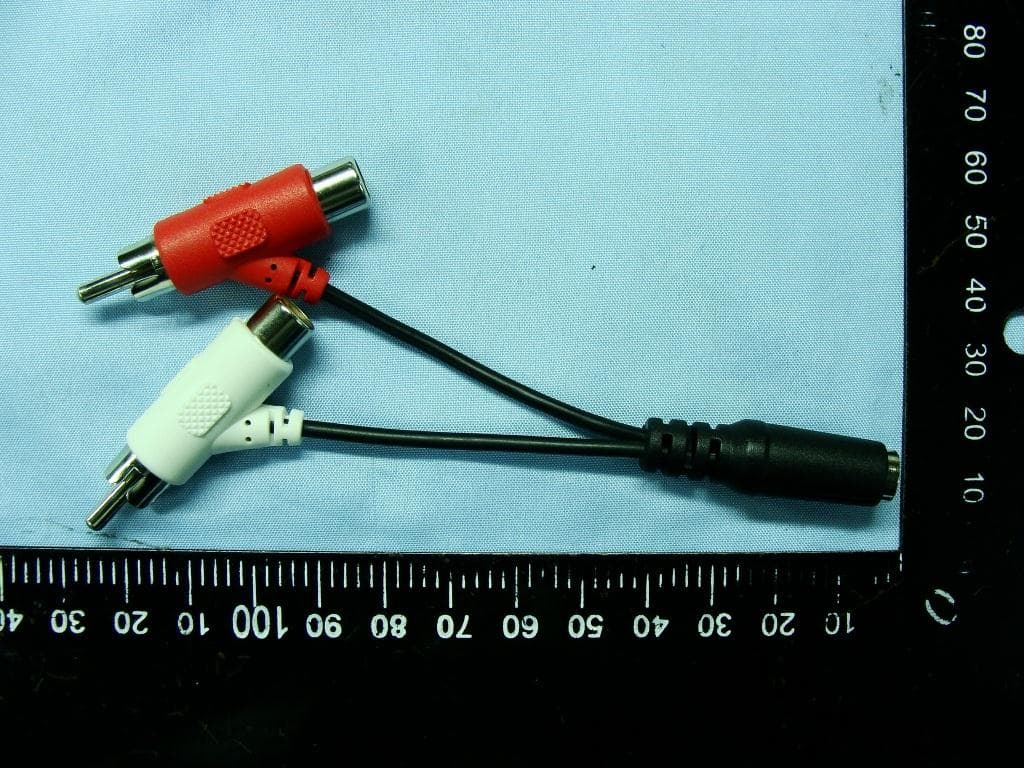
Click to zoom
Application Details
- Equipment Class
- DSS - Part 15 Spread Spectrum Transmitter
- Date of Grant
- May 22, 2011
- Application Purpose
- Original Equipment
- Date of Application
- May 17, 2011
- Equipment Note
- 2.4GHz STEREO HEADSET
- Frequency Range
- 2404.00000000 - 2478.00000000
- Company
- SteelSeries ApS
- Country
- United States
Documents & Files
Document Text
Text extracted from the exhibit documents filed with the FCC. Open a document above to read the original.
Users Manual
SPECTRUM GAMING HEADSET 7XB 4 5 PAIRING PROCEDURE Your SteelSeries Spectrum 7xb comes pre-paired. If for some reason the headset stops receiving from the transmitter follow the following procedure: • Start with the headset in the off state. • Press and hold the volume down and power buttons. Make sure to press the volume down button first. The LED will turn ON SOLID. • After ~3 seconds the LED will turn OFF. Release the power and volume buttons. • The headset pairing information is now reset. Power the headset on to connect with a new transmitter. If that does not pair your headset and Transmitter, you can also reset the pairing by the following: • Power on the transmitter. • Press the pairing reset button by inserting one end of an unfolded paper clip into the pin hole between the USB cable and 3.5mm jack. Once the button is pressed, the LEDs will turn off. Remove the paper clip. • The transmitter pairing information is now reset. If a headset (with reset pairing) is already powered on, then the transmitter will connect to it and pair immediately. DIsAssEmblING YOUR stEElsERIEs 7xb 1. Remove the cord from the headset by gently pulling on the microUSB connector. 2. On the inside of the headband, locate the tab 3. Press the tab firmly and gently pull the headband out of the hanger 4. Repeat steps 2 and 3 to detach the other side stEElsERIEs lIVEmIx SteelSeries LiveMix feature lowers the game volume when your teammates are talking. When teammates are giving each other important instructions through the microphone, the game sound will automatically lower in order for the players to hear the instructions clearly. Game volume will resume after talking stops. To turn LiveMix on and off, push the LiveMix button. SOUND LEVEL TIME 10 ms1.5 sec + GAME AUDIOVOICE AUDIO OtHER INFORmAtION SteelSeries Spectrum 7xb headset may also be used with a computer. To do so, plug the audio plug from the 7xb transmitter into the headset jack of the computer and the USB cable into an available USB port. sAFEtY tIPs Avoid hearing damage by taking into consideration that a loud volume level can damage your eardrums. Although you may not experience initial discomfort, your ears may be experiencing hearing damage. Ringing in your ears once you have removed the 7xb headset may be an indicator that the volume is too loud. When placing the headset on your ears, make sure the volume is turned down to low and then slowly turn the volume up to a level that you are comfortable with. Do not overdrive the speakers due to damage it can cause to both the 7xb headset and your eardrums. Avoid the use of headsets for an extended period of time to avoid hearing damage. sEE AlsO SteelSeries products are recommended for the ultimate experience. For more information please visit: www.steelseries.com For More FAQ Support: Please visit: http://faq.steelseries.com/categories/Audio/SteelSeries+7xb/ English English 8 9 PROCÉDURE D’APPARIEmENt Votre Spectrum 7xb de SteelSeries est livré pré-apparié. Si pour une raison quelconque le casque arrête de recevoir un signal de l’émetteur, suivez la procédure suivante : • Commencez avec le casque étant éteint. • Appuyez sur les boutons de diminution du volume et de mise en marche et maintenez-les enfoncés. Assurez-vous d’appuyer d’abord sur le bouton de diminution du volume. La LED s’allumera et RESTERA ALLUMÉE. • Après environ 3 secondes la LED s’ÉTEINDRA. Relâchez les boutons de mise en marche et de volume. • Les informations d’appariement du casque sont maintenant réinitialisées. Mettez sous tension le casque pour qu’il se connecte à un nouvel émetteur. Si cela ne fonctionne pas, vous pouvez également réinitialiser l’appariement d’émetteur en : • Mettant l’émetteur sous tension. • Appuyant sur le bouton de réinitialisation d’appariement en insérant une extrémité d’un trombone non plié dans le trou d’épingle entre le câble USB et le jack de 3,5 mm. Une fois le bouton enfoncé, les LED s’éteindront. Retirez le trombone. • Les informations d’appariement de l’émetteur sont maintenant réinitialisées. Si un casque (avec appariement réinitialisé) est déjà allumé, l’émetteur s’y connectera et s’y appariera immédiatement. DÉmONtER VOtRE stEElsERIEs 7xb 1. Retirez le cordon du casque en tirant doucement sur le connecteur microUSB. 2. À l’intérieur du serre-tête, localisez la languette 3. Appuyez fermement sur la languette et sortez doucement le serre-tête du support 4. Reprenez les étapes 2 et 3 afin de détacher l’autre côté lIVEmIx DE stEElsERIEs La fonction LiveMix de SteelSeries réduit le volume du jeu lorsque vos coéquipiers parlent. Lorsque vos coéquipiers se donnent des instructions importantes à travers leurs microphones, le son du jeu s’abaissera automatiquement afin que les joueurs puissent percevoir les instructions plus clairement. Le volume du jeu repassera à la normale une fois la conversation terminée. SOUND LEVEL TIME 10 ms1.5 sec + GAME AUDIOVOICE AUDIO Francais INFORmAtIONs sUPPlEmENtAIREs Le casque Spectrum 7xb de SteelSeries peut également être utilisé sur un ordinateur. Pour ce faire, branchez la fiche audio de l’émetteur 7xb dans le port audio pour casque de l’ordinateur et le câble USB sur un port USB disponible. CONsEIls DE sECURItE Evitez des dommages auditifs en prenant en compte le fait qu’un niveau de volume élevé peut endommager vos tympans. Bien que vous ne ressentiez pas forcément une sensation désagréable au départ, vos oreilles peuvent être en train de subir des dommages auditifs. Un bourdonnement dans vos oreilles lorsque vous ôtez le casque 7xb peut être un indicateur d’un volume trop puissant. Lorsque vous mettez le casque sur vos oreilles, assurez-vous que le volume est très bas, puis augmentez-le avec modération jusqu’à un niveau qui vous semble confortable. Évitez des niveaux de volume très élevés pour prévenir les dommages pouvant être occasionnés tant au casque 7xb que à vos tympans. Évitez d’utiliser des casques pendant des périodes prolongées afin de prévenir les d…
Text truncated - open the document above for the full version.
Users Manual
24 25 PROCEDImENtO DE EmPARElHAmENtO O seu SteelSeries Spectrum 7xb vem pré-emparelhado. Se por alguma razão os auscultadores pararem de receber do transmissor siga o seguinte procedimento: • Inicie com os auscultadores desligados. • Mantenha pressionado o volume para baixo e os botões de alimentação. Certifique-se de que pressiona o botão de volume para baixo primeiro. O LED ligará ON SOLID. • Após aproximadamente 3 segundos o LED irá desligar-se. Liberte os botões de alimentação e do volume. • A informação de emparelhamento dos auscultadores está agora redefinida. Ligue os auscultadores para ligá-los com um novo transmissor. Se não funcionar pode também redefinir o emparelhamento do Transmissor ao: • Ligar o transmissor. • Pressionar o botão de redefinição de emparelhamento ao inserir uma extremidade de um clipe de papel desdobrado no orifício do pino entre o cabo USB e a ficha de 3,5mm. Uma vez que o botão é pressionado, os LEDs irão desligar-se. Retire o clipe de papel. • A informação de emparelhamento do transmissor está agora redefinida. Se os auscultadores (com emparelhamento de redefinição) estão já ligados, de seguida, o transmissor irá ligar-se aos auscultadores e emparelhar imediatamente. DEsmONtAR O stEElsERIEs 7xb 1. Remova o fio dos auscultadores ao puxar gentilmente o conector micro USB. 2. No interior da fita, localize a patilha 3. Pressione firmemente a patilha e gentilmente puxe a fita para fora do gancho 4. Repita os passos 2 e 3 para separar o outro lado stEElsERIEs lIVEmIx A funcionalidade SteelSeries LiveMix diminui o volume do jogo quando os seus colegas de equipa estão a falar. Quando os colegas de equipa estão a dar instruções importantes uns aos outros através do microfone, o som do jogo irá automaticamente baixar de modo aos jogadores ouvirem claramente as instruções. O volume do jogo irá regressar à definição anterior após a conversação parar. SOUND LEVEL TIME 10 ms1.5 sec + GAME AUDIOVOICE AUDIO Português OUtRAs INFORmAÇÕEs O auricular SteelSeries Spectrum 7xb pode ser utilizado também com um computador. Para o fazer, ligue a ficha áudio do transmissor 7xb à entrada do auricular do computador e o cabo USB a uma porta USB disponível. DICAs DE sEGURANÇA Evite danos auditivos tomando em consideração que um volume alto pode lesar os seus tímpanos. Ainda que possa não sentir inicialmente desconforto, os seus ouvidos podem estar a sofrer danos auditivos. Se ouvir um som de campainha depois de tirar o auricular 7xb pode ser um indicador que o volume está demasiado alto. Quando colocar o auricular, certifique-se de que o volume está baixo e depois aumente lentamente o volume para um nível em que se sinta confortável.· Não sobrecarregue as colunas pois poderá danificar o auricular 7xb e os seus tímpanos. Evite utilizar o auricular durante um período de tempo prolongado de forma a evitar danos auditivos. VEJA tAmbÉm Os produtos SteelSeries são recomendados para uma experiência máxima. Para mais informações, visite: www.steelseries.com Português 28 29 ПРОЦЕДУРА КОММУТАЦИИ Устройство SteelSeries Spectrum 7xb поставляется с настроенными параметрами коммутации. Если по какой-либо причине гарнитура перестает получать сигналы передатчика, выполните следующую процедуру: • Выключите гарнитуру, если она включена. • Нажмите и удерживайте кнопки уменьшения громкости и питания. Первой обязательно нажмите кнопку уменьшения громкости. Индикатор загорится, и будет светиться некоторое время. • Примерно через три секунды индикатор отключится. Отпустите кнопки питания и громкости. • Настройки коммутации гарнитуры вернулись в исходное состояние. Включите гарнитуру для подключения с новым передатчиком. Если это не помогло, можно сбросить настройки коммутации передатчика: • Включите передатчик. • Нажмите на кнопку сброса коммутации (расположена в маленьком отверстии между кабелем USB и разъемом 3,5 мм) с помощью отогнутого конца скрепки. После нажатия на эту кнопку индикатор перестанет светиться. Выньте скрепку. • Настройки коммутации передатчика вернулись в исходное состояние. Если гарнитура (со сброшенными параметрами коммутации) уже включена, передатчик сразу же подключится к ней. РА збОР гАРнИТУРы SteelSerieS 7xB 1. Отделите шнур от гарнитуры, слегка потянув за разъем microUSB. 2. Найдите язычок, расположенный на внутренней части ободка. 3. С силой надавите на язычок, и аккуратно вытяните дужку ободка из крепления. 4. Повторите шаги 2 и 3, чтобы отсоединить вторую дужку ободка. ФУн КЦИЯ SteelSerieS liVeMix Функция SteelSeries LiveMix обеспечивает снижение уровня громкости игры во время разговора ваших товарищей по команде. Когда члены команды сообщают друг другу какие-либо инструкции по микрофону, звук игры автоматически уменьшается для того, чтобы игроки могли отчетливо слышать эти сообщения. После окончания разговора громкость игры вернется на исходный уровень. SOUND LEVEL TIME 10 ms1.5 sec + GAME AUDIOVOICE AUDIO Русский ДОПОЛн ИТЕЛЬныЕ СВЕДЕнИЯ Гарнитура SteelSeries Spectrum 7xb может также использоваться с компьютером. Для этого подключите штекер звукового сигнала передатчика 7xb к гнезду гарнитуры компьютера и подключите USB-кабель к свободному порту USB. СОВЕТы ПО бЕз ОПАСн ОСТИ Учтите, что высокий уровень громкости может повредить барабанные перепонки. Даже если вы поначалу не испытываете дискомфорта, ваш слух может пострадать. Звон в ушах после снятия гарнитуры 7xb может означать, что использовался слишком высокий уровень громкости. Перед надеванием гарнитуры убедитесь, что громкость убавлена до минимума, а затем медленно увеличивайте громкость до комфортного уровня. Не включайте громкость на максимум, поскольку это может привести к порче гарнитуры 7xb и к разрушению барабанных перепонок. Во избежание проблем со слухом не используйте гарнитуру в течение длительного времени. СМ. ТАКЖЕ Изделия SteelSeries рекомендуются для получения максимальных ощущений во время игры. Дополнительная информация доступна на сайте: www.steelseries.com Русский 32 33 配对步骤 您购买的赛睿 SteelSeries Spectrum…
Text truncated - open the document above for the full version.
Users Manual
36 37 페어링 절차 SteelSeries Spectrum 7xb는 페어링 되지 않은 상태로 들어 있습니다. 어떠한 이유로 전송기로부터 헤드셋에 소리가 전달되지 않을 경우 다음 절차를 수행합니다. • 헤드셋을 꺼짐 상태에서 시작합니다. • 볼륨 감소와 전원 버튼을 잠시 누르고 있습니다. 볼륨 감소 버튼을 먼저 눌러야 합니다. LED가 켜진 상태가 됩니다. • 3초 정도 지나면 LED가 꺼집니다. 전원 및 볼륨 버튼을 놓습니다. • 헤드셋 페어링 정보가 새로 설정됩니다. 헤드셋을 켜면 새 전송기와 연결됩니다. 이렇게 해도 해결되지 않을 경우 다음의 방법으로 전송기 페어링을 재설정할 수 있습니다. • 전송기 전원을 켭니다. • 펼쳐진 페이퍼 클립의 한쪽 끝을 USB 케이블과 3.5mm 잭 사이에 있는 핀 홀에 삽입하여 페어링 재설정 버튼을 누릅니다. 버튼을 누르면 LED가 꺼집니다. 페이퍼 클립을 뺍니다. • 전송기 페어링 정보가 재설정됩니다. 재설정 페어링이 진행된 헤드셋에 이미 전원이 들어와 있는 경우 전송기가 연결되며 바로 페어링됩니다. StEELSEriES 7xB 7H 분해 1. microUSB 커넥터에서 부드럽게 잡아당겨 헤드셋에서 코드를 제거합니다. 2. 헤드 밴드 안에서 탭의 위치를 찾습니다. 3. 탭을 단단히 누르고 행거 밖으로 헤드 밴드를 부드럽게 잡아당깁니다. 4. 단계 2와 단계 3을 반복하여 다른 쪽도 분리합니다. St EELSEriES LiVEMix SteelSeries LiveMix 기능을 사용하면 팀원들과 대화할 때 게임 볼륨이 줄어듭니다. 마이크를 통해 팀원간에 중요한 지침을 전달할 경우 플레이어들이 지침을 선명하게 들을 수 있도록 게임 사운드가 자동으로 줄어듭니다. 대화가 끝나면 게임 볼륨은 자동으로 커집니다. SOUND LEVEL TIME 10 ms1.5 sec + GAME AUDIOVOICE AUDIO 한국의 기타 정보 SteelSeries Spectrum 7xb 헤드셋은 또한 컴퓨터에서 사용할 수 있습니다. 컴퓨터에서 사용하려면 7xb 전송기의 오디오 플러그를 컴퓨터의 헤드셋 잭에 연결하고 사용 가능한 USB 포트에 USB 케이블을 연결합니다. 안전 정보 소리가 클 경우 고막이 손상될 수 있다는 사실을 고려하여 청각 손상을 피하십시오. 처음에는 통증을 느끼지 못할 수도 있지만 귀는 청각 손상을 겪을 수도 있습니다. 7xb 헤드셋을 벗은 후 귀에서 울리는 소리가 나면 소리가 너무 크다는 것을 나타냅니다. 헤드셋을 귀에 댈 때 볼륨이 낮게 설정되어 있어야 하며 헤드셋을 쓴 후 편안하게 느끼는 수준까지 볼륨 크기를 천천히 높여 조절합니다. 7xb 헤드셋 및 고막 둘 다에 손상을 줄 수 있으므로 스피커를 정격 수준 이상으로 오버드라이브(과잉 가동)하지 마십시오. 청각 손상을 피하기 위해 오랫동안 헤드셋을 사용하지 마십시오. 추가 정보 사용 경험을 극대화하기 위해 SteelSeries 제품과의 사용을 권장합니다. 자세한 정보는 www.steelseries.com을 방문하십시오. 한국의 40 41 ペアリング手順 SteelSeries Spectrum 7xbは、予めペアになっています。何らかの理由でヘッドセットが送信機から受信できなくな った場合は、以下の手順に従ってください。 • オフの状態のヘッドセットから開始します。 • 音量下降ボタンと電源ボタンを押したままにします。必ず音量下降ボタンを最初に押してくださ い。LEDが点灯します。 • 3秒以内にLEDが消えます。電源ボタンと音量ボタンを離します。 • ヘッドセットのペアリング情報がリセットされました。ヘッドセットの電源をオンにして、新しい送信 機に接続します。 接続されない場合は、以下の手順で送信機もリセットすることができます。 • 送信機の電源を入れます。 • USBケーブルと3.5mmジャックの間のピン穴に、まっすぐにしたペーパークリップの片方の端を挿入する ことにより、ペアリングリセットボタンを押します。ボタンが押されたら、LEDが消えます。ペーパク リップを抜きます。 • 送信機のペアリング情報がリセットされました。ヘッドセット(ペアリングリセット済み)がすでに電 源オンになっている場合は、送信機はヘッドセットに接続され、即座にペアになります。 ご使用のStEELSEriES 7xBの分解 1. マイクロUSBコネクタをゆっくりと引いて、ヘッドセットからコードを取り外します。 2. ヘッドセットの内部のタブを見つけます。 3. しっかりとタブを押して、ハンガーからゆっくりとヘッドバンドを引きます。 4. 手順2と3を繰り返して、もう一方の側も取り外します。 St EELSEriES LiVEMix SteelSeries LiveMix機能により、チームメイトが話しているときに、ゲームの音量が下がります。チームメイトがマ イクを通して、お互いに重要な指示を出しているとき、プレーヤーに指示がよく聞こえるように、ゲーム音声は自動 的に下がります。ゲーム音量は、話が終わると元に戻ります。 SOUND LEVEL TIME 10 ms1.5 sec + GAME AUDIOVOICE AUDIO 日本語 その他の情報 SteelSeries Spectrum 7xbヘッドセットはコンピュータでも使用可能です。コンピュータで使用するには、7xbトラン スミッターのオーディオプラグをコンピュータのヘッドセットジャックに差し、USBケーブルを利用可能なUSBポート に差します。 安全上のヒント 大音量が鼓膜を傷つける可能性があることを考慮に入れて、聴力の低下を避けてください。最初の不快感はなくて も、聴力が低下する恐れがあります。7xbヘッドセットを外したとき耳鳴りがする場合は、音量が大きすぎることを 示している可能性があります。 ヘッドセットを装着するとき、必ず音量が低くなっていることを確認してください、装着後音量を徐々に上げて快適 なレベルにします。 スピーカーと一緒に使用しないでください。7xbヘッドセットと鼓膜の両方に損害をもたらす恐れがあります。 聴力の低下を避けるために長時間ヘッドセットを使用しないでください。 以下も参照 SteelSeries製品は、究極の体験のために推奨されています。詳細については、以下のサイトにアクセスしてくださ い。www.steelseries.com 日本語 42 43 FCC REGUlAtIONs: • This device complies with part 15 of the FCC Rules. Operation is subject to the following two conditions: (1) This device may not cause harmful interference, and (2) this device must accept any interference received, including interference that may cause undesired operation. • This device has been tested and found to comply with the limits for a Class B digital device, pursuant to Part 15 of the FCC Rules. These limits are designed to provide reasonable protection against harmful interference in a residential installation. This equipment generates, uses and can radiated radio frequency energy and, if not installed and used in accordance with the instructions, may cause harmful interference to radio communications. However, there is no guarantee that interference will not occur in a particular installation If this equipment does cause harmful interference to radio or television reception, which can be determined by turning the equipment off and on, the user is encouraged to try to correct the interference by one or more of the following measures: -Reorient or relocate the receiving antenna. -Increase the separation between the equipment and receiver. -Connect the equipment into an outlet on a circuit different from that to which the receiver is connected. -Consult the dealer or an experienced radio/TV technician for help. Changes or modifications not expressly approved by the party responsible for compliance could void the user‘s authority to operate the equipment. The antenna(s) used for this transmitter must not be co-located or operating in conjunction with any other antenna or transmitter. IC WARNING stAtEmENt This device complies with Industry Canada licence-exempt RSS standard(s). Operation is subject to the following two conditions: (1) this device may not cause interference, and (2) this device must accept any interference, including interference that may cause undesired operation of the device. Le présent appareil est conforme aux CNR d’Industrie Canada applicables aux appareils radio exempts de licence. L’exploitation est autorisée aux deux conditions suivantes: (1) l’appareil ne doit pas produire de brouillage, et (2) l’utilisateur de l’appareil doit accepter tout brouillage radioélectrique subi, même si le brouillage est susceptible d’en This Class B digital apparatus complies with Canadian ICES-003. Cet appareil numérique de la classe B est conforme à la norme NMB-003 du Canada. CE stAtEmENt This product is CE marked according to the provision of the R&TTE Directive (99/5/EC). tECHNICAl sPECIFICAtIONs The 7xb is a 2.4GHz wireless device. NCC : 該中文使用說明書及外包裝標示如下: 1. 「經型式認證合格之低功率射頻電機,非經許可,公司、商號或使用者均不得擅自變更頻率、加大功率或變更原設 計之特性及功能」警語。 2. 「低功率射頻電機之使用不得影響飛航安全及干擾合法通信;經發現有干擾現象時,應立即停用,並改善至無干擾 時方得繼續使用。前項合法通信,指依電信法規定作業之無線電通信。低功率射頻電機須忍受合法通信或工業、科 學 及醫療用電波輻射性電機設備之干擾」警語。
External Photos
Photographs of EUT Report No.: EP141817 Brand Name: SteelSeries / Model Name: 61262-02 SPORTON INTERNATIONAL INC. Page Number : 1 of 14 TEL : 886-3-327-3456 Report Issued Date : May 10, 2011 FAX : 886-3-328-4978 Report Version : Rev. 01 FCC ID : ZHK-6126202 IC : 9638A-6126202 720510 1. External Photograph of EUT Photographs of EUT Report No.: EP141817 Brand Name: SteelSeries / Model Name: 61262-02 SPORTON INTERNATIONAL INC. Page Number : 2 of 14 TEL : 886-3-327-3456 Report Issued Date : May 10, 2011 FAX : 886-3-328-4978 Report Version : Rev. 01 FCC ID : ZHK-6126202 IC : 9638A-6126202 Photographs of EUT Report No.: EP141817 Brand Name: SteelSeries / Model Name: 61262-02 SPORTON INTERNATIONAL INC. Page Number : 3 of 14 TEL : 886-3-327-3456 Report Issued Date : May 10, 2011 FAX : 886-3-328-4978 Report Version : Rev. 01 FCC ID : ZHK-6126202 IC : 9638A-6126202 List of Accessory: Specification of Accessory Y Cable Brand Name no brand Model Name RCA Audio Cable Audio Cable Brand Name no brand Model Name 3.5φ Audio Cable Battery Brand Name GP Model Name GN24A MIC Line Brand Name SteelSeries Model Name Xbox connect Cable Remark: For accessories equipped with this EUT, please refer to the following photos. 2. Photograph of Accessory Photographs of EUT Report No.: EP141817 Brand Name: SteelSeries / Model Name: 61262-02 SPORTON INTERNATIONAL INC. Page Number : 4 of 14 TEL : 886-3-327-3456 Report Issued Date : May 10, 2011 FAX : 886-3-328-4978 Report Version : Rev. 01 FCC ID : ZHK-6126202 IC : 9638A-6126202 720510 Photographs of EUT Report No.: EP141817 Brand Name: SteelSeries / Model Name: 61262-02 SPORTON INTERNATIONAL INC. Page Number : 5 of 14 TEL : 886-3-327-3456 Report Issued Date : May 10, 2011 FAX : 886-3-328-4978 Report Version : Rev. 01 FCC ID : ZHK-6126202 IC : 9638A-6126202 Photographs of EUT Report No.: EP141817 Brand Name: SteelSeries / Model Name: 61262-02 SPORTON INTERNATIONAL INC. Page Number : 6 of 14 TEL : 886-3-327-3456 Report Issued Date : May 10, 2011 FAX : 886-3-328-4978 Report Version : Rev. 01 FCC ID : ZHK-6126202 IC : 9638A-6126202 Photographs of EUT Report No.: EP141817 Brand Name: SteelSeries / Model Name: 61262-02 SPORTON INTERNATIONAL INC. Page Number : 7 of 14 TEL : 886-3-327-3456 Report Issued Date : May 10, 2011 FAX : 886-3-328-4978 Report Version : Rev. 01 FCC ID : ZHK-6126202 IC : 9638A-6126202 Photographs of EUT Report No.: EP141817 Brand Name: SteelSeries / Model Name: 61262-02 SPORTON INTERNATIONAL INC. Page Number : 8 of 14 TEL : 886-3-327-3456 Report Issued Date : May 10, 2011 FAX : 886-3-328-4978 Report Version : Rev. 01 FCC ID : ZHK-6126202 IC : 9638A-6126202 Photographs of EUT Report No.: EP141817 Brand Name: SteelSeries / Model Name: 61262-02 SPORTON INTERNATIONAL INC. Page Number : 9 of 14 TEL : 886-3-327-3456 Report Issued Date : May 10, 2011 FAX : 886-3-328-4978 Report Version : Rev. 01 FCC ID : ZHK-6126202 IC : 9638A-6126202 Photographs of EUT Report No.: EP141817 Brand Name: SteelSeries / Model Name: 61262-02 SPORTON INTERNATIONAL INC. Page Number : 10 of 14 TEL : 886-3-327-3456 Report Issued Date : May 10, 2011 FAX : 886-3-328-4978 Report Version : Rev. 01 FCC ID : ZHK-6126202 IC : 9638A-6126202 Photographs of EUT Report No.: EP141817 Brand Name: SteelSeries / Model Name: 61262-02 SPORTON INTERNATIONAL INC. Page Number : 11 of 14 TEL : 886-3-327-3456 Report Issued Date : May 10, 2011 FAX : 886-3-328-4978 Report Version : Rev. 01 FCC ID : ZHK-6126202 IC : 9638A-6126202
ID Label/Location Info
Label location Brand (Trade) Name: SteelSeries Model Name: 61262-02 FCC ID: ZHK-6126202
Internal Photos
Photographs of EUT Report No.: EP141817 Brand Name: SteelSeries / Model Name: 61262-02 SPORTON INTERNATIONAL INC. Page Number : 12 of 14 TEL : 886-3-327-3456 Report Issued Date : May 10, 2011 FAX : 886-3-328-4978 Report Version : Rev. 01 FCC ID : ZHK-6126202 IC : 9638A-6126202 720510 3. Internal Photograph of EUT Photographs of EUT Report No.: EP141817 Brand Name: SteelSeries / Model Name: 61262-02 SPORTON INTERNATIONAL INC. Page Number : 13 of 14 TEL : 886-3-327-3456 Report Issued Date : May 10, 2011 FAX : 886-3-328-4978 Report Version : Rev. 01 FCC ID : ZHK-6126202 IC : 9638A-6126202 Photographs of EUT Report No.: EP141817 Brand Name: SteelSeries / Model Name: 61262-02 SPORTON INTERNATIONAL INC. Page Number : 14 of 14 TEL : 886-3-327-3456 Report Issued Date : May 10, 2011 FAX : 886-3-328-4978 Report Version : Rev. 01 FCC ID : ZHK-6126202 IC : 9638A-6126202
RF Exposure Info
SPORTON INTERNATIONAL INC. Page Number : 1 of 8 TEL : 886-3-327-3456 Report Issued Date : May 10, 2011 FAX : 886-3-328-4978 Report Version : Rev. 01 FCC ID : ZHK-6126202 RF Exposure Evaluation Report Report No. : FA141817 RF Exposure Evaluation Report APPLICANT : SteelSeries Aps. EQUIPMENT : 2.4GHz Stereo Headset BRAND NAME : SteelSeries MODEL NAME : 61262-02 FCC ID : ZHK-6126202 FILING TYPE : Certification STANDARD : OET Bulletin 65 Supplement C (Edition 01-01) We, SPORTON INTERNATIONAL INC., would like to declare that the device has been evaluated in accordance with FCC OET Bulletin 65 Supplement C (Edition 01-01), and pass the limit. Without written approval of SPORTON INTERNATIONAL INC., the test report shall not be reproduced except in full. Reviewed by: Jones Tsai / Manager SPORTON INTERNATIONAL INC. No. 52, Hwa Ya 1 st Rd., Hwa Ya Technology Park, Kwei-Shan Hsiang, Tao Yuan Hsien, Taiwan, R.O.C. SPORTON INTERNATIONAL INC. Page Number : 2 of 8 TEL : 886-3-327-3456 Report Issued Date : May 10, 2011 FAX : 886-3-328-4978 Report Version : Rev. 01 FCC ID : ZHK-6126202 RF Exposure Evaluation Report Report No. : FA141817 Table of Contents REVISION HISTORY .......................................................................................................................................... 3 1. RF EXPOSURE INTRODUCTION ............................................................................................................... 4 2. ADMINISTRATION DATA ........................................................................................................................... 6 2.1 Testing Laboratory ............................................................................................................................. 6 2.2 Applicant ............................................................................................................................................ 6 2.3 Manufacturer ...................................................................................................................................... 6 3. GENERAL INFORMATION ......................................................................................................................... 7 3.1 Description of Device Under Test (DUT) ........................................................................................... 7 4. RF EXPOSURE EVALUATION ................................................................................................................... 8 4.1 Radio Frequency Radiation Exposure Evaluation ............................................................................. 8 SPORTON INTERNATIONAL INC. Page Number : 3 of 8 TEL : 886-3-327-3456 Report Issued Date : May 10, 2011 FAX : 886-3-328-4978 Report Version : Rev. 01 FCC ID : ZHK-6126202 RF Exposure Evaluation Report Report No. : FA141817 Revision History REPORT NO. VERSION DESCRIPTION ISSUED DATE FA141817 Rev. 01 Initial issue of report May 10, 2011 SPORTON INTERNATIONAL INC. Page Number : 4 of 8 TEL : 886-3-327-3456 Report Issued Date : May 10, 2011 FAX : 886-3-328-4978 Report Version : Rev. 01 FCC ID : ZHK-6126202 RF Exposure Evaluation Report Report No. : FA141817 1. RF Exposure Introduction Requirements Three different categories of transmitters are defined by the FCC in OET Bulletin 65. These categories are fixed installation, mobile and portable and are defined as follows: Fixed installation: Fixed location means that the device, including its antenna, is physically secured at a permanent location and is not able to be easily moved to another location. Additionally, distance to humans form the antenna is maintained to at least 2 meters. Mobile Devices: A mobile device is defined as a transmitting device designed to be used in other than fixed locations and to be generally used in such a way that a separation distance of at least 20 centimeters is normally maintained between the transmitter’s radiating structures and the body of the user or nearby persons. Transmitters designed to be used by consumers or workers that can be easily re-located, such as a wireless modem operating in a laptop computer, are considered mobile devices if they meet the 20 centimeter separation requirement. The FCC rules for evaluating mobile devices for RF compliance are found in 47 CFR 2.1091. Portable Devices: A portable device is defined as a transmitting device designed to be used so that the radiating structure(s) of the device is/are within 20 centimeters of the body of the user. Portable device requirements are found in Section 2.1093 of the FCC’s Rules (47 CFR 2.1093) SPORTON INTERNATIONAL INC. Page Number : 5 of 8 TEL : 886-3-327-3456 Report Issued Date : May 10, 2011 FAX : 886-3-328-4978 Report Version : Rev. 01 FCC ID : ZHK-6126202 RF Exposure Evaluation Report Report No. : FA141817 The FCC also categorizes the use of the device as based upon the user’s awareness and ability to exercise control over his or her exposure. The two categories defined are Occupational/Controlled Exposure and General Population/Uncontrolled Exposure. These two categories are defined as follows: Occupational/controlled Exposure: In general, occupational/controlled exposure limits are applicable to situation in which persons are exposed as a consequence of their employment, who have been made fully aware of the potential for exposure. Awareness of the potential for RF exposure in a workplace or similar environment can be provided through specific training as part of a RF safety program. If appropriate, warning signs and labels can also be used to establish such awareness by providing prominent information on the risk of potential exposure and instructions on methods to minimize such exposure risks. General Population/Uncontrolled Exposure: The general population / uncontrolled exposure limits are applicable to situations in which the general public may be exposed or in which persons who are exposed as a consequence of their employment may not be made fu…
Text truncated - open the document above for the full version.
Test Report
SPORTON INTERNATIONAL INC. Page Number : 1 of 49 TEL : 886-3-327-3456 Report Issued Date : May 10, 2011 FAX : 886-3-328-4978 Report Version : Rev. 01 FCC ID : ZHK-6126202 FCC RF Test Report Report No. : FR141817 FCC RF Test Report APPLICANT : SteelSeries Aps. EQUIPMENT : 2.4GHz Stereo Headset BRAND NAME : SteelSeries MODEL NAME : 61262-02 FCC ID : ZHK-6126202 STANDARD : FCC Part 15 Subpart C §15.247 CLASSIFICATION : Digital Spread Spectrum (DSS) The product was received on Apr. 18, 2011 and completely tested on Apr. 29, 2011. We, SPORTON INTERNATIONAL INC., would like to declare that the tested sample has been evaluated in accordance with the procedures given in ANSI C63.4-2003 and shown the compliance with the applicable technical standards. The test results in this report apply exclusively to the tested model / sample. Without written approval of SPORTON INTERNATIONAL INC., the test report shall not be reproduced except in full. Reviewed by: Jones Tsai / Manager SPORTON INTERNATIONAL INC. No. 52, Hwa Ya 1 st Rd., Hwa Ya Technology Park, Kwei-Shan Hsiang, Tao Yuan Hsien, Taiwan, R.O.C. SPORTON INTERNATIONAL INC. Page Number : 2 of 49 TEL : 886-3-327-3456 Report Issued Date : May 10, 2011 FAX : 886-3-328-4978 Report Version : Rev. 01 FCC ID : ZHK-6126202 FCC RF Test Report Report No. : FR141817 TABLE OF CONTENTS SUMMARY OF TEST RESULT ......................................................................................................................... 4 1 GENERAL DESCRIPTION .......................................................................................................................... 5 1.1 Applicant ............................................................................................................................................ 5 1.2 Manufacturer ......................................…
Text truncated - open the document above for the full version.
Contact Information
Applicant
Chirky Lin(Regulatory Matter Manager)
Test Firm
Sporton International Inc.Alex Chen
Technical Specifications
| # | Rule Parts | Frequency Range | Power Output |
|---|---|---|---|
| 1 | 15C | 2.40 GHz - 2.48 GHz | 1.00 mW |
Other Applications from SteelSeries ApS
ZHK-GC10
Jun 23, 2026Gaming Controller
Equipment Class
DSS - Part 15 Spread Spectrum TransmitterZHK-HS35TXXP
May 22, 2026Transceiver
Equipment Class
DTS - Digital Transmission SystemZHK-HS35TXP
May 14, 2026Transceiver
Equipment Class
DTS - Digital Transmission SystemZHK-M031
May 10, 2026Wireless Mouse
Equipment Class
UWB - Ultra Wideband TransmitterZHK-M034
May 05, 2026Wireless Mouse
Equipment Class
UWB - Ultra Wideband Transmitter