ZNFC395Cellular/PCS GSM/EDGE/WCDMA Phone with Bluetooth
LG Electronics USA, Inc.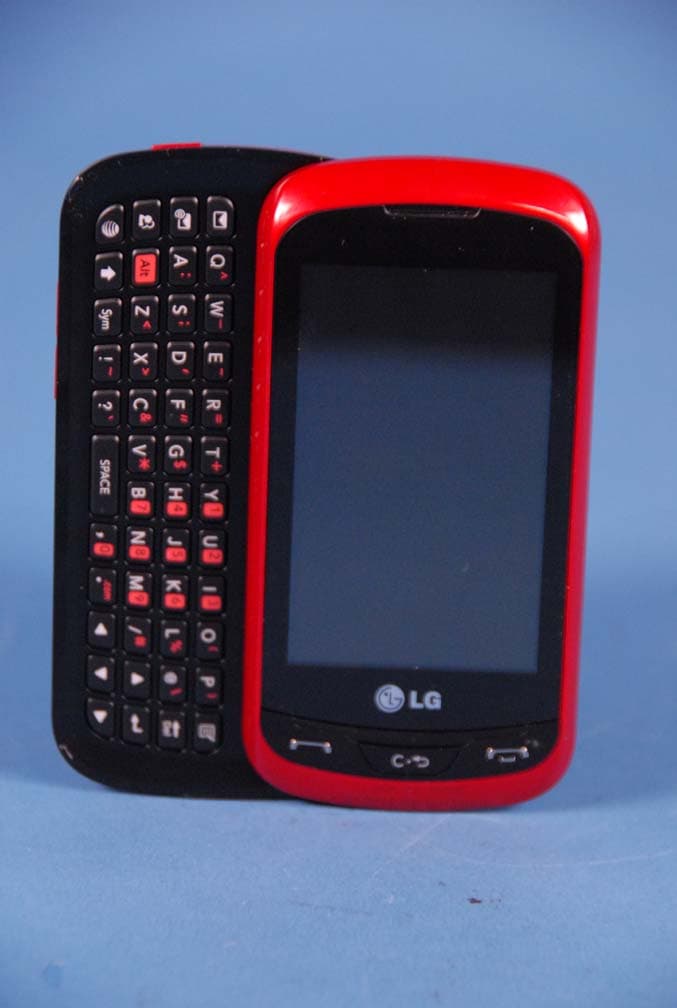
Click to zoom
Application Details
- Equipment Class
- JBP - Part 15 Class B Computing Device Peripheral
- Date of Grant
- Jan 23, 2012
- Application Purpose
- Original Equipment
- Date of Application
- Jan 23, 2012
- Equipment Note
- Cellular/PCS GSM/EDGE/WCDMA Phone with Bluetooth
- Company
- LG Electronics USA, Inc.
- Country
- United States
Documents & Files
Document Text
Text extracted from the exhibit documents filed with the FCC. Open a document above to read the original.
Users Manual
LG C395 User Guide All screen shots in this guide are simulated. Actual displays and the color of the phone may vary. Some of the contents in this manual may differ from your phone depending on the software of the phone or your service provider. P/NO: MFL (1.0)www.lg.com 48 Utilisation comme appareil portatif Ce téléphone a été testé en vue d'une utilisation type comme appareil portatif, avec une distance de 1 cm (0.39 pouces) entre l'arrière de l'appareil et le corps de l'utilisateur. Pour satisfaire aux exigences de la FCC en matière d'exposition aux radiofréquences, on doit maintenir une distance d'au moins 1 cm (0.39 pouces) entre le corps de l'utilisateur et l'arrière du téléphone. Les pinces de ceinture, les étuis et autres accessoires semblables d'autres marques et contenant des composantes métalliques ne doivent pas être utilisés. Les accessoires portatifs qui empêchent le maintien d'une distance de 1 cm (0.39 pouces) entre le corps de l'utilisateur et l'arrière du téléphone et qui n'ont pas été testés en vue d'une utilisation type comme accessoires portatifs peuvent ne pas satisfaire aux limites d'exposition aux radiofréquences stipulées par la FCC et, par conséquent, ne doivent pas être utilisés. Co FC Cet son Par Co et a num d’ I So aux (1) acc pro pré et s acc reç cau ind Sécurité 49 e Conformité aux normes FCC Part 15 Class B Cet appareil et ses accessoires sont conformes aux normes FCC Part 15 Class B de la Federal Communications Commission et aux exigences pour appareils numériques ICES-003 Class B d’ Industrie Canada. Son fonctionnement est sujet aux deux conditions suivantes : (1) Cet appareil et ses accessoires ne doivent pas provoquer de brouillage préjudiciable, et (2) cet appareil et ses accessoires doivent accepter toutes les interférences reçues, y compris celles pouvant causer un fonctionnement indésirable. Phone Components 1 2 3 6 4 7 5 8 9 10 Your Phone 1. Earpiece: Lets you hear the caller and automated prompts. 2. Main LCD: Displays phone status icons, menu items, web items, web information, pictures and more in full color. You can select menu items by touching the corresponding icons on the touchpad. 3. SEND Key : Press this key in standby mode to quickly access the most recent missed, dialed and received calls. 4. 3.5mm Headset Jack 5. Power/Lock Key : • Powers your phone on/off by pressing and holding the key. • Turns your screen on and off and locks it. 6. Eng Key : Ends or rejects a call. Press once to return to the standby screen. 7. Clear Key 8. Side Volume Keys • When on the standby screen: Allows you to set the Ringtone volume. Hold the Down key to toggle the Vibration Mode On and Off. • During a call: Allows you to change the Earpiece volume. • When playing background music: Allows you to change the music volume. 9. Charger/USB Port 10. Camera Key: Press to start the Camera function. Press and hold to start the Video record function. Your Phone Your Phone Rear View Battery cover External camera lens Camera Key microSD™ memory card slot Battery SIM card slot Your Phone QWERTY Keys Mobile Email IM Text Msg Caps Press to change between Upper Case and Lower Case. Sym Press to open the menu with Symbol entry options. Space Press to create a space between words. Press to input “@”. Delete Key Deletes digits and letters. Enter Key Left Down Right Up Installing the SIM Card and Battery 1. Remove the battery cover Hold the phone on your hand firmly. With the other hand, lift the back cover using the fingertip cutout located on the bottom of the cover and remove it. 2. Remove the battery Hold the top edge of the battery and using your fingernail, lift the battery from the battery compartment. Warning Do not remove the battery when the phone is switched on, as this may damage the phone. Getting Started Getting Started 3. Install the SIM card Slide the SIM card into the SIM card slot. Make sure that the gold contact area on the card is facing downward. To remove the SIM card, pull it gently in the opposite direction. 4. Install the battery Insert the top of the battery first into the top edge of the battery compartment. Ensure that the battery contacts align with the terminals on the phone. Press the bottom of the battery down until it clicks into place. Getting Started Charging your phone Lift the charger port cover on the top side of your LG-C395. Insert the charger connector to the phone (ensure that side ‘B’ of the connector is facing up) and then plug the other end into the wall socket. Your LG-C395 will need to be charged until you receive a ‘Battery Full’ notification. Important! You should insert the battery before charging. Warning Use of unauthorized accessories could damage your phone and void your warranty. Installing a Memory Card You can expand the available memory space on your phone by using a microSD™ memory card. The LG-C395 will support up to a 32 GB microSD™ memory card. Tip A memory card is an optional accessory. 1. Lift the memory card cover and insert a microSD™ card with the gold contact area facing the back side of the phone. Close the memory card cover. Getting Started Note If your memory card has existing content it will automatically be filed in the correct folder. For example, videos will be accessible from the Videos folder. If your memory card has protected content (i.e. content such as songs or graphics with Digital Rights Management copywriting loaded from another device), they will not be accessible. You may need to reformat the memory card prior to using it with this device. Getting Started ICON/ INDICATOR DESCRIPTION Network signal strength (number of bars will vary) No network signal Battery empty New text message New email An alarm is set Ring profile in use Silent profile in use Call Forward Calendar event with Alarm is set Bluetooth is active The browser is active Vibration mode Ring after Vibration mode Ring and Vibration mode ICON/ INDICATOR DESCRIPTION Speakerphone Call in Progress Voicemail Battery Full Battery Chargin…
Text truncated - open the document above for the full version.
Users Manual
Music Player To launch Music Player while in the standby screen, touch , , , and select Music Player. ►All Songs: You can view all the songs in your music library. ►Playlists: You can make your own playlists. ►Artist: Shows the list of artists of all the songs in your music library, and shows all the songs by a chosen artist. ►Album: Shows the list of albums of all the songs in your music library, and shows all the songs on a chosen album. ►Genre: Shows the list of genres of all the songs in your music library, and shows all songs of a specific genre. ►Shuffle: Allows you to play all the songs in your music library with shuffle. ►Favorites Note Copyrights of music files may be protected by copyright and intellectual property laws. Please ensure that you adhere to the applicable Terms of Use of materials laws prior to downloading or copying files. Playing Music To listen to music in your phone or the external memory, follow these quick easy steps: 1. From the standby screen, touch , then open the Multimedia tab by touching and touch . 2. You can select from All Songs, Playlists, Artist, Album, Genre, Favorites, and Shuffle songs to select your Music. The Now Playing menu will be only available when music is playing. Music Player Music Player Playlist Repeat Shuffle minimize Favorite Volume ►Touch the song you wish to play. ►Touch to pause the selected song. While playing, touch to adjust the volume. Touch and to skip to the next song or previous song. ►Touch to Minimize the music player and access other phone functions while music is playing. Note Files under 300 kb may not be displayed in this function and may be categorized as Ringtones. Adding Music To Your Handset Music files can be added to your handset by using one or more of the following methods: ►Download music and ringtones over the network directly to your device via the Shop Music link in the Music Folder or the Shop Tones link in the Audio folder. ►From your existing digital media collection on your PC via Windows Media ® Player and/or Windows Explorer. Music Player ►From your PC using other music subscription services, such as Napster or eMusic. Note In order to effectively store all your music files on your SD card, it’s important to ensure that there is enough free space available remaining on the SD card to support file transfer. If there is not enough free space on the SD card, this may result in transfer failures or lost data. (The maximum number of music files that the handset can support is 2000.) A 512 MB card requires up to 3 MB of free memory. A 4 GB card requires up to 6 MB of free memory. A 8 GB card requires up to 15 MB of free memory. A 16 GB card requires up to 25 MB of free memory. Purchasing and downloading Music directly to your Device 1. From the standby screen, touch , and then . 2. Select Shop Music. 3. Navigate the Shop Music page to download today’s hottest music, ringtones and other personalized content directly to your phone. Note Some sites are data intensive (i.e. previews via streaming) so the user should be enrolled in an unlimited data plan before using these services to avoid per-use data charges. Additional charges may apply when downloading music, ringtones etc. Music Player Transferring Music using your PC Before You Get Started To transfer music from your PC to your device, you will need the following: ►Windows Media ® Player 10 (or above) or other digital music management software such as Napster or eMusic ►A microSD™ card* (supports up to 32 GB cards) ►USB data cable* * microSD™ card and USB data cable sold separately; go to att.com/wireless for details. Note This device is not compatible with iTunes and/ or iTunes files. Transferring Music from the Digital Music Service 1. Using your computer, open your preferred PC music management client. 2. Download the selected song to your library. 3. Make sure the microSD™ card is inserted properly into the handset. 4. Use the USB adapter cable to connect the handset to the PC. 5. Once the USB connection has been established, the handset displays “Connected.” and the computer screen then shows the LG-C395 device. If the detection does not occur, skip to the Changing USB Connection Setting section on page . 6. Follow the instruction in the program to transfer music to your handset. Note If you have a USB hub, connect the handset directly to your computer rather than through the hub. Music Player Transferring Music using Windows Media Player 1. Open Windows Media ® Player on your computer (version 10.0 or higher). 2. Use the USB adapter cable to connect the handset to the PC. 3. Once the USB connection has been established, the handset displays “Connected.” and the computer screen then shows the LG-C395 device. Note If the target computer does not detect the newly connected handset or provide an MTP Player dialog window on the PC screen, skip to Changing USB Connection Settings section on page . 4. From within the Windows Media ® Player application, click on the Sync tab. Previously downloaded songs are then listed on the left side of the application. 5. Choose the destination location for the media files. The LG-C395 Music Sync Player appears in a drop-down list on the right side of the screen. Note If there are no items present in the playlist, click the Edit Playlist button and begin adding the music files from among the various media categories. 6. Click the Start Sync button to download the selected songs to your handset. A “synchronization in progress” message appears on the application. Do not unplug the handset during this process. Once complete, the progress bar will disappear. 7. It is now safe to unplug the USB connector from the handset once synchronization is complete. Music Player Drag and Drop Music Using LG-C395 As A Mass Storage Device 1. Make sure the microSD™ card is inserted properly into the headset. 2. Connect the device to a PC using a LG-C395 USB data cable. 3. A bubble may appear on the PC, “Found New Hardware LG USB Modem”. …
Text truncated - open the document above for the full version.
Cover Letter(s)
LG Electronics USA 1000 Sylvan Avenue Englewood Cliffs, NJ 07632 Date: December 20, 2011 Fede ral Communications Commission Author ization and Evaluation Division 7435 Oaklan d Mills Road, Columbia, MD 21046 RE: Request of Confidentiality for FCC ID: ZNFC395 Equipment Class: JBP: Part 15 Cla ss B Co mputing Device Peripheral To Whom It May Concern: Pursuant to Sections 0.457 and 0.459 of the Commission’s Rules (CFR 47), and Section 552 (b) (4) of the Freedom of Information Act, LG Electronics MobileComm USA hereby requests confid entiality and treatment of certain information accompanying this application. The materials contain trade secrets and proprietary information not customarily released to the public. The public disclosure of these matters might be harmful to the Applicant and provide unjustified benefits to its competitors. We are also hereby request Short-Term Confidentiality for 180 days after the grant as outlined in Public Notice DA 04-1705. This provision will give LG Electronics MobileComm USA temporary confidentiality of commercially sensitive information prior to pro duct release. The requested Permanent and Temporary Confidential exhibits are listed as follows: PERMANENT AND SHORT-TERM CONFIDENTIAL LIST Exhibit Description 1 Block Diagram PERMANENT 2 Operational Descriptions 3 External Photos 4 Internal Photos 5 Test-Setup Photos SHORT-TERM 6 User’s Manual The Applicant understands that pursuant to Rule 0.457, disclosure of this application and all accompanying documentations, where applicable, will not be made public before the date of the Grant for this application. Sincerely, Christopher Johnson Senoir Manager On behalf of LG Electronics MobileComm U.S.A, Inc. LG Electronics USA 1000 Sylvan Avenue Englewood Cliffs, NJ 07632
External Photos
LGE MobileComm FCC ID: ZNFC395 Model: C395 External Photos EUT Type: Portable Handset Page 1 of 5 © 2012 PCTEST Engineering Laboratory Inc. EXTERNAL PHOTOGRAPHS LGE MobileComm FCC ID: ZNFC395 Model: C395 External Photos EUT Type: Portable Handset Page 2 of 5 © 2012 PCTEST Engineering Laboratory Inc. LGE MobileComm FCC ID: ZNFC395 Model: C395 External Photos EUT Type: Portable Handset Page 3 of 5 © 2012 PCTEST Engineering Laboratory Inc. LGE MobileComm FCC ID: ZNFC395 Model: C395 External Photos EUT Type: Portable Handset Page 4 of 5 © 2012 PCTEST Engineering Laboratory Inc. LGE MobileComm FCC ID: ZNFC395 Model: C395 External Photos EUT Type: Portable Handset Page 5 of 5 © 2012 PCTEST Engineering Laboratory Inc.
ID Label/Location Info
Model No: C395 FCC ID : ZNFC395 S/N : Made in Korea LG Electronics MobileComm USA, Inc. LGE
Internal Photos
LGE MobileComm FCC ID: ZNFC395 Model: C395 Internal Photos EUT Type: Portable Handset Page 1 of 10 © 2012 PCTEST Engineering Laboratory Inc. INTERNAL PHOTOGRAPHS LGE MobileComm FCC ID: ZNFC395 Model: C395 Internal Photos EUT Type: Portable Handset Page 2 of 10 © 2012 PCTEST Engineering Laboratory Inc. LGE MobileComm FCC ID: ZNFC395 Model: C395 Internal Photos EUT Type: Portable Handset Page 3 of 10 © 2012 PCTEST Engineering Laboratory Inc. LGE MobileComm FCC ID: ZNFC395 Model: C395 Internal Photos EUT Type: Portable Handset Page 4 of 10 © 2012 PCTEST Engineering Laboratory Inc. LGE MobileComm FCC ID: ZNFC395 Model: C395 Internal Photos EUT Type: Portable Handset Page 5 of 10 © 2012 PCTEST Engineering Laboratory Inc. LGE MobileComm FCC ID: ZNFC395 Model: C395 Internal Photos EUT Type: Portable Handset Page 6 of 10 © 2012 PCTEST Engineering Laboratory Inc. LGE MobileComm FCC ID: ZNFC395 Model: C395 Internal Photos EUT Type: Portable Handset Page 7 of 10 © 2012 PCTEST Engineering Laboratory Inc. LGE MobileComm FCC ID: ZNFC395 Model: C395 Internal Photos EUT Type: Portable Handset Page 8 of 10 © 2012 PCTEST Engineering Laboratory Inc. LGE MobileComm FCC ID: ZNFC395 Model: C395 Internal Photos EUT Type: Portable Handset Page 9 of 10 © 2012 PCTEST Engineering Laboratory Inc. LGE MobileComm FCC ID: ZNFC395 Model: C395 Internal Photos EUT Type: Portable Handset Page 10 of 10 © 2012 PCTEST Engineering Laboratory Inc.
Test Report
FCC ID: ZNFC395 Report No.: HCTE1201FE03 Date: January 04, 2012 HCT CO., LTD. 105-1, JANGAM-RI, MAJANG-MYEON, ICHEON-SI, KYOUNGKI-DO, 467-811, REPUBLIC OF KOREA TEL: +82 31 645 6300 FAX: +82 31 645 6401 www.hct.co.kr Page 2 of 17 TABLE OF CONTENTS PAGE 1. GENERAL INFORMATION ....................................................................................................... 3 1.1 Product Description ................................................................................................................. 3 1.2 Related Submittal(s) / Grant(s)................................................................................................ 3 1.3 Tested System Details.............................................................................................................. 4 1.4 Cable Description .................................................................................................................... 5 1.5 Noise Suppression Parts on Cable. (I/O cable) ....................................................................... 5 1.6 Test Methodology .................................................................................................................... 6 1.7 Test Facility ............................................................................................................................. 6 1.8 Frequency Range of Radiated Measurements ......................................................................... 6 2. SYSTEM TEST CONFIGURATION........................................................................................... 7 2.1 Configuration of Test System .................................................................................................. 7 3. PRELIMINARY TEST ................................................................................................................. 8 3.1 Conducted Emission Test ........................................................................................................ 8 3. 2 Radiated Emission Test .......................................................................................................... 8 4. CONDUCTED AND RADIATED EMISSION TEST SUMMARY ........................................... 9 4.1 Conducted Emission Test ........................................................................................................ 9 4.2 Radiated Emission Test ......................................................................................................... 14 5. FIELD STRENGTH CALCULATION ...................................................................................... 15 6. TEST EQUIPMENT................................................................................................................... 16 7. CONCLUSION .......................................................................................................................... 17 ATTACHMENT: TEST SETUP PHOTOGRAPHS FCC ID: ZNFC395 Report No.: HCTE1201FE03 Date: January 04, 2012 HCT CO., LTD. 105-1, JANGAM-RI, MAJANG-MYEON, ICHEON-SI, KYOUNGKI-DO, 467-811, REPUBLIC OF KOREA TEL: +82 31 645 6300 FAX: +82 31 645 6401 www.hct.co.kr Page 3 of 17 1. GENERAL INFORMATION 1.1 Product Description Equipment Under Test (E.U.T) is Cellular/ PCS GSM/EDGE/WCDMA Phone with Bluetooth, Model: LG-C395 manufactured by LG Electronics MobileComm U.S.A., Inc. Its basic purpose is used for communications. Model LG-C395 Additional Model C395, LGC395 FCC ID ZNFC395 E.U.T Type Cellular/ PCS GSM/EDGE/WCDMA Phone with Bluetooth TX Frequency 824.20 ㎒ to 848.80 ㎒ (GSM 850) 1 850.20 ㎒ to 1 909.80 ㎒ (GSM 1 900) 826.40 ㎒ to 846.60 ㎒ (WCDMA 850) 1 852.4 ㎒ to 1 907.6 ㎒ (WCDMA 1 900) RX Frequency 869.20 ㎒ to 893.80 ㎒ (GSM 850) 1 930.20 ㎒ to 1 989.80 ㎒ (GSM 1 900) 871.40 ㎒ to 891.60 ㎒ (WCDMA 850) 1 932.4 ㎒ to 1 987.6 ㎒ (WCDMA 1 900) 1.2 Related Submittal(s) / Grant(s) Original submittal only. FCC ID: ZNFC395 Report No.: HCTE1201FE03 Date: January 04, 2012 HCT CO., LTD. 105-1, JANGAM-RI, MAJANG-MYEON, ICHEON-SI, KYOUNGKI-DO, 467-811, REPUBLIC OF KOREA TEL: +82 31 645 6300 FAX: +82 31 645 6401 www.hct.co.kr Page 4 of 17 1.3 Tested System Details All equipment descriptions used in the tested system (including inserted cards) are: Device Type Manufacturer Model Name FCC ID / DoC Connected To Cellular/ PCS GSM/ EDGE/WCDMA Phone with Bluetooth LG LG-C395 ZNFC395 Notebook PC Notebook PC LG X140-02 DoC E.U.T Notebook PC adaptor Notebook PC adaptor DELTA (JIANG SU) ADP-40PH AD - Notebook PC Mouse Microsoft Intellimouse optical USB and PS/2 compatible DoC Notebook PC Micro SD card (2 GB) SanDisk - - E.U.T USB cable - - - E.U.T Notebook PC Headset - - - E.U.T RJ45 cable - - - Router Notebook PC Router - HIGATE PLUS K12L012.00 - Notebook PC Router adaptor - SJH-0101R - Router FCC ID: ZNFC395 Report No.: HCTE1201FE03 Date: January 04, 2012 HCT CO., LTD. 105-1, JANGAM-RI, MAJANG-MYEON, ICHEON-SI, KYOUNGKI-DO, 467-811, REPUBLIC OF KOREA TEL: +82 31 645 6300 FAX: +82 31 645 6401 www.hct.co.kr Page 5 of 17 1.4 Cable Description Product Name Port Power Cord Shielded (Y/N) I/O Cable Shielded (Y/N) Length (m) Micro USB Y Y (P,D)1.2 Cellular/ PCS GSM/ EDGE/WCDMA Phone with Bluetooth Headset jack - N (D)1.1 RJ 45 - N (D)1.5 Notebook PC USB (Mouse) - Y (D)1.8 * The marked "(D)" means the data cable and "(P)" means the power cable. 1.5 Noise Suppression Parts on Cable. (I/O cable) Product Name Port Ferrite Bead (Y/N) Location Metal Hood (Y/N) Location Micro USB N N/A Y Both End Cellular/ PCS GSM/ EDGE/WCDMA Phone with Bluetooth Headset jack N N/A Y E.U.T End RJ 45 N N/A N Both End Notebook PC USB (Mouse) - - Y Notebook PC End FCC ID: ZNFC395 Report No.: HCTE1201FE03 Date: January 04, 2012 HCT CO., LTD. 105-1, JANGAM-RI, MAJANG-MYEON, ICHEON-SI, KYOUNGKI-DO, 467-811, REPUBLIC OF KOREA TEL: +82 31 645 6300 FAX: +82 31 645 6401 www.hct.co.kr Page 6 of 17 1.6 Test Methodology Both Conducted and Radiated testing was performed according to the procedures in ANSI C63.4/2003. Radiated testing was p…
Text truncated - open the document above for the full version.
Test Setup Photos
FCC ID: ZNFC395 Report No. HCTE1201FE03 Date: January 04, 2012 HCT CO., LTD. 105-1, JANGAM-RI, MAJANG-MYEON, ICHEON-SI, KYOUNGKI-DO, KOREA TEL: +82 31 645 6300 FAX: +82 31 645 6401 www.hct.co.kr Page 1 of 5 ATTACHMENT - TEST SETUP PHOTOS - FCC ID: ZNFC395 Report No. HCTE1201FE03 Date: January 04, 2012 HCT CO., LTD. 105-1, JANGAM-RI, MAJANG-MYEON, ICHEON-SI, KYOUNGKI-DO, KOREA TEL: +82 31 645 6300 FAX: +82 31 645 6401 www.hct.co.kr Page 2 of 5 1. CONDUCTED MEASUREMENT PHOTOS FCC ID: ZNFC395 Report No. HCTE1201FE03 Date: January 04, 2012 HCT CO., LTD. 105-1, JANGAM-RI, MAJANG-MYEON, ICHEON-SI, KYOUNGKI-DO, KOREA TEL: +82 31 645 6300 FAX: +82 31 645 6401 www.hct.co.kr Page 3 of 5 FCC ID: ZNFC395 Report No. HCTE1201FE03 Date: January 04, 2012 HCT CO., LTD. 105-1, JANGAM-RI, MAJANG-MYEON, ICHEON-SI, KYOUNGKI-DO, KOREA TEL: +82 31 645 6300 FAX: +82 31 645 6401 www.hct.co.kr Page 4 of 5 2. RADIATED MEASUREMENT PHOTOS FCC ID: ZNFC395 Report No. HCTE1201FE03 Date: January 04, 2012 HCT CO., LTD. 105-1, JANGAM-RI, MAJANG-MYEON, ICHEON-SI, KYOUNGKI-DO, KOREA TEL: +82 31 645 6300 FAX: +82 31 645 6401 www.hct.co.kr Page 5 of 5
Contact Information
Applicant
David Kim(Team leader, LGEUS NA Policy & Regulatory Affairs)
Technical Contact
PCTEST Engineering Laboratory, Inc.Randy Ortanez
[email protected]410-290-6652
6660-B Dobbin Road · Columbia, Maryland · United States
Test Firm
HCT Co., LTDSang Lee
Technical Specifications
| # | Rule Parts | Frequency Range | Power Output |
|---|---|---|---|
| 1 | 15B | - | - |
Other Applications from LG Electronics USA, Inc.

ZNFTONET80S
Nov 13, 2023Bluetooth Earbuds
Equipment Class
DTS - Digital Transmission System
ZNFTONETF8QC
Jun 21, 2022Bluetooth Earbud (Cradle)
Equipment Class
JBP - Part 15 Class B Computing Device Peripheral
ZNFTONEFP8
May 30, 2021Bluetooth Earbud
Equipment Class
DTS - Digital Transmission System
ZNFK200AM
Feb 18, 2021Portable Handset
Equipment Class
DSS - Part 15 Spread Spectrum Transmitter
ZNFK735MM
Feb 10, 2021Portable Handset
Equipment Class
NII - Unlicensed National Information Infrastructure TX