ZNFD724Cellular/PCS GSM/WCDMA Phone with WLAN and Bluetooth
LG Electronics USA, Inc.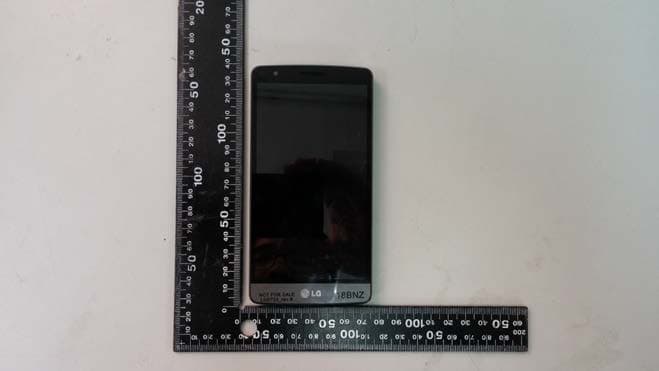
Click to zoom
Application Details
- Equipment Class
- JBP - Part 15 Class B Computing Device Peripheral
- Date of Grant
- Jul 10, 2014
- Application Purpose
- Original Equipment
- Date of Application
- Jul 10, 2014
- Equipment Note
- Cellular/PCS GSM/WCDMA Phone with WLAN and Bluetooth
- Company
- LG Electronics USA, Inc.
- Country
- United States
Documents & Files
Document Text
Text extracted from the exhibit documents filed with the FCC. Open a document above to read the original.
Users Manual
ENGLISH User Guide LG-D724 MFL00000000 (1.0) www.lg.com User Guide • Screen displays and illustrations may differ from those you see on actual phone. • Some of the contents of this guide may not apply to your phone, depending on the software and your service provider. All information in this document is subject to change without notice. • This handset is not suitable for people who have a visual impairment due to the tap screen keyboard. • Copyright ©2014 LG Electronics, Inc. All rights reserved. LG and the LG logo are registered trademarks of LG Group and its related entities. All other trademarks are the property of their respective owners. • Google™, Google Maps™, Gmail™, YouTube™, Hangouts™ and Play Store™ are trademarks of Google, Inc. ENGLISH 2 Table of contents For Your Safety....................................................5 Safety instructions ...........................................10 Important notice ...............................................16 Getting to know your phone .............................21 Phone overview ...............................................21 Charging your phone .......................................25 Using the memory card ...................................26 Locking and unlocking the screen ...................27 Your Home screen .............................................28 Touch screen tips ............................................28 Home screen ...................................................28 Extended home screen ..................................29 Customizing the Home screen .......................30 Returning to recently-used applications...........30 Notifi cations panel...........................................31 Using Dual SIM ................................................31 Opening the notifi cations panel ......................32 Indicator icons on the Status Bar....................32 On-screen keyboard ........................................34 Entering accented letters ...............................34 Google account setup .......................................35 Connecting to Networks and Devices ..............36 Wi-Fi ...............................................................36 Connecting to Wi-Fi networks ........................36 Turning Wi-Fi on and connecting to a Wi-Fi network ........................................................36 Bluetooth ........................................................37 Sharing your phone's data connection .............38 Wi-Fi Direct .....................................................39 SmartShare .....................................................39 Enjoying the content from Nearby devices .......40 PC connections with a USB cable ....................40 Calls ..................................................................42 Making a call ..................................................42 Calling your contacts .......................................42 Answering and rejecting a call.........................42 Adjusting the in-call volume ............................42 Making a second call ......................................43 Viewing your call logs ......................................43 Call settings ....................................................43 Contacts ............................................................44 Searching for a contact ...................................44 Adding a new contact ......................................44 Favourites contacts .........................................44 Creating a group .............................................45 Messaging .........................................................46 Sending a message .........................................46 Threaded box .................................................46 Changing your message settings .....................47 E-mail ................................................................48 Managing an email account ............................48 Working with account folders ..........................48 Composing and sending email .........................48 Camera ..............................................................49 Getting to know the viewfi nder ........................49 Using the advanced settings ............................50 Taking a quick photo ......................................51 Using Time catch shot mode ...........................51 Once you've taken a photo ..............................52 From your Gallery ............................................53 3 Video camera ....................................................54 Getting to know the viewfi nder ........................54 Using the advanced settings ............................55 Recording a quick video ..................................55 After recording a video ....................................56 From your Gallery ............................................56 Function ............................................................57 Guest Mode ...................................................57 Knock Code .....................................................57 KnockON .........................................................57 Plug & Pop ......................................................58 QuickMemo .....................................................58 Using the QuickMemo options .......................59 Viewing the saved QuickMemo .....................60 QSlide .............................................................60 QuickRemote ..................................................61 Multimedia ........................................................63 Gallery ............................................................63 Viewing pictures ...........................................63 Playing videos...............................................63 Editing photos ...............................................63 Deleting photos/videos ..................................63 Setting as wallpaper ......................................64 Videos ...........…
Text truncated - open the document above for the full version.
Attestation Statements
Date: June 10, 2014 Federal Communications Commission 7435 Oakland Mills Road Columbia MD 21046 c.c. PCTEST TCB 6660-A Dobbin Road Columbia, MD 21045, USA To whom it may concern: I, the undersigned, hereby authorize Lab Manager Feel. Jeong and of SGS Korea Co., Ltd and hereafter referred to as SGS Korea, to act on our behalf in all manners relating to application for equipment authorization, including signing of all documents relating to these matters. Any and all acts carried out by Lab Manager Feel. Jeong of SGS Korea Co., Ltd on our behalf shall have the same effect as acts of our own. I, the undersigned, hereby certify that we are not subject to a denial of federal benefits, that includes FCC benefits, pursuant to Section 5301 of the Anti-Drug Abuse Act of 1988, 21 U.S.C. 853(a). In authorizing SGS Korea as our agent, we still recognize that we are responsible to: a)comply with the relevant provisions of th e certification program; b)make all necessary arrangements for the conduct of the evaluation, including provision for examining documentation and access to all areas, records (including internal audit reports) and personnel for the purposes of evaluation (e.g. testing, in spec tion, assessment, surveillance, reassessment) and resolution of complaints; c)make claims regarding certification only in respect of the scope for which cert ifi cation has been granted; d)do not use our product certification in such a manner as to bring the Certification Divisi on into disrepute and not make any statement regarding our product certification which the Certification Division may consider misleading or unaut horized; e)upon suspension or cancellation of certification, discontinue use of all advertising m atter that contains any reference thereto and return any certification docume nts as required by the Certification Division; f) use certification only to indicate the products are certified as being in conformity with specified st andards; g) endeavor to ensure that no certificate or report nor any part thereof is used in a m isleading ma nner; h)ensure t hat any reference to our product certification in communication medi a such as docum ents, brochures or advertising, complies with the requirements of th e Certification Division ; i)kee p a record of all complaints made known to the us relating to the pro duct’s com pliance with requirements of the relevant standard and to make these record s avai lable to the Certification Division wh en requested; j)take appropriate action with respect to such complaints and any deficiencies found in products or services that affect compliance with the requirements for certific ation; k)do cument the acti ons taken. Th is authorization is valid until further written notice from the applicant. Sincerely Yours, Jacob Cho Director On behalf of LG Electronics MobileComm U.S.A, Inc.
Cover Letter(s)
LG Electronics USA 1000 Sylvan Avenue Englewood Cliffs, NJ 07632 Date: June 26, 2014 Fe deral Communications Commission Authorization and Evaluation Division 7435 Oakland Mills Road, Columbia, MD 21046 RE: Request of Confidentiality for FCC ID: ZNFD724 Equipment Class: JBP: Part 15 Clas s B Computing Device Peripheral To Whom It May Concern: Pursuant to Sections 0.457 and 0.459 of the Commission’s Rules (CFR 47), and Section 552 (b) (4) of the Freedom of Information Act, LG E lectronics MobileComm USA hereby requests confidentiality and treatment of certain information accompanying this application. The materi als contain trade secrets and proprietary information not customarily rel eased to the public. The public disclosure of these matters might be harmful to the Applicant and provide unjustified benefits to its competitors. We are also hereby request Short-Term Confidentiality for 180 days after the grant as outlined in Public Notice DA 04-1705. This provision will give LG Electronics MobileComm USA temporary confidentiality of commercially sensitive information prior to product release. The requested Permanent and Temporary Confidential exhibits are list ed as follows: PERMANENT AND S HORT-TERM CONFIDENTIAL LIST Exhibit Description 1 Block Diagram PERMANENT 2 Operational Descriptions 3 External Photos 4 Internal Photos 5 Test-Setup Photos SHORT-TERM 6 User’s Manual The Applicant understands that pursuant to Rule 0.457, disclosure of this application and all accompanying documentations, where applicable, will not be made public before the date of the Grant for this application. Sincerely, Jacob Cho Director On behalf of LG Electronics MobileComm U.S.A, Inc. LG Electronics MobileComm U.S.A 1000 Sylvan Avenue Englewood Cliffs, NJ 07632
External Photos
Model : LG-D724 External photos of EUT Model : LG-D724 Top view of EUT Bottom view of EUT Model : LG-D724 Side view of EUT
ID Label/Location Info
Model No: LG-D724 FCC ID : ZNFD724 S/N : Made in Korea LG Electronics MobileComm USA, Inc. LGE
Internal Photos
Model : LG-D724 Internal photos of EUT Model : LG-D724 Internal view of EUT Model : LG-D724 Top view of PCB Bottom view of PCB Model : LG-D724 View of WLAN, BT, BT LE Antenna View of GSM&WCDMA Antenna
Test Report
Test Report No. : F690501/RF-EMG005141-5 Page : 2 of 13 EMC5101-01A(2013.08.12.)(0) A4(210mm*297mm) Contents 1. General Information ................................................................................................... 3 1.1 Client Information ................................................................................................ 3 1.2 Test Laboratory ................................................................................................... 3 1.3 General Information of E.U.T. ............................................................................. 3 1.4 Operating Modes and Conditions ........................................................................ 3 1.5 Auxiliary Equipments .......................................................................................... 4 1.6 Cable List ............................................................................................................ 4 1.7 System Configurations ........................................................................................ 5 1.8 Test System Layout ............................................................................................ 5 1.9 Modifications ....................................................................................................... 5 1.10 Applicable Standards for Testing ...................................................................... 5 1.11 Summary of Test Results .................................................................................. 5 2. Emission Test ............................................................................................................ 6 2.1 Test Results ........................................................................................................ 6 2.2 Test Method and Limits ....................................................................................... 6 2.2.1 Test Method ............................................................................................... 6 2.2.2 Test Limits .................................................................................................. 6 2.3 Conducted Emission ........................................................................................... 7 2.3.1 Test Equipments ........................................................................................ 7 2.3.2 Test Site ..................................................................................................... 7 2.3.3 Environment Conditions ............................................................................. 8 2.4 Radiated Emission .............................................................................................. 9 2.4.1 Test Equipments ........................................................................................ 9 2.4.2 Test Site ..................................................................................................... 9 2.4.3 Environment Conditions ........................................................................... 10 Appendix A : Conducted Emission .............................................................................. 12 Appendix B : Radiated Emission (3 m Scan Data) ....................................................... 13 Test Report No. : F690501/RF-EMG005141-5 Page : 3 of 13 EMC5101-01A(2013.08.12.)(0) A4(210mm*297mm) 1. General Information 1.1 Client Information Applicant : LG Electronics MobileComm U.S.A., Inc. Address of Applicant : 10101 Old Grove Road, San Diego, CA 92131 Manufacturer : LG Electronics MobileComm U.S.A., Inc. Address of Manufacturer : 10101 Old Grove Road, San Diego, CA 92131 1.2 Test Laboratory Name and Address : SGS Korea Co., Ltd. (Gunpo Laboratory) 4, LS-ro 182beon-gil, Gunpo-si, Gyeonggi-do, 435-040 Korea Phone : + 82 31 428 5700 Fax : + 82 31 427 2370 e-mail : [email protected] 1.3 General Information of E.U.T. 1.4 Operating Modes and Conditions Product Name Cellular/PCS GSM/GPRS/EDGE RX Only/ WCDMA/HSUPA Phone with Bluetooth, WLAN Model Name LG-D724 Added Model Names LGD724, D724, LG-D723, LGD723, D723, LG-D723AR, LGD723AR, D723AR FCC ID ZNFD724 Model Difference 1. Dual SIM(one RF path) Model : LG-D724, LGD724, D724 2. Single SIM Model : LG-D723, LGD723, D723, LG-D723AR, LGD723AR, D723AR Serial No. - EMI Classification Class B Test Voltage 120 Va.c., 60 ㎐ (from. Notebook Computer) Highest Internal Frequency 1.2 ㎓ Operating mode Operating condition USB Communication PC Link USB Communication Test Report No. : F690501/RF-EMG005141-5 Page : 4 of 13 EMC5101-01A(2013.08.12.)(0) A4(210mm*297mm) 1.5 Auxiliary Equipments Description Model Serial No. Manufacturer FCC ID LCD Monitor S2740Lb CN-DP7D0G- 74261-352-05CL DELL Inc. DOC USB MOUSE MO28UOL - lenovo DOC USB Keyboard KB212-B CN-00GD4Y- 65890-12N-08XL- A00 DELL Inc. DOC Notebook Computer 7665-AH6 L3-E5323 Lenovo DOC Wireless RouterWG602v4 - NETGEAR PY3WG602V4 1.6 Cable List Start END Cable Spec. Name I/O Port Name I/O Port Length Shield Core EUT Micro USB Notebook Computer USB 1.0 Shield Not used 3.5 Headset Headset - 1.4 Shield Not used Notebook Computer USB USB Mouse - 1.8 Shield Not used USB USB Keyboard - 1.5 Shield Not used USB EUT Micro USB 1.0 Shield Not used DC IN AC AdapterDC OUT 1.8 Unshield Molded*1ea. RGB LCD Monitor RGB 1.5 Shield Molded*2ea. LAN Wireless Router LAN 3.0 Unshield Not used AC Adapter AC IN AC Source- 1.5 Unshield Not used LCD Monitor DC OUT AC AdapterDC IN 1.5 Unshield Molded *1ea. AC Adapter AC IN AC Source- 1.0 Unshield Not used Wireless Router DC IN AC AdapterDC OUT 1.0 Unshield Not used AC Adapter AC IN AC Source- - Unshield Not used Test Report No. : F690501/RF-EMG005141-5 Page : 5 of 13 EMC5101-01A(2013.08.12.)(0) A4(210mm*297mm) 1.7 System Configurations 1.8 Test System Layout 1.9 Modifications There was no modified item during the test. 1.10 Applicable Standards for Testing 1.11 Summary of Test Results Note : Test methods of all test items are performed according to the basic standard…
Text truncated - open the document above for the full version.
Test Setup Photos
Page : 1 of 5 Set-Up Photo Reference No. : G-45-2014-01450 Applicant : LG Electronics MobileComm U.S.A., Inc. Equipment Under Test (EUT) : Product Name : Cellular/PCS GSM/GPRS/EDGE RX Only/ WCDMA/HSUPA Phone with Bluetooth, WLAN Model Name : LG-D724 Added Model Names : LGD724, D724, LG-D723, LGD723, D723, LG-D723AR, LGD723AR, D723AR Page : 2 of 5 Contents 1. Photographs of Conducted Emission .................................................................... 3 2. Photographs of Radiated Emission (3 method below 1) ................................ 4 3. Photographs of Radiated Emission (3 method above 1) ............................... 5 Page : 3 of 5 1. Photographs of Conducted Emission Page : 4 of 5 2. Photographs of Radiated Emission (3 method below 1) Page : 5 of 5 3. Photographs of Radiated Emission (3 method above 1)
Contact Information
Applicant
David Kim(Team leader, LGEUS NA Policy & Regulatory Affairs)
Technical Contact
PCTEST Engineering Laboratory, Inc.Randy Ortanez
[email protected]410-290-6652
6660-B Dobbin Road · Columbia, Maryland · United States
Test Firm
SGS Korea Co., Ltd.Forest Lee
Technical Specifications
| # | Rule Parts | Frequency Range | Power Output |
|---|---|---|---|
| 1 | 15B | - | - |
Other Applications from LG Electronics USA, Inc.

ZNFTONET80S
Nov 13, 2023Bluetooth Earbuds
Equipment Class
DTS - Digital Transmission System
ZNFTONETF8QC
Jun 21, 2022Bluetooth Earbud (Cradle)
Equipment Class
JBP - Part 15 Class B Computing Device Peripheral
ZNFTONEFP8
May 30, 2021Bluetooth Earbud
Equipment Class
DTS - Digital Transmission System
ZNFK200AM
Feb 18, 2021Portable Handset
Equipment Class
DSS - Part 15 Spread Spectrum Transmitter
ZNFK735MM
Feb 10, 2021Portable Handset
Equipment Class
NII - Unlicensed National Information Infrastructure TX