ZNFE450GCellular/ PCS GSM/ WCDMA Phone with WLAN and Bluetooth
LG Electronics USA, Inc.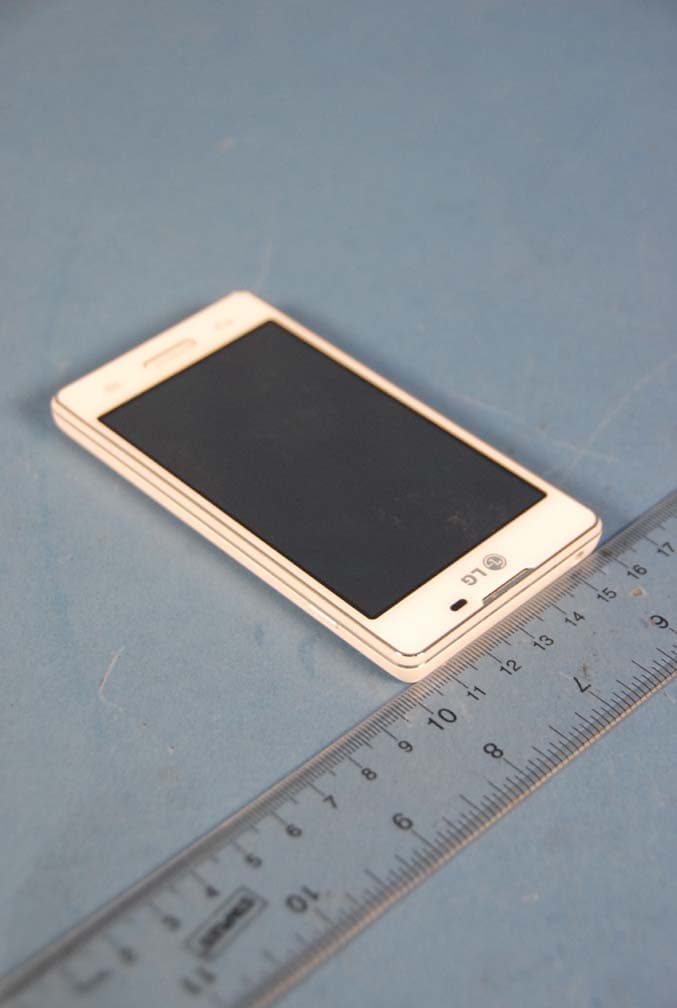
Click to zoom
Application Details
- Equipment Class
- DTS - Digital Transmission System
- Date of Grant
- Feb 26, 2013
- Application Purpose
- Original Equipment
- Date of Application
- Feb 26, 2013
- Equipment Note
- Cellular/ PCS GSM/ WCDMA Phone with WLAN and Bluetooth
- Frequency Range
- 2422.00000000 - 2452.00000000
- Company
- LG Electronics USA, Inc.
- Country
- United States
Documents & Files
Document Text
Text extracted from the exhibit documents filed with the FCC. Open a document above to read the original.
Users Manual
User Guide ENGLISH • Screen displays and illustrations may differ from those you see on actual phone. • Some of the contents of this guide may not apply to your phone, depending on the software and your service provider. All information in this document is subject to change without notice. • This handset is not suitable for people who have a visual impairment due to the touch screen keyboard. • Copyright ©2013 LG Electronics, Inc. All rights reserved. LG and the LG logo are registered trademarks of LG Group and its related entities. All other trademarks are the property of their respective owners. • Google™, Google Maps™, Gmail™, YouTube™, Google Talk™ and Play Store™ are trademarks of Google, Inc. 2 Guidelines for safe and efficient use .......5 Important notice .....................................15 Getting to know your phone ...................21 Phone overview .....................................21 Installing the SIM card and battery .........23 Charging the phone ...............................25 Using the memory card..........................25 Locking and unlocking the screen ..........26 Your Home screen ...................................27 Touch screen tips ..................................27 Home screen .........................................28 Customizing the Home screen ..............28 Returning to recently-used applications ...........................................29 Notifications ..........................................29 Swipe down for notifications & settings ...............................................30 Quick Settings .....................................30 Indicator icons on the Status Bar ..........31 On-screen keyboard ..............................32 Entering accented letters ......................32 Google account setup .............................33 Connecting to Networks and Devices ....34 Wi-Fi .....................................................34 Connecting to Wi-Fi networks ...............34 Turning Wi-Fi on and connecting to a Wi-Fi network ...................................34 Bluetooth ...............................................35 Sharing your phone's data connection ...36 PC connections with a USB cable ...........38 Calls ........................................................40 Making a call .........................................40 Calling your contacts .............................40 Answering and rejecting a call ...............40 Adjusting the in-call volume ...................41 Making a second call .............................41 Viewing your call logs ............................41 Call settings ...........................................42 Contacts ..................................................43 Searching for a contact ..........................43 Adding a new contact ............................43 Favorite contacts ...................................43 Creating a group ....................................44 Messaging ...............................................45 Sending a message ...............................45 Threaded box .......................................46 Changing your message settings ...........46 Email .......................................................47 Managing an email account ...................47 Working with account folders .................47 Composing and sending email ...............48 Camera ....................................................49 Getting to know the viewfinder ..............49 Using the advanced settings ..................50 Table of contents 3 Taking a quick photo .............................51 Once you've taken a photo.....................52 Viewing your saved photos ....................53 Video camera ..........................................54 Getting to know the viewfinder ..............54 Using the advanced settings ..................55 Recording a quick video .........................55 After recording a video...........................56 Watching your saved videos ..................56 Adjusting the volume when viewing a video ..................................................56 LG Unique Function.................................57 QuickMemo function ..............................57 Using the QuickMemo options ..............58 Viewing the saved QuickMemo ............58 LG SmartWorld ......................................59 How to Get to LG SmartWorld from Your Phone ..........................................59 How to use LG SmartWorld ...................59 Multimedia ..............................................61 Gallery ...................................................61 Viewing pictures ..................................61 Playing videos .....................................61 Editing photos/videos ...........................62 Deleting images ...................................62 Setting as wallpaper ............................62 Videos ...................................................62 Playing a video ....................................62 Music ....................................................63 Playing a song .....................................63 FM Radio ...............................................65 Searching for stations ............................65 Tuning in automatically .........................65 Utilities ....................................................66 Setting your alarm .................................66 Using your calculator .............................66 Adding an event to your calendar ...........66 Voice Recorder ......................................67 Recording a sound or voice ..................67 Tasks .....................................................67 Polaris Viewer ........................................68 Google+ ................................................68 Voice Search..........................................68 Downloads ............................................68 The Web ..................................................69 Internet ..................................................69 Using…
Text truncated - open the document above for the full version.
Users Manual
54 Getting to know the viewfinder Zoom – Zoom in or zoom out. Video size – Touch to set the size (in pixels) of the video you are recording. Brightness – This defines and controls the amount of sunlight entering the video. Flash – Allows you to turn on the flash when recording a video in dark conditions. Settings – Touch this icon to open the settings menu. Camera mode – Touch this icon to switch to camera mode. Record – Starts recording. Gallery – Touch to view the last video you recorded. This enables you to access your gallery and view your saved videos from within video mode. NOTE: While recording a video, place two fingers on the screen and pinch to use the Zoom function. Video camera 55 Using the advanced settings Using the viewfinder, touch to open all the advanced options. Touch if you want to change the viewfinder menu. Improves color quality in various lighting conditions. Choose a colour tone to use for your new view. Activate this to use your phone's location-based services. Choose Off to record a video without sound. Auto review automatically shows you the video you just recorded. Select storage to save videos. Restore all video camera default settings. Recording a quick video 1 Open the Camera application and touch the Video mode button. 2 The video camera viewfinder appears on the screen. 3 Hold your phone, point the lens towards the subject you wish to capture in your video. 4 Touch once to start recording. 5 A red light will appear at the top left corner of the viewfinder with a timer showing the length of the video. 6 Touch on the screen to stop recording. 56 Video camera After recording a video Touch to view the last video you took. Touch to record another video immediately. Touch to send your video to others or share it via social network services. Touch to delete the video. NOTE: Additional charges may apply when MMS messages are downloaded while roaming. Watching your saved videos 1 In the viewfinder, tap . 2 Your Gallery will appear on the screen. 3 Tap a video to play it automatically. Adjusting the volume when viewing a video To adjust the volume of a video while it is playing, use the volume keys on the left side of the phone. 57 QuickMemo function Use the QuickMemo function to practically and efficiently create memos during a call, with a saved picture or on the current phone screen. 1 Enter the QuickMemo function screen by pressing QuickMemo function key. OROR Touch and slide the status bar downward and touch . 2 Select the desired menu option from Pen type, Color, Eraser and create a memo. LG Unique Function 58 LG Unique Function 3 Touch in the Edit menu to save the memo with the current screen. NOTE: Please use a fingertip while using the QuickMemo function. Do not use your fingernail. Using the QuickMemo options You can easily use the QuickMenu options when using the QuickMemo function. Touch to keep the current memo on the screen and use the phone simultaneously. Selects whether to use the background screen or not. Undo or Redo. Selects the pen type and the colour. Erases the memo that you created. Touch to send your memo to others or share it via social network services. Saves the memo with the current screen in the Gallery. Viewing the saved QuickMemo Touch Gallery and select the QuickMemo album. 59 LG SmartWorld LG SmartWorld offers an assortment of exciting content - games, applications, wallpaper and ringtones - giving LG phone users the chance to enjoy richer "Mobile Life" experiences. How to Get to LG SmartWorld from Your Phone 1 Touch > Apps tab > tap the icon to access LG SmartWorld. 2 Tap Sign in and enter ID/PW for LG SmartWorld. If you have not signed up yet, tap Register to receive your LG SmartWorld membership. 3 Download the content you want. NOTE: What if there is no icon? 1 Using a mobile Web browser, access LG SmartWorld (www.lgworld.com) and select your country. 2 Download the LG SmartWorld App. 3 Run and install the downloaded file. 4 Access LG SmartWorld by tapping the icon. How to use LG SmartWorld • Participate in monthly LG SmartWorld promotions. Search content. Find content by category (e.g. Games, Education, Entertainment etc). List of downloaded/to-be updated content. 60 LG Unique Function • Try the easy "Menu" buttons to find what you’re looking for fast. Apps for you – Recommended content based on your previous choices. Settings – Set Profile and Display. Sign in – Set your ID and Password. • Try other useful functions as well. (Content Detail screen) NOTE: LG SmartWorld may not be available from all carriers or in all countries. 61 Gallery You can store multimedia files in internal memory for easy access to all your multimedia files. Use this application to view multimedia files like pictures and videos. 1 Touch > Apps tab > Gallery. Open a list of catalog bars that store your multimedia files. NOTE: • Some file formats are not supported, depending on the software installed on the device. • Some files may not play properly, depending on how they are encoded. Viewing pictures Launching Gallery displays your available folders. When another application, such as Email, saves a picture, the download folder is automatically created to contain the picture. Likewise, capturing a screenshot automatically creates the Screenshots folder. Select a folder to open it. Pictures are displayed by creation date in a folder. Select a picture to view it full screen. Scroll left or right to view the next or previous image. Zooming in and out Use one of the following methods to zoom in on an image: • Double-tap anywhere to zoom in. • Spread two fingers apart on any place to zoom in. Pinch to zoom out, or double-tap to return. Playing videos Video files show the icon in the preview. Select a video to watch it and tap . The Videos application will launch. Multimedia 62 Multimedia Editing photos/videos When viewing an photo/video, tap the Menu key and use the advanced editing options. • Slideshow: start a slideshow with the images in the current folde…
Text truncated - open the document above for the full version.
Cover Letter(s)
Date: Febrauary 20, 2013 Federal Communications Commission Authorization and Evaluation Division 7435 Oakland Mills Road, Columbia, MD 21046 RE: Request of Confidentiality for FCC ID: ZNFE450G Equip ment Class: DTS: Digital Transmission System To Whom It May Conce rn: Pursuant to Sections 0.457 and 0.459 of the Commission’s Rules (CFR 47), and Section 552 (b) (4) of the Freedom of Information Act, LG Electronics MobileComm USA hereby requests confidentiality and treatment of certain information accompanying this app lication. The materials contain trade secrets and pr oprietary information not customarily released to the public. The public disclosure of these matters might be harmful to the Applicant and provide unjustified benefits to its competitors. We are also hereby request Short-Term Confidentiality for 180 days after the grant as outlined in Public Notice DA 04-1705. This provision will give LG Electronics MobileComm USA temporary confidentiality of commercially sensitive information prior to product release. The requested Permanent and Temporary Confidential exhibits ar e listed as follows: PERMANENT AND SHORT-TERM CONFIDENTIAL LIST Exhibit Description 1 Block Diagram 2 Operational Descriptions PERMANENT 3 Schematics 4 External Photos 5 Internal Photos 6 Test-Setup Photos SHORT-TERM 7 User’s Manual The Applicant understands that pursuant to Rule 0.457, disclosure of this application and all accompanying documentations, where applicable, will not be made public before the date of the Grant for this application. Sincerely, Jacob Cho Director On behalf of LG Electronics MobileComm U.S.A, Inc. LG Electronics Inc. LGE LG Electronics MobileComm U.S.A 1000 Sylvan Avenue Englewood Cliffs, NJ 07632
External Photos
LG MobileComm FCC ID: ZNFE450G Model: LG-E450g External Photos EUT Type: Portable Handset Page 1 of 4 © 2013 PCTEST Engineering Laboratory Inc. EXTERNAL PHOTOGRAPHS LG MobileComm FCC ID: ZNFE450G Model: LG-E450g External Photos EUT Type: Portable Handset Page 2 of 4 © 2013 PCTEST Engineering Laboratory Inc. LG MobileComm FCC ID: ZNFE450G Model: LG-E450g External Photos EUT Type: Portable Handset Page 3 of 4 © 2013 PCTEST Engineering Laboratory Inc. LG MobileComm FCC ID: ZNFE450G Model: LG-E450g External Photos EUT Type: Portable Handset Page 4 of 4 © 2013 PCTEST Engineering Laboratory Inc.
ID Label/Location Info
Model No: LG-E450g FCC ID : ZNFE450G S/N : Ma de in Korea LG Electronics MobileComm USA, Inc. LGE
Internal Photos
LG MobileComm FCC ID: ZNFE450G Model: LG-E450g Internal Photos EUT Type: Portable Handset Page 1 of 9 © 2013 PCTEST Engineering Laboratory Inc. INTERNAL PHOTOGRAPHS LG MobileComm FCC ID: ZNFE450G Model: LG-E450g Internal Photos EUT Type: Portable Handset Page 2 of 9 © 2013 PCTEST Engineering Laboratory Inc. LG MobileComm FCC ID: ZNFE450G Model: LG-E450g Internal Photos EUT Type: Portable Handset Page 3 of 9 © 2013 PCTEST Engineering Laboratory Inc. LG MobileComm FCC ID: ZNFE450G Model: LG-E450g Internal Photos EUT Type: Portable Handset Page 4 of 9 © 2013 PCTEST Engineering Laboratory Inc. LG MobileComm FCC ID: ZNFE450G Model: LG-E450g Internal Photos EUT Type: Portable Handset Page 5 of 9 © 2013 PCTEST Engineering Laboratory Inc. LG MobileComm FCC ID: ZNFE450G Model: LG-E450g Internal Photos EUT Type: Portable Handset Page 6 of 9 © 2013 PCTEST Engineering Laboratory Inc. LG MobileComm FCC ID: ZNFE450G Model: LG-E450g Internal Photos EUT Type: Portable Handset Page 7 of 9 © 2013 PCTEST Engineering Laboratory Inc. LG MobileComm FCC ID: ZNFE450G Model: LG-E450g Internal Photos EUT Type: Portable Handset Page 8 of 9 © 2013 PCTEST Engineering Laboratory Inc. LG MobileComm FCC ID: ZNFE450G Model: LG-E450g Internal Photos EUT Type: Portable Handset Page 9 of 9 © 2013 PCTEST Engineering Laboratory Inc.
RF Exposure Info
© 2012 PCTEST Engineering Laboratory, Inc. APPENDIX D: SAR TISSUE SPECIFICATIONS FCC ID:ZNFE450G SAR EVALUATION REPORT Reviewed by: Quality Manager Test Dates: DUT Type: APPENDIX D: Page 1 of 2 01/07/13 - 01/08/13, 1/28/13 - 1/30/13 Portable Handset © 2013 PCTEST Engineering Laboratory, Inc. REV 11.3 M 04/23/2012 APPENDIX D: SAR TISSUE SPECIFICATIONS Measurement Procedure for Tissue Verification: 1) The network analyzer and probe system was configured and calibrated. 2) The probe was immersed in the tissue. The tissue was placed in a nonmetallic container. Trapped air bubbles beneath the flange were minimized by placing the probe at a slight angle. 3) The complex admittance with respect to the probe aperture was measured 4) The complex relative permittivity ε ’ can be calculated from the below equation (Pournaropoulos and Misra): b a b a rr ddd r rj ab j Y 0 2/1 0 ' 0 2 0 )(exp cos ln 2 where Y is the admittance of the probe in contact with the sample, the primed and unprimed coordinates refer to source and observation points, respectively, cos2 222 r, is the angular frequency, and 1j. Table D-I Composition of the Tissue Equivalent Matter Frequency (MHz)8358351900190024502450 TissueHeadBodyHeadBodyHeadBody Ingredients (% by weight) Bactericide0.10.1 DGBE44.92 29.4426.7 HEC11 NaCl1.450.940.18 0.390.1 Sucrose5744.9 Water40.4553.06 54.970.1773.2 See Next Page FCC ID:ZNFE450G SAR EVALUATION REPORT Reviewed by: Quality Manager Test Dates: DUT Type: APPENDIX D: Page 2 of 2 01/07/13 - 01/08/13, 1/28/13 - 1/30/13 Portable Handset © 2013 PCTEST Engineering Laboratory, Inc. REV 11.3 M 04/23/2012 Figure D-1 Composition of 2.4 GHz Head Tissue Equivalent Matter Note: 2.4 GHz head liquid recipes are proprietary SPEAG. Since the composition is approximate to the actual liquids utilized, the manufacturer tissue-equivalent liquid data sheets are provided below. Figure D-2 2.4 GHz Head Tissue Equivalent Matter © 2012 PCTEST Engineering Laboratory, Inc. APPENDIX E: SAR SYSTEM VALIDATION FCC ID:ZNFE450G SAR EVALUATION REPORT Reviewed by: Quality Manager Test Dates: DUT Type: APPENDIX E: Page 1 of 1 01/07/13 - 01/08/13, 1/28/13 - 1/30/13 Portable Handset © 2013 PCTEST Engineering Laboratory, Inc. REV 11.3 M 04/23/2012 APPENDIX E: SAR SYSTEM VALIDATION Per FCC KDB 865664 D02v01, SAR system validation status should be documented to confirm measurement accuracy. The SAR systems (including SAR probes, system components and software versions) used for this device were validated against its performance specifications prior to the SAR measurements. Reference dipoles were used with the required tissue- equivalent media for system validation, according to the procedures outlined in IEEE 1528-2003 and FCC KDB 865664 D01 v01. Since SAR probe calibrations are frequency dependent, each probe calibration point was validated at a frequency within the valid frequency range of the probe calibration point, using the system that normally operates with the probe for routine SAR measurements and according to the required tissue-equivalent media. A tabulated summary of the system validation status including the validation date(s), measurement frequencies, SAR probes and tissue dielectric parameters has been included. Table E-I SAR System Validation Summary COND.PERM. (σ) (ε r ) SENSI- TIVITY PROBE LINEARITY PROBE ISOTROPY MOD. TYPE DUTY FACTOR PAR G83510/18/20123213ES3DV3835Head0.98053.82N/AN/AN/AGMSKPASSN/A G83510/16/20123213ES3DV3835Head0.92843.36PASSPASSPASSN/AN/AN/A D83510/19/20123288ES3DV3835Body0.99155.66PASSPASSPASSGMSKPASSN/A G83510/17/20123213ES3DV3835Body0.86541.59PASSPASSPASSGMSKPASSN/A G190010/17/20123213ES3DV31900Head1.56252.56PASSPASSPASSGMSKPASSN/A E190010/18/20123263ES3DV31900Body1.57852.61PASSPASSPASSGMSKPASSN/A A24501/7/20133022ES3DV32450Head1.83637.78PASSPASSPASSOFDMN/APASS E245011/1/20123263ES3DV32450Body2.03250.78PASSPASSPASSOFDMN/APASS MOD. VALIDATIONCW VALIDATION SAR SYSTEM # FREQ. [MHz] DATE PROBE SN PROBE TYPE PROBE CAL. POINT
RF Exposure Info
FCC ID:ZNFE450G SAR EVALUATION REPORT Reviewed by: Quality Manager Document S/N: Test Dates: DUT Type: Page 1 of 32 0Y1301070049-R1.ZNF 01/07/13 - 01/08/13, 1/28/13 - 1/30/13 Portable Handset © 2013 PCTEST Engineering Laboratory, Inc. REV 11.3 M 04/23/2012 Applicant Name: Date of Testing: LG Electronics MobileComm U.S.A., Inc. 01/07/13 - 01/08/13, 1/28/13 - 1/30/13 1000 Sylvan Avenue, Test Site/Location: Englewood Cliffs, NJ 07632 PCTEST Lab, Columbia, MD, USA USA Document Serial No.: 0Y1301070049-R1.ZNF FCC ID: ZNFE450G APPLICANT: LG ELECTRONICS MOBILECOMM U.S.A., INC. DUT Type: Portable Handset Application Type: Certification FCC Rule Part(s): CFR §2.1093 Model(s): LG-E450g, LGE450g, E450g, LG-E450B, E450B 1 gm Head (W/kg) 1 gm Body- Worn (W/kg) 1 gm Hotspot (W/kg) PCEGSM/GPRS/ EDGE Rx Only 850824.20 - 848.80 MHz33.010.631.211.21 PCEUMTS 850824.20 - 848.80 MHz23.190.310.650.65 PCEGSM/GPRS/ EDGE Rx Only 19001850.20 - 1909.80 MHz29.960.670.810.81 PCEUMTS 19001852.4 - 1907.6 MHz23.191.091.191.19 DTS2.4 GHz WLAN2412 - 2462 MHz13.63< 0.1< 0.1< 0.1 DSSBluetooth2402 - 2480 MHz6.00 1.09 1.291.26 N/A SAR Band & ModeTx Frequency Measured Conducted Power [dBm] Simultaneous SAR per KDB 690783 D01v01r02: Equipment Class Note: Powers in the above table represent output powers for the SAR test configurations and may not represent the highest output powers for all configurations for each mode. This revised Test Report (S/N: 0Y1301070049-R1.ZNF) supersedes and replaces the previously issued test report on the same subject EUT for the same type of testing as indicated. Please discard or destroy the previously issued test report(s) and dispose of it accordingly. This wireless portable device has been shown to be capable of compliance for localized specific absorption rate (SAR) for uncontrolled environment/general population exposure limits specified in ANSI/IEEE C95.1-1992 and has been tested in accordance with the measurement procedures specified in Section 1.7 of this report; for North American frequency bands only. I attest to the accuracy of data. All measurements reported herein were performed by me or were made under my supervision and are correct to the best of my knowledge and belief. I assume full responsibility for the completeness of these measurements and vouch for the qualifications of all persons taking them. Test results reported herein relate only to the item(s) tested. PCTEST ENGINEERING LABORATORY, INC. 7185 Oakland Mills Road, Columbia, MD 21046 USA Tel. +1.410.290.6652 / Fax +1.410.290.6654 http://www.pctestlab.com SAR EVALUATION REPORT FCC ID:ZNFE450G SAR EVALUATION REPORT Reviewed by: Quality Manager Document S/N: Test Dates: DUT Type: Page 2 of 32 0Y1301070049-R1.ZNF 01/07/13 - 01/08/13, 1/28/13 - 1/30/13 Portable Handset © 2013 PCTEST Engineering Laboratory, Inc. REV 11.3 M 04/23/2012 TABLE OF CONTENTS 1 DEVICE UNDER TEST ................................................................................................................... 3 2 INTRODUCTION ............................................................................................................................. 6 3 DOSIMETRIC ASSESSMENT ........................................................................................................ 7 4 DEFINITION OF REFERENCE POINTS ........................................................................................ 8 5 TEST CONFIGURATION POSITIONS FOR HANDSETS .............................................................. 9 6 RF EXPOSURE LIMITS ................................................................................................................ 12 7 FCC MEASUREMENT PROCEDURES ........................................................................................ 13 8 RF CONDUCTED POWERS ......................................................................................................... 15 9 SYSTEM VERIFICATION .............................................................................................................. 18 10 SAR DATA SUMMARY ................................................................................................................. 20 11 FCC MULTI-TX AND ANTENNA SAR CONSIDERATIONS ......................................................... 24 12 SAR MEASUREMENT VARIABILITY ........................................................................................... 27 13 EQUIPMENT LIST ......................................................................................................................... 28 14 MEASUREMENT UNCERTAINTIES ............................................................................................ 29 15 CONCLUSION ............................................................................................................................... 30 16 REFERENCES .............................................................................................................................. 31 APPENDIX A: SAR TEST PLOTS APPENDIX B: SAR DIPOLE VERIFICATION PLOTS APPENDIX C: PROBE AND DIPOLE CALIBRATION CERTIFICATES APPENDIX D: SAR TISSUE SPECIFICATIONS APPENDIX E: SAR SYSTEM VALIDATION APPENDIX F: SAR TEST SETUP PHOTOGRAPHS FCC ID:ZNFE450G SAR EVALUATION REPORT Reviewed by: Quality Manager Document S/N: Test Dates: DUT Type: Page 3 of 32 0Y1301070049-R1.ZNF 01/07/13 - 01/08/13, 1/28/13 - 1/30/13 Portable Handset © 2013 PCTEST Engineering Laboratory, Inc. REV 11.3 M 04/23/2012 1 DEVICE UNDER TEST 1.1 Device Overview GSM/GPRS/ EDGE Rx Only 850Voice/Data824.20 - 848.80 MHz UMTS 850Voice/Data824.20 - 848.80 MHz GSM/GPRS/ EDGE Rx Onl y 1900Voice/Data1850.20 - 1909.80 MHz UMTS 1900Voice/Data1852.4 - 1907.6 MHz 2.4 GHz WLANData2412 - 2462 MHz BluetoothData2402 - 2480 MHz Operating ModesBand & ModeTx Frequency 1.2 Nominal and Maximum Output Power Specifications This device operates using the following maximum and nominal output power specifications. SAR values were scaled to the maximum allowed power to determine complianc…
Text truncated - open the document above for the full version.
Test Report
FCC ID: ZNFE450G FCC Pt. 15.247 802.11b/g/n MEASUREMENT REPORT (CERTIFICATION) Reviewed by: Quality Manager Test Report S/N: Test Dates: EUT Type: Page 1 of 54 0Y1301070051.ZNF 1/03-1/10/13, 2/7-2/13/13 Portable Handset © 2013 PCTEST Engineering Laboratory, Inc. REV 2.0WN40 11/08/2012 Applicant Name: Date of Testing: LG Electronics MobileComm U.S.A 1/03-1/10/13, 2/7-2/13/13 1000 Sylvan Avenue Test Site/Location: Englewood Cliffs, NJ 07632 PCTEST Lab, Columbia, MD, USA United States Test Report Serial No.: 0Y1301070051.ZNF FCC ID: ZNFE450G IC CERT. NO.: 2703C-E450B APPLICANT: LG Electronics MobileComm U.S.A Application Type: Certification Model(s): LG-E450g, E450g, LGE450g, LG-E450B, E450B EUT Type: Portable Handset FCC Classification: Digital Transmission System (DTS) FCC Rule Part(s): Part 15.247 Test Procedure(s): ANSI C63.10-2009, KDB 558074 v02 Max. Power (mW ) Max. Power (dBm) Max. Power (mW ) Max. Power (dBm) 802.11b 2412 - 246224.09913.8251.28617.10 802.11g 2412 - 24629.8409.9354.32517.35 802.11n (20MHz) 2412 - 24627.6218.8245.81416.61 802.11n (40MHz) 2422 - 24527.3118.6438.99415.91 Avg Conducted Mode Tx Frequency (MHz) Peak Conducted This equipment has been shown to be capable of compliance with the applicable technical standards as indicated in the measurement report and was tested in accordance with the measurement procedures specified in ANSI C63.10-2009 and KDB 558074. Test results reported herein relate only to the item(s) tested. I attest to the accuracy of data. All measurements reported herein were performed by me or were made under my supervision and are correct to the best of my knowledge and belief. I assume full responsibility for the completeness of these measurements and vouch for the qualifications of all persons taking them. PCTEST ENGINEERING LABORATORY, INC. 7185 Oakland Mills Road, Columbia, MD 21046 USA Tel. 410.290.6652 / Fax 410.290.6654 http://www.pctestlab.com MEASUREMENT REPORT FCC PART 15.247 WLAN 802.11b/g/n FCC ID: ZNFE450G FCC Pt. 15.247 802.11b/g/n MEASUREMENT REPORT (CERTIFICATION) Reviewed by: Quality Manager Test Report S/N: Test Dates: EUT Type: Page 2 of 54 0Y1301070051.ZNF 1/03-1/10/13, 2/7-2/13/13 Portable Handset © 2013 PCTEST Engineering Laboratory, Inc. REV 2.0WN40 11/08/2012 TABLE OF CONTENTS FCC PART 15.247 MEASUREMENT REPORT...................................................................................3 1.0 INTRODUCTION ...................................................................................................................................... 4 1.1 SCOPE ........................................................................................................................................................... 4 1.2 PCTEST TEST LOCATION ............................................................................................................................ 4 2.0 PRODUCT INFORMATION ..................................................................................................................... 5 2.1 EQUIPMENT DESCRIPTION......................................................................................................................... 5 2.2 DEVICE CAPABILITIES ................................................................................................................................. 5 2.3 TEST CONFIGURATION ............................................................................................................................... 5 2.4 EMI SUPPRESSION DEVICE(S)/MODIFICATIONS ...................................................................................... 5 2.5 LABELING REQUIREMENTS ........................................................................................................................ 5 3.0 DESCRIPTION OF TEST ........................................................................................................................ 6 3.1 EVALUATION PROCEDURE ......................................................................................................................... 6 3.2 AC LINE CONDUCTED EMISSIONS ............................................................................................................. 6 3.3 RADIATED EMISSIONS .....…
Text truncated - open the document above for the full version.
Contact Information
Applicant
David Kim(Team leader, LGEUS NA Policy & Regulatory Affairs)
Technical Contact
PCTEST Engineering Lab., Inc.Randy Ortanez
[email protected]410-290-6652
6660-B Dobbin Road · Columbia, Maryland · United States
Test Firm
PCTEST Engineering Laboratory, Inc.Randy Ortanez
Technical Specifications
| # | Rule Parts | Frequency Range | Power Output |
|---|---|---|---|
| 2 | 15C | 2.42 GHz - 2.45 GHz | 39.00 mW |
Other Applications from LG Electronics USA, Inc.

ZNFTONET80S
Nov 13, 2023Bluetooth Earbuds
Equipment Class
DTS - Digital Transmission System
ZNFTONETF8QC
Jun 21, 2022Bluetooth Earbud (Cradle)
Equipment Class
JBP - Part 15 Class B Computing Device Peripheral
ZNFTONEFP8
May 30, 2021Bluetooth Earbud
Equipment Class
DTS - Digital Transmission System
ZNFK200AM
Feb 18, 2021Portable Handset
Equipment Class
DSS - Part 15 Spread Spectrum Transmitter
ZNFK735MM
Feb 10, 2021Portable Handset
Equipment Class
NII - Unlicensed National Information Infrastructure TX