ZNFE450JCellular/PCS GSM and Cellular UMTS Phone with WLAN and Bluetooth
LG Electronics USA, Inc.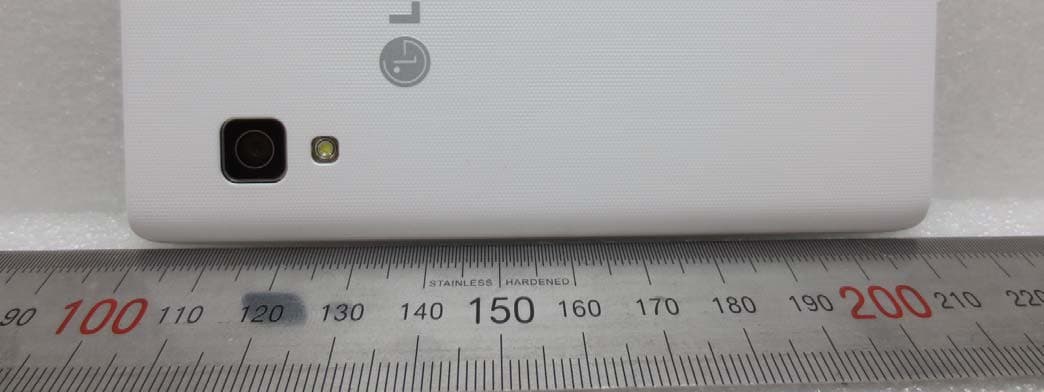
Click to zoom
Application Details
- Equipment Class
- JBP - Part 15 Class B Computing Device Peripheral
- Date of Grant
- May 08, 2013
- Application Purpose
- Original Equipment
- Date of Application
- May 08, 2013
- Equipment Note
- Cellular/PCS GSM and Cellular UMTS Phone with WLAN and Bluetooth
- Company
- LG Electronics USA, Inc.
- Country
- United States
Documents & Files
Document Text
Text extracted from the exhibit documents filed with the FCC. Open a document above to read the original.
Users Manual
ENGLISH 00000000 (1.0) User Guide LG-E450j www.lg.com User Guide ENGLISH • Screen displays and illustrations may differ from those you see on actual phone. • Some of the contents of this guide may not apply to your phone, depending on the software and your service provider. All information in this document is subject to change without notice. • This handset is not suitable for people who have a visual impairment due to the touch screen keyboard. • Copyright ©2013 LG Electronics, Inc. All rights reserved. LG and the LG logo are registered trademarks of LG Group and its related entities. All other trademarks are the property of their respective owners. • Google™, Google Maps™, Gmail™, YouTube™, Google Talk™ and Play Store™ are trademarks of Google, Inc. 2 Guidelines for safe and effi cient use .......5 Important notice .....................................15 Getting to know your phone ...................21 Phone overview .....................................21 Installing the SIM card and battery .........23 Charging the phone ...............................25 Using the memory card..........................25 Locking and unlocking the screen ..........26 Your Home screen ...................................27 Touch screen tips ..................................27 Home screen .........................................28 Customizing the Home screen ..............28 Returning to recently-used applications ...........................................29 Notifi cations ..........................................29 Swipe down for notifi cations & settings ...............................................30 Quick Settings .....................................30 Indicator icons on the Status Bar ..........31 On-screen keyboard ..............................32 Entering accented letters ......................32 Google account setup .............................33 Connecting to Networks and Devices ....34 Wi-Fi .....................................................34 Connecting to Wi-Fi networks ...............34 Turning Wi-Fi on and connecting to a Wi-Fi network ...................................34 Bluetooth ...............................................35 Sharing your phone's data connection ...36 PC connections with a USB cable ...........38 Calls ........................................................40 Making a call .........................................40 Calling your contacts .............................40 Answering and rejecting a call ...............40 Adjusting the in-call volume ...................41 Making a second call .............................41 Viewing your call logs ............................41 Call settings ...........................................42 Contacts ..................................................43 Searching for a contact ..........................43 Adding a new contact ............................43 Favorite contacts ...................................43 Creating a group ....................................44 Messaging ...............................................45 Sending a message ...............................45 Threaded box .......................................46 Changing your message settings ...........46 Email .......................................................47 Managing an email account ...................47 Working with account folders .................47 Composing and sending email ...............48 Camera ....................................................49 Getting to know the viewfi nder ..............49 Using the advanced settings ..................50 Table of contents 3 Taking a quick photo .............................51 Once you've taken a photo.....................52 Viewing your saved photos ....................53 Video camera ..........................................54 Getting to know the viewfi nder ..............54 Using the advanced settings ..................55 Recording a quick video .........................55 After recording a video...........................56 Watching your saved videos ..................56 Adjusting the volume when viewing a video .....................................................56 LG Unique Function.................................57 QuickMemo function ..............................57 Using the QuickMemo options ..............58 Viewing the saved QuickMemo ............58 LG SmartWorld ......................................59 How to Get to LG SmartWorld from Your Phone ..........................................59 How to use LG SmartWorld ...................59 Multimedia ..............................................61 Gallery ...................................................61 Viewing pictures ..................................61 Playing videos .....................................61 Editing photos/videos ...........................62 Deleting images ...................................62 Setting as wallpaper ............................62 Videos ...................................................62 Playing a video ....................................62 Music ....................................................63 Playing a song .....................................63 FM Radio ...............................................65 Searching for stations ............................65 Tuning in automatically .........................65 Utilities ....................................................66 Setting your alarm .................................66 Using your calculator .............................66 Adding an event to your calendar ...........66 Voice Recorder ......................................67 Recording a sound or voice ..................67 Tasks .....................................................67 Polaris Viewer ........................................68 Google+ ................................................68 Voice Search..........................................68 Downloads ............................................68 The Web ..................................................69 Inter…
Text truncated - open the document above for the full version.
Users Manual
47 You can use the E-mail application to read emails from services like Gmail. The E-mail application supports the following account types: POP3, IMAP and Exchange. Your service provider or system administrator can provide you with the account settings you need. Managing an email account The first time you open the E-mail application, a set-up wizard opens to help you to set up an email account. After the initial set-up, E-mail displays the contents of your inbox. If you have added more than one account, you can switch among accounts. To add another email account: • Touch > Apps tab > E-mail > touch > Accounts > touch > Add account. To change an email account's settings: • Touch > Apps tab > E-mail > touch > Accounts > touch > Entire settings. To delete an email account: • Touch > Apps tab > E-mail > touch > Accounts > touch > Remove account > touch an account you want to delete > Remove > select Yes. Working with account folders Touch > Apps tab > E-mail > touch and select Folders. Each account has an Inbox, Outbox, Sent and Drafts folder. Depending on the features supported by your account's service provider, you may have additional folders. Email 48 Email Composing and sending email To compose and send a message 1 While in the E-mail application, touch the . 2 Enter an address for the message's intended recipient. As you enter text, matching addresses will be proposed from your Contacts. Separate multiple addresses using semicolons. 3 Touch the Cc/Bcc field to add a Cc/Bcc and Touch to attach files, if required. 4 Enter the text of the message. 5 Touch . If you aren't connected to a network, for example, if you're working in airplane mode, the messages that you send will be stored in your Outbox folder until you connect to a network again. If it contains any pending messages, the Outbox will be displayed on the Accounts screen. TIP! When a new email arrives in your Inbox, you will be notified by a sound or vibration. Tap the email notification to stop receiving notifications. 49 To open the Camera application, tap Camera on the Home screen. Getting to know the viewfinder Cheese shutter – This enables you to take a picture as voice command. Say "Cheese" when you get ready to take a photo. Brightness – This defines and controls the amount of sunlight entering the image. Shot mode – Choose from Normal, Panorama or Continuous shot. Flash – Automatically turns on the flash when taking a photo in a dark place. Settings – Touch this icon to open the Settings menu. Video mode – Touch this icon to switch to video mode. Capture – Takes a photo. Gallery – Touch to view the last photo you captured. This enables you to access your gallery and view saved photos within camera mode. NOTE: The memory capacity may differ depending on the shooting scene or shooting conditions. Camera 50 Camera Using the advanced settings In the viewfinder, tap to open the advanced options. You can change the camera settings by scrolling through the list. After selecting the option, tap the Back key. Touch if you want to change the viewfinder menu. Zoom in or out. Selects photo resolution. If you choose high resolution, file size will increase, which means you will be able to store fewer photos in the memory. Finds the appropriate color and light settings for the current environment. The ISO rating determines the sensitivity of the camera's light sensor. The higher the ISO, the more sensitive the camera. This is useful in darker conditions when you cannot use the flash. Improves color quality in various lighting conditions. Applies artistic effects to your pictures. Sets a delay after the capture button is pressed. This is ideal if you want to be in the photo. Activate this to use your phone's location-based services. Take pictures wherever you are and tag them with the location. If you upload tagged pictures to a blog that supports geotagging, you can see the pictures displayed on a map. NOTE: This function is only available when the GPS function is active. Selects a shutter sound. Automatically shows you the picture you just took. 51 Restore all camera default settings. Select storage to save images. Touch this whenever you want to know how a function works. This icon will provide you with a quick guide. TIP! • When you exit the camera, some settings return to their defaults, such as white balance, color effect, timer and scene mode. Check these before you take your next photo. • The setting menu is superimposed over the viewfinder, so when you change photo color or quality elements, you will see a preview of the changed image behind the Settings menu. Taking a quick photo 1 Open the Camera application. 2 Holding the phone horizontally, point the lens towards the subject you want to photograph. 3 A focus box will appear in the center of the viewfinder screen. You can also tap anywhere on the screen to focus on that spot. 4 When the focus box turns green, the camera has focused on your subject. 5 Touch to capture the photo. 52 Camera Once you've taken a photo Touch to view the last photo you captured. Touch to take another photo immediately. Touch to send your photo to others or share it via social network services. Touch to delete the photo. TIP! If you have an SNS account and set it up on your phone, you can share your photo with your SNS community. NOTE: Additional charges may apply when MMS messages are downloaded while roaming. Touch the Menu key to open all advanced options. Set image as – Touch to use the photo as a Contact photo, Home screen wallpaper or Lock screen wallpaper. Move – Touch to move the photo to another place. Copy – Touch to copy the selected photo and save it to another album. Rename – Touch to edit the name of the selected photo. Rotate left/right – To rotate left or right. Crop – Crop your photo. Move your finger across the screen to select the area to be cropped. Edit – View and edit the photo. Slideshow – Automatically shows you the images in the current folder one after the other. Details –…
Text truncated - open the document above for the full version.
Cover Letter(s)
LG Electronics USA 1000 Sylvan Avenue Englewood Cliffs, NJ 07632 Date: April 24, 2013 Federal Communications Commission Authorization and Evaluation Division 7435 Oakland Mills Road, Columbia, MD 21046 RE: Request of Confidentiality for FCC ID: ZNFE450J Eq uipment Class: J BP: Part 15 Class B Computing Devic e Peripheral To Whom It May Concern: Pursuant to Sect ions 0.457 and 0.459 of the Commission’s Rules (CF R 47), and Section 552 (b) (4) of the Freedom of Information Act, LG Electronics MobileComm USA hereby requests confidentiality and treatment of certain information accompanying this applica tion. The materials contain trade secrets and proprietary information not customarily released to the public. The public disclosure of these matters might be harmful to the Applicant and provide unjustified benefits to its competitors. We are also hereby request Short-Term Confidentiality for 180 days after the grant as outlined in Public Notice DA 04-1705. This provision will give LG Electronics MobileComm USA temporary confidentiality of commercially sensitive information prior to product release. The requested Permanent and Temporary Confidential exhibits are listed as follows: PERMANENT AND SHORT-TERM CONFIDENTIAL LIST Exhibit Description 1 Block Diagram PERMANENT 2 Operational Descriptions 3 External Photos 4 Internal Photos 5 Test-Setup Photos SHORT-TERM 6 User’s Manual The Applicant understands that pursuant to Rule 0.457, disclosure of this application and all accompanying documentations, where applicable, will not be made public before the date of the Grant for this application. Sincerely, Jacob Cho Director On behalf of LG Electronics MobileComm U.S.A, Inc. LG Electronics MobileComm U.S.A 1000 Sylvan Avenue Englewood Cliffs, NJ 07632
External Photos
FCC ID: ZNFE450J HCT CO., LTD 105-1, JANGAM-RI, MAJANG-MYEON, ICHEON-SI, KYUNGGI-DO, 467-811 KOREA TEL : + 82 31 645 6300 FAX : + 82 31 645 6401 www.hct.co.kr Page 1 of 7 EXTERNAL PHOTOGRAPHS FCC ID: ZNFE450J HCT CO., LTD 105-1, JANGAM-RI, MAJANG-MYEON, ICHEON-SI, KYUNGGI-DO, 467-811 KOREA TEL : + 82 31 645 6300 FAX : + 82 31 645 6401 www.hct.co.kr Page 2 of 7 ■ EXTERNAL PHOTO FCC ID: ZNFE450J HCT CO., LTD 105-1, JANGAM-RI, MAJANG-MYEON, ICHEON-SI, KYUNGGI-DO, 467-811 KOREA TEL : + 82 31 645 6300 FAX : + 82 31 645 6401 www.hct.co.kr Page 3 of 7 ■ EXTERNAL PHOTO FCC ID: ZNFE450J HCT CO., LTD 105-1, JANGAM-RI, MAJANG-MYEON, ICHEON-SI, KYUNGGI-DO, 467-811 KOREA TEL : + 82 31 645 6300 FAX : + 82 31 645 6401 www.hct.co.kr Page 4 of 7 ■ EXTERNAL PHOTO FCC ID: ZNFE450J HCT CO., LTD 105-1, JANGAM-RI, MAJANG-MYEON, ICHEON-SI, KYUNGGI-DO, 467-811 KOREA TEL : + 82 31 645 6300 FAX : + 82 31 645 6401 www.hct.co.kr Page 5 of 7 ■ EXTERNAL PHOTO FCC ID: ZNFE450J HCT CO., LTD 105-1, JANGAM-RI, MAJANG-MYEON, ICHEON-SI, KYUNGGI-DO, 467-811 KOREA TEL : + 82 31 645 6300 FAX : + 82 31 645 6401 www.hct.co.kr Page 6 of 7 ■ EXTERNAL PHOTO FCC ID: ZNFE450J HCT CO., LTD 105-1, JANGAM-RI, MAJANG-MYEON, ICHEON-SI, KYUNGGI-DO, 467-811 KOREA TEL : + 82 31 645 6300 FAX : + 82 31 645 6401 www.hct.co.kr Page 7 of 7 ■ EXTERNAL PHOTO
ID Label/Location Info
※ FCC ID Label Form Note : The FCC ID shown will be readily visible at the time of purchase. Note! We, LG Electronics MobileCommUSA, state that our device, FCC ID ZNFE450J, has a battery. However the battery will not be placed in the battery compartment when delivery, so it is visible to the users as they purchase the product and install the battery. Additionally, the label is permanently attached. The label it’s attached to the EUT by an adhesive. The adhesive is permanent type with strong strength. The label is located back of the phone. When the user install the battery, the user can see the label.
Internal Photos
FCC ID: ZNFE450J HCT CO., LTD 105-1, JANGAM-RI, MAJANG-MYEON, ICHEON-SI, KYUNGGI-DO, 467-811 KOREA TEL : + 82 31 645 6300 FAX : + 82 31 645 6401 www.hct.co.kr Page 1 of 16 INTERNAL PHOTOGRAPHS FCC ID: ZNFE450J HCT CO., LTD 105-1, JANGAM-RI, MAJANG-MYEON, ICHEON-SI, KYUNGGI-DO, 467-811 KOREA TEL : + 82 31 645 6300 FAX : + 82 31 645 6401 www.hct.co.kr Page 2 of 16 ■ Main Antenna INTERNAL PHOTO Main Antenna FCC ID: ZNFE450J HCT CO., LTD 105-1, JANGAM-RI, MAJANG-MYEON, ICHEON-SI, KYUNGGI-DO, 467-811 KOREA TEL : + 82 31 645 6300 FAX : + 82 31 645 6401 www.hct.co.kr Page 3 of 16 ■ INTERNAL PHOTO FCC ID: ZNFE450J HCT CO., LTD 105-1, JANGAM-RI, MAJANG-MYEON, ICHEON-SI, KYUNGGI-DO, 467-811 KOREA TEL : + 82 31 645 6300 FAX : + 82 31 645 6401 www.hct.co.kr Page 4 of 16 ■ INTERNAL PHOTO FCC ID: ZNFE450J HCT CO., LTD 105-1, JANGAM-RI, MAJANG-MYEON, ICHEON-SI, KYUNGGI-DO, 467-811 KOREA TEL : + 82 31 645 6300 FAX : + 82 31 645 6401 www.hct.co.kr Page 5 of 16 ■ BT&WLAN Antenna_INTERNAL PHOTO BT / WiFi Antenna FCC ID: ZNFE450J HCT CO., LTD 105-1, JANGAM-RI, MAJANG-MYEON, ICHEON-SI, KYUNGGI-DO, 467-811 KOREA TEL : + 82 31 645 6300 FAX : + 82 31 645 6401 www.hct.co.kr Page 6 of 16 ■ INTERNAL PHOTO FCC ID: ZNFE450J HCT CO., LTD 105-1, JANGAM-RI, MAJANG-MYEON, ICHEON-SI, KYUNGGI-DO, 467-811 KOREA TEL : + 82 31 645 6300 FAX : + 82 31 645 6401 www.hct.co.kr Page 7 of 16 ■ INTERNAL PHOTO FCC ID: ZNFE450J HCT CO., LTD 105-1, JANGAM-RI, MAJANG-MYEON, ICHEON-SI, KYUNGGI-DO, 467-811 KOREA TEL : + 82 31 645 6300 FAX : + 82 31 645 6401 www.hct.co.kr Page 8 of 16 ■ INTERNAL PHOTO FCC ID: ZNFE450J HCT CO., LTD 105-1, JANGAM-RI, MAJANG-MYEON, ICHEON-SI, KYUNGGI-DO, 467-811 KOREA TEL : + 82 31 645 6300 FAX : + 82 31 645 6401 www.hct.co.kr Page 9 of 16 ■ INTERNAL PHOTO FCC ID: ZNFE450J HCT CO., LTD 105-1, JANGAM-RI, MAJANG-MYEON, ICHEON-SI, KYUNGGI-DO, 467-811 KOREA TEL : + 82 31 645 6300 FAX : + 82 31 645 6401 www.hct.co.kr Page 10 of 16 ■ INTERNAL PHOTO FCC ID: ZNFE450J HCT CO., LTD 105-1, JANGAM-RI, MAJANG-MYEON, ICHEON-SI, KYUNGGI-DO, 467-811 KOREA TEL : + 82 31 645 6300 FAX : + 82 31 645 6401 www.hct.co.kr Page 11 of 16 ■ INTERNAL PHOTO FCC ID: ZNFE450J HCT CO., LTD 105-1, JANGAM-RI, MAJANG-MYEON, ICHEON-SI, KYUNGGI-DO, 467-811 KOREA TEL : + 82 31 645 6300 FAX : + 82 31 645 6401 www.hct.co.kr Page 12 of 16 ■ INTERNAL PHOTO FCC ID: ZNFE450J HCT CO., LTD 105-1, JANGAM-RI, MAJANG-MYEON, ICHEON-SI, KYUNGGI-DO, 467-811 KOREA TEL : + 82 31 645 6300 FAX : + 82 31 645 6401 www.hct.co.kr Page 13 of 16 ■ INTERNAL PHOTO FCC ID: ZNFE450J HCT CO., LTD 105-1, JANGAM-RI, MAJANG-MYEON, ICHEON-SI, KYUNGGI-DO, 467-811 KOREA TEL : + 82 31 645 6300 FAX : + 82 31 645 6401 www.hct.co.kr Page 14 of 16 ■ INTERNAL PHOTO FCC ID: ZNFE450J HCT CO., LTD 105-1, JANGAM-RI, MAJANG-MYEON, ICHEON-SI, KYUNGGI-DO, 467-811 KOREA TEL : + 82 31 645 6300 FAX : + 82 31 645 6401 www.hct.co.kr Page 15 of 16 ■ INTERNAL PHOTO FCC ID: ZNFE450J HCT CO., LTD 105-1, JANGAM-RI, MAJANG-MYEON, ICHEON-SI, KYUNGGI-DO, 467-811 KOREA TEL : + 82 31 645 6300 FAX : + 82 31 645 6401 www.hct.co.kr Page 16 of 16 ■ INTERNAL PHOTO
Test Report
FCC ID: ZNFE450J Report No.: HCTE1304FE16 Date: April 19, 2013 HCT CO., LTD. 74, SEOICHEON-RO, 578BEON-GIL, MAJANG-MYEON, ICHEON-SI, GYEONGGI-DO, KOREA TEL: +82 31 645 6300 FAX: +82 31 645 6401 www.hct.co.kr Page 2 of 19 DOCUMENT HISTORY The revision history for this document is shown in table. Version Date Description HCTE1304FE16 April 19, 2013 Initial Release FCC ID: ZNFE450J Report No.: HCTE1304FE16 Date: April 19, 2013 HCT CO., LTD. 74, SEOICHEON-RO, 578BEON-GIL, MAJANG-MYEON, ICHEON-SI, GYEONGGI-DO, KOREA TEL: +82 31 645 6300 FAX: +82 31 645 6401 www.hct.co.kr Page 3 of 19 TABLE OF CONTENTS PAGE 1. GENERAL INFORMATION ....................................................................................................... 4 1.1 Product Description ................................................................................................................. 4 1.2 Related Submittal(s) / Grant(s)................................................................................................ 4 1.3 Tested System Details.............................................................................................................. 5 1.4 Cable Description .................................................................................................................... 6 1.5 Noise Suppression Parts on Cable. (I/O cable) ....................................................................... 6 1.6 Test Methodology .................................................................................................................... 7 1.7 Test Facility ............................................................................................................................. 7 1.8 Frequency Range of Radiated Measurements ......................................................................... 7 2. SYSTEM TEST CONFIGURATION ........................................................................................... 8 2.1 Configuration of Test System .................................................................................................. 8 3. PRELIMINARY TEST ................................................................................................................. 9 3.1 Conducted Emission Test ........................................................................................................ 9 3. 2 Radiated Emission Test .......................................................................................................... 9 4. CONDUCTED AND RADIATED EMISSION TEST SUMMARY ......................................... 10 4.1 Conducted Emission Test ...................................................................................................... 10 4.2 Radiated Emission Test ......................................................................................................... 15 5. FIELD STRENGTH CALCULATION ...................................................................................... 17 6. TEST EQUIPMENT ................................................................................................................... 18 7. CONCLUSION .......................................................................................................................... 19 ATTACHMENT: TEST SETUP PHOTOGRAPHS FCC ID: ZNFE450J Report No.: HCTE1304FE16 Date: April 19, 2013 HCT CO., LTD. 74, SEOICHEON-RO, 578BEON-GIL, MAJANG-MYEON, ICHEON-SI, GYEONGGI-DO, KOREA TEL: +82 31 645 6300 FAX: +82 31 645 6401 www.hct.co.kr Page 4 of 19 1. GENERAL INFORMATION 1.1 Product Description Equipment Under Test is EUT type: GSM/WCDMA Phone with Bluetooth3.0, WIFI802.11 b/g/n, Model: LG-E450j manufactured by LG Electronics MobileComm U.S.A., Inc. Its basic purpose is used for communications. Model LG-E450j FCC ID ZNFE450J Additional Model(s) LGE450j, E450j EUT Type GSM/WCDMA Phone with Bluetooth3.0, WIFI802.11 b/g/n TX Frequency 824.20 ㎒ to 848.80 ㎒ (GSM 850) 1 850.20 ㎒ to 1 909.80 ㎒ (GSM 1 900) 1 852.4 ㎒ to 1 907.6 ㎒ (WCDMA 1 900) RX Frequency 869.20 ㎒ to 893.80 ㎒ (GSM 850) 1 930.20 ㎒ to 1 989.80 ㎒ (GSM 1 900) 1 932.4 ㎒ to 1 987.6 ㎒ (WCDMA 1 900) 1.2 Related Submittal(s) / Grant(s) Original submittal only. FCC ID: ZNFE450J Report No.: HCTE1304FE16 Date: April 19, 2013 HCT CO., LTD. 74, SEOICHEON-RO, 578BEON-GIL, MAJANG-MYEON, ICHEON-SI, GYEONGGI-DO, KOREA TEL: +82 31 645 6300 FAX: +82 31 645 6401 www.hct.co.kr Page 5 of 19 1.3 Tested System Details All equipment descriptions used in the tested system (including inserted cards) are: Device Type Manufacturer Model Name FCC ID / DoC Connected To EUT LG LG-E450j ZNFE450J Notebook PC Headset USB cable Interfacesamil Co.EAD62377901 - E.U.T Notebook PC Headset I-SOUND EAB62209201 - E.U.T Notebook PC H.P ProBook6560b DoC EUT Notebook PC adapto r Notebook PC adaptor CHICONY POWER TECHNOLOGY Series PPP012H-S - Notebook PC Mouse Radio shack Series 2-button mouse FSUGMZE3 Notebook PC Net hard LG N1A1DD1 DoC NotebookPC Net hard adapto r Net hard adaptor Yang Ming Industrial DA-60M12 - Net hard RJ45 cable - - - Net hard Notebook PC Micro SD card SanDisk 8 GB - E.U.T FCC ID: ZNFE450J Report No.: HCTE1304FE16 Date: April 19, 2013 HCT CO., LTD. 74, SEOICHEON-RO, 578BEON-GIL, MAJANG-MYEON, ICHEON-SI, GYEONGGI-DO, KOREA TEL: +82 31 645 6300 FAX: +82 31 645 6401 www.hct.co.kr Page 6 of 19 1.4 Cable Description Product Name Port Power Cord Shielded (Y/N) I/O Cable Shielded (Y/N) Length (m) EUT Micro USB Y Y (P,D)1.1 Headset jack - N (D)1.2 Notebook PC RJ 45 - N (D)1.5 Serial (Mouse) - Y (D)1.8 DC in N - (P)1.8 Net hard DC in N - (P)1.8 * The marked "(D)" means the data cable and "(P)" means the power cable. 1.5 Noise Suppression Parts on Cable. (I/O cable) Product Name Port Ferrite Bead (Y/N) Location Metal Hood (Y/N) Location EUT Micro USB N N/A Y Both End Headset jack N N/A Y EUT End Notebook PC RJ 45 N N/A N N/A Serial (Mouse) N N/A Y Notebook PC End FCC ID: ZNFE450J Report No.: HCTE1304FE16 Date: April 19, 2013 HCT CO., LTD. 74, SEOICHEON-RO, 578BEON-GIL, MAJA…
Text truncated - open the document above for the full version.
Test Setup Photos
FCC ID: ZNFE450J Report No.: HCTE1304FE16 Date: April 19, 2013 HCT CO., LTD. 74, SEOICHEON-RO, 578BEON-GIL, MAJANG-MYEON, ICHEON-SI, GYEONGGI-DO, KOREA TEL: +82 31 645 6300 FAX: +82 31 645 6401 www.hct.co.kr Page 1 of 7 ATTACHMENT - TEST SETUP PHOTOS - FCC ID: ZNFE450J Report No.: HCTE1304FE16 Date: April 19, 2013 HCT CO., LTD. 74, SEOICHEON-RO, 578BEON-GIL, MAJANG-MYEON, ICHEON-SI, GYEONGGI-DO, KOREA TEL: +82 31 645 6300 FAX: +82 31 645 6401 www.hct.co.kr Page 2 of 7 1. CONDUCTED MEASUREMENT PHOTOS FCC ID: ZNFE450J Report No.: HCTE1304FE16 Date: April 19, 2013 HCT CO., LTD. 74, SEOICHEON-RO, 578BEON-GIL, MAJANG-MYEON, ICHEON-SI, GYEONGGI-DO, KOREA TEL: +82 31 645 6300 FAX: +82 31 645 6401 www.hct.co.kr Page 3 of 7 FCC ID: ZNFE450J Report No.: HCTE1304FE16 Date: April 19, 2013 HCT CO., LTD. 74, SEOICHEON-RO, 578BEON-GIL, MAJANG-MYEON, ICHEON-SI, GYEONGGI-DO, KOREA TEL: +82 31 645 6300 FAX: +82 31 645 6401 www.hct.co.kr Page 4 of 7 2. RADIATED MEASUREMENT PHOTOS [30 MHz - 1 GHz ] FCC ID: ZNFE450J Report No.: HCTE1304FE16 Date: April 19, 2013 HCT CO., LTD. 74, SEOICHEON-RO, 578BEON-GIL, MAJANG-MYEON, ICHEON-SI, GYEONGGI-DO, KOREA TEL: +82 31 645 6300 FAX: +82 31 645 6401 www.hct.co.kr Page 5 of 7 FCC ID: ZNFE450J Report No.: HCTE1304FE16 Date: April 19, 2013 HCT CO., LTD. 74, SEOICHEON-RO, 578BEON-GIL, MAJANG-MYEON, ICHEON-SI, GYEONGGI-DO, KOREA TEL: +82 31 645 6300 FAX: +82 31 645 6401 www.hct.co.kr Page 6 of 7 [ 1 ㎓ - 12 ㎓ ] FCC ID: ZNFE450J Report No.: HCTE1304FE16 Date: April 19, 2013 HCT CO., LTD. 74, SEOICHEON-RO, 578BEON-GIL, MAJANG-MYEON, ICHEON-SI, GYEONGGI-DO, KOREA TEL: +82 31 645 6300 FAX: +82 31 645 6401 www.hct.co.kr Page 7 of 7
Contact Information
Applicant
David Kim(Team leader, LGEUS NA Policy & Regulatory Affairs)
Technical Contact
PCTEST Engineering Laboratory, Inc.Randy Ortanez
[email protected]410-290-6652
6660-B Dobbin Road · Columbia, Maryland · United States
Test Firm
HCT Co., LTDSang Lee
Technical Specifications
| # | Rule Parts | Frequency Range | Power Output |
|---|---|---|---|
| 1 | 15B | - | - |
Other Applications from LG Electronics USA, Inc.

ZNFTONET80S
Nov 13, 2023Bluetooth Earbuds
Equipment Class
DTS - Digital Transmission System
ZNFTONETF8QC
Jun 21, 2022Bluetooth Earbud (Cradle)
Equipment Class
JBP - Part 15 Class B Computing Device Peripheral
ZNFTONEFP8
May 30, 2021Bluetooth Earbud
Equipment Class
DTS - Digital Transmission System
ZNFK200AM
Feb 18, 2021Portable Handset
Equipment Class
DSS - Part 15 Spread Spectrum Transmitter
ZNFK735MM
Feb 10, 2021Portable Handset
Equipment Class
NII - Unlicensed National Information Infrastructure TX