ZSR46LEDF3200BLCD TV
Nebraska Furniture Mart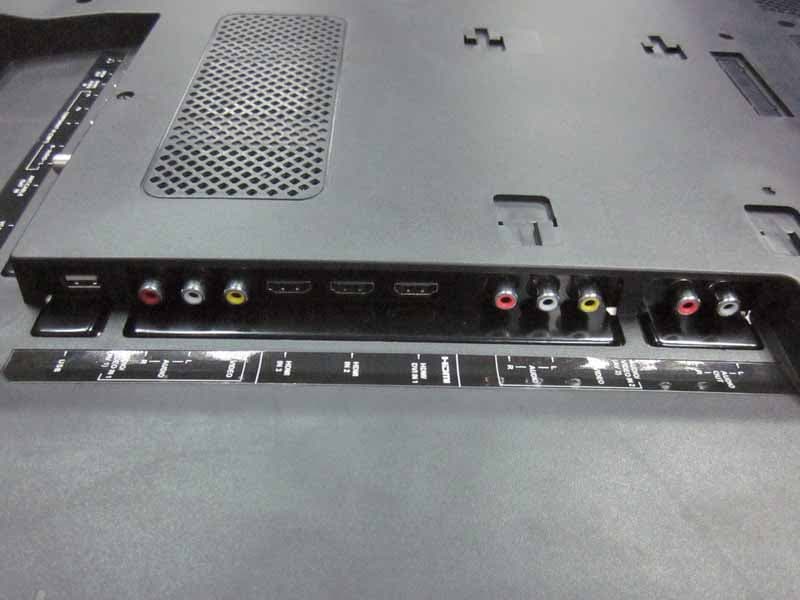
Click to zoom
Application Details
- Equipment Class
- JBP - Part 15 Class B Computing Device Peripheral
- Date of Grant
- Nov 09, 2011
- Application Purpose
- Original Equipment
- Date of Application
- Nov 08, 2011
- Equipment Note
- LCD TV
- Company
- Nebraska Furniture Mart
- Country
- United States
Documents & Files
Document Text
Text extracted from the exhibit documents filed with the FCC. Open a document above to read the original.
Users Manual
26LEDF3200B 32LEDF3200B 40LEDF3200B 46LEDF3200B Need Assistance? Please visit our website at www.NFM.com or call 1-888-731-6789. LED TV User’s Guide 2 This symbol indicates that this product contains mercury. Special disposal of this product for environmental reasons may be required under the laws applicable to your jurisdiction. For disposal or recycling information, please contact your local authorities or the Electronic Industries Alliance: www.eiae.org. Refer to the identification/rating label located on the back panel of your product for its proper operating voltage. FCC regulations state that unauthorized changes or modifications to this equipment may void the user’s authority to operate it. Cable TV Installer: This reminder is provided to call your attention to Article 820-40 of the National Electrical Code (Section 54 of the Canadian Electrical Code, Part 1) which provides guidelines for proper grounding and, in particular, specifies that the cable ground should be connected to the grounding system of the building as close to the point of cable entry as practical. Important: This television is a table model and is designed to sit on a firm, flat surface. Don’t place the TV on soft carpeting or similar surface because the ventilation slots on the bottom of the unit will be blocked, resulting in reduced lifetime from overheating. To assure adequate ventilation for this product, maintain a spacing of 4 inches from the top and side of the TV receiver and 2 inches from the rear of the TV receiver and other surfaces. Also, make sure the stand or base you use is of adequate size and strength to prevent the TV from being accidentally tipped over, pushed off, or pulled off. This could cause personal injury and/or damage to the TV. Refer to the Important Safety Instructions on the next page. The Power button (followed by the power symbol) on this TV and your remote control puts the TV into a very low-power standby mode but will not completely turn the power off. In order to completely shut the power off, you will need to disconnect the power cord from the outlet. The mains plug/appliance coupler is used as disconnect device, the disconnect device shall remain readily operable. Therefore, you should ensure that the TV is installed in a manner that allows you to disconnect the power cord when desired. Product Information Keep your sales receipt to obtain warranty parts and service and for proof of purchase. Attach it here and record the serial and model numbers in case you need them. These numbers are located on the product. Model No. ______________________ Serial No._____________________________________ Purchase Date __________________ Dealer/Address/Phone___________________________ WARNING The batteries shall not be exposed to excessive heat such as sunshine, fire or the like. Caution: To reduce the risk of electric shock, do not remove cover (or back). No user serviceable parts inside. Refer servicing to qualified service personnel. This symbol indicates “dangerous voltage” inside the product that presents a risk of electric shock or personal injury. This symbol indicates important instructions accompanying the product. This symbol indicates that this product incorporates double insulation between hazardous main voltage and user accessible parts. When servicing, use only identical replacement parts. WARNING To reduce the risk of fire or electric shock, do not expose this product to rain or moisture. This product should not be exposed to dripping or splashing. No objects filled with liquids, such as vases, should be placed on the component. The TV is unstable if it is not properly attached to the base or mounted to the wall. Please follow the base or wall mounting instructions provided in the User’s Guide to ensure your safety. WARNING CAUTION RISK OF ELECTRIC SHOCK. DO NOT OPEN. Important Information 3 ANTENNA LEAD IN WIRE GROUND CLAMP GROUNDING CONDUCT ORS ( NEC SECTION 810-21) GROUND CLAMPS POWER SERVICE GROUNDING ELECTRODE SYSTEM ( NEC ART 250, PAR TH) ELECTRIC SERVICE EQUIPMENT ANTENNA DISCHARGE UNIT(NEC SECTION 810-20) Important Safety Instructions 1. Read and follow all instructions. 2. Keep these instructions. 3. Heed all warnings. 4. Do not block any ventilation openings. Install in accordance with the manufacturer’s instructions. 5. Do not install near any heat sources such as radiators, heat registers, stoves, or other apparatus (including amplifiers) that produce heat. 6. Do not negate the safety purpose of the polarized or grounding-type plug. A polarized plug has two blades with one wider than the other. A grounding type plug has two blades and a third grounding prong. The wide blade or the third prong is provided for your safety. If the provided plug does not fit your outlet, consult an electrician for replacement of the obsolete outlet. 7. Protect the power cord from being walked on or pinched particularly at plugs, receptacles, and the point where it exits from the component. 8. Do not use this component near water. 9. Only use the attachments/accessories specified by the manufacturer. 10. Clean only with dry cloth. 11. Use only with the cart, stand, tripod, bracket, or table specified by the manufacturer, or sold with the component. When the TV is placed on a cart, use caution when moving the cart to avoid injury from tip-over. 12. Unplug this component during lightning storms or when unused for long periods of time. 13. Refer all servicing to qualified service personnel. Service is required when the component is damaged in any way, such as power supply cord or plug damage, liquid spilled on or objects falling onto the component, rain or moisture exposure, abnormal operation, or if the component has been dropped. 14. If an outside antenna or cable system is connected to the product, be sure the antenna or cable system is grounded so as to provide some protection against voltage surges and built-up static charges. Section 810 of the National Electrical Code, ANSI/NFPA No. …
Text truncated - open the document above for the full version.
Users Manual
22 Sound Menu The Sound Menu lets you adjust audio output. To access the Sound Menu, press MENU on the remote, and then use the up and down arrows () to highlight Sound from the Main Menu. Press the OK button or right arrow key () to select. The following options will be displayed: Equalizer – The five-band equalizer allows you to adjust the audio frequency settings. You can select one of the five preset options or create a custom preset. • Equalizer – Allows you to choose a specific sound preset: Standard, Music, Voice, Movie, and Personal. • Frequency Range – Displays the different graphic equalizer names set for each sound preset option. Choose a band and make adjustments. When making adjustments, the Equalizer option automatically changes to Personal. Press the left or right arrow () to select the desired frequency (100Hz, 300Hz, 1KHz, 3KHz, 10KHz) you wish to adjust. Use the up and down arrows () to adjust the level. When you have finished adjusting the levels, press the MENU button to exit. Sound Setup Parental Control Language Sound Picture Equalizer Balance Surround Analog TV Sound USB Exit 0 On Stereo Speaker On SPDIF Type Dolby Digital Auto Volume Control Off Back MENU EnterSelectExit CLEAR OK Balance – Adjust the amount of audio sent to the left and right speakers. Surround – Option On/Off. When turned on, this option enables a mode which simulates a surround sound effect. Speaker – Option On/Off. When you select the Off option, the sound speaker on the TV will be turned off. SPDIF Type – This option controls the type of audio stream sent to the Digital Audio Output jack. Available options are Dolby Digital, PCM, or Off. only available for analog channels Auto Volume Control – Option On/Off. This option reduces the annoying blasts in volume that often occur during commercial breaks, and also amplifies softer sounds in program material, eliminating the need for constant volume adjustment. Analog TV Sound – This option controls the manner in which the sound comes through your speakers. Options available vary according to the input selected. • Mono (available for regular TV viewing only) – This option plays the sound in mono only. Use this setting when receiving broadcasts with weak stereo signals. • Stereo – This option splits the incoming stereo audio signal into left and right channels. Most TV programs and recorded materials have stereo audio. The word “Stereo” appears in the Channel Banner when you tune to a program that is broadcast in stereo. • Second Audio Program (SAP) – This option plays the program’s audio in a second language, if available. The letters “SAP” appear in the Channel Banner when you tune to a program that is broadcast with SAP information. SAP audio is broadcast in mono only. SAP is also used to broadcast a program’s audio with descriptions of the video for the visually impaired. Sound Setup Parental Control Language Sound Picture Equalizer Balance Surround Analog TV Sound USB Exit 0 On Stereo Speaker On SPDIF Type Dolby Digital Auto Volume Control Off Back MENU AdjustSelectExit CLEAR 23 Default Audio Language – Choose the language you prefer for dialog on digital channels. If the preferred language is not broadcasted with the program, then the TV plays the default audio for the program (usually English in the US). There are 3 available default languages (English, French, Spanish). Current Audio Language – Press the left or right arrow () to choose from the list of languages available for the program you’re watching. The language chosen becomes your preferred language for all digital channels until you turn the TV off. If the language chosen is not being broadcasted with a program, the TV plays the default language for the program (usually English in the US). only available for digital channels Sound Setup Parental Control Language Sound Picture Equalizer Balance Surround USB Exit 0 On Default Audio Language English Current Audio Language Unknown Speaker On SPDIF Type Dolby Digital Auto Volume Control Off Back MENU AdjustSelectExit CLEAR Setup Menu The Setup Menu allows you to configure the TV with your preferences. Press MENU on the remote to open the Main Menu. Press the up and down arrows () to select Setup; then press the OK button or the right arrow () to display the following options: Signal Type Choose the type of signal (Cable/Sat or Antenna) you have connected to the ANT/CABLE/SAT IN. Channel Scan When you perform a Channel Scan, your TV searches for channels with signals and stores the channel information in the Channel List. Then, as you watch TV and press CH+ or CH-, your TV goes to the next or previous channel in the Channel List and skips the channels that do not have signals. If the TV signal source changes – for example, if you change from an outdoor antenna to cable TV – you will need to rescan for channels. To automatically scan for channels: 1. After choosing a signal type, press the up or down arrow () to highlight Channel Scan. 2. Press the OK button or the right arrow () to start the scan. You can see the search progress and how many channels are found in the on-screen menu. (Note: If you wish to stop the search, press the CLEAR button.) 3. After the scan is complete, press the OK button to restart scan, or press the MENU button to return to the previous menu, or press the CLEAR button to close the menu. Setup Setup Parental Control Language Sound Picture Signal Ty pe Channel Scan USB Exit Antenna Channel Skip Channel Edit Input Skip Input Labels Closed Caption Ti me Setup System Information Back MENU AdjustSelectExit CLEAR Reset All Setup Setup Parental Control Language Sound Picture Signal Ty pe Channel Scan USB Exit Antenna Channel Skip Channel Edit Input Skip Input Labels Closed Caption Ti me Setup System Information Back MENU EnterSelectExit CLEAR Reset All OK Channel Scan Setup Parental Control Language Sound Picture Signal Ty pe USB Exit Antenna Status: Scanning. Progress Analog Channels Found Digital Channels Found 3% 0 0 Can…
Text truncated - open the document above for the full version.
External Photos
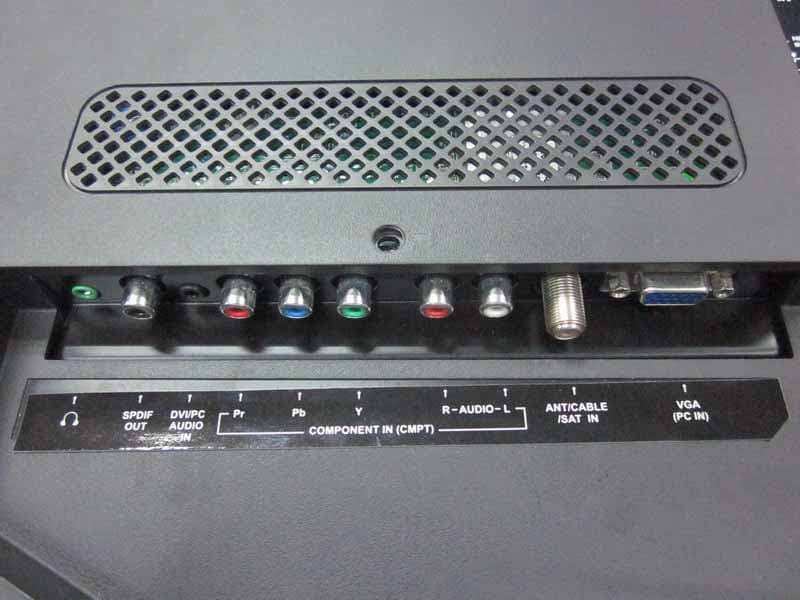
R AUDIX Technology (Shenzhen) Co., Ltd. FCC ID: ZSR46LEDF3200B Page 7-1 Audix Technology (Shenzhen) Co., Ltd. Report No. ACS-F11225 7. PHOTOS OF THE EUT Figure 1 General Appearance of the EUT Figure 2 General Appearance of the EUT R AUDIX Technology (Shenzhen) Co., Ltd. FCC ID: ZSR46LEDF3200B Page 7-2 Audix Technology (Shenzhen) Co., Ltd. Report No. ACS-F11225 Figure 3 General Appearance of the EUT Figure 4 General Appearance of the EUT R AUDIX Technology (Shenzhen) Co., Ltd. FCC ID: ZSR46LEDF3200B Page 7-3 Audix Technology (Shenzhen) Co., Ltd. Report No. ACS-F11225 Figure 5 General Appearance of the EUT Figure 6 General Appearance of the EUT
ID Label/Location Info
Label
Internal Photos
R AUDIX Technology (Shenzhen) Co., Ltd. FCC ID: ZSR46LEDF3200B Page 7-4 Audix Technology (Shenzhen) Co., Ltd. Report No. ACS-F11225 Figure 7 Inside Configuration of the EUT Figure 8 Inside Configuration of the EUT R AUDIX Technology (Shenzhen) Co., Ltd. FCC ID: ZSR46LEDF3200B Page 7-5 Audix Technology (Shenzhen) Co., Ltd. Report No. ACS-F11225 Figure 9 Inside Configuration of the EUT Figure 10 Frontside of the LCD Panel R AUDIX Technology (Shenzhen) Co., Ltd. FCC ID: ZSR46LEDF3200B Page 7-6 Audix Technology (Shenzhen) Co., Ltd. Report No. ACS-F11225 Figure 11 Backside of the LCD Panel Figure 12 Label of the LCD Panel R AUDIX Technology (Shenzhen) Co., Ltd. FCC ID: ZSR46LEDF3200B Page 7-7 Audix Technology (Shenzhen) Co., Ltd. Report No. ACS-F11225 Figure 13 Frontside of the Main Board Figure 14 Frontside of the Main Board R AUDIX Technology (Shenzhen) Co., Ltd. FCC ID: ZSR46LEDF3200B Page 7-8 Audix Technology (Shenzhen) Co., Ltd. Report No. ACS-F11225 Figure 15 Frontside of the Power Board Figure 16 Backside of the Power Board R AUDIX Technology (Shenzhen) Co., Ltd. FCC ID: ZSR46LEDF3200B Page 7-9 Audix Technology (Shenzhen) Co., Ltd. Report No. ACS-F11225 Figure 17 Frontside of the Power Board Figure 18 Backside of the Power Board R AUDIX Technology (Shenzhen) Co., Ltd. FCC ID: ZSR46LEDF3200B Page 7-10 Audix Technology (Shenzhen) Co., Ltd. Report No. ACS-F11225 Figure 19 Frontside of the PCB Figure 20 Frontside of the PCB R AUDIX Technology (Shenzhen) Co., Ltd. FCC ID: ZSR46LEDF3200B Page 7-11 Audix Technology (Shenzhen) Co., Ltd. Report No. ACS-F11225 Figure 21 Backside of the PCB Figure 22 Frontside of the PCB R AUDIX Technology (Shenzhen) Co., Ltd. FCC ID: ZSR46LEDF3200B Page 7-12 Audix Technology (Shenzhen) Co., Ltd. Report No. ACS-F11225 Figure 23 Backside of the PCB Figure 24 Frontside of the PCB R AUDIX Technology (Shenzhen) Co., Ltd. FCC ID: ZSR46LEDF3200B Page 7-13 Audix Technology (Shenzhen) Co., Ltd. Report No. ACS-F11225 Figure 25 Backside of the PCB Figure 26 Frontside of the PCB R AUDIX Technology (Shenzhen) Co., Ltd. FCC ID: ZSR46LEDF3200B Page 7-14 Audix Technology (Shenzhen) Co., Ltd. Report No. ACS-F11225 Figure 27 Backside of the PCB Figure 28 Speaker R AUDIX Technology (Shenzhen) Co., Ltd. FCC ID: ZSR46LEDF3200B Page 7-15 Audix Technology (Shenzhen) Co., Ltd. Report No. ACS-F11225 Figure 29 Speaker
Test Report
R AUDIX Technology (Shenzhen) Co., Ltd. FCC ID:ZSR46LEDF3200B Audix Technology (Shenzhen) Co., Ltd. Report No. ACS-F11225 APPLICATION OF CERTIFICATION For Nebraska Furniture Mart INC LCD TV Brand Name Model Number BERKSHIRE 46LEDF3200B FCC ID: ZSR46LEDF3200B Prepared for : Nebraska Furniture Mart INC 700 South 72nd street Omaha, Nebraska 68114 Prepared By: Audix Technology (Shenzhen) Co., Ltd. No. 6, Ke Feng Rd., 52 Block, Shenzhen Science & Industrial Park, Nantou, Shenzhen, Guangdong, China Tel: (0755) 26639496 Fax: (0755) 26632877 Report Number : ACS- F11225 Date of Test : Sep.18~24, 2011 Date of Report : Oct.12, 2011 R AUDIX Technology (Shenzhen) Co., Ltd. FCC ID:ZSR46LEDF3200B Audix Technology (Shenzhen) Co., Ltd. Report No. ACS-F11225 TABLE OF CONTENTS Description Page Test Report Certification 1. SUMMARY OF STANDARDS AND RESULTS................................................................... 1-1 1.1. Description of Standards and Results ............................................................................................1-1 2. GENERAL INFORMATION................................................................................................... 2-1 2.1. Description of Device (EUT)......................................................................................................... 2-1 2.2. Tested Supporting System Details ................................................................................................. 2-2 2.3. Block diagram of connection between the EUT and simulators.................................................... 2-3 2.4. Test Facility ................................................................................................................................... 2-4 2.5. Measurement Uncertainty (95% confidence levels, k=2) .............................................................. 2-4 3. POWER LINE CONDUCTED EMISSION TEST ................................................................ 3-1 3.1. Test Equipment .............................................................................................................................. 3-1 3.2. Block Diagram of Test Setup......................................................................................................... 3-1 3.3. Power Line Conducted Emission Test Limits ............................................................................... 3-1 3.4. Configuration of EUT on Test ....................................................................................................... 3-1 3.5. Operating Condition of EUT ......................................................................................................... 3-2 3.6. Test Procedure ............................................................................................................................... 3-2 3.7. Conducted Disturbance at Mains Terminals Test Results ............................................................. 3-2 4. RADIATED EMISSION TEST................................................................................................ 4-1 4.1. Test Equipment .............................................................................................................................. 4-1 4.2. Block Diagram of Test Setup......................................................................................................... 4-1 4.3. Radiated Emission Limit ............................................................................................................... 4-2 4.4. EUT Configuration on Test ........................................................................................................... 4-2 4.5. Operating Condition of EUT ......................................................................................................... 4-2 4.6. Test Procedure ............................................................................................................................... 4-3 4.7. Radiated Disturbance Test Results ................................................................................................ 4-3 5. DEVIATION TO TEST SPECIFICATIONS ......................................................................... 5-1 6. PHOTOGRAPH ........................................................................................................................ 6-1 6.1. Photos of Power Line Conducted Emission Test........................................................................... 6-1 6.2. Photos of Radiated Emission Test (In Anechoic Chamber) .......................................................... 6-2 7. PHOTOS OF THE EUT ........................................................................................................... 7-1 R AUDIX Technology (Shenzhen) Co., Ltd. FCC ID:ZSR46LEDF3200B Page Audix Technology (Shenzhen) Co., Ltd. Report No. ACS-F11225 1-1 1. SUMMARY OF STANDARDS AND RESULTS 1.1. Description of Standards and Results The EUT have been tested according to the applicable standards as referenced below. EMISSION Description of Test Item Standard Results Remarks Power Line Conducted Emission Test FCC Part 15: 2010 ANSI C63.4: 2009 PASS Meets Class B Limit Minimum passing margin is 7.81dB at 0.15000MHz Radiated Emission Test (30-1000MHz) FCC Part 15: 2010 ANSI C63.4: 2009 PASS Meets Class B Limit Minimum passing margin is 2.10dB at 390.000MHz Radiated Emission Test (1-2GHz) FCC Part 15: 2010 ANSI C63.4: 2009 PASS Meets Class B Limit Minimum passing margin is 8.84dB at 1709.260MHz R AUDIX Technology (Shenzhen) Co., Ltd. FCC ID:ZSR46LEDF3200B Page Audix Technology (Shenzhen) Co., Ltd. Report No. ACS-F11225 2-1 2. GENERAL INFORMATION 2.1. Description of Device (EUT) Description : LCD TV Model Number : Brand NameModel Number BERKSHIRE 46LEDF3200B FCC ID : ZSR46LEDF3200B Applicant : Nebraska Furniture Mart INC 700 South 72nd street Omaha, Nebraska 68114 Manufacturer : TCL King Electrical Appliances (Huizhou) Co., Ltd. Section 19, Zhongkai Development Zone for New…
Text truncated - open the document above for the full version.
Test Setup Photos
R AUDIX Technology (Shenzhen) Co., Ltd. FCC ID: ZSR46LEDF3200B Page 6-1 Audix Technology (Shenzhen) Co., Ltd. Report No. ACS-F11225 6. PHOTOGRAPH 6.1. Photos of Power Line Conducted Emission Test R AUDIX Technology (Shenzhen) Co., Ltd. FCC ID: ZSR46LEDF3200B Page 6-2 Audix Technology (Shenzhen) Co., Ltd. Report No. ACS-F11225 6.2. Photos of Radiated Emission Test (In Anechoic Chamber) R AUDIX Technology (Shenzhen) Co., Ltd. FCC ID: ZSR46LEDF3200B Page 6-3 Audix Technology (Shenzhen) Co., Ltd. Report No. ACS-F11225 R AUDIX Technology (Shenzhen) Co., Ltd. FCC ID: ZSR46LEDF3200B Page 6-4 Audix Technology (Shenzhen) Co., Ltd. Report No. ACS-F11225 Frequency range above 1GHz
Contact Information
Applicant
Susan E Fjelstad(Network Engineer)
Technical Contact
AUDIX Technology (Shenzhen) Co., Ltd.Zeng Sun
52 Block Shenzhen Science&Industry · Shenzhen · China
Test Firm
Audix Technology (Shenzhen) Co.Smart Tsai
Technical Specifications
| # | Rule Parts | Frequency Range | Power Output |
|---|---|---|---|
| 1 | 15B | - | - |
Other Applications from Nebraska Furniture Mart
ZSR40LEDF3200B
Sep 22, 2011LCD TV
Equipment Class
JBP - Part 15 Class B Computing Device Peripheral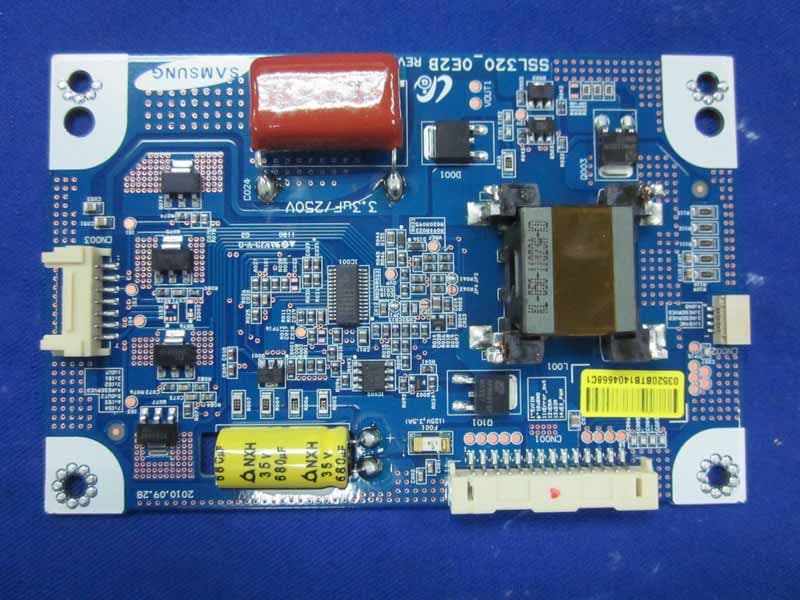
ZSR32LEDF3200B
Sep 22, 2011LCD TV
Equipment Class
JBP - Part 15 Class B Computing Device Peripheral