2A35K-DL4PLUSsmart phone
Shenzhen Mytron Technology Limited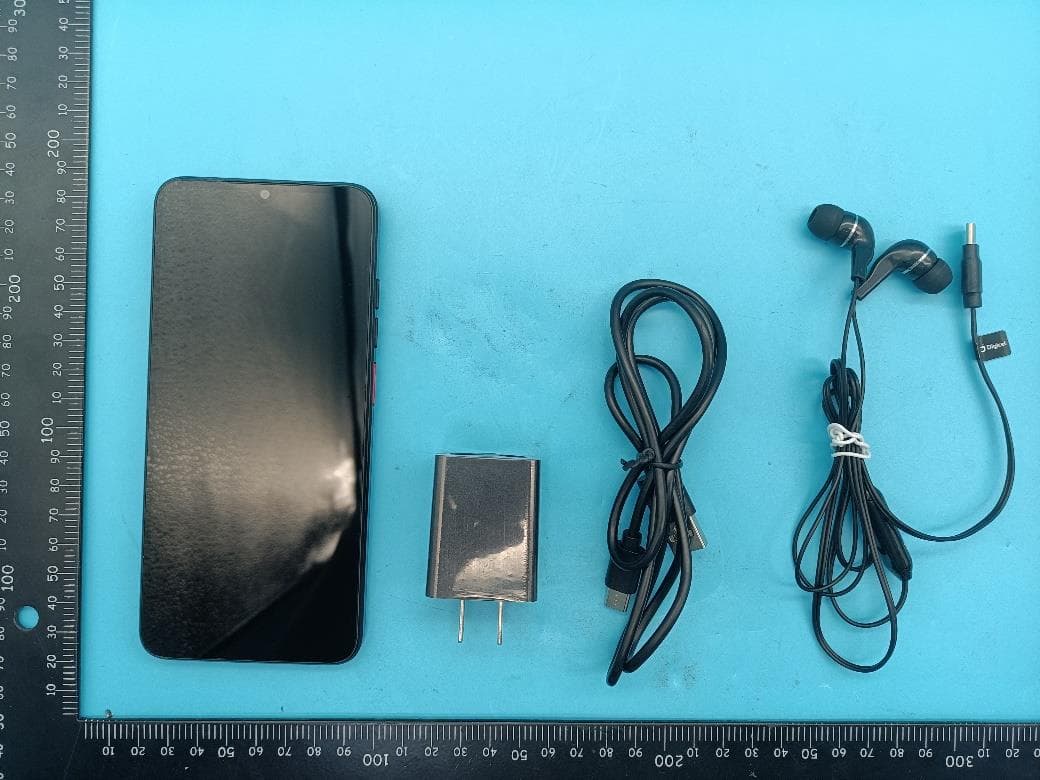
Click to zoom
Application Details
- Equipment Class
- DSS - Part 15 Spread Spectrum Transmitter
- Date of Grant
- Nov 09, 2022
- Application Purpose
- Original Equipment
- Date of Application
- Nov 09, 2022
- Equipment Note
- smart phone
- Frequency Range
- 2402.00000000 - 2480.00000000
- Country
- China
Documents & Files
Document Text
Text extracted from the exhibit documents filed with the FCC. Open a document above to read the original.
Users Manual
Basic Operations Switch on Touch and hold the Power button until the phone switches on. Note: If you have enabled USIM/SIM locking in the Settings menu, enter the correct PIN number upon power-on before you use the phone. Caution: Three consecutive attempts of entering an incorrect PIN will lock the SIM card. If it is locked, use a PUK provided by the operator to unlock it. Switch off Touch and hold the “Power button” until the Phone Options screen displays. Tap " Power off ” to switch off the phone. Unlock Short press the “Power button” light up the screen, according to the clues of the screen interface can be unlocked. Touchscreen Usage Use your fingers to perform operations directly on icons, buttons, and the on-screen keypad. Tap/Touch/Click Tap the icon of an App to start it. Touch & Hold Touch and hold an item to display a pop-up menu of options. For example, go to Address Book, touch and hold a contact on the Address Book page, and a menu of options pops up. Drag Tap an item on the screen and drag it to another place. Slide/Sweep To sweep vertically or horizontally across the screen, you can view apps, pictures, and webpages in a convenient manner. Scroll Similar to sweeping, but faster. Pinch Put two fingers on the screen to pinch in or out an item, such as a webpage or picture. Home Screen 1. Status bar: allows you to view status icons and notices, such as signal, battery, current time and data service. 2. Notification bar: On the Home screen, tap the status bar and drag it down to display the notification bar. Tap this bar. Then you can view the notices. Touch the return button to switch back to the previous page. 3. App icon: Tap an app to open it. 4. Main menu: Tap the arrow and drag it up to enter the app main menu. Phone Settings To display the Settings menu, tap the Settings icon directly. 1.SIM card: In the Settings menu, choose SIM Card. You can then manage your SIM cards on the pop-up page. 2. Network: In the Settings menu, select WLAN to configure your radio network; or select Traffic usage to configure your mobile date services; or select Mobile Network under More to configure data services of your phone. 3. Sound: In the Settings menu, choose Sound. The allows you to set the volume, enable/disable vibration during ringing, and select ringtones for incoming calls and messages, as well as enable/disable keypad touch sound effect, touch alert tone, and screen lock tone 4. Display: allows you to configure the brightness, wallpaper, automatic device rotation, sleep duration, and font size. 5. Security: In the Settings menu, choose Security. The Security page allows you to set the screen locking mode and USIM/SIM locking mode. App Permission: allows you to configure certain permissions for an App and monitor their usage. 6. Anti-theft: allows you to remotely lock the phone or clear all data of it. 7. Manage apps: In the Settings menu, choose Apps. Then you can view or manage your apps. Note: Disable or unload certain apps if available space is less than 100MB. 8. Message: On the Message page, tap the Menu button and choose Settings. On the Message Settings page, you can enable/disable report sending, create or select a message template, and configure a message alert tone for each short or multimedia message. 9. Call: To display the Call Settings page, choose Settings on the Call page. Shortcuts On the Home screen, lightly drag down the Status bar. On the screen top, a group of shortcuts are displayed, such as Settings, WLAN, Bluetooth, Brightness, Auto-rotate, flashlight Airplane mode and so on. Tap any of them to open it quickly. Shortcut menu Powered by Android™ 12 provides several easy-to-use shortcut menus on the home screen. On this screen, long press on the screen, the selection menu of the shortcut function menu will pop up. Click the menu of the desired settings and complete the function settings according to the prompts. Move/Uninstall apps 1. Access the App main menu from the Home screen. On the ALL App page, tap and hold an app to be put on the Home screen, and drag it left or right to locate it at a proper place. In this way, a desktop app is created. 2. On the All App page, tap and hold an app, and drag it to Uninstall on the desktop. In this way, the app is removed from the phone. Note: You are not allowed to uninstall basic apps of the phone. 3. On the All App page, tap and hold an app, and drag it to APP Info. on the desktop. In this way, details about the app is displayed. Call This phone allows you to make or answer a call, initiate an emergency call, and launch a multi-party call. On the bottom left of the Home screen, tap the Dial-up icon. The Dial-up page is displayed. Enter a phone number and choose between card 1 and card 2 to make the call. When you enter the number, the phone will automatically search among all contacts a number that best matches the entered numerals, to facilitate your operation. During a call, tap Add a Call, and this call automatically switches to Silent mode. Enter the number of another contact, tap Dial-up, and the previous call automatically switches to On-hold mode. After the second call is answered, tap Join. In this way, a teleconference is established to achieve a multi-party talk. Note: You need to subscribe to this service from your carrier before you use it. You are also allowed to initiate a call by selecting a phone number from the list of contacts or the Message page. Contacts Tap Contacts to open it. The Contacts page offers management functions. It allows you to view the list of contacts and related details, make a call or send an SMS to a certain contact, and share the contact. Contact import: On the Contacts page, tap the Menu button, and choose Import/Export to select a mode for importing or exporting a contact. Add a contact: On the lower right of the Contacts page, tap the Add button to add a contact to your phone or USIM/SIM. Enter the name and number, and tap Finish. In this way, a contact is created. Conta…
Text truncated - open the document above for the full version.
Cover Letter(s)
Shenzhen Mytron Technology Limited Agent Authorization Company: Shenzhen Mytron Technology Limited Address: Room 603, Block 4, Tongtai Times Center, Fuyong, Bao'an District, Shenzhen,Guangdong,China Product Name: smart phone Model Number(s): DL4 Plus Product Description: smart phone We authorize MiCOM Labs Inc., 575 Boulder Court, Pleasanton, California 94566, USA, to act on our behalf on all matters concerning the certification of above named equipment. We declare that MiCOM Labs Inc. is allowed to forward all information related to the approval and certification of equipment to the regulatory agencies as required and to discuss any issues concerning the approval application. Any and all acts carried out by MiCOM Labs on our behalf shall have the same effect as acts of our own. Signature: Date: 2022.11.4 Name: ChaoMing Guo Title: Manager Company: Shenzhen Mytron Technology Limited
Cover Letter(s)
QUALITY TECNOLOGY SAS Office of Engineering Technology Federal Communications Commission 7435 Oakland Mills Road Columbia, MD 21046 USA Date: 2022.11.4 Subject; Request for Confidentiality FCC ID: 2A35K-DL4PLUS To Whom It May Concern, Pursuant to the provisions of the Commission’s rules Title 47 Sections §0.457 and §0.459, we are requesting the Commission to withhold the following attachment(s) as confidential documents from public disclosure indefinitely. These documents contain detailed system and equipment descriptions and are considered as proprietary information in operation of the equipment. The public disclosure of these documents might be harmful to our company and would give competitors an unfair advantage in the market. Schematic Diagram Block Diagram Parts List Operational Description Tune-up Procedure In additional to above mentioned documents, in order to comply with the marketing regulations in Title 47 CFR §2.803 and the importation rules in Title 47 CFR §2.1204, while ensuring that business sensitive information remains confidential until the actual marketing of newly authorized devices, we request Short Term Confidentiality of the following attachment(s); External Photos Test Setup Photos Internal Photos User Manual For 45 days, pursuant to Public Notice DA 04-1705. OR For 180 days pursuant to KDB 726920 D01. It is our understanding that all measurement test reports, FCC ID label format and correspondence during the certification review process cannot be granted as confidential documents and this information will be available for public review once the grant of equipment authorization is issued. Sincerely, Signature: Name: ChaoMing Guo Title: Manager
External Photos
Page 1 of 4 Report No.: LGT22J003 Appendix - External Photographs of EUT Constructional Details Model Name: DL4 Plus Photo 1 Photo 2 Page 2 of 4 Report No.: LGT22J003 Photo 3 Photo 4 Page 3 of 4 Report No.: LGT22J003 Photo 5 Photo 6 Page 4 of 4 Report No.: LGT22J003 Photo 7
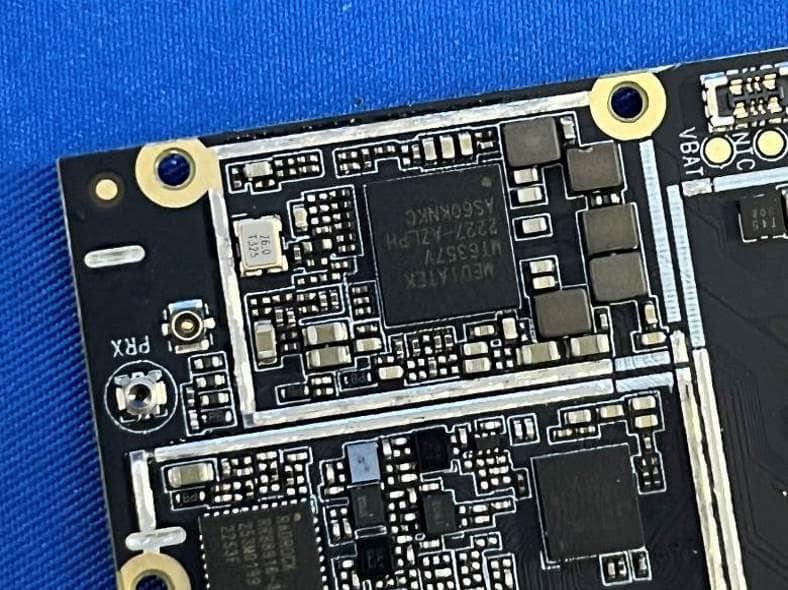
Internal Photos
Page 1 of 8 Report No.: LGT22J003 Appendix - Internal Photographs of EUT Constructional Details Model Name: DL4 Plus Photo 1 Photo 2 GPS/WIFI/BT ANT GSM/WCDMA/LTE RX ANT GSM/WCDMA/LTE TX ANT Page 2 of 8 Report No.: LGT22J003 Photo 3 Photo 4 Page 3 of 8 Report No.: LGT22J003 Photo 5 Photo 6 GSM/WCDMA/LTE RX ANT GPS/WIFI/BT ANT GSM/WCDMA/LTE TX ANT Page 4 of 8 Report No.: LGT22J003 Photo 7 Photo 8 Page 5 of 8 Report No.: LGT22J003 Photo 9 Photo 10 Page 6 of 8 Report No.: LGT22J003 Photo 11 Photo 12 Page 7 of 8 Report No.: LGT22J003 Photo 13 Photo 14 Photo 15 GSM/WCDMA/LTE TX ANT Page 8 of 8 Report No.: LGT22J003
RF Exposure Info
Shenzhen LGT Test Service Co., Ltd. Tel: 0755-89668180 E-mail:[email protected] Web: www.lgt-cert.com Room 205, Building 13, Zone B, Chen Hsong Industrial Park, No.177 Renmin West Road, Jinsha Community, Kengzi Street, Pingshan New District, Shenzhen, China SAR TEST REPORT Product Name : Smart phone Model Number : DL4 Plus FCC ID : 2A35K - DL4 Plus Prepared For : Shenzhen Mytron Technology Limited : Room 603, Block 4, Tongtai Times Center, Fuyong, Bao'an District, Shenzhen, Guangdong, China. Prepared By : Shenzhen LGT Test Service Co., Ltd. Room 205, Building 13, Zone B, Chen Hsong Industrial Park, No.177 Renmin West Road, Jinsha Community, Kengzi Street, Pingshan New District, Shenzhen, China Report Number : LGT22J003HA01 Date of Tests : October 11, 2022 –October 31, 2022 Date of Issue : November 01, 2022 Max. SAR (1g): : Head: 0.269 W/kg : Body: 0.749 W/kg Report No.: LGT22J003HA01 Page 2 of 82 Table of Contents 1. General Information 5 1.1 EUT Description 5 1.3 Test Factory 6 2. Test Standards and Limits 7 3. SAR Measurement System 8 3.1 Definition of Specific Absorption Rate (SAR) 8 3.2 SAR System 8 4. Tissue Simulating Liquids 11 4.1 Simulating Liquids Parameter Check 11 5. SAR System Validation 12 5.1 Validation System 12 5.2 Validation Result 13 6. SAR Evaluation Procedures 14 7. EUT Test Position 15 7.1 Cheek Position 15 7.2 Tilt Position 16 7.3 Body-worn Position Conditions 16 8. Measurement Uncertainty 17 9. Conducted Power Measurement 18 10. Test Photos and Results 34 10.1 EUT Photos 34 10.2 Setup Photos 37 11. SAR Result Summary 43 12. Equipment List 49 Appendix A. System Validation Plots 50 Appendix B. SAR Test Plots 60 Appendix C. Probe Calibration and Dipole Calibration Report 82 Report No.: LGT22J003HA01 Page 3 of 82 Revision History Rev. Issue Date Contents 00 November 01, 2022 Initial Issue Report No.: LGT22J003HA01 Page 4 of 82 TEST REPORT CERTIFICATION Applicant Shenzhen Mytron Technology Limited Address Room 603, Block 4, Tongtai Times Center, Fuyong, Bao'an District, Shenzhen, Guangdong, China. Manufacture Shenzhen Mytron Technology Limited Address Room 603, Block 4, Tongtai Times Center, Fuyong, Bao'an District, Shenzhen, Guangdong, China. Product Name Smart phone Trade Mark DIGICEL Model Name DL4 Plus Sample Status: Normal APPLICABLE STANDARDS STANDARD TEST RESULTS FCC KDB 447498 D04 v01;FCC KDB 865664 D01 v01r04;FCC KDB 865664 D02 v01r02; FCC KDB 941225 D01 v03r01;FCC KDB 941225 D05 v02r05;FCC KDB 941225 D06 v02r01;FCC KDB 648474 D04 v01r03;FCC KDB 248227 D01 Wi-Fi SAR v02r02 PASS Prepared by: Approved by: Zane Shan Engineer Vita Li Manager (1) The test report is effective only with both signature and specialized stamp. (2) This report shall not be reproduced except in full without the written approval of the Laboratory. (3) The results in this report apply to the test sample(s) mentioned above at the time of the testing period only and are not to be used to indicate applicability to other similar products. Report No.: LGT22J003HA01 Page 5 of 82 1. General Information 1.1 EUT Description Product Name Smart phone Brand Name DIGICEL Model Name DL4 Plus Series Model N/A Model Difference N/A Hardware Version V1.0 Software Version N/A Frequency Range GSM 850: 824 ~ 849 MHz PCS 1900: 1850 ~ 1910 MHz WCDMA Band II: 1850 ~ 1910 MHz WCDMA Band V: 824 ~ 849 MHz LTE Band 2: 1850 ~1910MHz LTE Band 4: 1710 ~1755MHz LTE Band 5: 824 ~ 849MHz LTE Band 12: 699~716MHz LTE Band 13: 777~787MHz WLAN 802.11b/g/n20: 2412 MHz ~ 2462 MHz WLAN 802.11n40: 2422 MHz ~ 2452 MHz Bluetooth: 2402 ~ 2480 MHz NFC: 13.56MHz Max. Reported SAR(1g) Mode Head(W/ kg) Body(W/ kg) GSM 850 0.066 0.282 PCS 1900 0.193 0.749 WCDMA Band II 0.269 0.590 WCDMA Band V 0.082 0.097 LTE Band 2 0.242 0.721 LTE Band 4 0.153 0.299 LTE Band 5 0.048 0.129 LTE Band 12 0.043 0.045 LTE Band 13 0.063 0.094 2.4G WLAN 0.114 0.166 Bluetooth 0.055 0.043 Limit 1.6 W/kg Battery Rated Voltage:3.85V Charge Limit Voltage:4.45V Capacity: 4250mAh Description test modes Only one SIM card Modulation Mode GSM: GSM Voice; GPRS/EGPRS Class 12 WCDMA: RMC, HSDPA, HSUPA Release 6 LTE: QPSK, 16QAM 2.4G WLAN : 802.11b(DSSS):CCK,DQPSK,DBPSK 802.11g(OFDM):BPSK,QPSK,16-QAM,64-QAM 802.11n(OFDM):BPSK,QPSK,16-QAM,64-QAM Bluetooth: GFSK +π/4DQPSK+8DPSK NFC: FSK Power control level GSM900: 5, DCS1800: 0 Power class GSM900: 4, GSM1800: 1 Antenna Specification GSM/WCDMA/LTE: PIFA Antenna Bluetooth: PIFA Antenna WLAN: PIFA Antenna NFC: Coil Antenna Operating Mode Maximum continuous output Report No.: LGT22J003HA01 Page 6 of 82 1.2 Test Environment Ambient conditions in the SAR laboratory: Items Required Temperature (°C) 18-25 Humidity (%RH) 30-70 1.3 Test Factory Company Name: Shenzhen LGT Test Service Co., Ltd. Address: Room 205, Building 13, Zone B, Chen Hsong Industrial Park, No.177 Renmin West Road, Jinsha Community, Kengzi Street, Pingshan New District, Shenzhen, China Report No.: LGT22J003HA01 Page 7 of 82 2. Test Standards and Limits No. Identity Document Title 1 47 CFR Part 2 Frequency Allocations and Radio Treaty Matters; General Rules and Regulations 2 ANSI/IEEE Std. C95.1-1992 IEEE Standard for Safety Levels with Respect to Human Exposure to Radio Frequency Electromagnetic Fields, 3 kHz to 300 GHz 3 IEEE Std. 1528-2013 Recommended Practice for Determining the Peak Spatial-Average Specific Absorption Rate (SAR) in the Human Head from Wireless Communications Devices: Measurement Techniques 4 FCC KDB 447498 D04 v01 RF Exposure Procedures and Equipment Authorization Policies for Mobile and Portable Devices 5 FCC KDB 865664 D01 v01r04 SAR Measurement 100 MHz to 6 GHz 6 FCC KDB 865664 D02 v01r02 RF Exposure Reporting 7 FCC KDB 941225 D01 v03r01 SAR Measurement Procedures for 3G Devices 8 FCC KDB 941225 D05 v02r05 SAR for LTE Devices 9 FCC KDB 941225 D06 v02r01 Hotspot Mode SAR 10 FCC KDB 648474 D04 v01r03 SAR Evaluation Considerations for Wireless Handsets 11 FCC KDB 248227 D01 Wi-Fi SAR v02r02 SAR Considerations for 802.11 Devices (A). Limits for Occup…
Text truncated - open the document above for the full version.
Test Report
Project:D99B Author: Haiou.Zhu File Name: D99B_APP_A.doc Date: 2022-10-25 Revision: A CONFIDENTIAL Shenzhen OnePlusOne Wireless Communication Technology Co.,Ltd. Page 1-1 of 12 深圳市一加一无线通讯技术有限公司 承认书 APPROVAL SHEET 客户 Customer 华星 项目名 Project D99B 料号 Part NO. 规格 Specification MAIN+DIV+GPS/WIFI/BT Antennas APPROVAL OnePlusOne: RF Check ME Check QC Check Confirm By Customer: EE Check PM Check QC Check Confirm By 承认鉴章后请寄回承认书一份 Please return to us one copy of “APPROVAL SHEET” with your approved signatures Pl Project:D99B Author: Haiou.Zhu File Name: D99B_APP_A.doc Date: 2022-10-25 Revision: A CONFIDENTIAL Shenzhen OnePlusOne Wireless Communication Technology Co.,Ltd. Page 1-2 of 12 Date: Revision: Updates and changes: Issued by: 2022-10-25 A Initial sheet Haiou.Zhu Contents 1 ANTENNA DESCRIPTION ................................................................................... 1-3 1.1 Part number ....................................................................................... 1-3 1.2 Antenna pictures ................................................................................ 1-3 2 ELECTRICAL PERFORMANCE ........................................................................... 2-3 2.1 Specificatio .......................................................................................... 2-3 2.2 Measurement Set-up .......................................................................... 2-3 2.2.1 VSWR and Return Loss .......................................................................................................................... 2-3 2.2.2 Efficiency and Gain ................................................................................................................................. 2-4 3 REFERENCE MEASUREMENT DATA ................................................................ 3-4 3.1 Passive ................................................................................................. 3-4 3.2 Active ................................................................................................. 3-8 3.3 GPS Performance Descriptions ........................................................ 3-9 3.4 Environmental Manipulation ......................................................... 3-11 4 MECHANICAL DESCRIPTION ........................................................................... 3-12 4.1 Drawings ........................................................................................... 3-12 Project:D99B Author: Haiou.Zhu File Name: D99B_APP_A.doc Date: 2022-10-25 Revision: A CONFIDENTIAL Shenzhen OnePlusOne Wireless Communication Technology Co.,Ltd. Page 2-3 of 12 1 Antenna description It summarize Main and DIV and GPS/WIFI/BT antennas for project D99B. MAIN antenna’s frequency band is 824-960MHz&1710-2690MHZ, Main antenna’s type is IFA. DIV antenna’s frequency band is 860~894MHz&1805~2690MHz. GPS/WIFI/BT antenna’s frequency band is 1575.42MHz&2400-2500MHz. GPS/WIFI/BT antenna’s type is IFA. Part number of antenna: FPC Antenna pictures 1.1 Part number Part number of antenna:D99B-MAIN, D99B-DIV, D99B-G/W/B. 1.2 Antenna pictures 2 Electrical Performance 2.1 Specificatio Main Frequency Range 824MHz~960MHz 1710MHz~2690MHz Return Loss <-2 <-5 Efficiency >25% >30% DIV Frequency Range 860MHz~894MHz 1805MHz~2690MHz Return Loss <-5 <-5 Efficiency >25% >30% GPS/WIFI/BT Frequency Range 1575.42MHz 2400MHz~2500MHz Return Loss <-5 <-5 Efficiency >35% >35% 2.2 Measurement Set-up 2.2.1 VSWR and Return Loss VSWR measurements (S 11 ) were performed using an Agilent ENA series Network Analyzer and the previously described test fixture. Coaxial chokes were used to mitigate surface currents on the outside of the cabling. The testing was performed in free space. Project:D99B Author: Haiou.Zhu File Name: D99B_APP_A.doc Date: 2022-10-25 Revision: A CONFIDENTIAL Shenzhen OnePlusOne Wireless Communication Technology Co.,Ltd. Page 3-4 of 12 2.2.2 Efficiency and Gain The gain of the antenna was measured in OPO’s 3D anechoic chamber in Shenzhen, China. The chamber is a ETS system capable of doing tests from 380MHz to 6GHz. Coaxial chokes on the feed cable were used to mitigate surface currents during passive tests. The measurement results are calibrated using dipole standards. For TRP and TIS the chamber uses a 8960 / MT8820C to establish the connection with the mobile device and read the power. 3 Reference measurement data 3.1 Passive Project:D99B Author: Haiou.Zhu File Name: D99B_APP_A.doc Date: 2022-10-25 Revision: A CONFIDENTIAL Shenzhen OnePlusOne Wireless Communication Technology Co.,Ltd. Page 3-5 of 12 无源参数 方向图 Project:D99B Author: Haiou.Zhu File Name: D99B_APP_A.doc Date: 2022-10-25 Revision: A CONFIDENTIAL Shenzhen OnePlusOne Wireless Communication Technology Co.,Ltd. Page 3-6 of 12 Project:D99B Author: Haiou.Zhu File Name: D99B_APP_A.doc Date: 2022-10-25 Revision: A CONFIDENTIAL Shenzhen OnePlusOne Wireless Communication Technology Co.,Ltd. Page 3-7 of 12 Project:D99B Author: Haiou.Zhu File Name: D99B_APP_A.doc Date: 2022-10-25 Revision: A CONFIDENTIAL Shenzhen OnePlusOne Wireless Communication Technology Co.,Ltd. Page 3-8 of 12 MAIN Return Loss 3.2 Active Project:D99B Author: Haiou.Zhu File Name: D99B_APP_A.doc Date: 2022-10-25 Revision: A CONFIDENTIAL Shenzhen OnePlusOne Wireless Communication Technology Co.,Ltd. Page 3-9 of 12 3.3 GPS Performance Descriptions 3.4WIFI Performance Descriptions Project:D99B Author: Haiou.Zhu File Name: D99B_APP_A.doc Date: 2022-10-25 Revision: A CONFIDENTIAL Shenzhen OnePlusOne Wireless Communication Technology Co.,Ltd. Page 3-10 of 12 3.5Matching Circuit Description. Project:D99B Author: Haiou.Zhu File Name: D99B_APP_A.doc Date: 2022-10-25 Revision: A CONFIDENTIAL Shenzhen OnePlusOne Wireless Communication Technology Co.,Ltd. Page 3-11 of 12 Environmental Manipulation Project:D99B Author: Haiou.Zhu File Name: D99B_APP_A.doc Date: 2022-10-25 Revision: A CONFIDENTIAL Shenzhen OnePlusOne Wireless Communication Technology Co.,Ltd. Page 3-12 of 12…
Text truncated - open the document above for the full version.
Test Report
The test report is effective only with both signature and specialized stamp. This report shall not be reproduced except in full without the written approval of the Laboratory. The results in this report only apply to the tested sample. Shenzhen LGT Test Service Co., Ltd. Tel: 0755-89668180 E-mail:[email protected] Web: www.lgt-cert.com Room 205, Building 13, Zone B, Chen Hsong Industrial Park, No.177 Renmin West Road, Jinsha Community, Kengzi Street, Pingshan New District, Shenzhen, China RF TEST REPORT Product Name: smart phone Model Name: DL4 Plus FCC ID: 2A35K-DL4PLUS Issued For : Shenzhen Mytron Technology Limited Room 603, Block 4, Tongtai Times Center, Fuyong, Bao'an District, Shenzhen, Guangdong, China. Issued By : Shenzhen LGT Test Service Co., Ltd. Room 205, Building 13, Zone B, Chen Hsong Industrial Park, No.177 Renmin West Road, Jinsha Community, Kengzi Street, Pingshan New District, Shenzhen, China Report Number: LGT22J003RF01 Sample Received Date: October 08, 2022 Date of Tested: October 08, 2022 – October 31, 2022 Date of Issue: November 01, 2022 Report No.: LGT22J003RF01 Page 2 of 107 TEST REPORT CERTIFICATION Applicant Shenzhen Mytron Technology Limited Address Room 603, Block 4, Tongtai Times Center, Fuyong, Bao'an District, Shenzhen, Guangdong, China. Manufacturer Shenzhen Mytron Technology Limited Address Room 603, Block 4, Tongtai Times Center, Fuyong, Bao'an District, Shenzhen, Guangdong, China. Product Name smart phone Trade Mark DIGICEL Model Name DL4 Plus Sample Status: Normal APPLICABLE STANDARDS STANDARD TEST RESULTS FCC Part 15.247, Subpart C ANSI C63.10-2013 PASS Prepared by: Approved by: Zane Shan Vita Li Engineer Technical Director Report No.: LGT22J003RF01 Page 3 of 107 Table of Contents Page 1. SUMMARY OF TEST RESULTS 6 1.1 TEST FACTORY 7 1.2 MEASUREMENT UNCERTAINTY 7 2. GENERAL INFORMATION 8 2.1 GENERAL DESCRIPTION OF THE EUT 8 2.2 DESCRIPTION OF THE TEST MODES 10 2.3 FREQUENCY HOPPING SYSTEM REQUIREMENTS 10 2.4 TABLE OF PARAMETERS OF TEST SOFTWARE SETTING 12 2.5 DESCRIPTION OF NECESSARY ACCESSORIES AND SUPPORT UNITS 12 2.6 EQUIPMENTS LIST 13 3. EMC EMISSION TEST 14 3.1 CONDUCTED EMISSION MEASUREMENT 14 3.2 RADIATED EMISSION MEASUREMENT 18 4. CONDUCTED SPURIOUS & BAND EDGE EMISSION 35 4.1 LIMIT 35 4.2 TEST PROCEDURE 35 4.3 TEST SETUP 36 4.4 EUT OPERATION CONDITIONS 36 4.5 TEST RESULTS 36 5. NUMBER OF HOPPING CHANNEL 37 5.1 LIMIT 37 5.2 TEST PROCEDURE 37 5.3 TEST SETUP 37 5.4 EUT OPERATION CONDITIONS 37 5.5 TEST RESULTS 37 6. AVERAGE TIME OF OCCUPANCY 38 6.1 LIMIT 38 6.2 TEST PROCEDURE 38 6.3 TEST SETUP 38 6.4 EUT OPERATION CONDITIONS 38 6.5 TEST RESULTS 38 7. HOPPING CHANNEL SEPARATION MEASUREMEN 39 7.1 LIMIT 39 7.2 TEST PROCEDURE 39 Report No.: LGT22J003RF01 Page 4 of 107 Table of Contents Page 7.3 TEST SETUP 39 7.4 EUT OPERATION CONDITIONS 39 7.5 TEST RESULTS 39 8. BANDWIDTH TEST 40 8.1 LIMIT 40 8.2 TEST PROCEDURE 40 8.3 TEST SETUP 40 8.4 EUT OPERATION CONDITIONS 40 8.5 TEST RESULTS 40 9. OUTPUT POWER TEST 41 9.1 LIMIT 41 9.2 TEST PROCEDURE 41 9.3 TEST SETUP 41 9.4 EUT OPERATION CONDITIONS 41 9.5 TEST RESULTS 42 10. ANTENNA REQUIREMENT 43 10.1 STANDARD REQUIREMENT 43 10.2 EUT ANTENNA 43 APPENDIX I:TEST RESULTS 44 DWELL TIME 44 DUTY CYCLE 54 MAXIMUM PEAK CONDUCTED OUTPUT POWER 60 -20DB BANDWIDTH 61 OCCUPIED CHANNEL BANDWIDTH 67 CARRIER FREQUENCIES SEPARATION 73 BAND EDGE 79 BAND EDGE (HOPPING) 86 CONDUCTED RF SPURIOUS EMISSION 93 NUMBER OF HOPPING CHANNEL 103 APPENDIX II:PHOTOS OF TEST SETUP 106 Report No.: LGT22J003RF01 Page 5 of 107 Revision History Rev. Issue Date Contents 00 November 01, 2022 Initial Issue Report No.: LGT22J003RF01 Page 6 of 107 1. SUMMARY OF TEST RESULTS Test procedures according to the technical standards: KDB 558074 D01 15.247 Meas Guidance v05r02. FCC Part 15.247,Subpart C Standard Section Test Item Judgment Remark 15.207 Conducted Emission PASS -- 15.247(a)(1) Hopping Channel Separation PASS -- 15.247(a)(1)&(b)(1) Output Power PASS -- 15.209 Radiated Spurious Emission PASS -- 15.247(d) Conducted Spurious & Band Edge Emission PASS -- 15.247(a)(1)(iii) Number of Hopping Frequency PASS -- 15.247(a)(1)(iii) Dwell Time PASS -- 15.247(a)(1) Bandwidth PASS -- 15.205 Restricted bands of operation PASS -- Part 15.247(d)/part 15.209(a) Band Edge Emission PASS -- 15.203 Antenna Requirement PASS -- NOTE: (1) ‘N/A’ denotes test is not applicable in this Test Report. (2) All tests are according to ANSI C63.10-2013. Report No.: LGT22J003RF01 Page 7 of 107 1.1 TEST FACTORY Company Name: Shenzhen LGT Test Service Co., Ltd. Address: Room 205, Building 13, Zone B, Chen Hsong Industrial Park, No.177 Renmin West Road, Jinsha Community, Kengzi Street, Pingshan New District, Shenzhen, China Accreditation Certificate FCC Registration No.: 746540 A2LA Certificate No.: 6727.01 1.2 MEASUREMENT UNCERTAINTY The reported uncertainty of measurement y ± U, where expended uncertainty U is based on a standard uncertainty multiplied by a coverage factor of k=2, providing a level of confidence of approximately 95 %. No. Item Uncertainty 1 RF output power, conducted ±0.68dB 2 Unwanted Emissions, conducted ±2.988dB 3 All emissions, radiated 9K-30MHz ±2.84dB 4 All emissions, radiated 30M-1GHz ±4.39dB 5 All emissions, radiated 1G-6GHz ±5.10dB 6 All emissions, radiated>6G ±5.48dB 7 Conducted Emission (9KHz-150KHz) ±2.79dB 8 Conducted Emission (150KHz-30MHz) ±2.80dB Report No.: LGT22J003RF01 Page 8 of 107 2. GENERAL INFORMATION 2.1 GENERAL DESCRIPTION OF THE EUT Product Name smart phone Trade Name DIGICEL Model Name DL4 Plus Series Model N/A Model Difference N/A Channel List Please refer to the Note 2. Bluetooth Frequency:2402 – 2480 MHz Modulation:GFSK(1Mbps), π/4-DQPSK(2Mbps), 8DPSK(3Mbps) Antenna Type Please refer to the Note 3. Adapter Input: 100-240V, 50/60Hz, 0.3A Output: 5V, 2A Battery Capacity: 4250mAh Rated Voltage: 3.85V Hardware version number V1.0 Software version number N/A Connecting I/O Port(s) Please refer to the Note 1. Note: 1. For a more detailed featu…
Text truncated - open the document above for the full version.
Test Report
Report No.: LGT22J003RF01 Page 74 of 107 Test Graphs CFS NVNT 1-DH5 2402MHz Ant1 CFS NVNT 1-DH5 2441MHz Ant1 Report No.: LGT22J003RF01 Page 75 of 107 CFS NVNT 1-DH5 2480MHz Ant1 CFS NVNT 2-DH5 2402MHz Ant1 Report No.: LGT22J003RF01 Page 76 of 107 CFS NVNT 2-DH5 2441MHz Ant1 CFS NVNT 2-DH5 2480MHz Ant1 Report No.: LGT22J003RF01 Page 77 of 107 CFS NVNT 3-DH5 2402MHz Ant1 CFS NVNT 3-DH5 2441MHz Ant1 Report No.: LGT22J003RF01 Page 78 of 107 CFS NVNT 3-DH5 2480MHz Ant1 Report No.: LGT22J003RF01 Page 79 of 107 BAND EDGE Condition Mode Frequency (MHz) Antenna Hopping Mode Max Value (dBc) Limit (dBc) Verdict NVNT 1-DH5 2402 Ant1 No-Hopping -62.13 -20 Pass NVNT 1-DH5 2480 Ant1 No-Hopping -62.63 -20 Pass NVNT 2-DH5 2402 Ant1 No-Hopping -59.04 -20 Pass NVNT 2-DH5 2480 Ant1 No-Hopping -60.44 -20 Pass NVNT 3-DH5 2402 Ant1 No-Hopping -60.46 -20 Pass NVNT 3-DH5 2480 Ant1 No-Hopping -62.18 -20 Pass Report No.: LGT22J003RF01 Page 80 of 107 Test Graphs Band Edge NVNT 1-DH5 2402MHz Ant1 No-Hopping Ref Band Edge NVNT 1-DH5 2402MHz Ant1 No-Hopping Emission Report No.: LGT22J003RF01 Page 81 of 107 Band Edge NVNT 1-DH5 2480MHz Ant1 No-Hopping Ref Band Edge NVNT 1-DH5 2480MHz Ant1 No-Hopping Emission Report No.: LGT22J003RF01 Page 82 of 107 Band Edge NVNT 2-DH5 2402MHz Ant1 No-Hopping Ref Band Edge NVNT 2-DH5 2402MHz Ant1 No-Hopping Emission Report No.: LGT22J003RF01 Page 83 of 107 Band Edge NVNT 2-DH5 2480MHz Ant1 No-Hopping Ref Band Edge NVNT 2-DH5 2480MHz Ant1 No-Hopping Emission Report No.: LGT22J003RF01 Page 84 of 107 Band Edge NVNT 3-DH5 2402MHz Ant1 No-Hopping Ref Band Edge NVNT 3-DH5 2402MHz Ant1 No-Hopping Emission Report No.: LGT22J003RF01 Page 85 of 107 Band Edge NVNT 3-DH5 2480MHz Ant1 No-Hopping Ref Band Edge NVNT 3-DH5 2480MHz Ant1 No-Hopping Emission Report No.: LGT22J003RF01 Page 86 of 107 BAND EDGE (HOPPING) Condition Mode Frequency (MHz) Antenna Hopping Mode Max Value (dBc) Limit (dBc) Verdict NVNT 1-DH5 2402 Ant1 Hopping -61.26 -20 Pass NVNT 1-DH5 2480 Ant1 Hopping -61.51 -20 Pass NVNT 2-DH5 2402 Ant1 Hopping -60.16 -20 Pass NVNT 2-DH5 2480 Ant1 Hopping -61.53 -20 Pass NVNT 3-DH5 2402 Ant1 Hopping -60.81 -20 Pass NVNT 3-DH5 2480 Ant1 Hopping -58.81 -20 Pass Report No.: LGT22J003RF01 Page 87 of 107 Test Graphs Band Edge(Hopping) NVNT 1-DH5 2402MHz Ant1 Hopping Ref Band Edge(Hopping) NVNT 1-DH5 2402MHz Ant1 Hopping Emission Report No.: LGT22J003RF01 Page 88 of 107 Band Edge(Hopping) NVNT 1-DH5 2480MHz Ant1 Hopping Ref Band Edge(Hopping) NVNT 1-DH5 2480MHz Ant1 Hopping Emission Repor…
Text truncated - open the document above for the full version.
Contact Information
Applicant
ChaoMing Guo(General Manager)
Technical Contact
Test Firm
Shenzhen LGT Test Service Co., Ltd.Wen Wen
[email protected]0755-89668180
Technical Specifications
| # | Rule Parts | Frequency Range | Power Output |
|---|---|---|---|
| 1 | 15C | 2.40 GHz - 2.48 GHz | 6.11 mW |
Other Applications from Shenzhen Mytron Technology Limited
2A35K-DL5PRO
Dec 02, 2023LTE smart phone
Equipment Class
PCE - PCS Licensed Transmitter held to ear