2A4M6-LHFTTOPWiFi Security Camera
Shenzhen Mulan Shijia Technology Co., Ltd.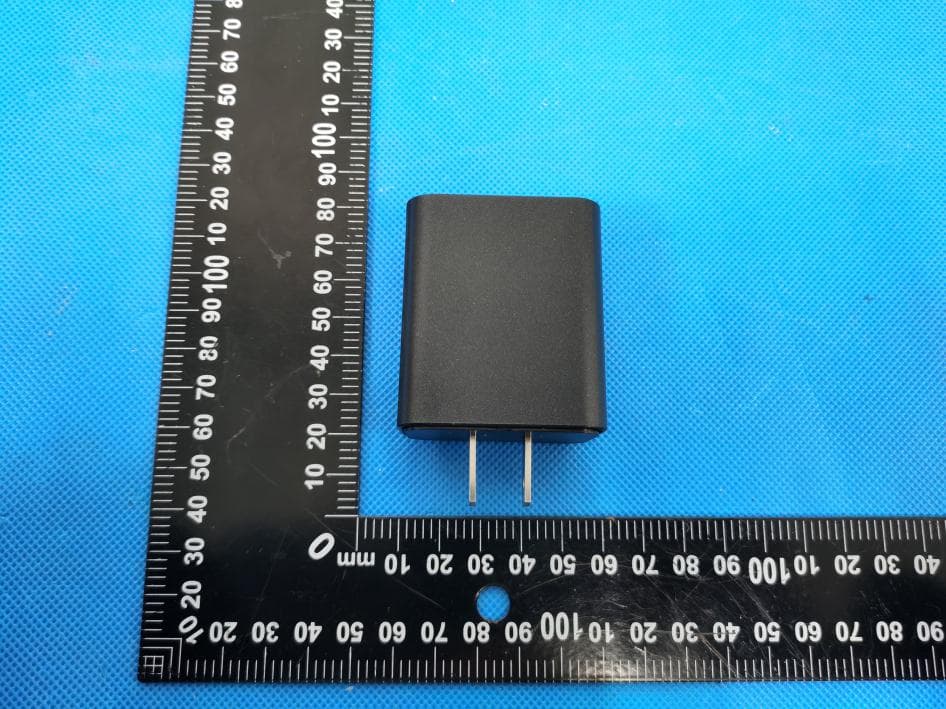
Click to zoom
Application Details
- Equipment Class
- DTS - Digital Transmission System
- Date of Grant
- Feb 23, 2022
- Application Purpose
- Original Equipment
- Date of Application
- Feb 23, 2022
- Equipment Note
- WiFi Security Camera
- Frequency Range
- 2412.00000000 - 2462.00000000
- Country
- China
Documents & Files
Document Text
Text extracted from the exhibit documents filed with the FCC. Open a document above to read the original.
Users Manual
* Please select a high-speed memory card; * The product cannot save recorded video without a memory card. * In loop recording mode, the camera automatically save a video per 10 minutes. In motion detection mode, the camera records a 2 minutes video after motion detected. Anti-slip Groove Hidden Built-in Indicator Light USB Port Hidden SD Card Slot Cover Board Reset Button 5 V = 1 A 5 V = 0 . 5 A R Top/Side Lens (based on product type) User Manual WWW.LUOHECAM.COM Enter the APP store of your Phone search for "CIXICM" and download the APP For iPhone Open “APP Store” 2 How do I insert the SD card In the case of inserting a memory card, the red indicator will stay on and go out after 1 minute. In the absence of a memory card, the red indicator light will flash for 1 minute and then go out. Plug the camera in outlet, and it will start up. How do I download the APP ? How do I start up the camera ? If you have inserted sd card into camera, the recorded video will automatically be saved in sd card. (maximum support 128G; the micro sd card is not included with this product) 4 3 How to save the recorded video?Getting to know WIFI Camera About charging 8 Heating will occur when charging a mobile phone, which is a normal phenomenon. Note: Please do not use this product to charge 2 mobile phones at the same time. If there is any blur or blue screen during the charging process, unplug the camera and wait for the temperature to return to normal. Card Reader, User Manual.Cover Board Removal Tool, Accessory 7 FQA 1 Please format the SD card on computer before inserting. Search “CIXICM” and download For Android Open “Play Store” Note: This camera doesn’t support login web page or computer How to connect mobile phone to the camera without internet? 输入手机连接 WIFI的密码 87 Complete Open the CIXICM APP, Click the "+" to select the manual networking mode. And then Follow tips to add the camera to the APP list. Add Camera Camera WIFI name: CAM***-****** How do I connect to the Internet ? 6 NOTE:The Camera does not currently support 5G WIFI Type your wifi password 87 1. Please connect your (home/office...) WIFI in your phone's settings first. 2. Open the CIXICM APP, click " + " to choose smart connection mode. And then follow tips to complete the WIFI configuration. Complete 5 Connect to CAM*** WIFI in phone settings Be sure the power is on till the lights are off. Then go ahead Camera wifi name: CAM***-*** Password: camdog66 Return to APP and wait for the connection Camera wifi name: CAM***-*** Password: camdog66 Connect to CAM*** WIFI in phone settings Be sure the power is on till the lights is off. Then go ahead For your better experience, please put the camera within 20 feet from the wireless router and make sure no barriers in between. if you have any issue, please feel free to contact us. We have a strong team and we are here to serve you. Indicator light: If blue light stays on, the camera is connected to wifi. If blue light flashes, the camera is not connected to wifi. If red light stays on, the sd card is recognized. If red light flashes, the sd card is not recognized. 8 seconds after the power is connected, the blue and red indicator light will both be on or flash, and the camera will start up. After 1 minute, the red and blue indicators will go out and the product will automatically enter recording mode. How to reset camera ? There are two ways for resetting. 1. Open APP, Follow "Camera Set"--"Restore factory settings"--"OK", the red and blue lights will flashes 5 times and go off, the camera is reset, and then the camera will automatically restarts after 2 minutes. 2. Use a pin to click the small hole with "R" icon on the case. The red and blue lights will flashes 5 times and go off, the camera is reset. then the camera will automatically restart after 2 minutes. Can I log this camera in web page/computer? Sorry, this camera only works with IOS and Android mobile phone. How do I set the time ? There is no need to set the time. It will automatically switch to the time on your phone after connected. How do I read videos stored on the micro sd Card ? Remove the micro sd card and use a card reader to connect to your computer, and then read the videos. How do I play recorded videos ? Please play videos with Media Player, VLC or other players. Can I put the camera under sunlight ? Please do not let the camera lens face sunlight or other light beam, as it will cause the screen to become unclear. In severe cases, the product will be damaged. If the power is suddenly cut off, can the camera still keep the recorded video ? Sudden power loss may affect the playback of the last recorded video but will not affect other videos saved on the SD card. What if the camera becomes hot when charging the phone ? Try not to charge devices on the camera during video recording. What if the picture is stuck or delayed ? Depending on the network, the picture may become stuck or delayed. Such phenomena are related to the network. O O Operating Temperature :-10C-25C Temperature rise is normal when charging devices on the product Open the back cover 6 4 G Insert the SD card Cover the back cover 3 2 G 5 V- - 2 A 5 V- - 1 A CAM***-****** CIXICMCIXICMCIXICMCIXICM CIXICMCIXICM CIXICMCIXICM When using the App, Please allow "CIXICM" access to location/notification/local network for the APP to work properly This device complies with part 15 of the FCC Rules. Operation is subject to the following two conditions: (1) This device may not cause harmful interference, and (2) this device must accept any interference received, including interference that may cause undesired operation. Any Changes or modifications not expressly approved by the party responsible for compliance could void the user's authority to operate the equipment. Note: This equipment has been tested and found to comply with the limits for a Class B digital device, pursuant to part 15 of the FCC Rules. These limits are designed to provide reasonable protection against harmful inte…
Text truncated - open the document above for the full version.
Attestation Statements
Shenzhen Mulan Shijia Technology Co., Ltd. Model Difference Product Name: WiFi Security Camera Model Number: LH-FT-TOP, LH-FT-SIDE, LH-5USB, LH-TY, LH-FX, LUOHE-TOP-BK FCC Identifier: 2A4M6-LHFTTOP All the models are the same circuit and RF module, except the mode names and outlook color. Regards Sincerely Client’s signature Client’s name / title: Carry Pan / Manager Contact information: Room 308, Unit 4, Building B, Zone 2,Baishilong Minzhi Street, Longhua District Shenzhen Guangdong 518000, China
Cover Letter(s)
Shenzhen Mulan Shijia Technology Co., Ltd. 1/1 Letter of Authorization Company: Shenzhen Mulan Shijia Technology Co., Ltd. Address: Room 308, Unit 4, Building B, Zone 2,Baishilong Minzhi Street, Longhua District Shenzhen Guangdong 518000, China Product Name: WiFi Security Camera Model Number: LH-FT-TOP, LH-FT-SIDE, LH-5USB, LH-TY, LH-FX, LUOHE-TOP-BK FCC Identifier:2A4M6-LHFTTOP We authorize LGAI Technological Center S.A., Ronda de la Font del Carme, s/n, 08193 Bellaterra, Spain, to act on our behalf on all matters concerning the above named equipment. Any individual within LGAI Technological Center S.A. is authorized to act on our behalf and take action on the application. We declare that authorize LGAI Technological Center S.A., Ronda de la Font del Carme, s/n, 08193 Bellaterra, Spain, is allowed to forward all information related to the approval project to the Federal Communication Commission and to discuss any issues concerning the approval application. Any and all acts carried out by LGAI Technological Center S.A. on our behalf shall have the same effect as acts of our own. Name: Carry Pan Date: 2022-02-21 Title: Manager Signature of applicant:
Cover Letter(s)
Shenzhen Mulan Shijia Technology Co., Ltd. 1/1 Office of Engineering Technology Federal Communications Commission 7435 Oakland Mills Road Columbia, MD 21046 Date: 2022-02-21 Subject: Request for Confidentiality FCC ID: 2A4M6-LHFTTOP To Whom It May Concern, Pursuant to the provisions of Sections 0.457 and 0.459 of Commission's rules (47CFR0.457, 0.459), we are requesting the Commission to withhold the following attachment(s) as confidential document from public disclosure. Exhibits Long-Term Confidentiality Short-Term Confidentiality NOTE 2 ID Label/Location No No Attestation Statement No No External Photos No ☐ Block Diagram ☒ ☐ Schematics ☒ ☐ Test Report No No Test Setup Photos No ☐ User’s Manual No ☐ Internal Photos No ☐ Parts List / Tune Up ☐ ☐ RF Exposure Info No No Operational Description ☒ ☐ Cover Letter(s) No No SDR Software / Security Info ☐ No NOTE 1: Long-Term Confidentiality may be permitted under special conditions (See II. LONG-TERM CONFIDENTIALITY, Section 3 of KDB 726920, use last in force) NOTE 2: Short-Term Confidentiality can be requested for a maximum of 180 days from the date of the grant. Above mentioned document contains detailed system and equipment description are considered as proprietary information in operation of the equipment. The public disclosure of above documents might be harmful to our company and would give competitor an unfair advantage in the market. It is our understanding that all measurement test reports, FCC ID label format and correspondent during certification review process cannot be granted as confidential documents and those information will be available for public review once the grant of equipment authorization is issued. Sincerely, Signature: Name: Carry Pan Title: Manager
ID Label/Location Info
Size:4.5*3mm M/N: LH-FT-TOP FCC ID: 2A4M6-LHFTTOP Label location
Internal Photos
ANT
RF Exposure Info
FCC ID:2A4M6-LHFTTOP RF Exposure Evaluation Limits The criteria listed in the following table shall be used to evaluate the environment impact of human exposure to radio frequency (RF) radiation as specified in 1.1307(b) Limits for Maximum Permissible Exposure (MPE) Frequency range (MHz) Electric field strength (V/m) Magnetic field strength (A/m) Power density (mW/cm 2 ) Averaging time (minutes) (A) Limits for Occupational/Controlled Exposures 0.3–3.0 614 1.63 *(100) 6 3.0–30 1842/f 4.89/f *(900/f 2 ) 6 30–300 61.4 0.163 1.0 6 300–1500 f/300 6 1500–100,000 5 6 (B) Limits for General Population/Uncontrolled Exposure 0.3–1.34 614 1.63 *(100) 30 1.34–30 824/f 2.19/f *(180/f 2 ) 30 30–300 27.5 0.073 0.2 30 300–1500 f/1500 30 1500–100,000 1.0 30 f = frequency in MHz Friis transmission formula: Pd = (Pout*G)/(4*pi*r 2 ) Where Pd = power density in mW/cm 2 , Pout = output power to antenna in mW; G = gain of antenna in linear scale, Pi = 3.1416; R = distance between observation point and center of the radiator in cm Pd id the limit of MPE, 1 mW/cm 2 . If we know the maximum gain of the antenna and the total power input to the antenna, through the calculation, we will know the distance r where the MPE limit is reached. Test Procedure Software provided by client enabled the EUT to transmit and receive data at lowest, middle and highest channel individually. Test Result of RF Exposure Evaluation wifi mode Channel Output power to antenna (dBm) Output power to antenna (mW) Power Density at R=20cm (mW/cm 2 ) Limit (mW/cm 2 ) Result Lowest 15.48 35.32 0.01114 1.0 PASS Middle 17.10 51.29 0.01617 1.0 PASS Highest 15.07 32.14 0.01013 1.0 PASS Remark: antenna gain=2dBi
Test Report
Shenzhen DL Testing Technology Co., Ltd. Report No.: DL-20220221016E Test Report Tel: 400-688-3552 Web:www.dl-cert.com Email: [email protected] Page 1 of 54 FCC Part 15C Test Report FCC ID: 2A4M6-LHFTTOP Applicant: Shenzhen Mulan Shijia Technology Co., Ltd. Address: Room 308, Unit 4, Building B, Zone 2,Baishilong Minzhi Street, Longhua District Shenzhen Guangdong 518000, China Manufacturer: Shenzhen Mulan Shijia Technology Co., Ltd. Address: Room 308, Unit 4, Building B, Zone 2,Baishilong Minzhi Street, Longhua District Shenzhen Guangdong 518000, China EUT: WiFi Security Camera Trade Mark: N/A Model Number: LH-FT-TOP, LH-FT-SIDE, LH-5USB, LH-TY, LH-FX, LUOHE-TOP-BK Date of Receipt: Feb. 16, 2022 Test Date: Feb. 16, 2022 – Feb. 21, 2022 Date of Report: Feb. 21, 2022 Prepared By: Shenzhen DL Testing Technology Co., Ltd. Address: 101-201, Building C, Shuanghuan, No.8, Baoqing Road, Baolong Industrial Zone, Baolong Street, Longgang District, Shenzhen, Guangdong, China Applicable Standards: FCC PART 15 C 15.247 ANSI C63.10:2013 Test Result: Pass Report Number: DL-20220221016E Prepared (Test Engineer): Pxing Huang Reviewer (Supervisor): Jack Bu Approved (Manager): Jade Yang This test report is based on a single evaluation of one sample of above mentioned products. It is not permitted to be duplicated in extracts without written approval of Shenzhen DL Testing Technology Co., Ltd. Shenzhen DL Testing Technology Co., Ltd. Report No.: DL-20220221016E Test Report Tel: 400-688-3552 Web:www.dl-cert.com Email: [email protected] Page 2 of 54 Table of Contents Page 1 . SUMMARY OF TEST RESULTS 4 1.1 MEASUREMENT UNCERTAINTY 4 2 . GENERAL INFORMATION 5 2.1 GENERAL DESCRIPTION OF EUT 5 2.2 DESCRIPTION OF TEST MODES 6 2.3 BLOCK DIGRAM SHOWING THE CONFIGURATION OF SYSTEM TESTED 7 2.4 DESCRIPTION OF SUPPORT UNITS(CONDUCTED MODE) 7 2.5 TABLE OF PARAMETERS OF TEST SOFTWARE SETTING 7 2.6 EQUIPMENTS LIST FOR ALL TEST ITEMS 8 3 . EMC EMISSION TEST 9 3.1 CONDUCTED EMISSION MEASUREMENT 9 3.1.1 POWER LINE CONDUCTED EMISSION LIMITS 9 3.1.2 TEST PROCEDURE 9 3.1.3 DEVIATION FROM TEST STANDARD 9 3.1.4 TEST SETUP 10 3.1.5 EUT OPERATING CONDITIONS 10 3.1.6 TEST RESULTS 10 3.2 RADIATED EMISSION MEASUREMENT 13 3.2.1 RADIATED EMISSION LIMITS 13 3.2.2 TEST PROCEDURE 14 3.2.3 DEVIATION FROM TEST STANDARD 14 3.2.4 TEST SETUP 14 3.2.5 EUT OPERATING CONDITIONS 15 3.2.6 TEST RESULTS (BETWEEN 9KHZ – 30 MHZ) 16 3.2.7 TEST RESULTS (BETWEEN 30MHZ – 1GHZ) 17 3.2.8 TEST RESULTS (1GHZ~25GHZ) 19 3.3 RADIATED BAND EMISSION MEASUREMENT 25 3.3.1 TEST REQUIREMENT: 25 3.3.2 TEST PROCEDURE 25 3.3.3 DEVIATION FROM TEST STANDARD 25 3.3.4 TEST SETUP 26 3.3.5 EUT OPERATING CONDITIONS 26 4 . PEAK OUTPUT POWER 33 4.1 APPLIED PROCEDURES / LIMIT 33 4.1.1 TEST PROCEDURE 33 4.1.2 DEVIATION FROM STANDARD 33 4.1.3 TEST SETUP 33 4.1.4 EUT OPERATION CONDITIONS 33 Shenzhen DL Testing Technology Co., Ltd. Report No.: DL-20220221016E Test Report Tel: 400-688-3552 Web:www.dl-cert.com Email: [email protected] Page 3 of 54 Table of Contents Page 4.1.5 TEST RESULTS 34 5 . POWER SPECTRAL DENSITY TEST 37 5.1 APPLIED PROCEDURES / LIMIT 37 5.1.1 TEST PROCEDURE 37 5.1.2 DEVIATION FROM STANDARD 37 5.1.3 TEST SETUP 37 5.1.4 EUT OPERATION CONDITIONS 37 5.1.5 TEST RESULTS 38 6 . 6DB BANDWIDTH TEST 41 6.1 APPLIED PROCEDURES / LIMIT 41 6.1.1 TEST PROCEDURE 41 6.1.2 DEVIATION FROM STANDARD 41 6.1.3 TEST SETUP 41 6.1.4 EUT OPERATION CONDITIONS 41 6.1.5 TEST RESULTS 42 7 . ANTENNA REQUIREMENT 45 7.1 STANDARD REQUIREMENT 45 7.2 EUT ANTENNA 45 8 . TEST SEUUP PHOTO 46 9 . EUT PHOTO 48 Shenzhen DL Testing Technology Co., Ltd. Report No.: DL-20220221016E Test Report Tel: 400-688-3552 Web:www.dl-cert.com Email: [email protected] Page 4 of 54 1. SUMMARY OF TEST RESULTS Test procedures according to the technical standards: FCC Part15 (15.247) , Subpart C Standard Section Test Item Judgment Remark 15.207 Conducted Emission PASS 15.247(c) Radiated Spurious Emission PASS 15.205 Band Edge Emission PASS 15.247(b)(1) Peak Output Power PASS 15.247(a)(2) 6dB Bandwidth PASS 15.247(d) Power Spectral Density PASS 15.203 Antenna Requirement PASS NOTE: (1)” N/A” denotes test is not applicable in this Test Report 1.1 MEASUREMENT UNCERTAINTY The reported uncertainty of measurement y ± U, where expended uncertainty U is based on a standard uncertainty multiplied by a coverage factor of k=2,providing a level of confidence of approximately 95 %。 No. Item Uncertainty 1 Conducted Emission Test ±2.56dB 2 RF power,conducted ±0.42dB 3 Spurious emissions,conducted ±2.76dB 4 All emissions,radiated(<1G) ±3.65dB 5 All emissions,radiated(>1G) ±4.89dB 6 Temperature ±0.5°C 7 Humidity ±2% Shenzhen DL Testing Technology Co., Ltd. Report No.: DL-20220221016E Test Report Tel: 400-688-3552 Web:www.dl-cert.com Email: [email protected] Page 5 of 54 2. GENERAL INFORMATION 2.1 GENERAL DESCRIPTION OF EUT Product Name: WiFi Security Camera Trademark N/A Model No.: LH-FT-TOP, LH-FT-SIDE, LH-5USB, LH-TY, LH-FX, LUOHE-TOP-BK Model Difference All samples are the same except the model name, so we prepare "LH-FT-TOP" for test only. Operation Frequency: 2412~2462 MHz for 802.11b/g/nHT20 2422~2452 MHz for 802.11nHT40 Channel numbers: 11 Channels for 802.11b/g/n(HT20) 7 channels for 802.11nHT40 Channel separation: 5MHz Modulation technology: 802.11b: DSSS (CCK, DQPSK, DBPSK) 802.11g/n(20): DSSS (CCK, DQPSK,DBPSK)+OFDM (QPSK, BPSK, 16-QAM, 64-QAM) Rate of Transmitter 802.11b: 11/5.5/2/1Mbps 802.11g: 54/48/36/24/18/12/9/6Mbps 802.11n: up to 150Mbps Antenna Type: Internal Antenna Antenna gain: 2dBi Power supply: AC 100-240V 50/60Hz Note: 1.For a more detailed features description, please refer to the manufacturer’s specifications or the User's Manual. 2.The EUT’s all information provided by client. Shenzhen DL Testing Technology Co., Ltd. Report No.: DL-20220221016E Test Report Tel: 400-688-3552 Web:www.dl-cert.com Email: [email protected] Page 6 of 54 2. Channel List(802.11b/g/nHT20) Channel Frequency (GHz) Channel Frequency (…
Text truncated - open the document above for the full version.
Test Setup Photos
Radiated Measurement Photos Conducted Measurement Photos
Contact Information
Applicant
Carry Pan
Technical Contact
Test Firm
Shenzhen DL Testing Technology Co., Ltd.Jade Yang
[email protected]400-688-3552
Technical Specifications
| # | Rule Parts | Frequency Range | Power Output |
|---|---|---|---|
| 1 | 15C | 2.41 GHz - 2.46 GHz | 51.29 mW |
Other Applications from Shenzhen Mulan Shijia Technology Co., Ltd.
2A4M6-007N
Jul 01, 2024Surveillance Camera
Equipment Class
DTS - Digital Transmission System