FCCID.CO- FCC ID Database
HomeCompaniesEquipment ClassesSearch

© 2026 FCC ID Database. All rights reserved.

AboutContactData sourced from FCC public records
  1. Home/
  2. DIFFANY Development Co. Ltd./
  3. 2AABR-ID678

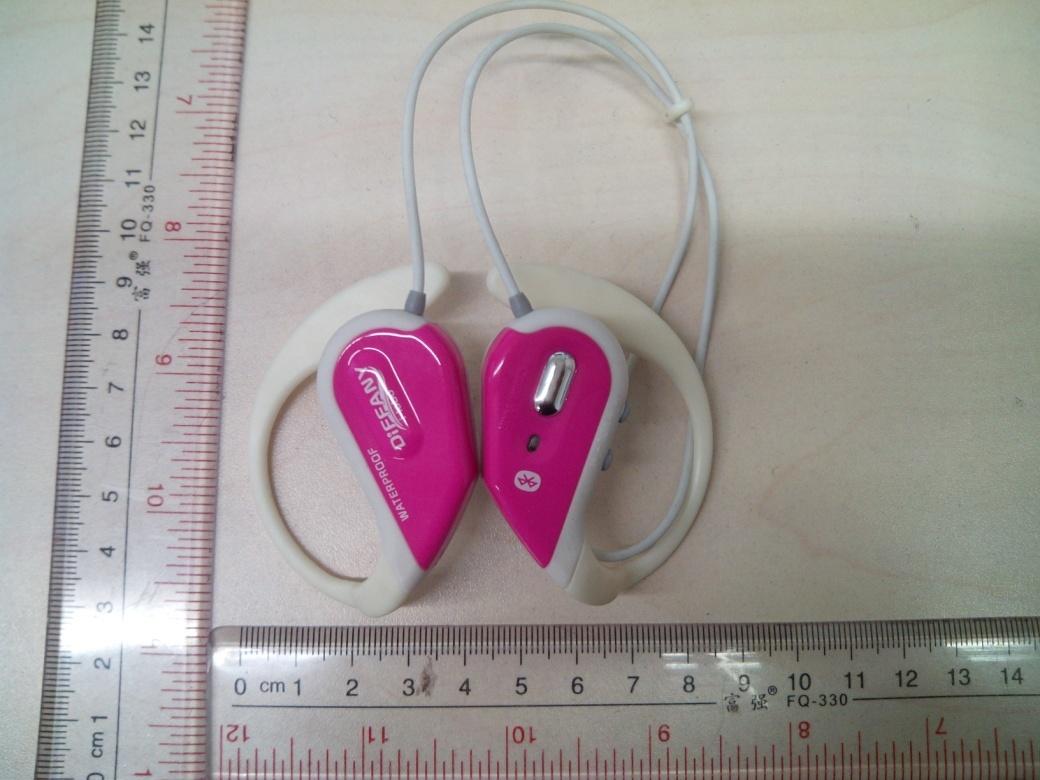
2AABR-ID678Waterproof Bluetooth Headset with Microphone

DIFFANY Development Co. Ltd.
Waterproof Bluetooth Headset with Microphone - FCC ID 2AABR-ID678 - DIFFANY Development Co. Ltd.
Click to zoom

Application Details

Equipment Class
DSS - Part 15 Spread Spectrum Transmitter
Date of Grant
Jan 28, 2014
Application Purpose
Original Equipment
Date of Application
Jan 27, 2014
Equipment Note
Waterproof Bluetooth Headset with Microphone
Frequency Range
2402.00000000 - 2480.00000000
Company
DIFFANY Development Co. Ltd.
Country
Hong Kong

Documents & Files

Select a file to view

Users Manual

↗

Cover Letter(s)

↗

External Photos

↗

ID Label/Location Info

↗

Internal Photos

↗

Test Report

↗

Test Setup Photos

↗

Document Text

Text extracted from the exhibit documents filed with the FCC. Open a document above to read the original.

Users Manual

This product in waterproof construction design with quality stereo headset can enrich and upgrade your lifestyle, enjoy your favor music at anywhere anytime. Its Bluetooth wireless system can be able to pair with your devices (such as tablets, notebooks, smartphone) easily. Also, built-in microphone can let you talk over the phone while sporting. WATERPROOF BLUETOOTH HEADSET WITH MICROPHONE Waterproof performance: The waterproof level of this product complies with IP46 standards, is designed to ensure norm al operation in water at a specified conditions and dustproof. It cannot be immersed in water. Design is for powerful water jets only. INSTRUCTION MANUAL Product Description: Before using this unit: Product Specifications: ▪ 1 Ear Hook ▪ 2 Ear bud ▪ 3 Headphone section ▪ 4 Neckband ▪ 5 Mirco USB charging plug ▪ 6 Restart the track/ Volume up ▪ 7 Play next track / Volume down ▪ 8 Indicator light ▪ 9 Function key (for on/off, pair, pause/ play, pick call/ dial) ▪ 10 Adjustable ring Please ensure that the watertight cap of the mirco USB plug is completed closed before using this unit. Trouble attribute to water seeping into the unit from to loosely closed watertight cap are not covered by the warranty. Water droplets that enter the headphone or microphone holes do not cause troubles. However, the product performance may temporarily decrease until the water droplets are dried. Problems may include unclear sound and difficulties in getting your voice clearly. If such circumstances exist, please remove water droplets and dry the product. Bluetooth version Operating range (maximum) Headset Impedance / Output: Power supply Battery Capacity Current consumption: Continuous standby time: Continuous transmission time: Continuous talking time: # Bluetooth V4.0 +EDR A2DP and AVRCP 10 m (The transmission distance changed depending on the environment where the product is used. 32Ω 0.02mm, dia. 10mm x 2 Built in Li-Polymer 3.7V / 80mAh <10uA 180 Hours 8 hours 5 hours #The actual continuous standby/transmission times may become shorter than those in the specifications depending on the environment or conditions for keeping/using the unit, etc. #Batteries are consumables. The battery service time gradually decreases after the charging and discharging cycles, even if the batteries are used properly. #The battery performance deteriorates quickly if the unit is kept under high temperature conditions. Please keep the unit in a cool, well-ventilated location, away from direct sunlight. Operating Temperature: Operating humidity range: Product size: Weight: Waterproof performance: Number of devices that can be registered 0 °C to – 40 °C 20-80% (no condensation) 55(W) x 52(H) x 30(D)mm (for single) 23g IP46 8 How to place the headset on your ears: How to install the earbuds: To prevent headset taking off your ears: 1. The headset has been marked the right and left side. Ensure you have the correct side. 2. Hang the neck band over the back of your ears. 3. Place the headset section horizontally and gently twist the headset into your ear unit you feel comfortable and snug fit into your ear. 4. And then turn up and place the hook behind your ear. 5. Do the same step on another ear. 6. If you feel uncomfortable or doesn’t snug fit, might try to change another size of earbuds. To Enjoy better sound quality, or to fit your ears, change the size of earbuds or adjust the earbud position to fit comfortably and snugly in your left and right ears separately. When you change the earbuds, turn them to install firmly on your headset and prevent the earbud from detaching and remaining in your ear. • Charging the headset by USB charging cable ( included in the package) • The LED lamp is lit red while the battery is charged. • The LED lamp is lit blue when the battery is fully charged. • It takes around 25 minutes to fully charge the battery 1. Connect the USB charging cable to the unit 2. Connect the USB charging cable to your PC * when the battery power is used up, a beeping alarm will sound, with the LED lamp blinking red. After a while, product will turn off * It is not possible to use the product during charging. By using provided adjustable ring to the neckband part before placing headset on your ears. Charging the battery: Pairing the product with your device at the first time: Up to eight Bluetooth device can be registered: Play music: Part 1: pick up call Part 2: Make a call Part 3: Pick up another incoming call Initializing the registration history / resetting the hardware of product: Caution: 1. Hold “Function key” for around 7 seconds, a signal will sound ‘Do re mi fa so’ keep pressing until red & blue light are flashing, means it is ready to be paired. 2. At this first time to pair, use your device to search the product model “#Bluetooth- Headset#”. 3. When your device searches the product model, press to connect, your device will show if it is successfully connected or not. 4. If it is successfully connected, you can play music through the product. Noted: Terminate any connection between the product and any device before starting the paring procedure. The pairing procedure cannot be started while a Bluetooth connection is established between the product and a registered device. Terminate the connection and turn off the product. When nine or more devices are registered, the previously registered devices will be deleted starting from the oldest, to register new ones. A device that is registered twice or more is identified as one device. Hold “+ ” to increase the volume. (when up to maximum, it will have ‘Beep~’ sound) Hold “- ” to decrease the volume. (when up to minimum, it will have ‘Beep ~' sound) Press “+” to restart the current track. Press twice to play previous track. Press “-” to play next track. Press “Function key” to pause/ play the track. 1. Press “Function key” to pick up the call. 2. Hold “+ ” to increase the volume. (when up to maximum, it will have ‘Beep~’ sound) 3. Hold “-” to decrease the volume. (wh…

Text truncated - open the document above for the full version.

Cover Letter(s)

DIFFANY Development Co. Ltd. Jan. 20, 2014 Federal Communications Commission Authorization and Evaluation Division FCC ID:2AABR-ID678 Confidentiality Request Pursuant to Sections 0.457 and 0.459 of the Commission’s Rules, the applicant hereby requests confidential treatment of information applied this application as outlined below: 1. Block Diagram 2. Circuit Diagram 3. Operational Description The above materials contain trade secrets and proprietary information not customarily released to the public. The public disclosure of these matters might be harmful to the applicant and provide unjustified benefits to its competitors. The Applicant understands that pursuant to Rule 0.457, disclosure of this Application and all accompanying documentation will not be made before the date of the Grant for this application Sincerely, Signature Name/Title: Catherine Tse / Manager Applicant: DIFFANY Development Co. Ltd. ADDRESS: G1, 13/F, World Tech Centre, 95 How Ming Street, Kwun Tong, Hong Kong TEL: 852 2152 9932 FAX: 852 2111 0712 Email: [email protected]

External Photos

External Photos

Internal Photos

Internal Photos Antenna

Test Report

Report Number: 60/790.13.035.01 Page 1 of 62 TÜV SÜD HONG KONG LTD., 3/F, West Wing, Lakeside 2, 10 Science Park West Avenue, Science Park, Shatin, HK. Tel: +852-2776 1323 Fax: +852-2776 1206 Rev. no.: 2.1 FCC / IC – Test report Report Number : 60/790.13.035.01 Date of Issue: 21 st January 2014 Model : iD 678 Product Type : Waterproof Bluetooth Headset with Microphone Applicant : DIFFANY Development Co. Ltd. Address : G1, 13/F, World Tech Centre, 95 How Ming Street, Kwun Tong Production Facility : DIFFANY Development Co. Ltd. Address : G1, 13/F, World Tech Centre, 95 How Ming Street, Kwun Tong Test Result :  PositiveNegative Total pages including Appendices : 62 TÜV SÜD Hong Kong Ltd. is a subcontractor to TÜV Product Service, GmbH according to the principles outlined in ISO 17025. TÜV SÜD Hong Kong Ltd. reports apply only to the specific samples tested under stated test conditions. Construction of the actual test samples has been documented. It is the manufacturer's responsibility to assure that additional production units of this model are manufactured with identical electrical and mechanical components. The manufacturer/importer is responsible to the Competent Authorities in Europe for any modifications made to the production units which result in non-compliance to the relevant regulations. TÜV SÜD Hong Kong Ltd. shall have no liability for any deductions, inferences or generalizations drawn by the client or others from TÜV SÜD Hong Kong Ltd. issued reports. This report is the confidential property of the client. As a mutual protection to our clients, the public and ourselves, extracts from the test report shall not be reproduced except in full without our written approval. Report Number: 60/790.13.035.01 Page 2 of 62 TÜV SÜD HONG KONG LTD., 3/F, West Wing, Lakeside 2, 10 Science Park West Avenue, Science Park, Shatin, HK. Tel: +852-2776 1323 Fax: +852-2776 1206 Rev. no.: 2.1 1. Table of Contents 1. Table of Contents ........................................................................................................................................................... 2 2. Details about the Test Laboratory .............................................................................................................................. 4 3. Description of the Equipment Under Test ............................................................................................................... 5 4. Summary of Test Standards ........................................................................................................................................ 6 5. Mode of Operation .......................................................................................................................................................... 6 6. Summary of Test Standards and Results ................................................................................................................ 7 7. General Remarks ............................................................................................................................................................ 8 8. Test Results ..................................................................................................................................................................... 9 7.1 Maximum Conducted Output Power Measurement ............................................................................................... 9 Limit .............................................................................................................................................................................................. 9 Test Setup ...................................................................................................................................................................................... 9 Test Instruments ............................................................................................................................................................................ 9 Test Procedure ............................................................................................................................................................................... 9 Test Result ................................................................................................................................................................................... 10 7.2 Conducted Emission Measurement ........................................................................................................................ 12 Limit ............................................................................................................................................................................................ 12 Test Instruments .......................................................................................................................................................................... 12 Test Setup .................................................................................................................................................................................... 12 Test Procedure ............................................................................................................................................................................. 13 Test Result ................................................................................................................................................................................... 14 7.3 Radiated Interference Measurement ....................................................................................................................... 16 Limit ............................................................................................................................................................................................ 16 Test Instruments .........................................................................…

Text truncated - open the document above for the full version.

Test Setup Photos

RE below 1 GHz RE Above 1 GHz

Contact Information

Applicant

Catherine Tse(Sales Manager)
[email protected]85221529932Fax: 85221110712

Test Firm

Audix Technology (Shenzhen) Co.Smart Tsai
[email protected]86-755-663-9495Fax: 86-755-663-2877

Technical Specifications

#Rule PartsFrequency RangePower Output
115C2.40 GHz - 2.48 GHz11.60 mW
Confidentiality
Long Term
Grant Notes
Output Power listed is conducted.

Other Applications from DIFFANY Development Co. Ltd.

2 in 1 Waterproof Bluetooth Speaker + Handset - FCC ID 2AABR-ID638 - DIFFANY Development Co. Ltd.
2AABR-ID638

2 in 1 Waterproof Bluetooth Speaker + Handset

Jun 18, 2013

Equipment Class

DSS - Part 15 Spread Spectrum Transmitter