2AAPEH825CDWColor Multifunction Printer
FUJIFILM Business Innovation Corp.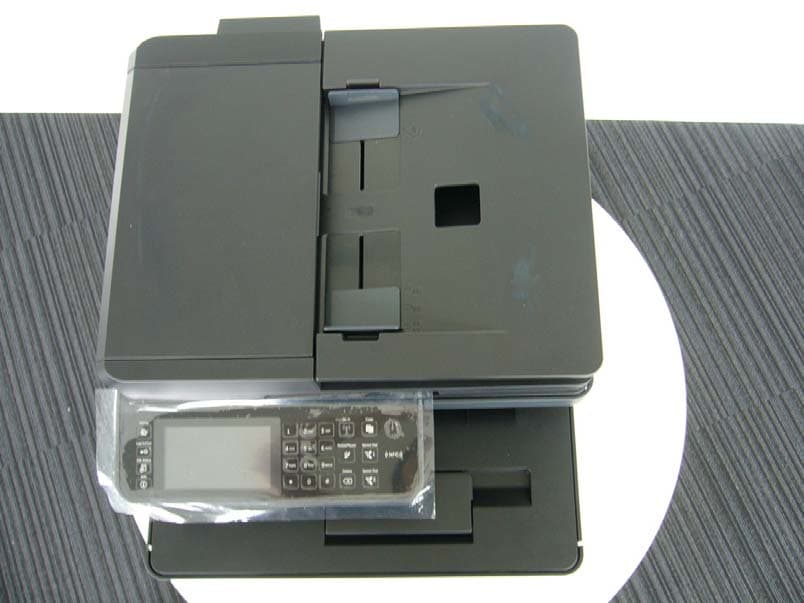
Click to zoom
Application Details
- Equipment Class
- DXX - Part 15 Low Power Communication Device Transmitter
- Date of Grant
- Sep 13, 2015
- Application Purpose
- Original Equipment
- Date of Application
- Sep 13, 2015
- Equipment Note
- Color Multifunction Printer
- Frequency Range
- 13.56000000 - 13.56000000
- Country
- Japan
Documents & Files
Document Text
Text extracted from the exhibit documents filed with the FCC. Open a document above to read the original.
Users Manual
Dell™ Color Cloud Multifunction Printer | H625cdw Dell™ Color Cloud Multifunction Printer | H825cdw Dell™ Color Smart Multifunction Printer | S2825cdn User's Guide Regulatory Model: H625cdw H825cdw S2825cdn 2| Notes, Cautions, and Warnings NOTE: •A NOTE indicates important information that helps you make better use of the printer. CAUTION: • A CAUTION indicates potential damage to hardware or loss of data if instructions are not followed. WARNING: • A WARNING indicates a potential for property damage, personal injury, or death. Information in this document is subject to change without notice. © 2015 Dell Inc. All rights reserved. Reproduction of these materials in any manner whatsoever without the written permission of Dell Inc. is strictly forbidden. Trademarks used in this text: Dell and the DELL logo are trademarks of Dell Inc. Microsoft, Windows, Windows Server, and Windows Vista are either trademarks or registered trademarks of Microsoft Corporation in the United States and/or other countries. Bonjour, iPhone, Macintosh, Mac OS, and AirPrint are trademarks of Apple Inc., registered in the U.S. and other countries. Adobe, PostScript, and Photoshop are either registered trademarks or trademarks of Adobe Systems Incorporated in the United States and/or other countries. RSA and BSAFE are either registered trademarks or trademarks of EMC Corporation in the United States and/or other countries. Microsoft product screen shot(s) reprinted with permission from Microsoft Corporation. Other trademarks and trade names may be used in this document to refer to either the entities claiming the marks and names or their products. Dell Inc. disclaims any proprietary interest in trademarks and trade names other than its own. About License XML Paper Specification (XPS): This product may incorporate intellectual property owned by Microsoft Corporation. The terms and conditions upon which Microsoft is licensing such intellectual property may be found at http://go.microsoft.com/fwlink/?LinkId=52369; DES: This product includes software developed by Eric Young ([email protected]); AES: Copyright (c) 2003, Dr Brian Gladman, Worcester, UK. All rights reserved. This product uses published AES software provided by Dr Brian Gladman under BSD licensing terms; TIFF (libtiff): Copyright (c) 1988-1997 Sam Leffler and Copyright (c) 1991-1997 Silicon Graphics, Inc.; ICC Profile (Little cms): Copyright (c) 1998-2004 Marti Maria. As for RSA BSAFE This printer includes RSA ® BSAFE ® Cryptographic software from EMC Corporation. ICC Profile Header Copyright (c) 1994-1996 SunSoft, Inc. Rights Reserved Permission is hereby granted, free of charge, to any person obtaining a copy of this software and |3 associated documentation files (the "Software"), to deal in the Software without restriction, including without limitation the rights to use, copy, modify, merge, publish distribute, sublicense, and/or sell copies of the Software, and to permit persons to whom the Software is furnished to do so, subject to the following conditions: The above copyright notice and this permission notice shall be included in all copies or substantial portions of the Software. THE SOFTWARE IS PROVIDED "AS IS", WITHOUT WARRANTY OF ANY KIND, EXPRESS OR IMPLIED, INCLUDING BUT NOT LIMITED TO THE WARRANTIES OF MERCHANTABILITY, FITNESS FOR A PARTICULAR PURPOSE AND NON-INFRINGEMENT. IN NO EVENT SHALL SUNSOFT, INC. OR ITS PARENT COMPANY BE LIABLE FOR ANY CLAIM, DAMAGES OR OTHER LIABILITY, WHETHER IN AN ACTION OF CONTRACT, TORT OR OTHERWISE, ARISING FROM, OUT OF OR IN CONNECTION WITH THE SOFTWARE OR THE USE OR OTHER DEALINGS IN THE SOFTWARE. Except as contained in this notice, the name of SunSoft, Inc. shall not be used in advertising or otherwise to promote the sale, use or other dealings in this Software without written authorization from SunSoft Inc. JPEG Library Independent JPEG Group's free JPEG software ____________________ This package contains C software to implement JPEG image encoding, decoding, and transcoding. JPEG is a standardized compression method for full-color and gray-scale images. The distributed programs provide conversion between JPEG "JFIF" format and image files in PBMPLUS PPM/PGM, GIF, BMP, and Targa file formats. The core compression and decompression library can easily be reused in other programs, such as image viewers. The package is highly portable C code; we have tested it on many machines ranging from PCs to Crays. We are releasing this software for both noncommercial and commercial use. Companies are welcome to use it as the basis for JPEG-related products. We do not ask a royalty, although we do ask for an acknowledgement in product literature (see the README file in the distribution for details). We hope to make this software industrial-quality --- although, as with anything that's free, we offer no warranty and accept no liability. For more information, contact [email protected]. Contents of this directory ____________________ jpegsrc.vN.tar.gz contains source code, documentation, and test files for release N in Unix format. jpegsrN.zip contains source code, documentation, and test files for release N in Windows format. jpegaltui.vN.tar.gz contains source code for an alternate user interface for cjpeg/djpeg in Unix format. jpegaltuiN.zip contains source code for an alternate user interface for cjpeg/djpeg in Windows format. wallace.ps.gz is a PostScript file of Greg Wallace's introductory article about JPEG. This is an update of the article that appeared in the April 1991 Communications of the ACM. jpeg.documents.gz tells where to obtain the JPEG standard and documents about JPEG-related file formats. jfif.ps.gz is a PostScript file of the JFIF (JPEG File Interchange Format) format specification. jfif.txt.gz is a plain text transcription of the JFIF specification; it's missing a figure, so use the 4| PostScript version if you can. TIFFTechNote2.txt.gz is a draft of the proposed revisions to TIFF 6.0's JPEG support. pm.…
Text truncated - open the document above for the full version.
Users Manual
300|Using Digital Certificates 4Enter a password. NOTE: •The password is not necessary when importing a PKCS#7 format certificate, which has the filename extension of p7b. 5Re-enter the password. 6Click Browse of File Name, and then select the file to be imported. 7Click Import. Setting a Digital Certificate NOTE: •To manage digital certificates, you must set up HTTPS communication. See "Preparing to Use HTTPS Communication." 1Start the Dell Printer Configuration Web Tool. See "Starting the Dell Printer Configuration Web Tool." 2Click Print Server Settings the Security tab SSL/TLS Certificate Management. 3Perform the following: To set a Wireless LAN (Server) certificate, select Trusted Certificate Authorities within Category. To set a certificate of SSL Server, SSL Client, IPsec, or Wireless LAN (Client), select Local Device. 4Select the purpose of use from the Certificate Purpose list. 5Click Display the List. NOTE: •If the list includes more than 20 certificates, click Next to display the next page. 6Select the certificate to associate. At this time, check that Validity of the certificate selected is set to Valid. 7Click Certificate Details. 8Check the content, and then click Use This Certificate at the upper-right corner. Confirming the Settings of a Digital Certificate NOTE: •To manage digital certificates, you must set up HTTPS communication. See "Preparing to Use HTTPS Communication." 1Start the Dell Printer Configuration Web Tool. See "Starting the Dell Printer Configuration Web Tool." 2Click Print Server Settings the Security tab SSL/TLS Certificate Management. 3Click Certificate Management. 4Select the category from the Category list. Using Digital Certificates|301 5Select the purpose of use from the Certificate Purpose list. 6Click Display the List. NOTE: •If the list includes more than 20 certificates, click Next to display the next page. The certificate displayed with an asterisk as "*Valid" in the Validity column is the certificate associated with the purpose of use and currently used. Deleting a Digital Certificate NOTE: •To manage digital certificates, you must set up HTTPS communication. See "Preparing to Use HTTPS Communication." 1Start the Dell Printer Configuration Web Tool. See "Starting the Dell Printer Configuration Web Tool." 2Click Print Server Settings the Security tab SSL/TLS Certificate Management. 3Select the category from the Category list. 4Select the purpose of use from the Certificate Purpose list. 5Click Display the List. NOTE: •If the list includes more than 20 certificates, click Next to display the next page. 6Select the certificate to be deleted. 7Click Certificate Details. 8To delete the selected certificate, click Delete at the upper-right corner. NOTE: •When a certificate is deleted, the features associated with the deleted certificate are disabled. To delete a certificate being used, either set the feature to OFF in advance or switch the association to another certificate, and then switch to another operation mode if possible before deleting the certificate. •For an SSL Server, sets the HTTP-SSL/TLS and IPPS communication to OFF. •For an SSL Client, set the LDAP-SSL/TLS, SMTP-SSL/TLS, and IEEE 802.1x (EAP-TLS) setting to OFF. •For IPsec, change the IKE setting to Pre-Shared Key or set the feature to OFF. •For wireless LAN, change the wireless security setting to other than WPA-Enterprise before deleting the certificate. Wireless network is available on Dell H625cdw and Dell H825cdw. Exporting a Digital Certificate NOTE: •To manage digital certificates, you must set up HTTPS communication. See "Preparing to Use HTTPS Communication." •Since the secret key is not exported, an imported PKCS#12 format certificate can be exported only as a PKCS#7 certificate. 1Start the Dell Printer Configuration Web Tool. 302|Using Digital Certificates See "Starting the Dell Printer Configuration Web Tool." 2Select Print Server Settings the Security tab SSL/TLS Certificate Management. 3Select the category from the Category list. 4Select the purpose of use from the Certificate Purpose list. 5Click Display the List. NOTE: •If the list includes more than 20 certificates, click Next to display the next page. 6Select the certificate to be exported. 7Click Certificate Details. 8Click Export This Certificate. Setting the Features You can set various security features using digital certificates. •"Setting the Certificate in the IPsec Digital Signature Mode" •"Setting the SSL-Use Server Certificate (HTTP/IPP)" •"Setting SMTP-SSL/TLS Communication" •"Setting LDAP-SSL/TLS Communication" •"Setting for Wireless LAN WPA-Enterprise (EAP-TLS)" •"Setting for Wireless LAN WPA-Enterprise (PEAPV0-MS-CHAPV2, EAP-TTLS PAP, EAP-TTLS CHAP)" •"Setting Client Certificate for IEEE 802.1x (EAP-TLS)" Setting the Certificate in the IPsec Digital Signature Mode NOTE: •To manage digital certificates, you must set up HTTPS communication. See "Preparing to Use HTTPS Communication." 1Import the certificate to be used with IPsec. See "Importing a Digital Certificate." 2Set the certificate to be used with IPsec. See "Setting a Digital Certificate." 3Make sure that the certificate is set correctly in IPsec. See "Confirming the Settings of a Digital Certificate." 4Select Print Server Settings the Security tab IPsec. 5Select the Enable check box for Protocol. 6Click Digital Signature from the IKE list. 7Set each item, as necessary. 8Click Apply New Settings. After restarting the printer, IPsec communication using digital signatures is enabled. You can execute IPsec communication (Digital Signature Mode) between the printer Using Digital Certificates|303 and the network device such as PC on which the certificate and IPsec are set identically as on the printer. Setting the SSL-Use Server Certificate (HTTP/IPP) NOTE: •To manage digital certificates, you must set up HTTPS communication. See "Preparing to Use HTTPS Communication." 1Import the certificate to be used with the SSL-use server. See "Importing a Digita…
Text truncated - open the document above for the full version.
Users Manual
PLEASE READ THIS DOCUMENT CAREFULLY! IT CONTAINS VERY IMPORTANT INFORMATION ABOUT YOUR RIGHTS AND OBLIGATIONS, AS WELL AS LIMITATIONS AND EXCLUSIONS. THESE TERMS REQUIRE THE USE OF ARBITRATION TO RESOLVE DISPUTES ON AN INDIVIDUAL BASIS, and, where applicable, specify arbitration INSTEAD OF JURY TRIALS OR CLASS ACTIONS. Dell™ Printers Important Information Informations importantes | Informações importantes Información importante booke11.book Page 1 Wednesday, October 8, 2014 1:52 PM booke11.book Page 2 Wednesday, October 8, 2014 1:52 PM www.dell.com | dell.com/support Dell™ Printers Important Information booke11.book Page 1 Wednesday, October 8, 2014 1:52 PM Notes, Cautions, and Warnings NOTE: A NOTE indicates important information that helps you make better use of your printer. CAUTION: A CAUTION indicates either potential damage to hardware or loss of data and tells you how to avoid the problem. WARNING: A WARNING indicates a potential for property damage, personal injury, or death. ____________________ Information in this document is subject to change without notice. © 2009-2015 Dell Inc. All rights reserved. Reproduction of these materials in any manner whatsoever without the written permission of Dell Inc. is strictly forbidden. Trademarks used in this text: Dell™ and the DELL logo are trademarks of Dell Inc. Other trademarks and trade names may be used in this document to refer to either the entities claiming the marks and names or their products. Dell Inc. disclaims any proprietary interest in trademarks and trade names other than its own. booke11.book Page 2 Wednesday, October 8, 2014 1:52 PM Important Information3 U.S. Consumer Terms of Sale - Direct PLEASE READ THIS DOCUMENT CAREFULLY! IT CONTAINS VERY IMPORTANT INFORMATION ABOUT YOUR RIGHTS AND OBLIGATIONS, AS WELL AS LIMITATIONS AND EXCLUSIONS. THESE TERMS REQUIRE THE USE OF ARBITRATION ON AN INDIVIDUAL BASIS TO RESOLVE DISPUTES, RATHER THAN JURY TRIALS OR CLASS ACTIONS. IF YOU DO NOT AGREE WITH THESE TERMS, DO NOT ORDER/KEEP YOUR PRODUCT. NOTE: These U.S. Consumer Terms of Sale apply to direct purchases made from Dell by phone, the Internet, or the Dell Direct store. These Terms of Sale ("Agreement") apply to your purchase of products and/or services and support ("Product") sold in the United States by Dell, including its affiliates or subsidiaries. By placing your order for Product, you accept and are bound to the terms of this Agreement. If you have placed an order but do not wish to be subject to these Terms of Sale, you must promptly cancel your order before it enters production and becomes non-cancellable (see:www.dell.com/ordersupport), or return your purchase in accordance with Dell’s Return Policy (see: www.dell.com/returnpolicy) within 21 days of the invoice date for a refund of your purchase price minus shipping, handling, and up to a 15% restocking fee. 1Other Documents. This Agreement may NOT be altered, supplemented, or amended by the use of any other document(s) unless otherwise agreed to in a written agreement signed by both you and Dell. If you do not receive an invoice or acknowledgement in the mail, via e-mail, or with your Product, information about your purchase may be obtained at https://support.dell.com/dellcare/Invoice.aspx or or by contacting your sales representative. 2Payment Terms; Orders; Quotes; Interest. Terms of payment are within Dell's sole discretion, and unless otherwise agreed to by Dell, payment must be received by Dell prior to Dell's acceptance of an order. Payment for the products will be made by credit card, wire transfer, or some other prearranged payment method unless credit terms have been agreed to by Dell. Invoices are due and payable within the time period noted on your invoice, measured from the date of the invoice. Dell may invoice parts of an order separately. Your order is subject to cancellation by Dell, in Dell's sole discretion. Unless you and Dell have agreed to a different discount, Dell's standard pricing policy for Dell-branded systems, which include both hardware and services in one discounted price, allocates the discount off list price applicable to the service portion of the system to be equal to the overall calculated percentage discount off list price on the entire system. Dell is not responsible for pricing, typographical, or other errors in any offer by Dell and reserves the right to cancel any orders arising from such errors. Invoices must be paid within 30 days of the invoice date. booke11.book Page 3 Wednesday, October 8, 2014 1:52 PM 4Important Information 3Shipping Charges; Taxes; Title; Risk of Loss. Shipping, handling and tax are additional unless otherwise expressly indicated at the time of sale. Title to products passes from Dell to Customer upon shipment to Customer. Loss or damage that occurs during shipping by a carrier selected by Dell is Dell's responsibility. Loss or damage that occurs during shipping by a carrier selected by you is your responsibility. You must notify Dell within 21 days of the date of your invoice or acknowledgement if you believe any part of your purchase is missing, wrong or damaged. Unless you provide Dell with a valid and correct tax exemption certificate applicable to your purchase of Product and the Product ship-to location, you are responsible for sales and other taxes associated with the order. Shipping and delivery dates are estimates only. 4Warranties. THE LIMITED WARRANTIES APPLICABLE TO DELL-BRANDED HARDWARE PRODUCT CAN BE FOUND AT www.dell.com/warranty OR IN THE DOCUMENTATION DELL PROVIDES WITH DELL-BRANDED PRODUCT. DELL MAKES NO OTHER WARRANTIES FOR DELL-BRANDED PRODUCT, AND MAKES NO WARRANTIES WHATSOEVER FOR SERVICE, SOFTWARE, MAINTENANCE OR SUPPORT OR FOR NON-DELL BRANDED PRODUCT. SUCH PRODUCT, SOFTWARE, SERVICE, MAINTENANCE OR SUPPORT IS PROVIDED BY DELL "AS IS" AND ANY THIRD-PARTY WARRANTIES, PRODUCTS, SOFTWARE, SERVICES, MAINTENANCE OR SUPPORT ARE PROVIDED BY THE ORIGINAL MANUFACTURER OR SUPPLIER, NOT BY DELL…
Text truncated - open the document above for the full version.
Users Manual
Explanation about User Manual The User’s Manuals on the following page is a general-purpose manual available on Dell’s website and covering the other products, and therefore, include notes for the products not covered by this application. The note about 5GHz is not relevant to Dell H625cdw, Dell H825cdw, the product for which Fuji Xerox is applying for certification. FCC Radiation Exposure Statement WARNING: The radiated output power of the Dell Wireless WLAN Card devices is below the FCC radio frequency exposure limits. Nevertheless, the Dell Wireless WLAN Card devices should be used in such a manner that the potential for human contact during normal operation is minimized. To avoid the possibility of exceeding the FCC radio frequency exposure limits, you should keep a distance of at least 20 cm between you (or any other person in the vicinity) and the antenna that is built into the end-product. To determine the location of the antenna within your end-product, check the information posted on the general Dell support site at http://support.dell.com. This device has also been evaluated for and shown compliant with the FCC RF exposure limits under portable exposure conditions (antennas are within 20 cm of a person's body) when installed in certain specific OEM configurations. Details of the authorized configurations can be found at FCC Equipment Authorization Search website https://apps.fcc.gov/oetcf/eas/reports/GenericSearch.cfm by entering the FCC ID number on the device. Interference Statement This equipment generates, uses, and can radiate radio frequency energy and, if not installed and used in accordance with the manufacturer's instruction manual, may cause interference with radio and television reception. This equipment has been tested and found to comply with the limits for a Class B digital device pursuant to Part 15 of the FCC Rules. This device complies with Part 15 of the FCC Rules. Operation is subject to the following two conditions: 1) This device may not cause harmful interference. 2) This device must accept any interference received, including interference that may cause undesired operation. Notice: The FCC regulations provide that changes or modifications not expressly approved by Dell Inc. could void your authority to operate this equipment. These limits are designed to provide reasonable protection against harmful interference in a residential installation. However, there is no guarantee that interference will not occur in a particular installation. If this equipment does cause harmful interference with radio or television reception, which can be determined by turning the equipment off and on, you are encouraged to try to correct the interference by one or more of the following measures: Reorient the receiving antenna. Relocate the system with respect to the receiver. Move the system away from the receiver. Plug the system into a different outlet so that the system and the receiver are on different branch circuits. If necessary, consult a representative of Dell Inc. or an experienced radio/television technician for additional suggestions. NOTE: This Dell Wireless WLAN Card must be installed and used in strict accordance with the manufacturer's instructions as described in the user documentation that comes with the product. Any other installation or use will violate FCC Part 15 regulations. Modifications not expressly approved by Dell could void your authority to operate the equipment. This device must not be co-located or operating in conjunction with any other antenna or transmitter. Notice for 5GHz only: Operations in the 5.15-5.25GHz band are restricted for indoor usage only.
External Photos
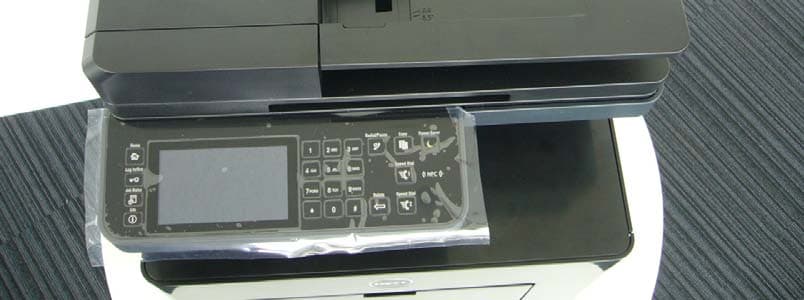
Photo Fuji Xerox Co., Ltd. Dell H625cdw, Dell H825cdw Front Back Photo Fuji Xerox Co., Ltd. Dell H625cdw, Dell H825cdw Top Bottom Photo Fuji Xerox Co., Ltd. Dell H625cdw, Dell H825cdw Left Right
ID Label/Location Info
Lable Location Label
Internal Photos
NFC Module A ntenna (Back of the board)
Test Report
Test report No. : 10693430S-A Page : 2 of 25 Issued date : July 31, 2015 Revised date : September 11, 2015 FCC ID : 2AAPEH825CDW UL Japan, Inc. Shonan EMC Lab. 1-22-3 Megumigaoka, Hiratsuka-shi, Kanagawa-ken, 259-1220 JAPAN Telephone : +81 463 50 6400 Facsimile : +81 463 50 6401 REVISION HISTORY Original Test Report No.: 10693430S-A Revision Test report No. Date Page revised Contents - (Original) 10693430S-A July 31, 2015 - - 1 10693430S-A September 4, 2015 1, 4, 8, 15-17, 19-20 Update of information (Equipment type, Clock frequency, Operating temperature) 2 10693430S-A September 11, 20154 Update of 2.1 Test report No. : 10693430S-A Page : 3 of 25 Issued date : July 31, 2015 FCC ID : 2AAPEH825CDW UL Japan, Inc. Shonan EMC Lab. 1-22-3 Megumigaoka, Hiratsuka-shi, Kanagawa-ken, 259-1220 JAPAN Telephone : +81 463 50 6400 Facsimile : +81 463 50 6401 Contents Page SECTION 1: Customer information ........................................................................................ 4 SECTION 2: Equipment under test (E.U.T.) .......................................................................... 4 SECTION 3: Test specification, procedures & results ........................................................... 5 SECTION 4: Operation of E.U.T. during testing .................................................................... 7 SECTION 5: Conducted emission ............................................................................................ 9 SECTION 5: Radiated emission (Fundamental and Spurious emission) ........................... 10 SECTION 6: 20dB bandwidth & Occupied bandwidth (99%) ............................................ 12 SECTION 7: Frequency tolerances ........................................................................................ 12 Contents of APPENDIXES ....................................................................................................... 13 APPENDIX 1: Data of Radio tests .......................................................................................... 14 APPENDIX 2: Test instruments ............................................................................................. 21 APPENDIX 3: Photographs of test setup ............................................................................... 22 Test report No. : 10693430S-A Page : 4 of 25 Issued date : July 31, 2015 Revised date : September 11, 2015 FCC ID : 2AAPEH825CDW UL Japan, Inc. Shonan EMC Lab. 1-22-3 Megumigaoka, Hiratsuka-shi, Kanagawa-ken, 259-1220 JAPAN Telephone : +81 463 50 6400 Facsimile : +81 463 50 6401 SECTION 1: Customer information Company Name : Fuji Xerox Co., Ltd. Address : 6-1 Minatomirai, Nishi-ku, Yokohama-shi, Kanagawa 220-8668, Japan Telephone Number : +81-45-755-4431 Contact Person : Shiro Miyake SECTION 2: Equipment under test (E.U.T.) 2.1 Identification of E.U.T. Type of Equipment : Color Multifunction Printer Model Number : Dell H825cdw Serial Number : Refer to 4.2 in this report. Rating : AC 110 V - 127 V, 50 Hz / 60Hz Country of Mass-production : Vietnam Condition of EUT : Production prototype (Not for Sale: This sample is equivalent to mass-produced items.) Receipt Date of Sample : June 23 and 30, 2015 Modification of EUT : No modification by the test lab. 2.2 Product description Model: Dell H825cdw (referred to as the EUT in this report) is Color Multifunction Printer. Clock frequency(ies) in the system : 525 MHz, 27.12 MHz Operating temperature : +10 deg.C to +32 deg. C. <Radio part> Radio Type : Transceiver Frequency of Operation : 13.56 MHz Modulation : ASK Antenna type : Loop ITU code : A1D Card type : MIFARE classic-1k, MIFARE classic-4k, MIFARE ultralight Similar model and difference: Model No. Print speed Dell H825cdw 30 ppm (letter) Dell H625cdw 25 ppm (letter) FCC 15.31 (e) The RF transmitter is provided the stable supply (DC 3.3V) from the host device. Therefore, this EUT complies with the requirement. FCC 15.203 The equipment and its antenna comply with this requirement since the antenna is built in the equipment and it cannot be replaced by end users. Test report No. : 10693430S-A Page : 5 of 25 Issued date : July 31, 2015 FCC ID : 2AAPEH825CDW UL Japan, Inc. Shonan EMC Lab. 1-22-3 Megumigaoka, Hiratsuka-shi, Kanagawa-ken, 259-1220 JAPAN Telephone : +81 463 50 6400 Facsimile : +81 463 50 6401 SECTION 3: Test specification, procedures & results 3.1 Test specification Test specification : FCC Part 15 Subpart C: 2015, final revised on June 12, 2015 and effective July 13, 2015 Title : FCC 47CFR Part15 Radio Frequency Device Subpart C Intentional Radiators Section 15.207 Conducted limits Section 15.209 Radiated emission limits, general requirements Section 15.215 Additional provisions to the general radiated emission limitations Section 15.225 Operation within the band 13.110-14.010MHz * The revision on June 12, 2015 does not affect the test specification applied to the EUT. The EUT has been tested for compliance with FCC Part 15 Subpart B by the customer. 3.2 Procedures & Results Item Test Procedure SpecificationRemarksDeviationWorst Margin Results Conducted emission ANSI C63.4:2009 7. AC powerline conducted emission measurements FCC 15.207 - N/A 2.1 dB Freq.: 13.56000 MHz Phase: N Complied Electric field strength of Fundamental emission ANSI C63.4:2009 13. Measurement of intentional radiators FCC 15.225 (a) RadiatedN/A 69.7 dB Polarization: Horizontal Complied Electric field strength of Spurious emission (within the 13.110-14.010MHz band) ANSI C63.4:2009 13. Measurement of intentional radiators FCC 15.225 (b)(c) RadiatedN/A 45.9 dB Freq.: 13.110 MHz Polarization: Horizontal Complied 45.9 dB Freq.: 14.010 MHz Polarization: Horizontal & Vertical Electric field strength of Spurious emission (outside of the 13.110-14.010MHz band) ANSI C63.4:2009 13. Measurement of intentional radiators FCC 15.209 FCC 15.225 (d) RadiatedN/A 0.8 dB Freq.: 800.05 MHz Polarization: Horizontal Complied 20dB bandwidth ANSI C63.4:2009 13. Measurement of intentional…
Text truncated - open the document above for the full version.
Test Setup Photos
Test report No. : 10005707S-A Page : 21 of 23 UL Japan, Inc. Shonan EMC Lab. 1-22-3 Megumigaoka, Hiratsuka-shi, Kanagawa-ken, 259-1220 JAPAN Telephone : +81 463 50 6400 Facsimile : +81 463 50 6401 APPENDIX 3: Photographs of test setup Conducted emission Front Side Test Report No 10693430S-A 22 of 25 Test report No. : 10005707S-A Page : 22 of 23 UL Japan, Inc. Shonan EMC Lab. 1-22-3 Megumigaoka, Hiratsuka-shi, Kanagawa-ken, 259-1220 JAPAN Telephone : +81 463 50 6400 Facsimile : +81 463 50 6401 Radiated emission Front (9 kHz - 1000 MHz) Rear (9 kHz - 30 MHz) Loop antenna: Horizontal Rear (9 kHz - 30 MHz) Loop antenna: Vertical Rear (30 MHz - 1000 MHz) Support equipment placed under the turn table Test Report No 10693430S-A 23 of 25 Test report No. : 10005707S-A Page : 23 of 23 UL Japan, Inc. Shonan EMC Lab. 1-22-3 Megumigaoka, Hiratsuka-shi, Kanagawa-ken, 259-1220 JAPAN Telephone : +81 463 50 6400 Facsimile : +81 463 50 6401 Pre-check of the worst case EUT with the card EUT without card Test Report No 10693430S-A 24 of 25 Test report No. : 10005707S-A Page : 24 of 23 UL Japan, Inc. Shonan EMC Lab. 1-22-3 Megumigaoka, Hiratsuka-shi, Kanagawa-ken, 259-1220 JAPAN Telephone : +81 463 50 6400 Facsimile : +81 463 50 6401 Card used for the test as representative Front Back END OF REPORT Test Report No 10693430S-A 25 of 25
Contact Information
Applicant
Makoto Fuchigami(Manager, Environment & Product Safety)
Technical Contact
UL Japan, Inc.Toyokazu Imamura
[email protected]81-463-50-6400
1-22-3 Megumigaoka, Hiratsuka-shi · Kanagawa-ken · Japan
Test Firm
UL Japan, Inc. Shonan EMC EMC Lab.Tetsuya Hashimoto
Technical Specifications
| # | Rule Parts | Frequency Range | Power Output |
|---|---|---|---|
| 1 | 15C | 13.56 MHz - 13.56 MHz | - |
Other Applications from FUJIFILM Business Innovation Corp.
2AAPEH815DW
Feb 02, 2015Multifunction Laser Printer
Equipment Class
DXX - Part 15 Low Power Communication Device Transmitter
2AAPEC2665DNF
Aug 25, 2013Dell C2665dnf Color Laser Multifunction Printer
Equipment Class
DXX - Part 15 Low Power Communication Device Transmitter