2ABRC-APBELBluetooth earphones
Optoma Corporation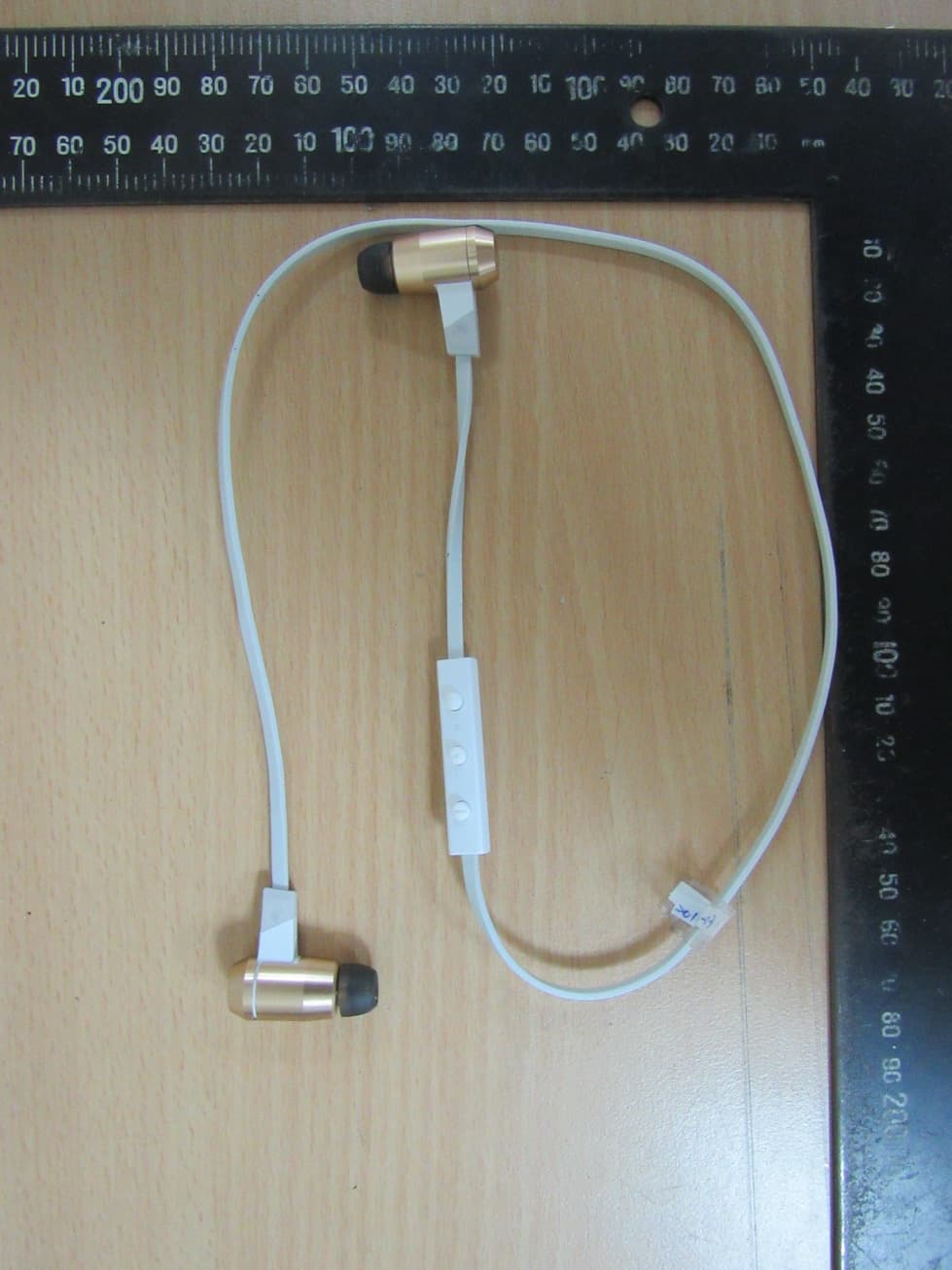
Click to zoom
Application Details
- Equipment Class
- DSS - Part 15 Spread Spectrum Transmitter
- Date of Grant
- Jul 29, 2015
- Application Purpose
- Original Equipment
- Date of Application
- Jul 29, 2015
- Equipment Note
- Bluetooth earphones
- Frequency Range
- 2402.00000000 - 2480.00000000
- Company
- Optoma Corporation
- Country
- Taiwan
Documents & Files
Document Text
Text extracted from the exhibit documents filed with the FCC. Open a document above to read the original.
Users Manual
User Manual Optoma NuForce Bluetooth earphone APBEL Contents What is in the box APBEL earphone The basics Charging your APBEL earbuds Checking battery level Power On/ Power Off Bluetooth Pairing Wearing your APBEL Handling Phone Calls Listening to music Miscellaneous Multipoint Connections Restoring Factory Settings Voice Prompts List Disclaimer FCC Interference Statement Specification What is in the box APBEL earphone (with Controller and Microphone) Eartips (4 pairs in L/M/S/XS) Stabilizers (1 pair) Cable loop for adjusting the length of cable Carry Case Charging Cable (Micro‐USB) Quick Start Guide APBEL earphone 1. Volume Up Button 2. Indicator LED 3. Power/Function Button 4. Charge port 5. Volume Down Button 6. Microphone The basics Charging Your APBEL earbuds Although your APBEL earbuds come with a partially charged battery, it is recommended that you fully charge your APBEL before first use. Charging your APBEL earbuds 1 Open the charge port cover on the controller. 2 The charge cable should be connected to the charge port and either to a PC or a dedicated USB charger. 3 When charging, the indicator LED is red and turns off once charging is complete. NOTE: It takes up to 2.5 hours to fully charge the APBEL earbuds. Checking Battery Level You can check the battery level for your APBEL earbuds with the indicator LED*. To check the battery level: 1 Press the power/function, volume up, and volume down buttons simultaneously. 2 The indicator LED will flash red and blue simultaneously. The battery level will be indicated by the number of flashes, as described in the table below: Number of Flashes Battery Level Number of flashes Battery Voltage Voice prompts(enable) 2 <3.6V Battery Low 3 <3.8V Battery at 50% 4 <4.0V Full Battery 5 >4.1V Full Battery NOTE: When the battery level is low, you will hear a “Battery Low” voice prompt from your APBEL earbuds every 2 minutes, Estimation operation time is under 15minutes remaining (Performance is dependent upon battery and usage and may vary by device). *You cannot check the battery level for your APBEL earbuds when you are listening to music, in the middle of a phone call and in pairing mode. Power On/Power Off To power on your APBEL, press power/function button for about 3 seconds until the LED indicator flashes blue and you hear the “Power on” (when voice prompt be activated). NOTE: Once you have successfully paired your APBEL to a Bluetooth‐enabled device, your APBEL will automatically connect with that device once they are powered on. For more information check section “ Bluetooth Pairing ”. If you have stored pairing information for multiple devices and more than one of those devices have Bluetooth enabled, your APBEL will automatically connect with the most recently paired device and will also enable multipoint connection. For more information read section “Multipoint Connections ”. To power off your APBEL, push power/function button for about 3 seconds until the indicator LED turns red and you hear the “Power off”. Bluetooth Pairing The first time you power on your APBEL, you start the pairing process to pair APBEL with the Bluetooth®‐enabled device you want to connect it to. Get paired 1. To push the power/function button for 6 seconds until the indicator light LED flashes blue/red. Your APBEL is now in pairing mode. 2. To activate the Bluetooth® on the device and to set it to search for new devices, then select device “Optoma NuForce APBEL” NOTE: Consult your device’s user manual for instructions on activating Bluetooth. 3. Once successfully paired, the indicator LED will flash blue and you will hear a tone from your APBEL. Please note that A. You must always enter pair mode from a powered‐off state. Otherwise, pushing the power/function button for more than 3 seconds from a powered‐on state will turn the APBEL off. B. If you left inactive in pairing mode, your APBEL will automatically power off after 3 minutes. C. Your APBEL can store pairing information for up to eight devices. To pair additional devices to your APBEL ensure that your APBEL is not concurrently connected to any device, then repeat the steps 1,2,3 outlined above. In case of your APBEL have already stored pair information for eight devices and you pair a ninth device, the stored information for the very first device will be deleted. Wearing Your APBEL To ensure a secure and comfortable fit when wearing your APBEL earbuds: 1 Install the stabilizers on the APBEL. 2 Select right size of tips and install tips on the earbuds. 3 Rotate the stabilizers and place the earbuds into each ear so that they are positioned comfortably. APBEL is with the magnetic heads and you can place the earbuds’ wire around the back of your neck when your APBEL earbuds are not in use. Handling Phone Calls When your APBEL earbuds are connected to a Bluetooth‐enabled smartphone you can handle your phone calls directly using your APBEL earbuds. The followings describe phone call options: Call option Status Action Answer a call Incoming call Tap the Power/Function button Decline a call Incoming call Press the Power/Function button for 2 seconds End a call In a call/outgoing call Tap the Power/Function button Redial the last number Standby/connected Double tap the Power/Function button Mute on or mute off microphone In a call/outgoing call Tap the Volume Up and Volume Down simultaneously Switching handset/earphone voice In a call Press the Volume Up and Volume Down buttons simultaneously for 2 seconds Adjust the volume Tap the Volume Up or Volume Down button Use Call Waiting ‐to put the first call on hold and answer the second call ‐to switch between calls In a call/ TWC* Press the Power/Function button for 2 seconds Use Call Waiting ‐to end the call and answer the second call on waiting In a call/ TWC* Tap the Power/Function button Use Call Waiting ‐to end the second call and retrieve the first call In a call/TWC* Double tap the Power/Function button Activate Siri (iOS) or Google Voice Search (Android) S…
Text truncated - open the document above for the full version.
External Photos
Registration number: W6M21505-15023-FCC FCC ID: 2ABRC-APBEL Worldwide Testing Services(Taiwan) Co., Ltd. Appendix page 2 of 26 External Photos Registration number: W6M21505-15023-FCC FCC ID: 2ABRC-APBEL Worldwide Testing Services(Taiwan) Co., Ltd. Appendix page 3 of 26 Registration number: W6M21505-15023-FCC FCC ID: 2ABRC-APBEL Worldwide Testing Services(Taiwan) Co., Ltd. Appendix page 4 of 26 Registration number: W6M21505-15023-FCC FCC ID: 2ABRC-APBEL Worldwide Testing Services(Taiwan) Co., Ltd. Appendix page 5 of 26 Registration number: W6M21505-15023-FCC FCC ID: 2ABRC-APBEL Worldwide Testing Services(Taiwan) Co., Ltd. Appendix page 6 of 26 Registration number: W6M21505-15023-FCC FCC ID: 2ABRC-APBEL Worldwide Testing Services(Taiwan) Co., Ltd. Appendix page 7 of 26 Registration number: W6M21505-15023-FCC FCC ID: 2ABRC-APBEL Worldwide Testing Services(Taiwan) Co., Ltd. Appendix page 8 of 26
Internal Photos
Registration number: W6M21505-15023-FCC FCC ID: 2ABRC-APBEL Worldwide Testing Services(Taiwan) Co., Ltd. Appendix page 9 of 26 Internal Photos Registration number: W6M21505-15023-FCC FCC ID: 2ABRC-APBEL Worldwide Testing Services(Taiwan) Co., Ltd. Appendix page 10 of 26 Registration number: W6M21505-15023-FCC FCC ID: 2ABRC-APBEL Worldwide Testing Services(Taiwan) Co., Ltd. Appendix page 11 of 26 Registration number: W6M21505-15023-FCC FCC ID: 2ABRC-APBEL Worldwide Testing Services(Taiwan) Co., Ltd. Appendix page 12 of 26 Registration number: W6M21505-15023-FCC FCC ID: 2ABRC-APBEL Worldwide Testing Services(Taiwan) Co., Ltd. Appendix page 13 of 26 Registration number: W6M21505-15023-FCC FCC ID: 2ABRC-APBEL Worldwide Testing Services(Taiwan) Co., Ltd. Appendix page 14 of 26 Registration number: W6M21505-15023-FCC FCC ID: 2ABRC-APBEL Worldwide Testing Services(Taiwan) Co., Ltd. Appendix page 15 of 26 Registration number: W6M21505-15023-FCC FCC ID: 2ABRC-APBEL Worldwide Testing Services(Taiwan) Co., Ltd. Appendix page 16 of 26 Registration number: W6M21505-15023-FCC FCC ID: 2ABRC-APBEL Worldwide Testing Services(Taiwan) Co., Ltd. Appendix page 17 of 26 Registration number: W6M21505-15023-FCC FCC ID: 2ABRC-APBEL Worldwide Testing Services(Taiwan) Co., Ltd. Appendix page 18 of 26 Registration number: W6M21505-15023-FCC FCC ID: 2ABRC-APBEL Worldwide Testing Services(Taiwan) Co., Ltd. Appendix page 19 of 26 Registration number: W6M21505-15023-FCC FCC ID: 2ABRC-APBEL Worldwide Testing Services(Taiwan) Co., Ltd. Appendix page 20 of 26
RF Exposure Info
3.2 Equivalent isotropic radiated power FCC Rule: 15.247(b)(3) Bluetooth 2.0 EIRP = max. conducted output power + antenna gain EIRP = 8.22 dBm + (-0.13) dBi = 8.09 dBm EDR EIRP = max. conducted output power + antenna gain EIRP = 7.13 dBm + (-0.13) dBi = 7 dBm Limit: EIRP = +36 dBm for Antenna gain <6dBi Test equipment used: ETSTW-RE 055 3.3 RF Exposure Compliance Requirements RESULT: Test standard : FCC KDB Publication 447498 D01 General RF Exposure Guidance v05r02 According to 447498 D01 General RF Exposure Guidance v05r02: SAR evaluation, by measurement or numerical simulation, is not required when the corresponding SAR Exclusion Threshold condition, listed below, is satisfied. The enclosure of the device provides ≥ 0.5 cm separation from the antenna elements to significant metal parts of the enclosure to minimize potential perturbations. Frequency Band:2400-2483.5 MHz Maximum Power fed to Antenna (BT2.0): 6.4417 mW Maximum Power fed to Antenna (EDR): 5.0119 mW Separation distances: Radiator to user: > 5 mm Distance prescribed in user manual: > 5 mm MHz 5 10 15 20 25 mm 2450 10 19 29 38 48 SAR Test Exclusion Threshold (mW) MHz 30 35 40 45 50 mm 2450 57 67 77 86 96 SAR Test Exclusion Threshold (mW) MHz 50 60 70 80 90 100 110120130140150160170180 190 mm 2450 96 196 296 396496 596 6967968969961096119612961396 1496 mW
Test Report
of Applicant: Optoma Corporation Address: 12F., No. 213, Sec. 3, Beixin Rd., Xindian Dist., New Taipei City, Taiwan 231 Tested and Prepared by Worldwide Testing Services (Taiwan) Co., Ltd. FCC Registration No.: 930600 Industry Canada filed test laboratory Reg. No. IC 5679A-1, IC 5107A-1 A2LA Accredited No.: 2732.01 Report No.: W6M21505-15023-C-1 6F, NO. 58, LANE 188, RUEY-KUANG RD., NEIHU TAIPEI 114, TAIWAN, R.O.C. TEL: 886-2-66068877 FAX: 886-2-66068879 E-mail: [email protected] FCC PART 15 SUBPART C TEST REPORT for Bluetooth earphones Model No.: APBEL FCC ID: 2ABRC-APBEL Registration number: W6M21505-15023-C-1 FCC ID: 2ABRC-APBEL Worldwide Testing Services(Taiwan) Co., Ltd. Page 1 of 43 TABLE OF CONTENTS 1 GENERAL INFORMATION ...................................................................................................... 2 1.1 Notes .................................................................................................. 2 1.2 Testing laboratory .................................................................................................. 3 1.2.1 Location .................................................................................................. 3 1.2.2 Details of accreditation status .............................................................................................. 3 1.3 Details of approval holder .................................................................................................. 3 1.4 Application details .................................................................................................. 4 1.5 General information of Test item......................................................................................... 4 1.6 Test standards .................................................................................................. 5 2 TECHNICAL TEST .................................................................................................................... 6 2.1 Summary of test results .................................................................................................. 6 2.2 Test environment .................................................................................................. 6 2.3 Test Equipment List .................................................................................................. 7 2.4 General Test Procedure .................................................................................................. 9 3 TEST RESULTS (ENCLOSURE) ............................................................................................ 11 3.1 Peak Output Power (transmitter) ....................................................................................... 12 3.2 RF Exposure Compliance Requirements ........................................................................... 16 3.3 Out of Band Radiated Emissions ....................................................................................... 16 3.4 Transmitter Radiated Emissions in restricted Bands ......................................................... 17 3.5 Spurious emissions (tx) ................................................................................................ 18 3.6 Carrier Frequency Separation ............................................................................................ 19 3.7 Number of Hopping Frequencies....................................................................................... 22 3.7.1 Pseudorandom Frequency Hopping Sequence................................................................... 24 3.7.2 Coordination of hopping sequences to other transmitters ................................................. 24 3.7.3 System Receiver Hopping Capability ................................................................................ 24 3.8 Time of Occupancy (Dwell Time) ..................................................................................... 25 3.9 20dB Bandwidth ................................................................................................ 31 3.9.1 System Receiver Input Bandwidth .................................................................................... 34 3.10 Band-edge Compliance of RF Emissions .......................................................................... 35 3.11 Radiated Emissions from Receiver Section of Transceiver............................................... 40 3.12 Power Line Conducted Emission....................................................................................... 41 Appendix..........................................................................................................43 Registration number: W6M21505-15023-C-1 FCC ID: 2ABRC-APBEL Worldwide Testing Services(Taiwan) Co., Ltd. Page 2 of 43 1 General Information 1.1 Notes The purpose of conformity testing is to increase the probability of adherence to the essential requirements or conformity specifications, as appropriate. The complexity of the technical specifications, however, means that full and thorough testing is impractical for both technical and economic reasons. Furthermore, there is no guarantee that a test sample which has passed all the relevant tests conforms to a specification. Neither is there any guarantee that such a test sample will interwork with other genuinely open systems. The existence of the tests nevertheless provides the confidence that the test sample possesses the qualities as maintained and that is performance generally conforms to representative cases of communications equipment. The test results of this test report relate exclusively to the item tested as specified in 1.5. The test report may only be reproduced or published in full. Reproduction or publication of extracts from the report requires the prior written approval of the Worldwide Testing Services(Taiwan) Co., Ltd. Tester: June 24, 2015 Spencer Yang Date WTS-Lab. Name Signature Technical responsibility for area of testing: June 24, 2015 Kevin Wang D…
Text truncated - open the document above for the full version.
Test Setup Photos
Registration number: W6M21505-15023-FCC FCC ID: 2ABRC-APBEL Worldwide Testing Services(Taiwan) Co., Ltd. Appendix page 21 of 26 Set Up Photo of Radiated Emission EMI Charge Below 1GHz Registration number: W6M21505-15023-FCC FCC ID: 2ABRC-APBEL Worldwide Testing Services(Taiwan) Co., Ltd. Appendix page 22 of 26 Above 1GHz Registration number: W6M21505-15023-FCC FCC ID: 2ABRC-APBEL Worldwide Testing Services(Taiwan) Co., Ltd. Appendix page 23 of 26 Battery Below 1GHz Registration number: W6M21505-15023-FCC FCC ID: 2ABRC-APBEL Worldwide Testing Services(Taiwan) Co., Ltd. Appendix page 24 of 26 Above 1GHz Registration number: W6M21505-15023-FCC FCC ID: 2ABRC-APBEL Worldwide Testing Services(Taiwan) Co., Ltd. Appendix page 25 of 26 RF Registration number: W6M21505-15023-FCC FCC ID: 2ABRC-APBEL Worldwide Testing Services(Taiwan) Co., Ltd. Appendix page 26 of 26 Set Up Photo of Conducted Emission
Contact Information
Applicant
francine wu(Product Manager)
Technical Contact
Worldwide Testing Services (Taiwan) Co., Ltd.Danny Sung
[email protected]+886-2-6606-8877
6F., No. 58, Lane 188, Ruey Kuand Rd. · Taipei · Taiwan
Test Firm
Worldwide Testing Services (Taiwan) Co., Ltd.Rex Kao
Technical Specifications
| # | Rule Parts | Frequency Range | Power Output |
|---|---|---|---|
| 1 | 15C | 2.40 GHz - 2.48 GHz | 6.64 mW |
Other Applications from Optoma Corporation
2ABRC-ALBTRZG
Feb 09, 2015apt-X Bluetooth receiver
Equipment Class
DSS - Part 15 Spread Spectrum Transmitter
2ABRC-ALWDCNZZ
Jan 15, 2015Wireless Digital to Analog Converter
Equipment Class
DTS - Digital Transmission System
2ABRC-BC300
Feb 17, 2014Emitter
Equipment Class
DXX - Part 15 Low Power Communication Device Transmitter